

What's Inside
Concept 1
Synchronous vs Asynchronous Communication
Why Async: The Fundamental Shift
In a synchronous system, Service A calls Service B and waits for a response before continuing. This is simple but creates tight coupling: A depends on B's availability, B's latency, and B's capacity. If B is slow, A is slow. If B is down, A fails. If B cannot keep up with traffic, requests pile up and both services degrade.
In an asynchronous system, Service A sends a message to a queue and immediately moves on. It does not wait for Service B. Service B processes the message whenever it is ready — seconds, minutes, or even hours later. The queue acts as a buffer between them, absorbing traffic spikes, surviving temporary failures, and allowing each service to scale independently.
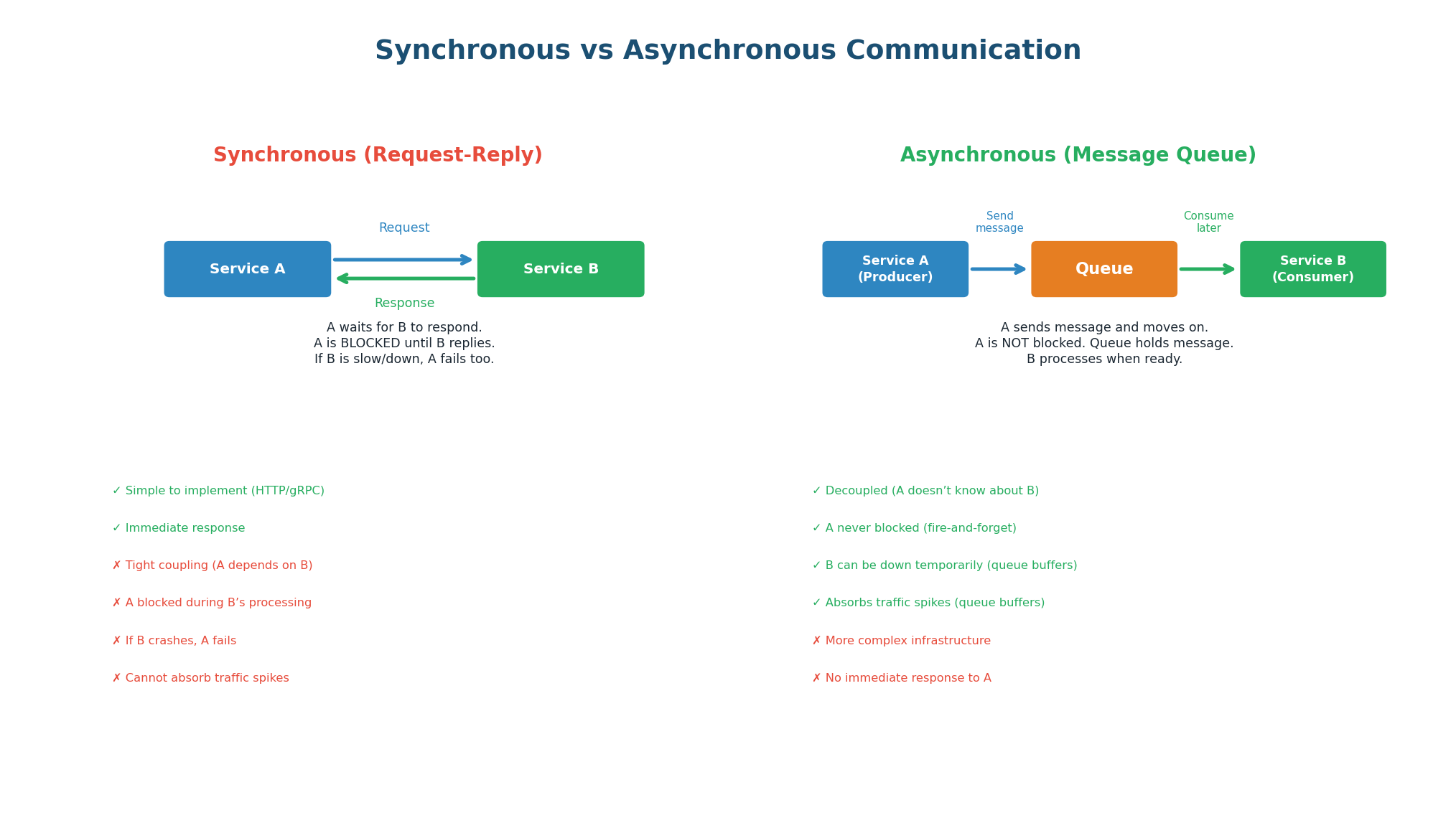
| Aspect | Synchronous (HTTP/gRPC) | Asynchronous (Message Queue) |
|---|---|---|
| Coupling | Tight (A must know B's address) | Loose (A only knows the queue) |
| Blocking | A waits for B's response | A continues immediately |
| Failure handling | If B is down, A fails | Queue buffers; B processes when back |
| Traffic spikes | B overwhelmed → A fails | Queue absorbs spike; B processes at steady pace |
| Latency | A's latency includes B's latency | A's latency is just the queue write (~5ms) |
| Response to caller | Immediate response with result | Immediate ACK, result available later |
| Complexity | Simple (standard HTTP/gRPC) | More complex (queue infra, consumer logic) |
| Best for | Reads, queries, real-time responses | Writes, tasks, events, heavy processing |
An e-commerce site runs a flash sale. In 1 second, 100,000 users click 'Buy.'
Synchronous: Order Service calls Payment, Inventory, and Email Services sequentially. Payment Service handles 5,000 req/sec. Result: 95,000 users get timeout errors.
Asynchronous: Order Service publishes 100,000 order.created events to Kafka in 1 second. Payment, Inventory, and Email services consume at their own pace (5K/sec each). All 100,000 orders processed within 20 seconds. Zero failures.
In any system design, ask: 'Does the user need to wait for this operation?' If no, make it async.
- User uploads a video? Return 'processing' immediately, encode in background.
- User places an order? Return 'order received' immediately, process payment async.
- User sends a message? Return 'sent' immediately, deliver async.
Concept 2
Message Queue Architecture
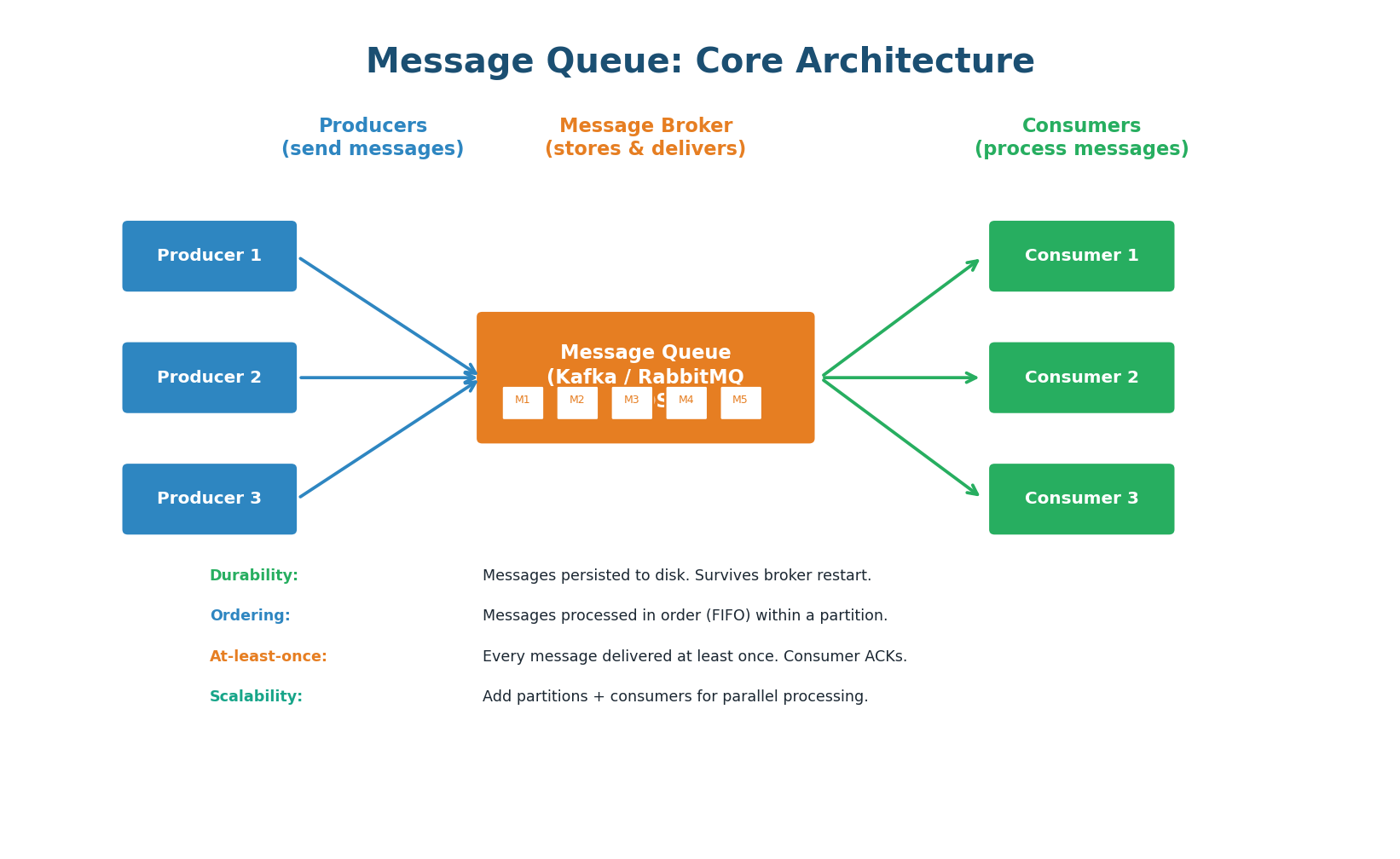
A message queue has three components: producers (send messages), the broker (stores and delivers messages), and consumers (process messages). The producer serializes a message (JSON, Protobuf) and sends it to a named queue or topic on the broker. The broker persists the message to disk and delivers it to one or more consumers. The consumer processes the message and sends an acknowledgment (ACK) to the broker, which then removes or marks the message as consumed.
Key Properties
Durability: Messages are persisted to disk on the broker. Even if the broker restarts, messages are not lost. Kafka retains messages for a configurable period (default 7 days) even after consumption, allowing replay.
Ordering: Messages within a single partition (Kafka) or queue (RabbitMQ) are delivered in FIFO order. Across partitions, ordering is not guaranteed. Use a partition key to ensure all related messages go to the same partition.
At-Least-Once Delivery: The default guarantee. The broker delivers each message at least once. If the consumer crashes before sending an ACK, the broker redelivers the message. This means consumers may see duplicates and must handle them (idempotent processing).
Scalability: Add more partitions (Kafka) or queues (RabbitMQ) for parallel processing. Add more consumers to increase throughput. Kafka can handle 1 million+ messages per second on a 3-node cluster.
Concept 3
Six Core Use Cases
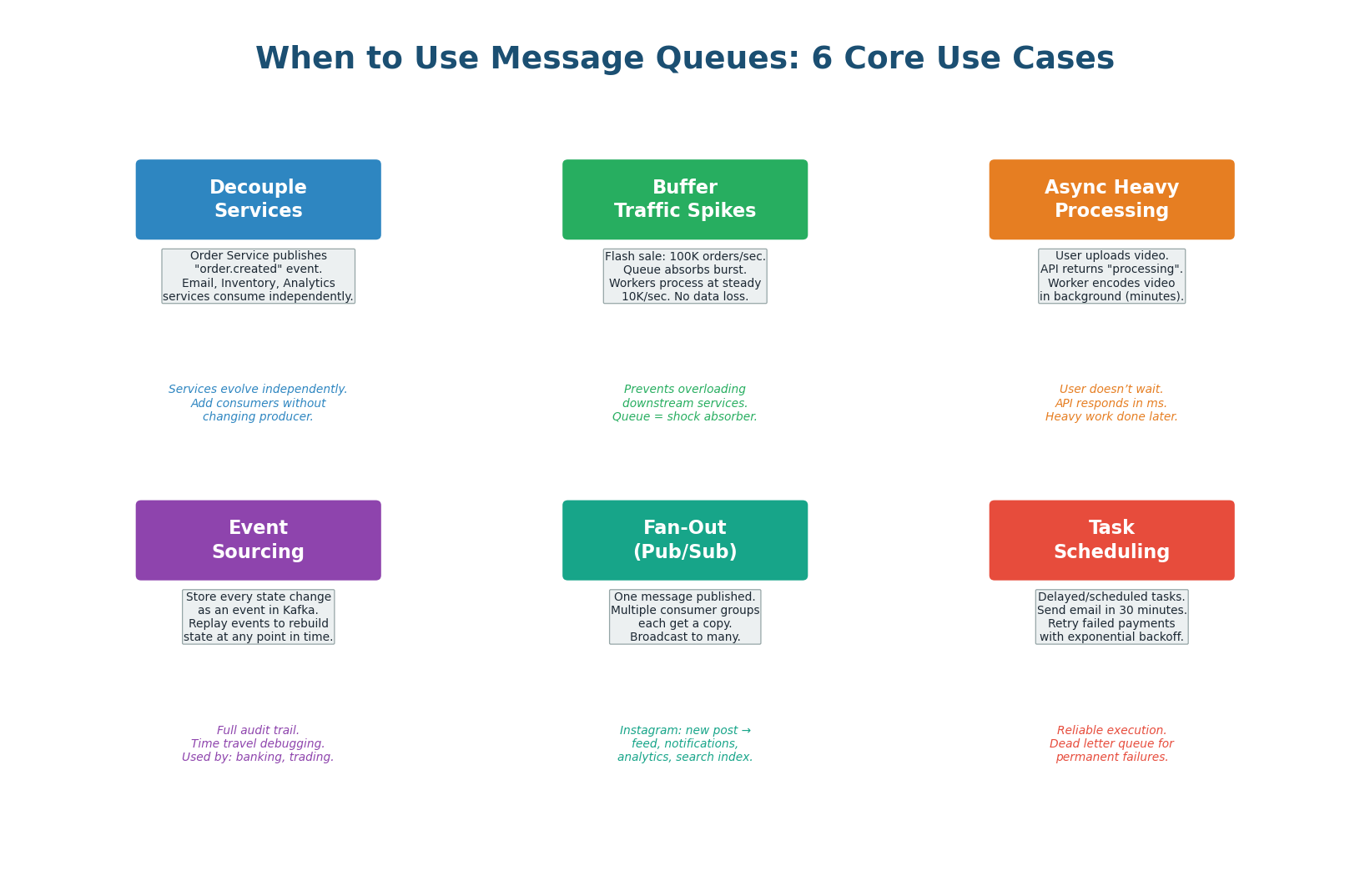
Order Service publishes one "order.created" event. Email, Inventory, Analytics each consume independently. Adding a new consumer requires zero changes to the producer.
Queue absorbs 100x spike. Messages queue up; consumers process at max sustainable throughput. User gets immediate "order received." Queue is a shock absorber.
Video encoding, PDF generation, ML inference — API returns immediately ("processing"), worker consumes message and does the heavy work in background.
Store every state change as an immutable event in Kafka. Complete audit trail, time-travel debugging, rebuild state at any point in time. Used in banking and trading.
One Instagram post event → Feed Service, Notification Service, Analytics Service, Search Service. One publish, four consumers, zero coupling between them.
Delayed tasks ("send email in 30 min"), scheduled jobs ("daily reports"), and retry logic (exponential backoff). DLQ for permanent failures after max retries.
Concept 4
Messaging Models: P2P and Pub/Sub
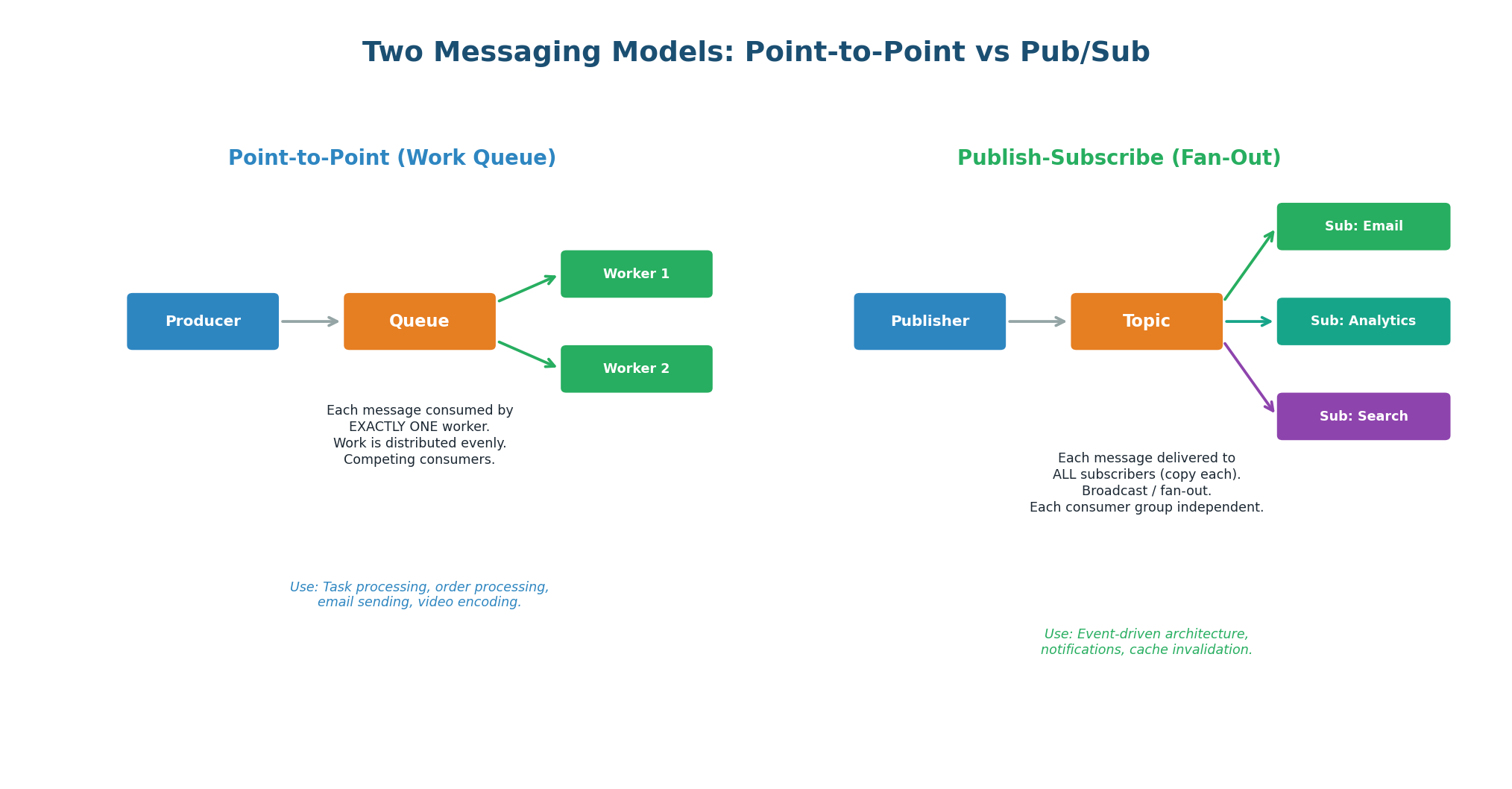
Point-to-Point (Work Queue / Competing Consumers)
Each message is delivered to exactly one consumer. If there are 3 workers, message 1 goes to worker A, message 2 to worker B, message 3 to worker C (round-robin). Workers compete for messages, distributing workload evenly. Use for task processing where each task should be executed once: sending an email, processing a payment, encoding a video. RabbitMQ queues and Kafka with a single consumer group both implement this model.
Publish-Subscribe (Fan-Out / Broadcast)
Each message is delivered to ALL subscribers. If there are 3 subscriber groups (Email, Analytics, Search), all three get a copy of every message. Each subscriber group is independent — it processes the message at its own pace and maintains its own offset. Use for events that multiple services need to react to: order created, user signed up, product updated.
| Aspect | Point-to-Point | Pub/Sub |
|---|---|---|
| Delivery | One consumer per message | All subscribers get a copy |
| Use case | Task processing (one executor) | Event broadcasting (many reactors) |
| Consumer relationship | Competing (work distribution) | Independent (each gets everything) |
| Kafka implementation | Single consumer group | Multiple consumer groups |
| Example | Send email, process payment | Order event → email + analytics + feed |
A Kafka topic with one consumer group acts as a work queue (P2P). The same topic with multiple consumer groups acts as pub/sub. This is why Kafka is the default choice in system design interviews — it handles both patterns simultaneously without any configuration change.
Concept 5
Apache Kafka Deep Dive
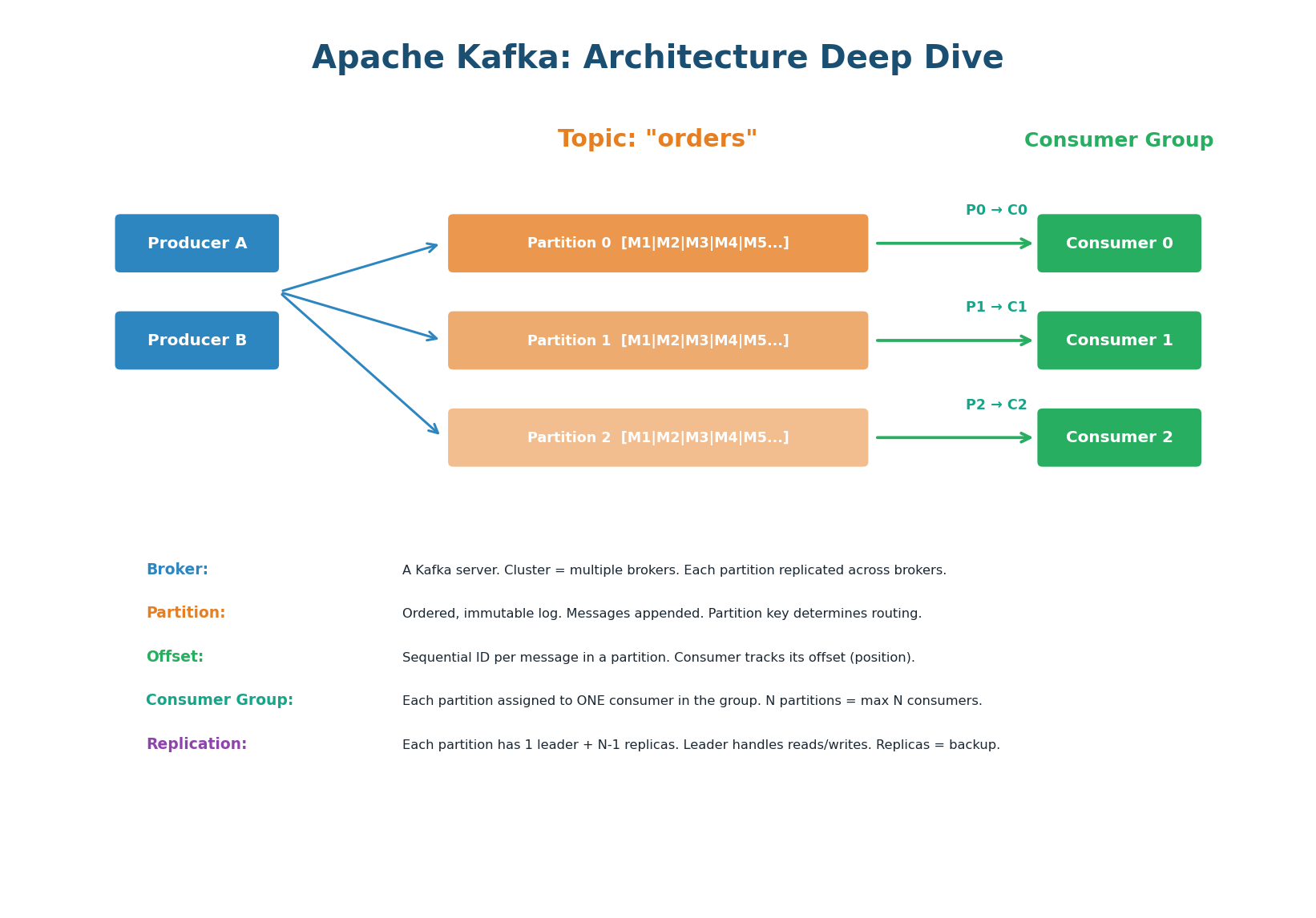
Apache Kafka is a distributed event streaming platform. Unlike traditional message queues that delete messages after consumption, Kafka retains messages for a configurable period (default 7 days), allowing consumers to replay events. Kafka is designed for high throughput (1M+ messages/sec), durability (replicated across brokers), and horizontal scalability (add partitions for parallelism). It is the backbone of data infrastructure at LinkedIn, Netflix, Uber, and Airbnb.
Topics and Partitions
A topic is a named stream of messages (e.g., "orders", "user-events"). Each topic is divided into partitions — ordered, immutable logs of messages. When a producer sends a message, it specifies a partition key. Kafka hashes the key to determine which partition receives the message. Messages with the same key always go to the same partition, guaranteeing ordering for that key.
Consumer Groups and Parallelism
A consumer group is a set of consumers that cooperatively process a topic. Each partition is assigned to exactly one consumer in the group. If the topic has 6 partitions and the consumer group has 3 consumers, each consumer handles 2 partitions. If you add a 4th consumer, partitions are redistributed (rebalanced). If you have more consumers than partitions, extra consumers sit idle.
The maximum number of consumers that can actively process a topic in parallel equals the number of partitions. Adding a 7th consumer to a 6-partition topic wastes a consumer. Partition count is also hard to change later — start with more partitions than you think you need (12–64) to allow future scaling.
Offsets and Replays
Each message in a partition has a sequential offset (0, 1, 2, 3…). Each consumer tracks its current offset — the position of the last successfully processed message. If a consumer crashes and restarts, it resumes from its last committed offset, ensuring no messages are skipped. Because Kafka retains messages (unlike RabbitMQ which deletes after ACK), you can reset a consumer's offset to replay historical events. This is invaluable for debugging, backfilling data, and rebuilding state.
Partitions, Ordering, and Parallelism
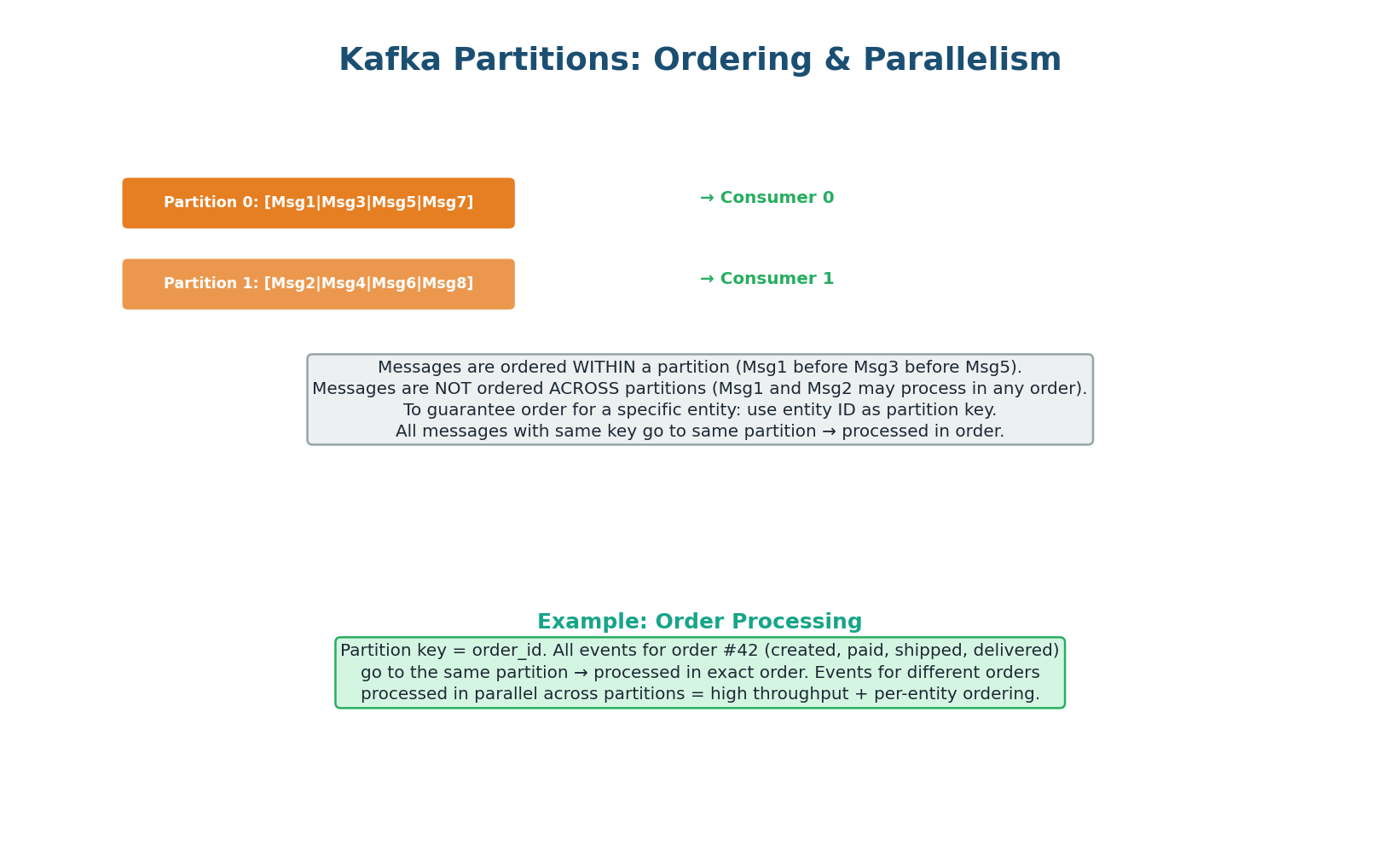
This is the most important Kafka concept for interviews: messages are ordered within a partition but NOT across partitions. If you need order processing events (created → paid → shipped → delivered) to be processed in order for each order, use order_id as the partition key. All events for order #42 go to the same partition and are processed in sequence. Events for different orders go to different partitions and are processed in parallel — giving you both ordering (per entity) and throughput (across entities).
Uber's ride events use rider_id as the partition key. All events for rider #42 (request → match → pickup → dropoff → payment) go to the same partition and are processed in order. Events for different riders are processed in parallel across 256 partitions, achieving 100K+ events/sec.
If they used a random partition key, events might be processed out of order (payment before pickup), causing incorrect state.
Concept 6
Delivery Guarantees & Error Handling
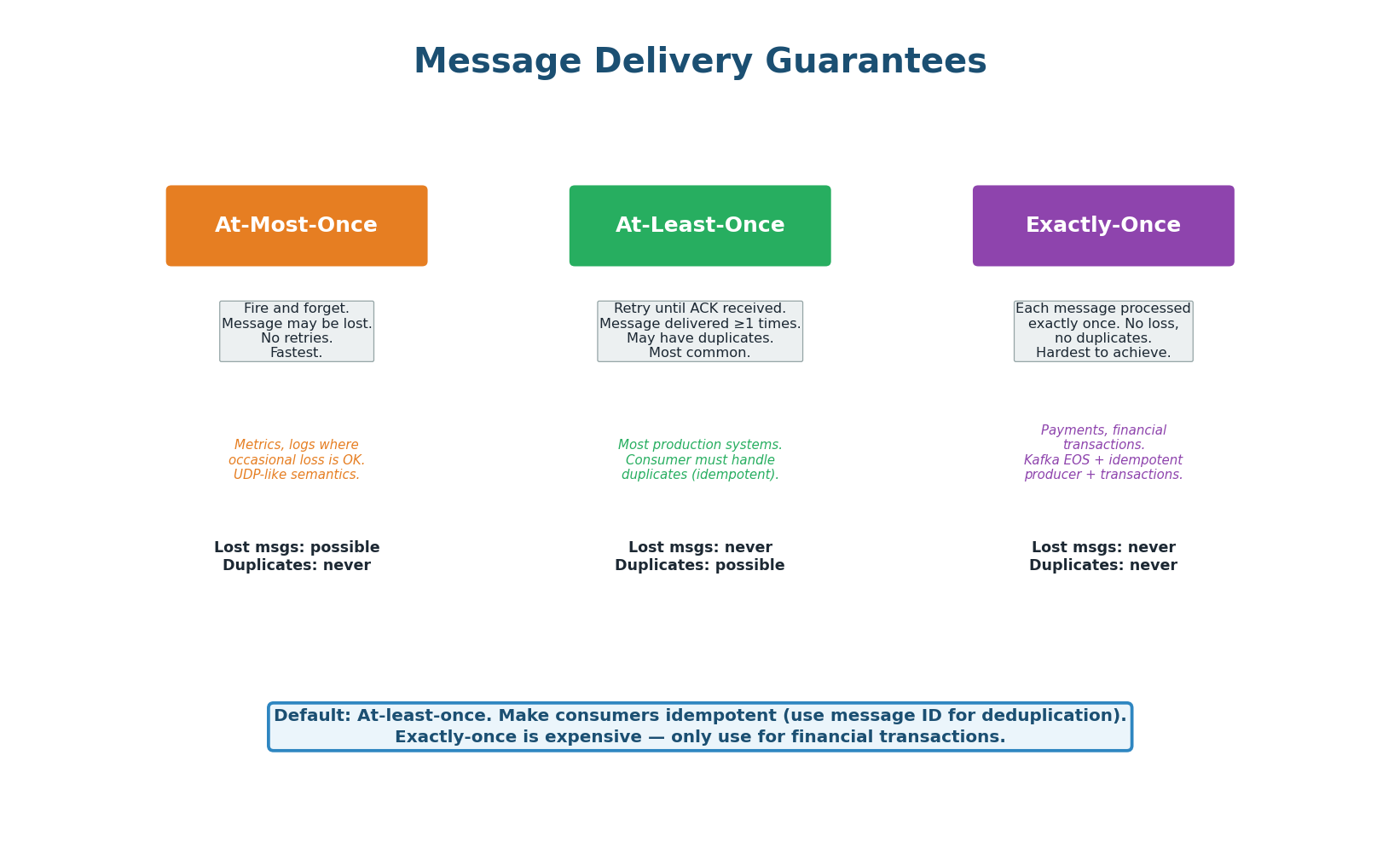
At-Most-Once (Fire and Forget): The producer sends a message and does not wait for ACK. If the message is lost, it is gone — no retries. Fastest but no durability. Use for non-critical data: metrics, logging, analytics where occasional loss is acceptable. Analogous to UDP.
At-Least-Once (The Default): The producer retries until it receives an ACK. The broker retries delivery until the consumer ACKs. If the consumer processes but crashes before ACKing, the broker redelivers — causing a duplicate. The consumer must be idempotent: processing the same message twice must produce the same result. Use an idempotency key (message ID) to detect and skip duplicates. This is the default for 90% of production systems.
Exactly-Once (The Holy Grail): Each message is processed exactly once — no loss, no duplicates. Kafka achieves this with idempotent producers (deduplicates retries by sequence number), transactional writes (atomic writes across multiple partitions), and exactly-once consumer semantics (commit offset and process atomically). This is expensive and complex — only use for financial transactions where duplicates cause real-world harm (double charges, double transfers).
| Guarantee | Lost Messages? | Duplicates? | Performance | Use Case |
|---|---|---|---|---|
| At-most-once | Possible | Never | Fastest | Metrics, logs, telemetry |
| At-least-once | Never | Possible | Good (default) | Most systems (+ idempotent consumer) |
| Exactly-once | Never | Never | Slowest | Payments, financial transactions |
'I use at-least-once delivery with idempotent consumers. Each message has a unique message_id. The consumer checks a deduplication table (Redis SET with message_id) before processing. If the ID exists, skip it. This gives effectively-once semantics without the overhead of true exactly-once.' This is how Netflix, Uber, and most production systems operate.
Dead Letter Queue: Handling Permanent Failures
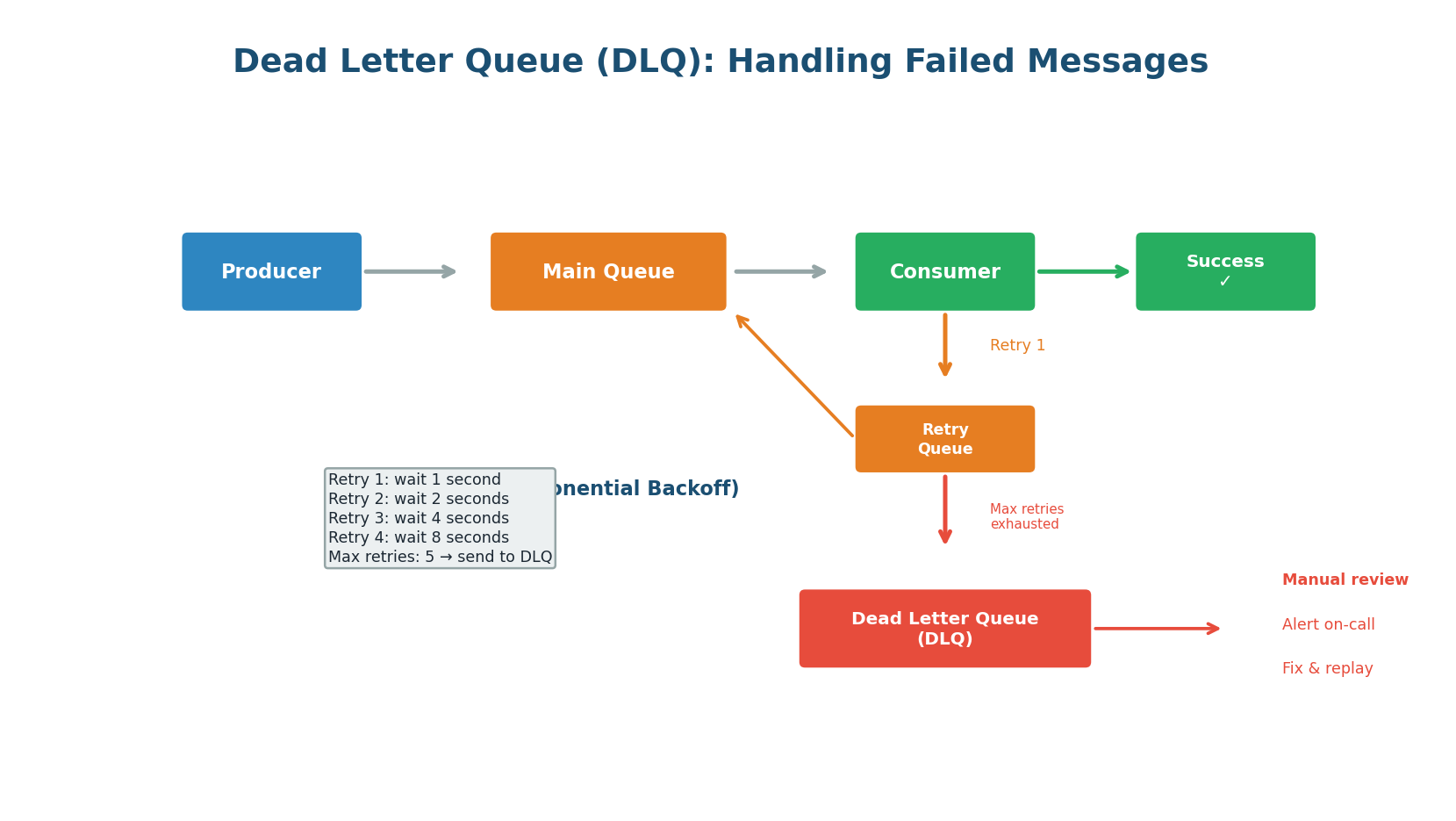
Not every message can be processed successfully. The message format might be corrupted, a downstream service might have a permanent bug, or the data might be invalid. After a configurable number of retries with exponential backoff (1s → 2s → 4s → 8s), the message is moved to a Dead Letter Queue (DLQ). The DLQ is a separate queue where failed messages are stored for manual inspection. An alert notifies the on-call engineer, who fixes the issue and replays the messages from the DLQ.
Retry Strategy: Exponential Backoff with Jitter
On failure, wait an exponentially increasing amount of time before retrying: 1s, 2s, 4s, 8s, 16s. This prevents a failing consumer from hammering a downstream service that is already struggling. Add random jitter to the backoff to prevent multiple consumers from retrying at exactly the same time (thundering herd).
An unmonitored DLQ is a graveyard. Set up alerts: if the DLQ receives more than N messages per hour, page the on-call engineer. Regularly review DLQ messages — they reveal bugs, data quality issues, and integration problems. A growing DLQ is a sign that something in the system is broken.
Concept 7
Kafka vs RabbitMQ vs SQS
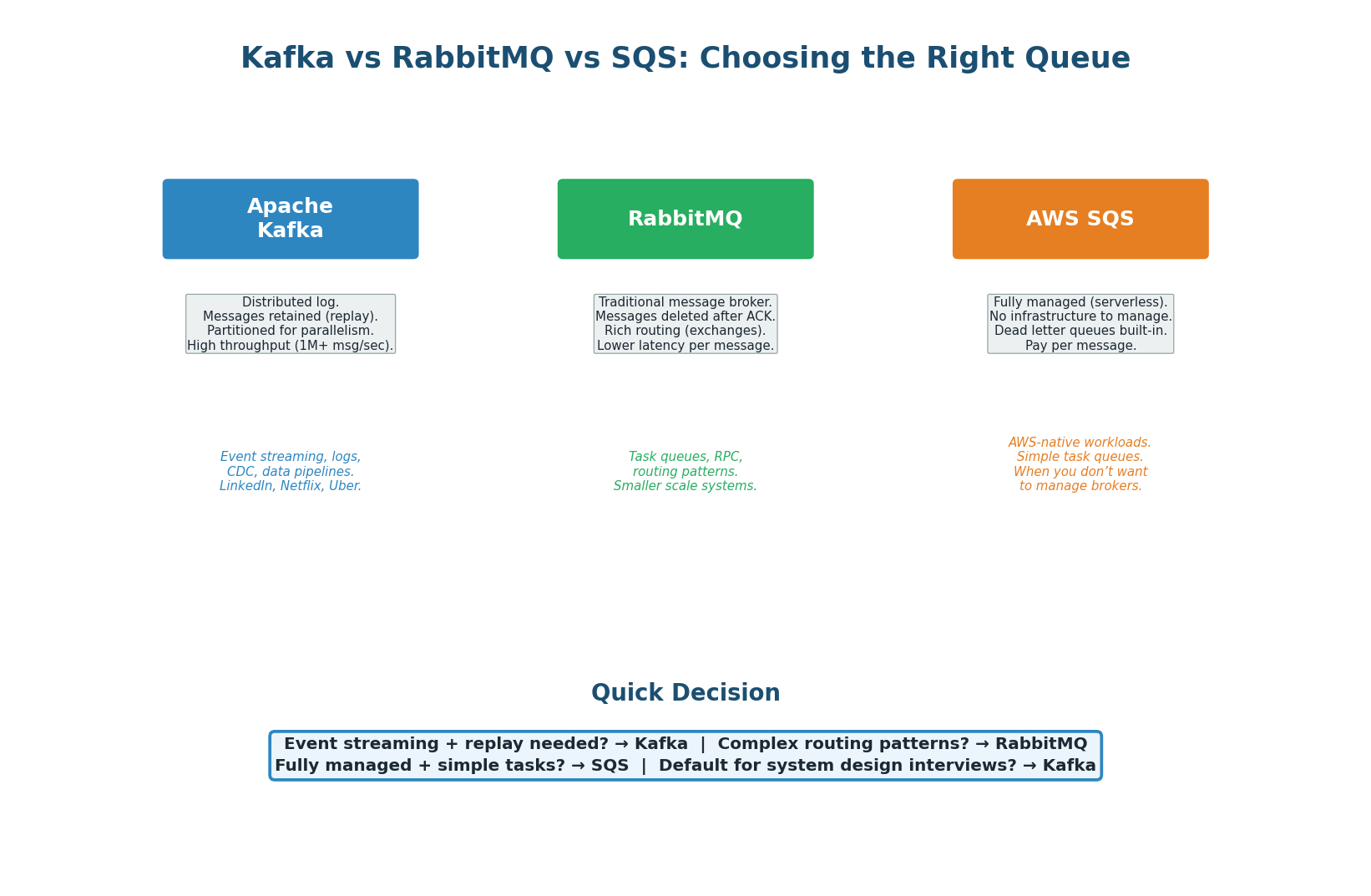
| Feature | Apache Kafka | RabbitMQ | AWS SQS |
|---|---|---|---|
| Model | Distributed log (append-only) | Message broker (queues) | Managed queue service |
| Message retention | Configurable (7 days default) | Deleted after ACK | 14 days max |
| Replay | Yes (reset offset) | No | No |
| Ordering | Per-partition FIFO | Per-queue FIFO | FIFO queues available |
| Throughput | 1M+ msg/sec | 50K–100K msg/sec | Unlimited (auto-scales) |
| Routing | Topic + partition key | Exchanges + routing keys | Standard or FIFO queues |
| Operations | Self-managed or Confluent Cloud | Self-managed or CloudAMQP | Fully managed by AWS |
| Best for | Event streaming, data pipelines, logs | Task queues, RPC, complex routing | Simple tasks on AWS, serverless |
| Used by | LinkedIn, Netflix, Uber, Airbnb | Many smaller/medium systems | AWS-native applications |
- Default for system design interviews: Kafka. Handles both work queues (single consumer group) and pub/sub (multiple groups), supports replay, and is the industry standard for event-driven architectures at scale.
- Simple task queue with complex routing: RabbitMQ. If you need messages routed based on headers, patterns, or priority, RabbitMQ's exchange system is more flexible.
- Managed, minimal ops, AWS-native: SQS. Zero infrastructure management. Pairs well with Lambda for serverless architectures.
Pre-Class Summary
Decision Guide & Cheat Sheet
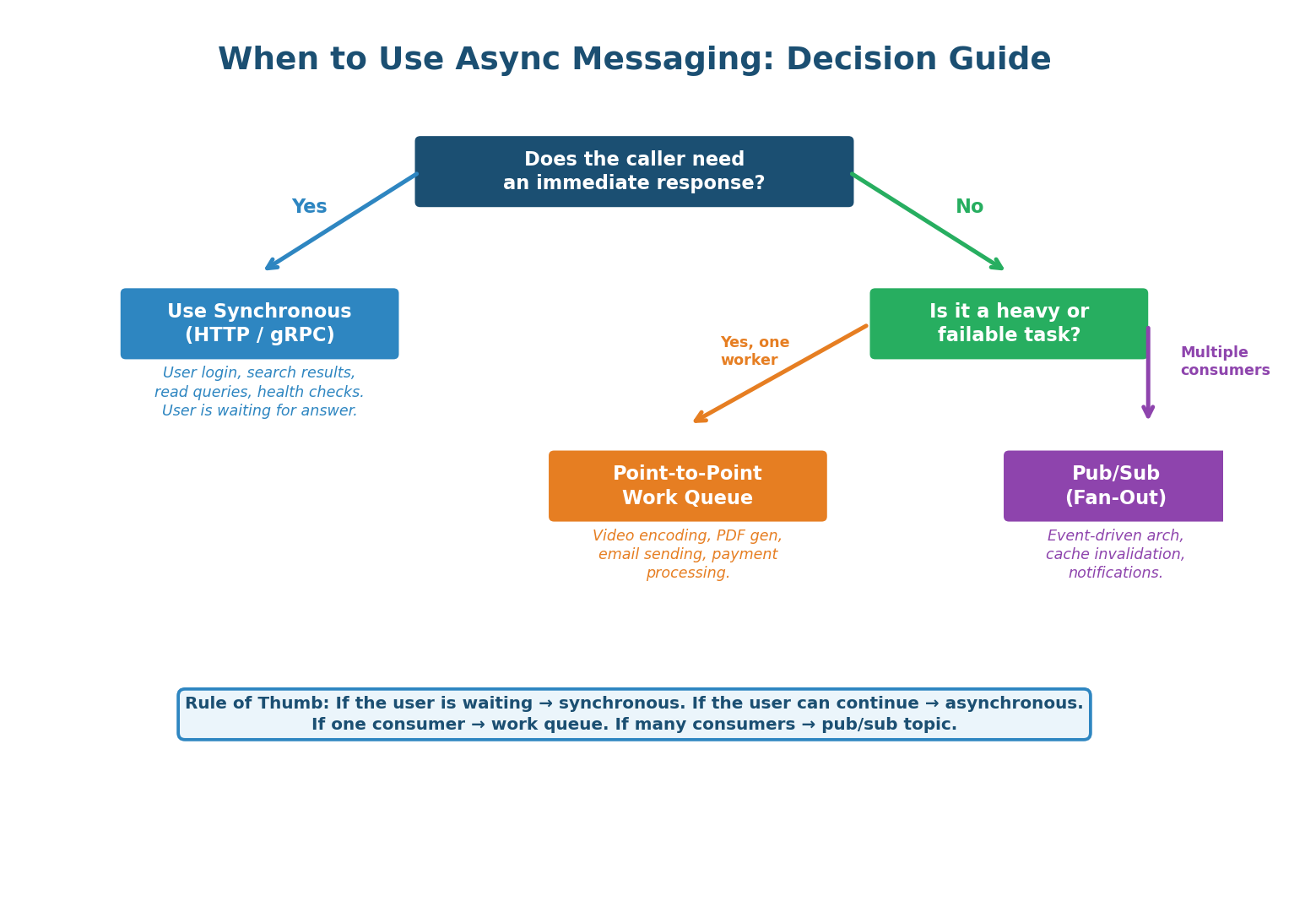
The decision to use async messaging starts with one question: Does the caller need an immediate response? If yes (user waiting for search results, login, a read query), use synchronous HTTP/gRPC. If no (the user can continue while work happens), use a message queue. Then choose the model: if one service should process each message, use a work queue (point-to-point). If multiple services need to react, use pub/sub (fan-out).
Sync vs Async: Synchronous (HTTP/gRPC) is simple but creates tight coupling. Asynchronous (message queue) decouples services, absorbs traffic spikes, and enables independent scaling. Use async for anything the user does not need to wait for.
Message Queue Architecture: Producers → broker (Kafka/RabbitMQ/SQS) → consumers. Broker stores durably, delivers to consumers, consumers ACK. Key properties: durability, ordering (within partition), at-least-once delivery, horizontal scalability.
Point-to-Point vs Pub/Sub: P2P delivers each message to one consumer (work distribution). Pub/Sub delivers to all subscribers (event broadcast). Kafka supports both via consumer groups.
Kafka Architecture: Topics split into partitions (ordered logs). Partition key determines routing and ordering. Each partition assigned to one consumer in a group. Offsets track position. Messages retained for replay. Max parallelism = number of partitions.
Delivery Guarantees: At-most-once (may lose), at-least-once (may duplicate, DEFAULT), exactly-once (expensive). Default to at-least-once with idempotent consumers using message ID deduplication.
Dead Letter Queue: Failed messages go to DLQ after max retries with exponential backoff. Monitor DLQ with alerts. Fix and replay. Essential for production reliability.
| Scenario | Pattern | System | Why |
|---|---|---|---|
| User places order | Async (event) | Kafka | Decouple from payment, inventory, email |
| User uploads video | Async (task queue) | Kafka / SQS | Heavy processing; return 'processing' immediately |
| Send welcome email | Async (task queue) | SQS / RabbitMQ | User doesn't wait for email delivery |
| Cache invalidation | Pub/Sub (fan-out) | Kafka | Multiple services need to invalidate their caches |
| Real-time analytics | Async (stream) | Kafka | High-volume event ingestion + processing |
| Retry failed payment | Async + DLQ | Kafka / SQS | Exponential backoff; DLQ for permanent failures |
| User login | Synchronous | HTTP / gRPC | User needs immediate yes/no response |
| Search query | Synchronous | HTTP / gRPC | User is waiting for search results |
| Health check | Synchronous | HTTP | Immediate response required for monitoring |
Want to Land at Google, Microsoft or Apple?
Watch Pranjal Jain's free 30-min training — the exact GROW Strategy that helped 1,572+ engineers go from TCS/Infosys to top product companies with a 3–5X salary hike.