

What's Inside
Part 1
Complete Caching Quiz — 30 Questions
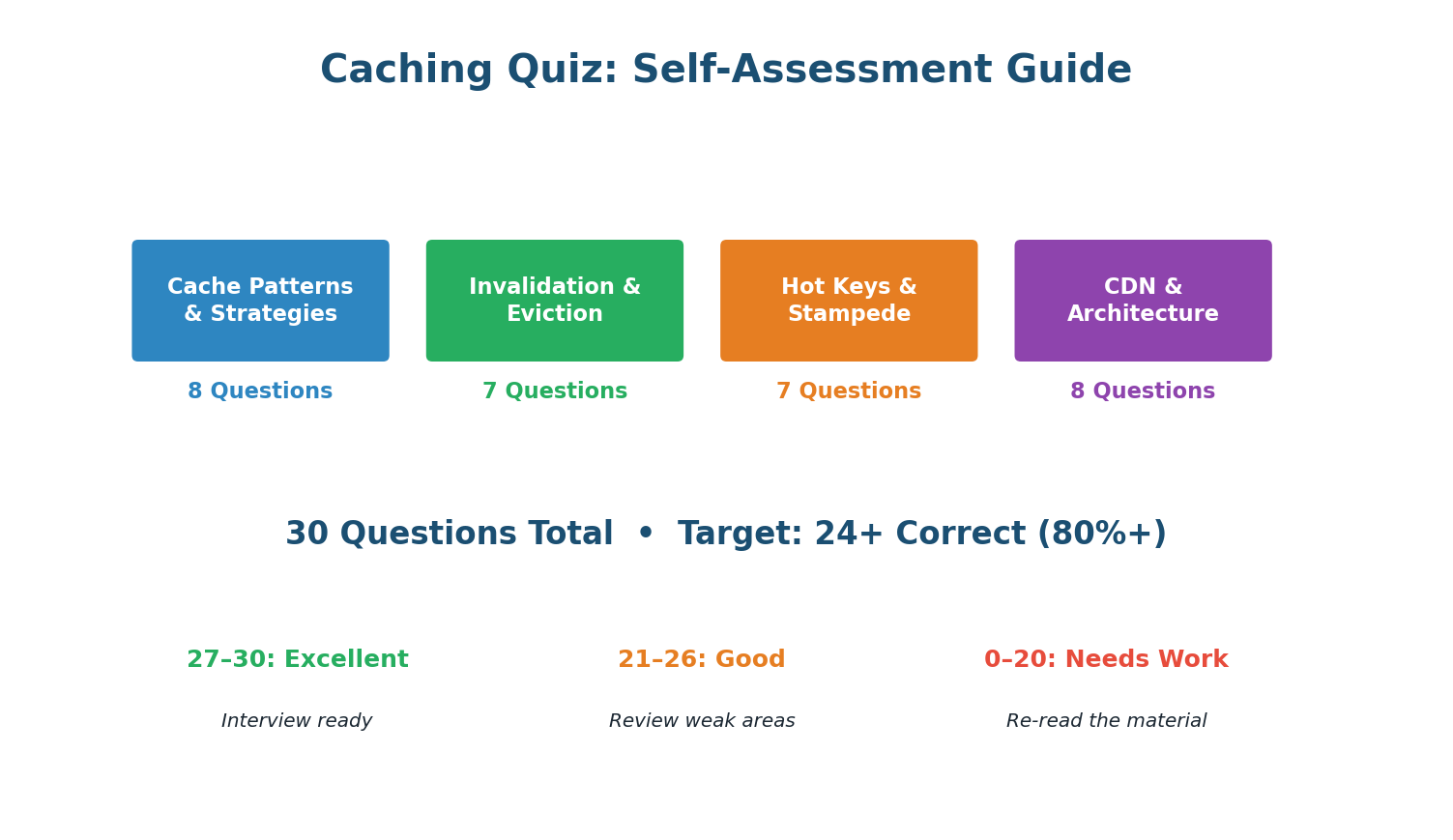
Section A · 8 Questions
Cache Patterns & Strategies
In cache-aside, on write: update DB, then DELETE the cache key. The next read triggers a cache miss and repopulates from DB. Deleting avoids race conditions from concurrent updates where two threads could leave stale data in the cache.
Write-through writes to cache + DB synchronously, ensuring the cache is always consistent. Best for data that must never be stale: user permissions, config, feature flags.
Write-behind writes to cache first and flushes to DB asynchronously. If the cache crashes before flushing, those writes are lost. Only use for data where brief loss is acceptable (view counts, metrics).
Cache-aside (lazy loading) is used by ~90% of production systems. The app checks cache, on miss queries DB and populates cache. Simple, effective, and fault-tolerant (cache failure just means more DB reads).
Redis read: ~0.5ms. PostgreSQL disk read: ~5ms (SSD) to 50ms+ (cold data). That is 10,000x to 100,000x faster. This is why caching is the #1 performance optimization in system design.
With concurrent writes, UPDATE can result in stale data if writes execute out of order: Thread A writes DB (v1), Thread B writes DB (v2), Thread B updates cache (v2), Thread A updates cache (v1 — stale!). DELETE avoids this: the next read always gets the latest from DB.
95% hit rate means 95% of 10,000 = 9,500 served by cache. Only 5% (500) reach the database. This 20x reduction is why caching is transformative for database scaling.
Refresh-ahead proactively refreshes cache entries before they expire, based on predicted access patterns. This eliminates cache misses entirely for predictable workloads (e.g., trending content refreshed every 30s).
Section B · 7 Questions
Invalidation & Eviction
TTL (Time-To-Live) sets an automatic expiry on cache keys. After the TTL, the key is deleted. The stale window equals the TTL. Simplest invalidation strategy — no code needed beyond setting TTL at write time.
In microservices, multiple services cache overlapping data. Event-driven invalidation via Kafka lets each service manage its own cache independently — the writing service publishes an event, each caching service handles its own invalidation. Fully decoupled.
LRU = Least Recently Used. It evicts the key that has not been accessed for the longest time. Based on temporal locality — recently used data is likely to be used again soon.
LFU preserves frequently accessed keys even if they have not been accessed recently. A product viewed 100K times survives eviction over a product viewed twice yesterday. Better for stable hot datasets.
allkeys-lru evicts the least recently used key across all keys when memory is full. noeviction (the Redis default!) returns errors when full — dangerous in production. Always explicitly configure your eviction policy.
Stale-while-revalidate immediately returns the stale cached value (zero latency for user) and refreshes in the background. The user gets an instant response, and the next request gets fresh data. Best user experience for latency-sensitive content.
Cache-Control: no-cache means:no-cache does NOT mean 'don't cache.' It means 'you can cache, but must revalidate with the origin before serving.' To actually prevent caching, use no-store. This is one of the most common interview misconceptions.
Section C · 7 Questions
Hot Keys & Stampede
Cache stampede = popular key expires + thousands of concurrent requests all miss cache + all query DB simultaneously = DB overloaded. Different from hot key (key exists but overwhelms one node).
Lock + single refill: first request acquires a distributed lock (SETNX), queries DB, repopulates cache. Others wait ~20ms and retry from cache. Result: 1 DB query instead of thousands.
Jittered TTL prevents mass expiry: instead of all keys expiring at exactly 3600s, they expire at 3600+random(0,300)s. This spreads expirations over 5 minutes, preventing simultaneous stampedes.
Hot key: key EXISTS in cache but gets so many reads it overwhelms the Redis node. Stampede: key EXPIRED and many requests simultaneously miss cache and hit DB. Different problems, different solutions.
Local in-process LRU with short TTL (5s) on each app server. 95%+ of reads served from local memory at 0.01ms. Redis sees only 1 miss per server per 5 seconds instead of millions of reads.
10 servers, each caching locally for 5 seconds. Each server misses once every 5 seconds. 10 × (1/5) = 2 Redis reads/sec. Down from 1,000,000 reads/sec — a 500,000x reduction in Redis load.
Splitting key into key_0 through key_9 distributes these sub-keys across different Redis hash slots (and therefore different nodes). Reads are spread across 10 nodes instead of hammering one.
Section D · 8 Questions
CDN & Architecture
CDNs cache content at edge servers in 300+ global locations. A user in Delhi gets content from Mumbai (10ms) instead of Virginia (150ms). The geographic proximity is the primary latency benefit.
Pull CDN fetches from origin on the first request (cache miss), caches the response at the edge, and serves subsequent requests from cache. This is the default mode for Cloudflare and CloudFront.
Fingerprinted URLs contain a hash of the file content (app.a3f2b1.js). When content changes, the hash changes, creating a new URL. The CDN treats it as new content, bypassing any stale cache. This lets you set 1-year TTLs safely.
Cache-Control: private means:private means only the end user's browser can cache this response. CDN, proxy servers, and shared caches must NOT cache it. Use for user-specific data (dashboards, profiles, account pages).
ETag is a content fingerprint. On subsequent requests, the client sends If-None-Match: {etag}. If content has not changed, the server returns 304 Not Modified (no body), saving bandwidth while still validating freshness.
With browser cache (~50%), CDN (~25%), proxy cache (~10%), local cache (~5%), and Redis (~8%), approximately 98% of reads are served by caches. Only ~2–5% reach the database.
Browser cache has the highest hit rate (~50% of all requests) because it serves repeat visits at 0ms with zero server resources. But it is limited to one user's data on one device — smallest capacity scope.
User-specific data should use Cache-Control: private (browser only, not CDN) and no-store for sensitive data. public would let CDNs cache personalized content, potentially serving user A's data to user B.
Part 2
Design Cache Layer for Instagram Feed
The Challenge: Serve 600K Feed Requests/Second
Instagram's feed is one of the most demanding caching problems in the industry. Every time a user opens the app, the feed service must assemble a personalized list of 50 posts from hundreds of followed accounts — complete with author info, like counts, comment previews, and a machine-learning-ranked ordering — all within 200 milliseconds. At 500 million daily active users, this translates to approximately 600,000 feed requests per second at peak. Without caching, this would require millions of database queries per second, which is physically impossible.
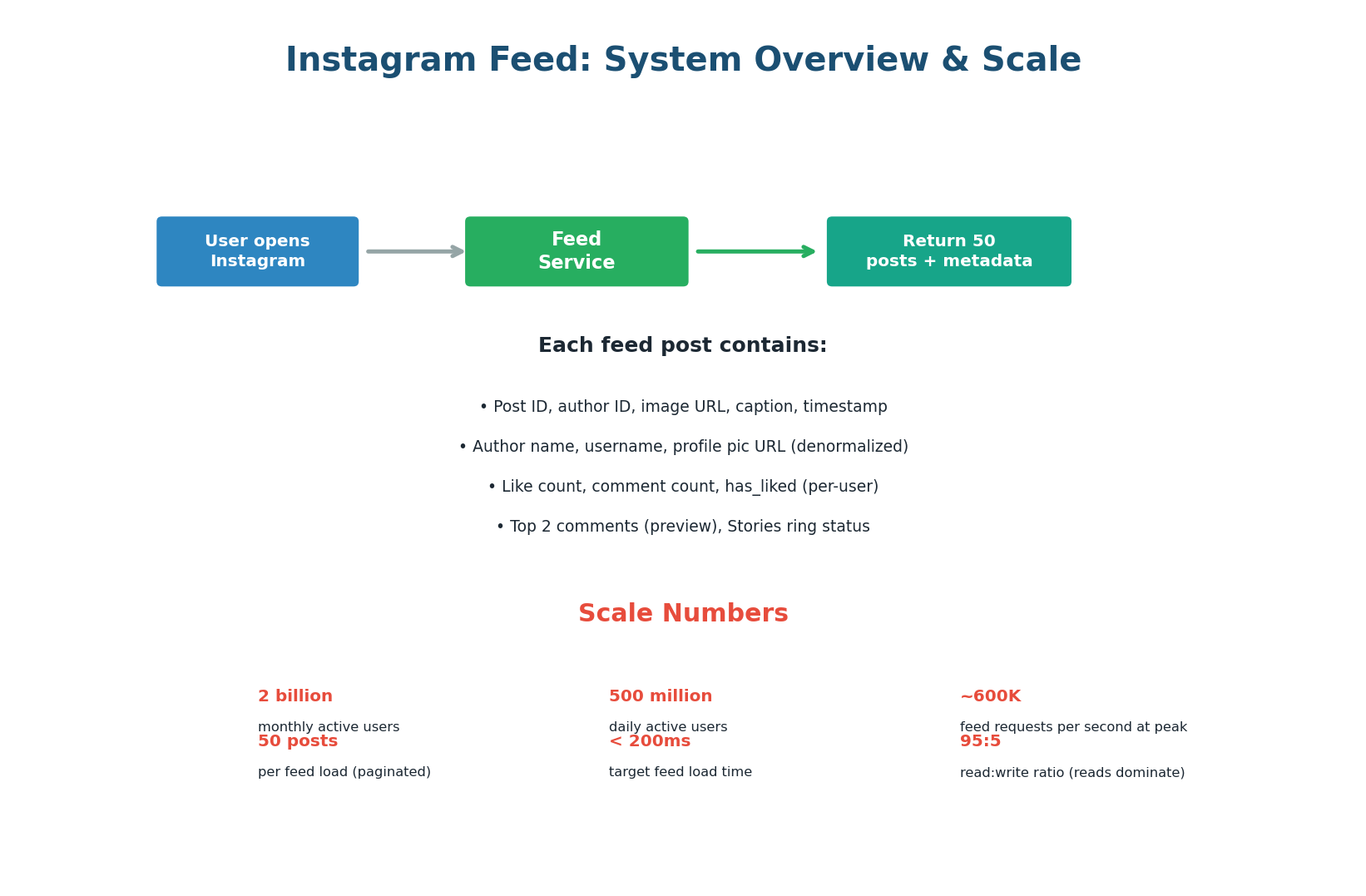
The first design decision is how feeds are generated. There are two fundamental approaches: fan-out on write (pre-compute the feed when a user posts) and fan-out on read (compute the feed when a user opens the app). Instagram uses a hybrid of both.
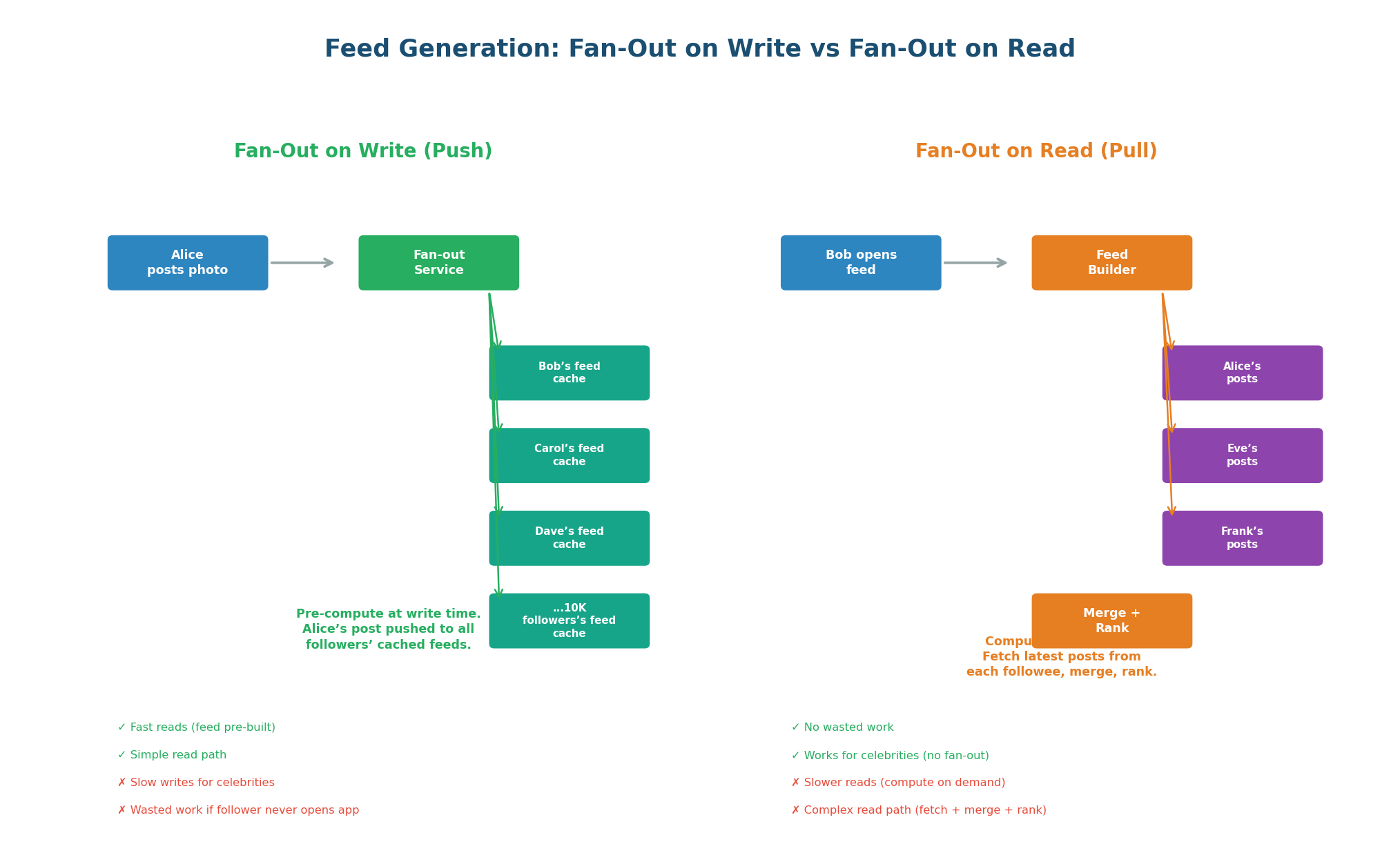
Fan-Out on Write (Push Model): When Alice posts a photo, a fan-out service immediately pushes Alice's post ID into the cached feed of every one of Alice's followers. When Bob opens Instagram, his feed is already pre-computed in Redis — just read and return. Reads are extremely fast (one Redis read) but writes are expensive for users with many followers. If Alice has 10,000 followers, her single post triggers 10,000 cache writes.
Fan-Out on Read (Pull Model): When Bob opens Instagram, the feed service fetches the latest posts from each account Bob follows, merges them, ranks them, and returns the top 50. No pre-computation, no wasted work. But reads are slower: if Bob follows 500 accounts, the service must fetch from 500 post lists, merge, and rank in real-time.
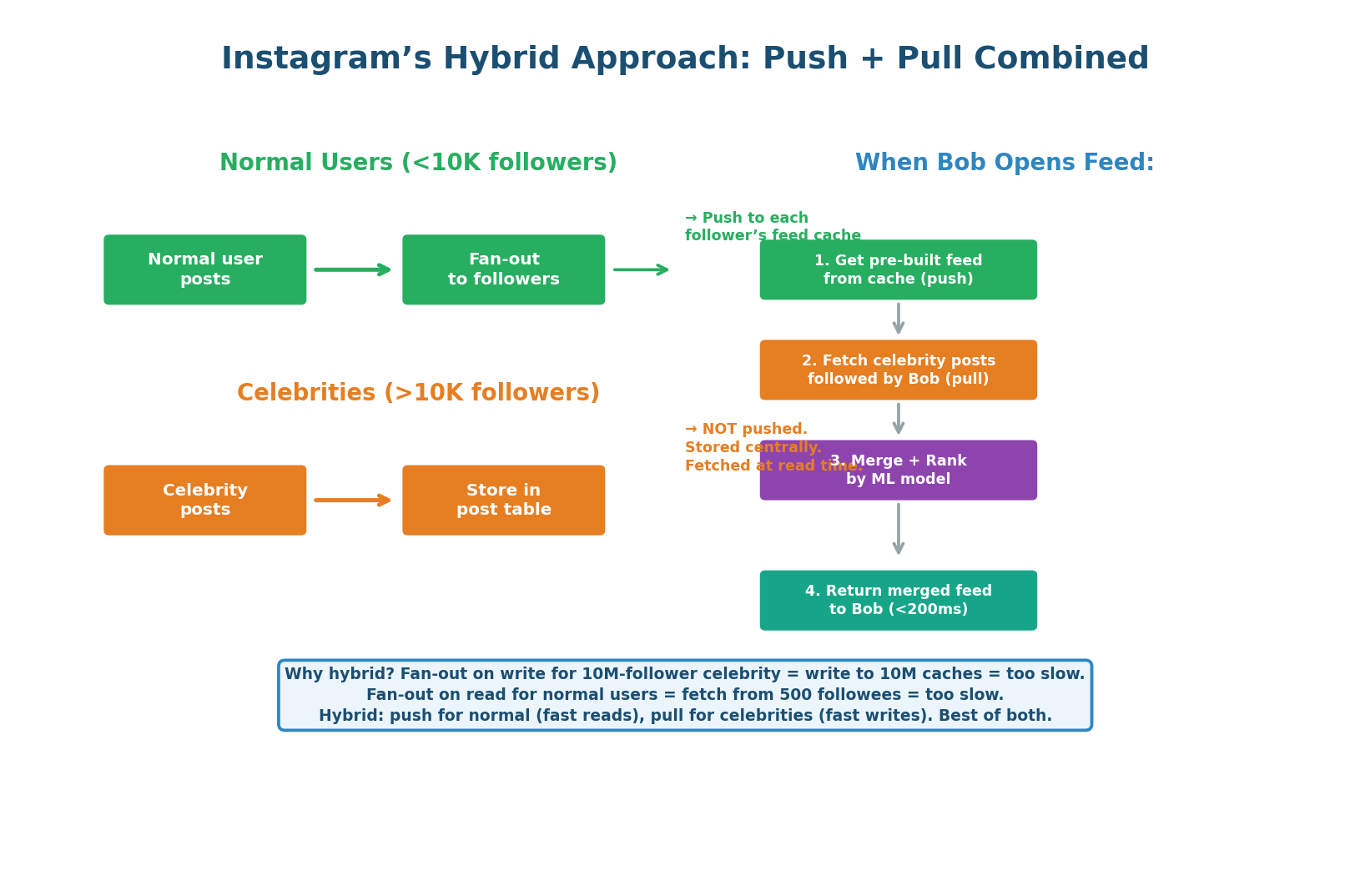
- Normal users (<10K followers): Fan-out on write. Post ID pushed to all followers' feed caches immediately. Fast fan-out (10K writes per post).
- Celebrities (>10K followers): NO fan-out on write. Posts stored centrally. At read time, the feed service fetches celebrity posts the user follows and merges them in.
- Read-time merge: Service reads Bob's pre-computed feed (normal-user posts), fetches celebrity posts Bob follows, merges, applies ML ranking, returns top 50. The merge adds ~5ms — worthwhile to avoid writing to millions of caches per celebrity post.
'I use fan-out on write for normal users because it gives O(1) read time from cache. For celebrity users with millions of followers, I skip fan-out and fetch their posts at read time to avoid writing to millions of caches. The feed service merges both at read time.' This shows you understand the celebrity problem and its solution.
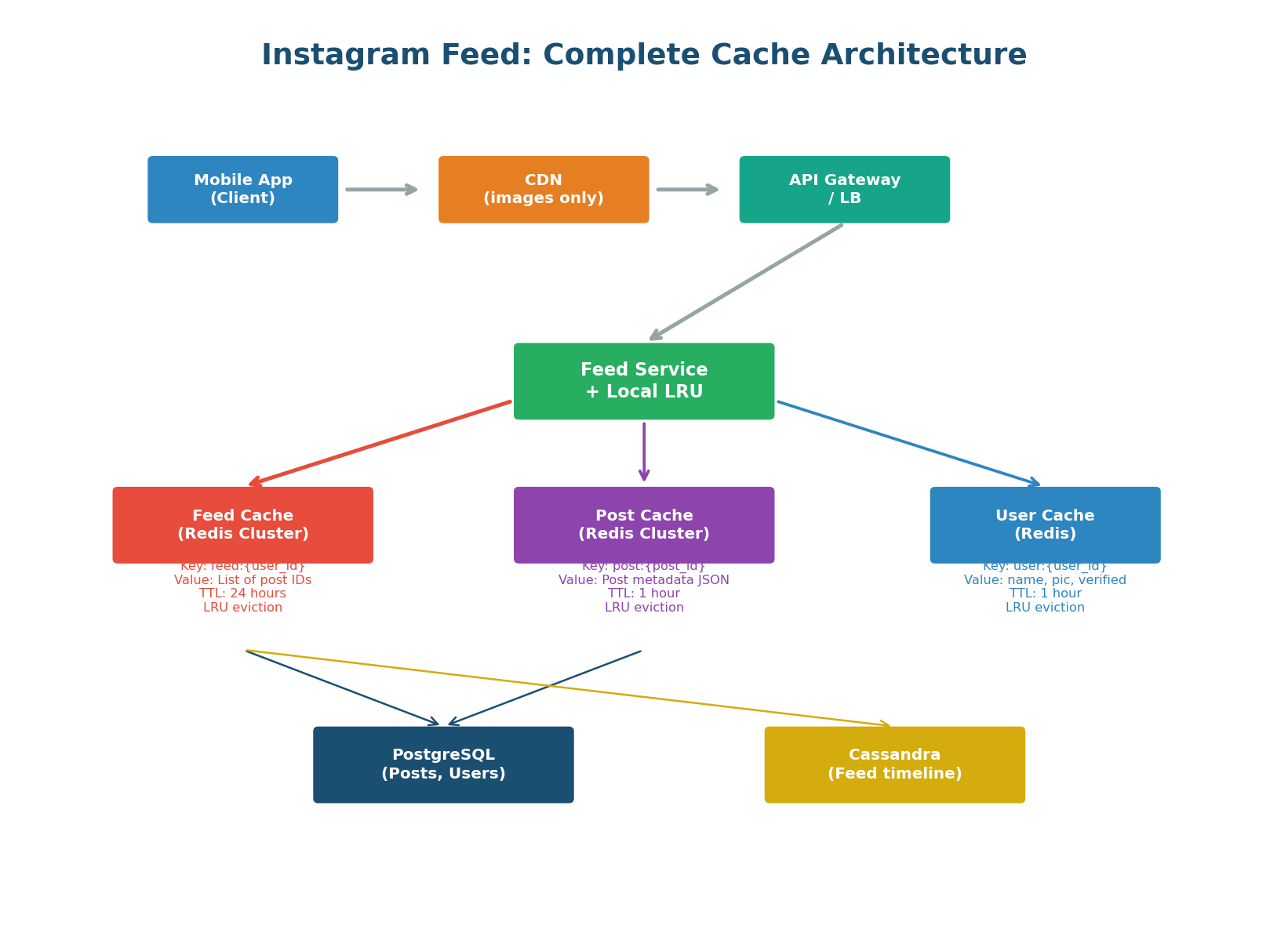
The feed cache architecture uses three separate Redis clusters, each optimized for a different data type:
- Feed Cache: Stores the pre-computed list of post IDs per user (
feed:{user_id}) - Post Cache: Stores post metadata — caption, image URL, timestamp (
post:{post_id}) - User Cache: Stores author profiles — name, avatar, verified badge (
user:{user_id})
This separation allows independent scaling, TTL tuning, and eviction policies per data type. The feed cache needs aggressive LRU eviction and large capacity. The post cache needs a medium TTL. The user cache needs event-driven invalidation on profile updates.
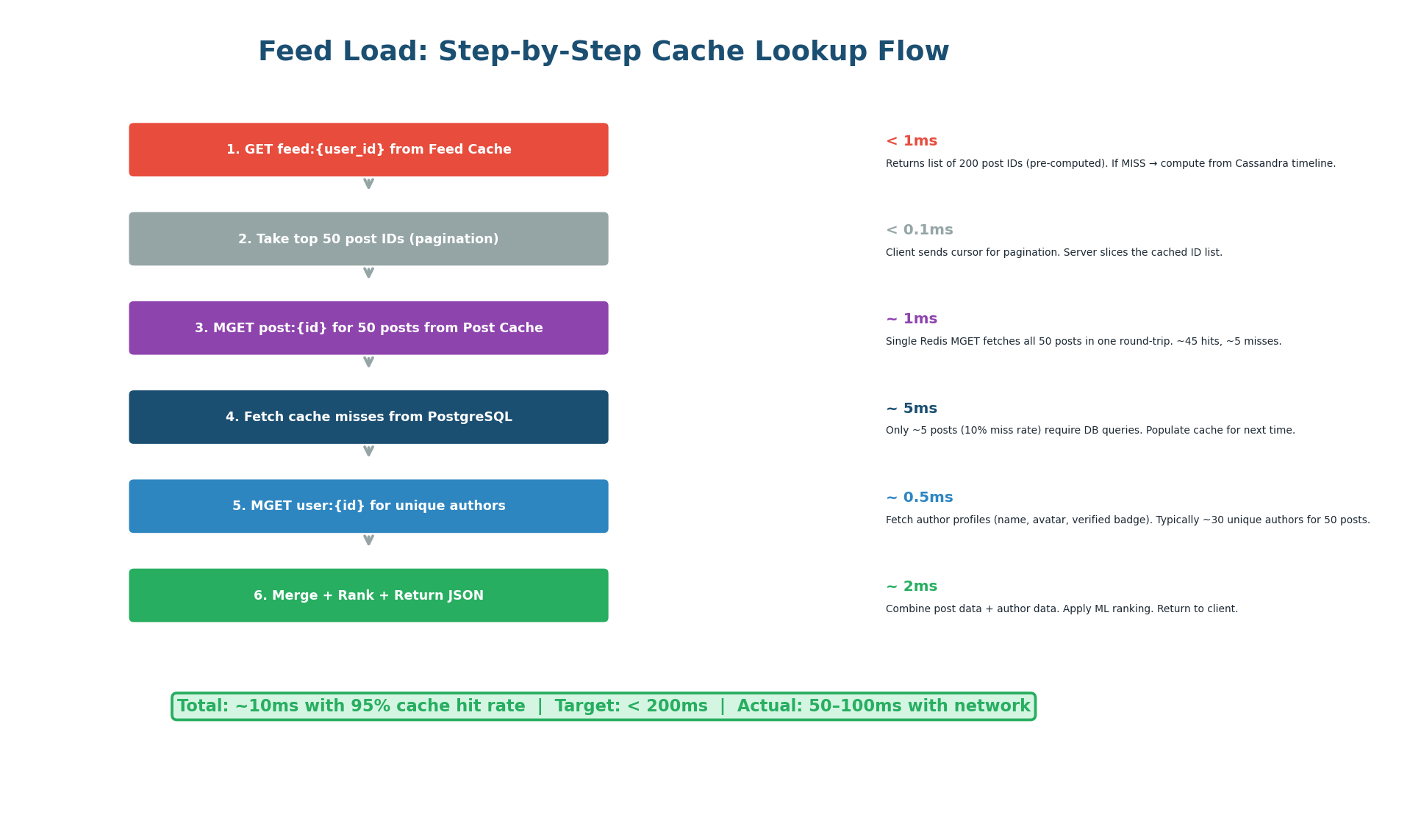
When Bob opens Instagram, the feed service executes six steps:
- Read
feed:bobfrom Feed Cache to get 200 pre-computed post IDs (<1ms). - Slice the top 50 for this page using Bob's pagination cursor (<0.1ms).
- MGET all 50 post details from Post Cache in a single Redis round-trip (~1ms, ~45 cache hits).
- Fetch the ~5 cache-miss posts from PostgreSQL (~5ms).
- MGET unique author profiles from User Cache (~0.5ms).
- Merge, rank with ML model, and return JSON (~2ms).
Total: approximately 10ms — well within the 200ms target.
Redis MGET fetches multiple keys in a single round-trip. Instead of 50 individual GET commands (50 round-trips at 0.5ms each = 25ms), one MGET retrieves all 50 posts in a single 1ms round-trip. That is a 25x latency improvement. Always use MGET/MSET for batch operations in production Redis.
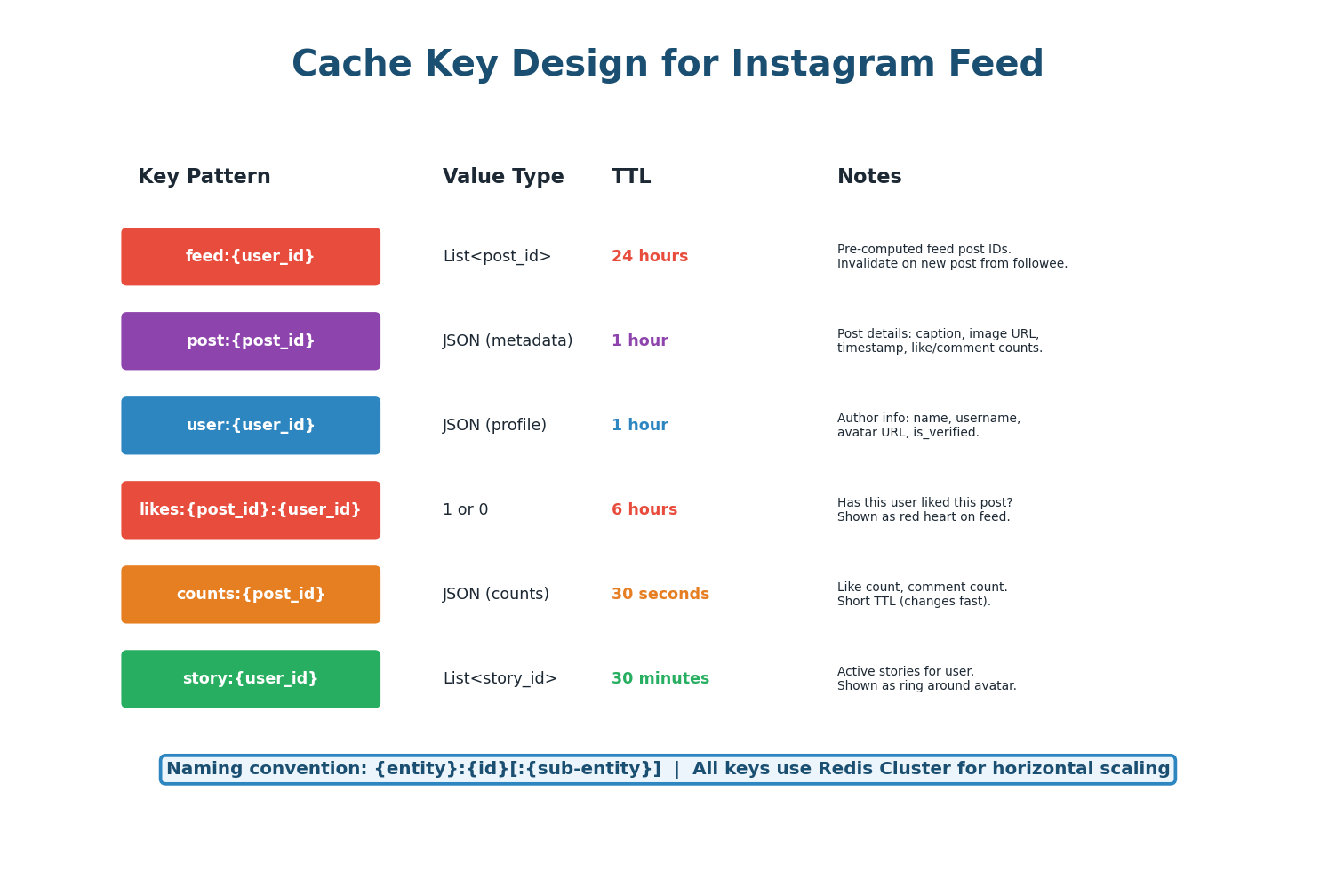
| Key Pattern | Value | TTL | Invalidation Trigger |
|---|---|---|---|
feed:{user_id} | List of 200 post IDs | 24 hours | New post from followee (LPUSH) |
post:{post_id} | JSON: caption, image_url, timestamp | 1 hour | Post edited/deleted (DEL) |
user:{user_id} | JSON: name, avatar, is_verified | 1 hour | Profile updated (DEL) |
likes:{post_id}:{user_id} | 1 or 0 (boolean) | 6 hours | User likes/unlikes (SET/DEL) |
counts:{post_id} | JSON: like_count, comment_count | 30 seconds | Any like/comment (INCR or TTL refresh) |
story:{user_id} | List of active story IDs | 30 minutes | New story posted / story expires |
Like and comment counts change every second on popular posts. A 1-hour TTL would show stale counts. Use a 30-second TTL for counts, or implement a pub/sub approach where counts are updated in real-time via Redis INCR. For the exact count shown on a post detail page, always read from the database.
The feed cache stores only post IDs (not full post data) because post IDs are tiny (~8 bytes each) while full post data is large (~500 bytes). Storing 200 post IDs per user costs 1.6 KB per user. With 500 million users, the feed cache needs approximately 800 GB — achievable with a 50-node Redis cluster at 16 GB per node.
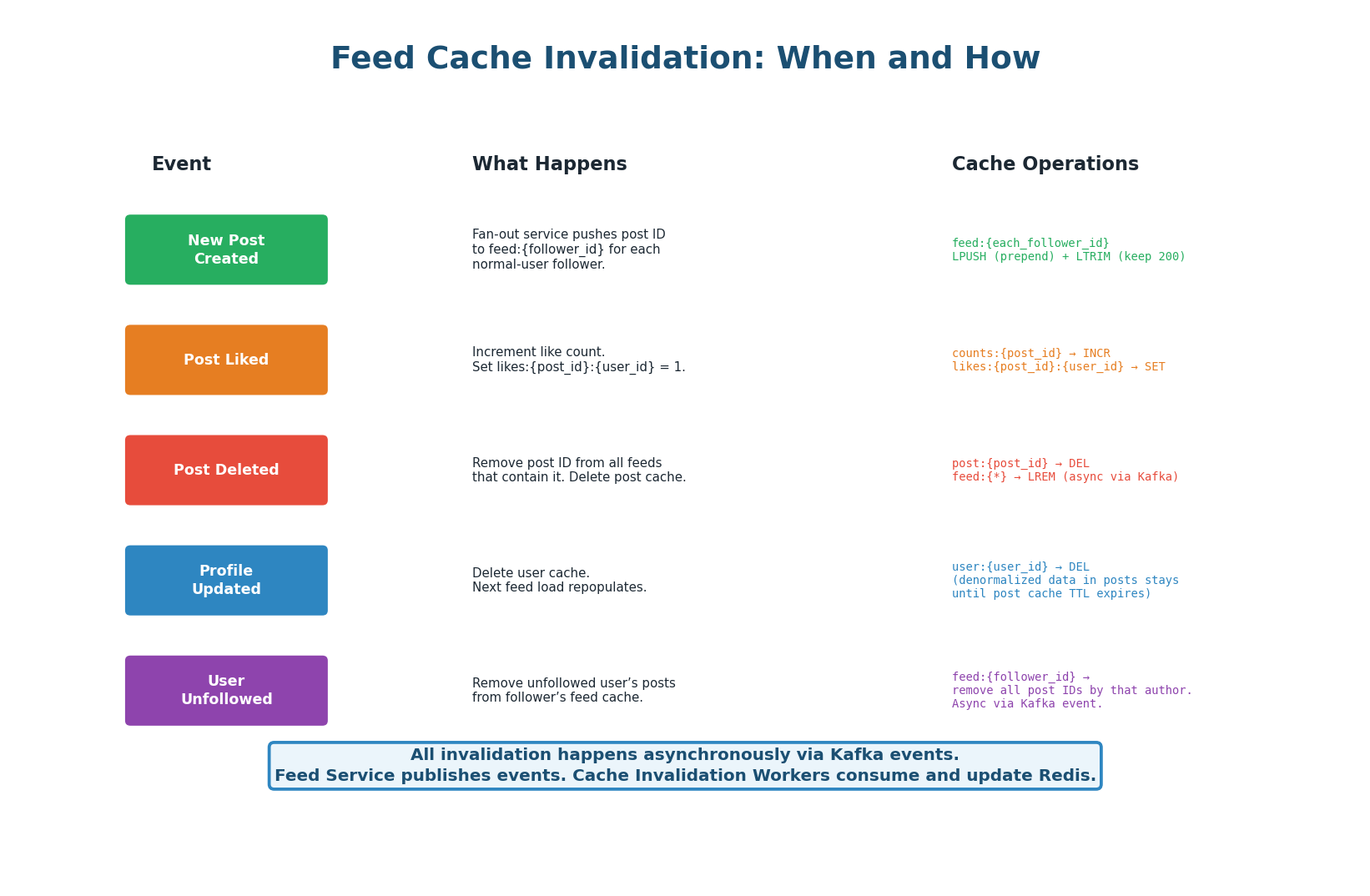
All cache invalidation is event-driven via Kafka. When an action occurs (new post, like, delete, profile update, unfollow), the responsible service publishes an event to Kafka. Cache Invalidation Workers consume these events and perform the appropriate Redis operations. This decouples the action from the cache update — the write path is never slowed down by cache operations.
| Event | Kafka Topic | Cache Operation | Latency Impact |
|---|---|---|---|
| New post (normal user) | post.created | LPUSH to feed:{each_follower} + LTRIM to 200 | Async, ~100ms for 10K followers |
| New post (celebrity) | post.created | Store in posts table only (no fan-out) | ~1ms (no cache write) |
| Post liked | post.liked | INCR counts:{post_id}:likes + SET likes:{post}:{user} | Async, <1ms |
| Post deleted | post.deleted | DEL post:{id} + LREM from affected feeds | Async, ~50ms |
| Profile updated | user.updated | DEL user:{user_id} | Async, <1ms |
| Unfollowed | user.unfollowed | Remove author's posts from feed:{follower} | Async, ~10ms |
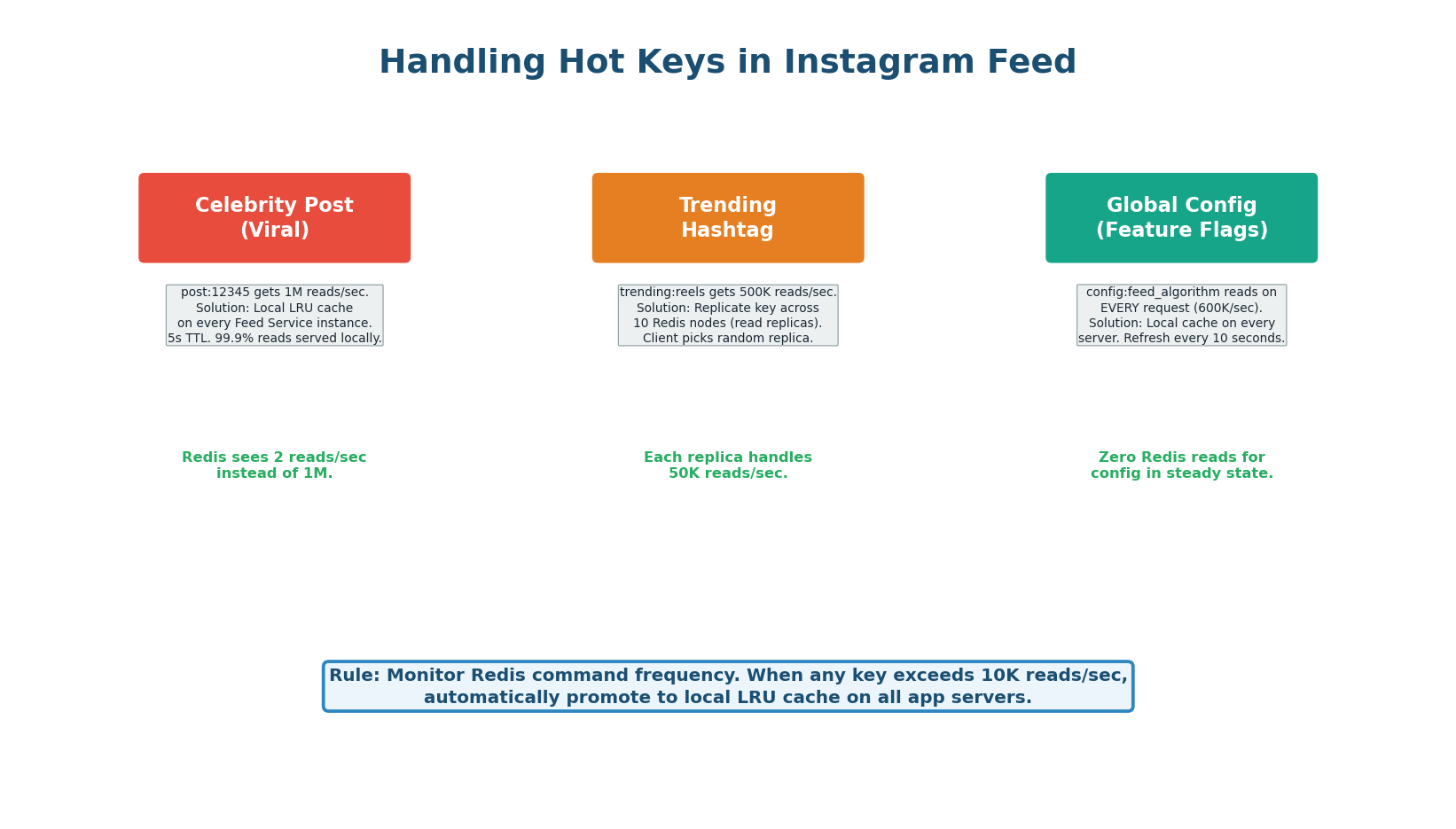
Instagram's feed has three hot key scenarios:
- Celebrity posts: A viral post from a 100M-follower account generates millions of reads to
post:{id}. Solution: local LRU cache on every feed service instance with 5-second TTL reduces Redis load by 99.9%. - Trending hashtags: Generate 500K reads/sec to
trending:reels. Solution: replicate the key across 10 Redis read replicas. - Global config: Feature flags, ML model version is read on every single request. Solution: local cache refreshed every 10 seconds — zero Redis reads in steady state.
Most candidates mention caching. Few mention hot keys. Proactively say: 'For celebrity posts that go viral, post:{id} could receive 1M reads/sec. I add a local in-process LRU with 5s TTL on every feed service instance. Redis sees 2 reads/sec instead of 1M. For global config read on every request, I cache locally with 10s refresh — zero Redis overhead.' This shows production-level thinking.
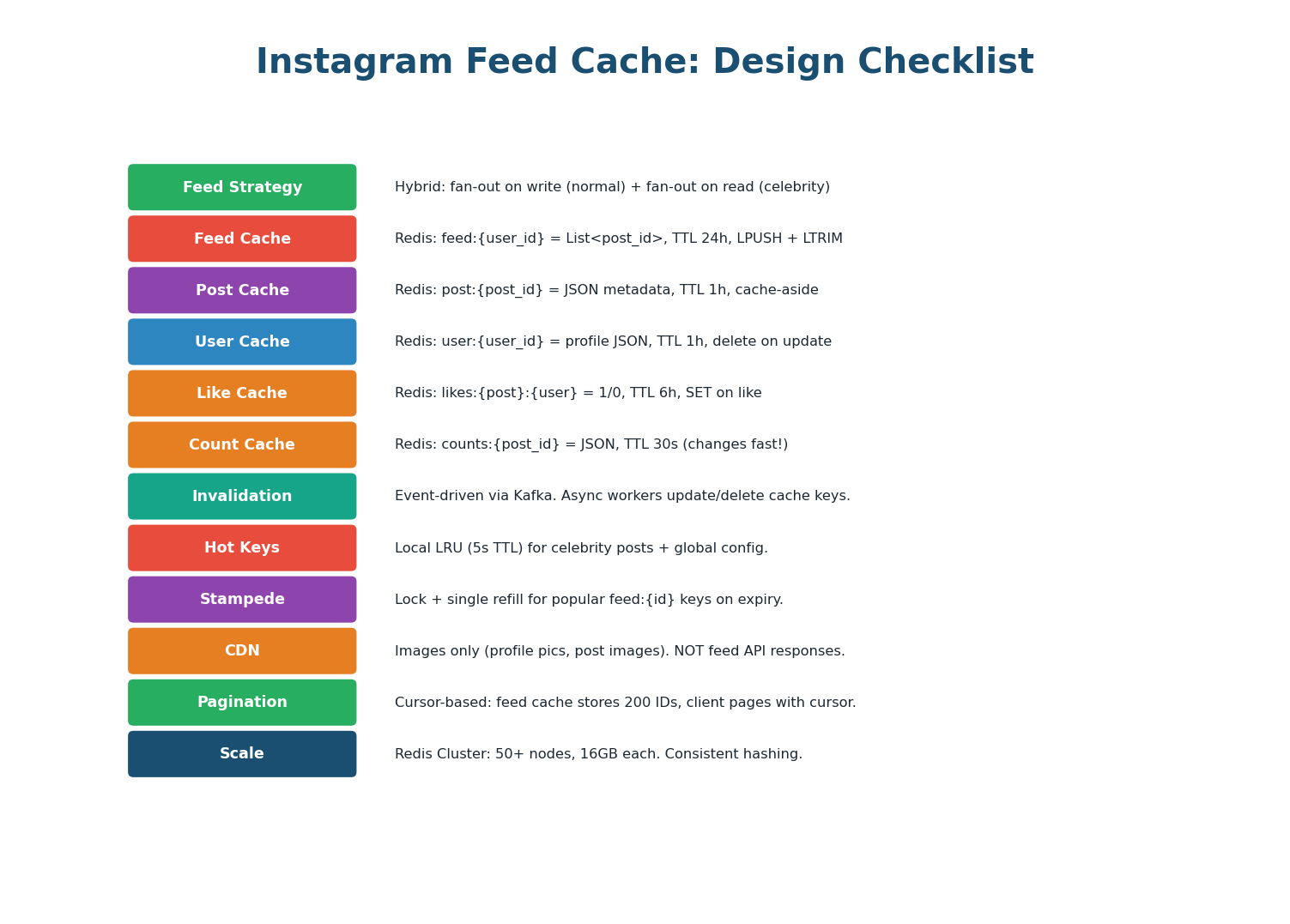
| Aspect | Design Decision | Why |
|---|---|---|
| Feed Strategy | Hybrid: push (normal) + pull (celebrity) | Avoids writing to 10M caches per celebrity post |
| Feed Cache | Redis: feed:{user_id} = List<post_id> | Stores 200 IDs per user, 1.6 KB each. 50-node cluster. |
| Post Cache | Redis: post:{post_id} = JSON | Denormalized metadata. MGET for batch fetch. |
| User Cache | Redis: user:{user_id} = JSON | Author profile denormalized. 1-hour TTL. |
| Count Cache | Redis: counts:{post_id} = JSON | 30-second TTL. INCR for likes. Short TTL for freshness. |
| Invalidation | Kafka events → Invalidation Workers | Async, decoupled. No write-path latency impact. |
| Hot Keys | Local LRU (5s) for viral posts + config | 99.9% read reduction on hot keys. |
| Stampede | Lock + single refill on feed:{id} | Prevents 10K DB queries when popular feed expires. |
| CDN | Images only. NOT feed API responses. | Feed is personalized — cannot cache at CDN. |
| Pagination | Cursor-based on cached ID list | Client sends cursor, server slices from cache. |
| Eviction | allkeys-lru on all Redis clusters | Best general-purpose eviction for web workloads. |
| Scale | 50+ Redis nodes, consistent hashing | ~800GB for feed cache, ~200GB for post cache. |
The Instagram feed cache design is a template for Twitter timelines, Facebook news feeds, LinkedIn feeds, TikTok For-You pages, and any content discovery system. The patterns are identical: hybrid fan-out, multi-key Redis caching (feed IDs + entity cache), MGET for batch reads, event-driven invalidation via Kafka, local LRU for hot keys, and cursor-based pagination. Master this design and you can apply it to any feed-based interview question.
Want to Land at Google, Microsoft or Apple?
Watch Pranjal Jain's free 30-min training — the exact GROW Strategy that helped 1,572+ engineers go from TCS/Infosys to top product companies with a 3–5X salary hike.