

What's Inside
Topic 1
Message Queues: Deep Dive
Consumer Lifecycle: ACK, NACK, and Redelivery
The consumer lifecycle determines how messages flow through the system and what happens when things go wrong. Understanding this cycle is critical because it governs data safety: a message must not be lost and must not be processed twice unless the consumer is idempotent. The ACK mechanism is what makes this possible.
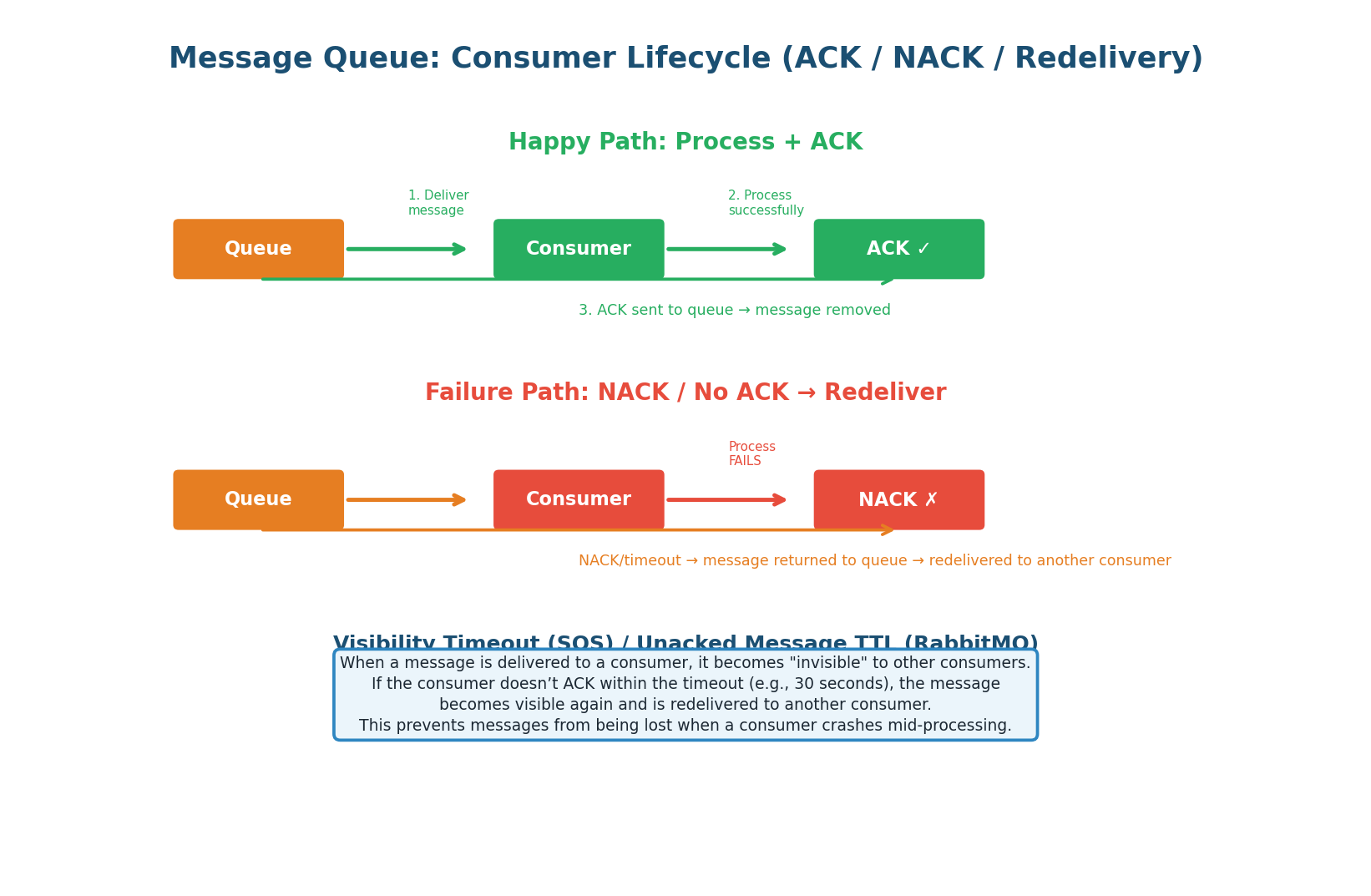
The ACK Contract: When a consumer receives a message, it enters an "in-flight" state. The message is invisible to other consumers during a visibility timeout (SQS: default 30s, RabbitMQ: until ACK/NACK, Kafka: until offset committed). The consumer processes the message and sends:
- ACK (success) — broker removes the message permanently.
- NACK (failure) — broker requeues the message for redelivery to another consumer.
- Timeout (crash/no response) — visibility timeout expires, message becomes visible again automatically.
Never ACK a message before processing is complete. If you ACK and then crash during processing, the message is permanently lost — the broker has already removed it.
The correct pattern: receive → process → commit side effects → ACK. In Kafka, this means committing the offset AFTER processing, not before. When to NACK: when processing fails but the message is valid (transient error like timeout or rate limit). If the failure is permanent (invalid data), send to the Dead Letter Queue instead of NACKing endlessly.
Competing Consumers: Scaling with Workers
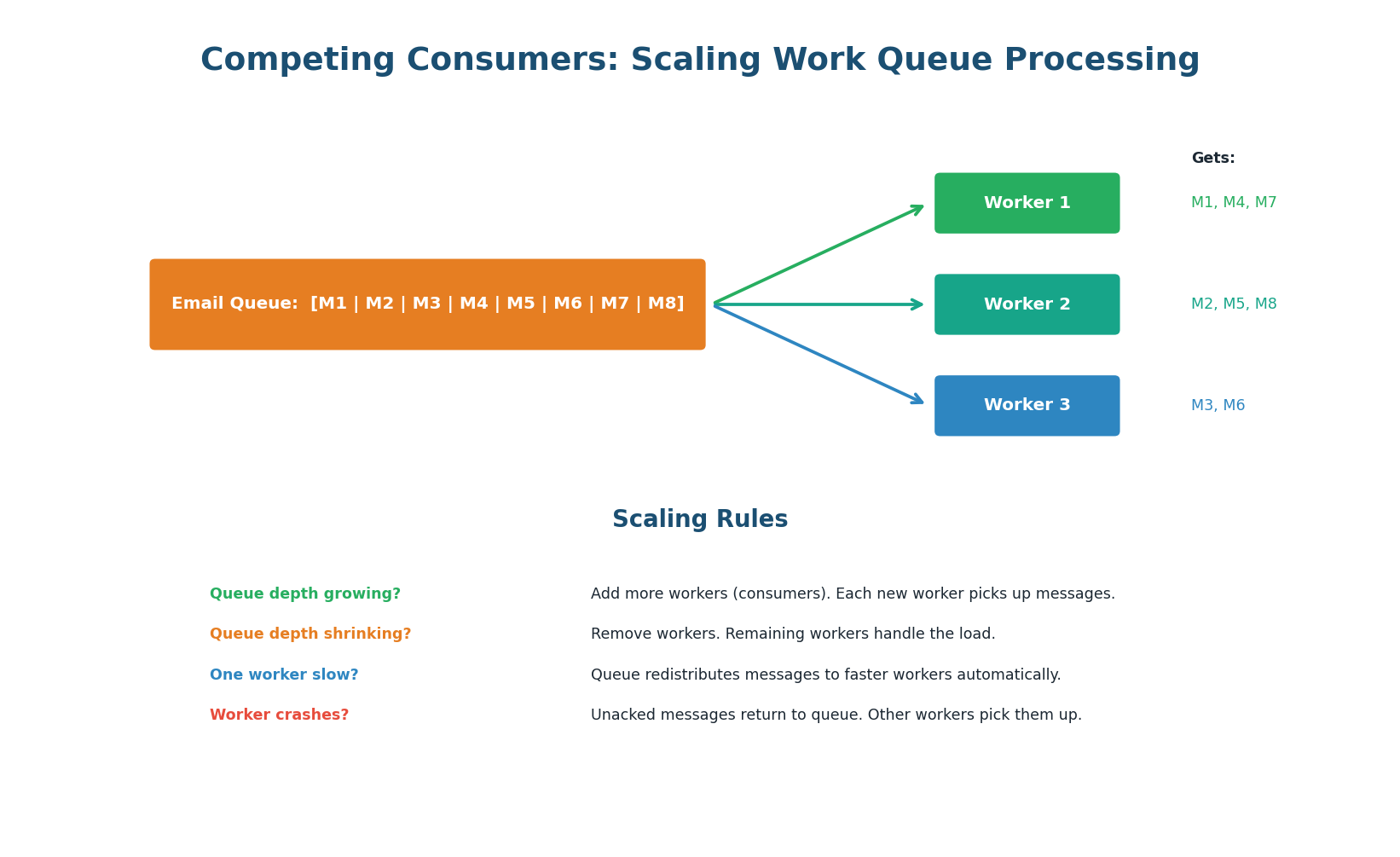
The competing consumers pattern distributes work across multiple worker instances. Each message is delivered to exactly one worker. The queue automatically load-balances: if Worker 1 is slow processing a heavy task, Workers 2 and 3 pick up the remaining messages. This is the fundamental scaling mechanism for message queues.
Auto-Scaling Based on Queue Depth: The queue depth (number of messages waiting) is the key metric for scaling consumers. In AWS, configure SQS queue depth to trigger auto-scaling: queue depth > 1,000 → add 2 workers; queue depth < 100 → remove 1 worker. This creates an elastic processing pipeline that scales with demand.
'I set up CloudWatch alarms on SQS queue depth. If messages exceed 1,000, auto-scaling adds workers. I also monitor the DLQ — any messages there trigger a PagerDuty alert because it means our consumer has a bug or a dependency is permanently down.' This shows production readiness that most candidates miss.
Topic 2
Pub/Sub: Fan-Out in Practice
Kafka Consumer Groups: Pub/Sub + Work Queue in One
Kafka's consumer group model is elegantly powerful: it combines pub/sub (multiple consumer groups each get all messages) with work queue (within a group, partitions are distributed across consumers). A single Kafka topic can serve both patterns simultaneously — which is why Kafka has become the default messaging system for system design interviews.
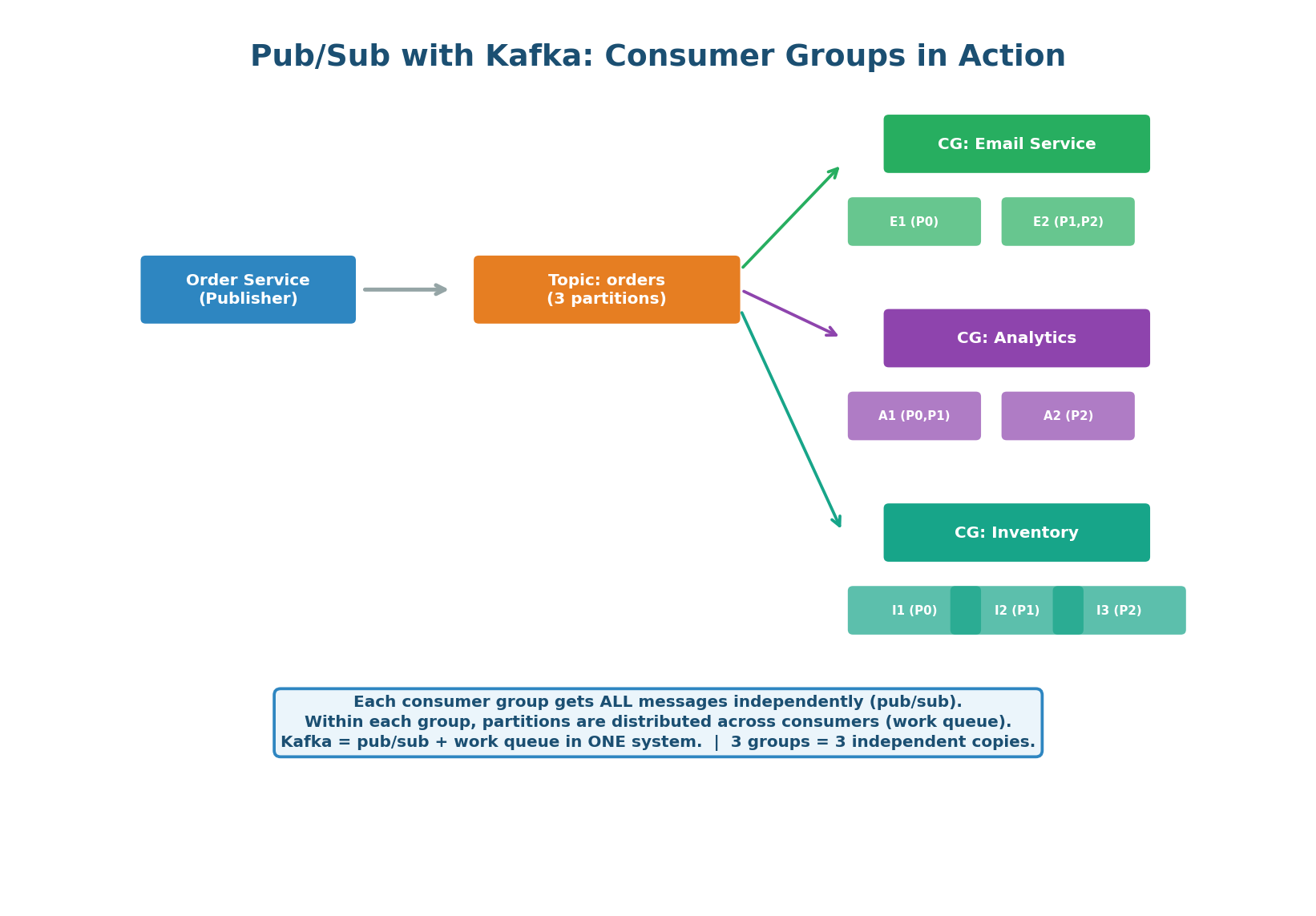
How It Works: The Order Service publishes an order.created event to the "orders" topic (3 partitions). Three consumer groups are subscribed: Email Service (2 consumers), Analytics Service (2 consumers), and Inventory Service (3 consumers). Each group independently receives ALL messages. Within the Email Service group, partitions are split across consumers for parallel processing.
Adding a New Consumer: Zero Producer Changes. When the team builds a Fraud Detection Service, they simply create a new consumer group and subscribe to the "orders" topic. The Order Service does not change at all — it has no knowledge of its consumers. The new service independently processes all past and future events from its own offset. This is the core benefit of event-driven architecture: extend the system without modifying existing services.
Uber's event bus handles 1 trillion+ events per day across thousands of Kafka topics. When a ride is completed, the trip.completed event is consumed by: billing (charge rider), driver payment (pay driver), analytics (metrics dashboard), ML models (demand prediction), surge pricing (update multiplier), and customer support (populate ride history).
One event, six independent consumers. Adding the seventh requires zero changes to the trip service.
Pub/Sub Anti-Patterns to Avoid
| Anti-Pattern | Problem | Solution |
|---|---|---|
| Oversized messages | Large payloads (>1MB) slow the broker and consumers | Store data in S3/DB; put reference (URL/ID) in message |
| Chatty publishers | Publishing on every minor state change floods the topic | Batch events or debounce (publish once per second per entity) |
| No schema evolution | Changing message format breaks all consumers | Use schema registry (Avro/Protobuf). Backward-compatible changes. |
| Ignoring consumer lag | Consumers fall behind without anyone noticing | Alert on consumer lag > 1,000 offsets per partition |
| Unbounded topics | Topic grows forever, disk fills up | Set retention period (7 days) or compaction policy |
Topic 3
Backoff & Retry Strategies
Exponential Backoff with Jitter: The Gold Standard
When a message fails to process, the consumer must decide how long to wait before retrying. Retrying immediately is dangerous: if the downstream service is overloaded, immediate retries add more load, making the problem worse. Exponential backoff solves this by doubling the wait time with each retry, giving the failing service time to recover. Adding random jitter prevents synchronized retry storms when many consumers retry at the same exponential intervals.
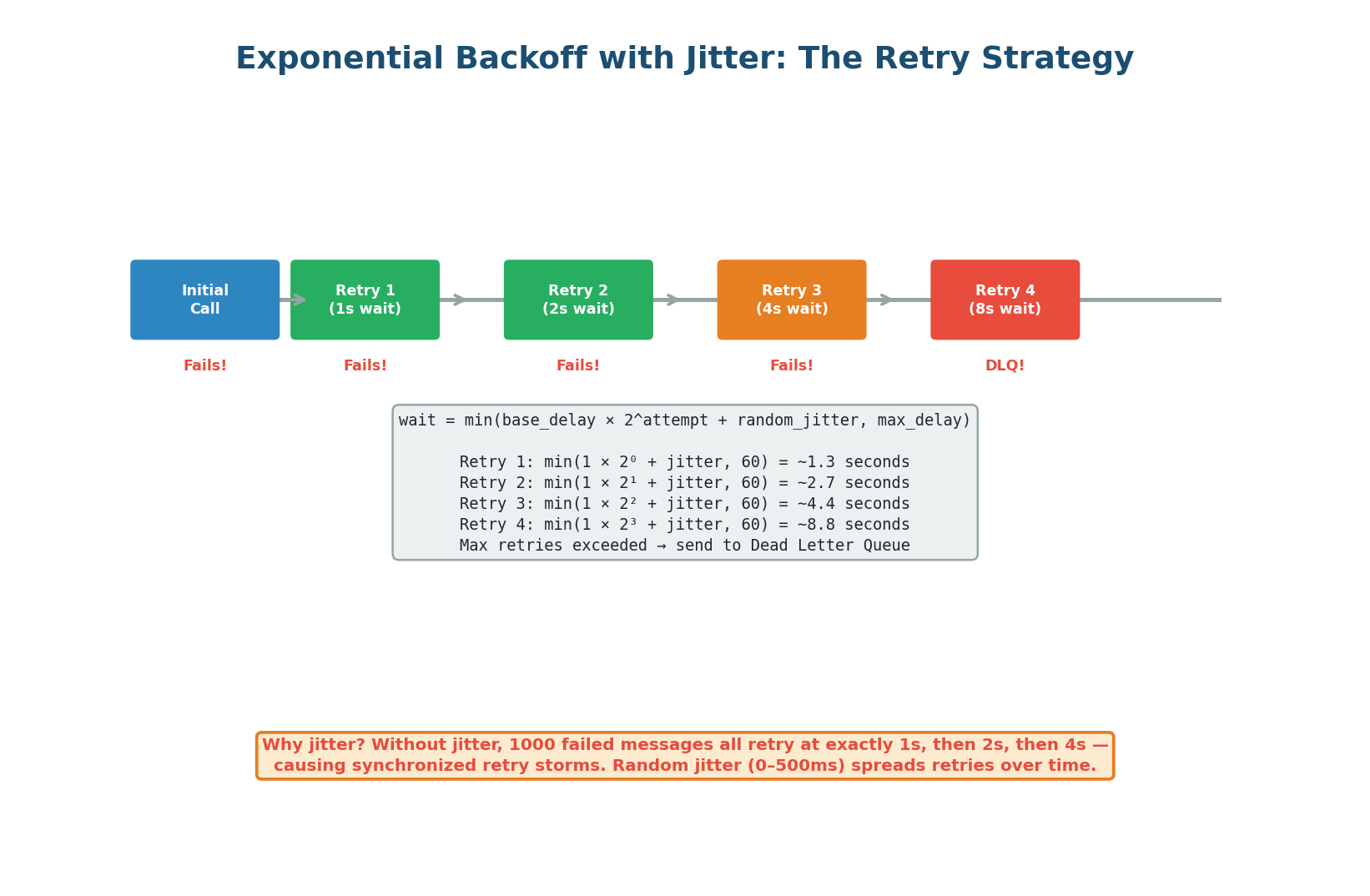
The Formula: wait_time = min(base_delay × 2^attempt + random(0, jitter_max), max_delay)
With base_delay=1s, jitter_max=500ms, max_delay=60s: Retry 1 waits ~1.3s, Retry 2 waits ~2.7s, Retry 3 waits ~4.4s, Retry 4 waits ~8.9s. After max_retries (typically 3–5), the message goes to the DLQ. The cap at max_delay (60s) prevents absurdly long waits.
Four Retry Strategies Compared
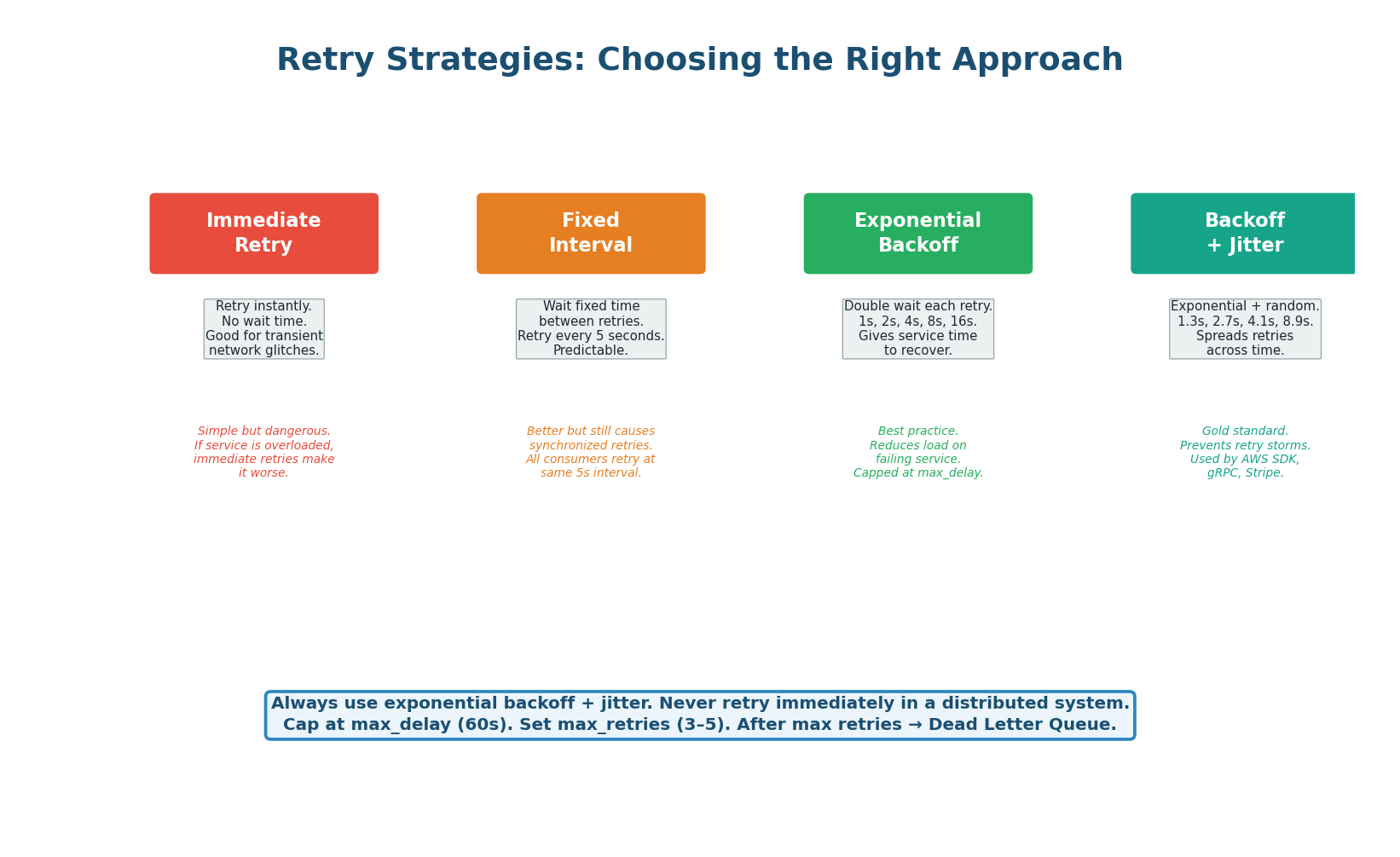
| Strategy | Wait Pattern | Retry Storm Risk | When to Use |
|---|---|---|---|
| Immediate retry | 0, 0, 0, 0 | Very high | Only for idempotent, instant-recovery errors |
| Fixed interval | 5s, 5s, 5s, 5s | Medium | Simple systems with low concurrency |
| Exponential backoff | 1s, 2s, 4s, 8s | Low | Any distributed system |
| Backoff + jitter | 1.3s, 2.7s, 4.1s, 8.9s | Very low | Production standard (AWS SDK default) |
Kafka does not have built-in retry/delay mechanisms like SQS. The common pattern is retry topics: on failure, the consumer publishes the message to a retry topic (orders.retry.1, orders.retry.2) with increasing delays. A separate consumer reads from retry topics and re-publishes to the main topic after the delay. After max retries, the message goes to orders.dlq.
This pattern is used by Uber, LinkedIn, and Netflix in production.
SQS has built-in retry support via the visibility timeout. When a consumer does not ACK within the timeout, SQS automatically makes the message visible again. The ApproximateReceiveCount attribute tracks retries. Configure a redrive policy: after N receives (e.g., 5), SQS automatically moves the message to the Dead Letter Queue. No application-level retry logic needed.
'I implement exponential backoff with jitter. Base delay 1 second, multiplier 2, max delay 60 seconds, max retries 5. After 5 failures, the message goes to the DLQ. I classify errors: transient (timeout, 429, 503) trigger retries. Permanent (400, schema error) skip retries and go directly to DLQ to avoid wasting resources.' This level of specificity impresses interviewers.
Topic 4
Dead Letter Queue Deep Dive
The Complete DLQ Pipeline
A Dead Letter Queue is the safety net for your messaging system. It catches messages that cannot be processed after all retry attempts are exhausted. Without a DLQ, failed messages are either lost (at-most-once) or retried infinitely — poisoning the main queue. The DLQ provides a holding area where failed messages can be inspected, root cause identified, bug fixed, and messages replayed.
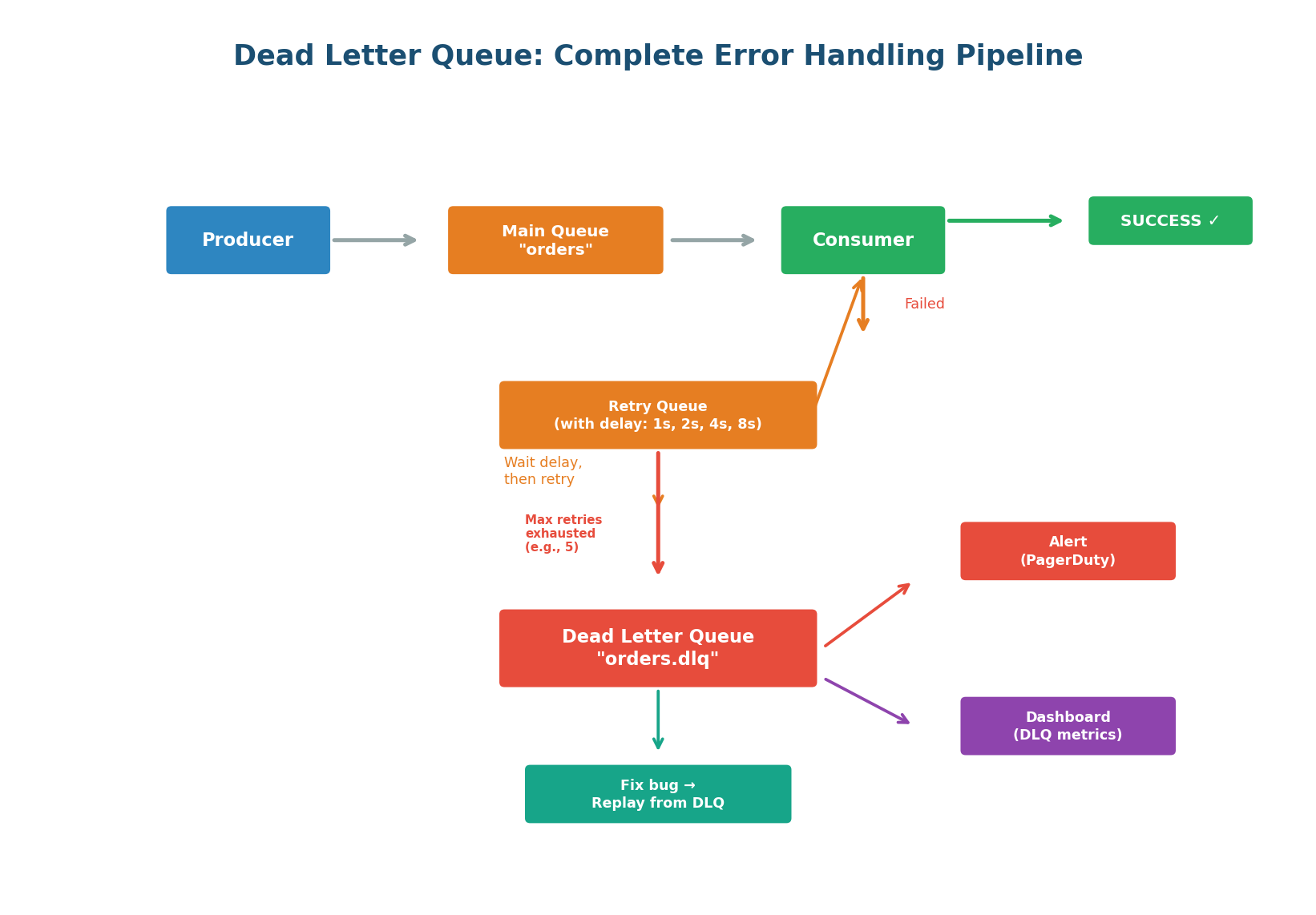
DLQ Best Practices:
- Naming convention: append
.dlqto the main queue name.orders→orders.dlq. Easy to trace which queue a failed message came from. - Preserve metadata: when moving to DLQ, attach original queue name, error message, stack trace, retry count, and timestamp of last attempt. This context is essential for debugging.
- Alert immediately: any message in the DLQ means something is broken. Set up a PagerDuty/Slack alert when DLQ depth > 0. Do not let messages rot unnoticed.
- Build a DLQ dashboard: showing message count, age of oldest message, error distribution, and trend over time.
- Build replay tooling: the recovery path is fix code → deploy → replay DLQ messages → verify.
A growing DLQ is a sign that something in the system is broken. Set up alerts: if the DLQ receives more than N messages per hour, page the on-call engineer. Regularly review DLQ messages — they reveal bugs, data quality issues, and integration problems that you would never otherwise discover.
Smart Retry: Classify Before You Retry
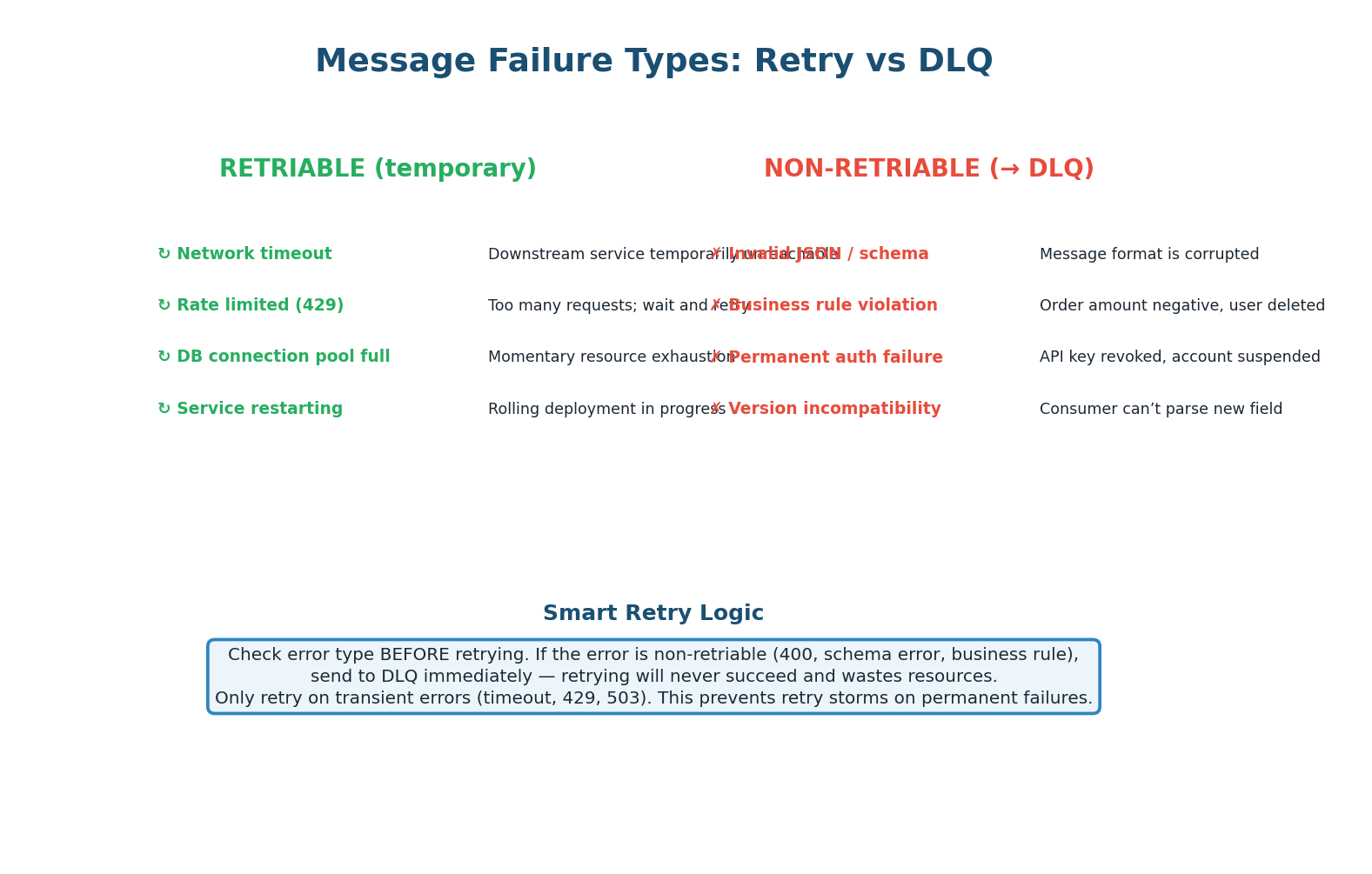
Not all errors are worth retrying. A network timeout is transient — the next attempt will likely succeed. An invalid JSON payload is permanent — retrying 5 times just wastes resources and delays other messages. Smart consumers classify errors before deciding whether to retry or DLQ.
| Error Type | Examples | Action | Rationale |
|---|---|---|---|
| Transient (retriable) | Timeout, 429 (rate limited), 503 (unavailable), connection refused | Retry with backoff | Service is temporarily unhealthy; will recover |
| Permanent (non-retriable) | 400 (bad request), invalid JSON, schema mismatch, business rule violation | DLQ immediately | Retrying will never succeed; fix the message or consumer |
| Unknown | Unexpected 500, unhandled exception | Retry 1–2 times, then DLQ | Might be transient; if not, DLQ quickly |
A 'poison message' is a message that crashes the consumer every time it is processed. Without smart retry logic, the consumer receives it → crashes → message is redelivered → consumer crashes again — an infinite loop. The consumer never processes other messages in the queue.
Solution: track per-message retry count. After N crashes on the same message, move it to DLQ and continue processing the queue. Never let one bad message block the entire pipeline.
Topic 5
Event-Driven Architecture
Services Communicate via Events, Not Calls
In an event-driven architecture (EDA), services communicate by publishing and consuming events through a central event bus (typically Kafka). A service publishes events about what happened (order.created, payment.succeeded) without knowing or caring who will consume them. This is fundamentally different from request-driven architecture where Service A directly calls Service B — creating tight coupling, synchronous blocking, and cascading failures.
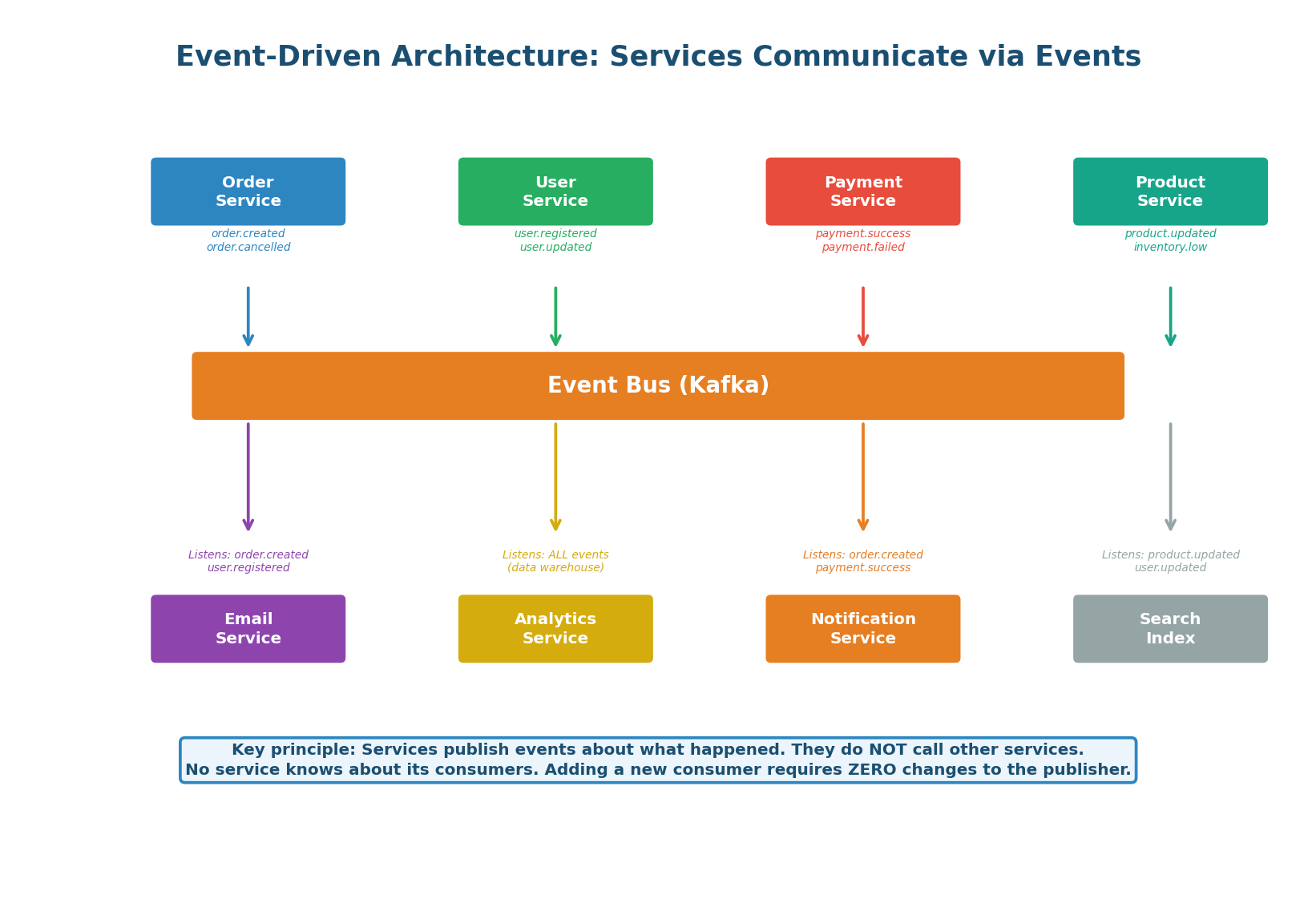
The Three Rules of EDA:
- Events describe facts: "Order #42 was created" is a fact, not a command. It does not tell anyone what to do. Each consumer decides how to react independently.
- Publishers are ignorant: the Order Service does not know that Email, Analytics, and Notification services exist. It publishes the event and moves on. This enables independent development and deployment.
- Consumers are autonomous: each consumer maintains its own state, processes at its own pace, and can fail without affecting other consumers or the publisher.
| Pattern | Example | When to Use |
|---|---|---|
entity.action (past tense) | order.created, payment.failed | Standard for domain events (most common) |
domain.entity.action | ecommerce.order.created | When multiple domains share the same bus |
entity.action.version | order.created.v2 | When evolving event schemas (breaking changes) |
The Saga Pattern: Distributed Transactions
In a monolithic system, placing an order is one database transaction: decrement inventory, create order, charge payment, send email — all or nothing (ACID). In microservices, each step is a separate service with its own database. You cannot use a single ACID transaction across services. The Saga pattern solves this by breaking the transaction into a sequence of local transactions, each publishing an event. If a step fails, compensating events undo previous steps.
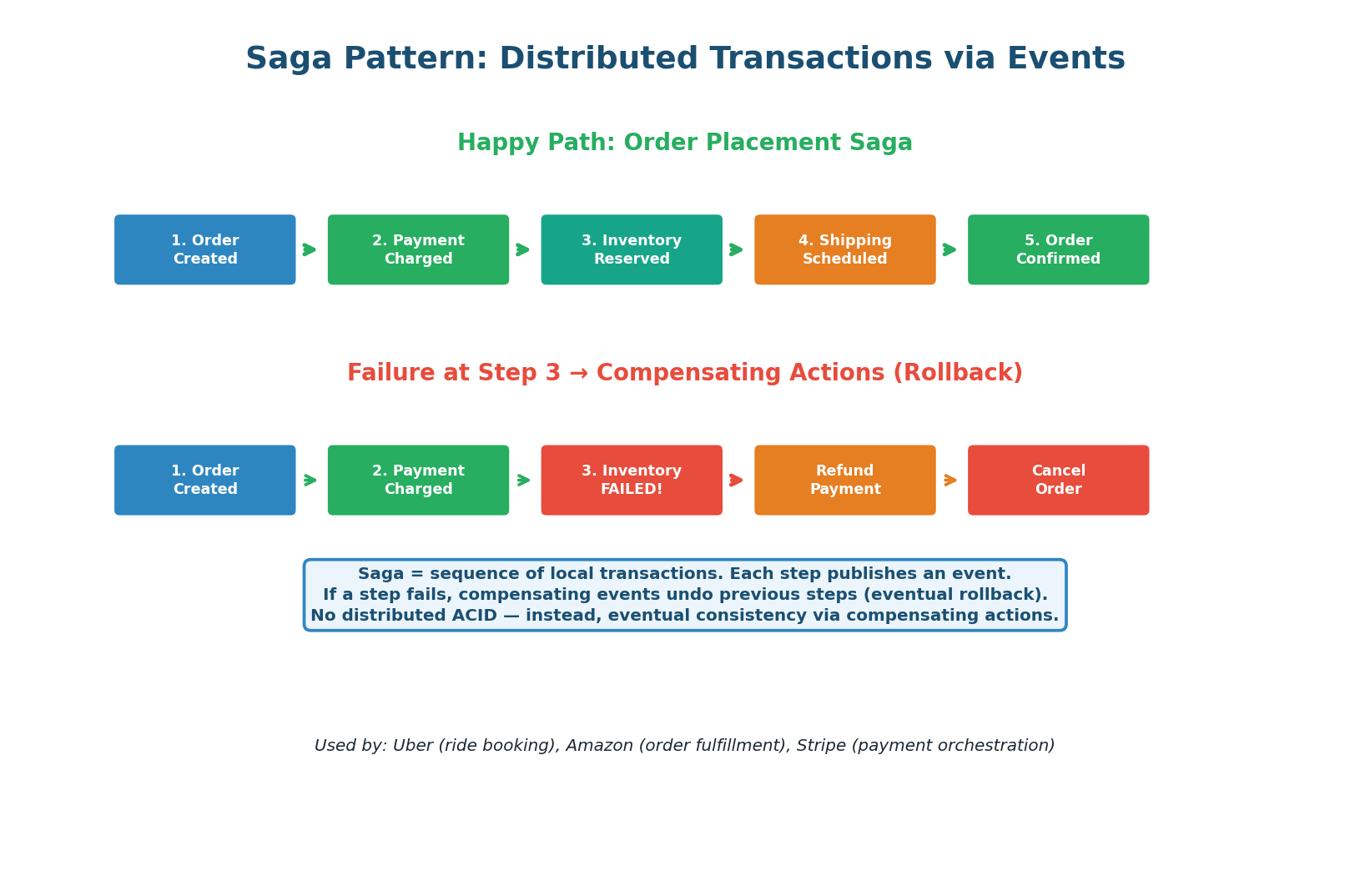
How Saga Compensation Works (Order Example):
-
1Order Service creates the order, publishes
order.created. ✅ -
2Payment Service charges the card, publishes
payment.succeeded. ✅ -
3Inventory Service tries to reserve stock but FAILS (out of stock). Publishes
inventory.failed. ❌ -
↩Payment Service receives
inventory.failed, issues a refund. Publishespayment.refunded. -
↩Order Service receives
payment.refunded, cancels the order. Publishesorder.cancelled.
The end state is consistent: no money taken, no inventory reserved, order cancelled. But this consistency is eventual, not immediate — there is a brief window where payment has been charged but inventory has not yet been reserved. This is the trade-off of Saga vs ACID.
| Aspect | ACID Transaction | Saga Pattern |
|---|---|---|
| Scope | Single database | Multiple services / databases |
| Consistency | Immediate (strong) | Eventual (compensating actions) |
| Rollback | Automatic (DB ROLLBACK) | Manual (compensating events) |
| Isolation | Guaranteed (DB locks) | Not guaranteed (intermediate states visible) |
| Complexity | Low (one transaction) | Higher (orchestrate multiple steps) |
| Scalability | Limited (single DB) | High (independent services) |
| Used by | Monoliths, single-service ops | Microservices: Uber, Amazon, Stripe |
'Since these are separate microservices with separate databases, I cannot use a single ACID transaction. I implement the Saga pattern: each service performs its local transaction and publishes an event. If any step fails, compensating events undo the previous steps. This gives me eventual consistency across services.' Mention that you track saga state for debugging and idempotency on compensating actions.
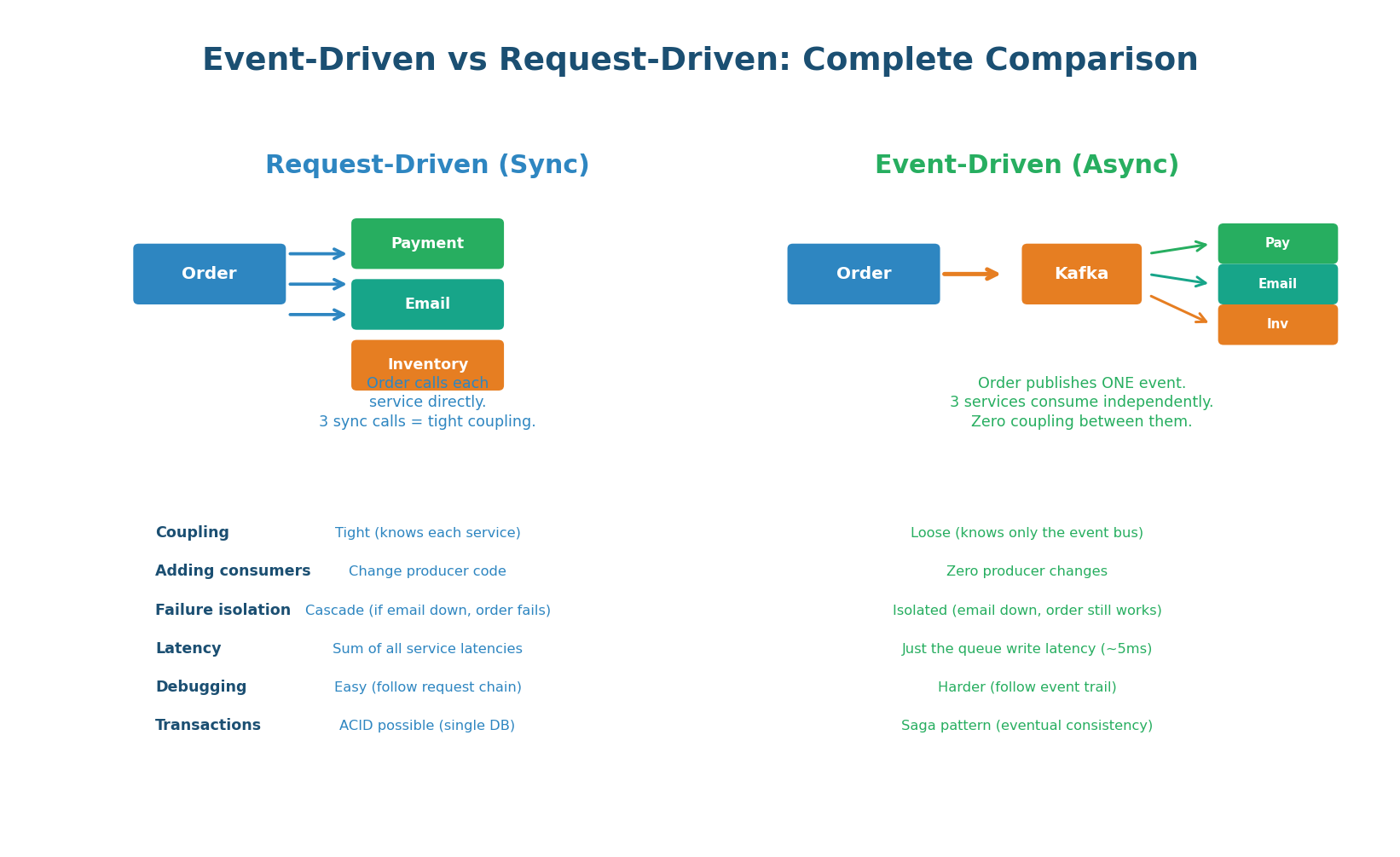
| Aspect | Request-Driven (Sync) | Event-Driven (Async) |
|---|---|---|
| Coupling | Tight (producer knows consumers) | Loose (producer knows only the bus) |
| Adding consumers | Modify producer code + deploy | Zero producer changes |
| Failure isolation | Cascade (one failure breaks chain) | Isolated (failures contained per service) |
| Latency for caller | Sum of all service latencies | Just queue write (~5ms) |
| Debugging | Easy (follow HTTP call chain) | Harder (trace event flow across services) |
| Transactions | ACID possible (single DB) | Saga pattern (eventual consistency) |
| Scalability | Limited by slowest service | Each service scales independently |
| Best for | Simple CRUD, low service count | Complex systems, many services, high scale |
Class Summary
Five Topics, One Coherent System
Message Queues (Work Queue): Consumers ACK after processing. NACK or timeout returns message to queue. Competing consumers distribute work. Scale based on queue depth. ACK only after processing is complete — never before.
Pub/Sub (Fan-Out): Kafka consumer groups give you both pub/sub (each group gets all messages) and work queue (within a group, partitions are distributed). One topic, multiple independent consumer groups, zero coupling. Adding consumers requires zero producer changes.
Backoff & Retries: Always use exponential backoff with jitter. Never retry immediately. Classify errors: transient (retry) vs permanent (DLQ immediately). Cap retries at 3–5 with max_delay of 60 seconds. AWS SDK, gRPC, and Stripe all use this pattern.
Dead Letter Queue: Safety net for failed messages. Append .dlq to queue name. Preserve error metadata. Alert on any DLQ messages. Build replay tooling. Monitor DLQ depth as a health metric. Prevent poison messages with per-message retry tracking.
Event-Driven Architecture: Services publish facts (events) to Kafka. No service knows about its consumers. Each consumer is autonomous. Saga pattern handles distributed transactions via compensating actions. Trade-off: eventual consistency + harder debugging for loose coupling + independent scaling.
Want to Land at Google, Microsoft or Apple?
Watch Pranjal Jain's free 30-min training — the exact GROW Strategy that helped 1,572+ engineers go from TCS/Infosys to top product companies with a 3–5X salary hike.