

What's Inside
Concept 1
Why Caching and How It Works
The Single Most Impactful Optimization
Caching is the technique of storing frequently accessed data in a faster storage layer so that future requests for that data are served more quickly. It is the single most impactful performance optimization in system design. A well-implemented caching layer can reduce database load by 95%, cut response times from 50ms to 1ms, and allow a system to handle 10x–100x more traffic without adding more database servers.
The fundamental principle is the memory hierarchy: data that is closer to the CPU is faster to access. An L1 cache read takes 1 nanosecond. A Redis read takes 0.5 milliseconds. A database read from SSD takes 5 milliseconds. A cross-network API call takes 50–200 milliseconds. Caching moves data from slow layers (disk, network) to fast layers (memory, edge servers).
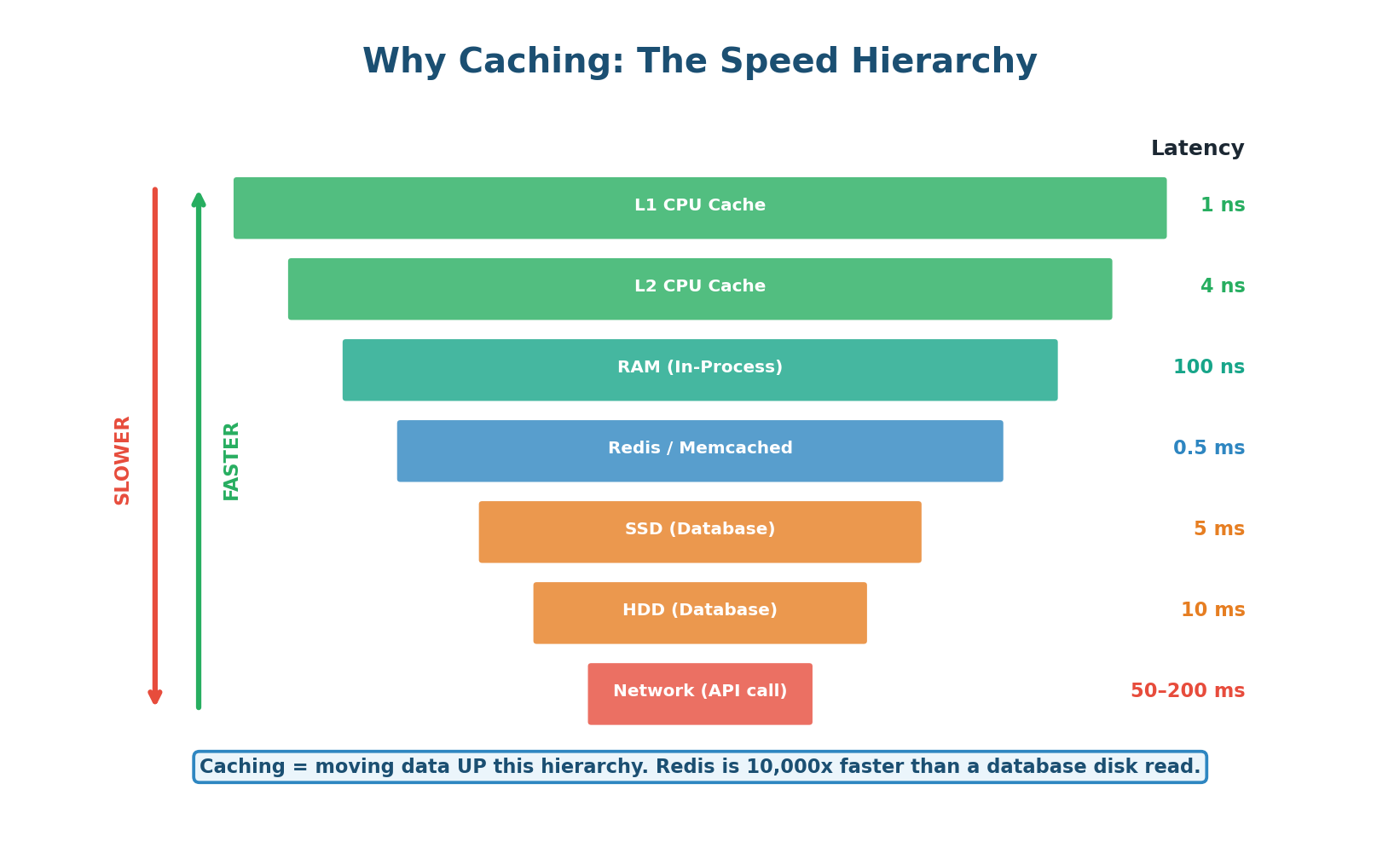
Without caching: 10,000 requests/sec → 50ms per DB query = 500 concurrent DB connections = database at capacity.
With Redis cache (95% hit rate): 500 requests/sec hit DB (5% misses) → 50ms = 25 concurrent DB connections. The same database now serves 20x more traffic. Redis handles the other 9,500 requests/sec at <1ms each.
Concept 2
Cache Read/Write Patterns
Cache-Aside (Lazy Loading): The Default Pattern
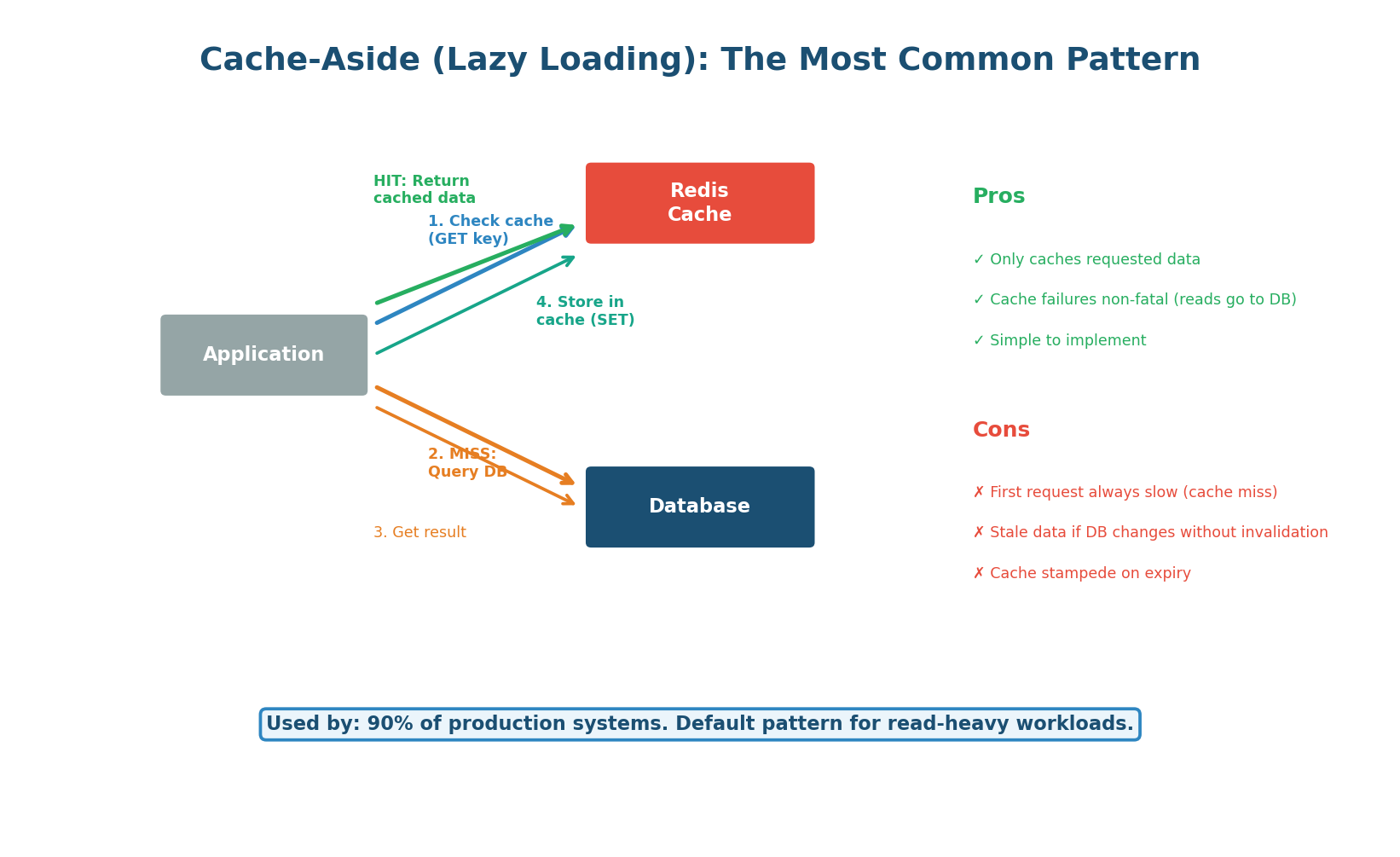
Cache-aside is the most common caching pattern and should be your default in system design interviews. The application is responsible for reading from and writing to the cache. On a read: the app checks the cache first. If the data is there (cache hit), it returns immediately. If not (cache miss), the app queries the database, stores the result in the cache, and then returns. The cache is populated lazily — only data that is actually requested gets cached.
When to use: Read-heavy workloads (90%+ reads). This is the default for most web applications: user profiles, product catalogs, API responses, configuration data. Used by virtually every production system.
How it handles writes: On a write, the application updates the database and then either deletes the cache key (most common, called cache invalidation) or updates the cache key (less common, called cache refresh). Deleting is preferred because it avoids the risk of the cache and DB getting out of sync if one write fails.
Write-Through and Write-Behind
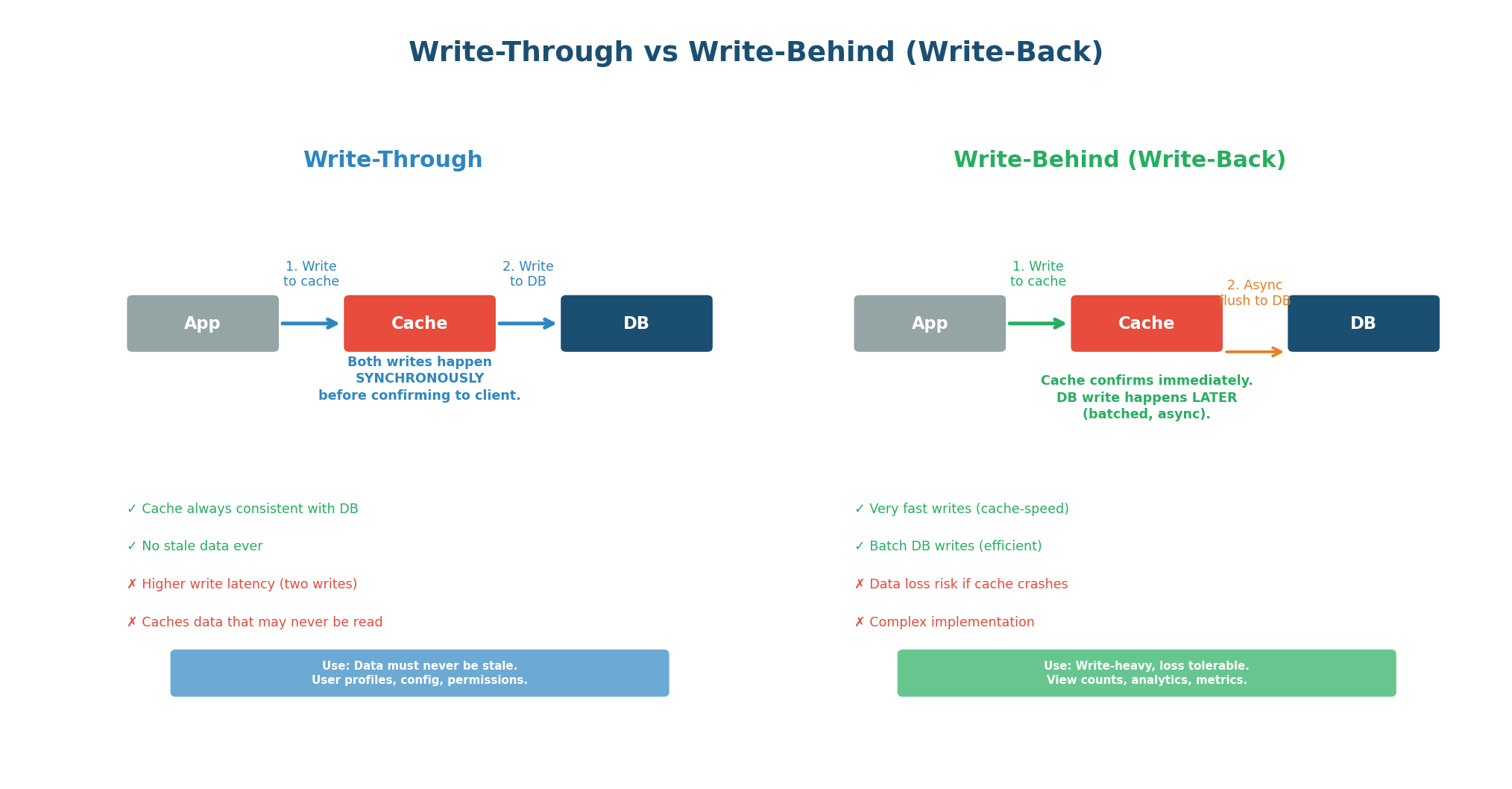
Write-Through: In write-through caching, every write goes to both the cache and the database synchronously. The write is not confirmed to the client until both the cache and database have been updated. This guarantees the cache is always consistent with the database — there is never stale data. The trade-off is higher write latency (two writes per operation) and the fact that data may be cached that is never read.
Use when: Data consistency is critical and writes are relatively infrequent. User profiles, permissions, configuration that must never be stale. Often combined with cache-aside for reads.
Write-Behind (Write-Back): In write-behind caching, writes go only to the cache. The cache then asynchronously flushes changes to the database in batches. The client gets an immediate response (cache-speed write) without waiting for the database. This dramatically improves write performance but introduces the risk of data loss: if the cache crashes before flushing, uncommitted writes are lost.
Use when: Write speed matters more than durability. View counts, like counts, analytics metrics, real-time dashboards. The data is valuable but not catastrophic to lose a few seconds of.
Read-Through: Read-through is similar to cache-aside but the cache itself is responsible for loading data from the database on a miss (rather than the application). The application always reads from the cache; the cache transparently fetches from the DB when needed. This simplifies the application code but couples the cache to the data source.
| Pattern | Read Path | Write Path | Consistency | Best For |
|---|---|---|---|---|
| Cache-Aside | App checks cache, then DB | App writes DB, deletes cache key | Eventual (stale window = TTL) | Most read-heavy systems (default) |
| Write-Through | App reads from cache | App writes cache + DB synchronously | Strong (always in sync) | Data that must never be stale |
| Write-Behind | App reads from cache | App writes cache; async flush to DB | Weak (data loss risk) | Write-heavy, loss-tolerant metrics |
| Read-Through | App reads cache (auto-loads) | Varies (combine with write-through) | Depends on write strategy | Simplified application code |
'I implement cache-aside with Redis. On read: check Redis, on miss query PostgreSQL and populate Redis with a 1-hour TTL. On write: update PostgreSQL, then delete the Redis key so the next read gets fresh data.'
Concept 3
Cache Invalidation & Eviction Policies
Cache Invalidation: The Hardest Problem
Phil Karlton famously said: "There are only two hard things in Computer Science: cache invalidation and naming things." Cache invalidation is hard because you must decide when cached data is stale and needs to be refreshed. Too aggressive (short TTL) and you lose the caching benefit. Too lax (long TTL) and users see outdated data.
TTL-Based Expiry: Set a Time-To-Live (TTL) on each cached key. After the TTL expires, the key is automatically deleted, and the next read triggers a cache miss that repopulates from the database. This is the simplest and most common strategy. Choose TTL based on how stale the data can tolerate: product prices (5 minutes), user profiles (1 hour), static content (24 hours).
Event-Based Invalidation: When the database changes, explicitly delete the corresponding cache key. The next read triggers a cache miss and repopulates with fresh data. This is more accurate than TTL-based expiry because the cache is invalidated immediately when data changes, not after an arbitrary timeout. The challenge is ensuring every write path knows which cache keys to invalidate.
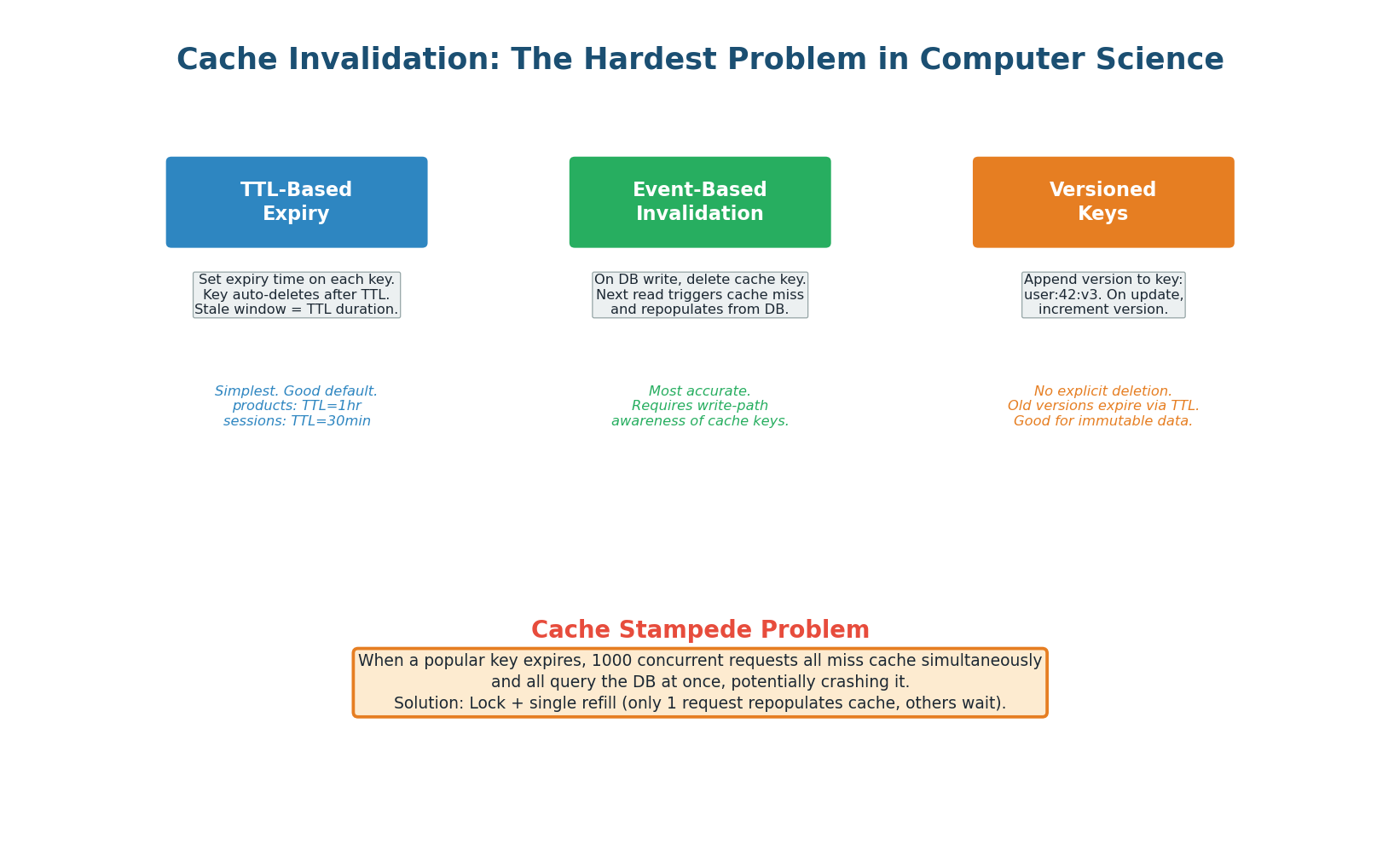
When a popular cache key expires, hundreds or thousands of concurrent requests suddenly find an empty cache and all query the database simultaneously. This can overwhelm the database, causing a cascade of failures.
Solutions: use a lock so only one request repopulates the cache while others wait (request coalescing / lock-and-load), add a random jitter to TTLs so keys do not expire simultaneously, or use a "stale-while-revalidate" approach where the cache serves the stale value while one request fetches fresh data in the background.
Production example: A major e-commerce site had a product page cached with TTL=300s. During a flash sale, the key expired and 50,000 users hit the uncached page simultaneously. All 50,000 queries hit the database, which crashed, taking down the entire site.
Eviction Policies
When a cache is full and a new key needs to be stored, the cache must evict (remove) an existing key. The eviction policy determines which key gets removed. Choosing the right policy has a significant impact on cache hit rate.
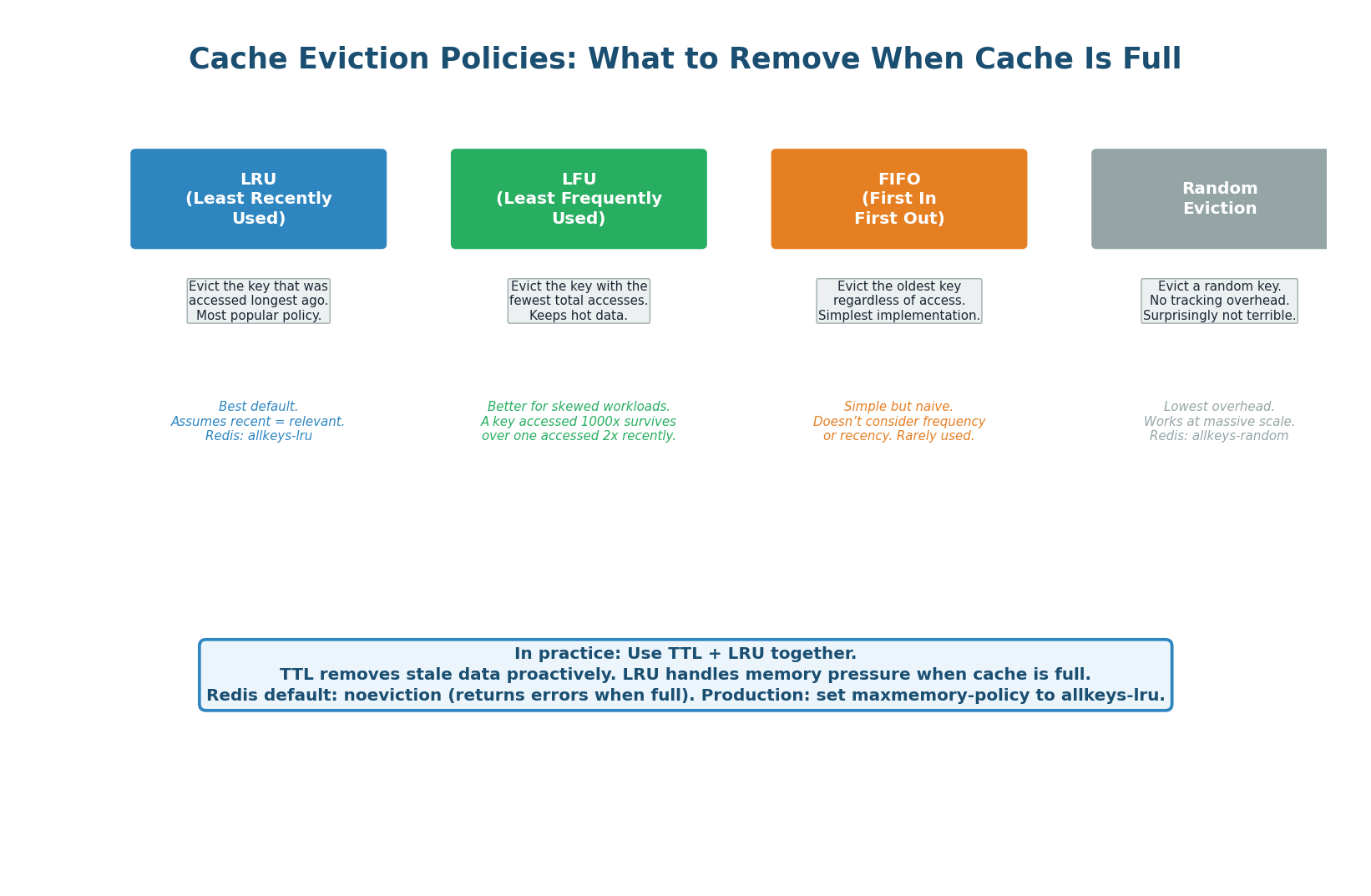
| Policy | Evicts | Best For | Weakness | Redis Config |
|---|---|---|---|---|
| LRU | Oldest access | Most web workloads | Can evict popular but temporarily idle keys | allkeys-lru |
| LFU | Fewest total accesses | Stable hot datasets | New items start cold (need time to build count) | allkeys-lfu |
| FIFO | Oldest insertion | Simple, predictable | Ignores access patterns entirely | N/A (manual) |
| Random | Random key | Massive scale, low overhead | Unpredictable, may evict hot keys | allkeys-random |
| TTL-based | Keys closest to expiry | Mixed TTL workloads | Only evicts keys with TTL set | volatile-ttl |
| No eviction | Nothing (returns error) | When data loss is unacceptable | Cache becomes useless when full | noeviction |
'I configure Redis with maxmemory 16GB and allkeys-lru eviction policy. I also set TTLs on all keys: 1 hour for user data, 24 hours for product data.' Never use noeviction (the default) in production — it causes Redis to return errors when full instead of gracefully evicting old data.
Concept 4
Caching Layers in a System
Six Layers of Caching
A production system uses multiple layers, each catching a percentage of requests and reducing the load on layers below. Together they achieve ~98% cache hit rate.
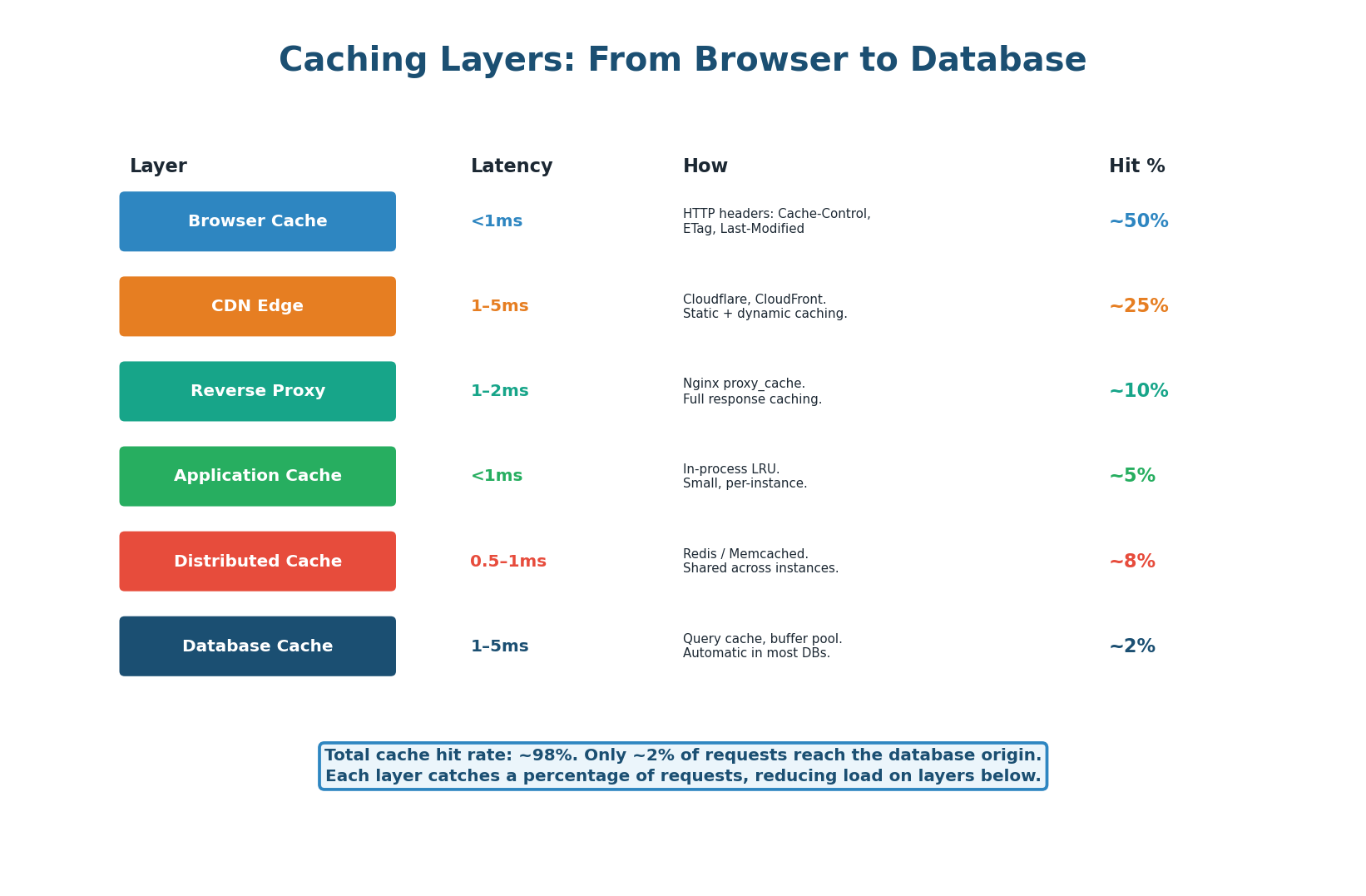
- Layer 1: Browser Cache (~50% of requests) — Controlled via HTTP Cache-Control headers.
Cache-Control: max-age=3600stores the response locally for 1 hour. Zero server resources required. - Layer 2: CDN Edge (~25% of remaining) — CDN edge servers (Cloudflare, CloudFront) cache responses at 300+ global locations, returning responses in 1–5ms without reaching your origin server.
- Layer 3: Reverse Proxy Cache (~10%) — Nginx or Varnish cache entire HTTP responses at the reverse proxy level. Useful for API responses that are the same for many users.
- Layer 4: Application In-Process Cache (~5%) — A small LRU cache within the application process itself (Python dict, Java ConcurrentHashMap, Go sync.Map). Extremely fast (<1ms, no network hop) but not shared across instances.
- Layer 5: Distributed Cache – Redis/Memcached (~8%) — Shared, distributed cache accessible by all application instances. Sub-millisecond latency. Primary application cache for most systems.
- Layer 6: Database Buffer Pool (~2%) — The database itself caches recently accessed data pages in its buffer pool (PostgreSQL's shared_buffers, MySQL's InnoDB buffer pool). Automatic, no application changes required.
Over 1,000 Memcached servers caching hundreds of terabytes of data. Overall cache hit rate exceeds 99%, meaning less than 1% of read requests ever reach a database.
Concept 5
Content Delivery Networks (CDN)
CDN: The Global Caching Layer
A CDN is a geographically distributed network of edge servers that caches content close to users. CDNs reduce latency by 80–90%, offload 60–80% of traffic from your origin, and provide DDoS protection.
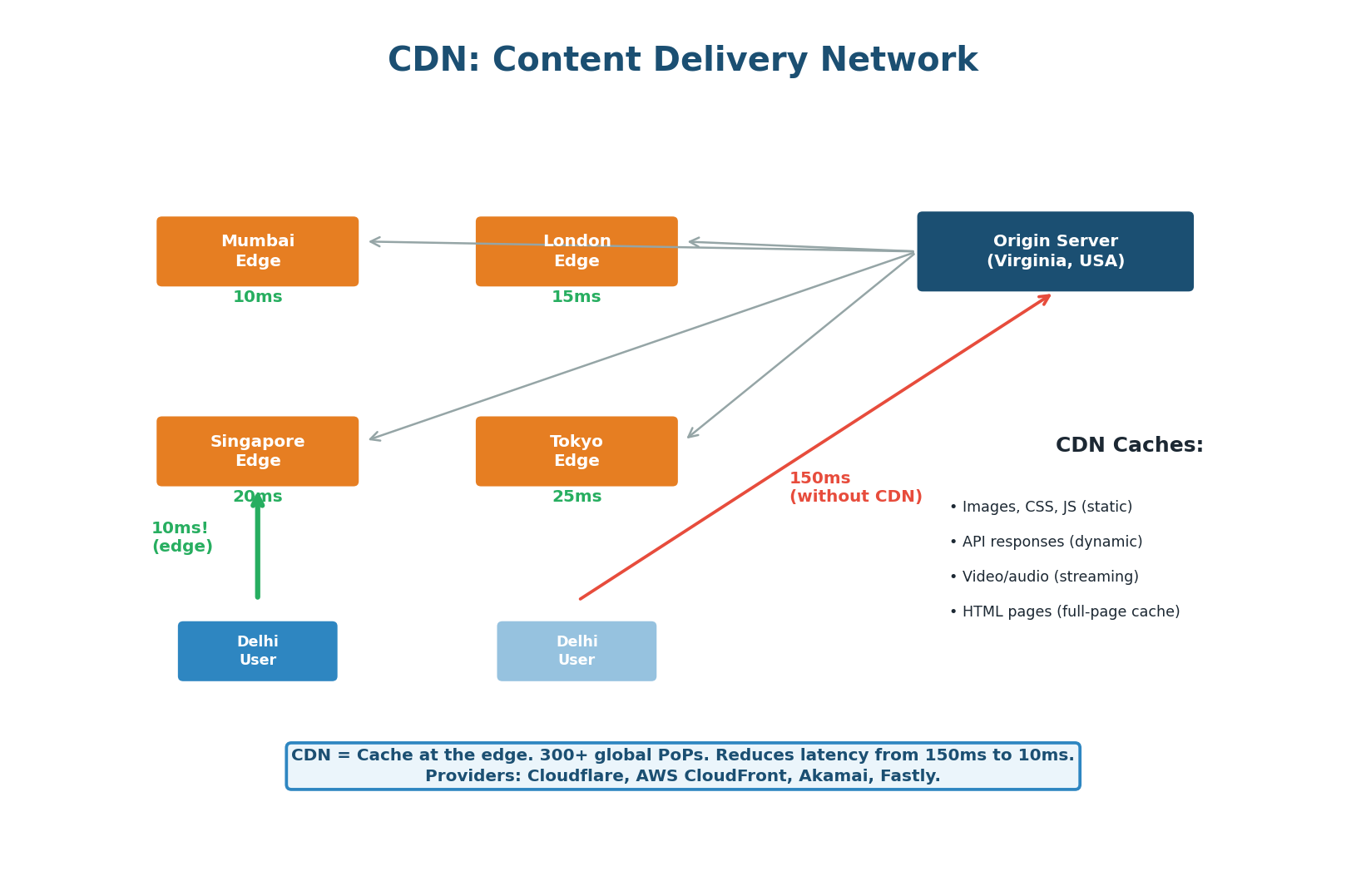
What CDNs Cache:
- Static assets (images, CSS, JS, fonts, videos) — long TTLs (24 hours to 1 year), use fingerprinted filenames for cache busting.
- Dynamic API responses (product listings, trending content, public feeds) — shorter TTLs (1–60 minutes).
- Full HTML pages — for content-heavy sites; eliminates all server-side processing. Edge-side Includes (ESI) allow caching templates with dynamic fragments.
Pull CDN vs Push CDN
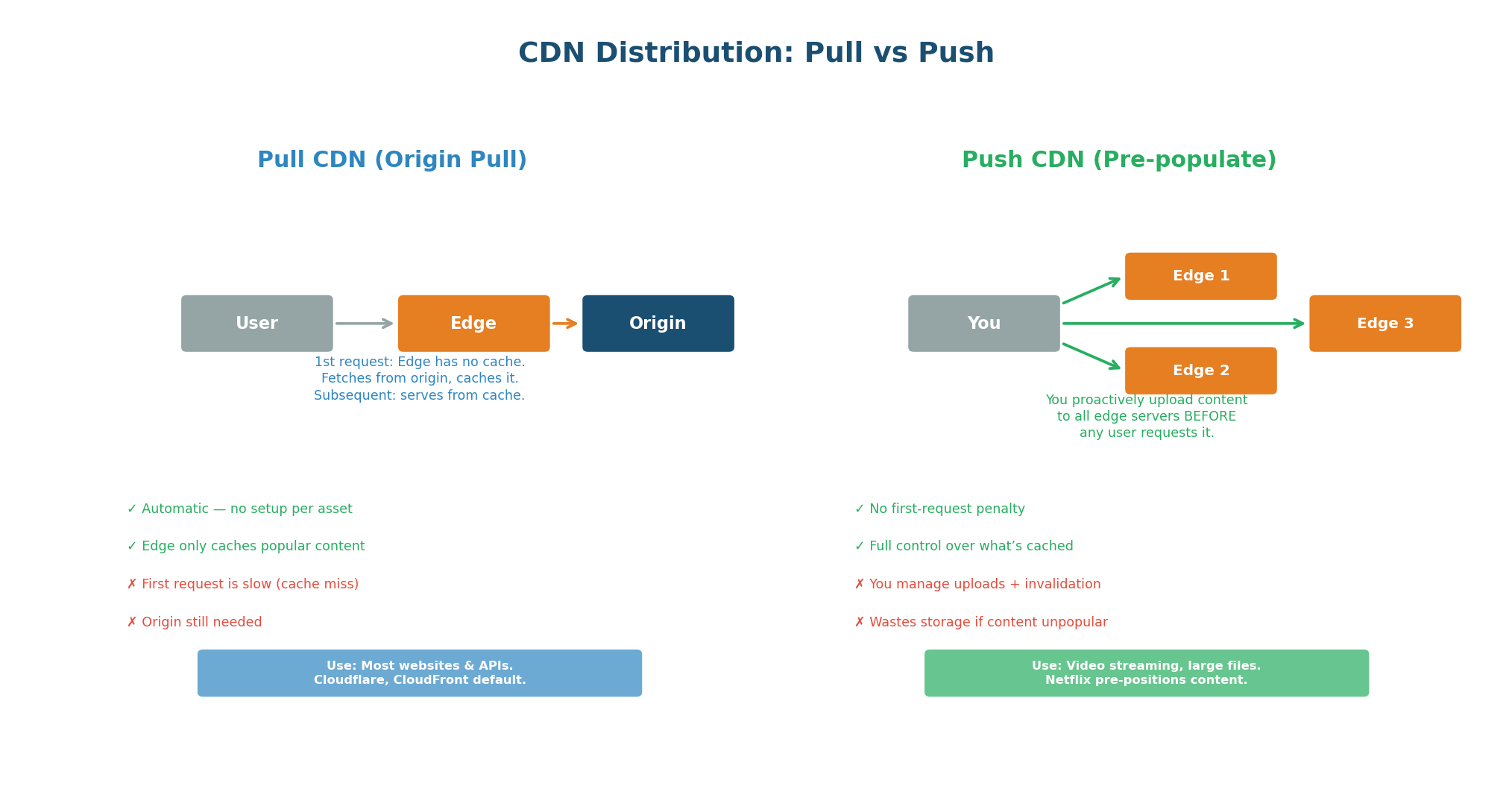
| Aspect | Pull CDN | Push CDN |
|---|---|---|
| How it works | Edge fetches from origin on first request | You upload content to edges proactively |
| First request | Slow (cache miss, fetches from origin) | Fast (content pre-positioned) |
| Setup effort | Minimal (just point DNS to CDN) | More work (upload pipeline needed) |
| Storage cost | Only caches what's requested | Caches everything you upload |
| Best for | Web apps, APIs, dynamic content | Video streaming, large file downloads |
| Invalidation | Purge API or wait for TTL | Re-upload new version |
| Examples | Cloudflare, CloudFront (default) | Netflix Open Connect, Akamai |
Netflix pre-positions content to edge servers inside ISP networks worldwide before a new show launches. When you press Play, the video streams from a server inside your ISP's network — not from Netflix's data center. This is why Netflix can serve 250 million subscribers without their own global server infrastructure.
Concept 6
HTTP Cache Headers
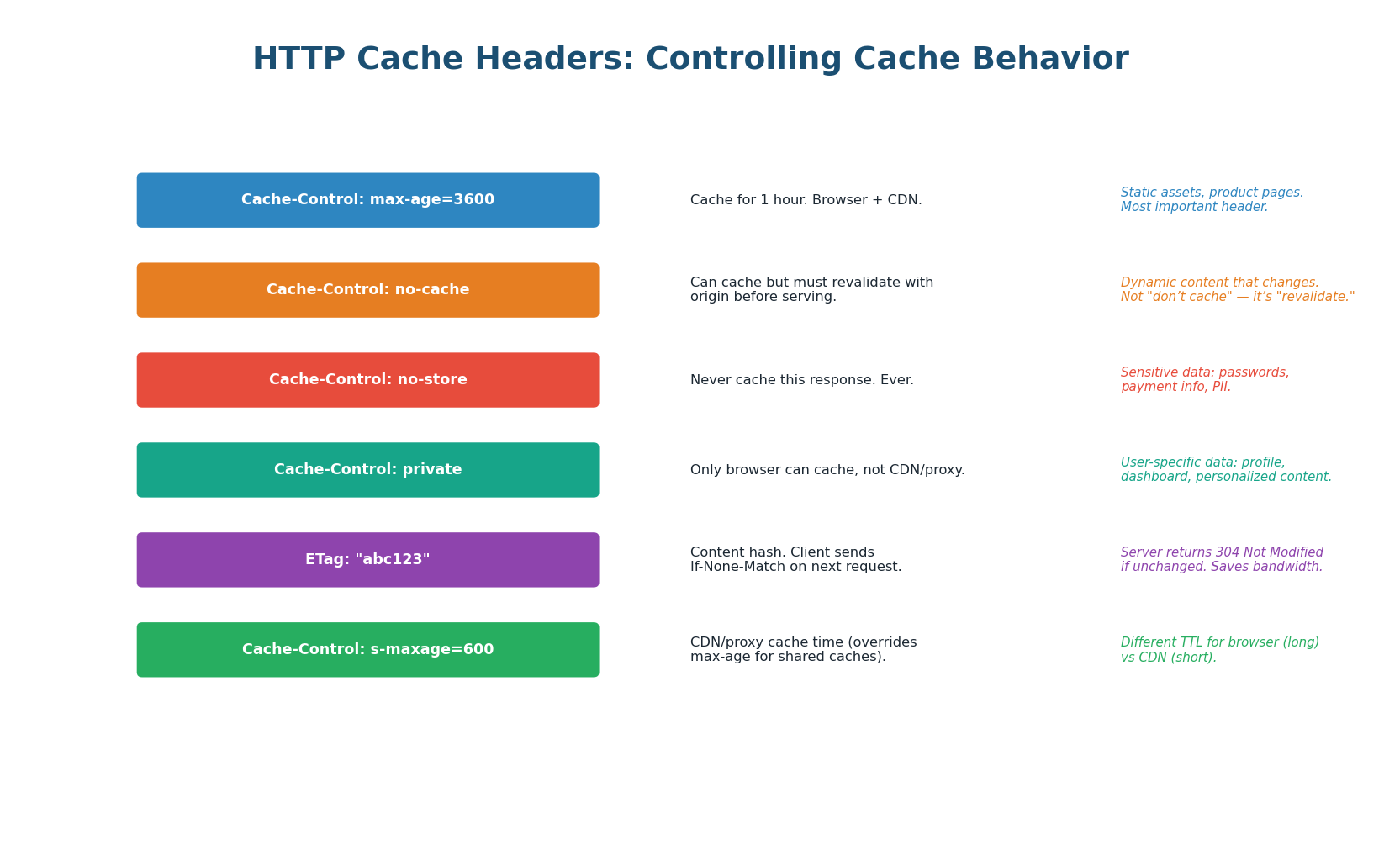
| Header | What It Does | Example | Use Case |
|---|---|---|---|
Cache-Control: max-age=N | Cache for N seconds (browser + CDN) | max-age=3600 | Static assets, stable API responses |
Cache-Control: s-maxage=N | CDN-only cache time (overrides max-age) | s-maxage=600 | Different TTL for CDN vs browser |
Cache-Control: no-cache | Cache but revalidate before serving | no-cache | Dynamic content, must-be-fresh |
Cache-Control: no-store | Never cache this response | no-store | Passwords, payment data, PII |
Cache-Control: private | Only browser can cache, not CDN | private, max-age=300 | User-specific data, dashboards |
ETag / Last-Modified | Content fingerprint for revalidation | ETag: "abc123" | 304 Not Modified (save bandwidth) |
Cache-Control: no-cache does NOT mean "do not cache" — it means "cache but revalidate." To truly prevent caching, use Cache-Control: no-store. This is one of the most common interview pitfalls.
'Static assets get Cache-Control: public, max-age=31536000 with fingerprinted filenames. API responses for product listings get Cache-Control: public, s-maxage=300. User-specific data gets Cache-Control: private, no-store.'
Pre-Class Summary
Caching Cheat Sheet
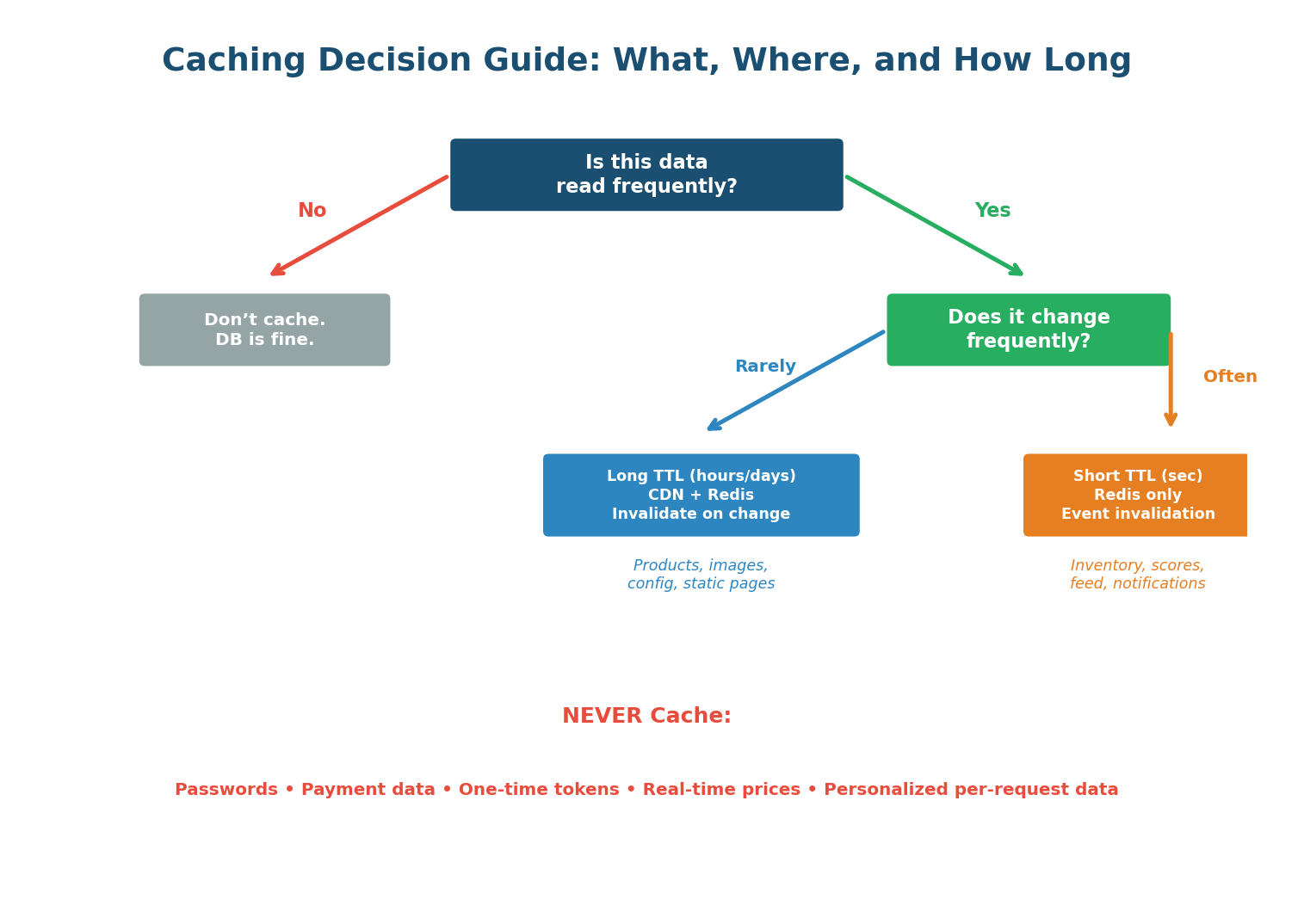
Cache Patterns: Cache-aside (lazy loading) is the default for 90% of systems. Write-through for consistency-critical data. Write-behind for write-heavy metrics.
Invalidation: TTL-based is simplest. Event-based is most accurate. Watch out for cache stampede on popular key expiry — use jitter and lock-based refill.
Eviction: LRU is the best default. LFU for stable hot datasets. Always configure Redis maxmemory and eviction policy. Never use noeviction (default) in production.
Cache Layers: Browser → CDN → reverse proxy → in-process → Redis/Memcached → database buffer pool. Together they achieve 98%+ cache hit rate.
CDN: Pull CDNs (Cloudflare, CloudFront) auto-fetch from origin. Push CDNs (Netflix Open Connect) pre-position content. Always use no-store for sensitive data.
| Data Type | Where to Cache | TTL | Pattern |
|---|---|---|---|
| Static assets (JS, CSS, images) | CDN + Browser | 1 year (fingerprinted) | Cache-Control: immutable |
| Product catalog | CDN + Redis | 1–24 hours | Cache-aside, event invalidation |
| User profiles | Redis | 30–60 minutes | Cache-aside, delete on update |
| Shopping cart | Redis (persistent) | No TTL (session-bound) | Direct Redis read/write |
| Session tokens | Redis | 30 minutes (extend on activity) | Direct Redis read/write |
| Rate limit counters | Redis | Fixed window (1 minute) | Atomic INCR + TTL |
| Search results | CDN + Redis | 5–15 minutes | Cache-aside, short TTL |
| Real-time inventory | Redis | 10 seconds (or pub/sub) | Short TTL, verify at checkout |
| Passwords / payment data | NEVER CACHE | N/A | Cache-Control: no-store |
Want to Land at Google, Microsoft or Apple?
Watch Pranjal Jain's free 30-min training — the exact GROW Strategy that helped 1,572+ engineers go from TCS/Infosys to top product companies with a 3–5X salary hike.