

What's Inside
Load Balancing
What Is a Load Balancer?
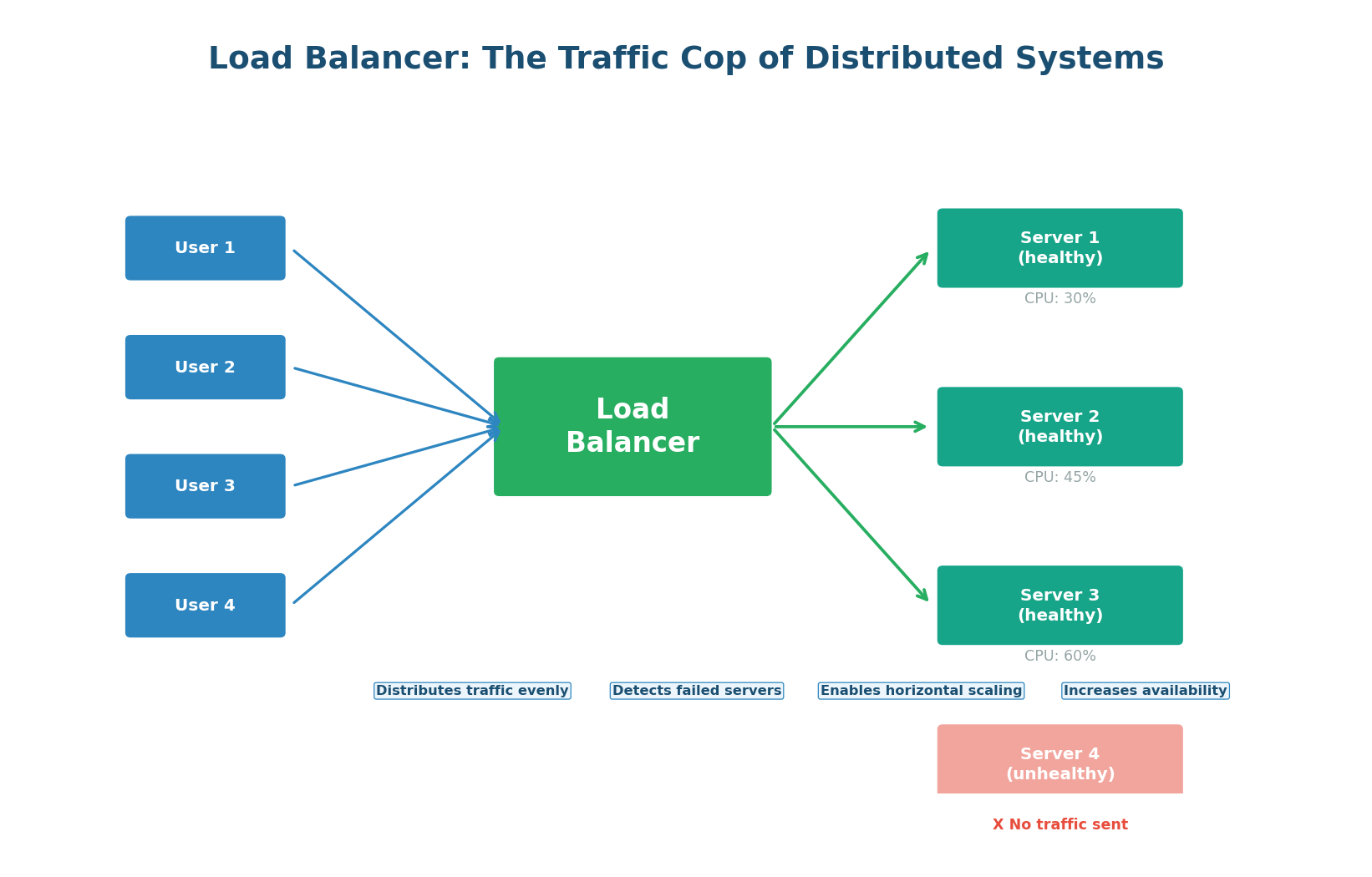
A load balancer is a device or software component that distributes incoming network traffic across multiple servers. Without a load balancer, all traffic goes to a single server — creating a bottleneck and a single point of failure. With a load balancer, traffic is spread across many servers, so no single server is overwhelmed.
Think of a supermarket with 10 checkout counters. Without a system, all customers might queue at counter 1, leaving counters 2–10 idle. A load balancer is like a greeter who directs each customer to the counter with the shortest line. The result: every counter is busy, no customer waits too long, and if one counter breaks down, the others absorb the queue without anyone noticing.
Why Every System Needs a Load Balancer
- Horizontal Scalability: A single server can handle perhaps 10,000 requests per second. Need to handle 100,000? Add 10 servers behind a load balancer. The load balancer makes scaling linear — double the servers, double the capacity.
- High Availability: If Server 3 crashes, the load balancer detects the failure through health checks and stops routing traffic to it. Users experience no downtime because their requests are automatically rerouted to healthy servers. This is zero-downtime failure handling.
- Zero-Downtime Deployments: When deploying new code, you can update servers one at a time (rolling deployment). The load balancer routes traffic away from the server being updated, updates it, health-checks it, and routes traffic back. Users never see a disruption.
- SSL Termination: The load balancer can handle TLS encryption/decryption, offloading this CPU-intensive work from backend servers. Backends receive plain HTTP over the secure internal network.
Load Balancing Algorithms
The load balancer must decide which server receives each request. This decision is made by a load balancing algorithm. Different algorithms optimize for different goals: simplicity, fairness, latency, or session persistence.
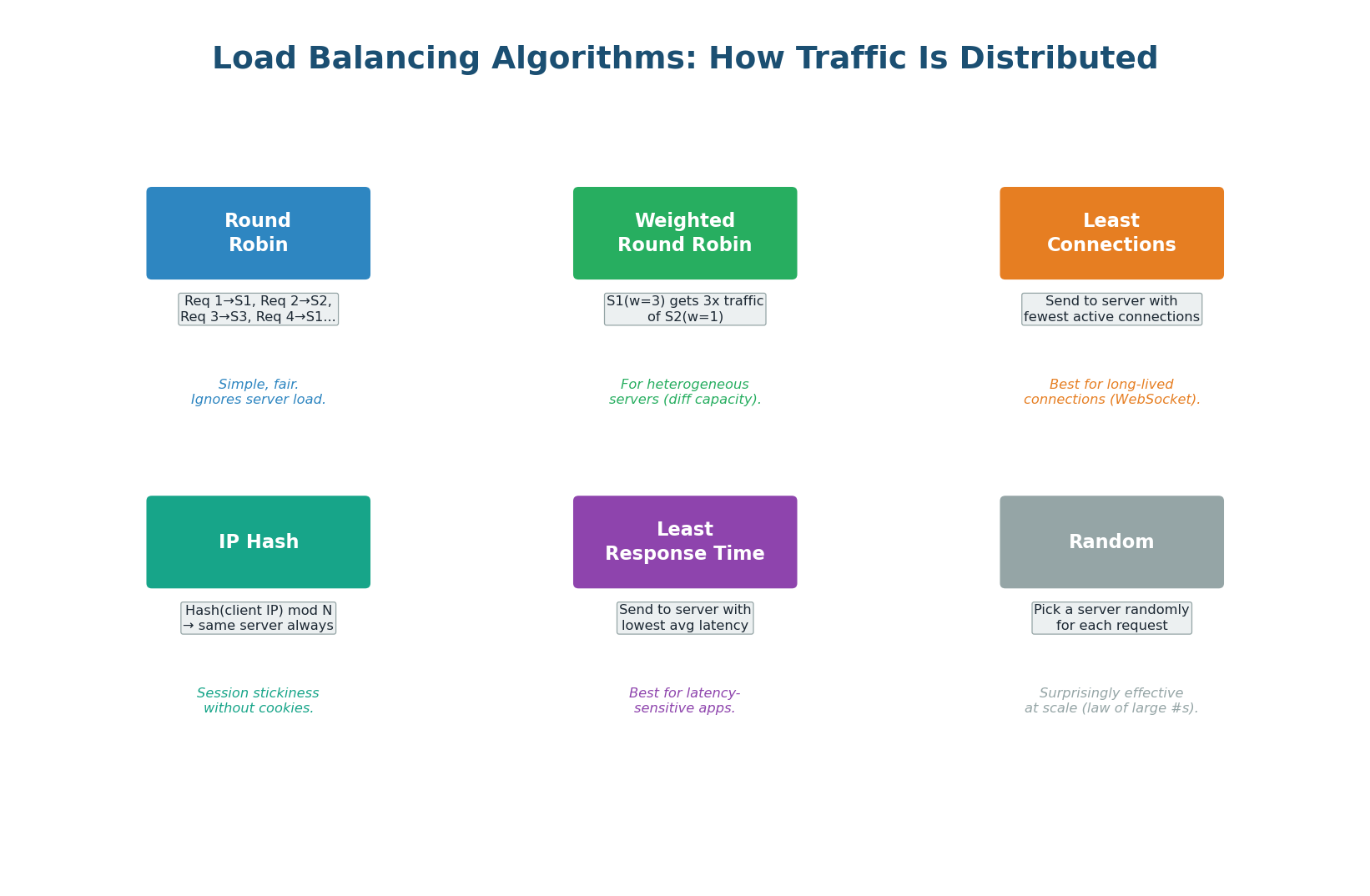
Round Robin — The simplest algorithm. Requests are distributed in sequential order: request 1 goes to Server 1, request 2 to Server 2, request 3 to Server 3, request 4 back to Server 1, and so on. Round Robin is perfectly fair when all servers have identical capacity and all requests take the same time. It fails when servers have different capacities or when requests vary significantly in processing time.
Weighted Round Robin — An extension of Round Robin that accounts for servers with different capacities. Server A (16 GB RAM) gets weight 3, Server B (8 GB RAM) gets weight 1. For every 4 requests, Server A gets 3 and Server B gets 1. AWS Auto Scaling groups use weighted routing to gradually shift traffic to new instance types.
Least Connections — Sends each new request to the server with the fewest active connections. This is better than Round Robin when requests have varying processing times. This is the best default algorithm for most production workloads.
IP Hash — Hashes the client's IP address to determine which server receives the request. The same client always goes to the same server (session stickiness). Useful when your application stores session data in server memory rather than in a shared store like Redis. However, it causes uneven distribution if some clients send significantly more traffic than others.
Least Response Time — Combines active connections with server response time. Sends requests to the server with the lowest average response time and fewest connections. This is the most intelligent algorithm but requires the load balancer to continuously measure backend latency. It naturally routes traffic away from slow or overloaded servers.
In interviews, don't just say "round robin." Show trade-off thinking: "For this system where requests have varying processing times (some queries are fast lookups, others are complex aggregations), I'd use Least Connections rather than Round Robin, because Round Robin could overload a server handling many slow requests while sending more work to it."
Layer 4 vs Layer 7 Load Balancing
Load balancers can operate at different OSI layers, with fundamentally different capabilities:
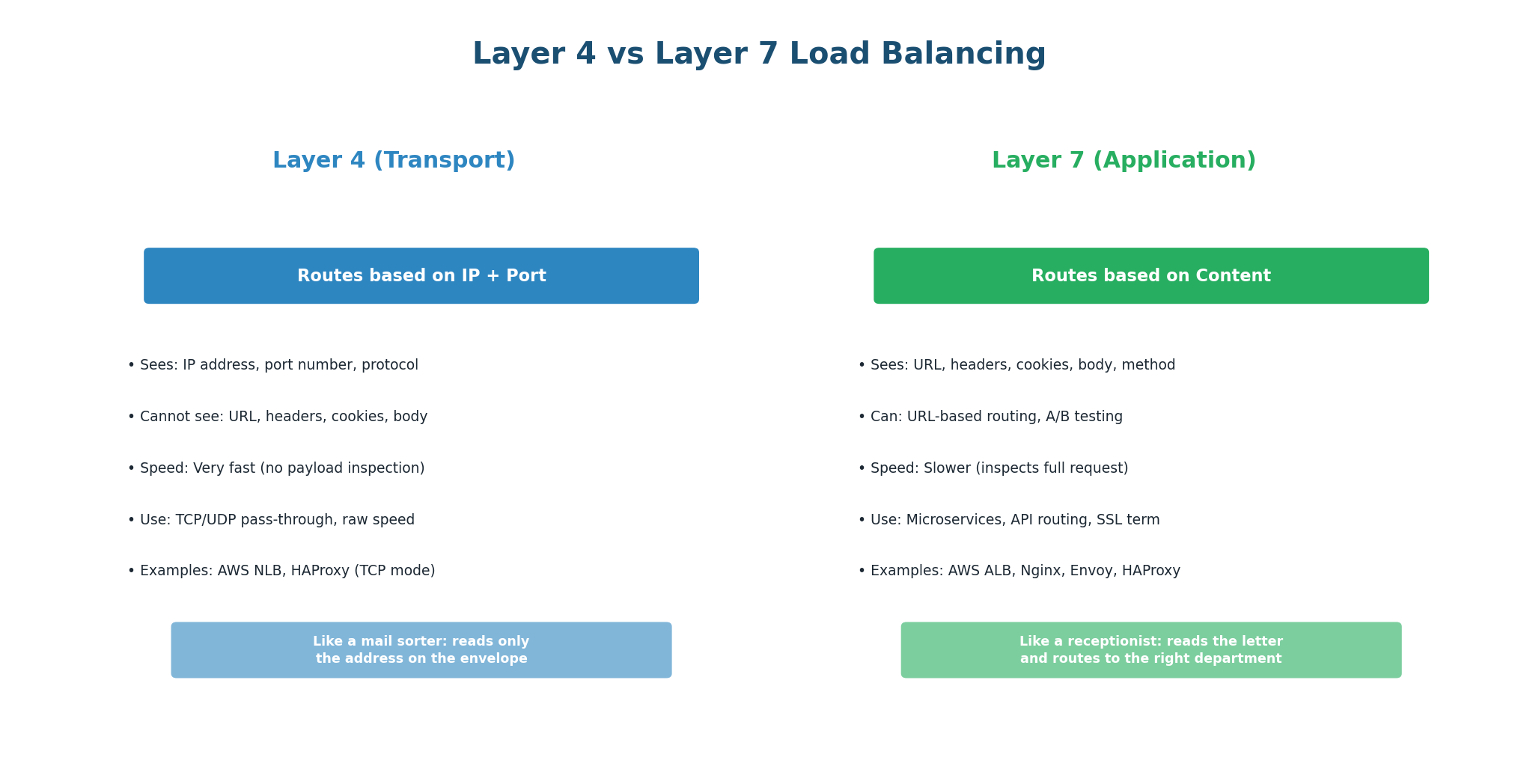
Layer 4 (Transport) Load Balancing — L4 load balancers make routing decisions based on transport-layer information: source/destination IP addresses and ports. They do not inspect the actual request content (URL, headers, body). They simply forward TCP/UDP packets to a backend server. Because they do not need to parse HTTP, they are extremely fast and efficient. A single L4 load balancer can handle millions of connections per second.
Use L4 when: You need raw throughput and low latency, you are load-balancing non-HTTP protocols (database connections, gaming, VoIP), or you want to pass through TCP connections without terminating them.
Layer 7 (Application) Load Balancing — L7 load balancers fully parse the HTTP request and can make routing decisions based on any content: URL path, HTTP headers, cookies, query parameters, or even the request body. This enables powerful routing rules: send /api/* to the API service, send /static/* to the CDN, send requests with a specific cookie to the canary deployment.
Use L7 when: You need content-based routing (microservices), SSL termination, A/B testing, canary deployments, WebSocket upgrade handling, or request/response modification (header injection, compression).
| Feature | Layer 4 | Layer 7 |
|---|---|---|
| Routing basis | IP address + port | URL, headers, cookies, body |
| Performance | Extremely fast | Slightly more overhead |
| SSL Termination | No (pass-through) | Yes |
| Content routing | No | Yes |
| Examples | AWS NLB, HAProxy TCP | AWS ALB, Nginx, Envoy |
| Best for | High throughput, non-HTTP | Microservices, APIs, HTTPS |
Health Checks: Detecting Failed Servers
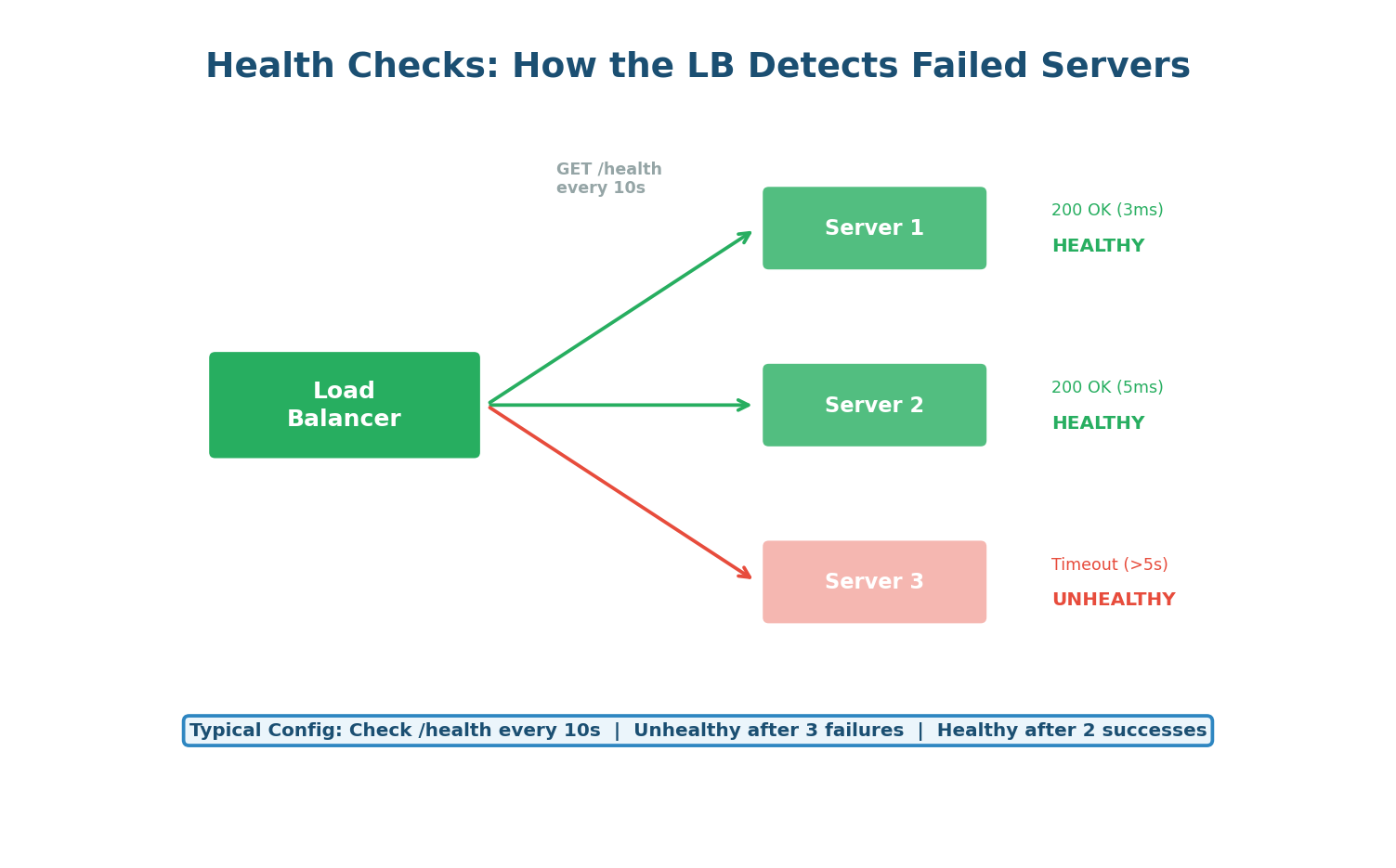
The load balancer periodically sends health check requests to each backend server (typically GET /health every 10–30 seconds). If a server fails to respond (or returns a non-200 status code) for a configured number of consecutive checks (e.g., 3), it is marked as unhealthy and removed from the rotation. When it recovers, it passes a configured number of consecutive health checks before being reintroduced.
A good health check endpoint should verify that the application can actually serve requests, not just that the process is running. It should check: can the app connect to the database? Is the cache reachable? Are all required services available? This is called a deep health check. A shallow health check just returns 200 OK if the process is alive — it misses cases where the app is running but broken (e.g., database connection lost).
A health check that just returns 200 OK regardless of internal state is dangerous. If your app loses its database connection but the process is still running, the load balancer will keep sending it traffic — and every request will fail. Always verify critical dependencies in your health check endpoint.
Load Balancer Deployment Patterns
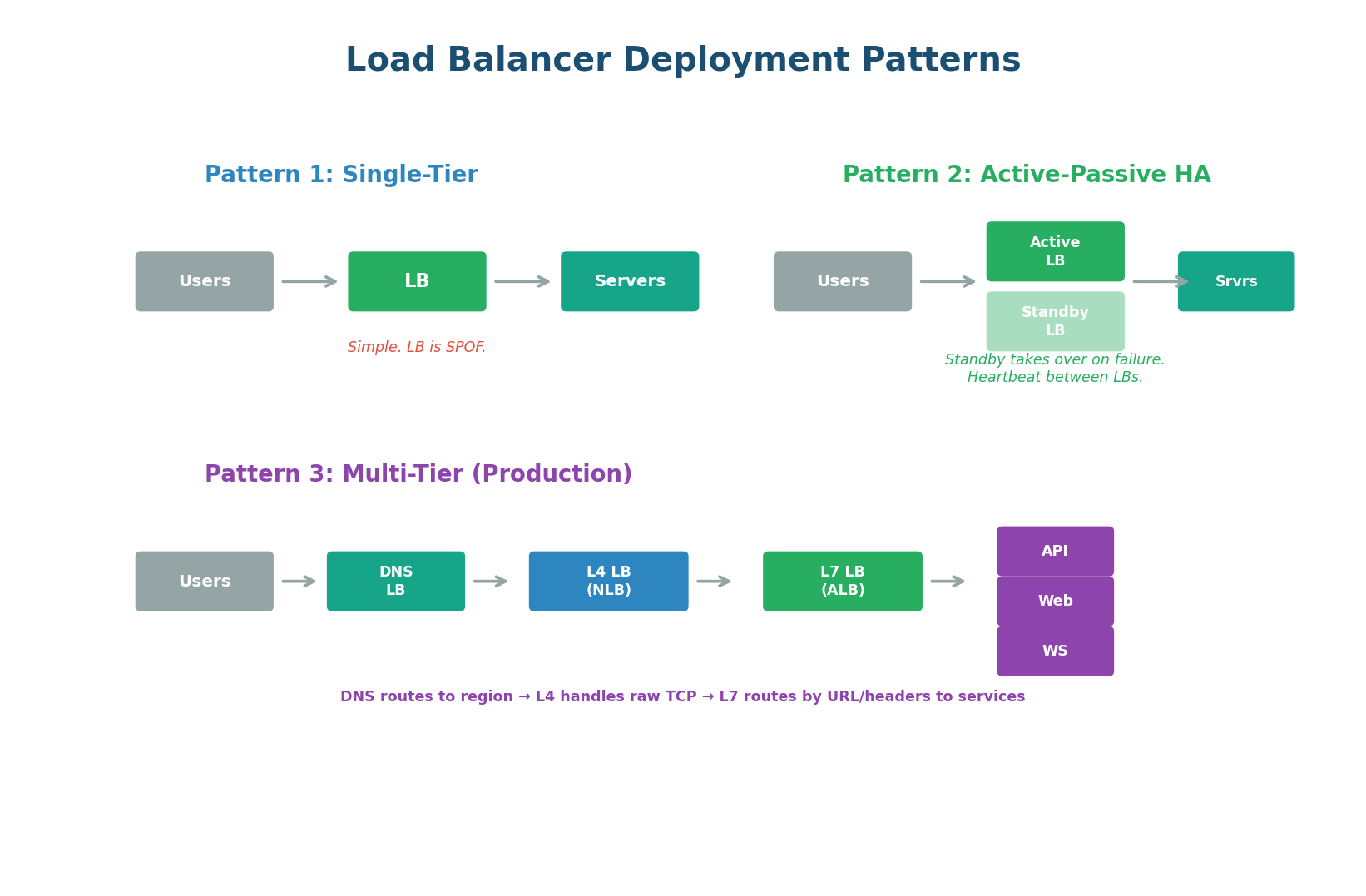
Single-Tier (Development) — One load balancer in front of your servers. Simple but the load balancer itself is a single point of failure. Acceptable for development or low-traffic systems.
Active-Passive HA (Standard Production) — Two load balancers: one active (handling all traffic) and one standby (ready to take over). They communicate via a heartbeat protocol. If the active LB fails, the standby takes over within seconds, usually using a floating IP address (Virtual IP / VIP) that transfers to the standby. This eliminates the load balancer as a single point of failure — the industry standard for production.
Multi-Tier (Large-Scale Production) — Multiple layers of load balancing, each handling a different concern: DNS-based load balancing routes users to the nearest region. L4 load balancers handle raw TCP connections at massive scale. L7 load balancers route requests to specific microservices based on URL paths. This is how Netflix, Google, and Amazon operate at planetary scale.
In interviews, always address the load balancer as a potential single point of failure. The expected answer: "I'll use an Active-Passive pair of load balancers with a Virtual IP (VIP). If the primary fails, the secondary takes over the VIP within seconds via heartbeat monitoring. This ensures the load balancer itself cannot take down the system."
API Fundamentals
What Is an API?
An API (Application Programming Interface) is a contract that defines how two software systems communicate. When your mobile app shows your bank balance, it calls your bank's API. When you log into a website with Google, it uses Google's OAuth API. When your backend fetches data from a database, it uses the database driver's API. APIs are everywhere — they are the connective tissue of modern software.
In system design interviews, you will be expected to design APIs for the system you are building. This means choosing the right API paradigm (REST, GraphQL, or gRPC), designing the endpoints, defining the request/response formats, and handling cross-cutting concerns like authentication, rate limiting, and versioning.
The Three API Paradigms
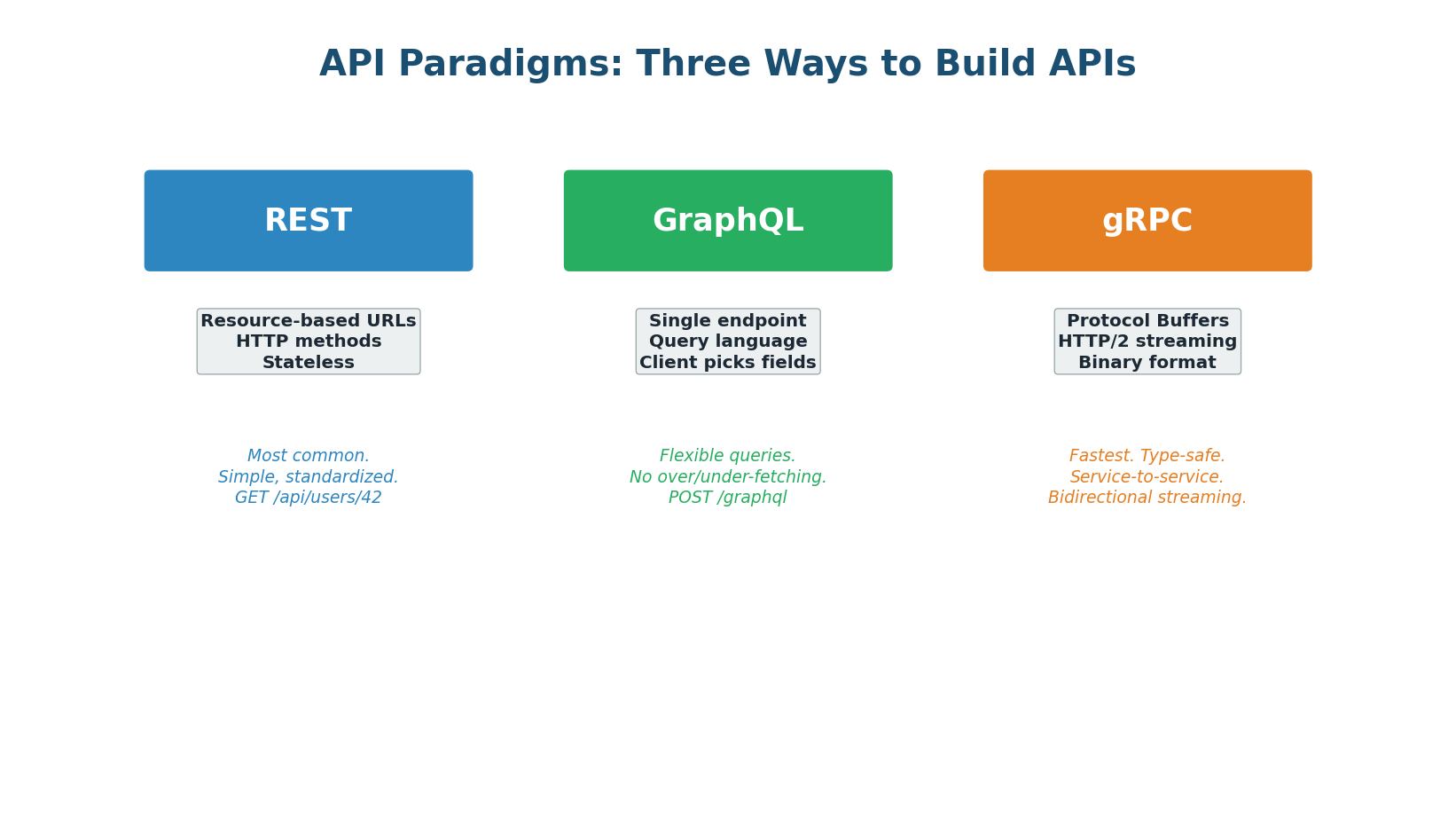
REST: The Standard
REST (Representational State Transfer) is the most widely used API paradigm. It treats everything as a resource (users, orders, products) identified by URLs. You interact with resources using standard HTTP methods (GET, POST, PUT, DELETE). REST APIs are stateless — each request contains all information needed to process it, enabling horizontal scaling.
REST Design Principles
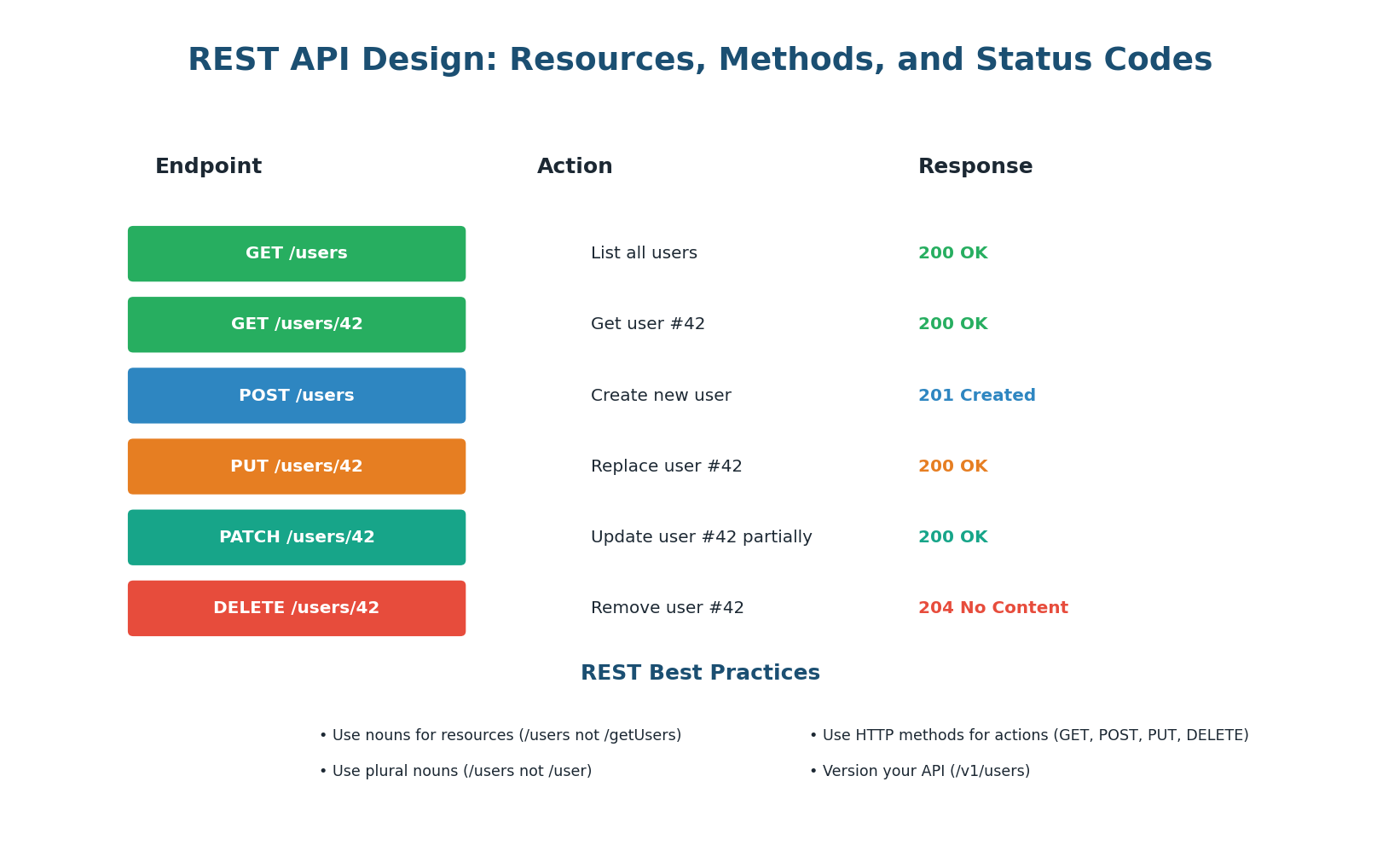
- Resources as nouns: URLs represent resources (things), not actions. Use
/users(not/getUsers),/orders/42(not/fetchOrder?id=42). Resources are always plural nouns. - HTTP methods as verbs: GET retrieves, POST creates, PUT replaces, PATCH updates partially, DELETE removes. The method tells the server what to do; the URL tells it what resource to act on.
- Stateless: Every request contains all information needed (authentication token, parameters). The server stores no client state between requests. This enables horizontal scaling — any server can handle any request.
- Idempotency: GET, PUT, and DELETE are idempotent (calling them multiple times produces the same result). POST is not idempotent (each call creates a new resource). This matters for retry logic: if a PUT request times out, you can safely retry it. If a POST times out, retrying might create a duplicate.
Nested Resources — Resources can be nested to express relationships: GET /users/42/orders returns all orders for user 42. Keep nesting to a maximum of 2–3 levels — deeper nesting creates unwieldy URLs. If you find yourself going deeper, consider flattening the hierarchy.
GraphQL: Flexible Queries
GraphQL, developed by Facebook in 2012, solves a fundamental problem with REST: over-fetching and under-fetching. With REST, GET /users/42 returns all fields of user 42 (name, email, address, preferences, avatar — even if you only need the name). This is over-fetching. To get a user's orders, you need a second call: GET /users/42/orders. This is under-fetching. GraphQL eliminates both problems.
How GraphQL Works
GraphQL uses a single endpoint (typically POST /graphql) and a query language. The client sends a query specifying exactly which fields it needs, and the server returns exactly those fields — nothing more, nothing less. For example: query { user(id: 42) { name, email, orders { id, total } } } returns only the name, email, and a list of order IDs and totals for user 42 — in a single request.
GraphQL Strengths
- No over-fetching: Mobile apps with limited bandwidth can request only the fields they display. A list view requests
{ name, avatar }while a detail view requests all fields. - No under-fetching: A single query can fetch related data (user + orders + products) that would require 3 separate REST calls. This is transformative for mobile apps where each round-trip adds 100ms+ of latency.
- Strongly typed schema: The schema defines all types, fields, and relationships. Clients get auto-complete, validation, and documentation for free.
GraphQL Weaknesses
- Complexity: Server implementation is more complex than REST. You need a schema definition, resolvers for each field, and query optimization (N+1 query prevention with DataLoader).
- Caching: REST responses are easily cached by URL. GraphQL POST requests with different query bodies are harder to cache at the HTTP level. You need application-level caching (Apollo Client) or persisted queries.
- Security: Clients can craft arbitrarily complex queries. You need query depth limiting, complexity analysis, and rate limiting to prevent abuse.
gRPC: Maximum Performance
gRPC (Google Remote Procedure Call) is a high-performance RPC framework that uses Protocol Buffers (protobuf) for serialization and HTTP/2 for transport. Instead of sending JSON over HTTP (text-based, requires parsing), gRPC sends binary-encoded protobuf messages over HTTP/2 multiplexed streams — resulting in 2–10x smaller payloads and 10x higher throughput than REST for the same hardware.
How gRPC Works
You define your service in a .proto file that specifies the methods and message types. The gRPC compiler generates client and server code in your language (Go, Java, Python, etc.). The client calls methods as if they were local functions, and gRPC handles serialization, transport, and deserialization. This is the RPC (Remote Procedure Call) model — calling remote functions as if they were local.
gRPC Strengths
- Performance: Binary serialization (protobuf) is 2–10x faster and smaller than JSON. HTTP/2 multiplexing eliminates head-of-line blocking. Together, gRPC can handle 10x the throughput of REST for the same hardware.
- Type Safety: The
.protofile is a strict contract. Client and server code is auto-generated with full type checking. Breaking changes are caught at compile time, not at runtime. - Streaming: Native support for all four streaming patterns (unary, server streaming, client streaming, bidirectional) makes gRPC ideal for real-time data feeds (stock prices, chat messages, IoT sensor data).
gRPC Weaknesses
- Browser support: Browsers cannot make native gRPC calls. You need gRPC-Web (a proxy that translates between browser HTTP and gRPC) or a REST gateway.
- Human readability: Protobuf messages are binary, not human-readable. Debugging requires special tools (grpcurl, BloomRPC). JSON REST responses can be read directly in a browser or curl.
Choosing the Right API Paradigm
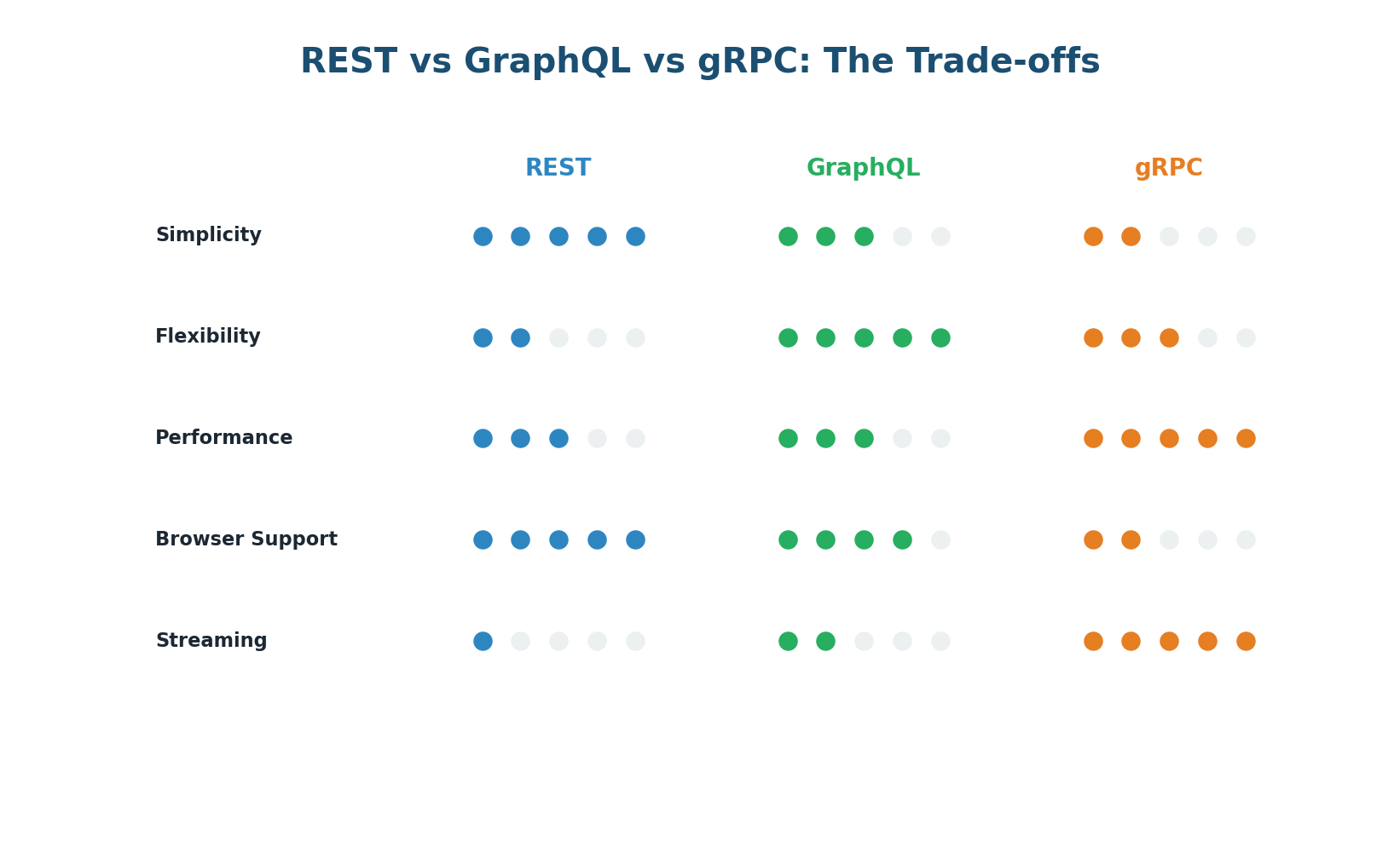
| Criteria | REST | GraphQL | gRPC |
|---|---|---|---|
| Best for | Public APIs, CRUD | Mobile apps, complex queries | Internal microservices |
| Performance | Good | Good (less round-trips) | Excellent (binary) |
| Browser support | Native | Native | Needs gRPC-Web |
| Caching | Easy (HTTP cache) | Hard | Manual |
| Type safety | Optional (OpenAPI) | Built-in (schema) | Strict (protobuf) |
| Learning curve | Low | Medium | Medium-High |
Use REST when building public-facing APIs or simple CRUD services where developer experience and cacheability matter. Use GraphQL when your clients (especially mobile) need flexible, efficient queries across related data. Use gRPC for internal microservice-to-microservice communication where performance and strict contracts are critical.
API Cross-Cutting Concerns
Authentication, Rate Limiting & Versioning
Authentication
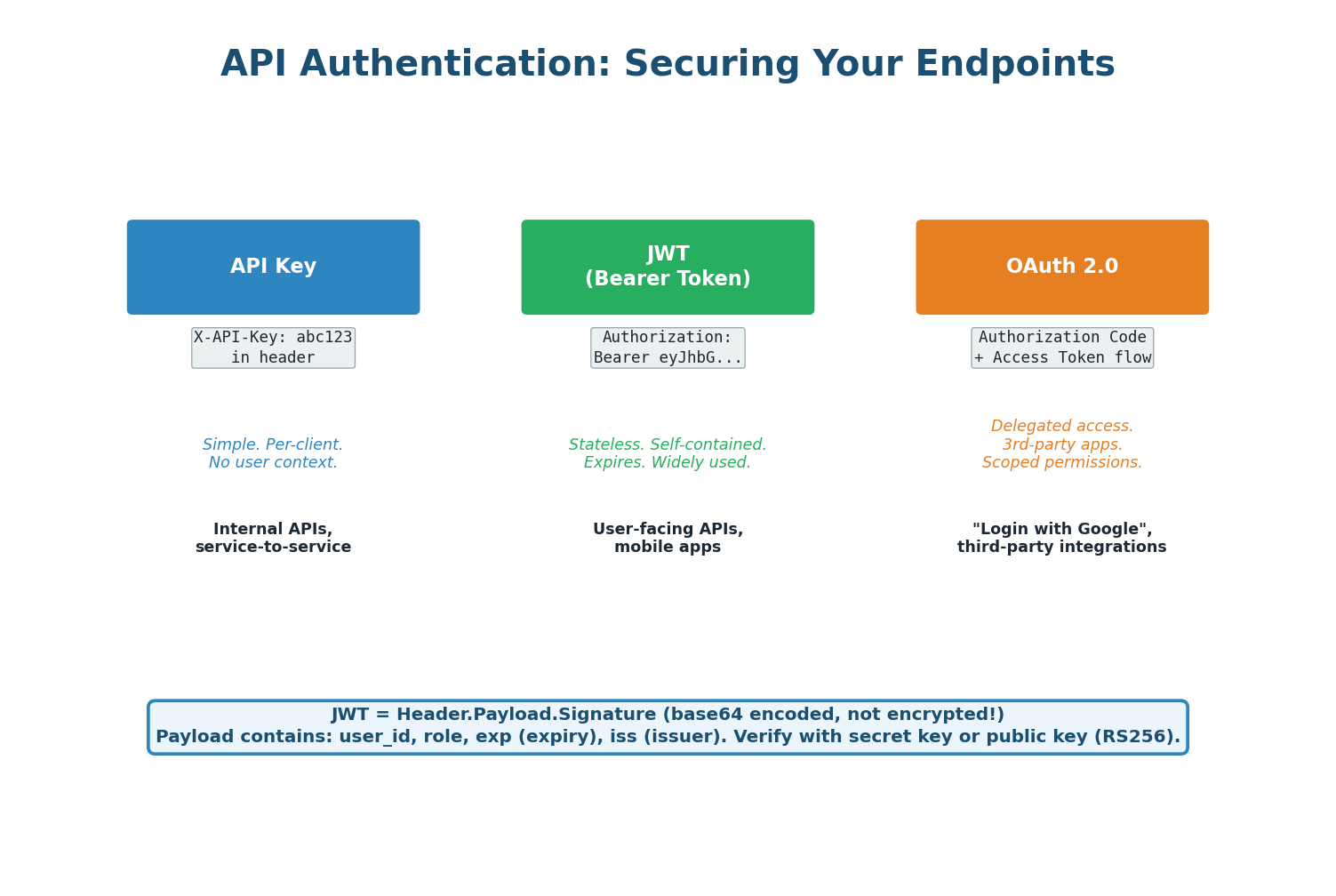
Every API needs authentication (who are you?) and authorization (what can you do?).
- API Keys — Simplest approach: each client gets a unique key passed in a header (
Authorization: ApiKey abc123). Good for server-to-server communication and public APIs. Does not inherently identify a user — just a client application. - JWT (JSON Web Tokens) — Self-contained tokens that include user identity and permissions, verified by signature without a database call. The server signs the token; any server can verify it using the shared secret or public key. Great for stateless, horizontally-scaled systems.
- OAuth 2.0 — The standard for delegated authorization. Used when your app needs to access resources on behalf of a user from a third-party service (Google login, GitHub login). Issues short-lived access tokens and longer-lived refresh tokens.
Rate Limiting and Pagination
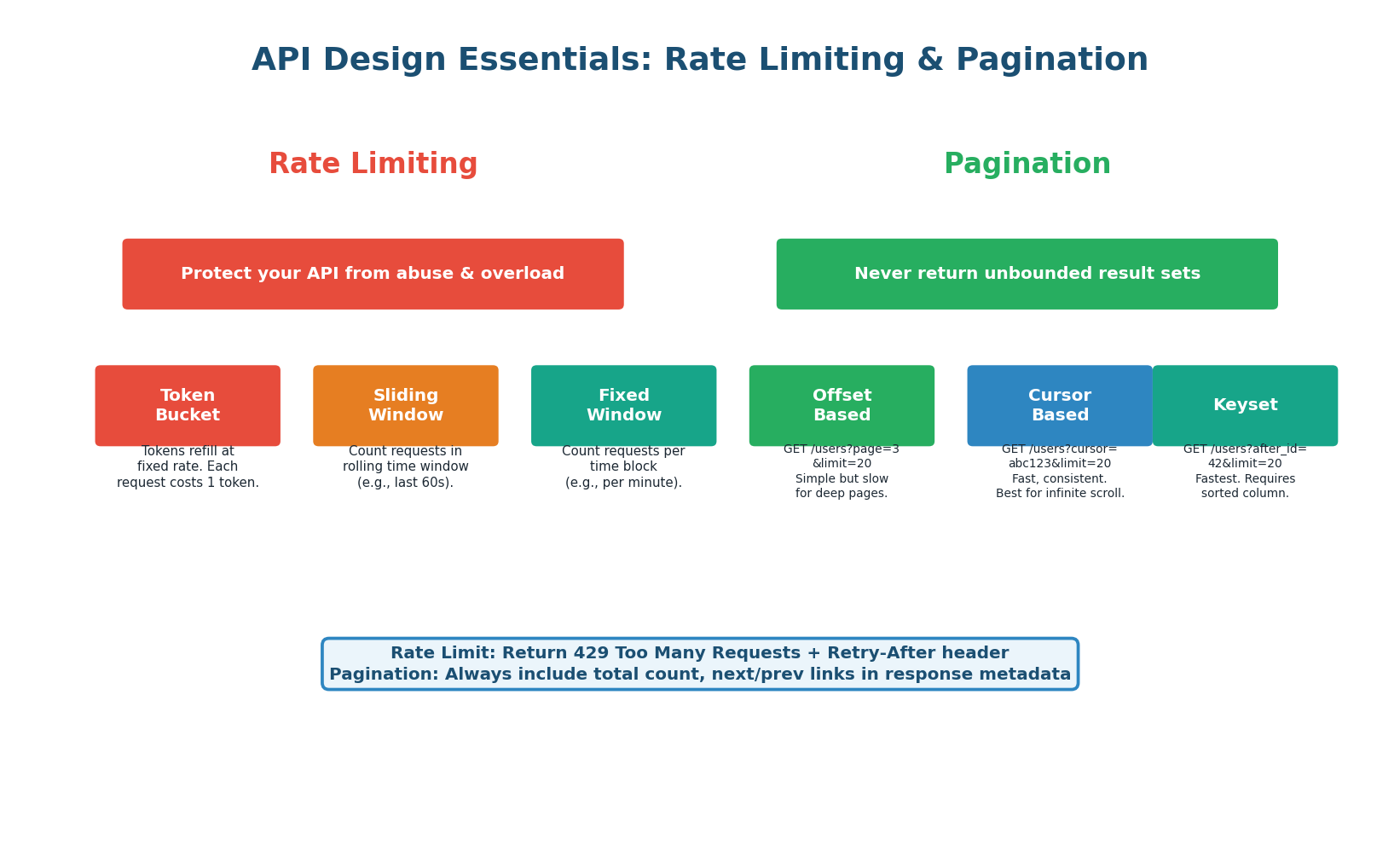
Rate limiting prevents abuse by restricting how many requests a client can make per time window (e.g., 100 requests per minute). When exceeded, the API returns 429 Too Many Requests with a Retry-After header. Common algorithms:
- Token Bucket — Most flexible, allows bursts up to bucket size, then refills at a constant rate.
- Sliding Window — Smoothest limiting, counts requests in a rolling time window.
- Fixed Window — Simplest to implement but can allow 2× the rate at window boundaries.
Pagination ensures APIs never return unbounded result sets. Three approaches:
- Offset-based (
page=3&limit=20) — Simple but slow for deep pages because the DB must skip rows. - Cursor-based (
cursor=abc123&limit=20) — Fast and consistent, best for infinite scroll. - Keyset (
after_id=42&limit=20) — Fastest for large datasets, uses indexed columns.
API Versioning
APIs evolve. When you need to make breaking changes, you must version your API to avoid breaking existing clients. Three strategies:
- URL versioning (
/v1/users,/v2/users) — Simplest and most common. Easy to test in a browser. The industry default. - Header versioning (
Accept: application/vnd.api.v2+json) — Cleaner URLs but harder to test and document. - Query parameter (
/users?version=2) — Acceptable but pollutes query strings.
In API design questions, proactively mention versioning: "I'll use URL versioning (/v1/) because it's the most explicit, widely understood, and easy to route at the load balancer or API gateway level." Interviewers appreciate that you think ahead about backward compatibility.
Pre-Class Summary
What You Should Know Before Class
Before class, make sure you can answer these questions confidently:
- Load Balancing: What is a load balancer and why is it essential? What are the main algorithms (Round Robin, Least Connections, IP Hash, Least Response Time)? What is the difference between L4 and L7 load balancing? How do health checks work? What deployment patterns eliminate the LB as a single point of failure?
- API Fundamentals: What are the three main API paradigms (REST, GraphQL, gRPC)? When would you choose each? How do you design a RESTful API (resources, methods, status codes, idempotency)? What is over-fetching and under-fetching? What are JWT, API keys, and OAuth 2.0? How do rate limiting and pagination protect your API?
Want to Land at Google, Microsoft or Apple?
Watch Pranjal Jain's free 30-min training — the exact GROW Strategy that helped 1,572+ engineers go from TCS/Infosys to top product companies with a 3–5X salary hike.