Quick Reference
Cheat Sheets Before You Start
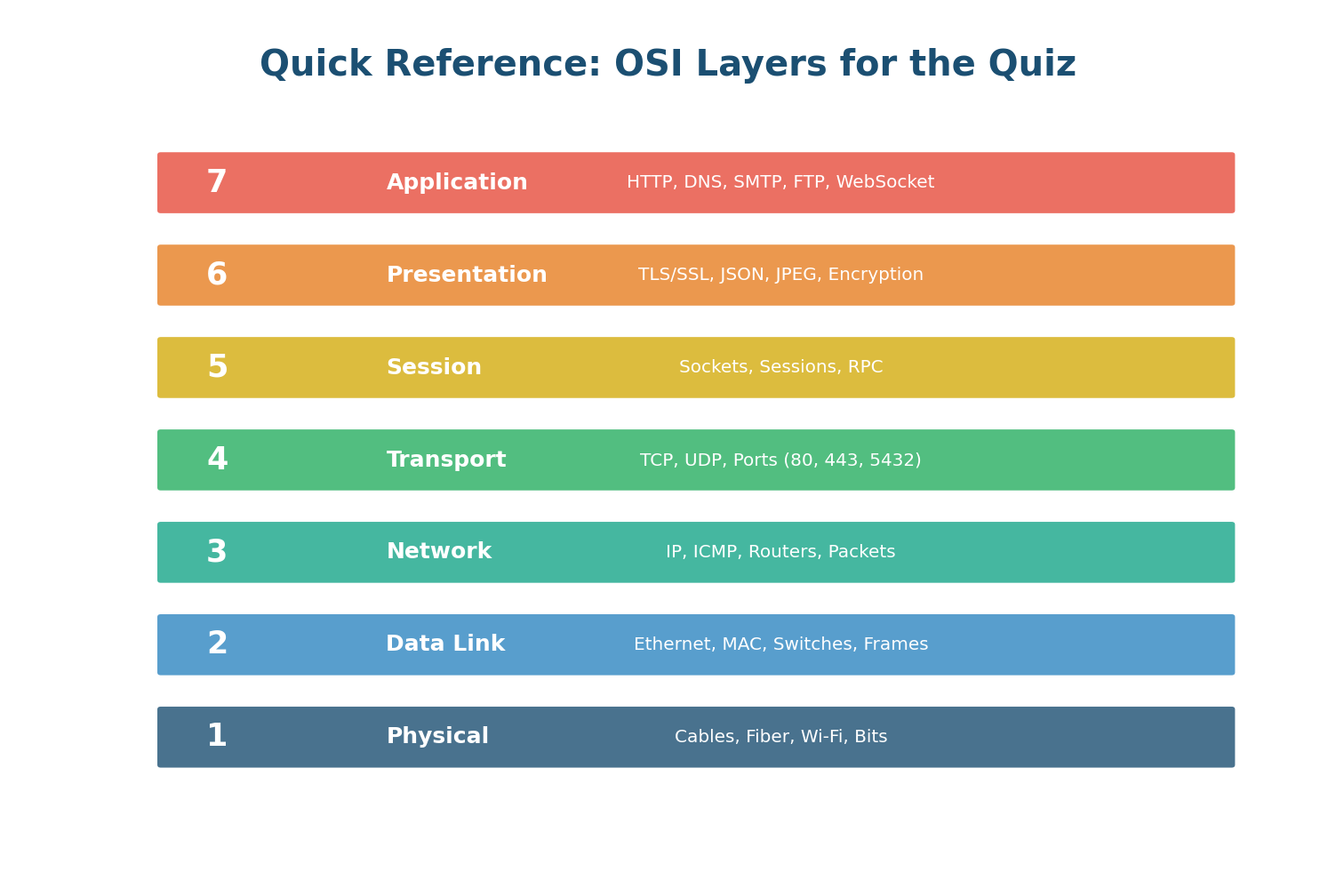
OSI Layers Quick Reference — all 7 layers, protocols, and system design relevance
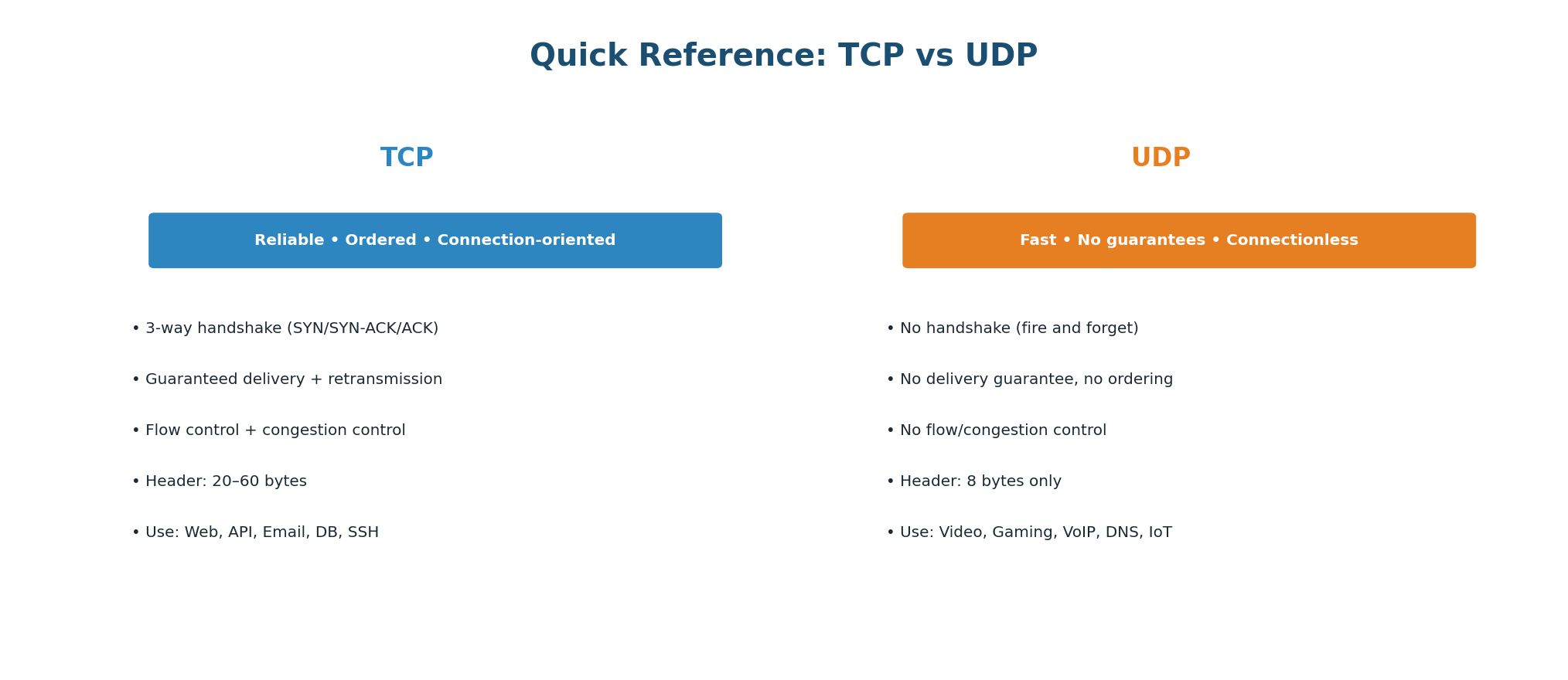
TCP vs UDP Quick Reference — when to use each with real-world examples
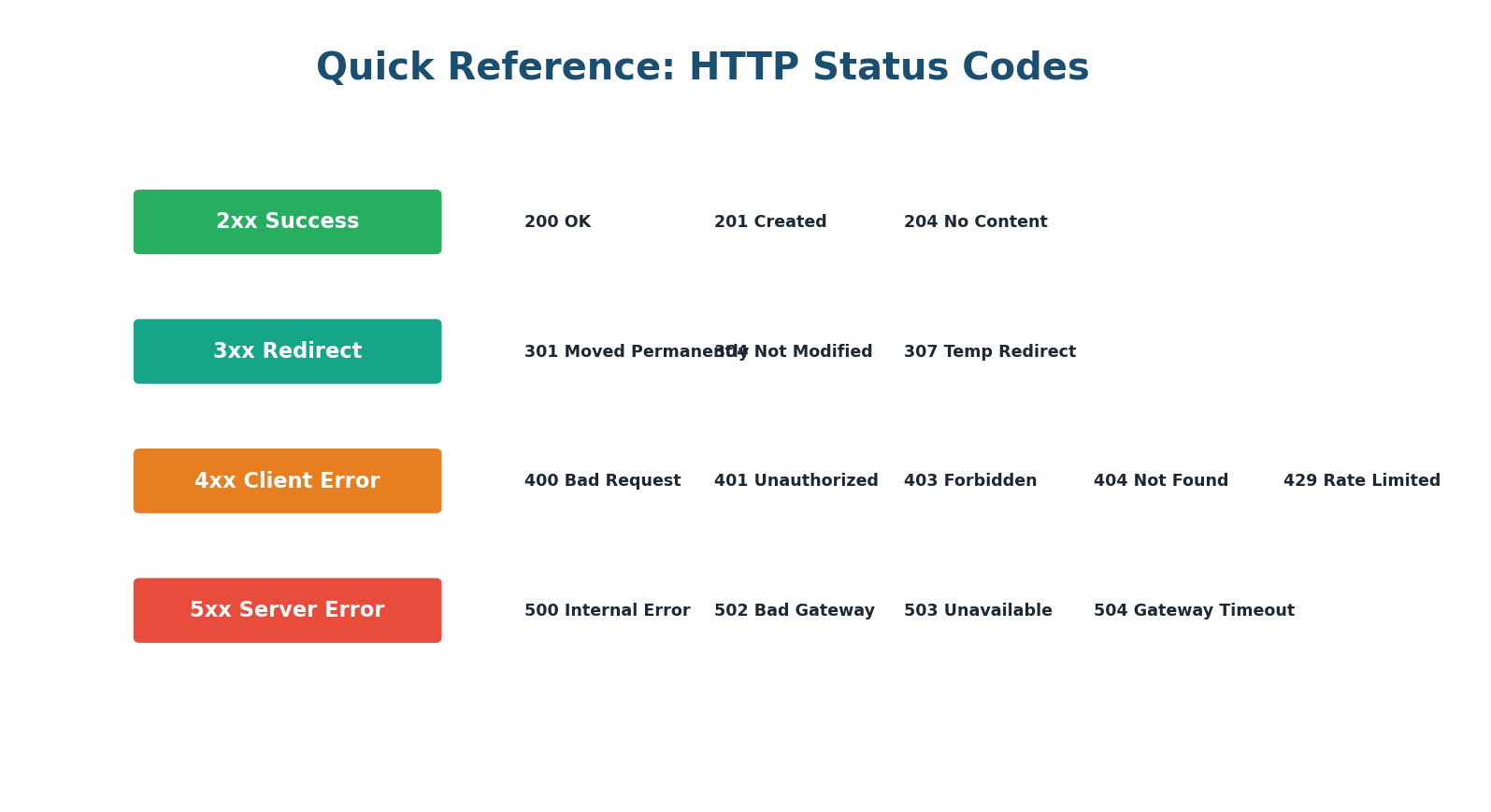
HTTP Status Codes Quick Reference — every code you need to know for interviews
Part 1 · Section A
OSI Model & Layers (6 Questions)
Q1
At which OSI layer does HTTP operate?
- A) Layer 4 (Transport)
- B) Layer 7 (Application) ✓
- C) Layer 3 (Network)
- D) Layer 6 (Presentation)
Q2
TLS encryption conceptually belongs to which OSI layer?
- A) Layer 7 (Application)
- B) Layer 4 (Transport)
- C) Layer 6 (Presentation) ✓
- D) Layer 3 (Network)
Q3
What is the correct order of data encapsulation (top to bottom)?
- A) Bits → Frames → Packets → Segments → Data
- B) Data → Segments → Packets → Frames → Bits ✓
- C) Data → Packets → Segments → Frames → Bits
- D) Segments → Data → Packets → Bits → Frames
Q4
Which OSI layer is responsible for routing packets across different networks?
- A) Layer 2 (Data Link)
- B) Layer 3 (Network) ✓
- C) Layer 4 (Transport)
- D) Layer 1 (Physical)
Q5
Ports (like 80 for HTTP and 443 for HTTPS) belong to which OSI layer?
- A) Layer 7 (Application)
- B) Layer 3 (Network)
- C) Layer 4 (Transport) ✓
- D) Layer 2 (Data Link)
Q6
MAC addresses are used at which OSI layer?
- A) Layer 3 (Network)
- B) Layer 1 (Physical)
- C) Layer 2 (Data Link) ✓
- D) Layer 4 (Transport)
Part 1 · Section B
IP Addressing & DNS (8 Questions)
Q7
How many bits are in an IPv4 address?
- A) 16 bits
- B) 32 bits ✓
- C) 64 bits
- D) 128 bits
Q8
Which of these is a private IP address range?
- A) 8.8.8.0/24
- B) 192.168.1.0/24 ✓
- C) 142.250.0.0/16
- D) 93.184.0.0/16
Q9
What does NAT (Network Address Translation) do?
- A) Encrypts network traffic
- B) Translates private IP addresses to public IP addresses ✓
- C) Converts domain names to IP addresses
- D) Compresses data for faster transmission
Q10
What is the correct order of DNS resolution for an uncached lookup?
- A) Root Server → TLD Server → Authoritative Server ✓
- B) TLD Server → Root Server → Authoritative Server
- C) Authoritative Server → TLD Server → Root Server
- D) Root Server → Authoritative Server → TLD Server
Q11
What DNS record type maps a domain name to an IPv4 address?
- A) CNAME
- B) MX
- C) A ✓
- D) TXT
Q12
What does TTL (Time To Live) control in DNS?
- A) The maximum number of network hops
- B) How long a DNS response is cached before re-querying ✓
- C) The encryption strength of DNS queries
- D) The maximum response size
Q13
Why can't you put a CNAME record on a bare/apex domain (example.com)?
- A) CNAME records only work with subdomains
- B) It would conflict with required SOA and NS records at the zone apex ✓
- C) CNAME records are deprecated
- D) Apex domains cannot have any DNS records
Q14
GeoDNS routes users to the nearest server by:
- A) Compressing data based on location
- B) Returning different IP addresses based on the client's geographic location ✓
- C) Encrypting traffic for specific regions
- D) Blocking users from distant regions
Part 1 · Section C
TCP, UDP & HTTP/HTTPS (8 Questions)
Q15
How many round-trips does a TCP three-way handshake require?
- A) 0 (no handshake needed)
- B) 1 round-trip ✓
- C) 2 round-trips
- D) 3 round-trips
Q16
Which protocol would you choose for a live video streaming application?
- A) TCP (guaranteed delivery is essential)
- B) UDP (low latency matters more than perfect delivery) ✓
- C) FTP (optimized for media transfer)
- D) SMTP (supports multimedia)
Q17
What is TCP's header size compared to UDP's?
- A) TCP: 8 bytes, UDP: 20 bytes
- B) Both are 20 bytes
- C) TCP: 20–60 bytes, UDP: 8 bytes ✓
- D) TCP: 8 bytes, UDP: 8 bytes
Q18
Which HTTP method is idempotent?
- A) POST
- B) PUT ✓
- C) Neither
- D) Both
Q19
An API returns HTTP 429. What does this mean?
- A) Server internal error
- B) Resource not found
- C) Too many requests (rate limited) ✓
- D) Unauthorized access
Q20
What problem does HTTP/2 multiplexing solve?
- A) Encryption overhead
- B) Head-of-line blocking at the application level ✓
- C) DNS resolution speed
- D) Server-side caching
Q21
HTTP/3 uses QUIC which is built on top of:
- A) TCP
- B) UDP ✓
- C) ICMP
- D) Ethernet
Q22
What does TLS add to HTTP to create HTTPS?
- A) Compression only
- B) Encryption, authentication, and integrity ✓
- C) Faster routing
- D) Load balancing
Part 1 · Section D
Proxies & Request Lifecycle (8 Questions)
Q23
A forward proxy hides the identity of:
- A) The server from clients
- B) The client from servers ✓
- C) Both client and server from each other
- D) The DNS resolver
Q24
Which of these is a reverse proxy?
- A) Squid
- B) Tor Browser
- C) Corporate VPN
- D) Nginx ✓
Q25
SSL/TLS termination at the reverse proxy means:
- A) The proxy blocks all encrypted traffic
- B) The proxy decrypts HTTPS and forwards plain HTTP to backends ✓
- C) Backend servers handle all encryption
- D) TLS is disabled for better performance
Q26
In the request lifecycle, which step happens FIRST?
- A) TLS handshake
- B) TCP handshake
- C) DNS resolution ✓
- D) HTTP request
Q27
Which phase of the request lifecycle typically has the highest latency?
- A) DNS resolution (cold)
- B) TCP handshake
- C) Server processing (database query) ✓
- D) TLS handshake
Q28
How does a CDN reduce request latency?
- A) By compressing the server's CPU usage
- B) By serving cached content from edge servers geographically close to the user ✓
- C) By upgrading the user's internet speed
- D) By converting HTTP to a faster protocol
Q29
A warm (repeat) request is much faster than a cold (first) request because:
- A) The server processes it faster the second time
- B) DNS is cached, TCP/TLS connections are reused, and responses may be cached ✓
- C) The browser skips rendering
- D) IPv6 is used for repeat requests
Q30
Which single optimization typically has the largest impact on server-side latency?
- A) Switching from HTTP/1.1 to HTTP/2
- B) Adding a Redis cache to avoid database queries ✓
- C) Using gzip compression
- D) Enabling DNS prefetch
Part 2
Draw the Request Lifecycle
Exercise: Reconstruct the Full Request Lifecycle
This exercise tests your ability to draw a complete system architecture diagram from memory. In a system design interview, you will be expected to draw and explain this architecture. The goal is to be able to reproduce it without looking at any notes.
Instructions
- Look at the blank template diagram below. Each dashed box represents a component in the request lifecycle.
- Fill in each blank box with the correct component name (e.g., DNS Resolver, Reverse Proxy, Database).
- For each arrow between components, write what data flows along that path (e.g., "DNS query", "HTTP request", "SQL query").
- Add approximate latency for each phase using the numbers from the in-class notes.
- Check your work against the Answer Key diagram below.
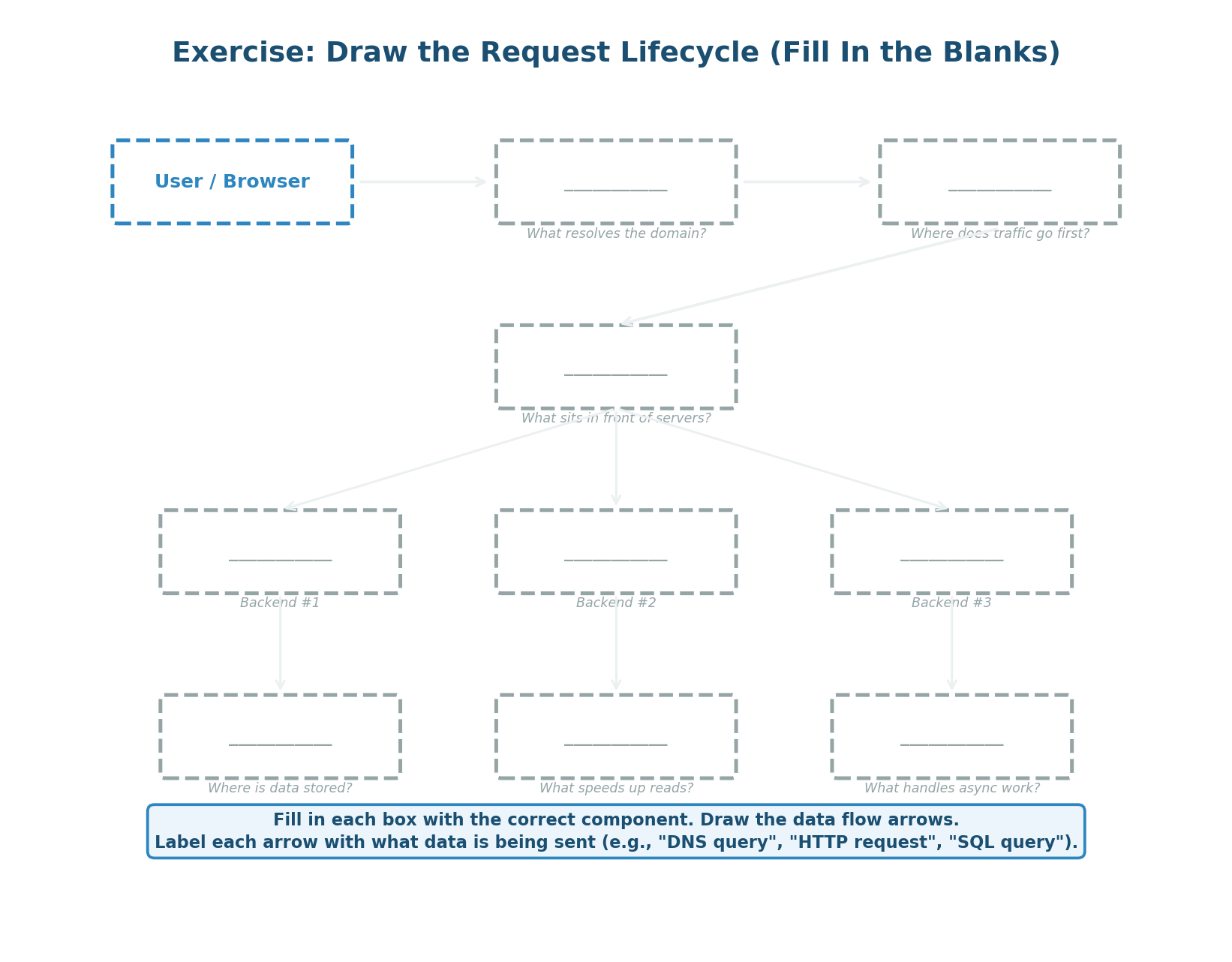
Blank Template — fill in each dashed box with the correct component and label each arrow with the data flow
Hints
The 10 components you need to place are: User/Browser (given), DNS Resolver, CDN/Edge Server, Reverse Proxy/Load Balancer, App Server (×2), Cache (Redis), Database (PostgreSQL), Message Queue (Kafka), and Background Worker. The data flows between them are: DNS query/response, TCP+TLS handshake, HTTP request/response, SQL query/result, Redis GET/SET, and queue publish/consume.
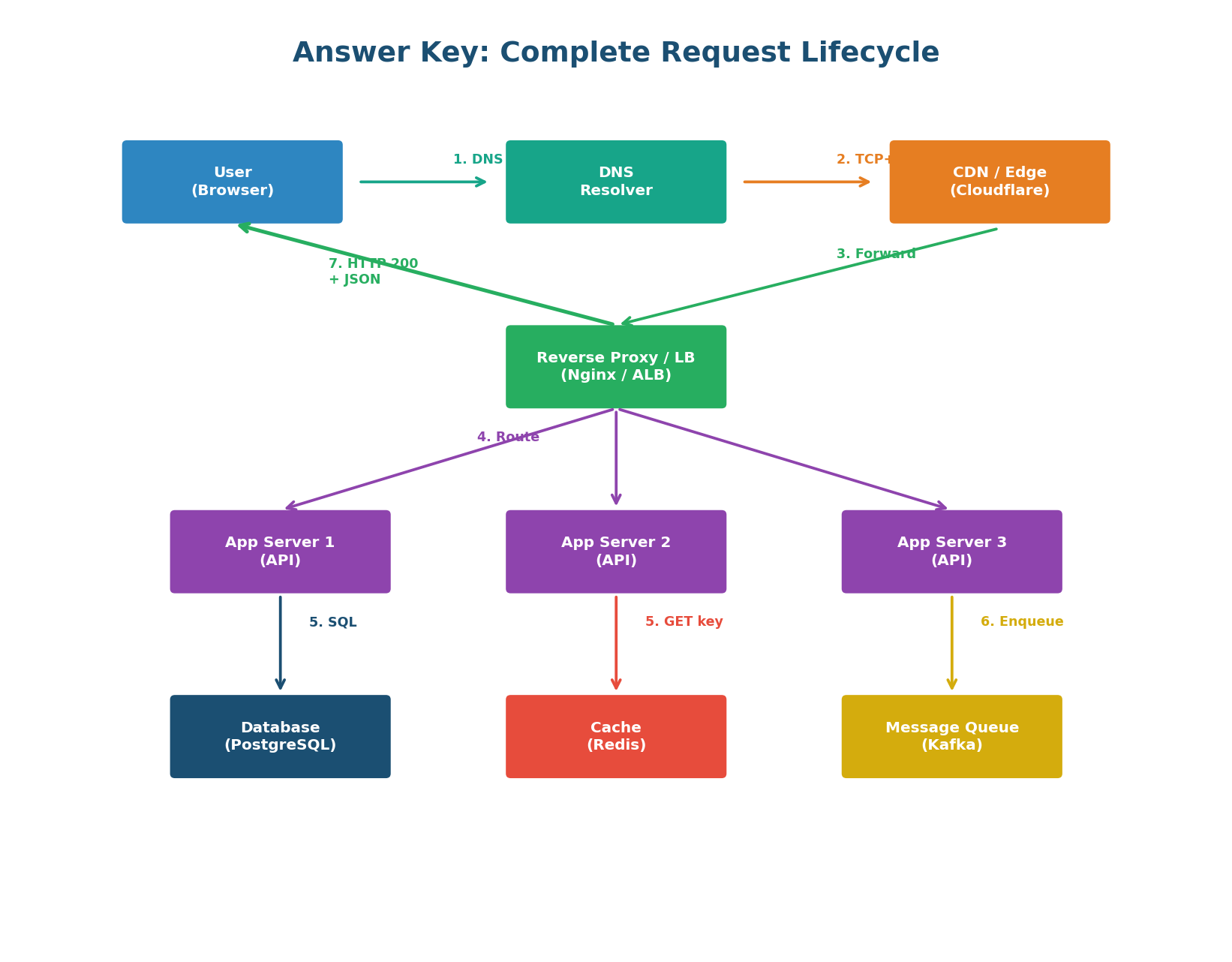
Answer Key — the complete request lifecycle with all components, data flows, and latencies labeled
Component-by-Component Explanation
- User (Browser) → DNS Resolver: The browser sends a DNS query to resolve
api.example.com into an IP. Cold: ~50ms. Warm (cached): <1ms.
- User → CDN/Edge (Cloudflare): The browser establishes a TCP connection (1 RTT) and TLS connection (1 RTT with TLS 1.3). The CDN edge is geographically close, keeping these RTTs small (~5–30ms).
- CDN → Reverse Proxy/LB (Nginx/ALB): If the CDN has no cached response, it forwards to the origin's reverse proxy. The proxy handles SSL termination, rate limiting, and load balancing.
- Reverse Proxy → App Servers: The proxy load-balances to one of multiple app servers using round-robin, least-connections, or consistent hashing based on session requirements.
- App Server → Cache (Redis) or Database (PostgreSQL): The app server first checks Redis (~1ms). On cache miss, it queries the database (~10–100ms for indexed queries). On cache hit, it returns in ~2ms total server processing time.
- App Server → Message Queue (Kafka): For non-critical async work (sending emails, updating analytics, generating thumbnails), the app server publishes to a message queue and returns the response immediately without waiting for the background work to complete.
- Response Path: The app server returns a JSON response to the reverse proxy, which compresses it, adds security headers, and forwards it through the CDN back to the browser. Total: ~40ms warm, ~350ms cold.
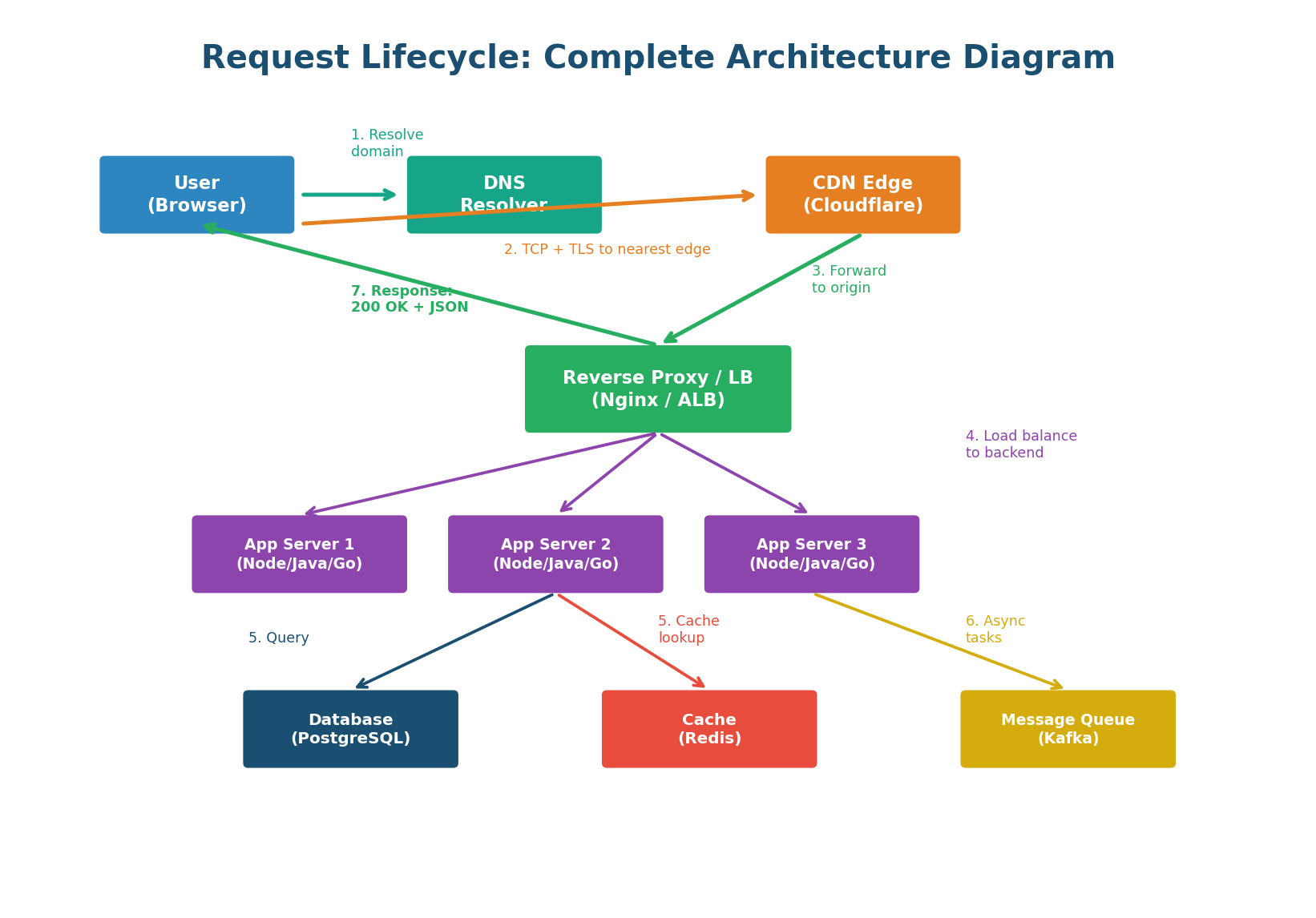
The complete architecture diagram with all components, data flows, and latencies
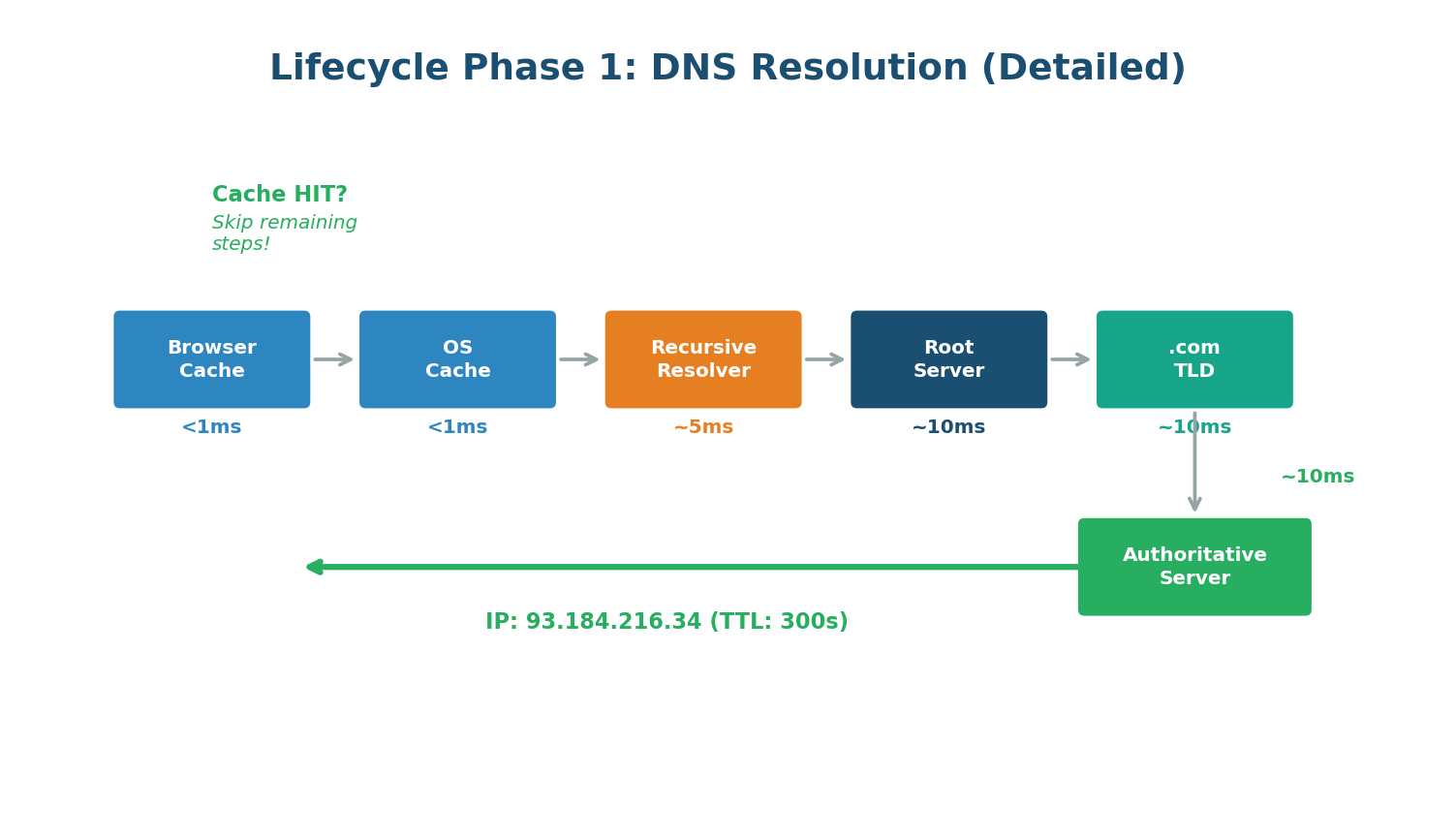
DNS Resolution Phase — cache checks at every level before walking the hierarchy
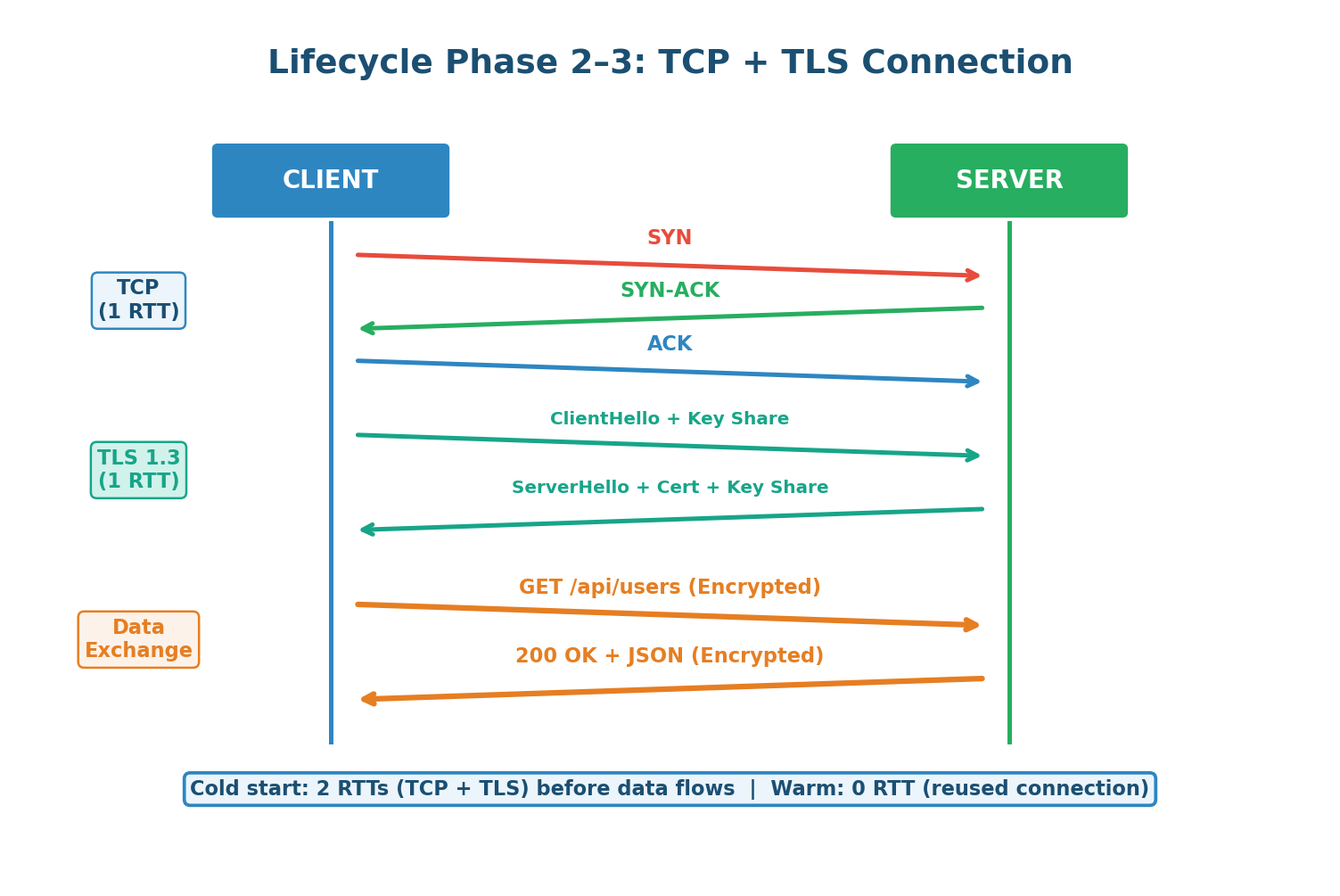
TCP + TLS Connection Phase — 2 RTTs for cold start, 0 RTT for warm connections
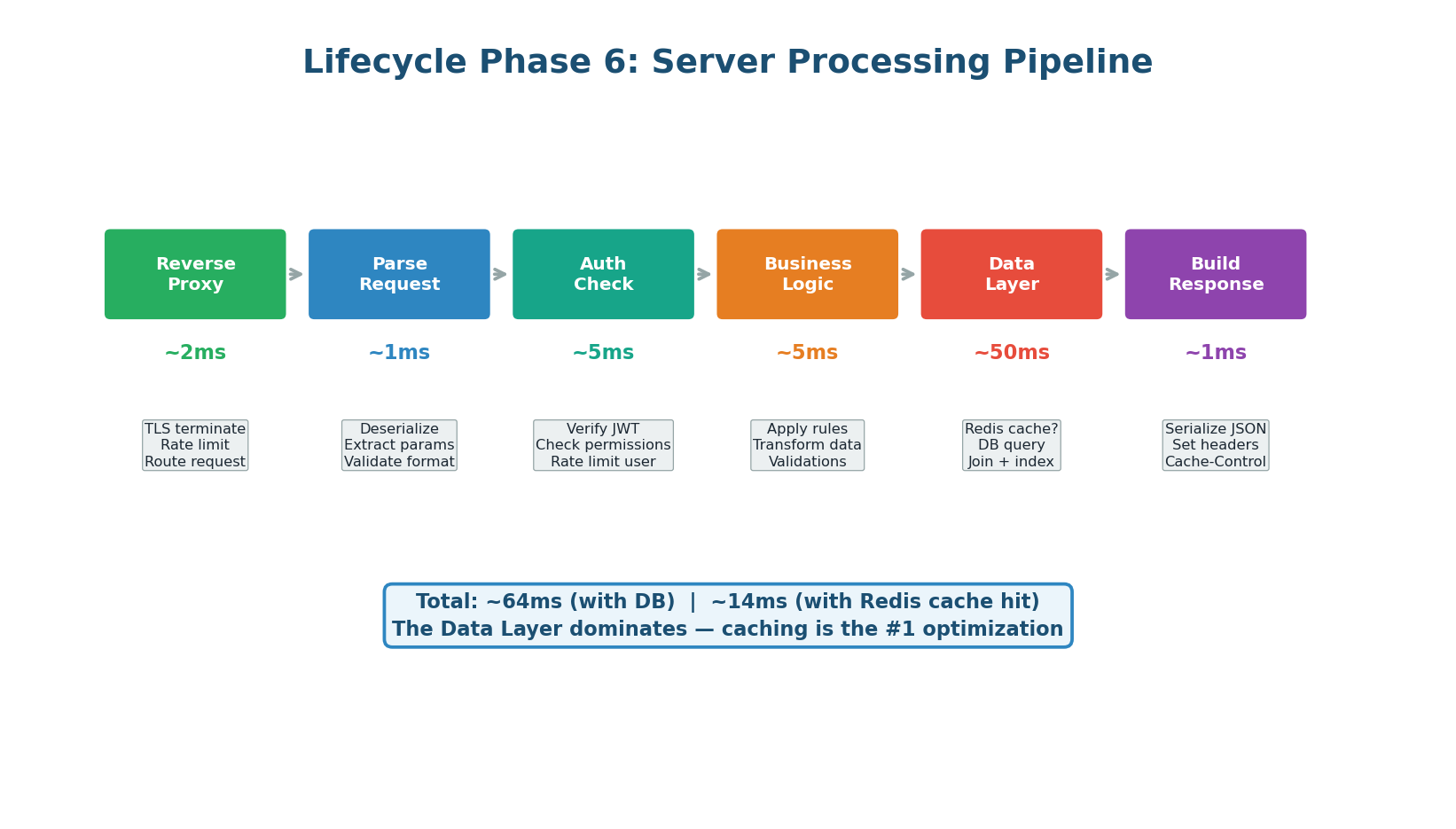
Server Processing Pipeline — 6 stages from proxy to response building, data layer dominates latency
Quiz Answer Key
With Explanations
Section A: OSI Model & Layers
Q1: B — HTTP is an Application layer (Layer 7) protocol. It defines the format and semantics of web requests and responses. Browsers and APIs communicate using HTTP.
Q2: C — TLS/SSL operates at the Presentation layer (Layer 6), handling encryption, data formatting, and certificate exchange. It sits between the Application layer (HTTP) and the Transport layer (TCP).
Q3: B — Encapsulation goes: Application Data → Transport Segments (TCP header added) → Network Packets (IP header added) → Data Link Frames (MAC header added) → Physical Bits. Decapsulation reverses this at the receiver.
Q4: B — The Network layer (Layer 3) handles IP addressing and routing. Routers operate at this layer, forwarding packets based on IP addresses and routing tables.
Q5: C — Ports are a Transport layer (Layer 4) concept. TCP and UDP use port numbers to identify specific applications (e.g., port 80 for HTTP, 443 for HTTPS, 5432 for PostgreSQL).
Q6: C — MAC addresses are Data Link layer (Layer 2) identifiers. Switches use MAC addresses to forward frames within a local network. Routers use IP addresses (Layer 3) for inter-network routing.
Section B: IP Addressing & DNS
Q7: B — IPv4 uses 32-bit addresses (4 octets × 8 bits = 32 bits), supporting ~4.3 billion unique addresses. IPv6 uses 128-bit addresses, supporting ~340 undecillion addresses.
Q8: B — 192.168.x.x is a private IP range (along with 10.x.x.x and 172.16–31.x.x). 8.8.8.8 is Google's public DNS. 142.250.x.x is Google's public IP range. 93.184.x.x belongs to Example.com (IANA).
Q9: B — NAT translates private IPs (192.168.x.x) to a single public IP so multiple devices behind a home or corporate router can share one internet-facing address.
Q10: A — DNS resolution walks the hierarchy top-down: Root Server (knows TLDs) → TLD Server (knows domain nameservers) → Authoritative Server (knows actual IPs).
Q11: C — An A record maps a domain to an IPv4 address. AAAA maps to IPv6. CNAME creates an alias from one name to another. MX specifies mail servers.
Q12: B — TTL specifies how many seconds a DNS response should be cached before the resolver must re-query. Lower TTL = faster failover but more DNS queries. Higher TTL = fewer queries but slower propagation of IP changes.
Q13: B — A CNAME at the zone apex conflicts with the mandatory SOA (Start of Authority) and NS (Nameserver) records. RFC 1034 prohibits this. Use A/ALIAS records or CNAME flattening (Cloudflare) for apex domains.
Q14: B — GeoDNS (e.g., AWS Route 53 geolocation routing) returns different IP addresses based on the client's location, routing users to their nearest data center for lower latency.
Section C: TCP, UDP & HTTP/HTTPS
Q15: B — The 3-way handshake (SYN → SYN-ACK → ACK) requires exactly 1 RTT. The client sends SYN and receives SYN-ACK in one round trip, then sends ACK. The ACK can be piggybacked with the first data packet.
Q16: B — UDP is correct for live streaming. TCP's retransmission causes stutter — if a frame is lost, TCP waits for the retransmit before delivering later frames (head-of-line blocking). In live video, a dropped frame is better than a 200ms buffer stall.
Q17: C — TCP header is 20–60 bytes (20 base + up to 40 bytes of options). UDP header is fixed at 8 bytes. This is why UDP has lower per-packet overhead for high-frequency small-message applications.
Q18: B — PUT is idempotent: calling PUT /users/42 with the same body 10 times produces the same result as calling it once. POST is not idempotent — it creates a new resource each time (e.g., 10 POST /orders creates 10 orders).
Q19: C — HTTP 429 means Too Many Requests — the client has been rate-limited. The server includes a Retry-After header indicating when to try again.
Q20: B — HTTP/2 multiplexing sends multiple requests/responses interleaved on one TCP connection, solving HTTP/1.1's head-of-line blocking where a slow response blocked all subsequent requests in the pipeline.
Q21: B — HTTP/3 uses QUIC, which is built on UDP. QUIC adds its own reliability and flow control per-stream, eliminating TCP's transport-level head-of-line blocking. One dropped packet only blocks its own stream, not all streams.
Q22: B — TLS adds encryption (nobody can read the data in transit), server authentication (certificate proves you are talking to the real server), and integrity (HMAC ensures data has not been tampered with).
Section D: Proxies & Request Lifecycle
Q23: B — A forward proxy hides the client's identity. The server sees the proxy's IP, not the client's real IP. This is why VPNs (which function like forward proxies) provide privacy.
Q24: D — Nginx is a reverse proxy (sits in front of servers). Squid is a forward proxy. Tor is a privacy routing network. Corporate VPNs function as forward proxies for corporate internet access.
Q25: B — SSL/TLS termination means the proxy handles all TLS decryption and forwards plain HTTP to backends over the internal network. This simplifies certificate management and reduces backend CPU overhead.
Q26: C — DNS resolution must happen first — the browser needs the server's IP address before it can initiate a TCP connection. TCP requires an IP. TLS requires TCP. HTTP requires TLS (for HTTPS).
Q27: C — Server processing (especially unoptimized database queries) is typically the highest-latency phase at 50–200ms, compared to DNS (50ms cold, ~0ms warm), TCP (30ms, ~0ms warm), and TLS (40ms, ~0ms warm).
Q28: B — CDNs cache content on edge servers worldwide. A user in Delhi gets content from a Mumbai edge server (~10ms) instead of a US server (~200ms). This reduces both latency and origin server load.
Q29: B — Warm requests skip DNS (TTL still valid), reuse TCP connections (HTTP keep-alive), skip TLS handshake (session resumption), and may get cached responses from CDN or proxy. This reduces ~350ms to ~40ms.
Q30: B — Redis caching reduces server-side latency from ~50–200ms (database query) to ~1ms (cache hit). A 99%+ cache hit rate on common queries cuts average server latency by 50× or more — far greater impact than HTTP version upgrades or compression.
Reference
Latency Summary: Cold vs Warm
| Phase | Cold (First Request) | Warm (Repeat) | Key Optimization |
|---|
| DNS Resolution | ~50ms | <1ms (cached) | DNS prefetch, low TTL |
| TCP Handshake | ~30ms | 0ms (connection reuse) | Keep-alive, connection pool |
| TLS Handshake | ~40ms | 0ms (session resume) | TLS 1.3, 0-RTT |
| CDN / Edge | ~10ms (miss → forward) | <5ms (edge cache hit) | Cache-Control headers |
| Reverse Proxy | ~2ms | ~2ms | Minimal optimization needed |
| Server Processing | ~50–200ms | ~10ms (Redis cache hit) | Caching, indexing, async |
| Response Transfer | ~10ms | ~5ms (compressed) | gzip/Brotli |
| Browser Rendering | ~50ms | ~20ms (cached assets) | Code splitting, lazy load |
| TOTAL | ~250–400ms | ~40–80ms | ~80% reduction with caching |
Want to Land at Google, Microsoft or Apple?
Watch Pranjal Jain's free 30-min training — the exact GROW Strategy that helped 1,572+ engineers go from TCS/Infosys to top product companies with a 3–5X salary hike.
DSA + System Design roadmap
1:1 mentorship from ex-Microsoft
1,572+ placed · 4.9★ rated
Watch Free Training →

