

What's Inside
Concept Overview
The Four Pillars of Robust Systems
Every production-grade system — from WhatsApp to Amazon to Google Search — is built on four fundamental qualities. Understanding these four concepts is the foundation upon which every System Design interview answer is built. Without them, you are just drawing boxes and arrows. With them, you can reason about why each box exists and what happens when it fails.
These four concepts are Scalability (can the system handle growth?), Availability (does the system stay online?), Reliability (does the system produce correct results?), and eliminating Single Points of Failure (are there any weak links that could take down the entire system?). They are deeply interconnected — improving one often improves the others, and ignoring one often undermines the rest.
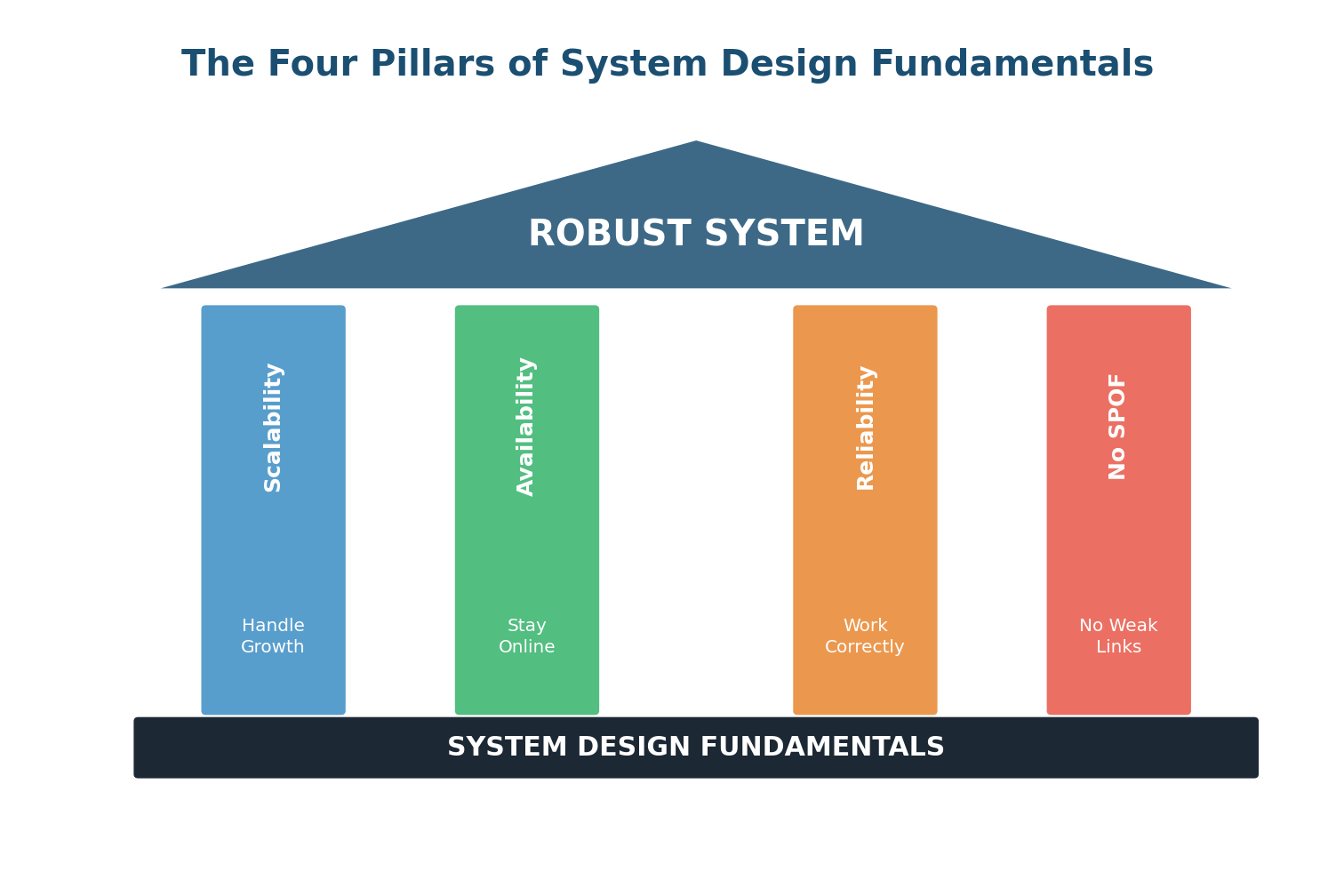
Think of these four pillars like the legs of a table. If any one leg is missing or weak, the entire table becomes unstable. A system that is scalable but unreliable will handle millions of users while occasionally giving them wrong data. A system that is reliable but not scalable will work perfectly for 100 users and crash at 100,000. A system with a single point of failure can be scalable, available, and reliable — until that one component fails and the whole thing collapses.
Scalability
What Is Scalability?
Scalability is the ability of a system to handle increased load by adding resources, without a proportional decrease in performance. The key word here is "without a proportional decrease." A system that responds in 100ms for 1,000 users but takes 10 seconds for 100,000 users is fast but not scalable. A scalable system maintains acceptable performance as load increases.
Think of a highway. A two-lane road works fine for a small town. But as the town grows into a city, traffic jams become unbearable. Scalability is about building the system so you can add more lanes (horizontal scaling) or widen the existing lanes (vertical scaling) to keep traffic flowing smoothly even as the city grows.
Vertical vs Horizontal Scaling
These are the two fundamental approaches to scaling, and every system designer must understand both:
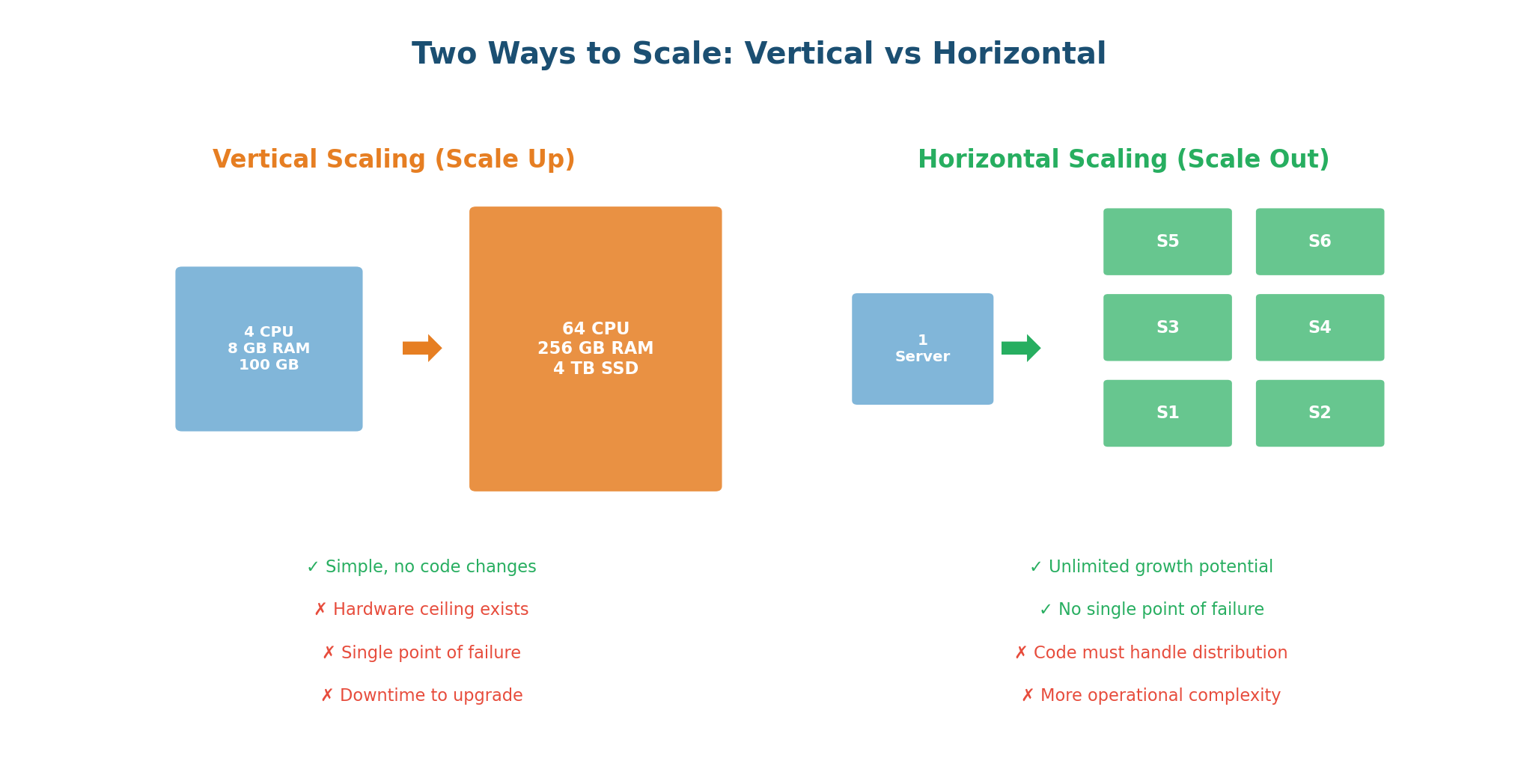
Vertical Scaling (Scale Up) means making a single machine more powerful: more CPU cores, more RAM, faster disks, better network. Your application code usually does not change at all. If your database server is running slow because it has 16 GB of RAM and your dataset is 14 GB, upgrading to 128 GB solves the problem immediately.
WhatsApp's early architecture is a famous example of vertical scaling done brilliantly. With just 32 extremely powerful Erlang-based servers, they handled 200 million users. Each server could manage hundreds of thousands of concurrent connections because Erlang was designed for high concurrency.
Horizontal Scaling (Scale Out) means adding more machines. Instead of one powerful server, you deploy 10, 100, or 10,000 smaller servers behind a load balancer. Each server handles a fraction of the total load. If one server can handle 10,000 requests per second, ten servers can handle 100,000.
Netflix is a prime example of horizontal scaling. During peak hours, Netflix uses thousands of servers across multiple AWS regions. When a new season of a popular show drops and traffic spikes 10x, auto-scaling adds more server instances automatically. When the spike subsides, instances are removed to save cost.
| Dimension | Vertical Scaling | Horizontal Scaling |
|---|---|---|
| Approach | Bigger machine | More machines |
| Code Changes | None required | Must handle distribution |
| Limit | Hardware ceiling exists | Virtually unlimited |
| Cost | Exponential at high scale | Linear, cost-efficient |
| Fault Tolerance | Single point of failure | Naturally redundant |
| Best For | Databases, quick fixes | Web servers, microservices |
The Scalability Toolkit
Scaling a system is not just about adding servers. It requires a coordinated set of strategies:
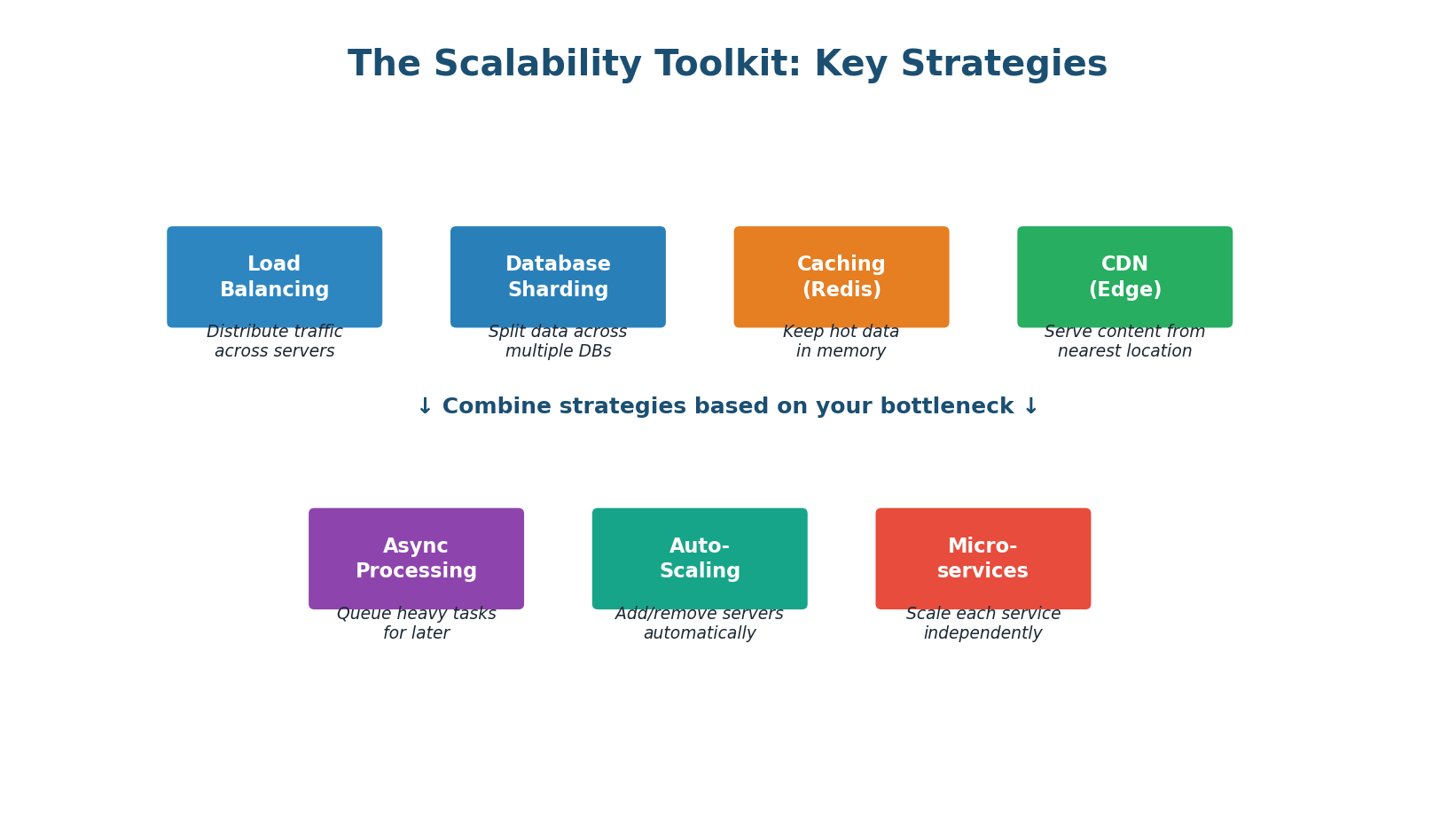
- Load Balancing: Distributes incoming traffic across multiple servers. Common algorithms: Round Robin, Least Connections, IP Hashing.
- Database Sharding: Splits data across multiple database instances. WhatsApp shards messages by
conversation_idso all messages in a chat are on one shard. - Caching: Stores frequently accessed data in fast memory (Redis/Memcached). A good cache can reduce DB load by 90–99% and cut latency from milliseconds to microseconds.
- CDN (Content Delivery Network): Serves static content from edge servers close to users, reducing latency and offloading bandwidth from origin servers.
- Async Processing: Not everything needs an instant response. Sending emails, generating reports, and processing uploads can happen in the background via message queues (Kafka, RabbitMQ).
- Auto-Scaling: Automatically adds servers when load increases and removes them when load decreases. Cloud platforms make this straightforward with rules like "add 2 servers when CPU exceeds 70%."
- Microservices: Instead of one monolith, split the system into independent services. Each service scales independently based on its own load pattern.
Always quantify scalability. Key metrics include: RPS (Requests Per Second) — how many requests can the system handle; Latency percentiles — p50, p95, p99 response times; Throughput — data processed per second; Error rate — percentage of failed requests under load. State your targets before designing.
Availability
What Is Availability?
Availability is the percentage of time a system is operational and accessible to users. It answers a simple question: when a user tries to use the system, is it up and responding? An available system is one that is ready to serve requests whenever they arrive, 24 hours a day, 365 days a year.
Availability is calculated as: Uptime / (Uptime + Downtime) × 100%. If a system is up for 364 days and down for 1 day in a year, its availability is 364/365 = 99.73%. That might sound good, but it means 8.76 hours of downtime, which could be catastrophic for a payment system, a messaging app, or an emergency service.
The Nines of Availability
Availability is commonly expressed in "nines." Each additional nine represents 10x less downtime, but achieving it costs exponentially more engineering effort and infrastructure investment:
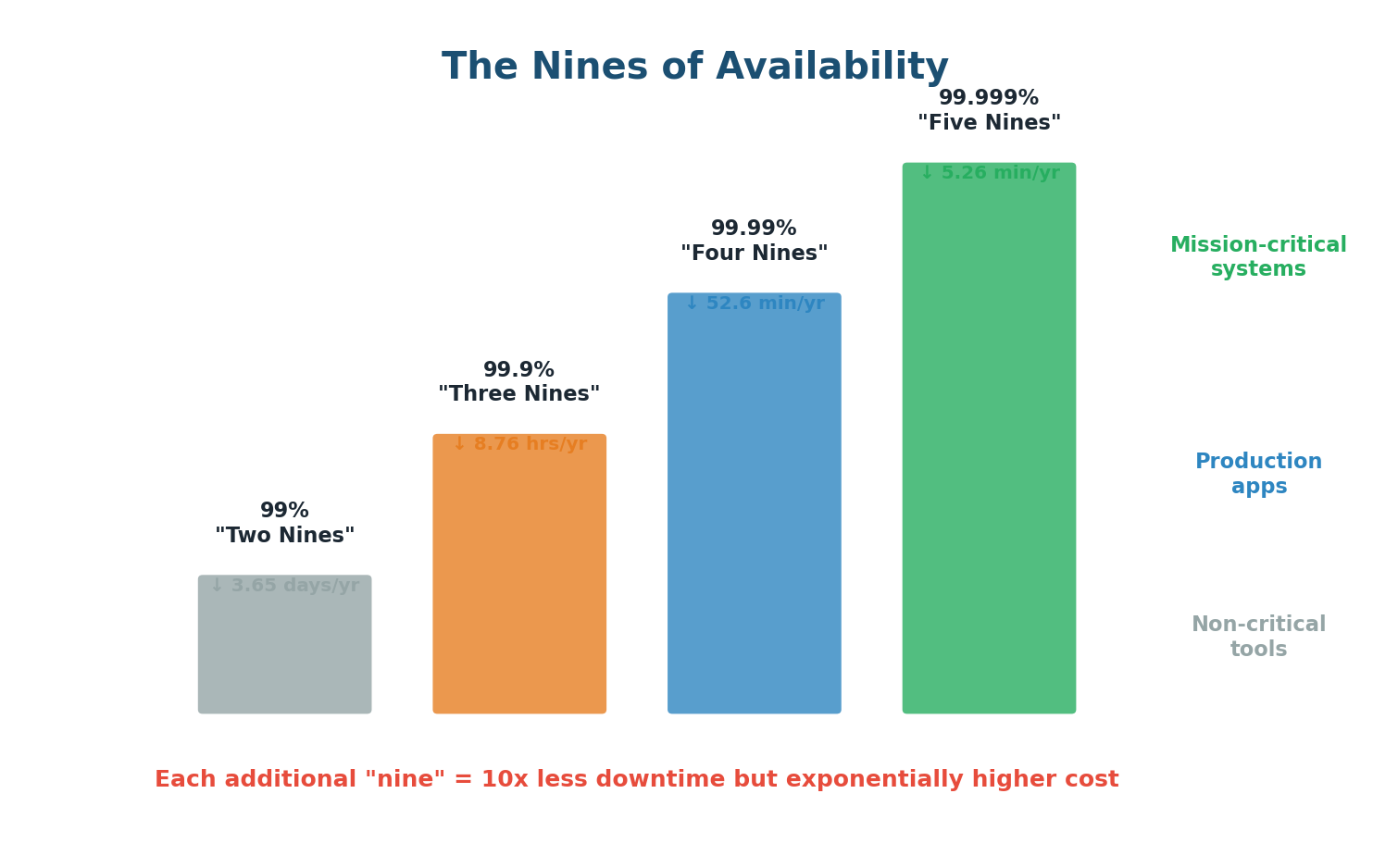
| Level | Availability | Downtime/Year | Typical Use |
|---|---|---|---|
| Two nines | 99% | 3.65 days | Internal tools |
| Three nines | 99.9% | 8.76 hours | Most web services |
| Four nines | 99.99% | 52.6 minutes | E-commerce, APIs |
| Five nines | 99.999% | 5.26 minutes | Banking, emergency services |
The cost curve between these levels is dramatic. Going from 99.9% to 99.99% might mean adding redundant load balancers, database replicas, and automatic failover. Going from 99.99% to 99.999% requires multi-region active-active deployment, zero-downtime deployments, chaos engineering, and a dedicated SRE team. The difference is 47 minutes per year, but the engineering cost can be millions of dollars.
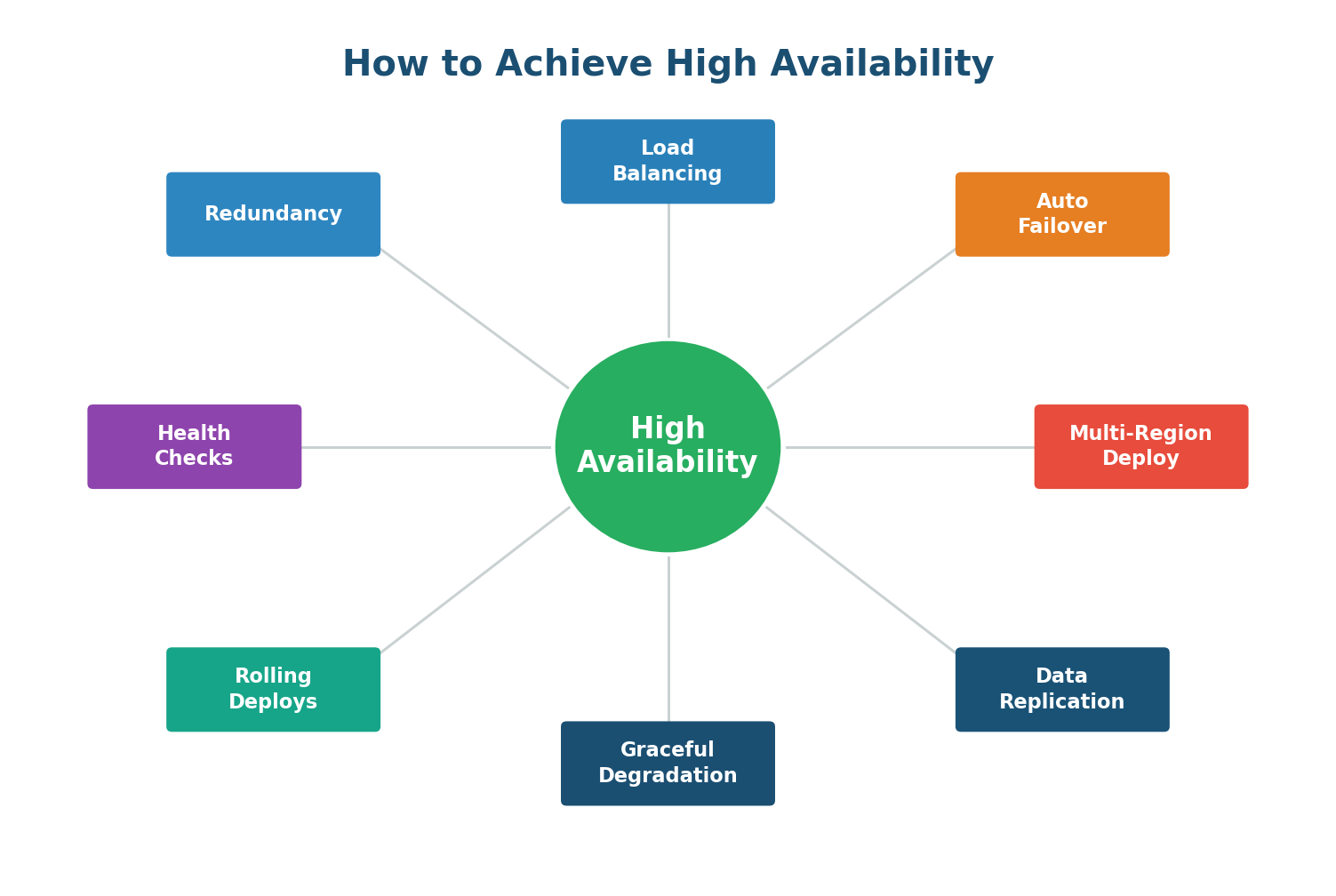
- Redundancy: Every critical component must have at least one backup.
- Load Balancing: Detects server failures via health checks and reroutes traffic automatically.
- Automatic Failover: When a primary component fails, a standby takes over without human intervention.
- Health Checks & Monitoring: Periodic requests to each component verify it is alive and functioning.
- Multi-Region Deployment: Protects against entire data center or cloud region failures.
- Graceful Degradation: When under extreme stress, serve partial results rather than crashing completely.
- Rolling Deployments: Update servers one at a time to keep the system available during deployments.
- Data Replication: Critical data is copied to multiple locations so no single node failure loses data.
Reliability
What Is Reliability?
Reliability is the ability of a system to perform its intended function correctly and consistently over time, even when things go wrong. A reliable system does not just work under ideal conditions; it works when hardware fails, when networks partition, when traffic spikes, and when software bugs surface.
The fundamental truth of distributed systems, as expressed by Amazon CTO Werner Vogels, is: "Everything fails, all the time." A reliable system is not one that prevents all failures — that is impossible. It is one that continues to function correctly despite failures.
Reliability vs Availability: They Are Not the Same
This distinction is a favorite interview topic, and many candidates confuse the two:
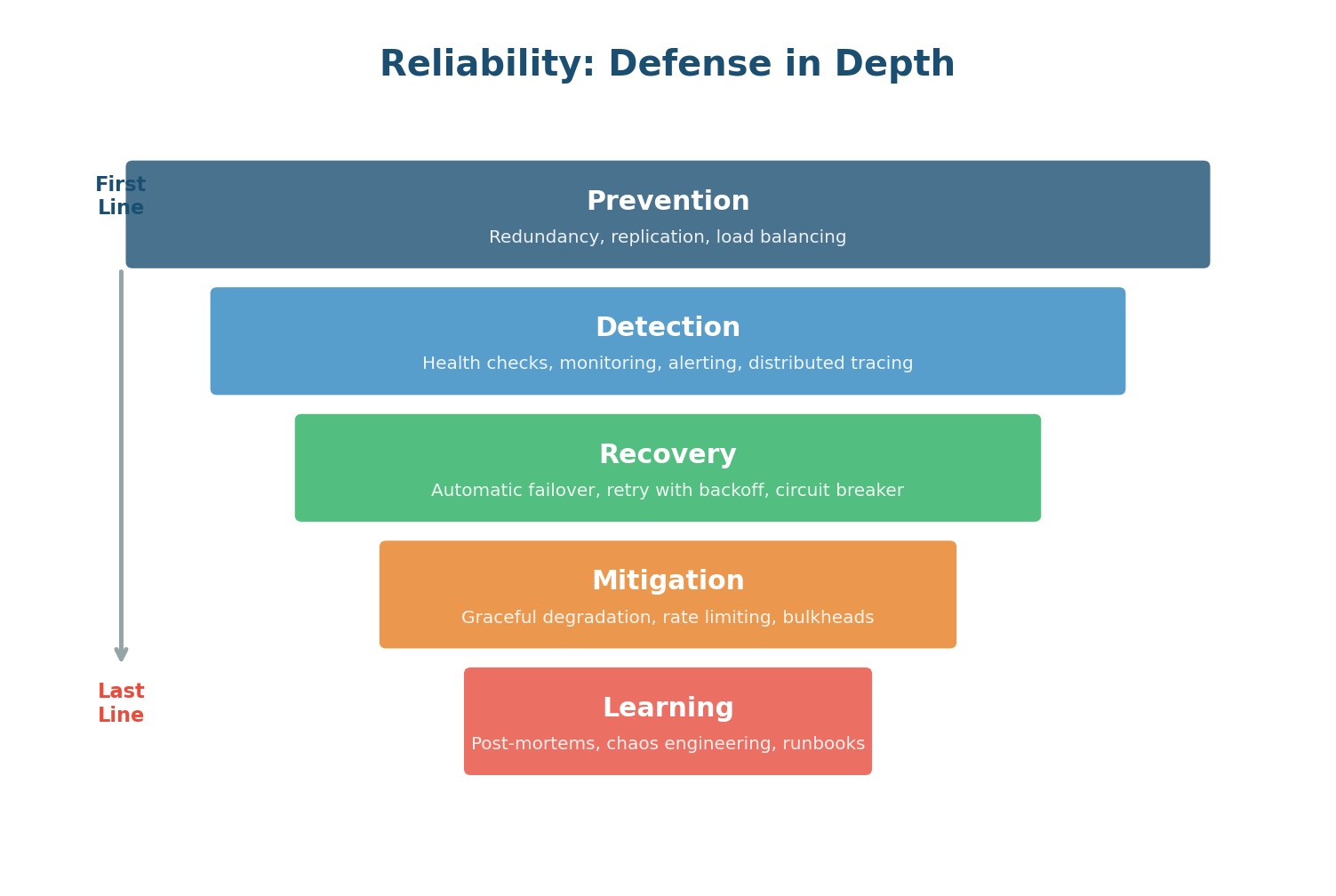
- Available but Unreliable: A database that is always online but occasionally returns stale data due to replication lag. An API that responds to every request but sometimes returns incorrect calculations. Users do not realize they are getting bad data, which can be worse than an outage.
- Reliable but Unavailable: A system that works perfectly when running but has frequent downtime for maintenance. Users trust the data when they can access it, but they cannot always access it.
An available but unreliable system is often worse than being down. If your bank shows you ₹50,000 but you actually have ₹5,000 — that is not a minor bug. It is a trust-destroying catastrophe. Always aim for both available AND reliable.
Building Reliability: Defense in Depth
A single reliability mechanism is never enough. Production systems use multiple layers of protection, each catching failures that slip through the layer above:
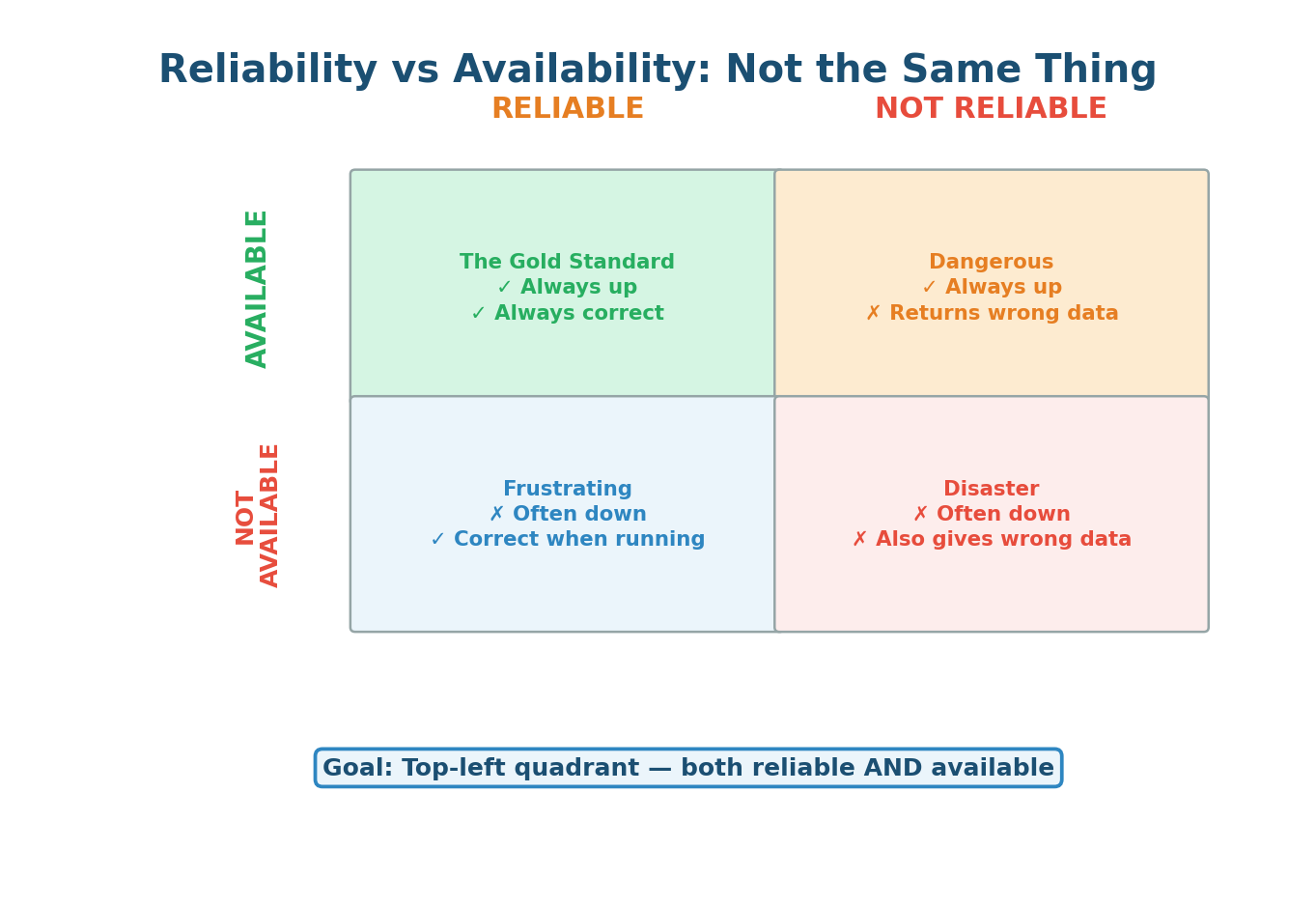
- Layer 1 — Prevention: Redundancy, data replication, and load balancing reduce the impact of failures before they happen.
- Layer 2 — Detection: Health checks, monitoring, alerting, and distributed tracing identify failures quickly once they occur.
- Layer 3 — Recovery: Automatic failover, retry with exponential backoff, and circuit breakers enable self-healing without human intervention.
- Layer 4 — Mitigation: Graceful degradation, rate limiting, and bulkheads isolate failures so they don't cascade through the system.
- Layer 5 — Learning: Blameless post-mortems, chaos engineering (Netflix's Chaos Monkey), and runbooks continuously improve reliability over time.
| Pattern | What It Does | When to Use |
|---|---|---|
| Retry + Exponential Backoff | Retries failed requests with increasing delays (1s, 2s, 4s, 8s) | Transient network failures |
| Circuit Breaker | Stops calling a failing service after repeated failures | Prevent cascading failures |
| Idempotency | Same operation run multiple times = same result | Payment APIs, order creation |
| Bulkhead | Isolates failure in one component from affecting others | Microservice dependencies |
| Timeout | Abandons requests that take too long | All external calls |
Single Point of Failure (SPOF)
What Is a Single Point of Failure?
A Single Point of Failure (SPOF) is any component in a system whose failure would cause the entire system to stop functioning. It is the weakest link in the chain. If there is no backup, no redundancy, and no alternative path, that component is a SPOF. When it fails — and in distributed systems, failures are inevitable — the entire system goes down.
Think of a bridge connecting two cities. If it is the only route between them and it collapses, the cities are completely cut off. The bridge is a Single Point of Failure. Now imagine there are three bridges. If one collapses, traffic reroutes to the other two. The system is inconvenienced but not broken.
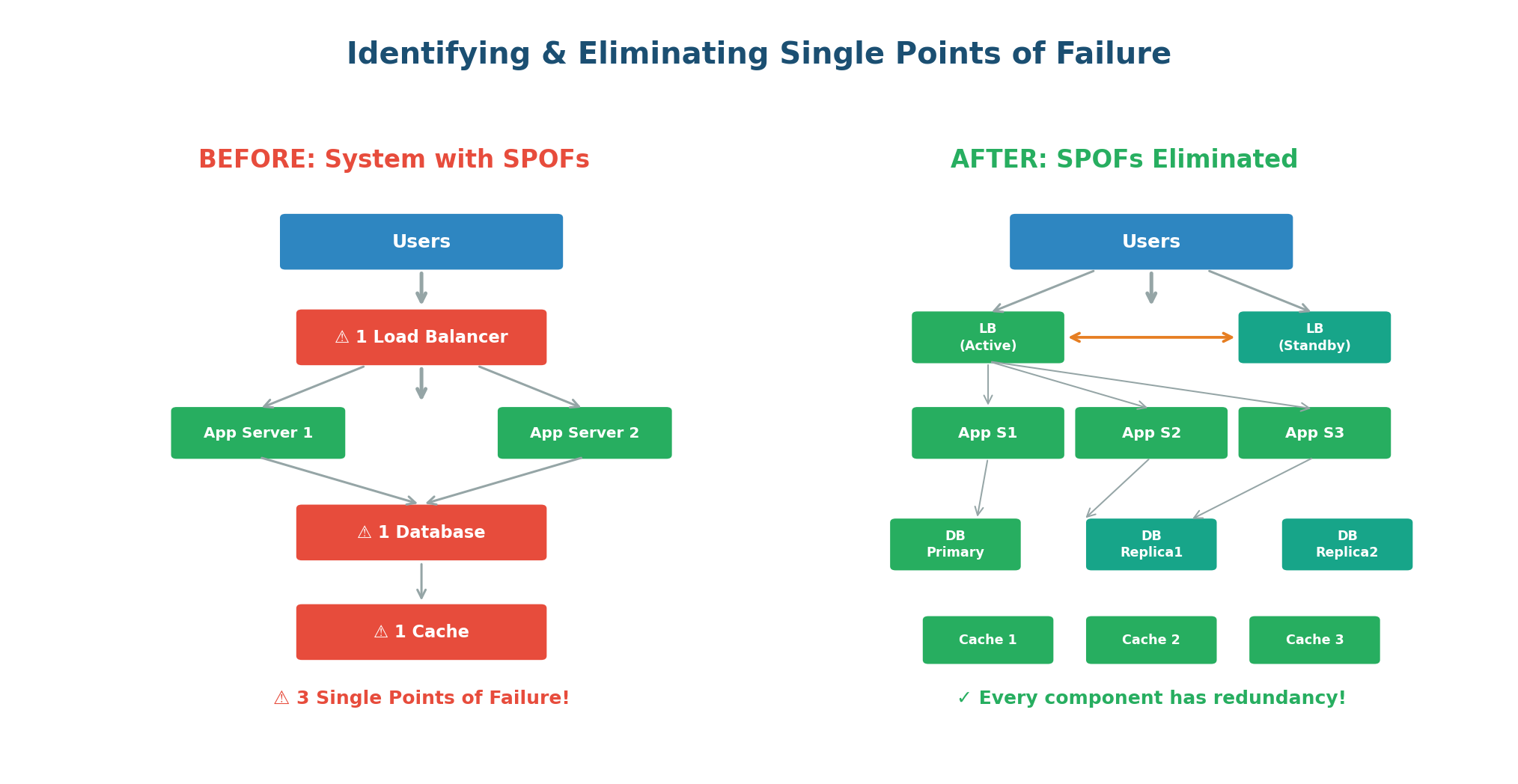
In the "Before" architecture, three components are SPOFs: the single load balancer, the single database, and the single cache. In the "After" architecture, every SPOF has been eliminated. Now, no single component failure can take down the system.
The SPOF Detection Method
Use this systematic approach in any interview:
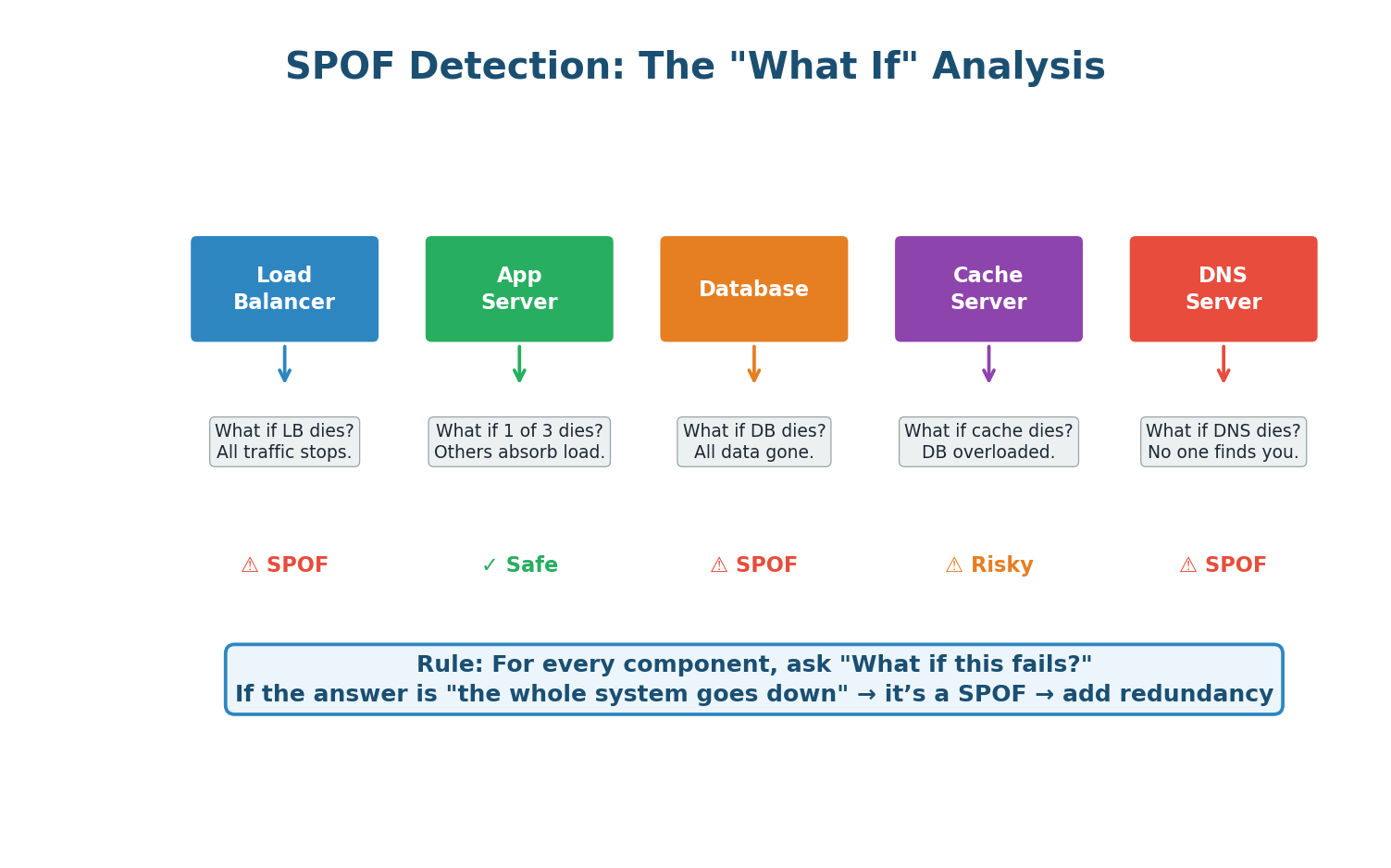
- Draw your complete architecture diagram. Every box is a component: clients, load balancers, servers, databases, caches, message queues, DNS, CDN.
- For each component, ask: "What if this component fails completely?" Write down the impact.
- If the impact is "the system stops working" or "significant degradation," that component is a SPOF.
- For each identified SPOF, add redundancy: a standby pair, a cluster, a replica, or an alternative path.
- Repeat the analysis. Check that your redundancy mechanisms do not introduce new SPOFs.
| Component at Risk | Elimination Strategy |
|---|---|
| Single Load Balancer | Active-passive or active-active LB pair with DNS failover |
| Single Database | Primary + replica cluster with automatic failover |
| Single Cache Node | Redis Cluster or Redis Sentinel (3+ nodes) |
| Single Region | Multi-region active-active or active-passive deployment |
| Single DNS Provider | Multiple DNS providers with health-based routing |
Adding redundancy can create new SPOFs. If you add two load balancers but they both connect through the same network switch, that switch is now a SPOF. If both database replicas are in the same data center, a power outage takes them both down. Always trace your redundancy all the way through.
Putting It Together
How All Four Concepts Connect
Scalability, Availability, Reliability, and SPOF elimination are not independent goals. They form a tightly interconnected web where improving one often improves the others.
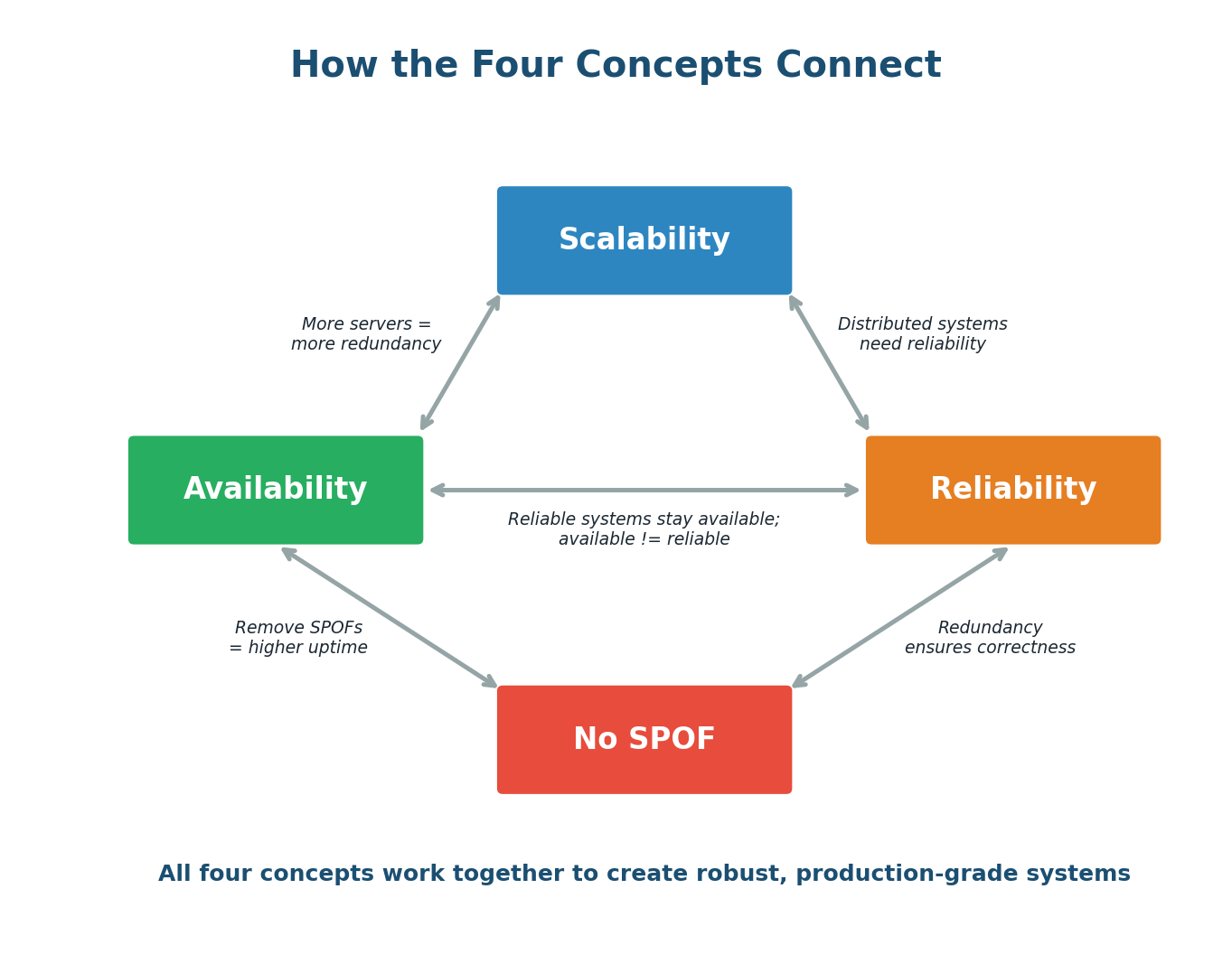
- Scalability enables Availability: Horizontal scaling to 100 servers gives you natural redundancy. Losing one of 100 servers is trivial; losing one of 2 is catastrophic. More servers = more fault tolerance = higher availability.
- Scalability requires Reliability: Distributed systems introduce new failure modes (network partitions, split-brain, data inconsistency). Without reliability patterns, a scaled system becomes fragile.
- SPOF elimination drives Availability: Every SPOF you eliminate removes a way the system can go completely down. Redundant load balancers, database replicas, and multi-region deployment are all SPOF elimination strategies that directly increase availability.
- Reliability reinforces Availability: A system with good reliability patterns (circuit breakers, graceful degradation) stays available even when individual components fail.
- Availability is not Reliability: A system can be available (up and responding) but unreliable (returning wrong data). Always aim for both.
Pre-Class Summary
What You Should Know Before Class 2
Before coming to class, make sure you can confidently answer these questions:
- Scalability: What is the difference between vertical and horizontal scaling? When would you use each? What are the 7 key scalability strategies?
- Availability: What do the "nines" mean? Why does each additional nine cost exponentially more? What are the 8 strategies for achieving high availability?
- Reliability: How is reliability different from availability? What are the 5 layers of defense in depth? What are the key reliability patterns (retry, circuit breaker, idempotency)?
- SPOF: What is a Single Point of Failure? How do you identify them? How do you eliminate them? What is the "hidden SPOF" trap?
- Connections: How do these four concepts reinforce each other? Can you give an example of designing for all four simultaneously?
Want to Land at Google, Microsoft or Apple?
Watch Pranjal Jain's free 30-min training — the exact GROW Strategy that helped 1,572+ engineers go from TCS/Infosys to top product companies with a 3–5X salary hike.