

What's Inside
Part 1
Course Introduction
What Is System Design?
Imagine you are asked to build a house. You would not just start stacking bricks randomly. You would first think about how many rooms you need, where the kitchen should go, how the plumbing connects, and how the electrical wiring runs through the walls. System Design is exactly like that, but for software. It is the process of defining the architecture, components, modules, interfaces, and data flow of a system to satisfy specified requirements.
In the world of software engineering, System Design refers to the art and science of designing the backbone of applications that can handle millions (or even billions) of users, process enormous amounts of data, and remain available around the clock. Think about the applications you use daily: Instagram, YouTube, Amazon, WhatsApp. Under the hood, these are not simple programs running on a single computer. They are massive, distributed systems made up of hundreds or thousands of servers, databases, caches, and queues, all working together seamlessly.
Think of a busy restaurant. The dining area is your frontend (what customers see). The kitchen is your backend (where the work happens). The waiters are your APIs (they carry requests and responses). The pantry is your database (where ingredients are stored). The menu is your interface (it defines what customers can order). If the restaurant gets very popular, you need more kitchens (horizontal scaling), faster chefs (vertical scaling), and maybe even a chain of restaurants across the city (distributed systems). System Design is about planning all of this before you start building.
Why Should You Learn System Design?
1. It Is Critical for Technical Interviews
Almost every major technology company, including Google, Amazon, Meta, Netflix, Microsoft, and Apple, includes System Design as a key round in their interview process. Unlike coding interviews where there is often a single correct answer, System Design interviews test your ability to think broadly, make trade-off decisions, and communicate your architectural reasoning clearly.
2. It Makes You a Better Engineer
Understanding how large-scale systems work gives you a mental model for debugging production issues, evaluating new technologies, and making architectural decisions at work.
3. It Helps You Build Real Products
If you ever want to build your own product or startup, you need to know how to architect a system that can scale. You cannot redesign your entire architecture every time your user base doubles.
4. It Bridges the Gap Between Theory and Practice
Computer Science teaches you algorithms and data structures. System Design teaches you how to put those building blocks together to create real, working, large-scale applications.
How to Approach System Design
There Is No Single Right Answer. Unlike a coding problem where you either pass or fail test cases, System Design is open-ended. Two excellent engineers might design the same system differently, and both designs could be perfectly valid.
Always Start with Requirements. Before drawing any boxes or arrows, ask: What exactly are we building? System Design questions are intentionally vague. Your first job is to clarify:
- Functional Requirements: What should the system do? For example, users should be able to upload photos, follow other users, and see a news feed.
- Non-Functional Requirements: How well should the system perform? For example, 100 million daily active users, less than 200ms latency, 99.99% uptime.
Think in Terms of Trade-Offs. Want faster reads? You might sacrifice write speed. Want higher availability? You might have to accept occasional stale data. The best engineers understand the constraints and make informed compromises.
- Step 1: Clarify requirements (functional and non-functional)
- Step 2: Estimate the scale (users, data, requests per second)
- Step 3: Define the high-level design (draw major components)
- Step 4: Deep-dive into specific components (database choice, caching layer, etc.)
- Step 5: Discuss trade-offs, bottlenecks, and potential improvements
Part 2
Top 30 System Design Concepts
Client-Server Architecture
Almost every web application you use today is built on a fundamental pattern called Client-Server Architecture. This is the starting point for understanding how the internet works.
In this model, there are two main players. The Client is any device or application that makes a request — your web browser, a mobile app, or a command-line tool. The Server is a powerful computer that receives these requests, processes them, and sends back a response.
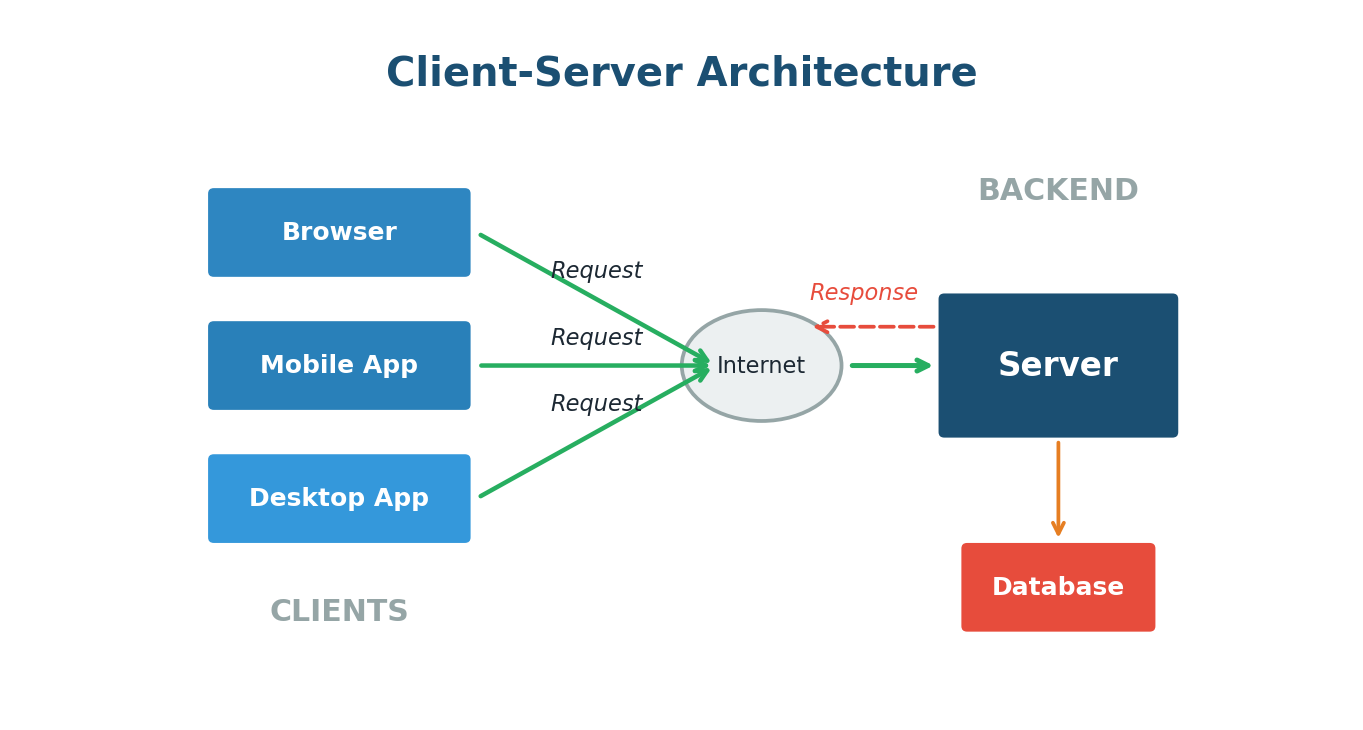
The beauty of this model is the separation of concerns. The client handles the user interface and experience. The server handles business logic, data storage, and heavy processing. This separation means you can update the server without changing the client, and vice versa.
When you open the Zomato app on your phone, your phone is the client. It sends a request to Zomato's servers asking for the list of restaurants near you. The server receives this request, looks up restaurants in your area from its database, and sends the list back to your phone. Every tap you make — viewing a menu, placing an order, tracking delivery — follows this same request-response cycle.
Client-Server Architecture is the backbone of the modern internet. The client asks, the server answers. This simple model scales to handle billions of interactions daily across every major web application.
IP Addresses and DNS
Every device connected to the internet has a unique identifier called an IP (Internet Protocol) Address. Think of it like a postal address for your computer. When you visit a website, your computer needs to know the exact IP address of the server hosting that website.
But IP addresses are numbers like 142.250.190.46. Nobody wants to type numbers every time they visit a website. This is where DNS comes in.
Domain Name System (DNS) is essentially the phonebook of the internet. It translates human-readable domain names (like google.com) into the numerical IP addresses that computers use.
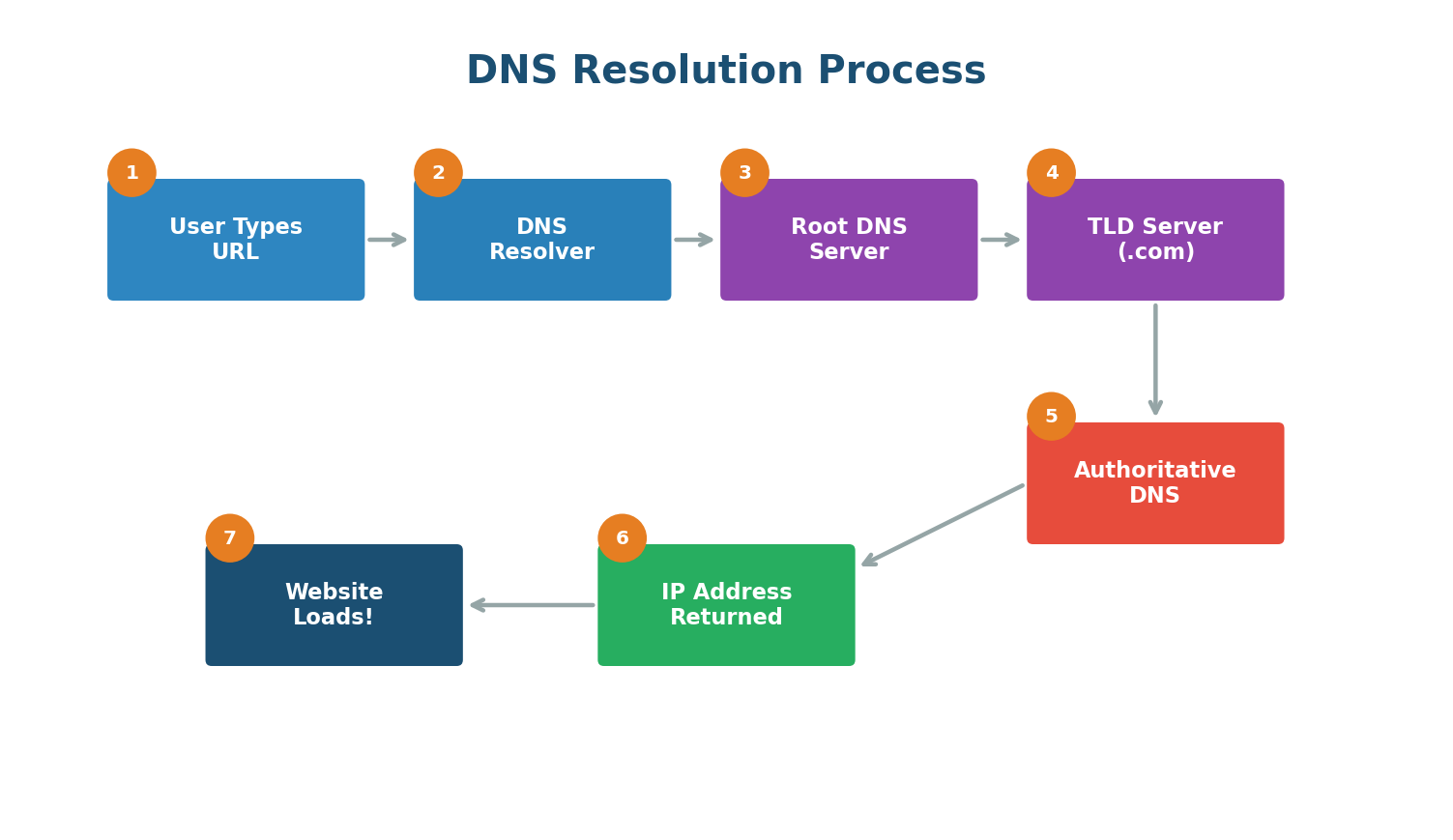
When you type www.google.com into your browser, a complex but lightning-fast process happens:
- Your browser checks its local cache to see if it already knows the IP address.
- If not found, it asks your operating system, which checks its own cache.
- The request goes to a DNS Resolver (usually provided by your ISP or a service like Google DNS at 8.8.8.8).
- The resolver queries the Root DNS Servers, which direct it to the appropriate TLD server (for .com, .org, etc.).
- The TLD server points to the Authoritative DNS Server for google.com.
- The authoritative server returns the actual IP address.
- Your browser can now connect to that IP and load the website.
In October 2021, Facebook experienced a massive outage lasting about six hours. The root cause was a DNS configuration error. Because DNS stopped resolving facebook.com, instagram.com, and whatsapp.com, billions of users worldwide could not access these services. The servers were running fine — but nobody could find them because the phonebook was broken.
APIs (Application Programming Interfaces)
An API is a contract between two pieces of software that defines how they communicate. If Client-Server Architecture tells you who is talking, APIs define what they are saying and how they are saying it.
Think of an API like a waiter in a restaurant. You (the client) do not go into the kitchen to cook your food. Instead, you give your order to the waiter (the API), who takes it to the kitchen (the server), and brings back your food (the response).
REST APIs are the most common API design pattern on the web. They use standard HTTP methods:
| HTTP Method | Purpose | Real-World Example |
|---|---|---|
GET | Retrieve data | GET /users/123 fetches user 123's profile |
POST | Create new data | POST /tweets creates a new tweet |
PUT | Update existing data | PUT /users/123 updates user 123's profile |
DELETE | Remove data | DELETE /tweets/456 deletes tweet 456 |
GraphQL is a newer alternative to REST, developed by Facebook. Instead of multiple endpoints, GraphQL provides a single endpoint where the client specifies exactly what data it needs — solving over-fetching and under-fetching.
gRPC is a high-performance API framework by Google. It uses Protocol Buffers (a compact binary format) and HTTP/2, making it significantly faster. Widely used for internal communication between microservices.
Databases: SQL vs NoSQL
Every application needs to store data. The two major categories are SQL (relational) and NoSQL (non-relational), and choosing between them is one of the most important design decisions you will make.
SQL databases store data in structured tables with predefined schemas. Each table has rows and columns, and tables can be linked together through relationships. Examples: MySQL, PostgreSQL, Oracle. They follow ACID properties and guarantee strong consistency.
NoSQL databases were born from the need for greater flexibility and scalability. They come in several flavors:
- Key-Value Stores (Redis, DynamoDB): The simplest model. Blazing fast for lookups.
- Document Stores (MongoDB, CouchDB): Store data as flexible JSON-like documents.
- Column-Family Stores (Cassandra, HBase): Organize data by columns. Excellent for massive distributed datasets. Used by Netflix and Uber.
- Graph Databases (Neo4j, Amazon Neptune): Designed for data with complex relationships, like social networks.
| Feature | SQL Databases | NoSQL Databases |
|---|---|---|
| Schema | Fixed, predefined | Flexible, dynamic |
| Scaling | Primarily vertical | Primarily horizontal |
| Consistency | Strong (ACID) | Eventual (BASE) |
| Best For | Transactions, relationships | Large scale, flexible data |
| Examples | MySQL, PostgreSQL | MongoDB, Redis, Cassandra |
Banking system? Use SQL (PostgreSQL). You need ACID transactions to ensure that when money moves from Account A to Account B, both operations either succeed together or fail together.
Social media feed? Use NoSQL (MongoDB or Cassandra). You need the flexibility to handle varied content types and the scalability to serve millions of users.
Vertical Scaling vs Horizontal Scaling
When your application grows and starts getting more traffic than a single server can handle, you need to scale. There are two fundamental approaches.
Vertical Scaling (Scaling Up) means making your existing server more powerful by adding more CPU, RAM, or storage. It is like replacing your sedan with a sports car. Simple — no code changes needed — but there is a hard limit and it creates a single point of failure.
Horizontal Scaling (Scaling Out) means adding more servers to handle the load. Instead of one powerful server, you have ten (or a hundred) smaller servers working together. Virtually unlimited scaling and no single point of failure, but much more complex to manage.
Netflix serves over 200 million subscribers worldwide. They use horizontal scaling extensively, running thousands of servers on AWS. During peak hours (like a big new show release), they automatically spin up additional servers and scale back down afterwards. This would be impossible with vertical scaling alone.
Load Balancing
Once you have multiple servers (horizontal scaling), you need a way to distribute incoming requests across them. This is exactly what a Load Balancer does. It sits between the clients and your pool of servers, receiving all incoming requests and forwarding each one to an appropriate server.
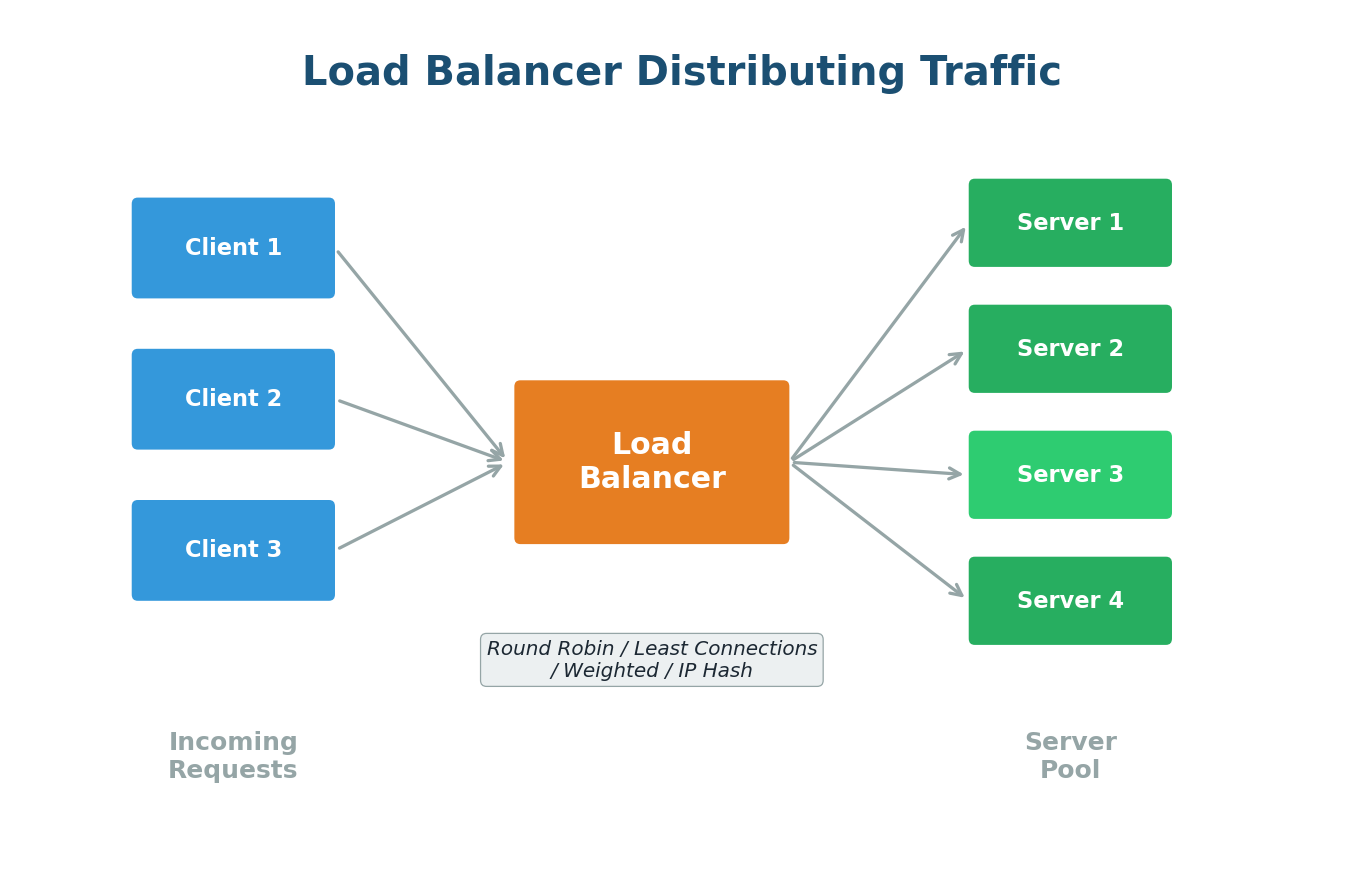
Common Load Balancing Algorithms:
- Round Robin: Requests distributed sequentially — Server 1, Server 2, Server 3, repeat. Like dealing cards.
- Weighted Round Robin: Powerful servers get more requests based on their capacity.
- Least Connections: Sends requests to the server with the fewest active connections. Better for varying processing times.
- IP Hash: Client's IP determines the server, ensuring session persistence.
When you visit amazon.com during Prime Day, their load balancers distribute millions of concurrent requests across thousands of servers. If a server starts responding slowly, the load balancer automatically routes fewer requests to it and more to healthier servers.
Load balancers are not optional in production systems. They improve availability, performance, and reliability. Popular options include NGINX, HAProxy, and AWS Elastic Load Balancer.
Caching
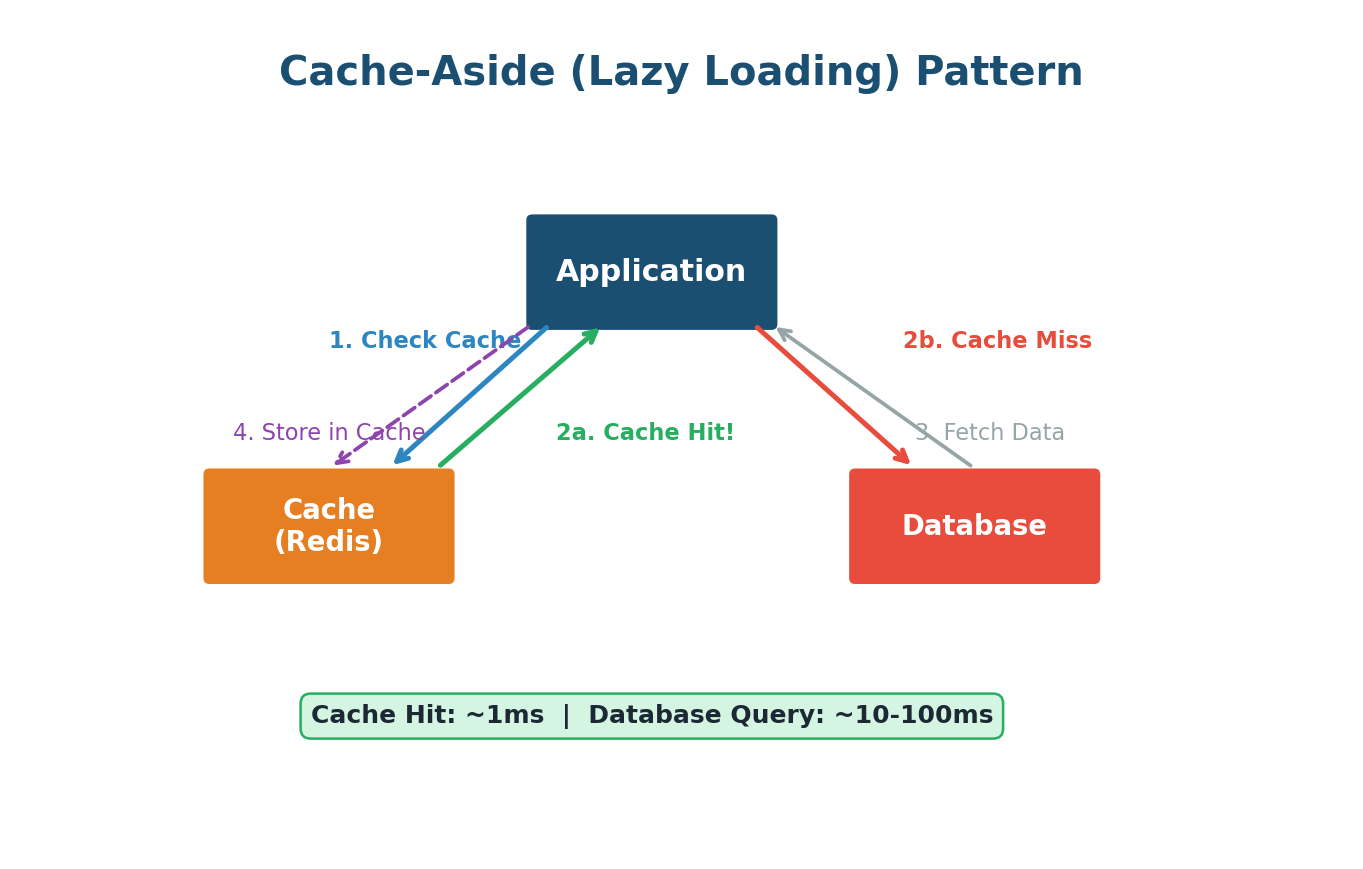
Caching is one of the most powerful performance optimization techniques in System Design. The core idea: store frequently accessed data in a fast, temporary storage layer so you do not have to fetch it from the slower original source every time. Think of it like writing a formula on a sticky note instead of flipping through the textbook each time.
Types of Caches:
- Browser Cache: Your browser stores images, CSS, and JavaScript locally for fast revisits.
- Distributed Cache (Redis, Memcached): A shared cache accessible by multiple servers. Redis can serve millions of read operations per second.
- CDN Cache: Caches static content at servers geographically close to users.
Caching Strategies:
- Cache-Aside (Lazy Loading): Check cache first. On miss, fetch from DB, store in cache, return. Most common strategy.
- Write-Through: Every write goes to both cache and database simultaneously. Always up-to-date but adds write latency.
- Write-Back: Writes go to cache first, then async to database. Very fast writes, but risk of data loss on cache crash.
Cache Eviction Policies:
- LRU (Least Recently Used): Removes data not accessed for the longest time. Most commonly used.
- LFU (Least Frequently Used): Removes data accessed the fewest times.
- TTL (Time to Live): Data automatically expires after a set duration.
When a celebrity posts a tweet, millions try to see it simultaneously. Twitter caches popular tweets in Redis. Your timeline loads from cache in milliseconds, not from the database (which could take hundreds of milliseconds).
Content Delivery Network (CDN)
A CDN is a network of servers distributed across the globe that delivers content to users from the server geographically closest to them. The primary goal is to reduce latency.
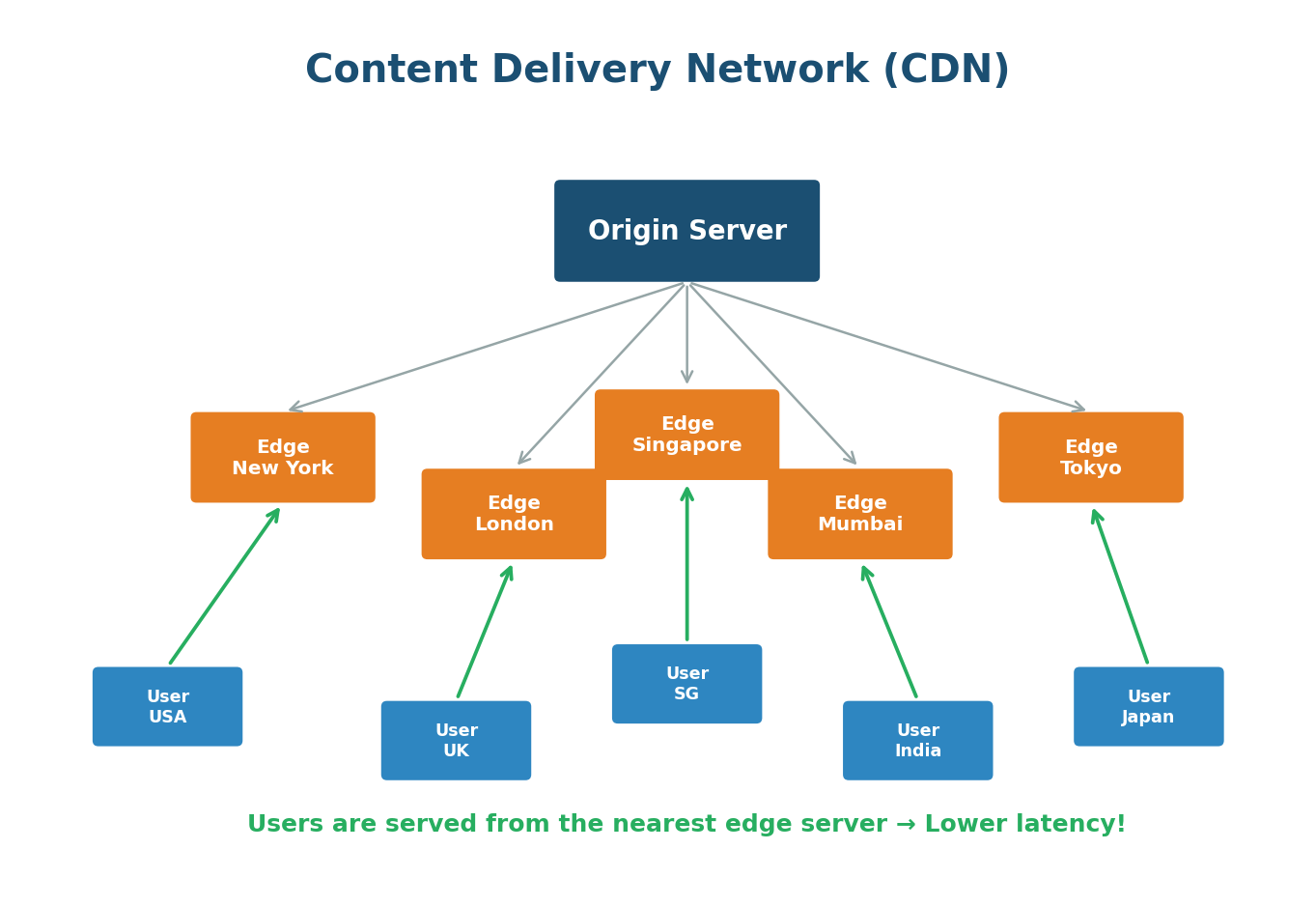
What CDNs Cache:
- Static content: images, videos, CSS files, JavaScript files, fonts
- Dynamic content: some CDNs can also cache API responses and dynamic HTML
- Streaming content: video chunks for services like Netflix and YouTube
Netflix built its own CDN called Open Connect. They place custom hardware servers inside ISP data centers worldwide. When you stream a movie, it comes from a server physically close to you — often within your own ISP's network. This is how Netflix delivers smooth 4K streaming to 200+ million users globally.
Cloudflare, AWS CloudFront, Akamai, Fastly, and Google Cloud CDN. Cloudflare alone handles more than 20% of all internet traffic.
Proxies (Forward and Reverse)
A proxy is an intermediary server that sits between a client and a destination server, forwarding requests and responses between the two.
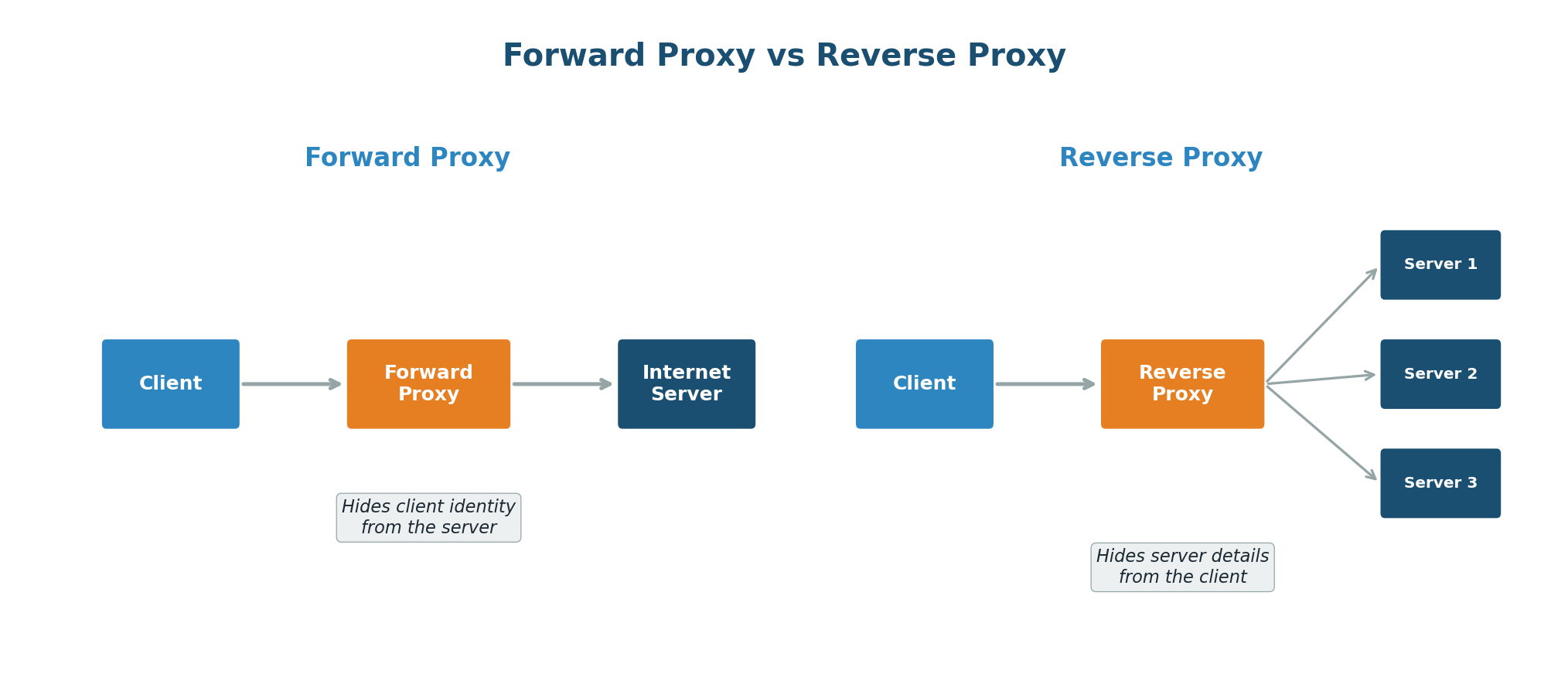
Forward Proxy sits between clients and the internet. The destination server sees the proxy's IP, not the client's. Used for anonymity, content filtering, and bypassing geographic restrictions.
Reverse Proxy sits in front of web servers. The client never knows about backend servers. Used for load balancing, SSL termination, caching, security, and compression. When you visit a website, you are almost certainly talking to a reverse proxy (like NGINX or Cloudflare).
Forward Proxy is like a personal assistant who makes phone calls on your behalf. The person you are calling only interacts with your assistant. Reverse Proxy is like a company's receptionist — when you call a company, the receptionist figures out which department should handle your call and transfers you. You never directly dial individual employees.
CAP Theorem
The CAP Theorem is one of the most important theoretical foundations in distributed systems. It states that in any distributed data store, you can only guarantee two out of three properties simultaneously:
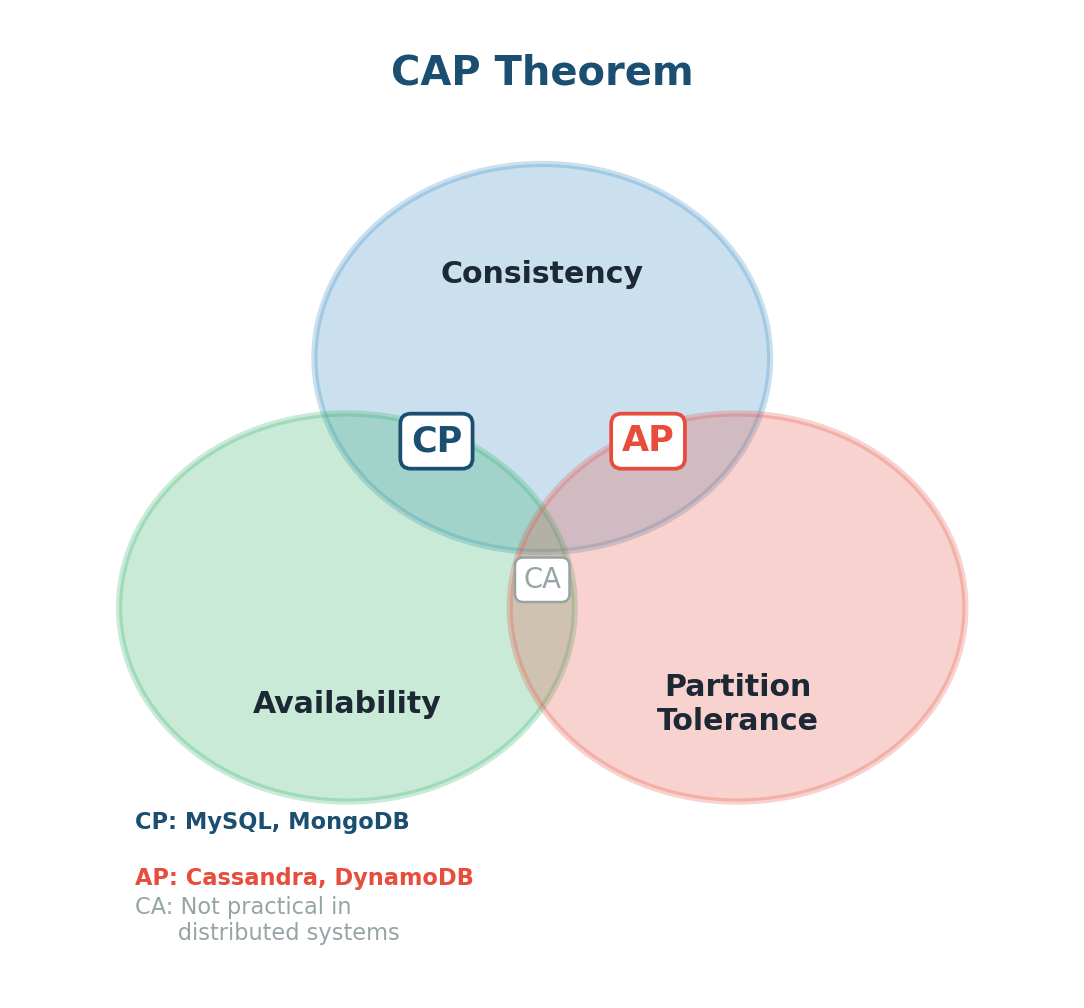
- Consistency (C): Every read receives the most recent write. All nodes see the same data at the same time.
- Availability (A): Every request receives a response, even if the data might not be the most recent.
- Partition Tolerance (P): The system continues to function even when there is a network failure between nodes.
Since network failures are inevitable in real-world distributed systems, Partition Tolerance is always required. The real choice is between Consistency and Availability:
| Choice | Behavior | Example |
|---|---|---|
| CP | Data always correct, may reject requests during failures | Banking systems, MySQL |
| AP | Always responds, may return stale data during failures | Social media feeds, Cassandra |
In a chat app like WhatsApp, you might prioritize AP. Users should always be able to send messages, even if the network between data centers is temporarily broken. A banking app would prioritize CP: you never want two ATMs showing different balances for the same account.
ACID Transactions
ACID is a set of properties that guarantee reliable processing of database transactions. It is the gold standard for data integrity in SQL databases:
- Atomicity: All-or-nothing. Either all operations succeed, or none do. A bank transfer either moves money completely, or not at all.
- Consistency: A transaction brings the database from one valid state to another. All rules are maintained.
- Isolation: Concurrent transactions do not interfere with each other.
- Durability: Once committed, data is permanently saved, even if the system crashes immediately after.
When you place an order on Amazon, several things must happen atomically: reduce stock, charge your card, create the order, trigger confirmation. ACID ensures that if the credit card charge fails, the stock count is not reduced and no order is created. Everything rolls back.
Data Replication
Data Replication is the practice of storing copies of the same data on multiple servers (replicas). It improves availability (if one server dies, others have the data) and performance (read requests can be distributed across replicas).
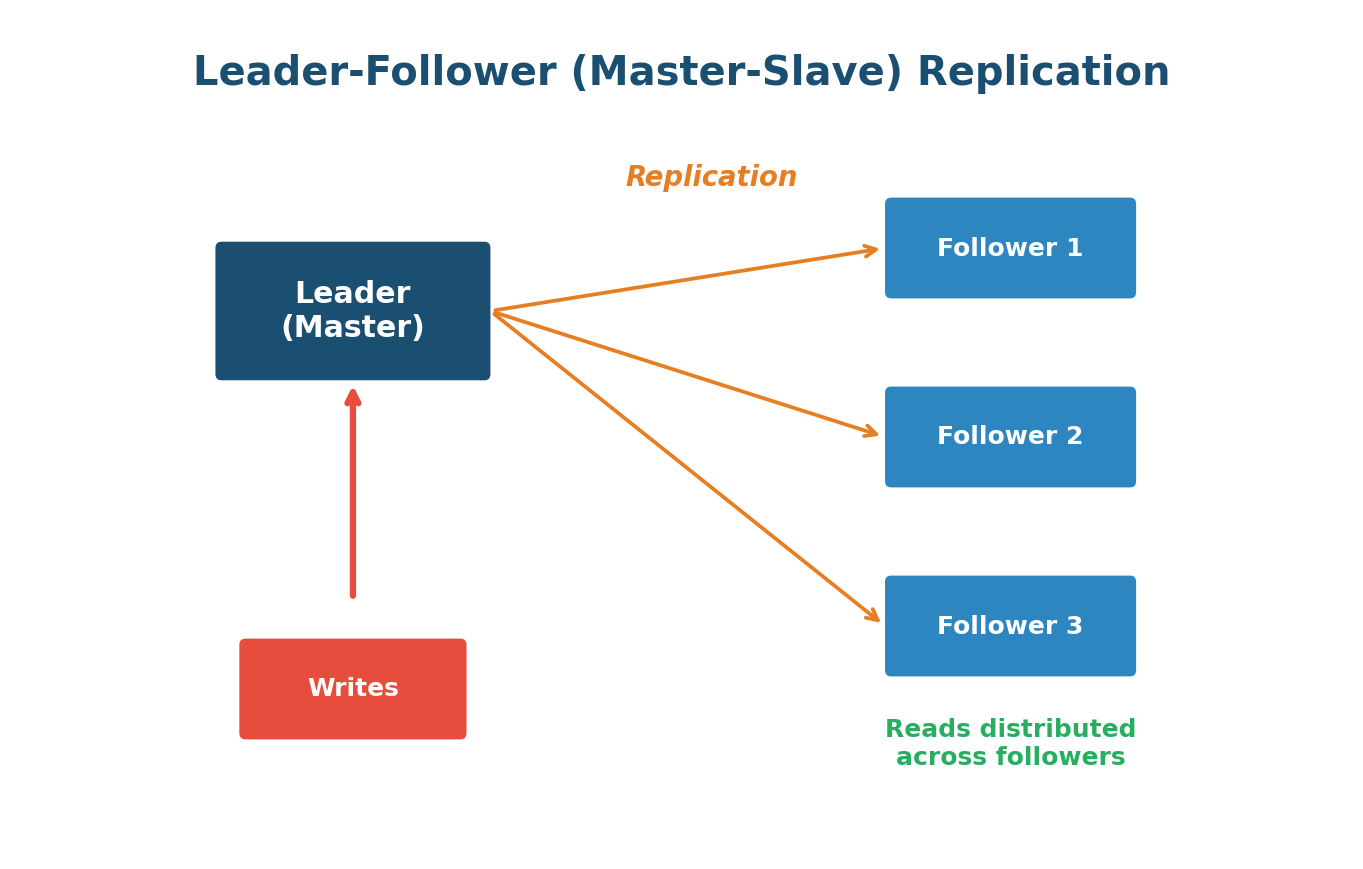
Leader-Follower (Master-Slave) Replication: One server is the Leader — all writes go there. Changes replicate to Followers. Read operations can be served by any follower, distributing the read load. Simple but has replication lag and requires failover if the leader goes down.
Leader-Leader (Multi-Master) Replication: Multiple servers accept writes, each replicating changes to the others. Higher write availability but complex conflict resolution when two leaders receive conflicting writes simultaneously.
YouTube has far more reads than writes. A video upload goes to the leader, which replicates to followers worldwide. When millions watch that video, reads are served by whichever follower is closest.
Data Partitioning (Sharding)
When your database grows so large that a single server cannot handle it, you split the data across multiple servers. This is Sharding. Think of a library splitting across multiple buildings by subject.
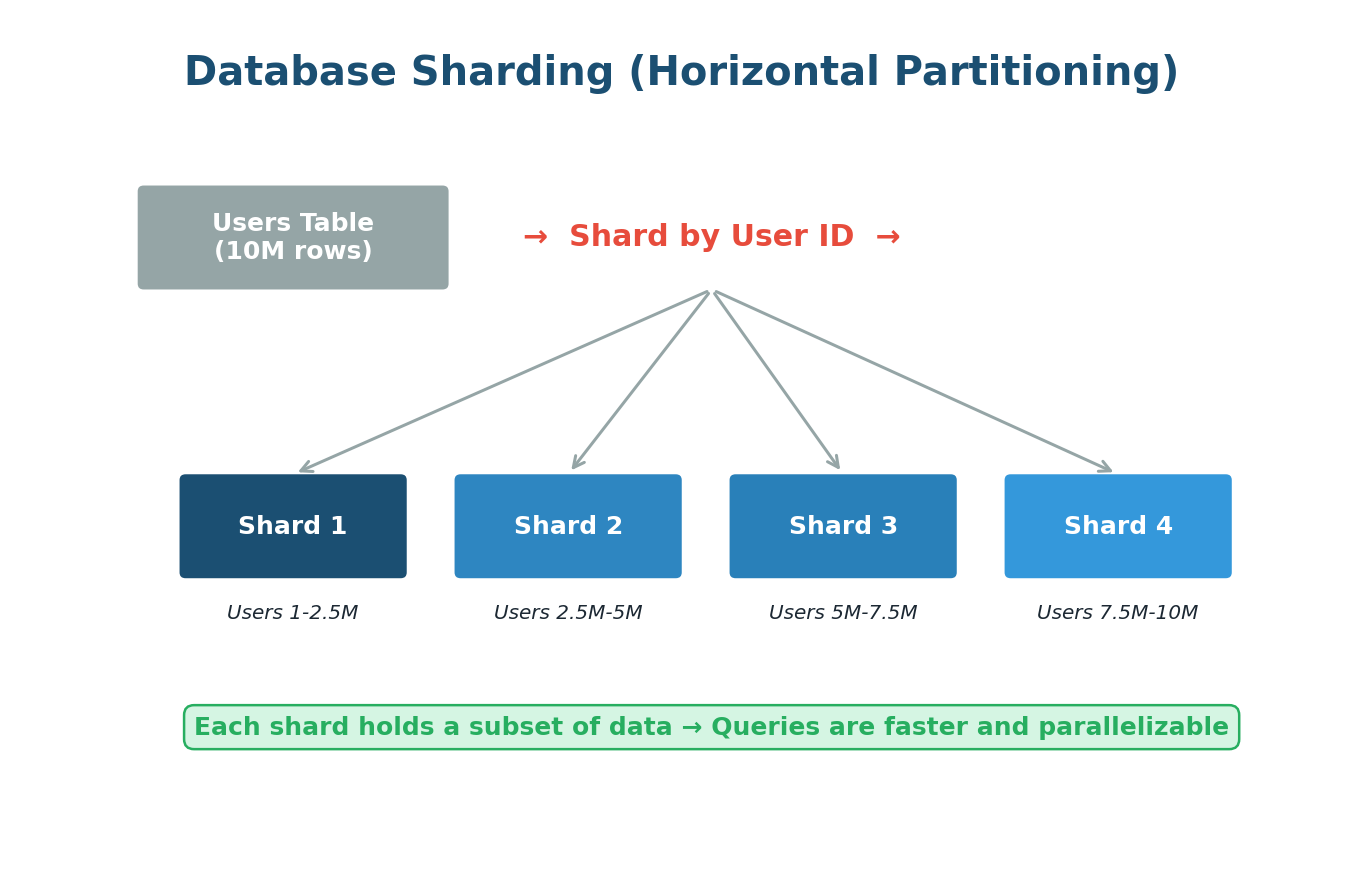
Sharding Strategies:
- Range-Based Sharding: Users A-M go to Shard 1, N-Z to Shard 2. Simple but can lead to uneven distribution (hotspots).
- Hash-Based Sharding: A hash function determines the shard. More uniform distribution but makes range queries difficult.
- Directory-Based Sharding: A lookup table maps each piece of data to its shard. Flexible but introduces a single point of failure.
Instagram stores billions of photos. They shard data by User ID. When you upload a photo, it goes to the shard responsible for your User ID. When viewing your profile, only your specific shard is queried, not the entire database.
Cross-shard queries become difficult, multi-shard transactions are complex, and rebalancing data when adding new shards is non-trivial. Use sharding only when you genuinely need it.
Consistent Hashing
Consistent Hashing solves a critical problem: how to distribute data across multiple servers while minimizing disruption when servers are added or removed. With regular hashing (hash(key) % N), adding a server changes N and remaps almost all keys. Consistent hashing avoids this.
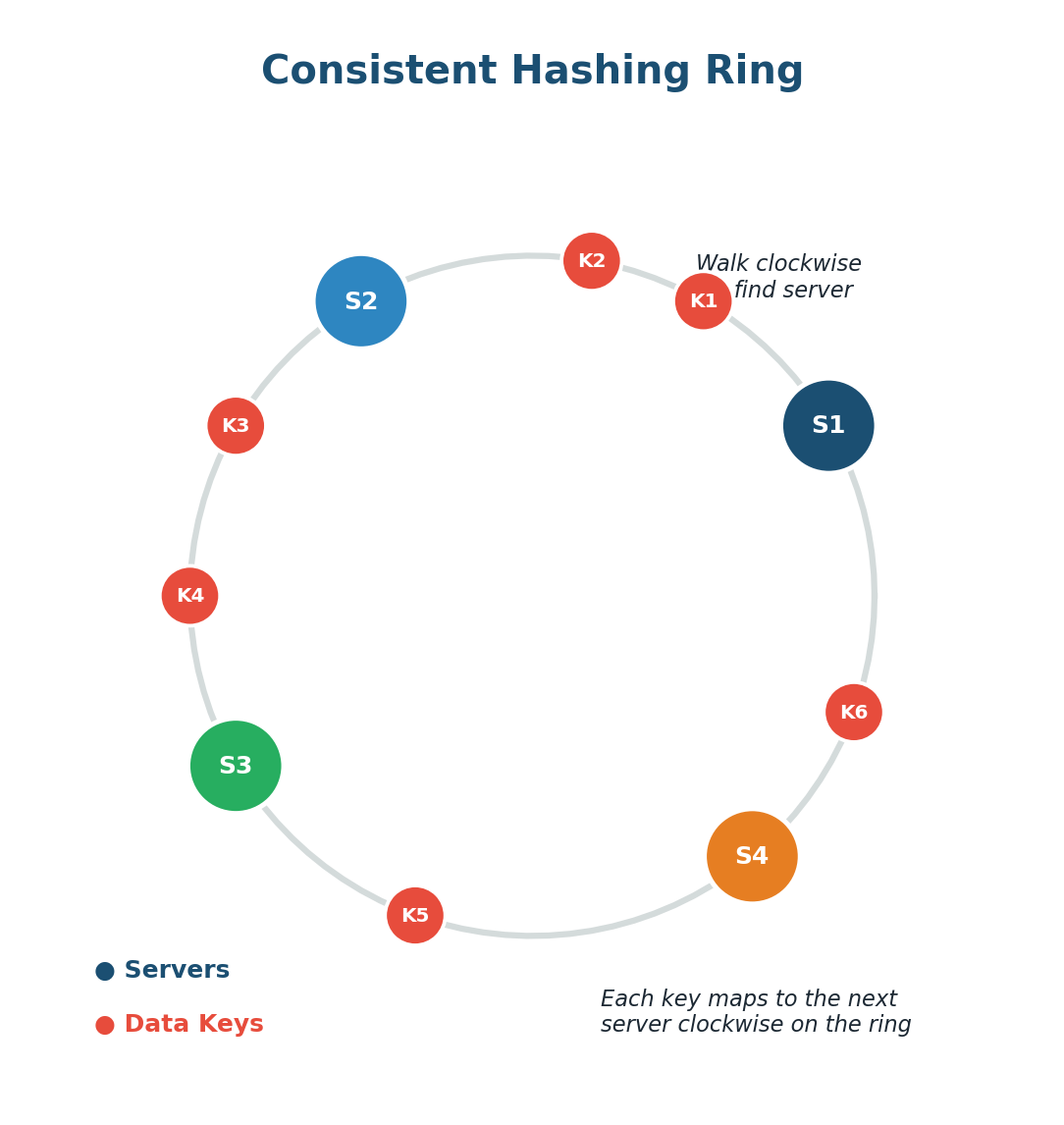
How It Works: Imagine a circular number line (a ring). Both servers and data keys are hashed onto positions on this ring. To find which server stores a key, walk clockwise from the key's position until you find a server. When you add a new server, only keys between it and the previous server are remapped. The rest stay put.
Virtual Nodes: Each physical server maps to multiple positions on the ring (virtual nodes), ensuring a more balanced distribution of keys across servers.
DynamoDB uses consistent hashing to distribute data. When Amazon adds a new storage node, only a small fraction of data moves to the new node. The rest stays exactly where it is, allowing DynamoDB to scale seamlessly to serve millions of requests per second.
Database Indexing
A database index dramatically speeds up data retrieval at the cost of additional storage and slightly slower writes. Without an index, the database must scan every row (full table scan). With an index, it jumps directly to the relevant rows.
How Indexes Work: Most databases use B-Trees for indexes. This tree structure keeps data sorted and allows searches in logarithmic time. Instead of scanning millions of rows, the database traverses a tree just a few levels deep. Hash Indexes are extremely fast for exact-match lookups but do not support range queries.
If you want to find "photosynthesis" in a textbook, you could read the whole book (full table scan) or check the index at the back which says page 147 (database index). The index takes extra pages (storage) but saves enormous time.
Index columns frequently used in WHERE clauses, JOINs, and ORDER BY. Do not index everything — each index slows down writes. Read-heavy tables benefit greatly; write-heavy tables need indexes chosen carefully.
Message Queues
A Message Queue allows different parts of a system to communicate asynchronously. Instead of Service A directly calling Service B, Service A places a message in a queue, and Service B picks it up when ready. Think of it like a mailbox.
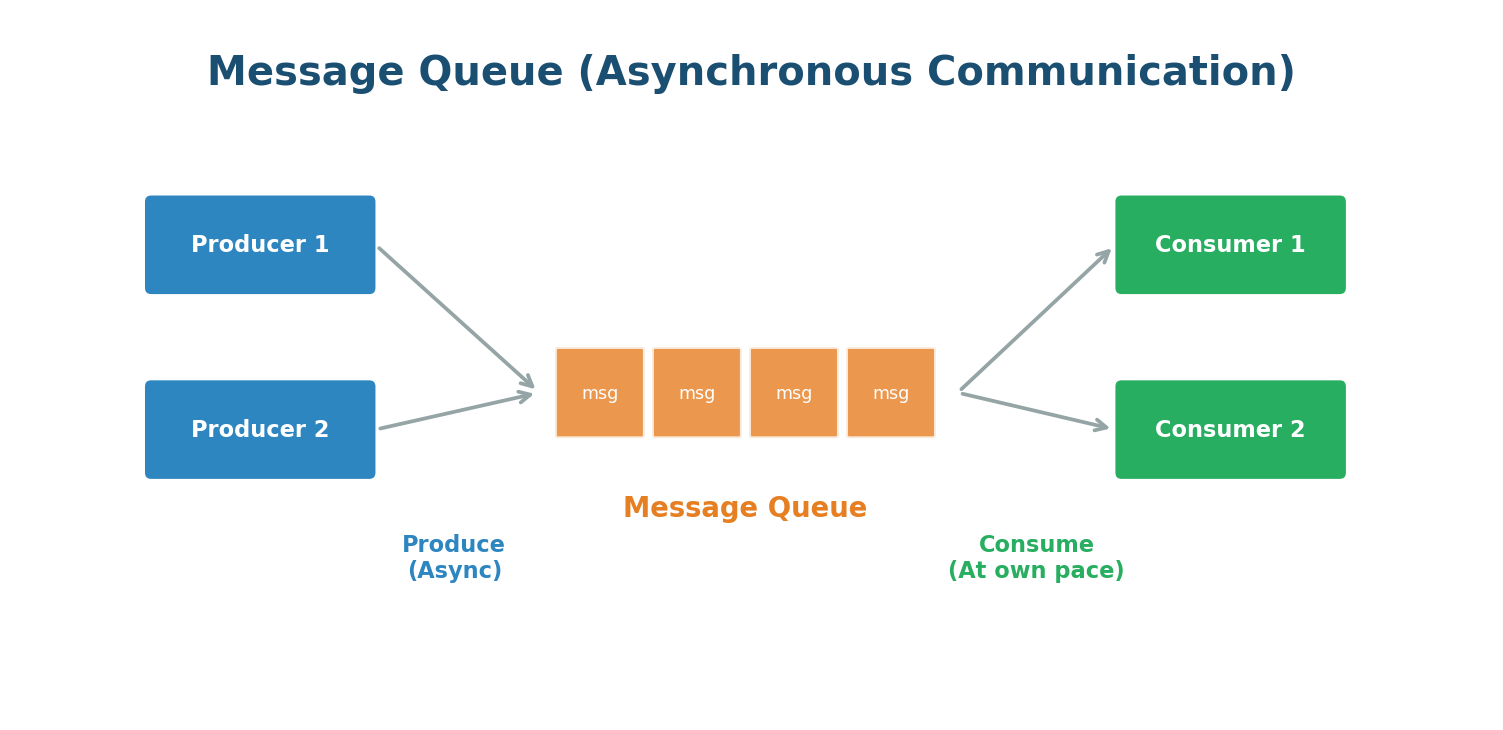
Key Benefits:
- Decoupling: Services do not need to know about each other. Either side can be updated or scaled independently.
- Buffering: If the consumer is slow, messages pile up instead of overwhelming it.
- Resilience: If the consumer crashes, messages remain safely in the queue until recovery.
Popular message queue systems include RabbitMQ, Amazon SQS, Apache Kafka, and Redis.
When you place an order, the system confirms it immediately and places messages in a queue for payment processing, inventory update, warehouse notification, and email. Separate services handle each step independently. You get confirmation in milliseconds while backend work happens asynchronously.
Publish-Subscribe (Pub/Sub)
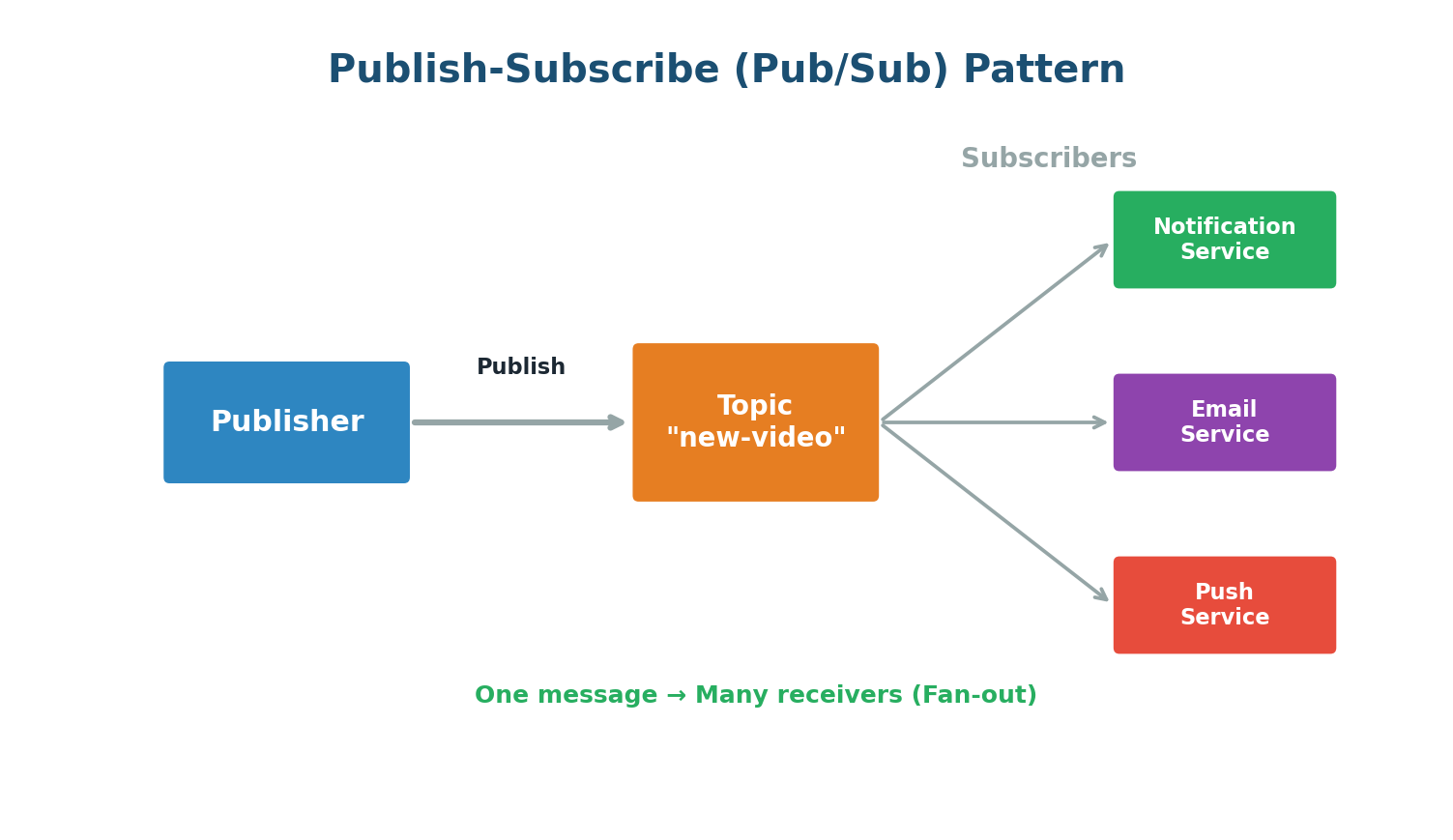
Pub/Sub is a messaging pattern where publishers send messages to a topic, and any number of subscribers receive them. Unlike a traditional queue where each message is consumed by one consumer, in Pub/Sub a single message can be delivered to many subscribers simultaneously.
Popular Pub/Sub systems include Apache Kafka, Google Cloud Pub/Sub, Amazon SNS, and Redis Pub/Sub.
When a YouTuber uploads a new video, a message is published to a topic. YouTube's notification service, email service, and push service are all subscribed. Each independently receives the message and acts. If YouTube adds SMS notifications later, they just subscribe a new service — the upload process does not change.
API Gateway
An API Gateway is a server that acts as the single entry point for all client requests in a multi-service system. Instead of clients communicating with dozens of microservices directly, they send all requests to the gateway, which routes them appropriately.
What an API Gateway Does:
- Request Routing: Routes requests to the correct backend service based on URL path, headers, or other criteria.
- Authentication & Authorization: Verifies identity and permissions once at the gateway level.
- Rate Limiting: Prevents any single client from overwhelming the system.
- Response Aggregation: Fans out to multiple services, collects responses, and returns a unified response.
- SSL Termination: Handles HTTPS encryption so backend services can communicate over plain HTTP internally.
Netflix processes billions of API requests daily through their API Gateway (originally Zuul). It handles authentication, routing, failure monitoring, and throttling. Without it, every client would need addresses of dozens of internal services.
Microservices Architecture
Microservices Architecture builds a large application as a collection of small, independent services, each responsible for a specific business function, running in its own process, and communicating over the network via APIs.
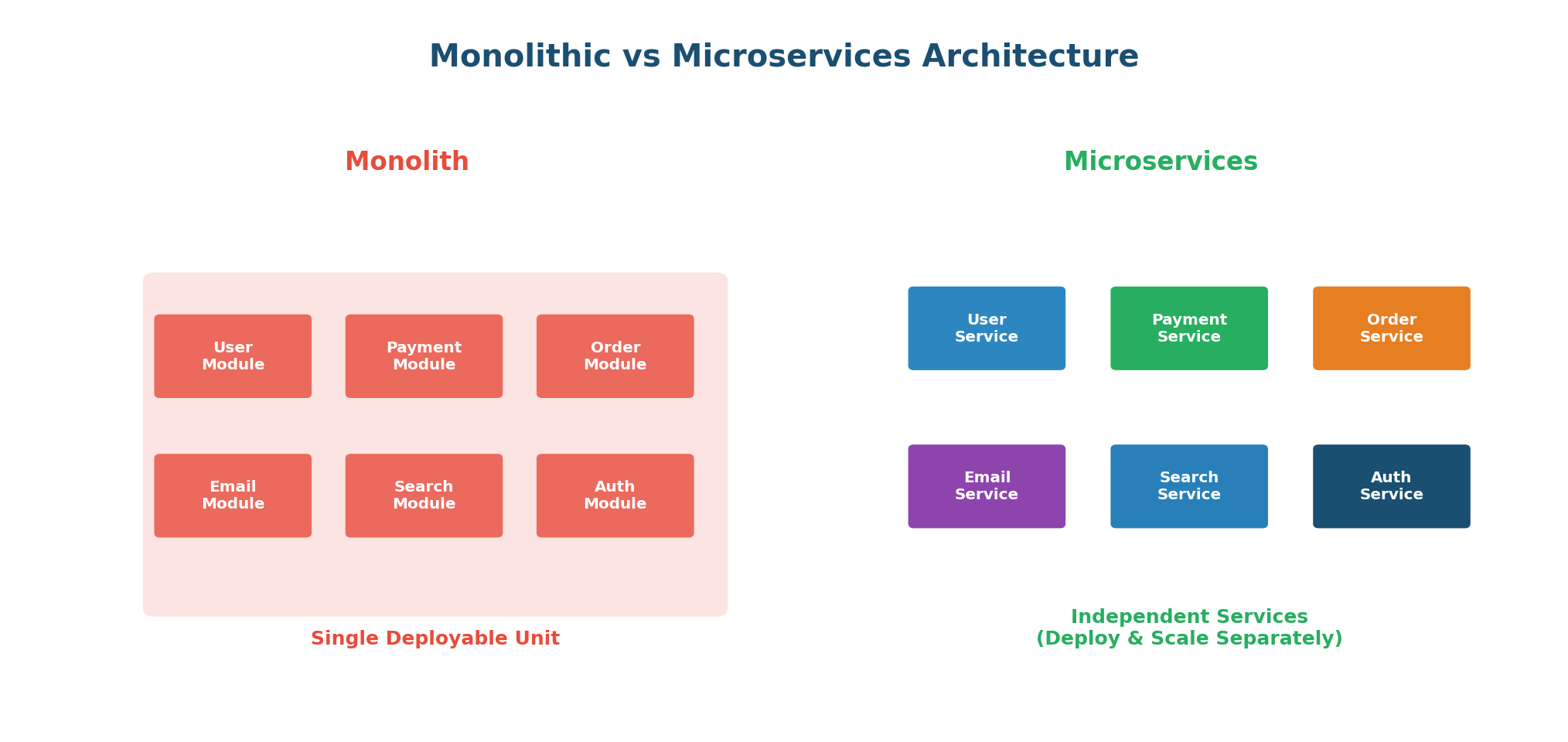
| Aspect | Monolithic | Microservices |
|---|---|---|
| Deployment | Entire app as one unit | Each service independently |
| Scaling | Scale everything together | Scale individual services |
| Technology | Single tech stack | Each service can differ |
| Failure Impact | One bug can crash all | Failure isolated to one service |
| Complexity | Simple to start | Complex to start, easier to evolve |
Amazon started as a monolith. As they grew, deploying changes became difficult because a small change required redeploying everything. They decomposed into hundreds of microservices: product catalog, orders, payments, recommendations. Each team owns their services and deploys independently, multiple times per day.
Do not start with microservices. Start with a monolith and decompose as your team and product grow. Microservices add significant operational complexity. For a small team or new product, this complexity is not worth it.
Rate Limiting
Rate Limiting controls how many requests a client can make within a given time period. It prevents abuse, ensures fair usage, and protects servers from being overwhelmed.
Common Algorithms:
- Token Bucket: A bucket holds tokens; each request consumes one. Tokens are added at a fixed rate. Allows bursts up to bucket capacity. Most widely used.
- Leaky Bucket: Requests enter a queue and are processed at a fixed rate, smoothing burst traffic into a steady flow.
- Fixed Window: Divides time into fixed intervals and counts requests per window. Simple but allows bursts at window boundaries.
- Sliding Window: A rolling window that smooths out the boundary issue. More accurate but slightly more complex.
Twitter limits API requests per 15-minute window (e.g., 900 reads per window). Exceeding the limit returns a 429 Too Many Requests error. This prevents bots from consuming disproportionate resources.
WebSockets
WebSockets provide full-duplex, bidirectional communication over a single, long-lived TCP connection. Unlike HTTP (where the client must initiate every interaction), WebSockets let both sides send data at any time. HTTP is like sending letters; WebSockets are like a phone call.
When to Use WebSockets:
- Real-time chat (WhatsApp Web, Slack, Discord)
- Live sports scores and stock tickers
- Multiplayer online games
- Collaborative editing (Google Docs)
- Live notifications and alerts
In Fortnite, players need to see movements in real-time. With WebSockets, the server pushes updates to all clients the instant something changes. No need for clients to keep asking "has anything changed?"
Long Polling vs Short Polling
Short Polling: The client repeatedly sends requests at fixed intervals (e.g., every 2 seconds). Most responses are empty. Simple but wasteful.
Long Polling: The client sends a request, and the server holds it open until there is new data. Reduces empty responses but ties up server resources.
| Feature | Short Polling | Long Polling | WebSockets |
|---|---|---|---|
| Connection | New each request | Held until data | Persistent |
| Latency | Up to interval delay | Near real-time | True real-time |
| Server Load | High (many empty) | Medium | Low (efficient) |
| Use Case | Low-frequency updates | Notifications | Chat, gaming, live data |
Heartbeat
In distributed systems, a Heartbeat is a periodic signal between components to indicate they are still operational. Like a doctor checking a pulse: a steady pulse means alive, a missing pulse means trouble.
- Push-Based: Each server sends "I am alive" signals to a monitor at regular intervals. Missing heartbeats trigger failure detection.
- Pull-Based: A monitoring service periodically pings each server. No response within timeout means the server is considered down.
Kubernetes monitors every container using liveness probes (heartbeats). If a container does not respond, Kubernetes automatically restarts it. Readiness probes check if a container is ready to serve traffic — if not, traffic is routed away. This is how Kubernetes maintains high availability automatically.
Checksums
When data travels across networks or is stored on disks, it can get corrupted. A Checksum is a small piece of data computed using a hash function (like MD5, SHA-256) used to verify data integrity. Compute before sending, recompute after receiving. If they match, data is intact.
When you download a Linux ISO, the website shows a SHA-256 checksum. After downloading, you compute the checksum and compare. If they match, the file is intact. Amazon S3 and HDFS use checksums internally to detect and repair corruption automatically.
Bloom Filters
A Bloom Filter is a space-efficient probabilistic data structure that tells you whether an element is "possibly in a set" or "definitely not in a set." It can have false positives but never false negatives.
How It Works: It uses a bit array and multiple hash functions. To add an element, pass it through all hash functions and set those bit positions to 1. To check membership, verify all positions are 1. If any is 0, the element is definitely not in the set. If all are 1, it is probably in the set (but might be a false positive).
Chrome uses a local Bloom Filter of known malicious URL hashes. When you visit a site, Chrome checks the filter locally. If it says "definitely not malicious," Chrome proceeds instantly. If it says "possibly malicious," Chrome does a more expensive server check. This keeps browsing fast while maintaining security.
Latency vs Throughput
- Latency: Time to complete a single operation. How long from click to response? Measured in ms. Lower is better.
- Throughput: Operations completed per unit time. How many requests per second? Higher is better.
Latency = speed of a single car. Throughput = number of cars per hour the highway handles. You can have a fast car on a narrow road (low latency, low throughput) or slow cars on a superhighway (high latency, high throughput). Ideally, you want fast cars on wide highways.
Common benchmarks: memory access ~0.1μs · SSD read ~100μs · network within datacenter ~0.5ms · DB query ~1-10ms.
Caching improves latency. Horizontal scaling improves throughput. Sometimes improving one hurts the other.
Availability vs Reliability
- Availability: Percentage of time the system is operational. 99.9% = ~8.7 hours downtime/year.
- Reliability: Probability the system performs correctly over time. A system can be available but unreliable (responds but with wrong data).
| Level | Uptime | Downtime/Year |
|---|---|---|
| Two nines (99%) | 99% | 3.65 days |
| Three nines (99.9%) | 99.9% | 8.76 hours |
| Four nines (99.99%) | 99.99% | 52.6 minutes |
| Five nines (99.999%) | 99.999% | 5.26 minutes |
An ATM that is always on is available. But if it occasionally dispenses the wrong amount, it is not reliable. An ideal system is both highly available and highly reliable.
Redundancy and Failover
Redundancy means having duplicate components. Failover is switching to a backup when the primary fails. Any component without a backup is a Single Point of Failure (SPOF).
- Active-Passive: Passive server sits idle, takes over when active fails. Simple but wastes resources.
- Active-Active: All servers handle traffic. If one fails, others absorb its load. Efficient but complex.
Airlines have redundant servers and entire data centers. If the primary in Chicago goes down, the system fails over to Dallas so quickly most users never notice. Airlines cannot afford even minutes of downtime.
Consistency Patterns
Strong Consistency: After a write, every read from any node returns the updated value. Strongest guarantee but higher latency. Use case: Banking.
Eventual Consistency: Replicas might temporarily differ but eventually converge (usually within seconds). Better performance and availability. Use case: Social media likes.
Causal Consistency: Causally related operations are seen in correct order. Unrelated operations may be seen in any order. Use case: Comment threads.
When a celebrity posts a photo, Instagram uses eventual consistency for like counts. Different servers might momentarily show different counts but converge within seconds. Strong consistency here would be overkill and slow.
Idempotency
Idempotency means performing the same operation multiple times produces the same result as performing it once. Crucial in distributed systems where operations may be retried due to network failures.
Why It Matters: In a payment system, if a network timeout causes a retry, you do not want the user charged twice. The solution: include an Idempotency Key (a unique ID per request). The server checks if it already processed that key. If so, it returns the cached result without re-processing.
| HTTP Method | Idempotent? | Explanation |
|---|---|---|
GET | ✅ Yes | Reading data multiple times returns the same result |
PUT | ✅ Yes | Setting a value to X multiple times results in X |
DELETE | ✅ Yes | Deleting something twice has the same effect |
POST | ❌ No | Creating a resource twice creates two resources |
Stripe supports idempotency keys. When creating a payment, you include an Idempotency-Key header. If retried with the same key, Stripe returns the original result without reprocessing. This ensures payment failures never result in double charges.
Wrapping Up
What Comes Next
You have now covered the 30 most fundamental concepts in System Design. These are the building blocks that power every large-scale system on the internet. Every time you open Netflix, order food on Zomato, send a message on WhatsApp, or search on Google, these concepts are at work behind the scenes.
But knowing these concepts individually is just the beginning. The real skill lies in knowing when and how to combine them. A URL shortening service uses DNS, load balancing, databases, caching, and consistent hashing. A chat application uses WebSockets, message queues, data replication, and rate limiting.
Come to Class 1 ready to apply these concepts in real design problems. The in-class session will build directly on this foundation.
Want to Land at Google, Microsoft or Apple?
Watch Pranjal Jain's free 30-min training — the exact GROW Strategy that helped 1,572+ engineers go from TCS/Infosys to top product companies with a 3–5X salary hike.