

Chapters
Chapter 1
What Is System Design?
Understanding System Design
Imagine you are asked to build a house. You would not just start stacking bricks randomly. You would first think about how many rooms you need, where the kitchen should go, how the plumbing connects, and how the electrical wiring runs through the walls. System Design is exactly like that, but for software.
System Design is the process of defining the architecture, components, modules, interfaces, and data flow of a system to satisfy specified requirements. It is the blueprint that guides how a software application is built, how its pieces communicate, and how it handles real-world challenges like millions of users, hardware failures, and growing data.
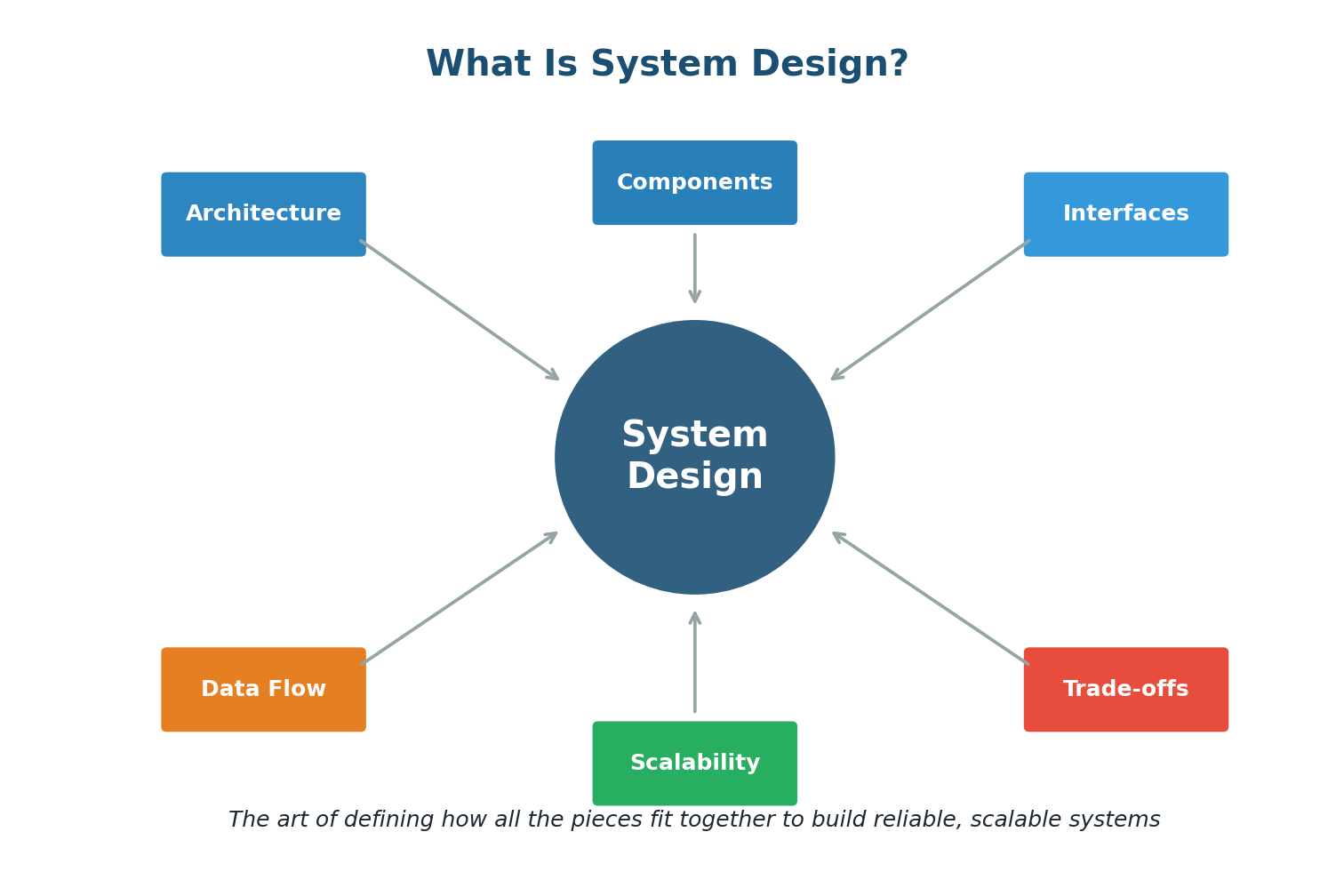
Think of a busy restaurant. The dining area is your frontend (what customers see). The kitchen is your backend (where the work happens). The waiters are your APIs (they carry requests and responses). The pantry is your database (where ingredients are stored). The menu is your interface (it defines what customers can order). If the restaurant gets very popular, you need more kitchens (horizontal scaling), faster chefs (vertical scaling), and maybe a chain of restaurants across the city (distributed systems). System Design is about planning all of this before you start building.
Why Does System Design Matter?
A poorly designed system might work fine for 100 users but collapse under 100,000. It might handle normal traffic but fail during a flash sale. It might store data correctly but take 10 seconds to retrieve it. System Design is what separates a hobby project from a production-grade application.
Consider this: when Instagram launched in 2010, it had 25,000 users on day one. Within two years, it had 100 million. If the founders had not thought carefully about how to design their system for growth, the app would have crashed long before reaching that milestone.
The Two Levels of System Design
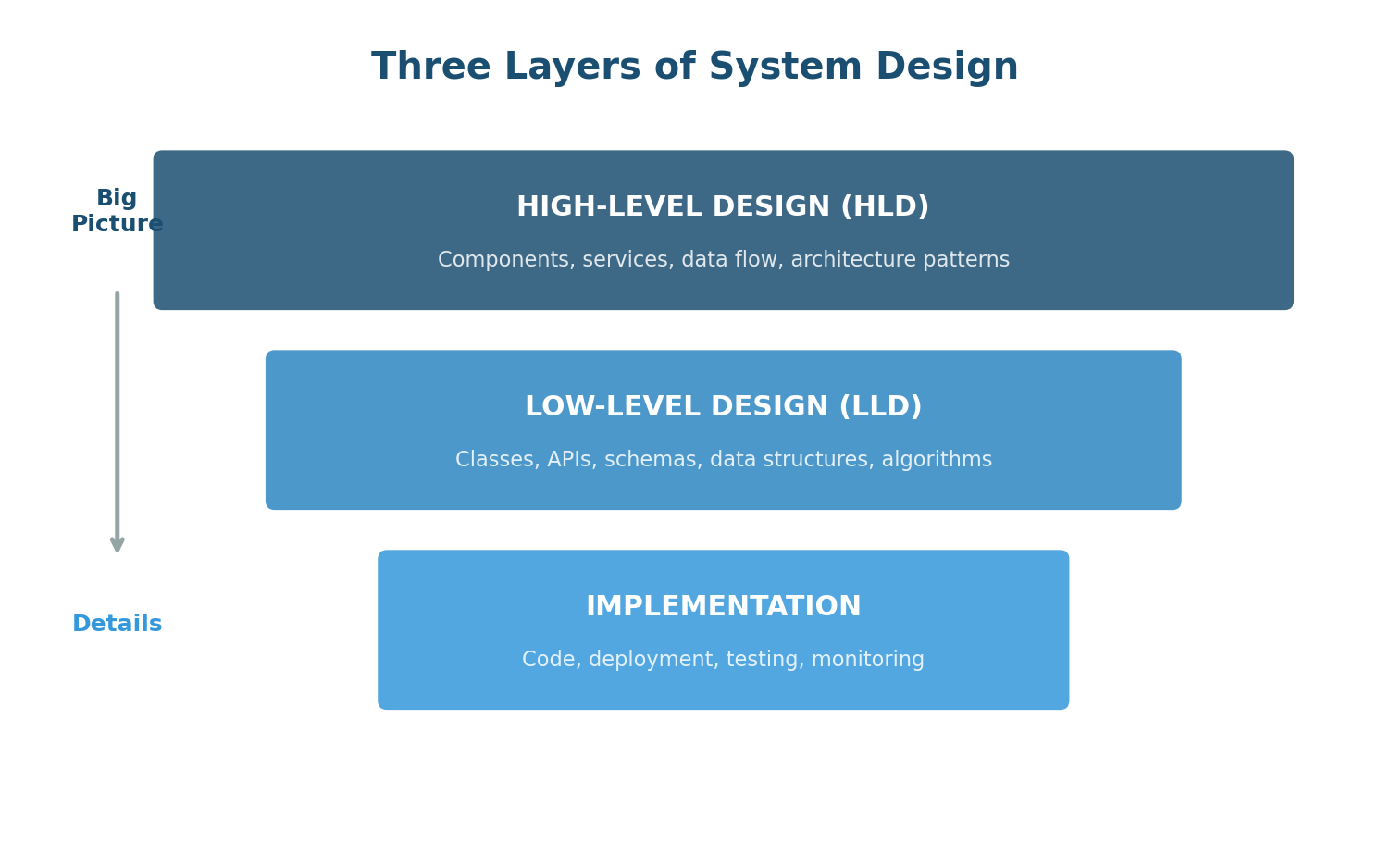
High-Level Design (HLD)
HLD focuses on the big picture. It answers: What are the major components? How do they interact? Where does data flow? What technologies will we use? HLD is like the architectural blueprint of a building — it shows the overall structure and how rooms connect, but not the colour of the walls.
In an HLD discussion you talk about: load balancer distribution, SQL vs NoSQL choice, caching with Redis, message queues for async processing. The focus is on components and relationships.
At the high level: a web server to handle requests, an API layer for creating and redirecting short URLs, a database to store URL mappings, a cache (Redis) for frequently accessed URLs, and a load balancer to distribute traffic. Draw boxes for each component and arrows showing data flow.
Low-Level Design (LLD)
LLD zooms into specific components. It answers: What classes and objects do we need? What does the database schema look like? What are the exact API endpoints? LLD is like the detailed construction drawings that specify exact measurements and wiring.
Define the URL table: id (bigint PK), original_url (varchar 2048), short_code (varchar 8, unique index), created_at (timestamp), expires_at (timestamp nullable), click_count (integer default 0). Specify the Base62 encoding algorithm and define the exact API: POST /api/shorten with body {url: string} returns {short_url: string, expires_at: string}.
The Building Blocks Approach
Every complex system is built from fundamental building blocks — like LEGO bricks. Once you understand each piece, you can assemble them creatively to design almost any system:
- Networking Fundamentals: DNS, IP addresses, HTTP/HTTPS, TCP/UDP — how do machines find and talk to each other?
- APIs: REST, GraphQL, gRPC — how do different parts of the system communicate?
- Databases: SQL, NoSQL, replication, sharding, indexing — how do we store and retrieve data efficiently?
- Caching: Redis, Memcached, CDNs — how do we speed up data access?
- Scaling: Vertical, horizontal, load balancing — how do we handle growing traffic?
- Messaging: Message queues, pub/sub, event streaming — how do we decouple services?
- Reliability: Replication, redundancy, failover, monitoring — how do we keep the system running?
System Design is not about memorizing architectures. It is about understanding building blocks, knowing how to combine them, and being able to reason about trade-offs. There is rarely one correct answer. The best design depends on the specific requirements, constraints, and priorities of the system you are building.
Chapter 2
System Design Interview Expectations
What to Expect in a System Design Interview
The System Design interview is fundamentally different from a coding interview. In a coding interview, there is usually one correct answer. In a System Design interview, there is no single right answer. The interview is open-ended, conversational, and evaluates how you think, communicate, and make decisions under ambiguity.
Interviews typically last 45–60 minutes and begin with a broad, deliberately vague prompt like "Design Twitter" or "Design a URL shortener." Your job is not to produce a perfect architecture — your job is to demonstrate structured thinking, technical depth, and the ability to navigate trade-offs.
Instead of immediately jumping in, you ask: Are we designing the tweet posting feature, the timeline/feed, or the entire platform? Should we support media or just text? How many daily active users? What is the expected tweets-per-second volume? Do followers need to see tweets in real-time? These questions dramatically narrow the scope and show the interviewer you think before you build.
The Interview Timeline
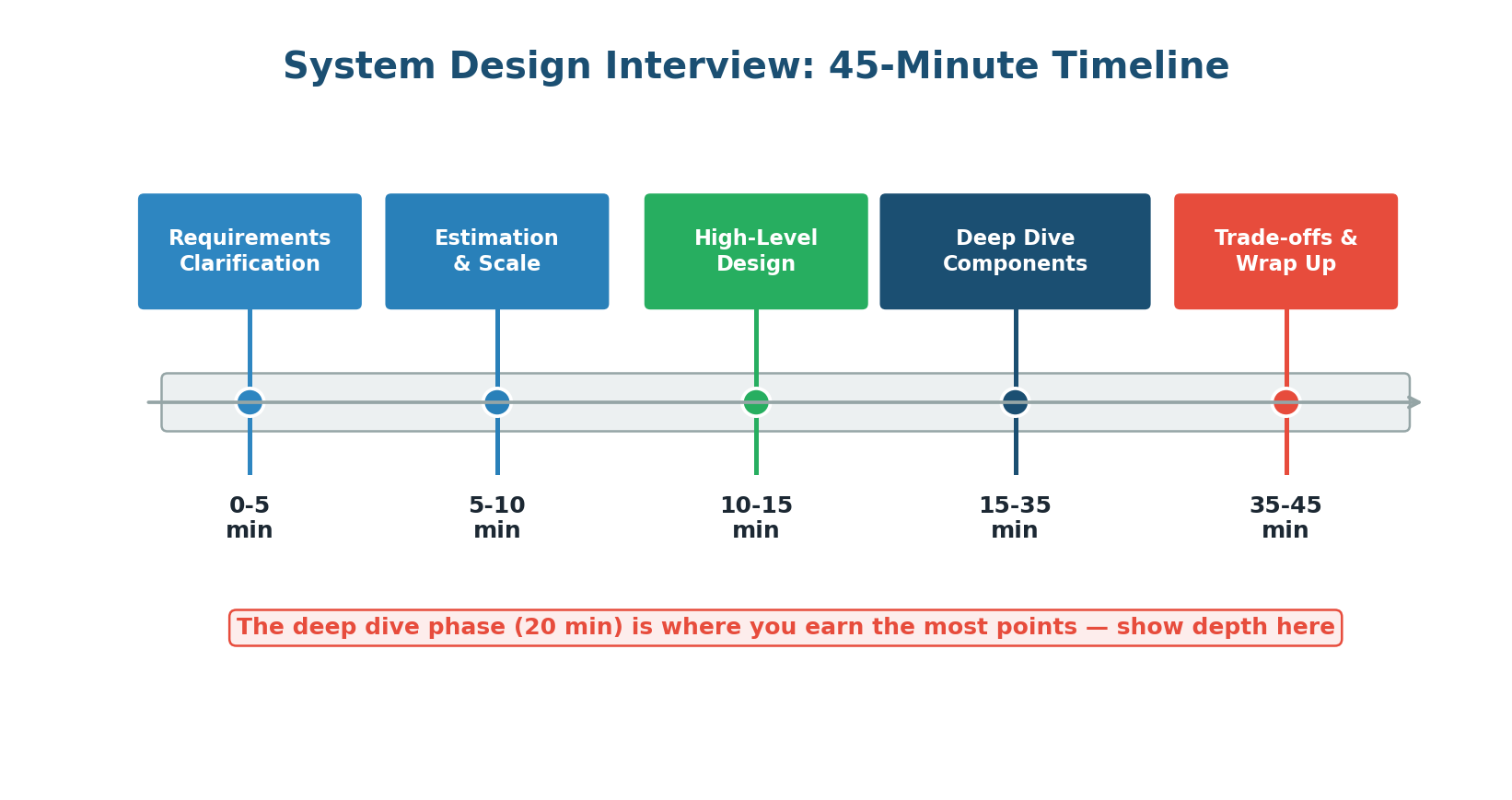
The most important phase. The interviewer gives a vague prompt and your first move is to ask clarifying questions, not to start drawing diagrams. Good questions: What are the core features? How many users? Read-to-write ratio? Real-time updates needed? Latency requirements? Consistency critical or eventual OK?
Back-of-the-envelope estimation. No exact numbers needed, but reasonable approximations that inform architectural decisions. Example for Twitter: 500M DAU × 100 tweets/day = 50B reads/day ≈ 580K reads/sec. These numbers tell you that you need a read-heavy architecture with aggressive caching.
Draw the major components and how they interact. Sketch boxes for clients, load balancers, web servers, application servers, databases, caches, and message queues. Connect with arrows showing data flow. Keep it clean and well-labelled.
The longest and most critical phase. The interviewer drills into specific components: "Tell me more about your database choice," "How would you handle news feed ranking?", "What happens when a server goes down?" Demonstrate technical depth — discuss specific technologies, algorithms, data structures, and design patterns.
Discuss trade-offs in your design, potential bottlenecks, and how you might improve the system. Acknowledging limitations and proposing improvements shows engineering maturity.
What Interviewers Actually Evaluate
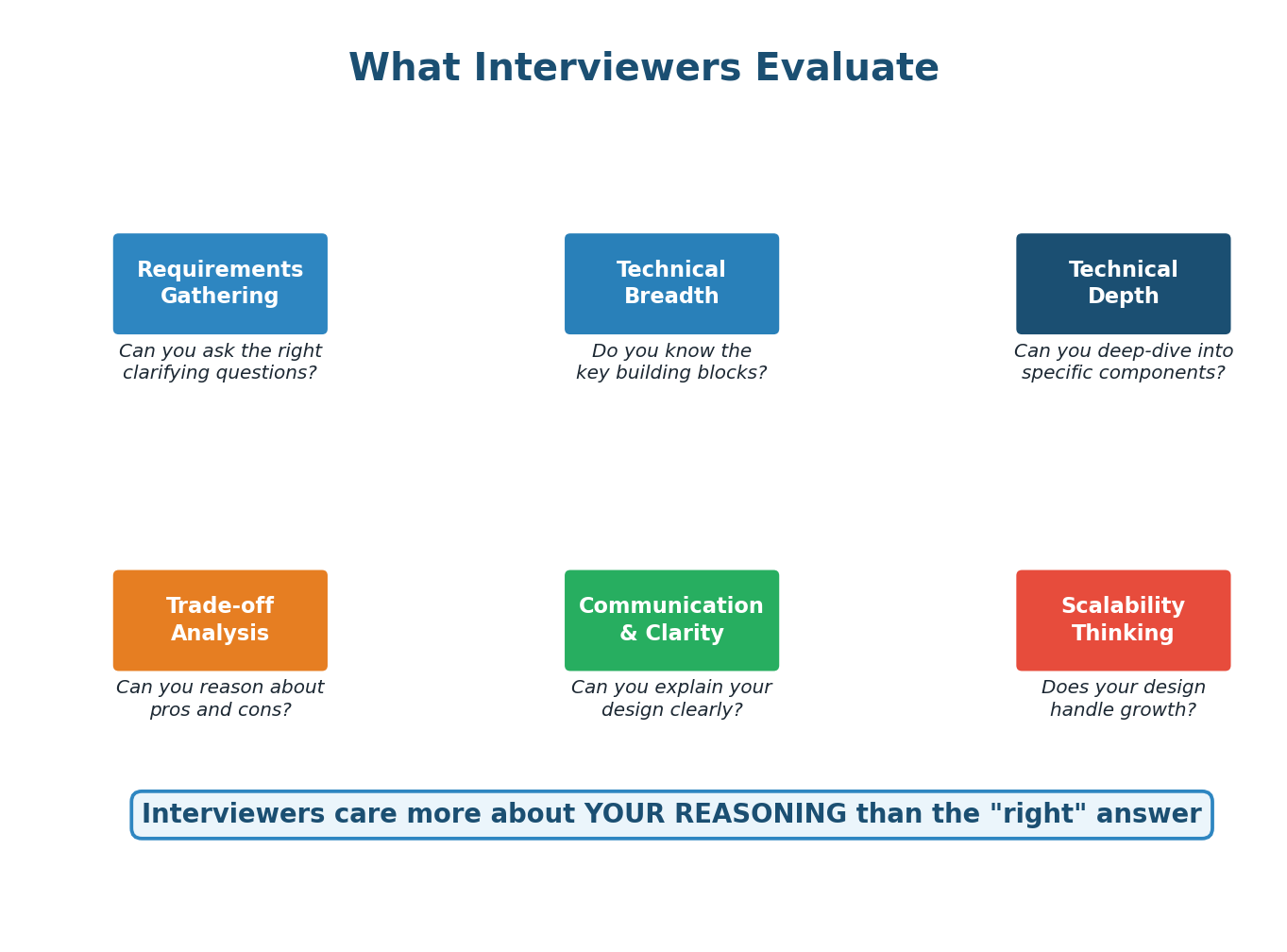
Interviewers are not checking if you arrive at a specific "correct" architecture. They are evaluating several dimensions of your engineering ability:
Expectations by Seniority Level
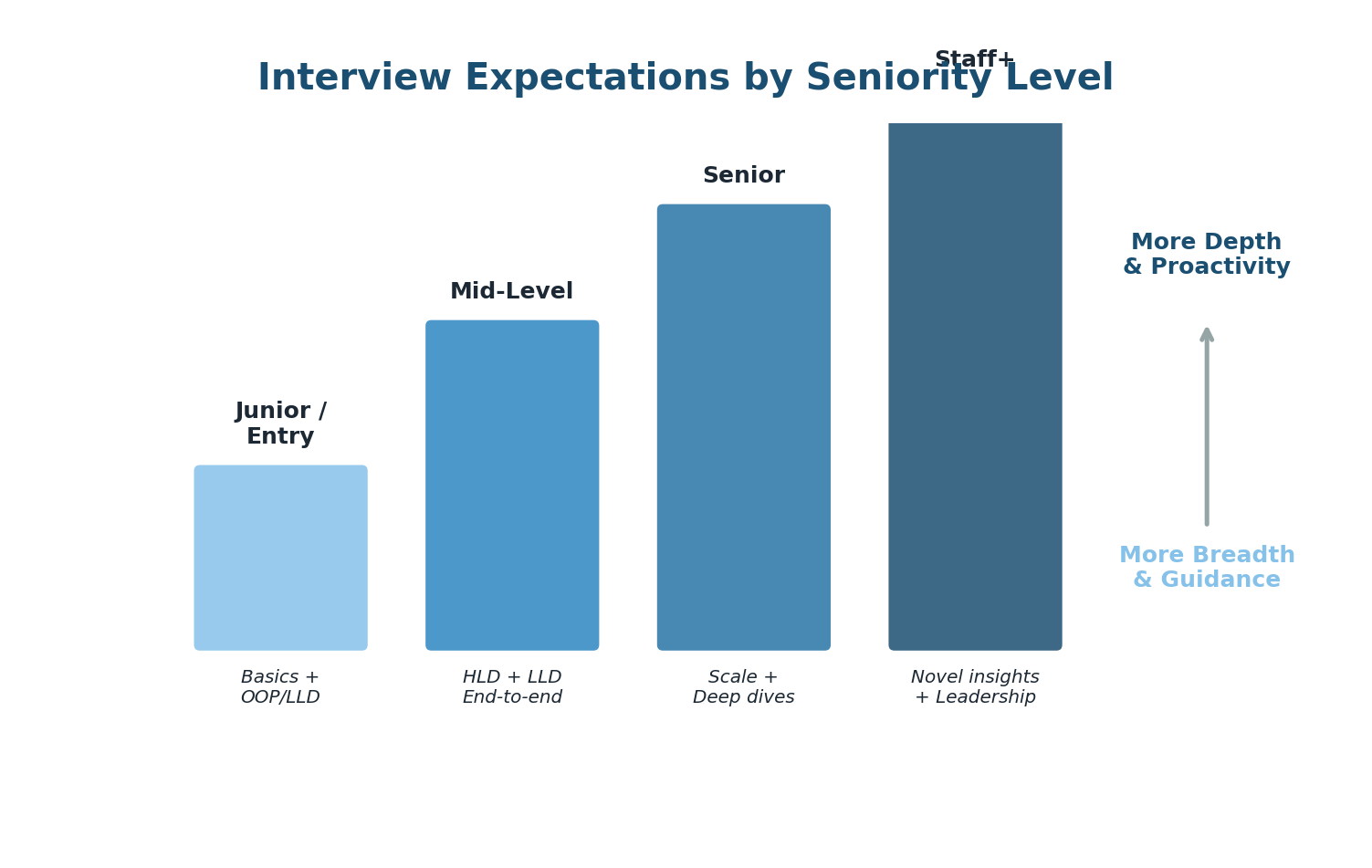
| Level | Breadth | Depth | Who Drives? |
|---|---|---|---|
| Junior / Entry | High: Know many basics at surface level | Low: Fundamentals only | Interviewer drives completely |
| Mid-Level | High: End-to-end HLD + some LLD | Medium: Can deep-dive 1–2 areas | Interviewer drives, you follow |
| Senior | Assumed: Basics taken for granted | High: Deep expertise in 2–3 areas | You drive, interviewer follows |
| Staff+ | Assumed: No time spent on basics | Very High: Novel insights, teach interviewer | You fully own the conversation |
Mid-level: "I would use Redis for caching here because it is fast."
Senior: "I would use Redis with a cache-aside strategy. We will set a TTL of 5 minutes to balance freshness with cache hit rate. For invalidation, we will use a write-through pattern for user profile updates since consistency matters there, but cache-aside for feed items where eventual consistency is acceptable. We should also consider a Redis cluster with 3 replicas for high availability."
Notice how the senior answer is specific, justified, and considers trade-offs.
Common Interview Mistakes
- Jumping straight to the solution: The biggest mistake. Always start with requirements. Designing without understanding the problem is like coding without reading the problem statement.
- Over-engineering: Using microservices, Kubernetes, and event sourcing for a system with 1,000 users. Match your architecture to the scale.
- Under-communicating: Thinking silently and presenting a complete design. The interviewer wants to see your thought process. Think out loud.
- Ignoring non-functional requirements: Focusing only on features while ignoring latency, availability, consistency, and fault tolerance.
- Not discussing trade-offs: Presenting decisions as obvious without explaining alternatives and why you chose one over another.
- Getting stuck on one component: Spending 20 minutes on the database schema and running out of time for the rest of the design. Manage your time.
Treat the System Design interview as a collaborative design session, not an exam. The interviewer is your partner. Ask questions, share your reasoning, welcome their input, and adapt your design based on feedback. The best candidates make the interviewer feel like they just had a productive design meeting.
Chapter 3
Functional vs Non-Functional Requirements
The Foundation of Every Good Design
Before you can design anything, you need to know what you are building and how well it needs to work. Think of it this way: if you are buying a car, the functional requirements are things like "it must be able to drive, have four doors, and seat five people." The non-functional requirements are things like "it must go from 0 to 100 km/h in under 8 seconds, get at least 15 km per liter, and have a 5-star safety rating." A car that drives but is unsafe is useless. A car that is safe but does not drive is equally useless.
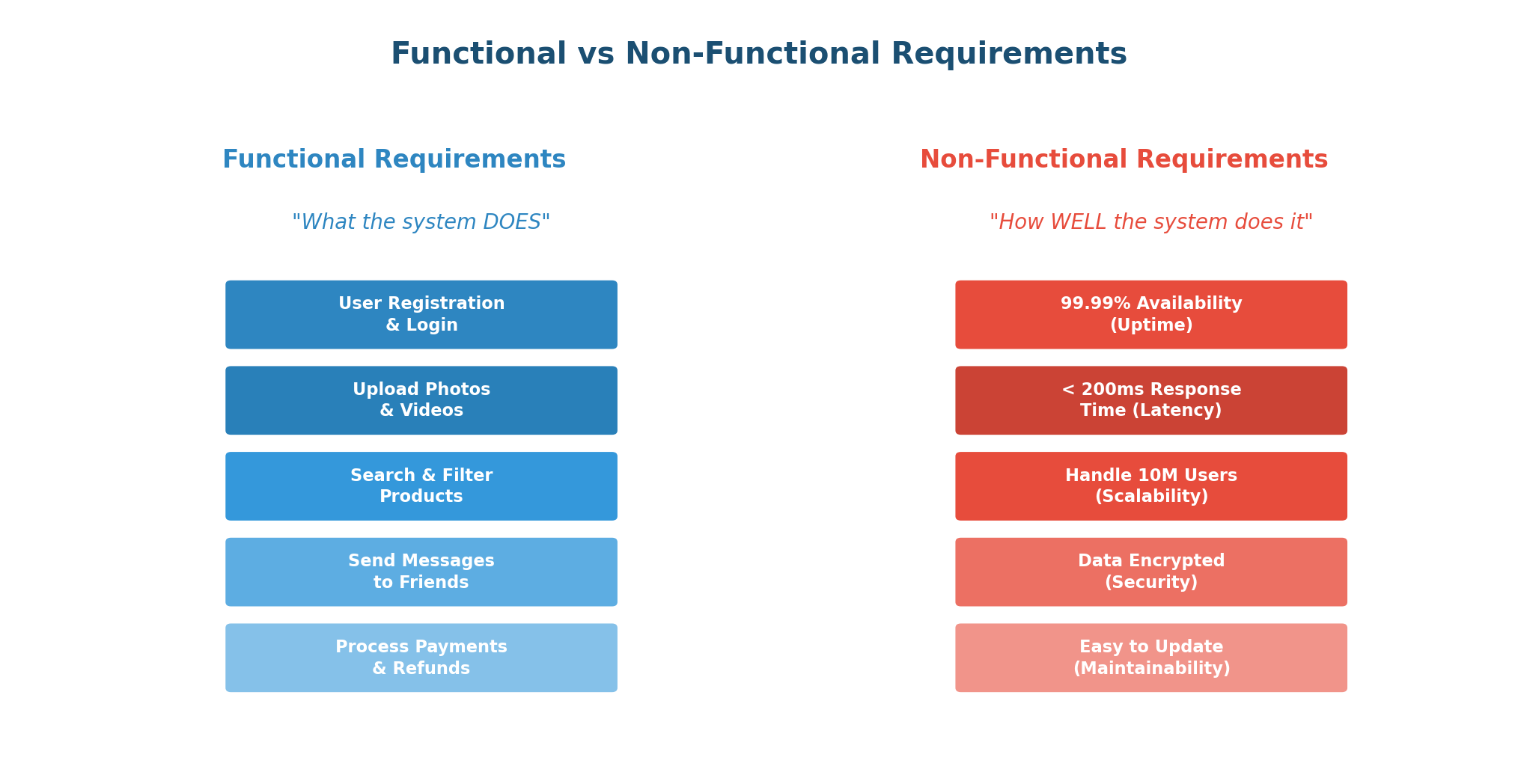
Functional Requirements (FRs)
Functional requirements define what the system should do — the specific features, behaviors, and operations that users directly interact with. If a functional requirement is missing, users cannot accomplish their goals.
Functional requirements are typically expressed as user actions or system behaviors. For Twitter:
- Users should be able to create an account and log in using email or social media
- Users should be able to post tweets with text up to 280 characters
- Users should be able to follow and unfollow other users
- The system should generate a personalized timeline showing tweets from followed users
- Users should be able to like, retweet, and reply to tweets
- The system should send notifications when a user is mentioned or followed
How to Identify FRs in an Interview:
- Identify the actors: Who uses the system? (e.g., buyers, sellers, admins)
- Identify the core use cases: What are the 3–5 most important things each actor does?
- Identify the data: What entities does the system manage? (users, products, orders, messages)
- Prioritize: Which features are must-haves vs nice-to-haves? Focus on must-haves first.
Non-Functional Requirements (NFRs)
Non-functional requirements define how the system should perform — the quality attributes that determine whether the system is fast, reliable, scalable, and secure. NFRs are often more important than functional requirements in System Design interviews. A social media app that has all the features but takes 10 seconds to load will lose all its users. A banking app that processes transactions but occasionally loses money will face lawsuits.
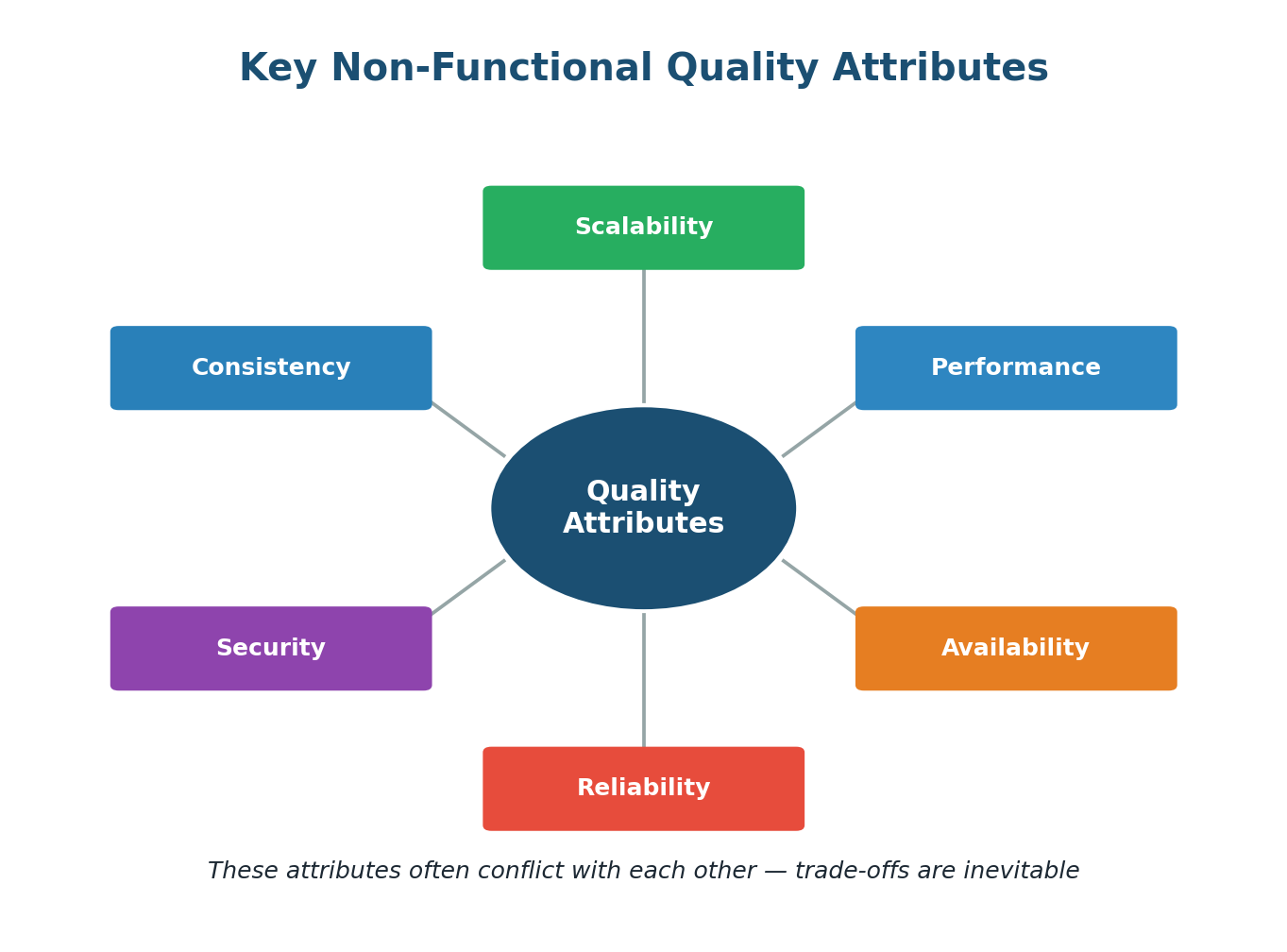
FR vs NFR: Side-by-Side
| Aspect | Functional Requirements | Non-Functional Requirements |
|---|---|---|
| Definition | What the system DOES | How WELL the system does it |
| Focus | Features, behaviors, operations | Quality, performance, constraints |
| User Visibility | Directly visible to users | Often invisible but deeply felt |
| Example | User can upload a photo | Photo uploads complete in <2 seconds |
| Testing | Functional testing (does it work?) | Load testing, stress testing (how well?) |
| If Missing | Feature does not exist | Feature exists but is slow/unreliable |
| Interview Impact | Defines WHAT to build | Drives architectural decisions |
Functional:
- Users can send and receive text messages in real-time
- Users can create group chats with up to 256 members
- Users can see message delivery status (sent, delivered, read)
- Users can share images, videos, and documents
- The system stores chat history and syncs across devices
Non-Functional:
- Latency: Messages delivered within 100ms for online users
- Availability: 99.99% uptime
- Scale: Support 2 billion users, 100 billion messages per day
- Consistency: Messages delivered in order within a conversation
- Security: End-to-end encryption for all messages
Many candidates focus only on functional requirements and start designing immediately. This is a major red flag. Non-functional requirements are what drive your architecture. The design for a chat system serving 1,000 users is completely different from one serving 1 billion users. Always explicitly state both types before designing.
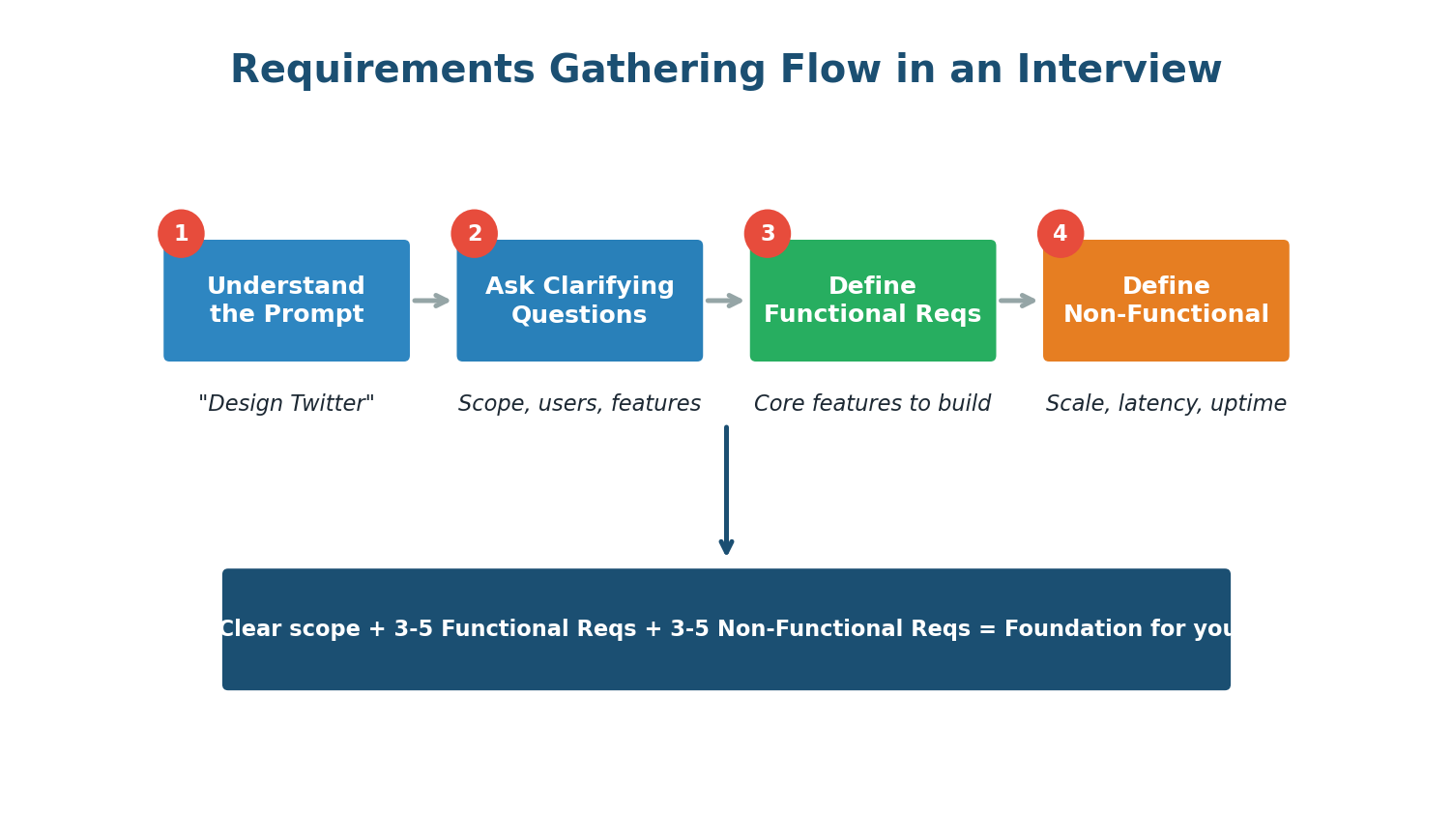
In an interview, aim to identify 3–5 functional requirements and 3–5 non-functional requirements before drawing a single diagram. Write them on the whiteboard. Confirm them with the interviewer. This takes 3–5 minutes but saves you from designing the wrong system — and immediately signals that you approach problems methodically.
Gathering Requirements: The Interview Flow
Users must be able to: search for products by name, category, or filter; view product details; add products to a shopping cart; complete checkout with multiple payment methods; track order status from placement to delivery; return or exchange products within 30 days.
The system must: calculate taxes and shipping costs automatically; send order confirmation and shipping notification emails; generate invoices for completed orders.
Chapter 4
Trade-offs in System Design
Why Trade-offs Are the Heart of System Design
If there is one thing that separates great system designers from mediocre ones, it is their ability to reason about trade-offs. In System Design, there is no free lunch. Every decision you make optimizes for something while sacrificing something else. Choosing a SQL database gives you strong consistency but makes horizontal scaling harder. Choosing NoSQL gives you easy scaling but requires you to manage consistency at the application level.
Trade-off analysis is also the single most evaluated skill in System Design interviews. Interviewers are not impressed by "I'll use Redis for caching." They are impressed by "I'm choosing Redis over Memcached because we need support for data structures beyond simple key-value pairs, and the trade-off is slightly more memory overhead, which is acceptable at our scale."
The Fundamental Trade-offs
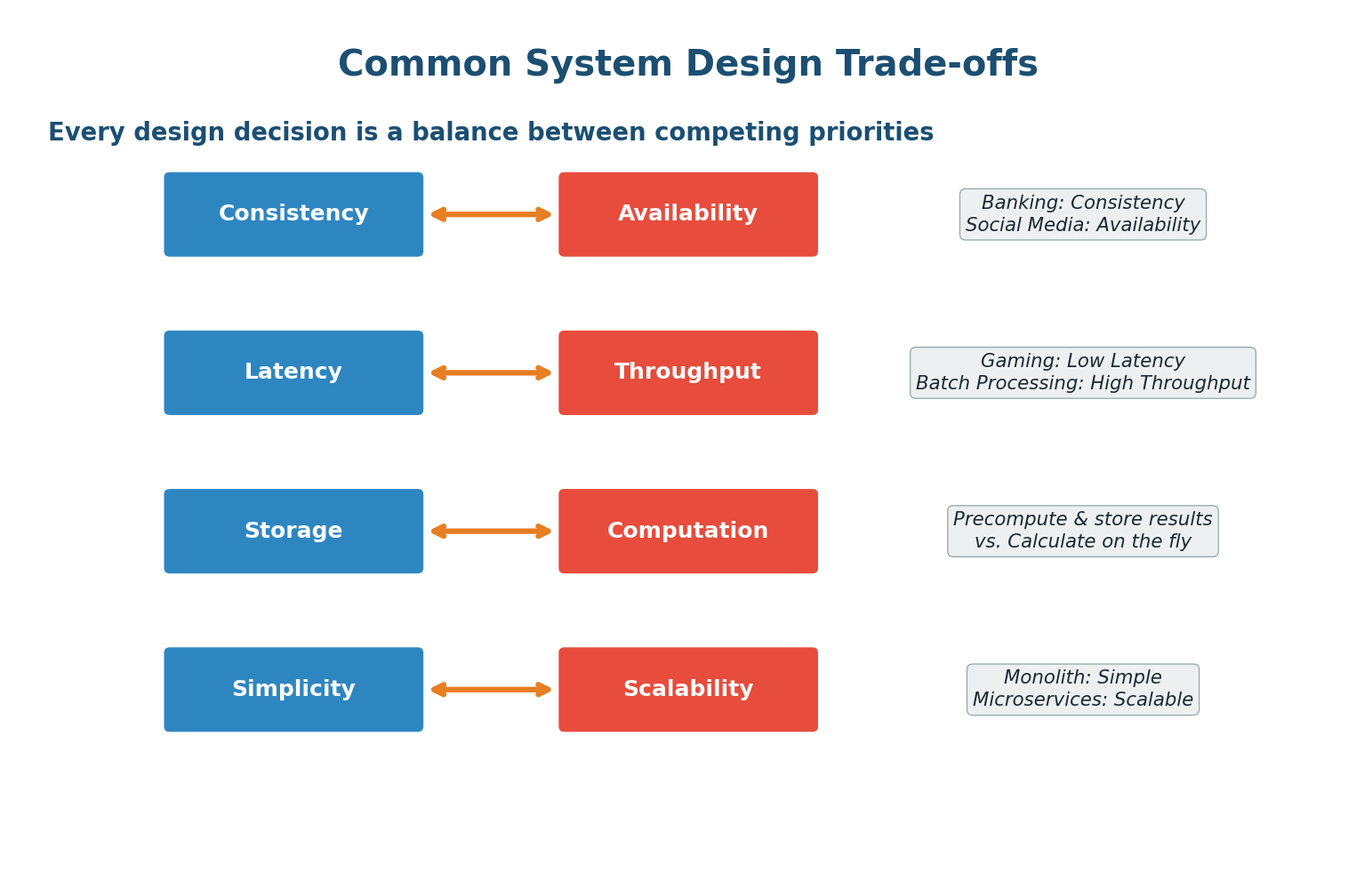
Additional Critical Trade-offs
5. Read Optimization vs Write Optimization
Systems are rarely read-heavy and write-heavy simultaneously. A social media platform (1000:1 read-to-write) should optimize for reads: use caching, denormalize data, create read replicas. A logging system (writes dominate) should optimize for writes: use append-only storage, batch writes, eventual indexing.
Fan-out on Write (Storage-heavy): When a user posts a tweet, immediately copy it to every follower's timeline cache. Reading a timeline is instant (just fetch from cache), but writes are expensive — a celebrity with 50 million followers triggers 50 million write operations.
Fan-out on Read (Computation-heavy): Store tweets once. When a user opens their timeline, fetch and merge tweets from all followed users in real-time. Writes are cheap (store once), but reads are expensive (must query and merge multiple data sources).
Twitter uses a hybrid approach: fan-out on write for regular users and fan-out on read for celebrities. This is the trade-off applied intelligently to different situations.
6. Cost vs Performance
Better performance typically costs more money — more servers, more memory, premium CDN providers, multi-region deployments. The goal is not to build the fastest possible system, but to build a system that meets performance requirements at acceptable cost.
7. Accuracy vs Speed
Sometimes you can get a fast approximate answer instead of a slow exact answer. Bloom filters tell you "probably yes" or "definitely no" in constant time. HyperLogLog can estimate the number of unique elements using almost no memory, but the count might be off by a small percentage. In many real-world applications, an approximate answer delivered instantly is more valuable than an exact answer delivered after 30 seconds.
The Pick Two Principle
A useful mental model: for many engineering decisions, you can optimize for two out of three desirable properties, but achieving all three simultaneously is extremely difficult.
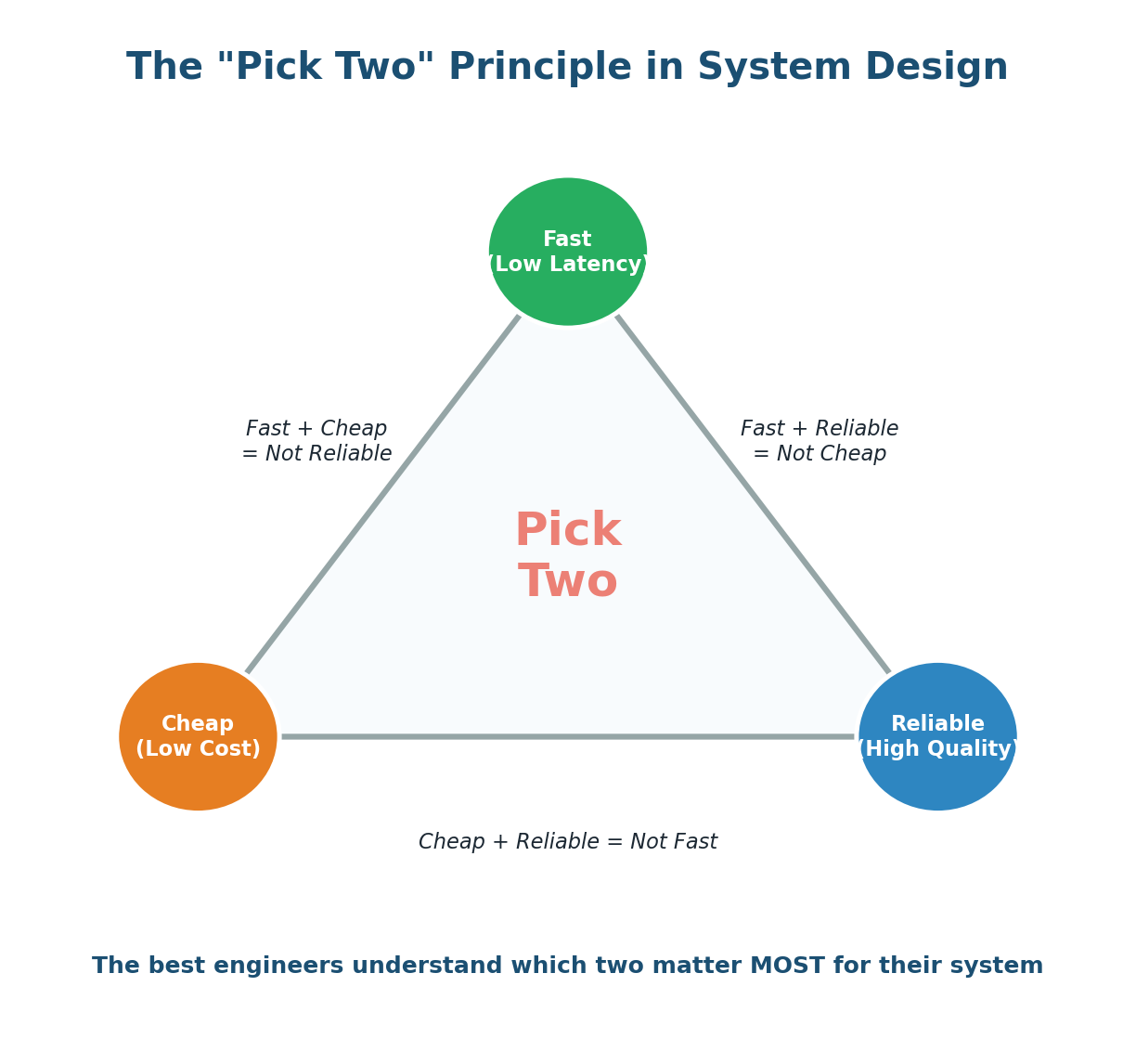
- Fast + Cheap = Not Reliable: You can build quickly and cheaply, but it cuts corners on testing, redundancy, and quality. Think of a hackathon project.
- Fast + Reliable = Not Cheap: You can build quickly and reliably, but you need experienced engineers, premium infrastructure, and expensive tools. Think of a fintech startup spending heavily on AWS.
- Cheap + Reliable = Not Fast: You can build reliably on a budget, but it takes time. Careful planning, open-source tools, and thorough testing take longer.
How to Discuss Trade-offs in an Interview
- State the decision: "I need to choose between SQL and NoSQL for our database."
- Present the options: "SQL gives us strong consistency and ACID transactions. NoSQL gives us flexible schemas and easy horizontal scaling."
- Analyze in context: "Our system is a payment platform. Data consistency is critical — we cannot have a payment succeed on one server and fail on another."
- Make the decision: "I will use PostgreSQL because ACID compliance is essential for our use case."
- Acknowledge the trade-off: "The trade-off is that horizontal scaling will be harder. To address this, I will use read replicas for read-heavy queries and consider sharding by merchant ID if we outgrow a single master."
Decision: Should we add a caching layer?
Options: (1) No cache — simpler, always fresh, but higher latency. (2) Cache with short TTL (30s) — good balance. (3) Cache with long TTL (1hr) — best performance but stale risk.
Analysis: Our system is a product catalog with 10,000 products and 100,000 daily visitors. Products update once or twice per day. Read-to-write ratio is 10,000:1.
Decision: Add Redis as a cache with a 5-minute TTL plus a cache invalidation trigger when a product is updated.
Trade-off: Adds operational complexity (maintaining Redis, handling cache failures) and small risk of serving stale data for up to 5 minutes. But reduces database load by 90%+ and cuts p99 latency from 200ms to 5ms. For a product catalog, 5 minutes of staleness is completely acceptable.
Wrapping Up
Building Your System Design Foundation
You have now covered four foundational pillars of System Design: what System Design is and why it matters, what interviewers expect and how to perform in those high-pressure 45 minutes, the distinction between functional and non-functional requirements, and the ability to reason about trade-offs — the single most important skill in System Design.
These four topics form the bedrock on which everything else is built. Every design problem starts with requirements gathering. Every architectural decision involves trade-offs. Every interview evaluates your ability to think through both.
Remember: System Design is not about memorizing solutions. It is about developing a way of thinking. The best system designers are not the ones who know the most technologies. They are the ones who ask the right questions, reason about trade-offs, and communicate their decisions clearly.
Want to Land at Google, Microsoft or Apple?
Watch Pranjal Jain's free 30-min training — the exact GROW Strategy that helped 1,572+ engineers go from TCS/Infosys to top product companies with a 3–5X salary hike.