

Chapters
Chapter 1
Case Study: Writing FR/NFR for WhatsApp
Why WhatsApp Is the Perfect Case Study
WhatsApp is one of the most frequently asked System Design interview questions, and for good reason. It is a deceptively simple product — at its core, it just sends messages between people. But beneath that simplicity lies an engineering marvel that handles over 100 billion messages per day from more than 2 billion users across nearly every country on Earth.
What makes WhatsApp particularly valuable as a learning exercise is that it forces you to think about every major System Design concept: real-time communication (WebSockets), distributed storage (Cassandra), caching (Redis), message queues (Kafka), presence management, media handling, encryption, and more. If you can write clear requirements for WhatsApp, you can write requirements for almost any system.
Step 1: Understand the Scope
Before writing any requirements, you must clarify the scope. WhatsApp has many features: one-on-one messaging, group chats, voice calls, video calls, status/stories, payments, business accounts, and more. In an interview, you cannot design all of these in 45 minutes. You need to pick a focused subset.
| ✅ In Scope | ❌ Out of Scope |
|---|---|
| One-on-one text messaging | WhatsApp Business features |
| Group messaging (up to 1024 members) | WhatsApp Payments |
| Media sharing (images, videos, documents) | Voice/Video calling (separate system) |
| Message delivery status (sent/delivered/read) | Channels and newsletters |
| Online/offline presence and last seen | End-to-end encryption key exchange details |
| Push notifications for offline users | Message search and indexing |
| Status/Stories (24-hour ephemeral posts) | Account migration between devices |
Spending 2 minutes scoping the problem saves you from designing the wrong system. Say something like: "I'd like to focus on the core messaging features: 1:1 messages, groups, media sharing, and delivery status. I'll exclude calls and payments for now. Does that sound reasonable?" This shows the interviewer you think before you build.
Step 2: WhatsApp's High-Level Architecture
Before diving into requirements, it helps to understand what WhatsApp looks like at a high level. This context will make the requirements feel concrete rather than abstract.
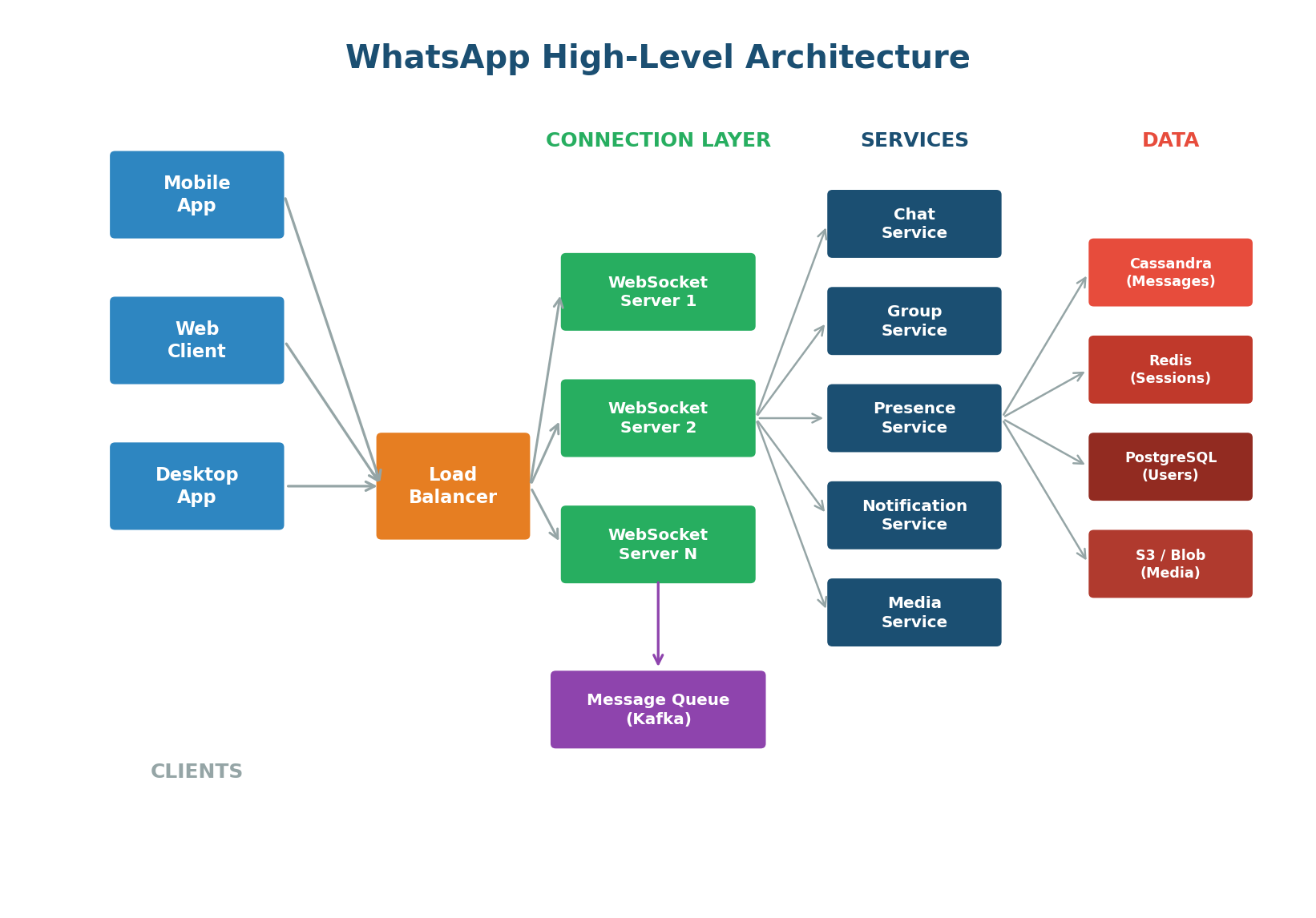
At a high level, WhatsApp's architecture has four layers:
- Client Layer: Mobile apps (iOS, Android), web clients, and desktop apps that establish persistent WebSocket connections.
- Connection Layer: WebSocket servers maintaining millions of concurrent connections, with a load balancer distributing traffic.
- Service Layer: Independent microservices — chat, group, presence, notification, and media service.
- Data Layer: Cassandra for message storage (write-heavy, time-ordered), Redis for sessions and presence, PostgreSQL for user/group metadata, and blob storage (S3) + CDN for media.
Functional Requirements for WhatsApp
Functional requirements define what the system must do — the features and behaviors that users directly interact with.
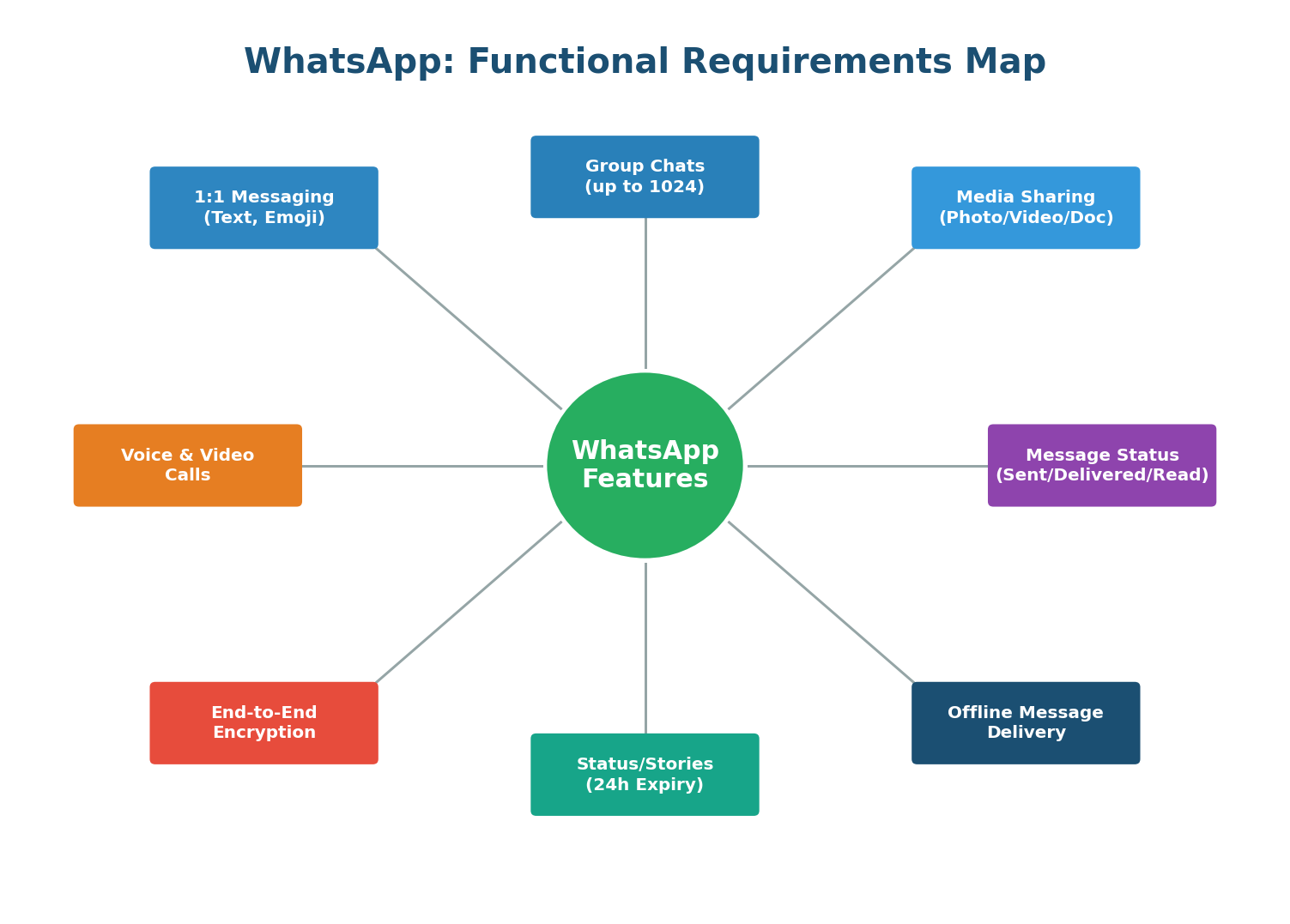
Group messaging introduces fan-out: one message must reach up to 1,024 recipients. For a group of 1,024 members, a single send triggers 1,023 deliveries. If you have millions of active groups, this creates enormous write amplification. The Group Service must efficiently fan out messages using a message queue like Kafka to avoid overwhelming the WebSocket servers.
Delivery status requires acknowledgment flows: the server acknowledges receipt (sent), the client acknowledges receipt (delivered), and the client reports the message was viewed (read). Each acknowledgment is itself a message flowing through the system. For 100 billion messages per day, that means 200–300 billion additional acknowledgment events. This is why efficient, lightweight acknowledgment protocols matter.
Complete FR Summary Table
| ID | Requirement | Priority |
|---|---|---|
| FR1 | Send/receive 1:1 text messages in real-time with in-order delivery | P0 Must Have |
| FR2 | Create/manage groups up to 1024 members with fan-out delivery | P0 Must Have |
| FR3 | Share images, videos, documents, voice messages with thumbnails | P0 Must Have |
| FR4 | Show message status: sent, delivered, read (with privacy controls) | P0 Must Have |
| FR5 | Display online/offline presence and last seen timestamp | P1 Important |
| FR6 | Send push notifications for offline users via APNs/FCM | P0 Must Have |
| FR7 | Post ephemeral status updates that expire after 24 hours | P1 Important |
| FR8 | End-to-end encrypt all content using Signal Protocol | P0 Must Have |
Use P0 (must have), P1 (important), P2 (nice to have) labels. In an interview, focus your design on P0 requirements first. Mentioning P1/P2 shows thoroughness, but spending time designing P2 features before nailing P0 is a red flag.
Non-Functional Requirements for WhatsApp
While functional requirements define what WhatsApp does, non-functional requirements define how well it must do it. At WhatsApp's scale — 2 billion users, 100 billion messages per day — the non-functional requirements are what truly shape the architecture.
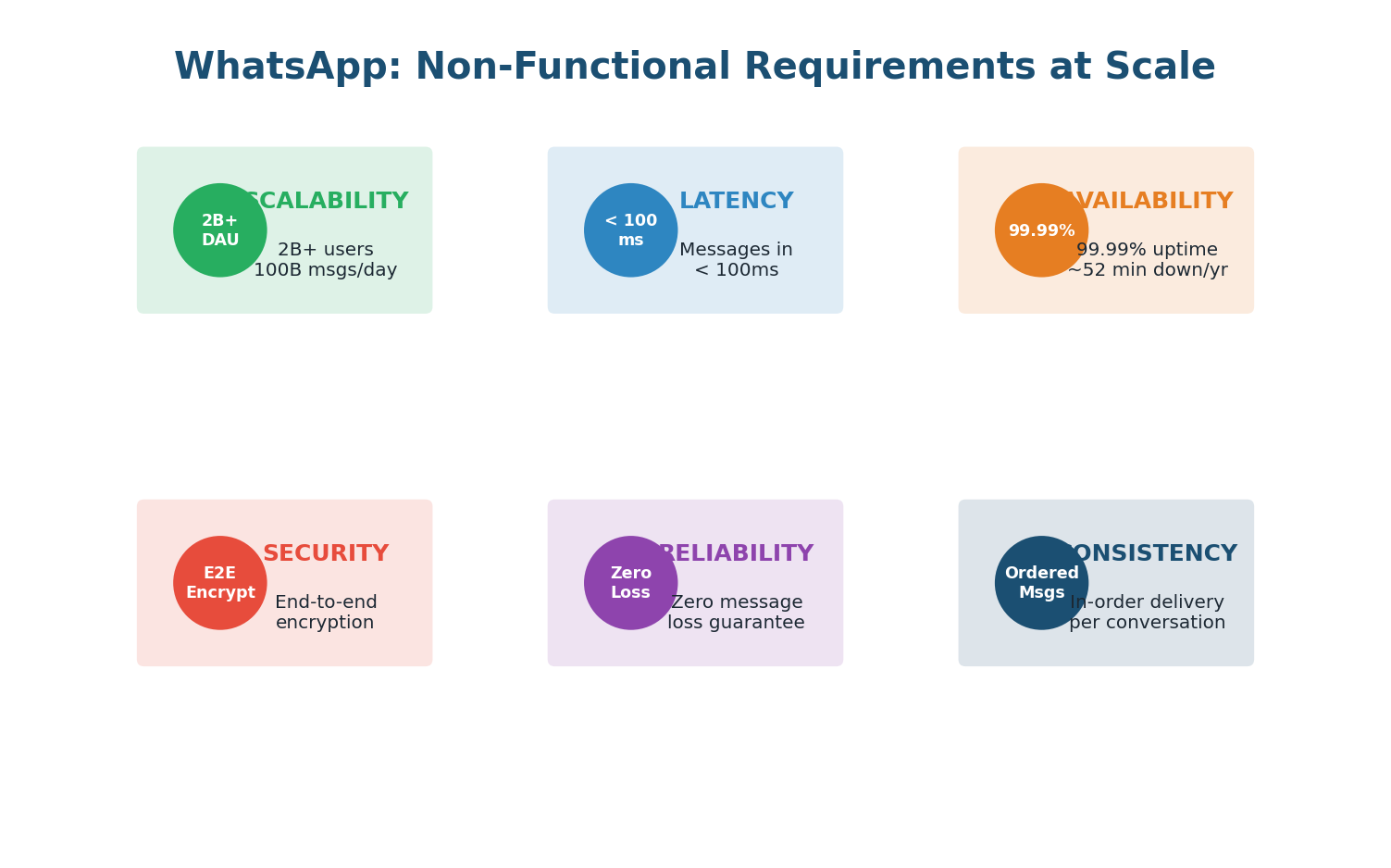
Must scale horizontally. Hundreds of WebSocket servers behind load balancers. Data partitioned across database clusters. Each microservice scales independently based on its load pattern.
Persistent WebSocket connections eliminate TCP handshake overhead. Routes through nearest data center. Redis session lookups in microseconds. Media served through CDN edge nodes.
Redundancy at every layer: multiple WebSocket servers, database replicas, cross-region failover, no single point of failure. Must continue operating even when entire data centers go down.
Write-ahead logging, Kafka with replication, Cassandra with replication factor of 3. Messages removed from delivery queue only after the recipient's device explicitly acknowledges receipt.
Signal Protocol for encryption. Keys generated and stored on-device. Server facilitates key exchange but never possesses decryption keys. Group keys rotate on membership changes for forward secrecy.
Per-conversation sequence numbers guarantee message order. Cassandra partition key is conversation_id with clustering on timestamp. Presence can be eventually consistent — a few seconds of stale data is imperceptible and acceptable.
Complete NFR Summary
| ID | Attribute | Target | Why It Matters |
|---|---|---|---|
| NFR1 | Scalability | 2B users, 100B msgs/day, 1.2M QPS | System must grow with user base |
| NFR2 | Latency | <100ms delivery, <2s media | Users expect instant feel |
| NFR3 | Availability | 99.99% (52.6 min/yr downtime) | Communication is mission-critical |
| NFR4 | Reliability | Zero message loss after server ACK | Trust requires guaranteed delivery |
| NFR5 | Security | E2E encryption, GDPR compliance | Private communication is sacred |
| NFR6 | Consistency | In-order per conversation, eventual for presence | Ordered chat, relaxed presence |
How Requirements Drive Architecture
Every architectural decision in WhatsApp traces back to a specific requirement. This is what separates a good System Design answer from a great one:
- Scalability → Microservices: Each service (chat, groups, presence) can be scaled independently. Groups might need 10x the compute during peak hours, while presence stays steady.
- Latency → WebSockets + Redis: Persistent connections eliminate repeated handshakes. Redis session lookups in microseconds ensure messages route to the correct server instantly.
- Availability → No Single Point of Failure: Multiple WebSocket servers, Cassandra with replication factor 3, multi-region deployment.
- Reliability → Kafka + Cassandra: Kafka provides durable message queuing with at-least-once delivery. Cassandra stores messages with replication across 3 nodes.
- Security → Signal Protocol: End-to-end encryption means the server only routes encrypted blobs. Even a complete server breach reveals nothing.
- Consistency → Per-Conversation Sequencing: Each conversation has a monotonically increasing sequence number. Cassandra's partition key is conversation_id with clustering on timestamp.
In your interview, explicitly connect requirements to architecture: "Because we need sub-100ms delivery (NFR2), I am choosing WebSocket over HTTP polling. Because we need zero message loss (NFR4), I am persisting messages to Cassandra before acknowledging to the sender. Because groups can have 1024 members (FR2), I am using Kafka for fan-out to avoid overwhelming the chat servers." This kind of reasoning is exactly what interviewers want to hear.
Message Delivery: Putting FR and NFR Together
The message delivery flow is where functional and non-functional requirements collide. Here is what happens when User A sends a message to User B:
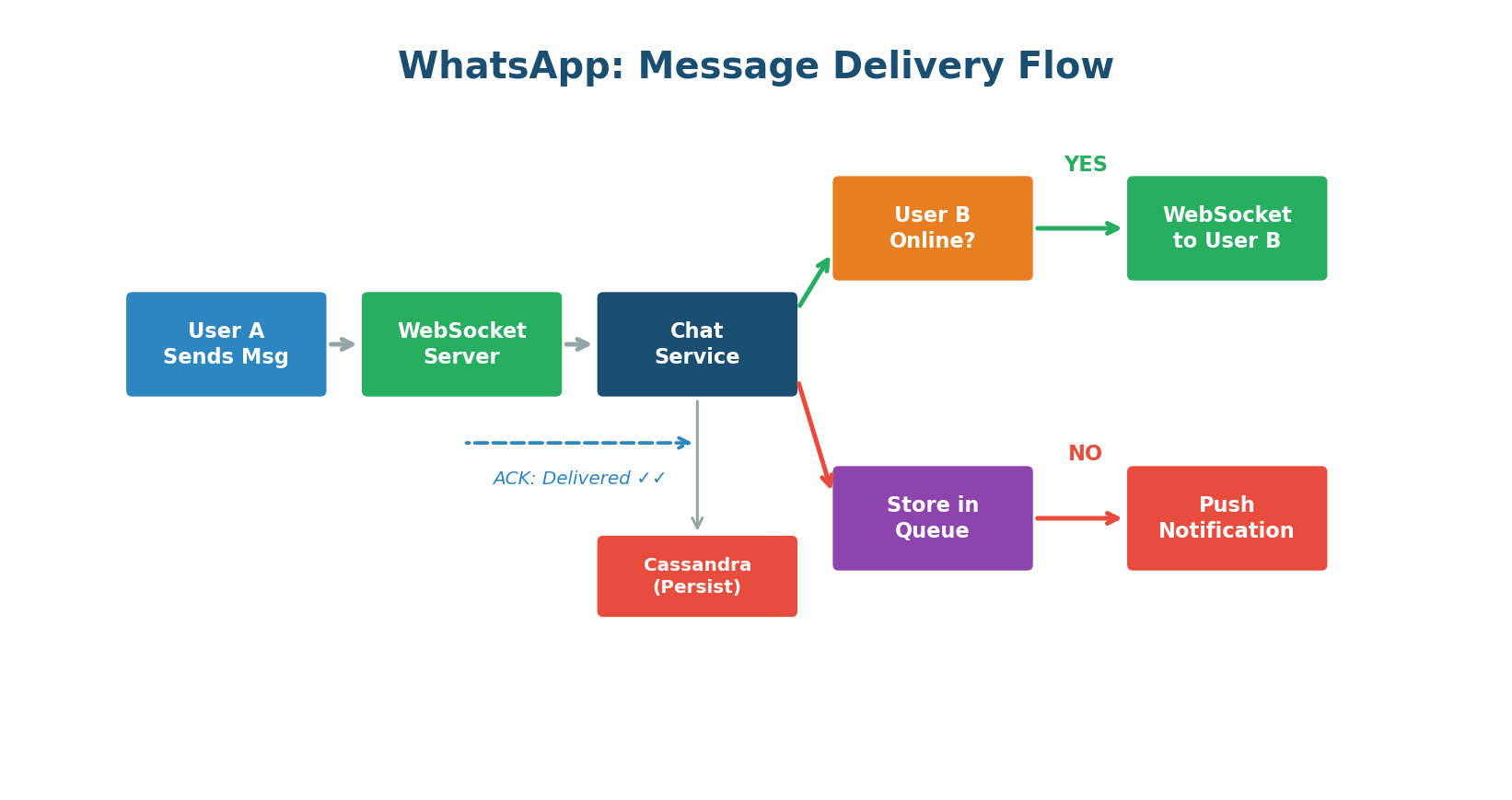
(FR8) and sends it over the WebSocket connection to the server (NFR2: low latency).(NFR4: reliability) and returns a "sent" ACK to User A. User A sees a single grey tick (FR4).(NFR2: fast lookup). If User B is online, the message is pushed through User B's WebSocket instantly (FR1: real-time).(FR4). User A sees double grey ticks.(NFR4: zero loss) and a push notification is sent via APNs/FCM (FR6). When User B comes online, all queued messages arrive in order (NFR6).(FR4). User A sees double blue ticks.Many candidates describe the happy path only (both users online). Strong candidates also cover the offline path, the group fan-out path, and failure scenarios (what if the WebSocket server crashes mid-delivery?). Discussing edge cases demonstrates real-world engineering maturity.
Chapter 2
Deep Dive: Scalability
What Is Scalability?
Scalability is the ability of a system to handle increased load without degrading performance. It is not about being fast — that is performance. Scalability is about staying fast as you grow. A system that responds in 50ms for 100 users but takes 10 seconds for 100,000 users is fast but not scalable.
Think of it like a restaurant. A small café with one chef can serve 20 customers per hour beautifully. But when 200 customers show up, the chef cannot cook 10x faster. Scalability is about adding more chefs (horizontal scaling), upgrading to a bigger kitchen (vertical scaling), or opening multiple locations (distributed systems) — while keeping the quality consistent.
Vertical vs Horizontal Scaling
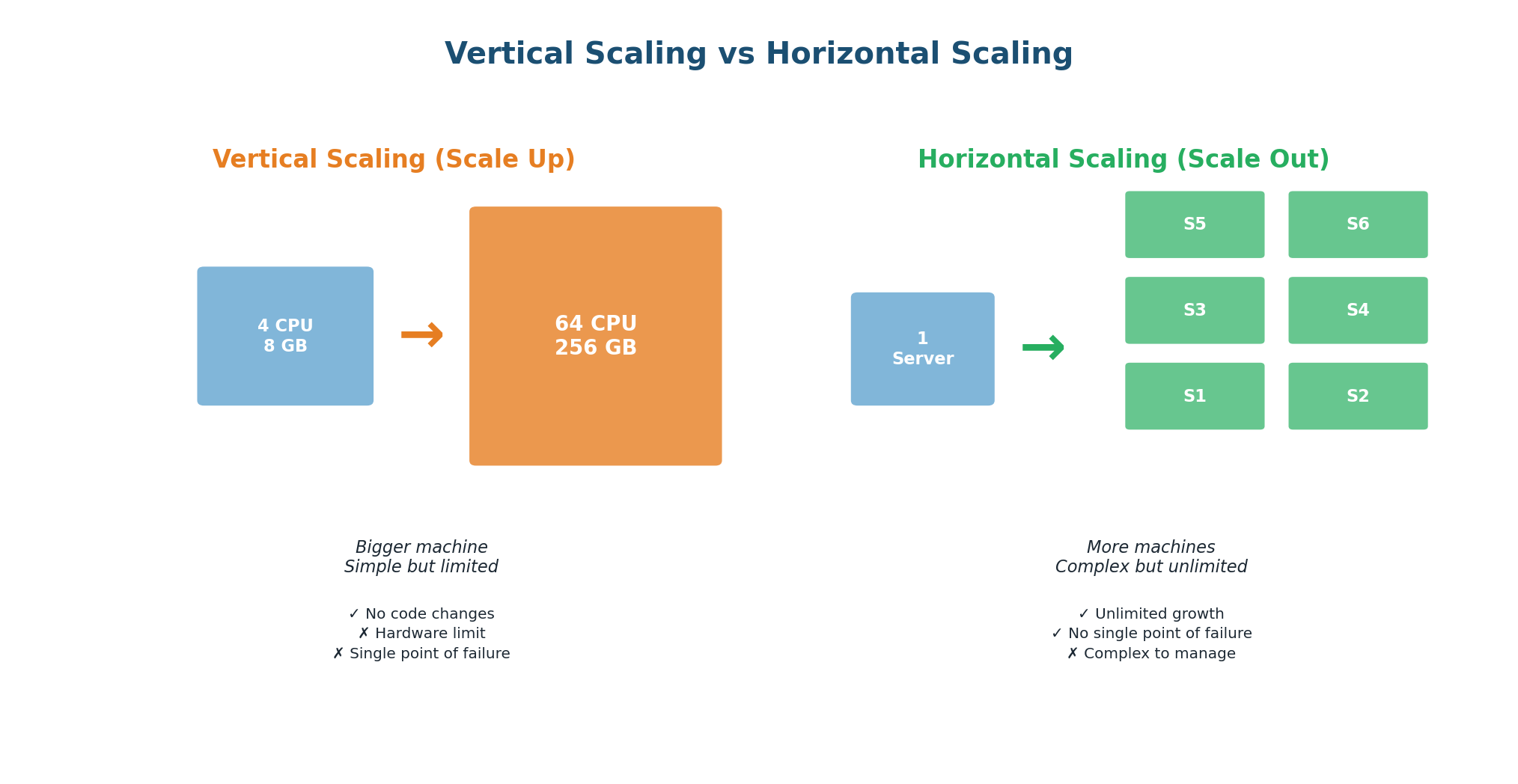
Vertical Scaling (Scaling Up)
Upgrade a single machine: more CPU cores, more RAM, faster SSDs. The simplest approach — your application code does not change.
| ✅ Advantages | ❌ Disadvantages |
|---|---|
| No code changes required | Hardware has physical limits |
| No distributed system complexity | Single point of failure |
| Easy to manage and debug | Cost increases non-linearly (2x specs = >2x price) |
| Simple data consistency (single machine) | Requires downtime to upgrade |
Ideal for: early-stage startups with limited traffic, databases that are hard to distribute (like a single PostgreSQL instance), and workloads where simplicity is more valuable than fault tolerance. WhatsApp, in its early days with 200 million users, ran on just 32 servers — but they were extremely powerful Erlang machines optimized for concurrency. This is a brilliant example of vertical scaling done right.
Horizontal Scaling (Scaling Out)
Add more machines. Instead of one powerful server, you have 10, 100, or 10,000 smaller servers working together. Traffic is distributed using load balancers; data is partitioned using sharding.
| ✅ Advantages | ❌ Disadvantages |
|---|---|
| Virtually unlimited scaling capacity | Application code must handle distribution |
| No single point of failure | Data consistency becomes complex |
| Cost-effective (commodity hardware) | Operational overhead increases |
| Scale incrementally (add servers one at a time) | Network latency between machines adds up |
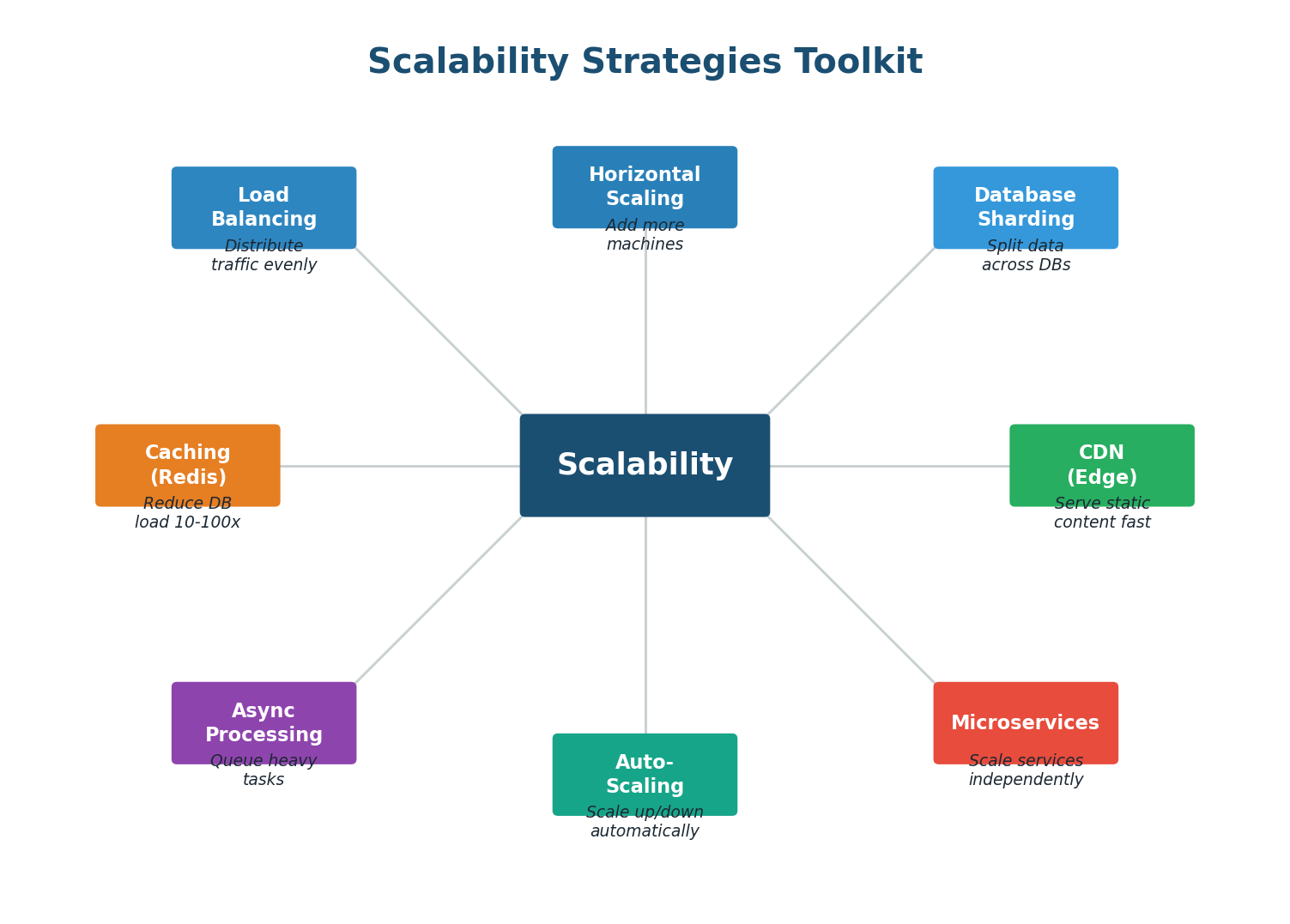
The Scalability Toolkit
Scaling is not just about adding servers. It requires a coordinated set of strategies that work together:
Scalability Metrics: How to Measure It
| Metric | Definition | WhatsApp Example |
|---|---|---|
| Throughput | Requests processed per second | 1.2M messages/sec at peak |
| Latency (p50) | Median response time | 50ms for message delivery |
| Latency (p99) | 99th percentile response time | 200ms (worst 1% of requests) |
| Concurrent Users | Simultaneous active connections | 500M+ concurrent WebSocket connections |
| Data Volume | Data stored and transferred | 100B messages/day ≈ 10 PB/month |
| Horizontal Capacity | Machines needed to serve load | Thousands of servers across regions |
Instead of "We need a lot of servers," say: "With 1.2M QPS and each server handling ~10K connections, we need at least 120 WebSocket servers for connection handling alone, with 2x capacity for redundancy — so about 250 servers." This kind of reasoning demonstrates real engineering ability.
100 billion messages per day = 1.16 million messages per second on average. But traffic is not uniform — peak hours can see 3–5x the average. The system must handle 3–6 million messages per second at peak. Each message generates 2–3 acknowledgment events, so the real event throughput is 6–18 million events per second. Sharding by conversation ID distributes this load across hundreds of database nodes.
Chapter 3
Deep Dive: Reliability
What Is Reliability?
Reliability is the ability of a system to perform its intended function correctly and consistently over time, even when things go wrong. A reliable system does not just work — it works when hardware fails, when networks partition, when traffic spikes, and when software bugs surface.
The fundamental truth of distributed systems is that everything fails, all the time. Hard drives fail. Network cables get cut. Entire data centers lose power. Software has bugs. A reliable system is not one that prevents all failures (that is impossible). It is one that continues to function correctly despite failures.
Werner Vogels, CTO of Amazon, famously said: "Everything fails, all the time." This is not pessimism — it is engineering reality. At Amazon's scale (millions of servers), hundreds of components fail every day. The system is designed so that no single failure, or even multiple simultaneous failures, takes down the overall service.
Reliability vs Availability: What Is the Difference?
| Concept | Definition | Analogy |
|---|---|---|
| Availability | Is the system UP and responding? | Is the hospital open today? |
| Reliability | Is the system producing CORRECT results? | Does the hospital give correct diagnoses? |
A system can be available but unreliable: it is up and responding, but it returns wrong data, drops messages, or produces inconsistent results. A system can also be reliable but unavailable: when it is up it works perfectly, but it experiences frequent downtime. For WhatsApp, both are critical — the system must be up 99.99% of the time AND never lose a message.
Redundancy and Failover
The primary strategy for achieving reliability is redundancy — having backup components that can take over when primary components fail.
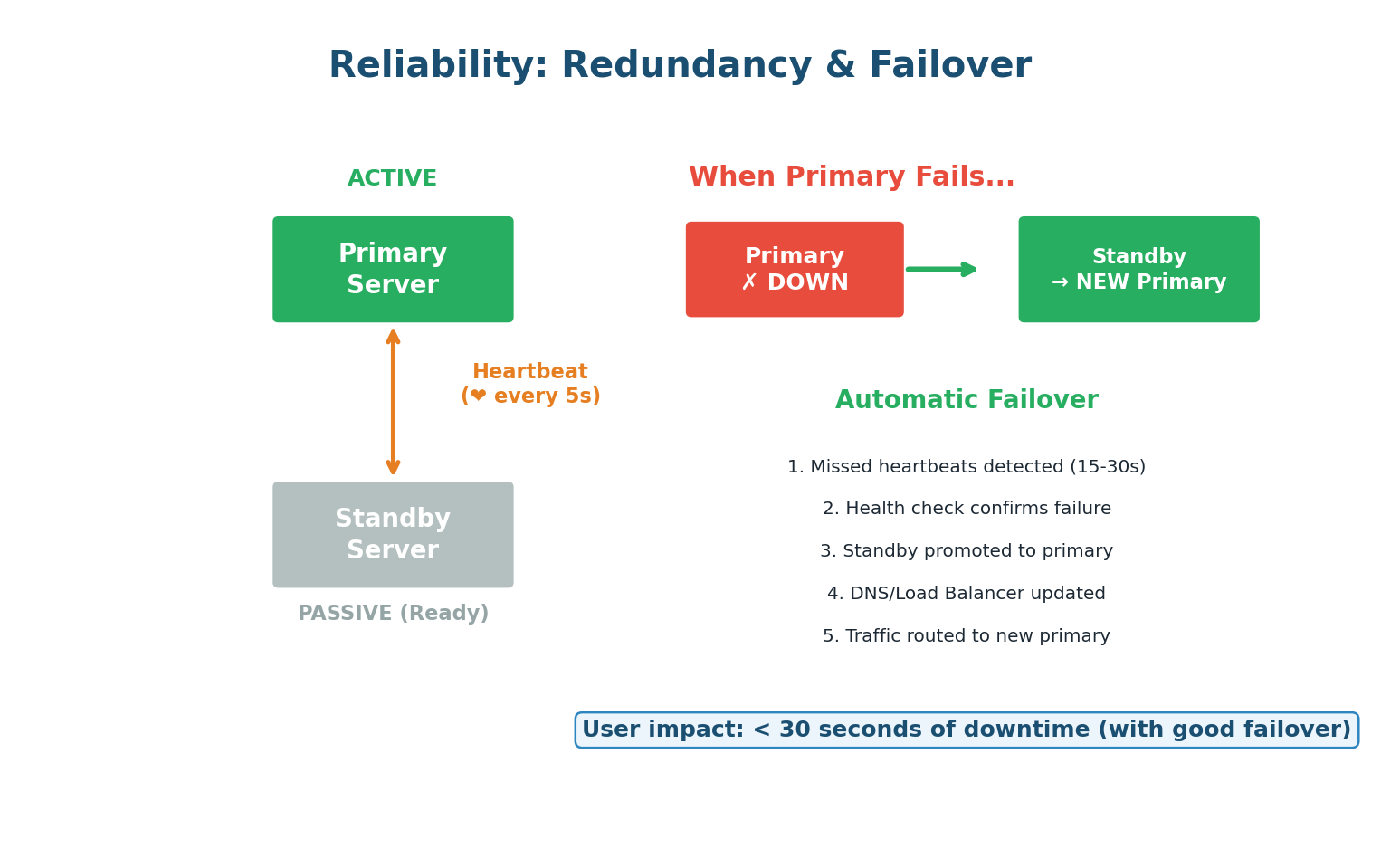
Active-Passive Failover
One server (active/primary) handles all requests. A second server (passive/standby) sits idle, receiving data replication from the primary. If the primary fails, the standby is promoted. Simple but wastes resources. Failure detection works through heartbeats: the primary sends a periodic signal ("I'm alive") to a monitoring system. If heartbeats stop for 15–30 seconds, the system promotes the standby.
Active-Active Failover
Both servers actively handle requests. Traffic is split between them. If one fails, the other absorbs the full load. More efficient (no idle resources) but more complex (both servers must be synchronized). This is WhatsApp's approach: multiple WebSocket servers actively handle connections, and if one goes down, affected users reconnect to another server automatically.
Defense in Depth: Layers of Reliability
A single reliability mechanism is not enough. Production systems use multiple layers of protection, each catching failures that slip through the layer above:
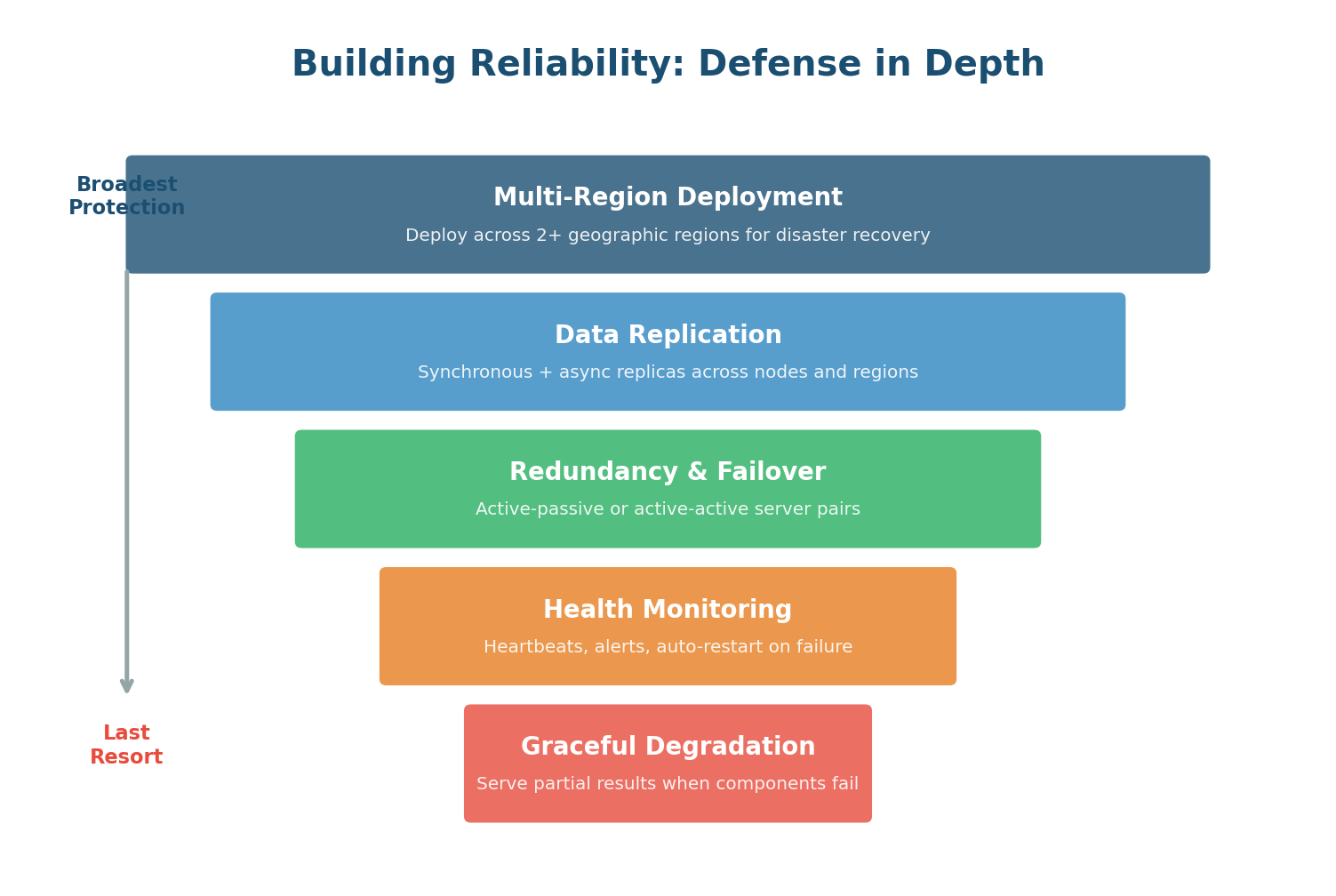
Deploy across multiple geographic regions (US East, US West, Europe, Asia). Protects against regional disasters: data center fires, power grid failures, natural disasters, even undersea cable cuts. If the entire US East region goes down, traffic routes to US West.
Every piece of critical data stored on multiple machines. Cassandra's replication factor of 3 means every message exists on three different nodes, typically in different racks or data centers. If one node's hard drive fails, two copies remain.
At the component level, every critical service has backup instances. If a WebSocket server crashes, the load balancer detects the failure via health checks and routes new connections to healthy servers. Users experience a brief disconnection but reconnect within seconds.
Comprehensive monitoring tracks CPU, memory, disk I/O, network latency, error rates, and business metrics (messages/sec, delivery latency). Automated alerts notify on-call engineers. For critical failures, automated remediation scripts restart failed services or trigger failover without human intervention.
The last resort. When overwhelmed, serve partial results instead of crashing. If the presence service is down, WhatsApp can still deliver messages — users just will not see "online" status temporarily. The most critical features (message delivery) are protected at the expense of less critical ones (typing indicators).
During the massive traffic spike on New Year's Eve 2017, WhatsApp temporarily disabled status updates and typing indicators to protect core message delivery. Users could still send and receive messages without issues. Most users did not even notice the degradation. This is graceful degradation: sacrifice the peripheral to protect the essential.
The Nines of Availability
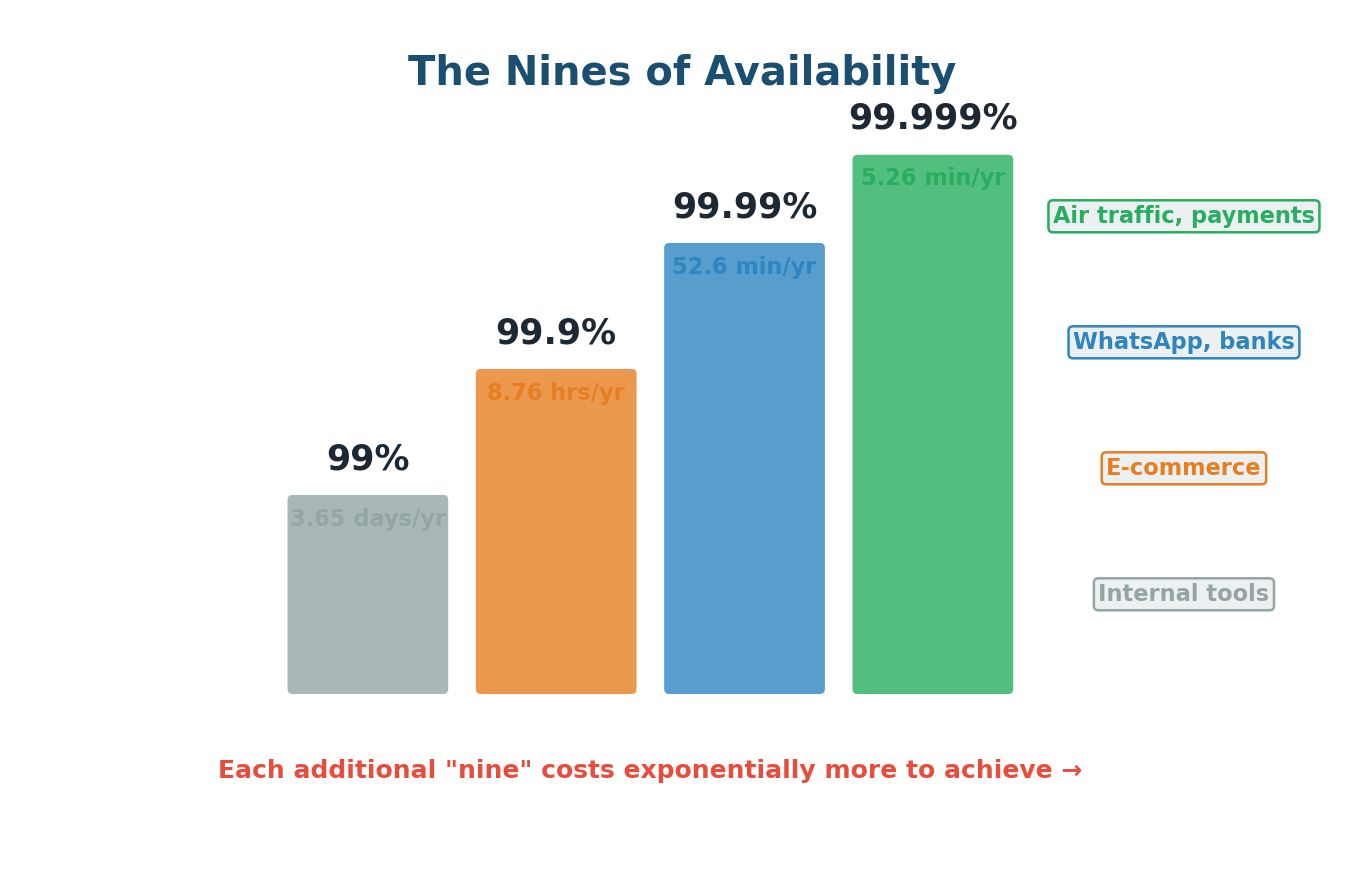
Availability is measured as a percentage of uptime, expressed in "nines." Each additional nine represents a 10x reduction in downtime — but achieving it costs exponentially more:
| Availability | Annual Downtime | Monthly Downtime | Typical System |
|---|---|---|---|
| 99% (two nines) | 3.65 days | 7.2 hours | Internal tools, dev environments |
| 99.9% (three nines) | 8.76 hours | 43.2 minutes | Standard SaaS products |
| 99.99% (four nines) | 52.6 minutes | 4.38 minutes | WhatsApp, payment systems, banks |
| 99.999% (five nines) | 5.26 minutes | 25.9 seconds | Air traffic control, stock exchanges |
A common mistake is saying "We need 99.999% availability" without understanding the cost. It is far more impressive to say: "Our messaging system needs 99.99% availability because communication is mission-critical. Five nines would require multi-region active-active deployment which adds significant complexity and cost. Given our scale, four nines is the right balance of reliability and engineering investment." This shows you understand the trade-off between availability and cost.
Reliability Patterns Every Engineer Should Know
How Scalability and Reliability Work Together
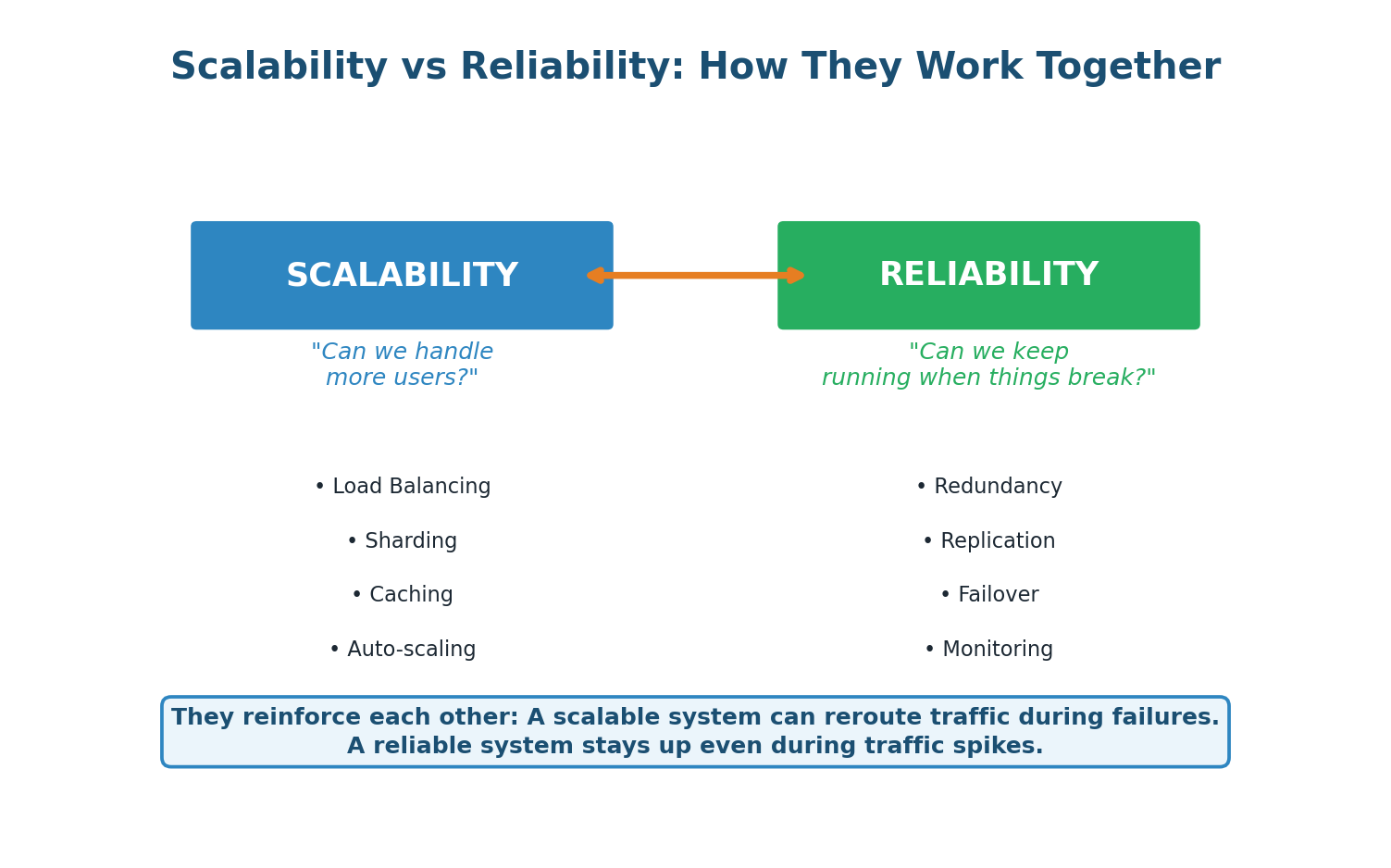
A scalable system with many server instances naturally has redundancy built in. If one of 100 servers fails, the remaining 99 absorb the load — a trivial impact. But if you only have 2 servers, losing one means the survivor must handle double the load, potentially cascading into a full outage.
Conversely, a reliable system with good failover can scale more confidently. Auto-scaling works best when the system can gracefully handle servers being added and removed without disruption. Health monitoring ensures that newly added servers are healthy before receiving traffic.
For WhatsApp, these two qualities form a virtuous cycle: horizontal scaling across thousands of servers provides natural redundancy, while reliability mechanisms ensure that scaling events do not introduce instability. Together, they enable a system that serves 2 billion users with less than an hour of downtime per year.
When discussing scalability and reliability, always show how they connect: "By horizontally scaling our WebSocket tier across 250 servers, we get both throughput capacity for 1.2M QPS (scalability) and natural fault tolerance because losing any single server only affects 0.4% of connections (reliability). This is a design where scalability and reliability reinforce each other — which is always what we aim for." This kind of integrated thinking is what earns top marks.
Wrapping Up
Class 1 Complete
This post-class covered three interconnected topics that form the core of System Design thinking:
- WhatsApp FR/NFR Case Study: How to systematically write Functional Requirements (8 features: messaging, groups, media, delivery status, presence, notifications, stories, encryption) and Non-Functional Requirements (6 quality attributes: scalability for 2B users, sub-100ms latency, 99.99% availability, zero message loss, end-to-end security, per-conversation consistency).
- Scalability Deep Dive: Vertical vs horizontal scaling trade-offs, the toolkit of 7 strategies (load balancing, sharding, caching, async processing, CDN, microservices, auto-scaling), and how to quantify scalability with real numbers.
- Reliability Deep Dive: Redundancy and failover patterns, defense in depth (5 layers), the nines of availability, and key reliability patterns (retry, circuit breaker, idempotency, dead letter queues, chaos engineering).
The crucial insight: requirements drive architecture. Every WhatsApp decision — WebSockets over HTTP, Cassandra over MySQL, Kafka for async delivery, Redis for session lookup, CDN for media — traces directly back to a specific FR or NFR. When you can explain those connections clearly in an interview, you demonstrate the kind of engineering thinking that companies are looking for.
Want to Land at Google, Microsoft or Apple?
Watch Pranjal Jain's free 30-min training — the exact GROW Strategy that helped 1,572+ engineers go from TCS/Infosys to top product companies with a 3–5X salary hike.