

What's Inside
Part 1
Complete Queues Quiz — 30 Questions
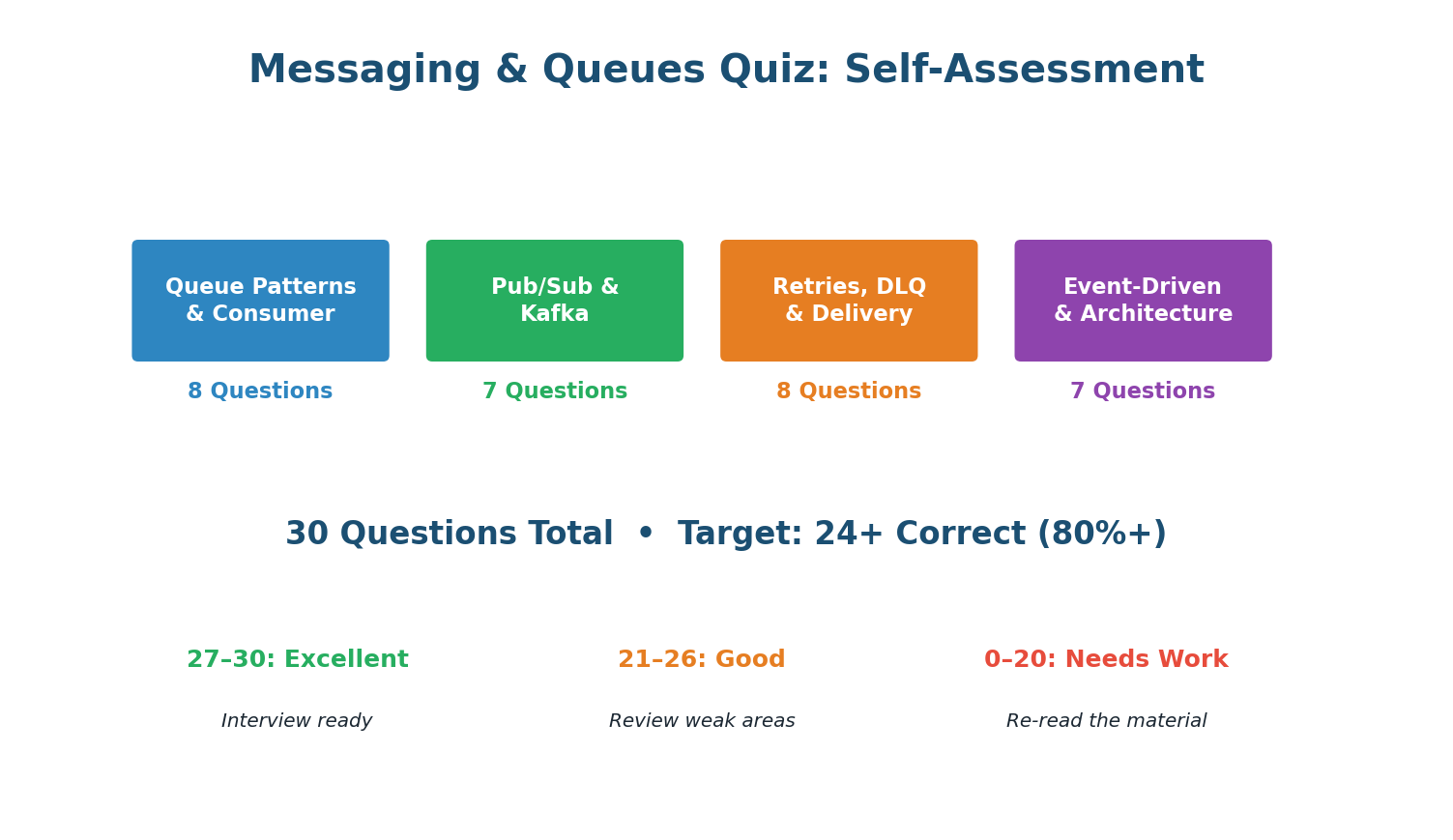
Section A · 8 Questions
Queue Patterns & Consumer
Async messaging: the producer sends to the queue and continues immediately (fire-and-forget). The queue buffers the message. The consumer processes it later. The producer is never blocked.
ACK only after processing is complete and side effects are committed. If you ACK before processing and then crash, the message is lost — the broker already removed it.
The visibility timeout (SQS) or unacked message TTL (RabbitMQ) expires. The message becomes visible again and is redelivered to another consumer. This is the at-least-once guarantee in action.
Competing consumers: multiple consumers pull from the same queue. The broker delivers each message to exactly one consumer. Work is distributed automatically (round-robin or least-busy).
Growing queue depth means consumers cannot keep up. Add more consumer instances. More workers = more parallel processing = queue drains faster. This is the primary scaling mechanism.
Async messaging decouples producer from consumer: they operate independently, the queue buffers traffic spikes, and if the consumer is down, messages wait instead of causing producer failures.
Visibility timeout: while a consumer is processing a message, it is hidden from other consumers. If the consumer does not ACK within the timeout, the message becomes visible again for redelivery.
Sending emails after purchase is async: the user does not wait for email delivery. Login, search, and profile fetch all need immediate responses — these are synchronous operations.
Section B · 7 Questions
Pub/Sub & Kafka
A consumer group receives ALL messages in the topic. Partitions are distributed among group members — each member handles a subset of partitions but the group as a whole gets everything.
6 partitions / 3 consumers = 2 partitions per consumer. Kafka evenly distributes partitions within a consumer group. Adding a 4th consumer would make it 6/4, some get 2, some get 1.
Ordering is guaranteed within a single partition (messages appended in order, consumed in order). Across partitions, there is no ordering guarantee. Use partition keys for per-entity ordering.
Using order_id as partition key ensures all events for order #42 hash to the same partition. Within that partition, events are ordered (created → paid → shipped → delivered).
Multiple consumer groups = pub/sub. Each group independently receives all messages. Within each group, it is a work queue. This is how Kafka combines both patterns in one system.
Kafka retains messages (default 7 days) to enable replay. Consumers can reset their offset to reprocess historical events — invaluable for debugging, backfilling data, and rebuilding state.
New consumer groups subscribe independently. The producer has no knowledge of its consumers. Zero code changes to the producer. This is the core decoupling benefit of event-driven architecture.
Section C · 8 Questions
Retries, DLQ & Delivery
Exponential backoff doubles the wait: ~1s, ~2s, ~4s, ~8s. Jitter adds random offset to prevent synchronized retries. This is the gold standard used by AWS SDK, gRPC, and Stripe.
Without jitter, 1000 consumers all retry at exactly 1s, 2s, 4s — creating synchronized storms. Jitter spreads retries over time, smoothing the load on the recovering service.
DLQ stores messages that exhausted all retries. These need manual investigation: the consumer has a bug, the data is invalid, or a dependency is permanently down.
Invalid JSON is a permanent error — retrying will never fix it. Send to DLQ immediately to avoid wasting retry resources. Only retry transient errors (timeout, 429, 503).
At-least-once: the broker retries until ACKed. If the consumer processes but crashes before ACKing, the message is redelivered (duplicate). Consumers must be idempotent.
Idempotent consumers produce the same result when processing the same message twice. Use a deduplication check (message_id in Redis SET) to detect and skip duplicates.
A poison message crashes the consumer on every attempt, creating an infinite retry loop. Solution: track per-message retry count. After N failures, send to DLQ and continue.
DLQ messages mean something is broken. Alert immediately (PagerDuty/Slack). An unmonitored DLQ is a data graveyard. Review regularly, fix bugs, and replay.
Section D · 7 Questions
Event-Driven Architecture
Event-driven: services publish events to a central bus (Kafka). Consumers react independently. No direct service-to-service calls. Loose coupling, independent scaling.
Key benefit: loose coupling. Adding a new consumer (e.g., Fraud Detection) requires zero changes to any existing service. The new service just subscribes to relevant topics.
Saga pattern: distributed transactions as a sequence of local transactions + compensating actions. If step 3 fails, compensating events undo steps 1 and 2 (eventual rollback).
Saga compensation: when step 3 fails, compensating actions fire to undo steps 1 and 2 (e.g., refund payment, cancel order). The end state is consistent, but eventually, not immediately.
Events are facts ('order.created' = this happened). Each consumer independently decides how to react. Commands ('send_email') couple the publisher to specific consumer behavior.
Event-driven trade-offs: eventual consistency (not immediate), harder debugging (trace events across services). Benefits: loose coupling, independent scaling, failure isolation.
Kafka is the default for system design interviews. It supports both work queue (single consumer group) and pub/sub (multiple groups), message replay, high throughput, and is industry standard.
Part 2
Design a Notification System
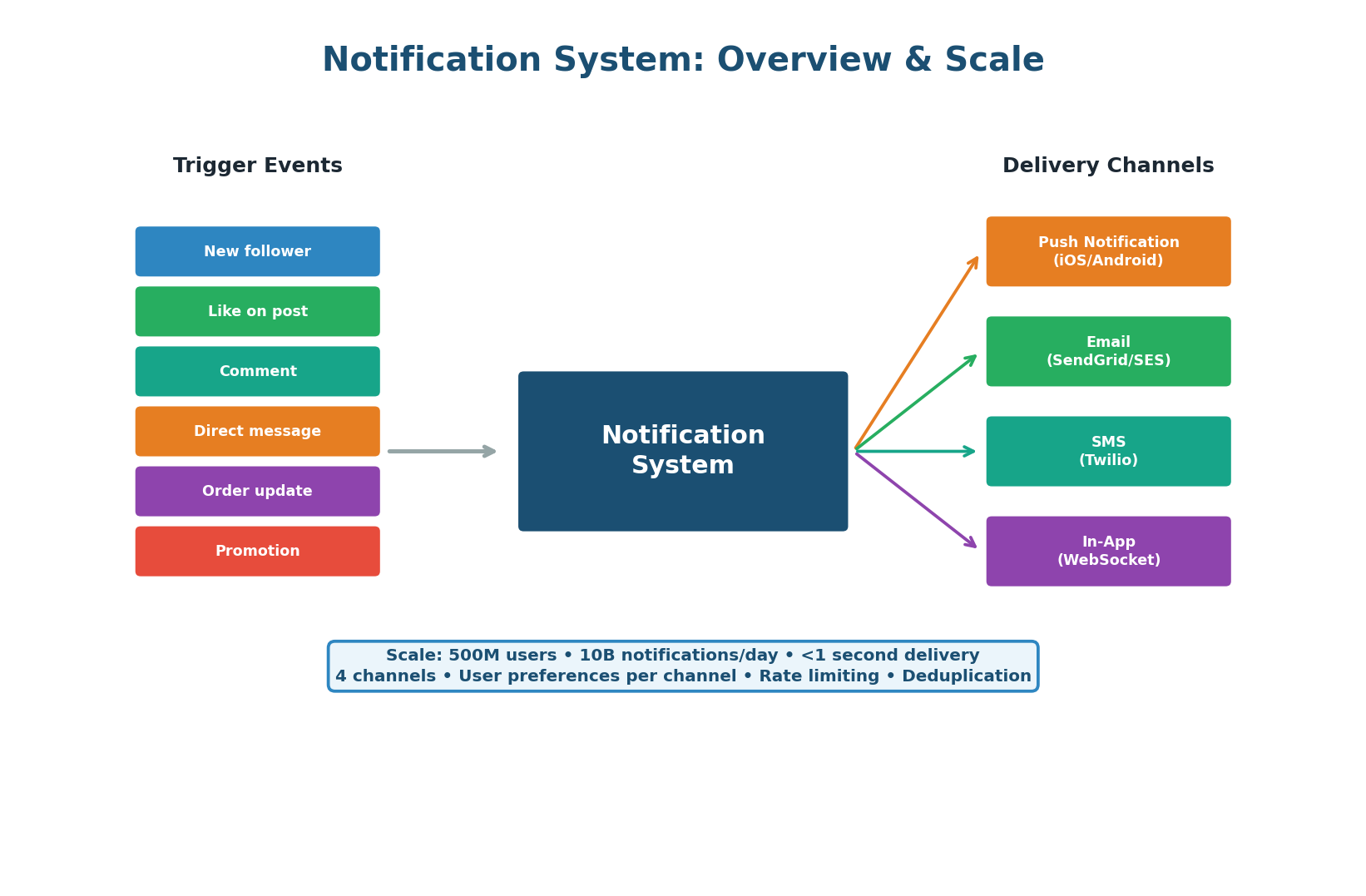
Notification systems are one of the most common system design interview questions because they require every concept from this class: message queues for decoupling, pub/sub for fan-out, retries with backoff for reliability, dead letter queues for error handling, and event-driven architecture for extensibility. This exercise walks through a production-grade design that handles 10 billion notifications per day across push, email, SMS, and in-app channels.
Scale Context
500M users × 20 notifications/day average = 10B notifications/day. Peak: 200K notifications/second (during events like New Year, flash sales). Each notification may be delivered on multiple channels (push + in-app = 2 deliveries per notification). Total deliveries: ~15B/day. Latency target: <1 second from event to device.
Architecture
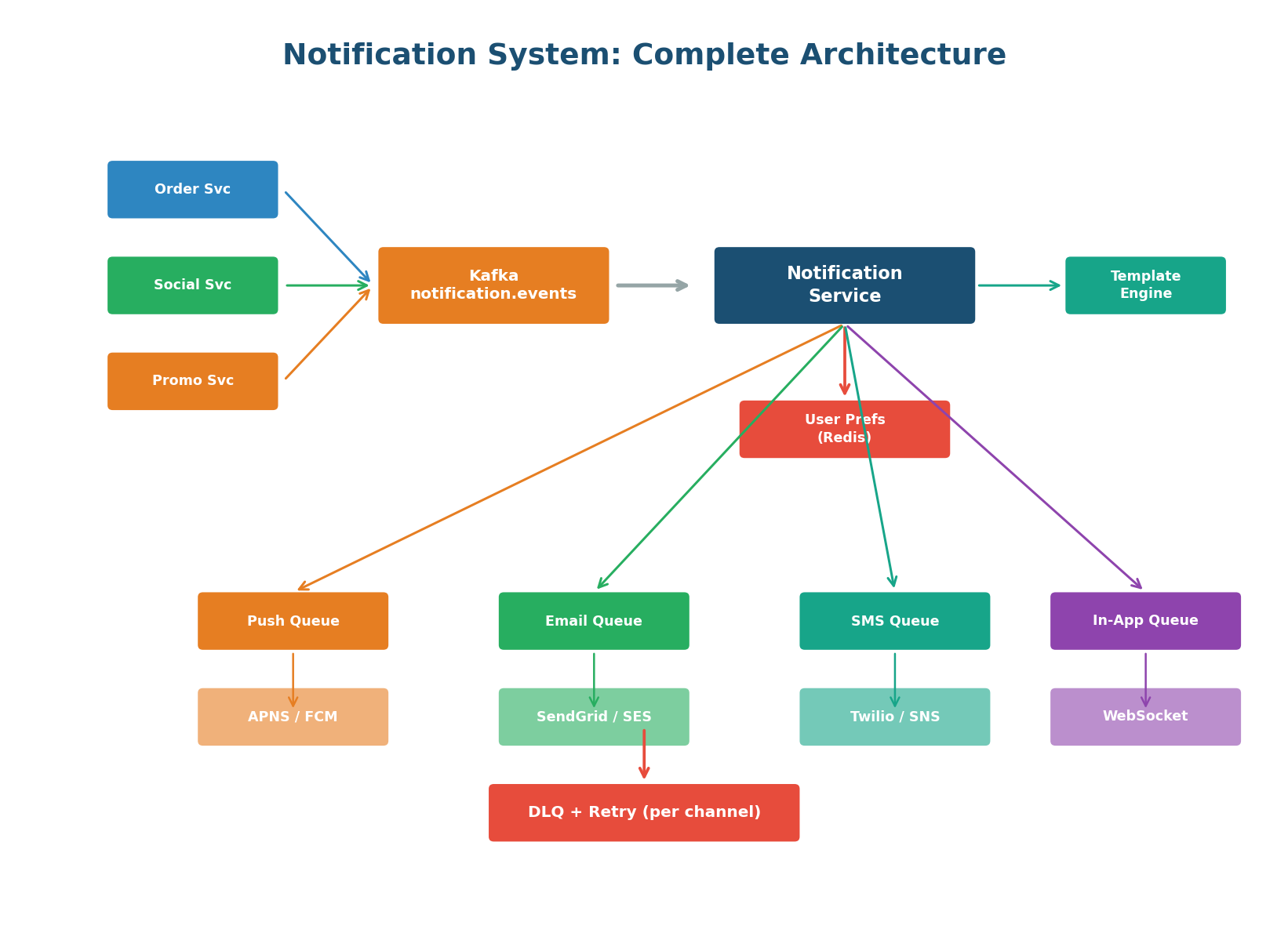
The architecture follows the event-driven pattern. Any service in the system can trigger a notification by publishing an event to Kafka (topic: notification.events). The Notification Service consumes events, checks user preferences, applies rate limiting and deduplication, renders the message using templates, and enqueues to the appropriate channel queue(s).
Each channel has its own dedicated queue and worker fleet that handles the specific provider API (APNS for iOS push, FCM for Android, SendGrid for email, Twilio for SMS, WebSocket for in-app).
Each delivery channel has different characteristics: push is fast but rate-limited by Apple/Google, email is slow but high-volume, SMS is expensive and very limited, in-app is instant for online users but requires store-and-forward for offline users.
Separate queues allow independent scaling (more push workers during a viral event), independent retry strategies (email retries over hours, push retries over minutes), and independent DLQs — an email bounce does not affect push delivery.
Event Schema & Routing
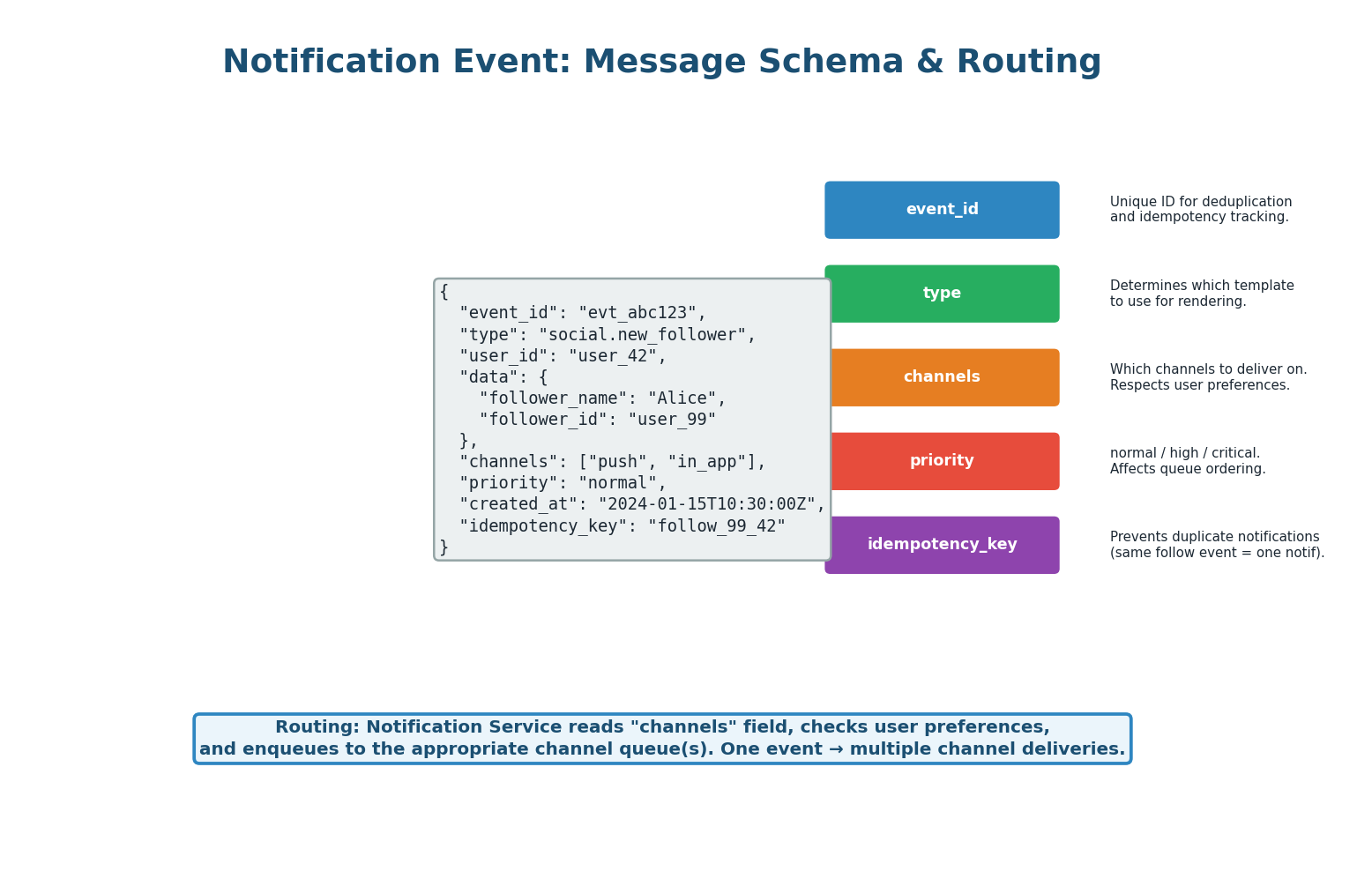
Every notification event contains: event_id (unique identifier for tracking), type (determines the template, e.g., social.new_follower), user_id (recipient), data (dynamic content like follower_name), channels (which delivery channels to use), priority (normal/high/critical), and idempotency_key (prevents duplicate notifications).
The Notification Service uses the type to select a message template, the channels field (intersected with user preferences) to determine delivery targets, and the idempotency_key to skip already-sent notifications.
User Preferences & Quiet Hours
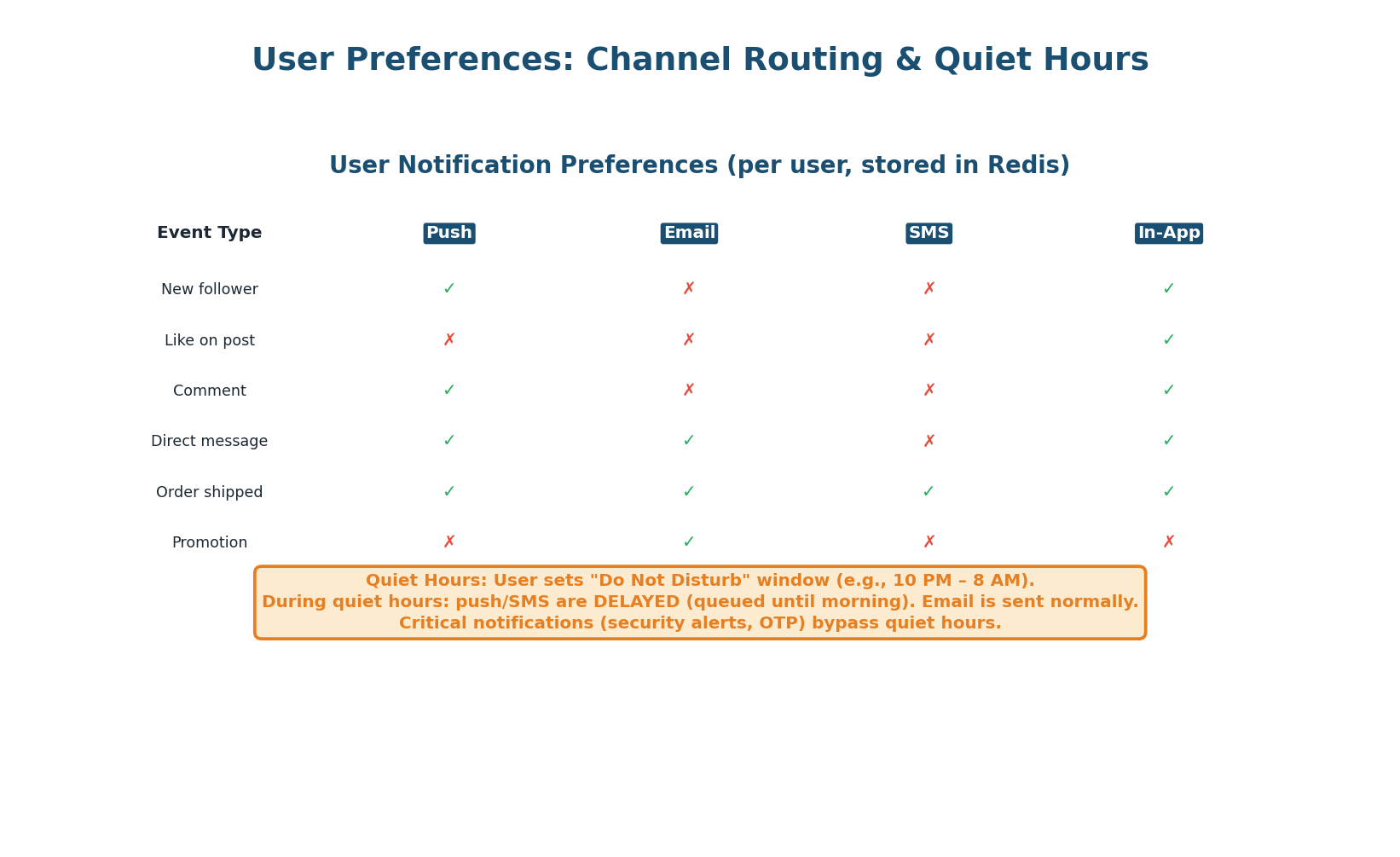
Users control which notifications they receive on which channels. This preference matrix is stored in Redis for sub-millisecond lookups (key: user_prefs:{user_id}, value: JSON). The Notification Service intersects the event's requested channels with the user's enabled channels.
Quiet Hours: Users can set a Do Not Disturb window (e.g., 10 PM – 8 AM). During quiet hours, push notifications and SMS are delayed and batched for morning delivery. Email is unaffected (read at user's convenience). Critical notifications (security alerts, OTP codes) bypass quiet hours completely.
Rate Limiting & Deduplication
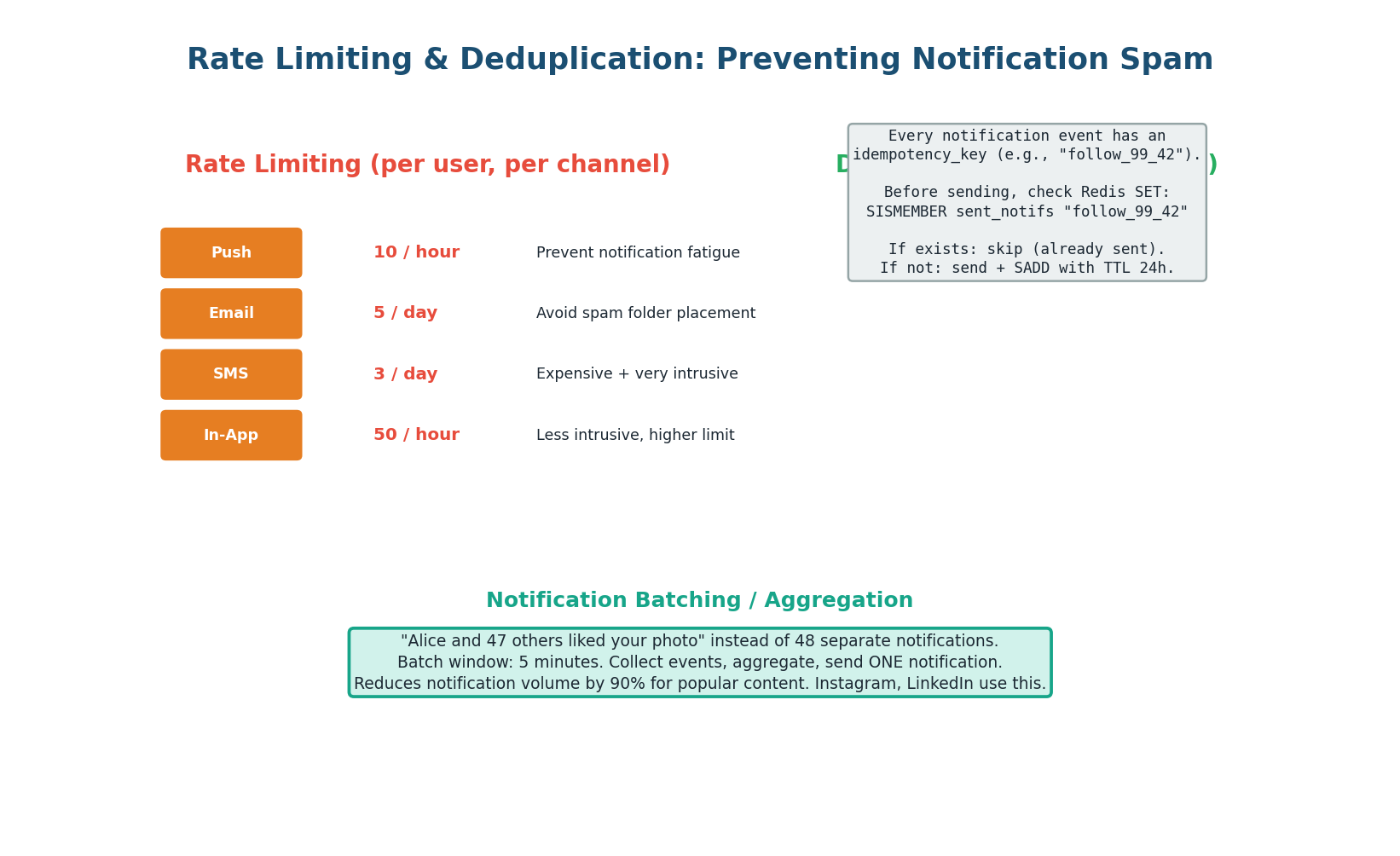
Rate Limiting: Each channel has per-user rate limits — push 10/hour, email 5/day, SMS 3/day, in-app 50/hour. Implemented with Redis counters: INCR rate:{user_id}:{channel}:{window} with TTL matching the window. When the limit is exceeded, the notification is dropped (low priority) or queued for the next window (high priority).
Deduplication: Every event has an idempotency_key. Before sending, the Notification Service checks Redis: SISMEMBER sent_notifs:{user_id} "follow_99_42". If the key exists, the notification was already sent (skip). If not, send and SADD with a 24-hour TTL. This prevents duplicates from Kafka retries or duplicate events from upstream services.
These two features separate a good notification design from a great one: "I implement per-user per-channel rate limits in Redis to prevent notification spam. I use idempotency keys for deduplication to prevent duplicates from Kafka retries. I batch high-frequency events into aggregated notifications ('48 people liked your photo') using a 5-minute buffer window." Interviewers love this level of detail.
Push Notification Delivery
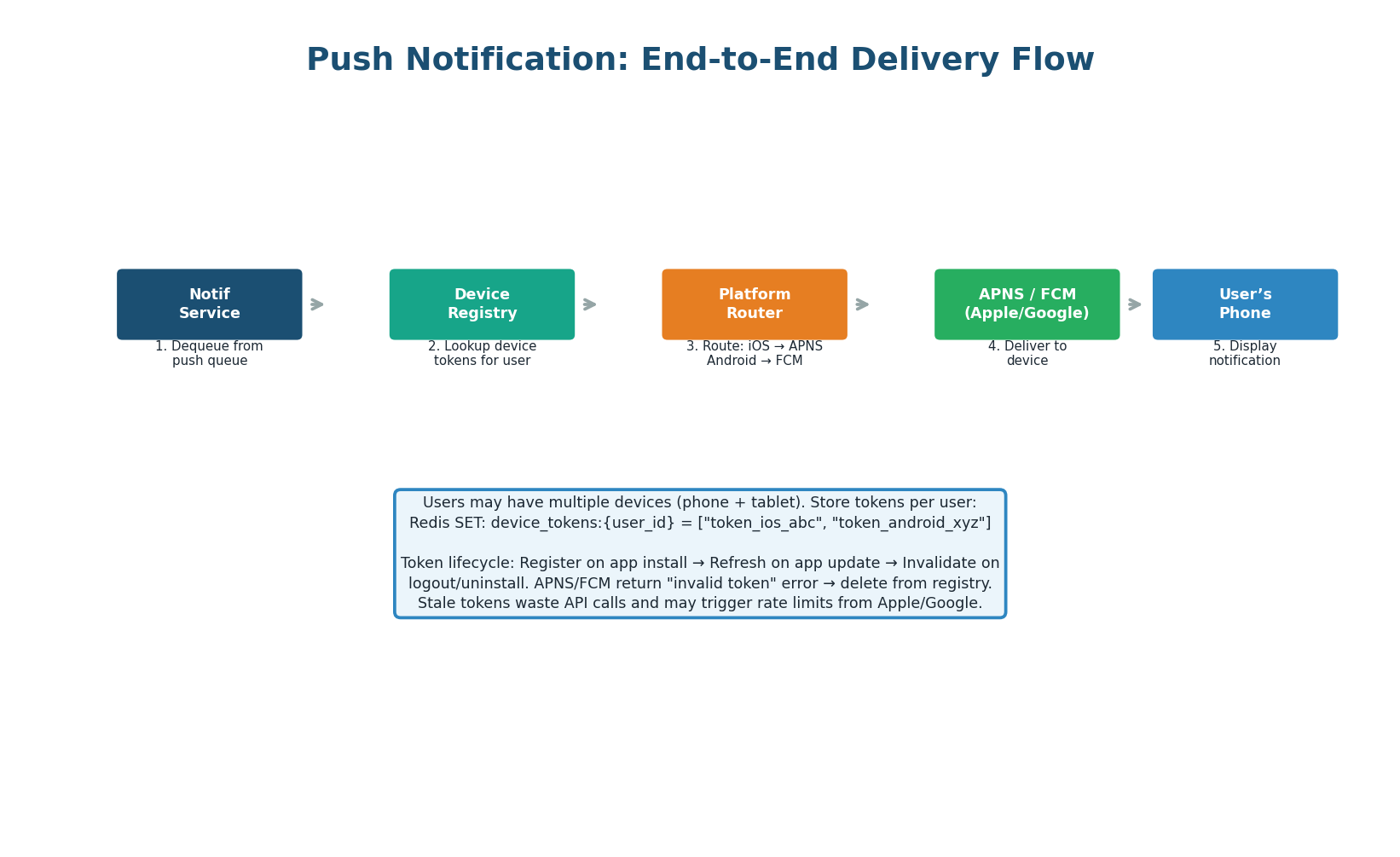
Push notification delivery requires a device token registry. When a user installs the app, the device registers its push token (APNS token for iOS, FCM token for Android) with the backend. These tokens are stored in Redis: device_tokens:{user_id} = set of tokens.
Users with multiple devices (phone + tablet) have multiple tokens. The push worker looks up all tokens for the user, routes to the correct platform (iOS → Apple APNS, Android → Google FCM), and sends. If APNS/FCM returns an "invalid token" error, the token is removed from the registry (user uninstalled the app or the token was refreshed).
Per-Channel Retry & DLQ Strategy
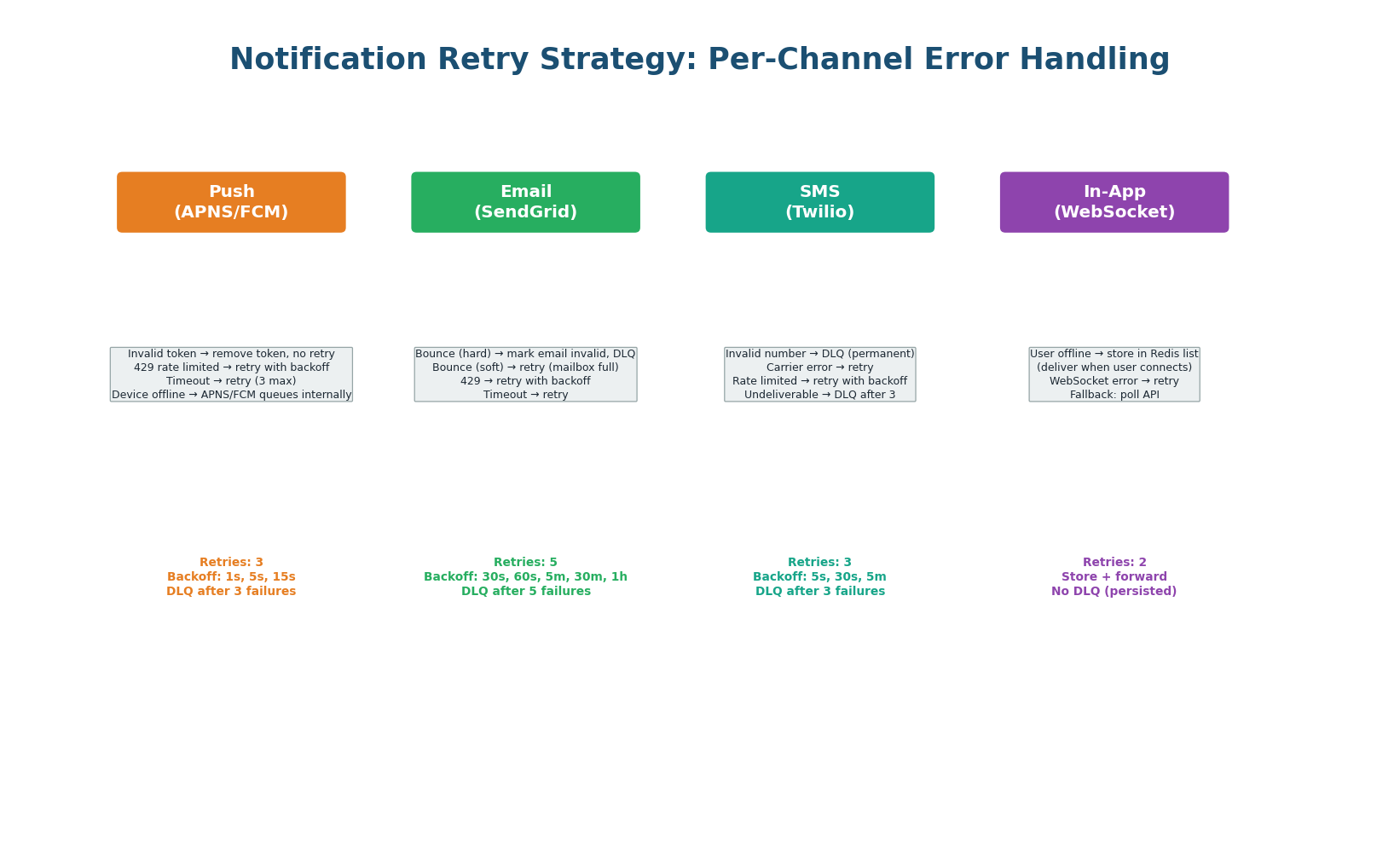
Each delivery channel has its own retry strategy because failure modes differ drastically. Push retries are fast because APNS/FCM responses are immediate. Email retries are slow because email delivery is inherently delayed. In-app uses store-and-forward: if the user is offline, the notification is stored in a Redis list and delivered when the user's WebSocket reconnects.
| Channel | Max Retries | Backoff | Permanent Errors → DLQ | Provider |
|---|---|---|---|---|
| Push | 3 | 1s, 5s, 15s | Invalid token (remove + DLQ) | APNS (iOS), FCM (Android) |
| 5 | 30s, 60s, 5m, 30m, 1h | Hard bounce (mark invalid + DLQ) | SendGrid, AWS SES | |
| SMS | 3 | 5s, 30s, 5m | Invalid number (DLQ) | Twilio, AWS SNS |
| In-App | 2 | Store + forward | N/A (persisted in Redis) | WebSocket, SSE |
Analytics & Monitoring
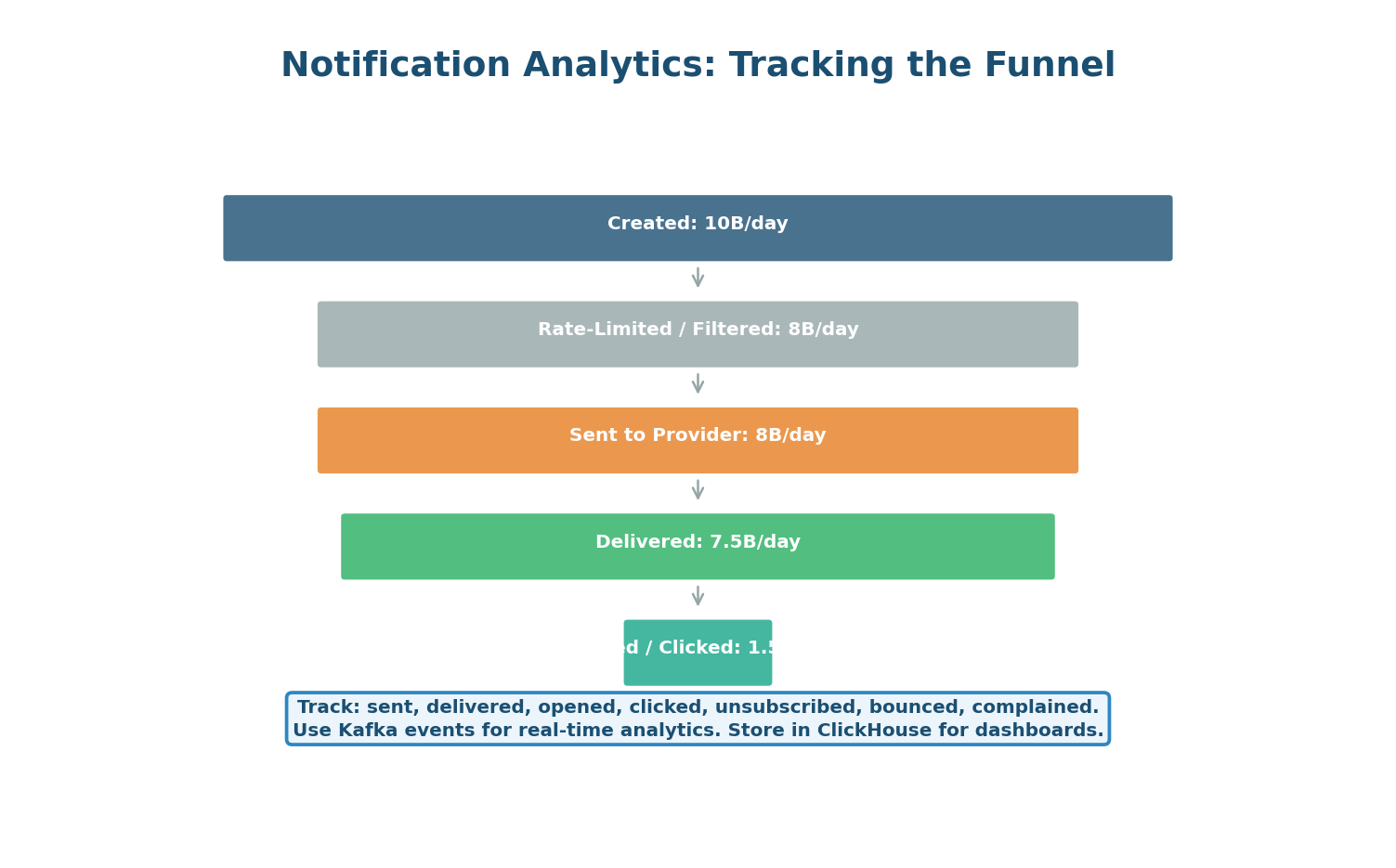
Every notification passes through a tracking funnel: Created (event received) → Filtered (rate-limited or preference-blocked) → Sent (enqueued to provider) → Delivered (provider confirms) → Opened (user tapped) → Clicked (user interacted). Each stage publishes a tracking event to a Kafka analytics topic, flowing to ClickHouse for real-time dashboards.
| Metric | Healthy | Warning | Action |
|---|---|---|---|
| Delivery rate | 95%+ | <90% | Check provider errors, DLQ |
| Open rate (push) | 5–15% | <3% | Review notification content/timing |
| Bounce rate (email) | <2% | 2–5% | Clean email list, check sender reputation |
| DLQ depth | 0 | 1–10 | Fix consumer bug, replay from DLQ |
| Latency (event to delivery) | <1 second | 1–5 seconds | Scale workers, check provider latency |
Design Checklist
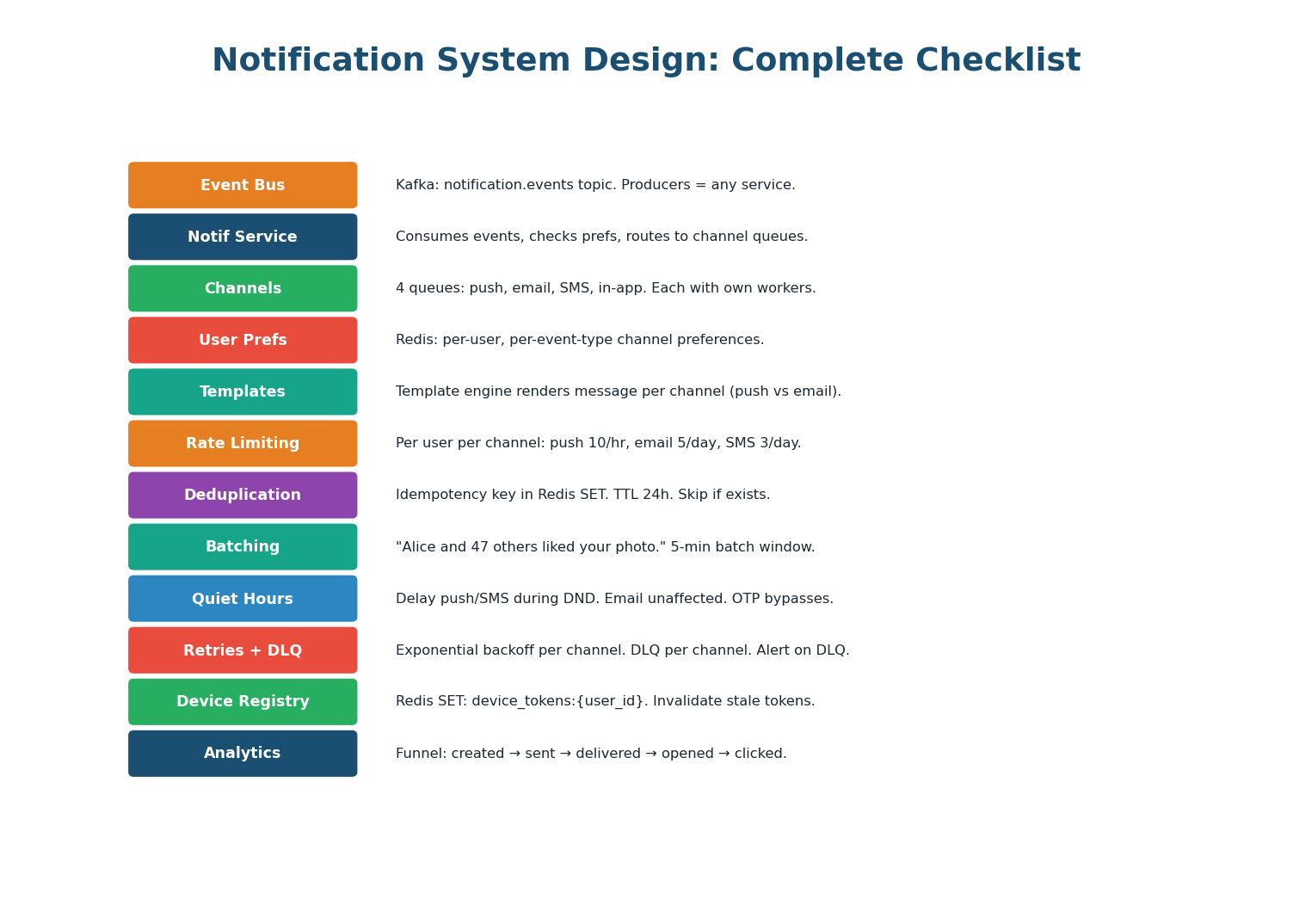
| Aspect | Design Decision | Why |
|---|---|---|
| Event Bus | Kafka: notification.events topic | Decouple trigger services from notification logic |
| Notification Service | Consumes events, routes to channel queues | Central orchestration: prefs, rate limit, dedup, template |
| Channel Queues | 4 separate queues: push, email, SMS, in-app | Independent scaling, retry, and DLQ per channel |
| User Preferences | Redis: per-user per-event-type channel matrix | Sub-ms lookup. Users control their notification experience. |
| Rate Limiting | Redis counters: push 10/hr, email 5/day, SMS 3/day | Prevent notification fatigue and provider rate limits |
| Deduplication | Idempotency key in Redis SET (24h TTL) | Prevent duplicates from retries and duplicate events |
| Batching | 5-min window: '48 people liked your photo' | 90% volume reduction for high-frequency events |
| Quiet Hours | Delay push/SMS during DND. Email unaffected. | Respect user attention. OTP/security bypass DND. |
| Retries | Exponential backoff per channel. Smart error classification. | Transient errors retry. Permanent errors go to DLQ immediately. |
| DLQ | Per-channel DLQ. Alert on any message. Replay tooling. | Safety net. No notification permanently lost. |
| Device Registry | Redis SET: device_tokens per user. Invalidate stale. | Multi-device support. Clean up uninstalled apps. |
| Analytics | Kafka → ClickHouse: created/sent/delivered/opened funnel | Real-time dashboards. Measure notification effectiveness. |
This design is the template for WhatsApp notifications, Slack alerts, Uber ride updates, DoorDash order tracking, and any multi-channel notification platform. The patterns are identical: Kafka event bus, central routing service, per-channel queues, user preferences, rate limiting, deduplication, batching, per-channel retry/DLQ, and delivery analytics. Master this design and apply it to any notification interview question.
Want to Land at Google, Microsoft or Apple?
Watch Pranjal Jain's free 30-min training — the exact GROW Strategy that helped 1,572+ engineers go from TCS/Infosys to top product companies with a 3–5X salary hike.