

8-Step Design Walkthrough
The Exercise: Design a URL Shortener API
URL shorteners (like bit.ly, TinyURL, and short.io) are one of the most popular system design interview questions because they touch on every concept we have learned: API design, database design, caching, rate limiting, idempotency, load balancing, and scalability. This post-class exercise walks through a complete, production-grade API design that you can use as a template for interviews.
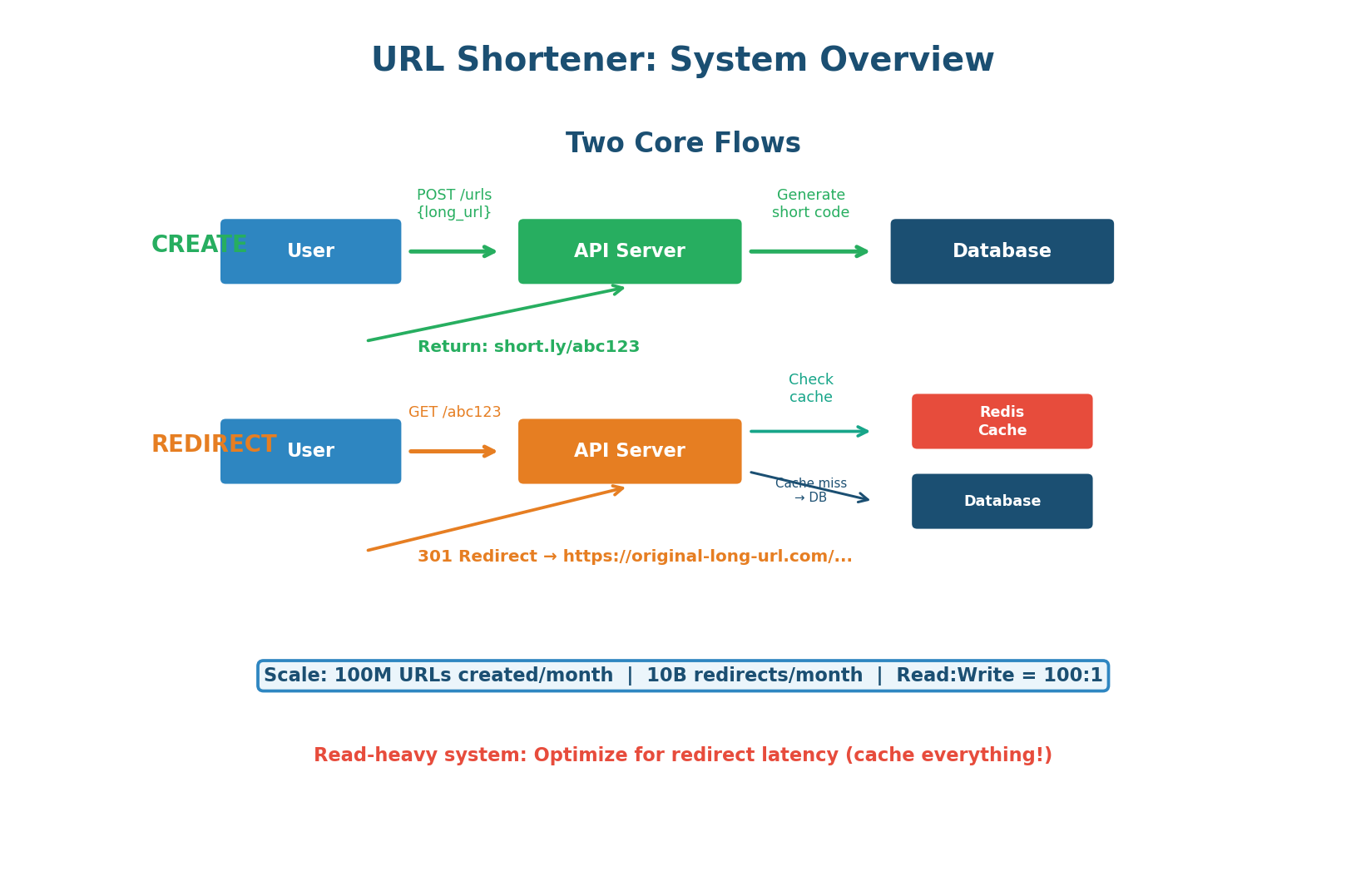
The challenge: design an API that can handle the following scale requirements:
- 100 million short URLs created per month (~40 writes/second)
- 10 billion redirects per month — a 100:1 read-to-write ratio (~4,000 reads/second)
- Redirects return in under 10ms for cached URLs
- Must scale horizontally without downtime
This is a read-heavy system where caching is king. The redirect path must be optimized for speed above everything else.
Define the API Endpoints
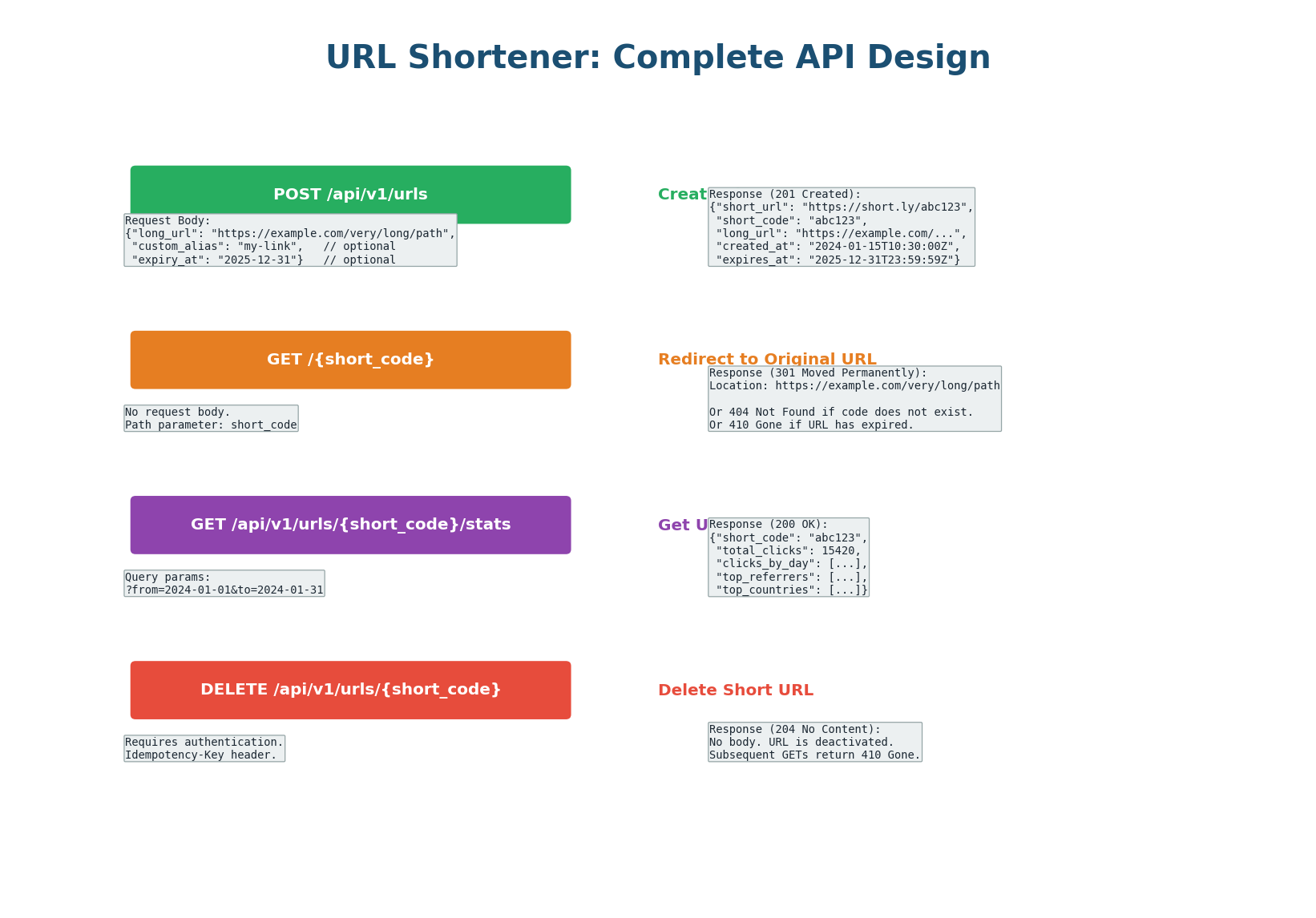
A well-designed URL shortener needs exactly four endpoints. Each endpoint follows REST principles: resources are nouns, HTTP methods are verbs, and status codes communicate the result clearly.
Endpoint 1: Create Short URL
POST /api/v1/urls — creates a new short URL. The client sends the long URL in the request body. Optionally, the client can request a custom alias (e.g., short.ly/my-brand) and set an expiration date.
Endpoint 2: Redirect
GET /{short_code} — the redirect endpoint. When a user visits short.ly/abc123, the server looks up abc123, finds the corresponding long URL, and returns a redirect response. This endpoint must be extremely fast because it handles 100× more traffic than the create endpoint.
Returns one of three status codes: 301 or 302 for successful redirects (see Step 4 for the critical design decision), 404 Not Found if the short code does not exist, or 410 Gone if the URL has expired.
Endpoint 3: Get Analytics
GET /api/v1/urls/{short_code}/stats — returns click analytics: total clicks, clicks by day/hour, top referrers, top countries, and device breakdown. Analytics data is collected asynchronously (click events published to Kafka and processed by a separate analytics service) so it does not slow down the redirect flow.
Endpoint 4: Delete URL
DELETE /api/v1/urls/{short_code} — deactivates a short URL. Requires authentication (only the URL creator can delete it). After deletion, the redirect endpoint returns 410 Gone. This endpoint must be idempotent: deleting an already-deleted URL should return 204 (not an error).
| Endpoint | Method | Auth? | Success Code |
|---|---|---|---|
/api/v1/urls | POST | Optional | 201 Created |
/{short_code} | GET | No | 301 or 302 |
/api/v1/urls/{code}/stats | GET | Yes | 200 OK |
/api/v1/urls/{short_code} | DELETE | Yes | 204 No Content |
Short Code Generation
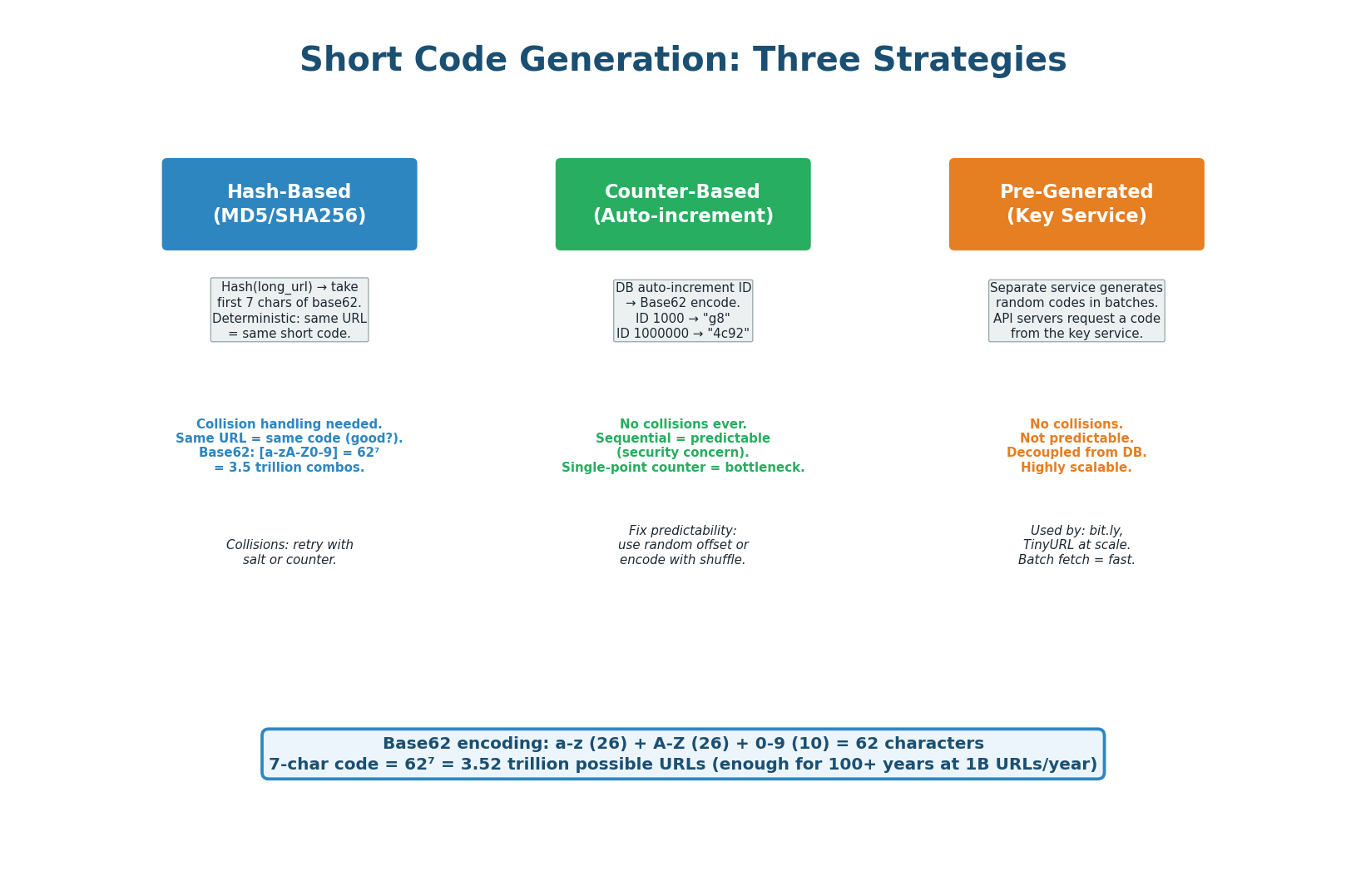
The short code is the heart of the system. It must be short (7 characters), unique (no collisions), and generated quickly (sub-millisecond). We use Base62 encoding (a–z, A–Z, 0–9 = 62 characters), giving us 627 = 3.52 trillion possible codes — enough for over 1,000 years at 1 billion URLs per year.
Strategy 1: Hash the Long URL
Take the MD5 or SHA256 hash of the long URL and extract the first 7 characters of the Base62 encoding. The same long URL always produces the same short code (deterministic). The problem: hash collisions — two different URLs might hash to the same 7-character code. Solution: on collision, append a counter (hash of URL + "1", then URL + "2") and retry. In practice, with 3.5 trillion possible codes, collision rate is extremely low. Avoid for new systems — the Key Generation Service is strictly better.
Strategy 2: Auto-Increment Counter
Use a database auto-increment ID and convert it to Base62. ID 1 becomes "1", ID 62 becomes "10", ID 1,000,000 becomes "4c92". Zero collisions by definition. The problem: codes are sequential and predictable — a malicious user can enumerate all URLs by incrementing the code. Solutions: use a random starting offset, XOR the ID with a secret before encoding, or use a range-based approach where each server takes a range of IDs.
Strategy 3: Pre-Generated Key Service RECOMMENDED
A separate Key Generation Service (KGS) pre-generates millions of random unique 7-character codes and stores them in a database. When an API server needs a new code, it fetches one (or a batch of 1,000) from the KGS. The KGS marks the code as "used" atomically. This approach has zero collisions, is not predictable, decouples code generation from the main request path, and is highly scalable — multiple API servers can fetch batches in parallel without coordination.
When asked "how do you generate short codes?", answer: "I'll use a pre-generated Key Generation Service that creates random Base62 7-character codes in batches. API servers fetch a batch of 1,000 codes on startup and replenish when running low. This gives us zero collision risk, unpredictable codes, and sub-microsecond code assignment without database round-trips on the critical path."
Database Schema
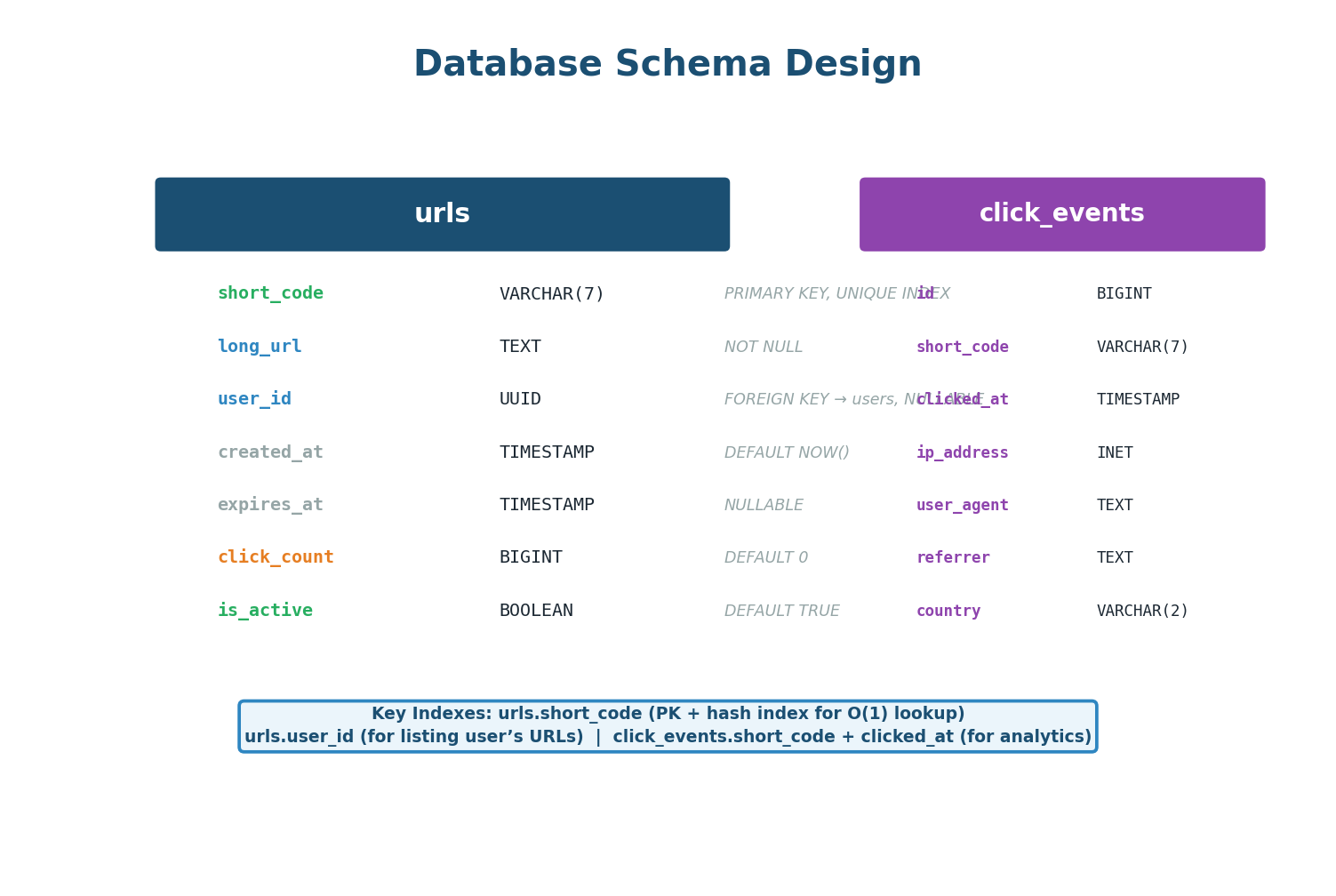
urls (mapping) and click_events (analytics)The schema is intentionally simple. The urls table stores the mapping between short codes and long URLs. The short_code column is the primary key (hash index for O(1) lookup) — the most performance-critical index in the entire system.
For the click_events table, avoid PostgreSQL at scale. Click events are write-heavy (4,000 inserts/second), append-only, and queried by time range — a perfect fit for ClickHouse or Cassandra. ClickHouse handles 100K+ inserts/second and runs analytics queries 100× faster than PostgreSQL on time-series data. The /stats endpoint should query ClickHouse, not PostgreSQL.
The 301 vs 302 Decision
This is one of the most important design decisions in a URL shortener, and interviewers love to ask about it. The answer depends entirely on whether you need analytics.
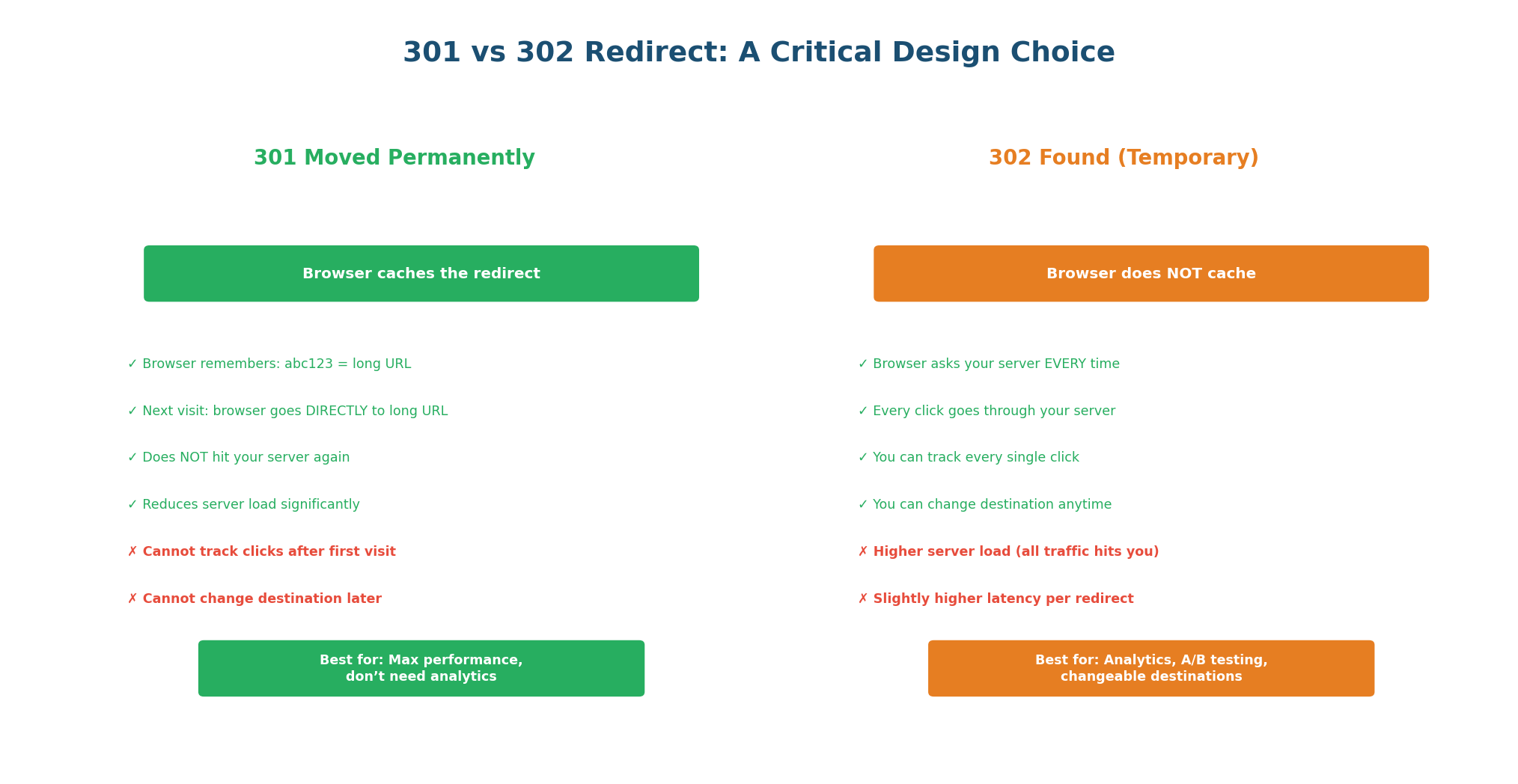
| Criteria | 301 Moved Permanently | 302 Found (Temporary) |
|---|---|---|
| Browser caching | Yes — cached forever | No — every click hits server |
| Server load | Very low (browser handles repeat visits) | Higher (every click = server request) |
| Analytics | No repeat-click tracking | Every click tracked |
| Can change destination | No (browser has it cached) | Yes |
| Expiration enforcement | No (browser ignores expiry) | Yes (server checks on each request) |
| Best for | High-traffic, no analytics needed | Analytics, campaigns, A/B testing |
The hybrid approach (used by bit.ly): Use 302 by default for analytics-rich URLs. Offer 301 as an option for high-traffic URLs where the creator does not need analytics. bit.ly uses 301 for free users (reduces their infrastructure cost) and 302 for paying customers (provides click analytics as a premium feature).
"I'll use 302 by default because our system promises click analytics. With 301, the browser caches the redirect and subsequent visits never reach our server — we'd lose analytics data. The trade-off is higher server load, but our multi-layer cache (CDN → Redis) means most requests don't reach the application server anyway."
Multi-Layer Caching
With a 100:1 read-to-write ratio, caching is the single most important optimization. The goal is for 95%+ of redirect requests to be served without touching the database.
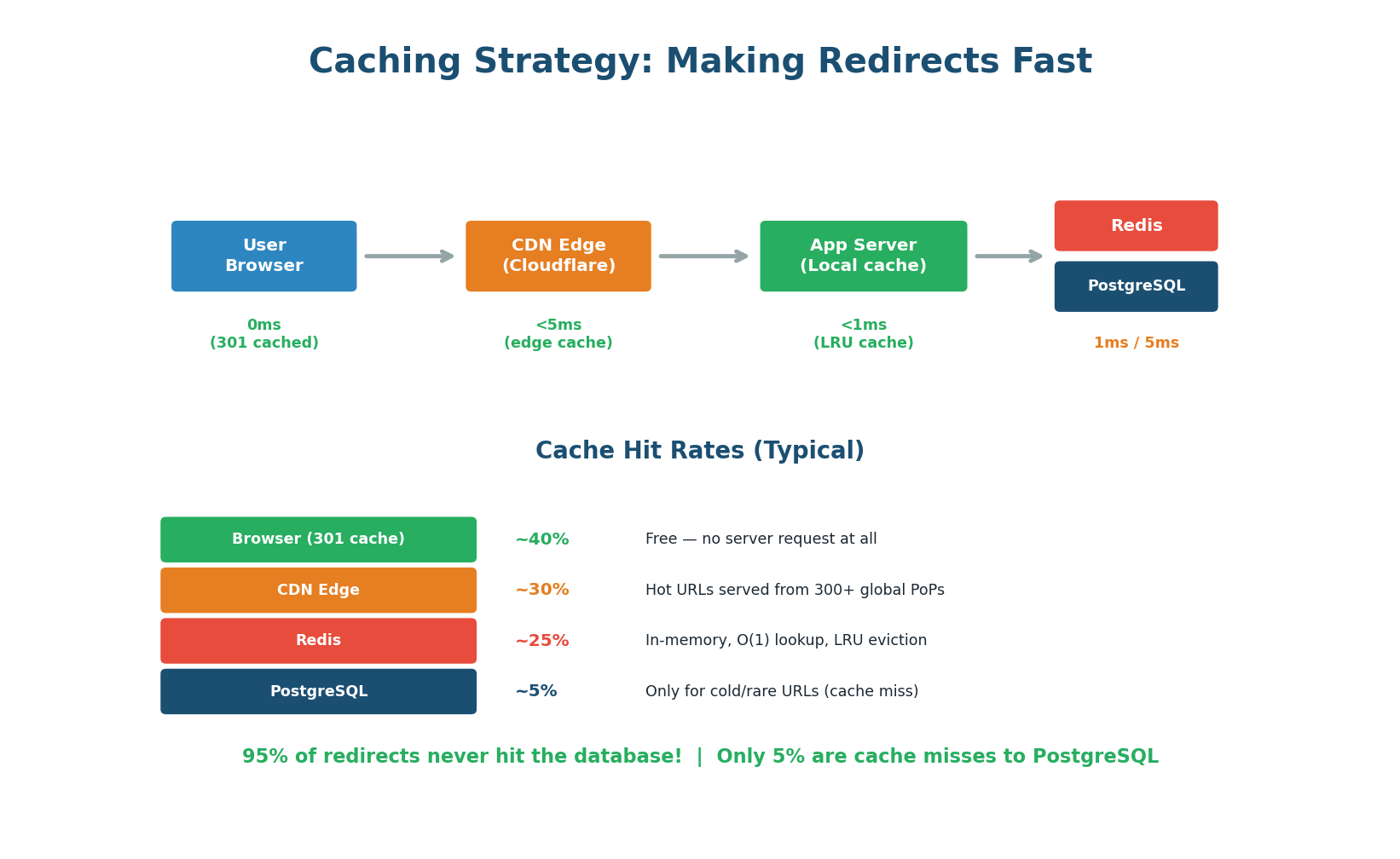
Layer 1: Browser Cache (301 Redirects)
If you use 301 redirects, the browser caches the mapping permanently. The second time a user visits the short URL, their browser resolves it locally without any network request — 0ms and costs you nothing. For 302 redirects, this layer does not apply.
Layer 2: CDN Edge (Cloudflare)
Configure your CDN to cache redirect responses at the edge. When 1,000 different users access the same short URL, only the first request reaches your origin server. The remaining 999 are served from the CDN edge (~5ms). This is especially effective for viral URLs receiving thousands of clicks per minute.
Layer 3: Redis In-Memory Cache
For requests that reach your application server, check Redis first (key: short_code, value: long_url). Redis lookup takes <1ms compared to 5–10ms for a PostgreSQL query. Use an LRU (Least Recently Used) eviction policy: popular URLs stay in cache, rarely-accessed URLs are evicted. With even a modest Redis cluster (16 GB), you can cache 50–100 million URL mappings.
Layer 4: PostgreSQL (Source of Truth)
Only ~5% of requests reach the database (cold URLs not in any cache). On a cache miss, the application queries PostgreSQL, stores the result in Redis with a 24-hour TTL, and returns the redirect. Subsequent requests for the same URL are served from Redis.
When a URL is deleted, you must invalidate the cache: delete the Redis key immediately and send a cache purge request to Cloudflare. Otherwise, users will continue to be redirected even after deletion. This is a classic cache invalidation problem — always address it in interviews.
Rate Limiting
Rate limiting is essential for a URL shortener because short codes are a finite resource and creation can be abused for spam. The redirect endpoint needs much higher limits since blocking a redirect means a broken link.
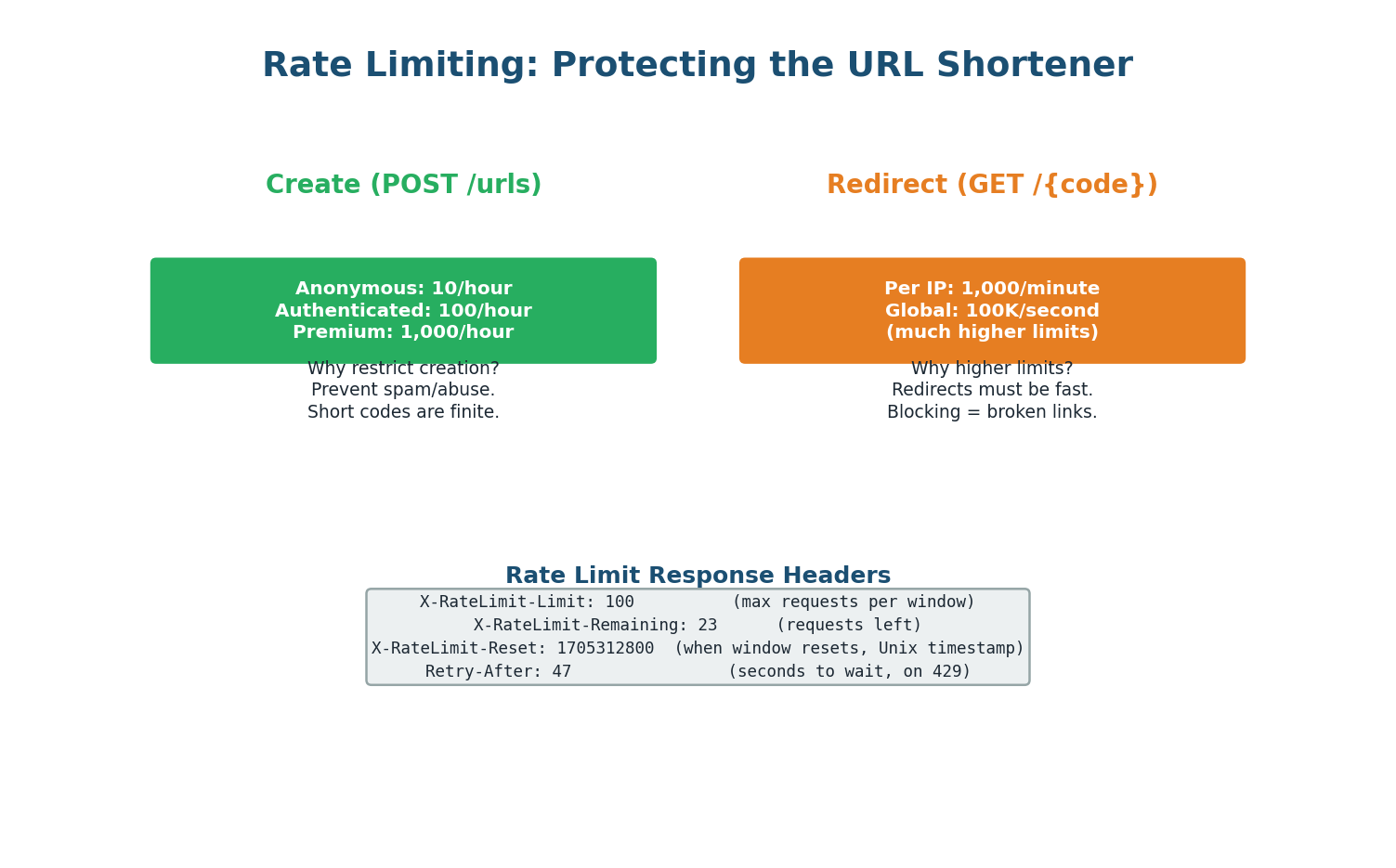
Creation Endpoint (POST /urls) — Strict Limits
- Anonymous users: 10 URLs per hour
- Authenticated users: 100 per hour
- Premium: 1,000 per hour
Implement using a Token Bucket algorithm backed by Redis (key: rate_limit:{api_key}, value: remaining tokens, TTL: 1 hour). Return 429 Too Many Requests with Retry-After header when exceeded.
Redirect Endpoint (GET /{code}) — Lenient Limits
1,000 requests per minute per IP. This prevents DDoS but does not interfere with legitimate traffic. If a viral URL gets 10,000 clicks per second, the CDN cache handles it without rate limiting individual users.
Idempotency for Creation
All POST requests accept an Idempotency-Key header. If the client retries with the same key (e.g., after a network timeout), the server returns the original short URL without creating a duplicate. Keys are stored in Redis with a 24-hour TTL.
Error Handling
A well-designed API returns consistent, helpful errors. Every error response follows the same JSON structure regardless of the type of error.
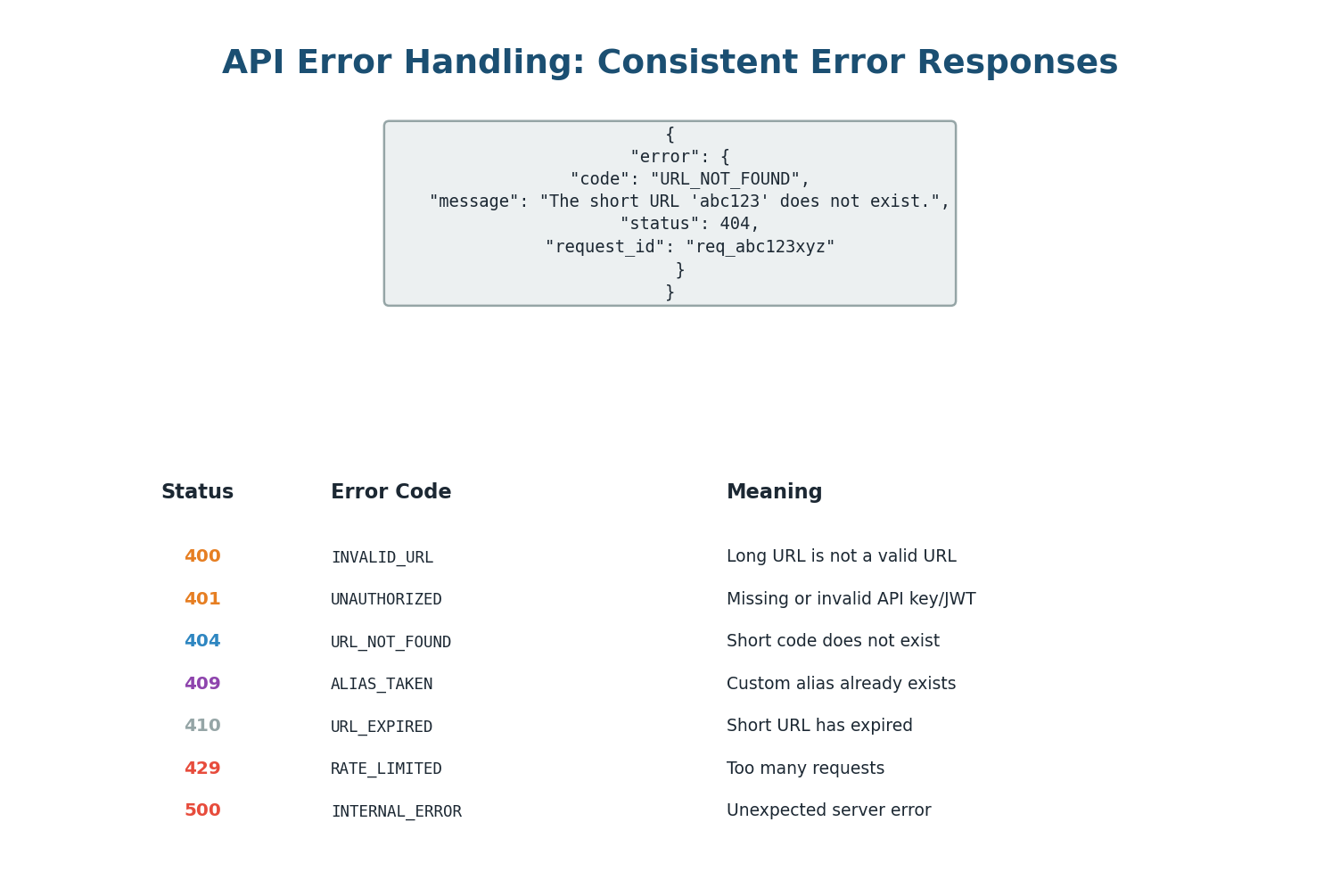
| Error Code | HTTP Status | When It Occurs |
|---|---|---|
INVALID_URL | 400 | long_url is malformed or not HTTP/HTTPS |
ALIAS_TAKEN | 409 | custom_alias is already in use |
URL_NOT_FOUND | 404 | short_code does not exist |
URL_EXPIRED | 410 | URL existed but has passed expiry date |
UNAUTHORIZED | 401 | Auth required but no token provided |
FORBIDDEN | 403 | Token valid but user does not own this URL |
RATE_LIMIT_EXCEEDED | 429 | Too many requests, Retry-After header included |
Always include a unique request_id in error responses. This lets users and support teams correlate a specific failed request with your server logs. Without it, a user reporting "I got an error" is nearly impossible to debug at scale. Generate a UUID per request in your middleware and attach it to every response.
Complete Architecture
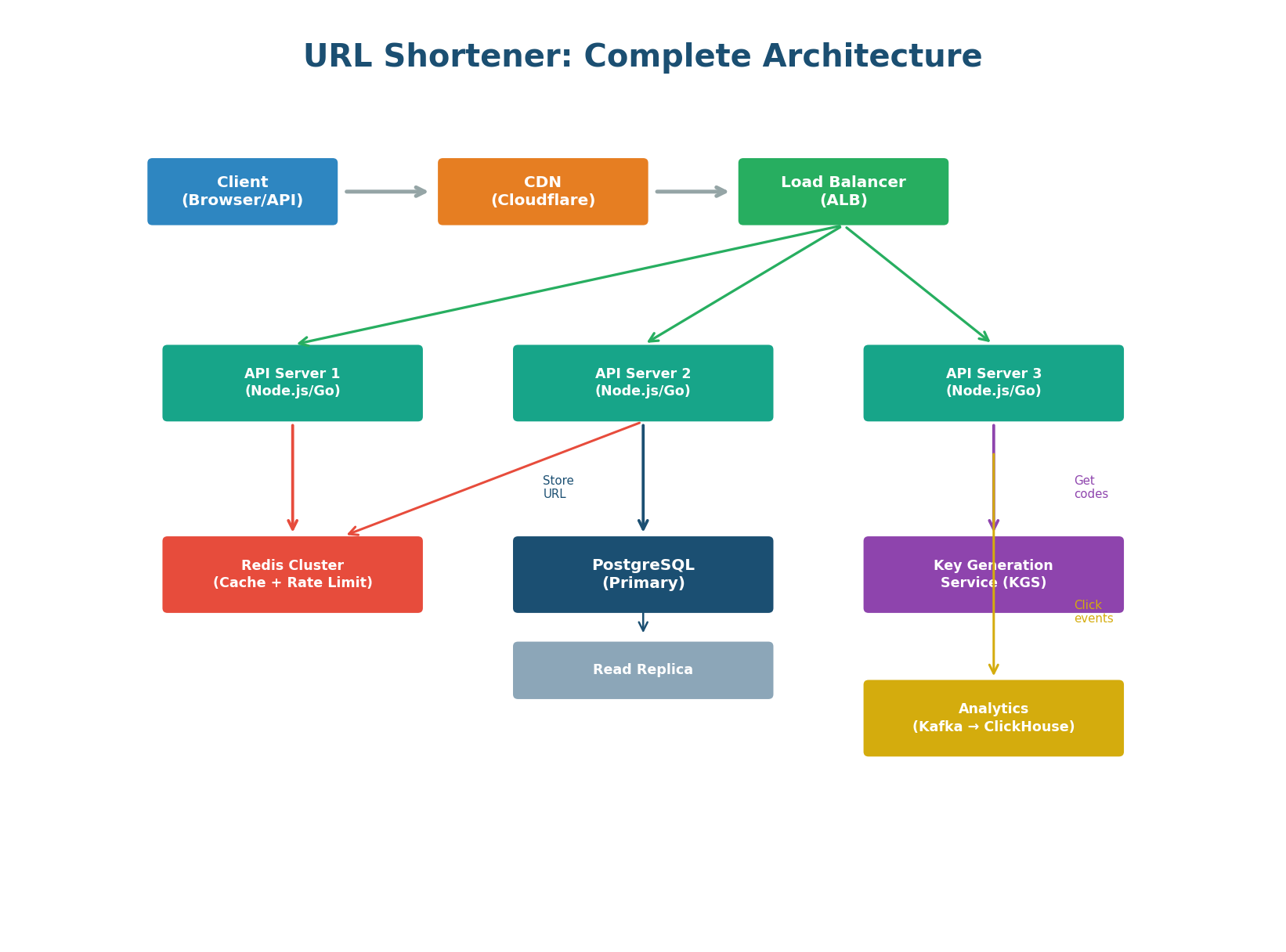
Component by Component
CDN (Cloudflare) — Sits in front of everything. Caches redirect responses at 300+ global edge locations. Absorbs DDoS attacks. Provides SSL termination at the edge for lowest-latency TLS handshakes.
Load Balancer (AWS ALB) — Layer 7 load balancer using Least Connections algorithm. Routes POST /api/* to the API service and GET /{code} to the redirect service. Health checks on /health every 30 seconds with Active-Passive HA to eliminate the LB as a SPOF.
API Servers (3+ instances) — Stateless application servers (Node.js or Go). Handle create, redirect, analytics, and delete. Horizontally scalable: add more servers behind the ALB for more capacity. Each server holds a local in-memory LRU cache for the hottest URLs.
Redis Cluster — Serves two purposes: (1) caching URL mappings for <1ms redirect lookups, and (2) storing rate limit counters and idempotency keys. 3-node cluster with replication for high availability.
PostgreSQL (Primary + Replica) — Source of truth for URL data. Primary handles writes (40 QPS). Read replica handles analytics queries and cache-miss reads. The redirect path almost never hits PostgreSQL (95%+ Redis cache hit rate).
Key Generation Service (KGS) — Pre-generates random unique 7-character Base62 codes in batches of 10,000. API servers fetch a batch when they run low. Decouples code generation from the request path and eliminates collision checking on the hot path.
Analytics Pipeline (Kafka → ClickHouse) — Click events are published to Kafka asynchronously (does not slow the redirect). A Kafka consumer writes events to ClickHouse (columnar time-series database). The /stats endpoint queries ClickHouse, not PostgreSQL.
In an interview, draw the architecture top-down: Client → CDN → Load Balancer → API Servers → Redis → PostgreSQL. Then add the async analytics side branch: API Servers → Kafka → ClickHouse. Highlight the two critical design decisions: (1) the multi-layer cache eliminates 95% of DB reads, and (2) analytics are processed asynchronously so they never block the redirect. This structure shows end-to-end systems thinking.
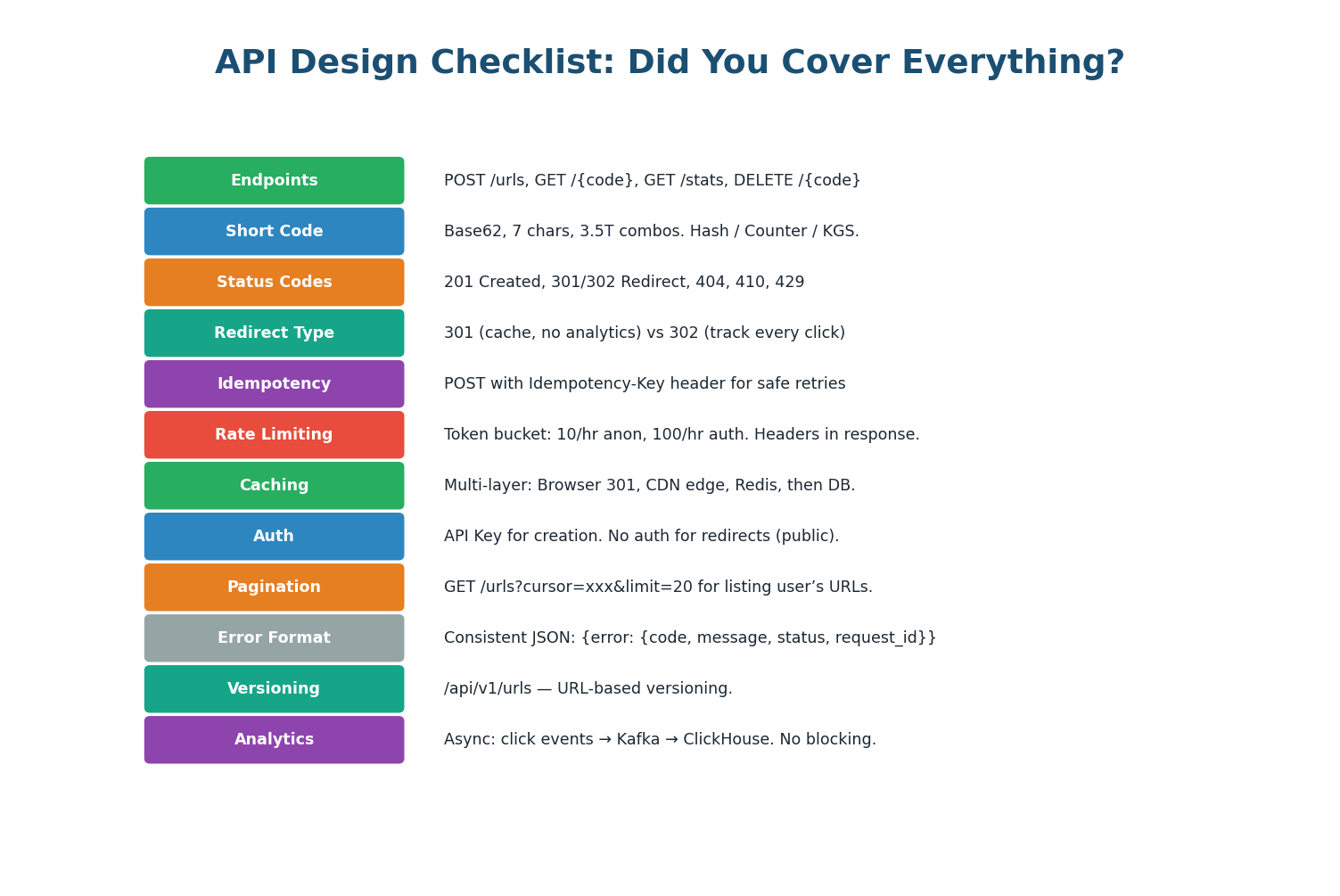
API Design Checklist
Use this checklist to verify your URL shortener design covers all important aspects. In an interview, touching on each of these topics demonstrates comprehensive API design skills.
| # | Checklist Item | Covered in Step |
|---|---|---|
| 1 | REST endpoints defined (nouns, HTTP verbs, status codes) | Step 1 |
| 2 | Short code generation strategy (Base62, collision-free) | Step 2 |
| 3 | Database schema with correct indexes | Step 3 |
| 4 | Redirect type justified (301 vs 302) | Step 4 |
| 5 | Multi-layer caching (browser, CDN, Redis, DB) | Step 5 |
| 6 | Cache invalidation on delete | Step 5 |
| 7 | Rate limiting (different limits per tier and endpoint) | Step 6 |
| 8 | Idempotency keys for safe retries | Step 6 |
| 9 | Consistent error format with request_id | Step 7 |
| 10 | API versioning (/v1/) | Step 1 |
| 11 | Load balancer HA (Active-Passive, VIP) | Step 8 |
| 12 | Async analytics pipeline (Kafka → ClickHouse) | Step 8 |
Want to Land at Google, Microsoft or Apple?
Watch Pranjal Jain's free 30-min training — the exact GROW Strategy that helped 1,572+ engineers go from TCS/Infosys to top product companies with a 3–5X salary hike.