

What's Inside
Introduction
Why Networking Matters for System Design
Every system you will ever design — from a simple web app to a globally distributed microservices architecture — relies on the network. When a user clicks a button, their request travels through multiple layers of networking protocols before reaching your server. When your server responds, the data travels back through those same layers. Understanding how this works is not optional for system designers; it is foundational.
Networking knowledge helps you answer critical design questions: Why does this API call take 200ms? (Because of TCP handshake + TLS + cross-region network latency.) Why are we seeing dropped messages? (Because we used UDP without application-level retries.) Why is our system insecure? (Because we used HTTP instead of HTTPS.) This module covers the four pillars of networking that every system designer must know: the OSI Model, IP Addressing, TCP vs UDP, and HTTP/HTTPS.
The OSI Model
What Is the OSI Model?
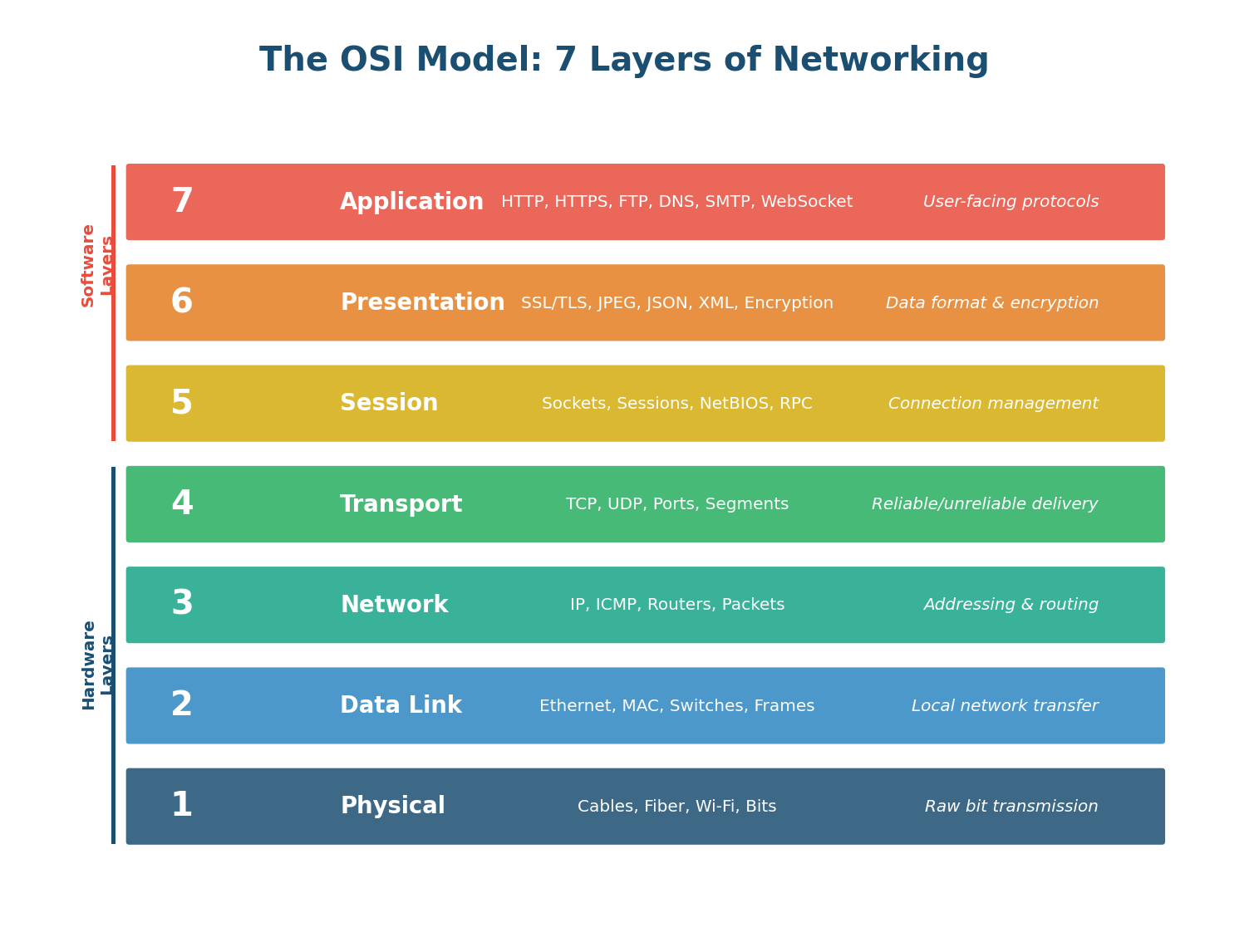
The OSI (Open Systems Interconnection) Model is a conceptual framework that divides network communication into seven distinct layers. Think of it as a postal system: when you send a letter, you write the message (application), put it in an envelope (presentation), address it (network), and the postal service handles physical delivery (physical). Each layer has a specific job, communicates only with the layers directly above and below it, and can be updated independently without breaking the others.
While no real network protocol stack maps perfectly to the OSI model (the internet uses the simpler TCP/IP model with 4 layers), the OSI model is the universal language for discussing network behavior in system design interviews and engineering conversations.
Layer by Layer: What Each Layer Does
Layer 7: Application — The only layer that directly interacts with the user. It provides protocols for specific types of user-facing communication: HTTP/HTTPS for web, SMTP for email, DNS for name resolution, FTP for file transfer. This is where your REST APIs, GraphQL endpoints, and WebSocket connections live.
Layer 6: Presentation — Handles data translation, encryption, and compression. It transforms data from the application format to a network-ready format. TLS/SSL encryption operates here, as does JPEG compression for images and JSON/XML serialization.
Layer 5: Session — Manages connections between applications. It establishes, maintains, and terminates sessions (conversations) between two communicating systems. Authentication tokens, session IDs, and RPC (Remote Procedure Call) frameworks operate at this layer.
Layer 4: Transport — Crucial for system designers. It provides end-to-end communication between applications on different hosts. TCP and UDP live here. This layer handles segmentation of data, ports (80 for HTTP, 443 for HTTPS, 5432 for PostgreSQL), and end-to-end error recovery.
Layer 3: Network — Handles routing — finding the path from the source to the destination across multiple networks. IP (Internet Protocol) operates here. Routers use IP addresses and routing tables to forward packets toward their destination.
Layer 2: Data Link — Handles communication within a single network (local area network). Ethernet and Wi-Fi operate here. MAC addresses identify devices on the same network. Switches forward frames based on MAC addresses.
Layer 1: Physical — Transmits raw bits (0s and 1s) over the physical medium: electrical signals on copper cables, light pulses on fiber optic cables, or radio waves for Wi-Fi.
When discussing network issues in an interview, reference OSI layers: "The latency is high because of Layer 3 routing across regions." "We need to implement rate limiting at Layer 7." "The load balancer operates at Layer 4 (TCP) or Layer 7 (HTTP)." This precision immediately shows network fluency.
IP Addressing
The Internet's Addressing System
Every device on the internet needs a unique address so other devices can find it and send data to it. This is the job of IP addressing. Think of IP addresses like postal codes: they identify where a device is located on the global network and enable data to be routed to it correctly.
IPv4: The Classic Address Format
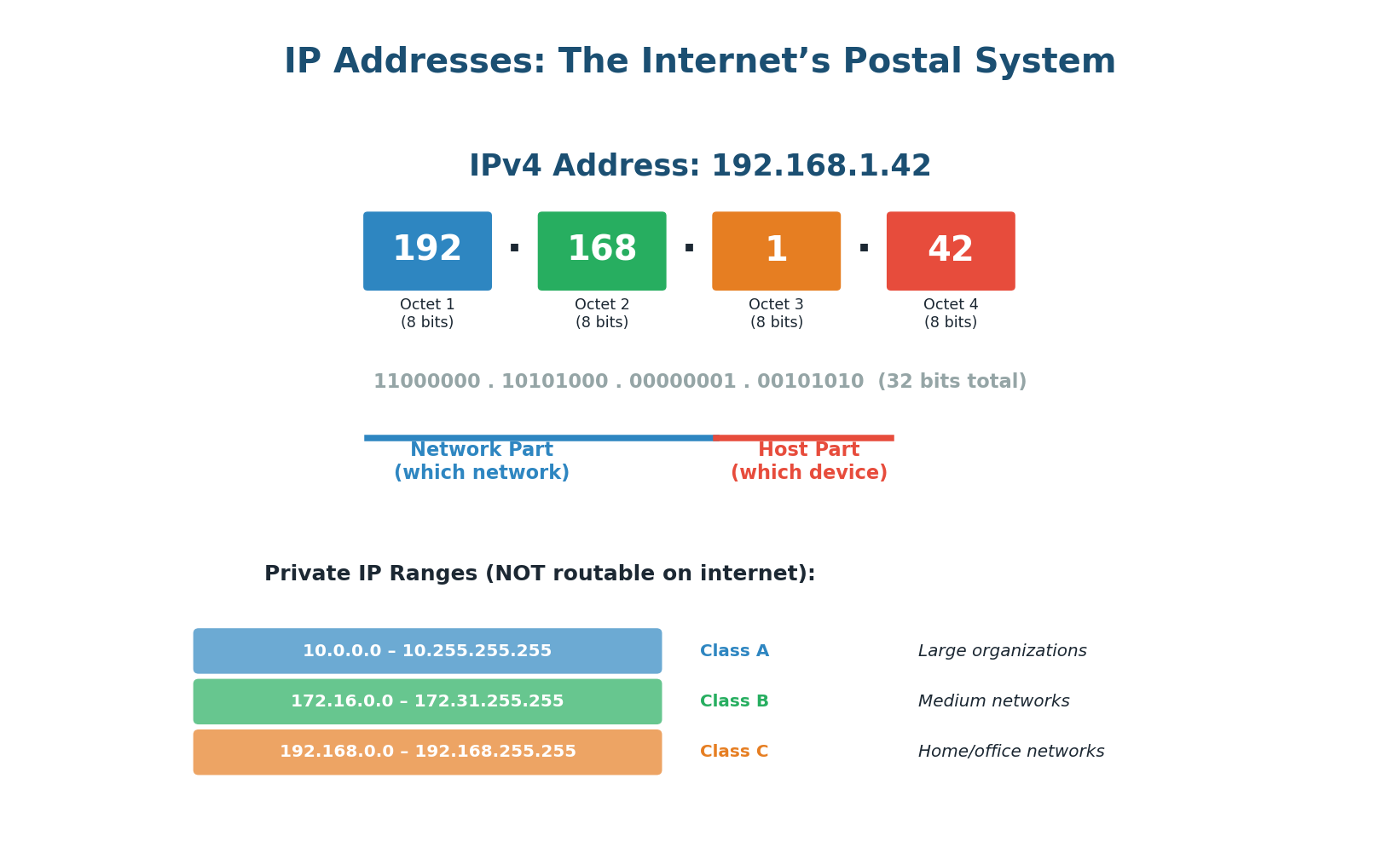
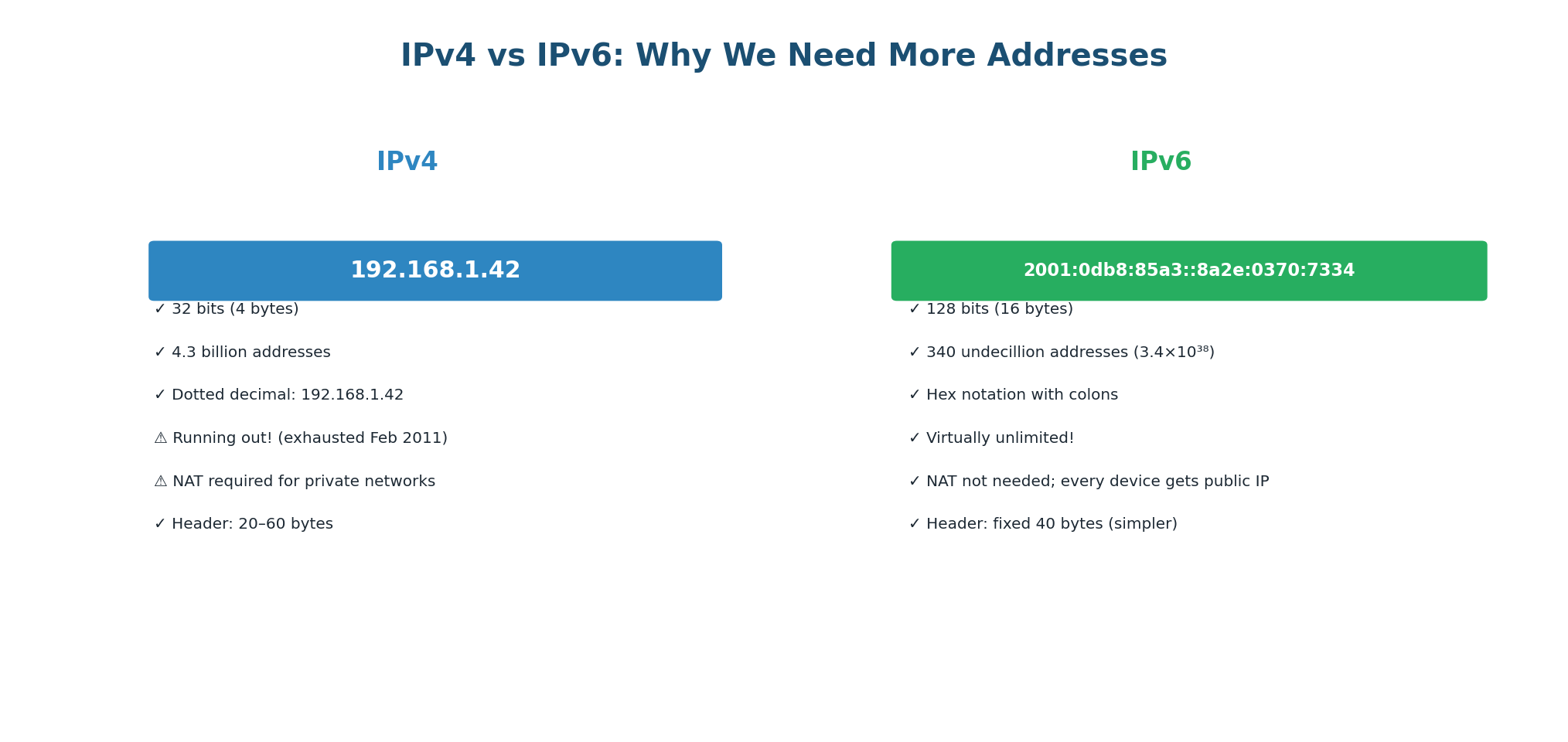
IPv4 addresses are 32-bit numbers, typically written in dotted-decimal notation as four numbers (0–255) separated by dots: 192.168.1.1. With 32 bits, IPv4 supports ~4.3 billion unique addresses — which sounded like plenty in 1981 but ran out by 2011 due to the explosion of internet-connected devices.
An IP address has two parts: the network part (identifying which network the device is on) and the host part (identifying the specific device on that network). The subnet mask (e.g., /24 or 255.255.255.0) tells you where the split is. In 192.168.1.1/24, the first three octets identify the network, the last octet identifies the device.
Not all IP addresses are routable on the public internet. Three ranges are reserved for private use: 10.0.0.0/8 (16.7 million addresses, used by large enterprises), 172.16.0.0/12 (1 million addresses), and 192.168.0.0/16 (65,000 addresses, used in homes and small offices). Your home Wi-Fi router assigns addresses in the 192.168.x.x range. NAT (Network Address Translation) allows all these private devices to share a single public IP when accessing the internet.
IPv6: The Future of Addressing
IPv6 uses 128-bit addresses, written as eight groups of four hexadecimal digits: 2001:0db8:85a3:0000:0000:8a2e:0370:7334. With 2128 possible addresses (~340 undecillion), IPv6 provides more addresses than there are grains of sand on Earth. Adoption is growing — as of 2024, approximately 40–45% of internet traffic uses IPv6.
When designing distributed systems, reference IP concepts: "I will use private IPs (10.x.x.x) for inter-service communication inside the VPC to avoid public internet latency and cost." "I will use Elastic IPs for services that need a stable public endpoint." "Our microservices will use service discovery instead of hardcoded IPs for dynamic scaling."
TCP vs UDP
Two Ways to Deliver Data
At the Transport layer (Layer 4), you have two fundamental choices for how data is delivered: TCP (Transmission Control Protocol) and UDP (User Datagram Protocol). This is one of the most important trade-off decisions in system design, because the protocol you choose affects reliability, latency, and application complexity.
TCP: Reliable, Ordered, Connection-Oriented
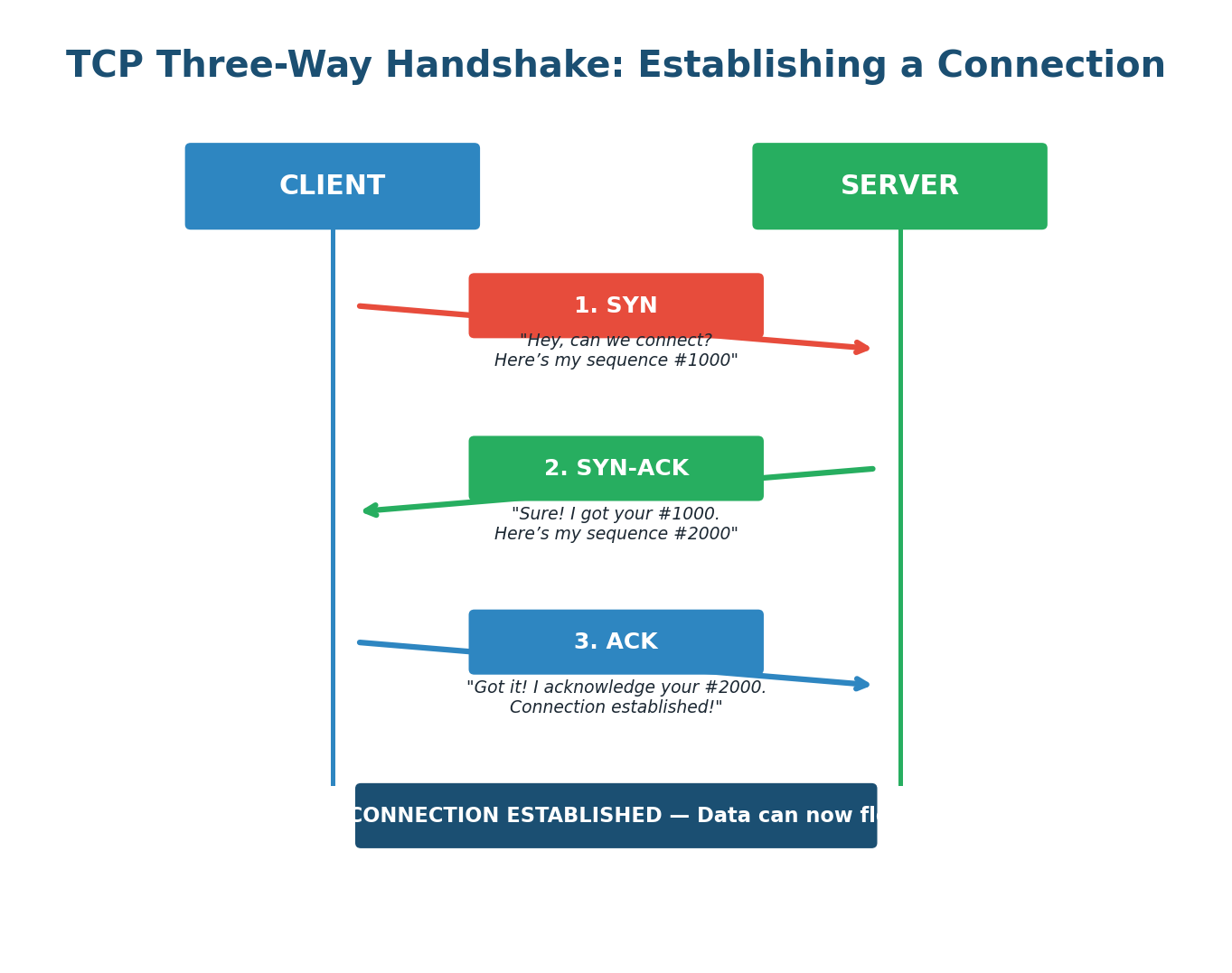
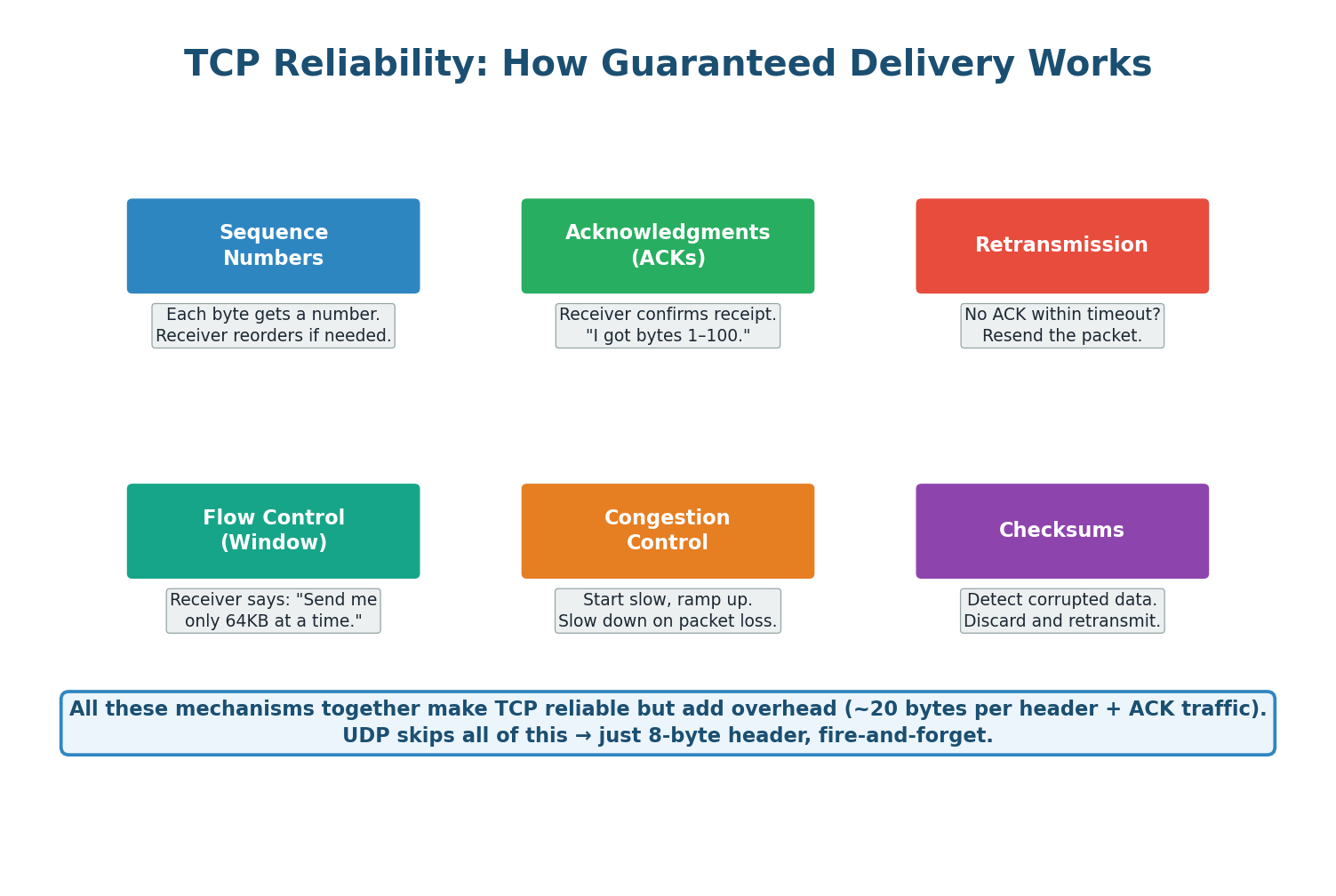
TCP guarantees that every byte of data sent will arrive at the destination, in the correct order, without corruption. It achieves this through a three-way handshake, sequence numbers, acknowledgments, retransmission on loss, flow control, and congestion control. Before any data flows, TCP requires a three-step connection setup: the client sends SYN, the server responds with SYN-ACK, and the client completes with ACK. This takes one round-trip time (RTT) before the first byte of actual data can be sent.
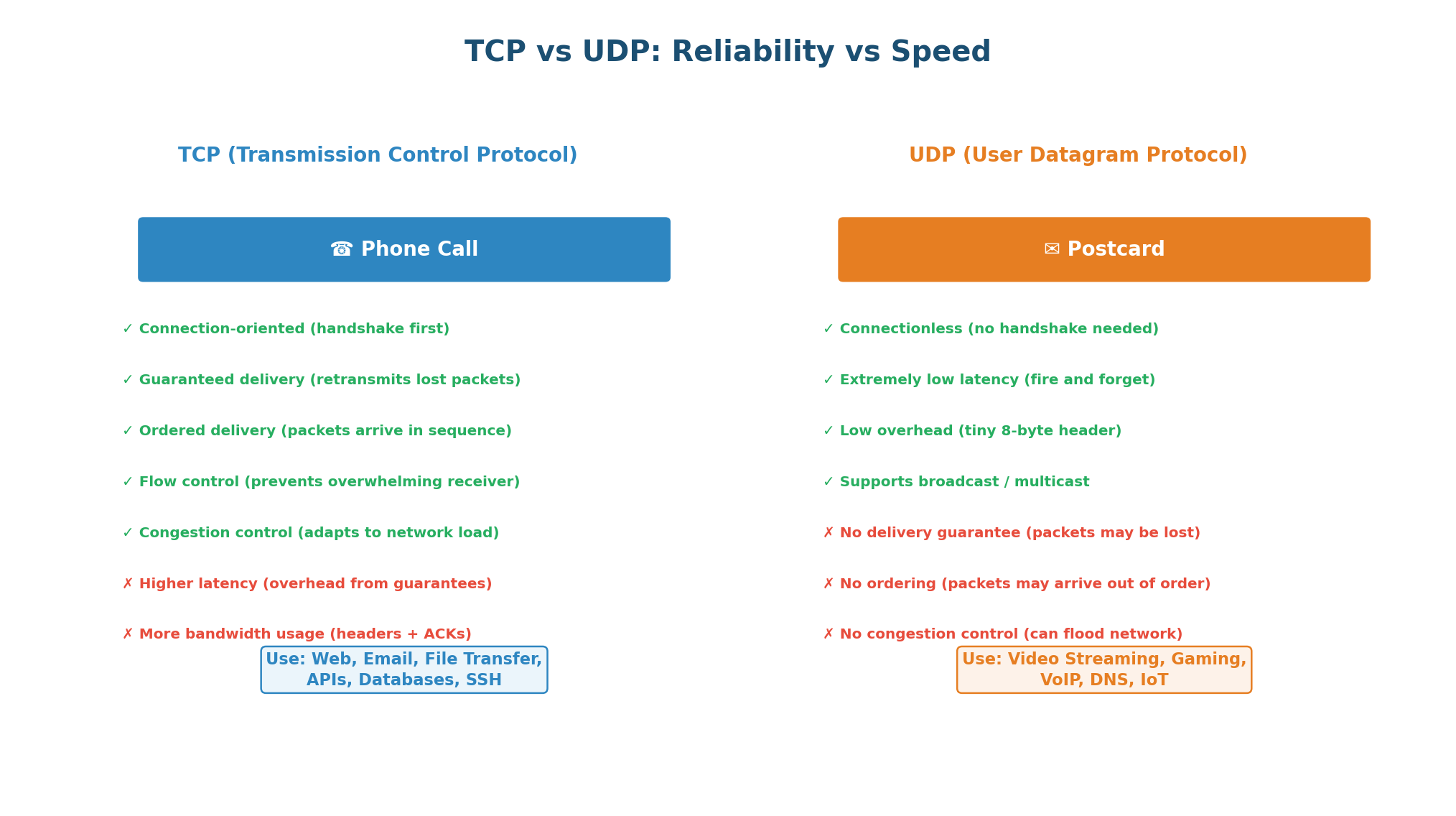
| Feature | TCP | UDP |
|---|---|---|
| Connection | Connection-oriented (handshake) | Connectionless (no handshake) |
| Reliability | Guaranteed delivery (retransmits) | No guarantee (fire-and-forget) |
| Ordering | Packets arrive in order | No ordering guarantee |
| Speed | Slower (overhead from guarantees) | Faster (minimal overhead) |
| Header Size | 20–60 bytes | 8 bytes |
| Use Cases | Web, APIs, email, databases, SSH | Video streaming, gaming, VoIP, DNS, IoT |
UDP: Fast, Minimal, Connectionless
UDP is the opposite of TCP: no connection establishment, no reliability guarantees, no ordering, no flow control, and no congestion control. It simply fires packets and forgets about them. Its header is just 8 bytes (vs TCP's 20–60 bytes). Why choose UDP? Because sometimes speed and low latency matter more than reliability. In a live video call, a dropped frame is better than a delayed call. In online gaming, the current game state is more important than replaying every event. Applications using UDP typically implement their own application-level reliability when needed.
A common mistake is defaulting to TCP for everything. If an interviewer asks you to design a live streaming system and you say "TCP, because reliability," you have shown poor judgment. The right answer is UDP (or QUIC), because a few dropped frames are far better than the buffering and latency caused by TCP retransmission. Always show trade-off awareness.
Use TCP when data must arrive completely and in order (web pages, API calls, file downloads, database queries, email). Use UDP when low latency matters more than perfect delivery (live video/audio streaming, online gaming, DNS queries, IoT sensor data). When asked, explicitly state the trade-off: "I am using UDP here because dropped frames are acceptable, but TCP's retransmission overhead would cause unacceptable buffering."
HTTP and HTTPS
The Language of the Web
HTTP (HyperText Transfer Protocol) is the application-layer protocol that powers the web. Every time you load a webpage, call an API, or submit a form, an HTTP request is made. HTTP is stateless: each request is independent, and the server retains no memory of previous requests by default. Session state must be managed explicitly via cookies, tokens, or session IDs.
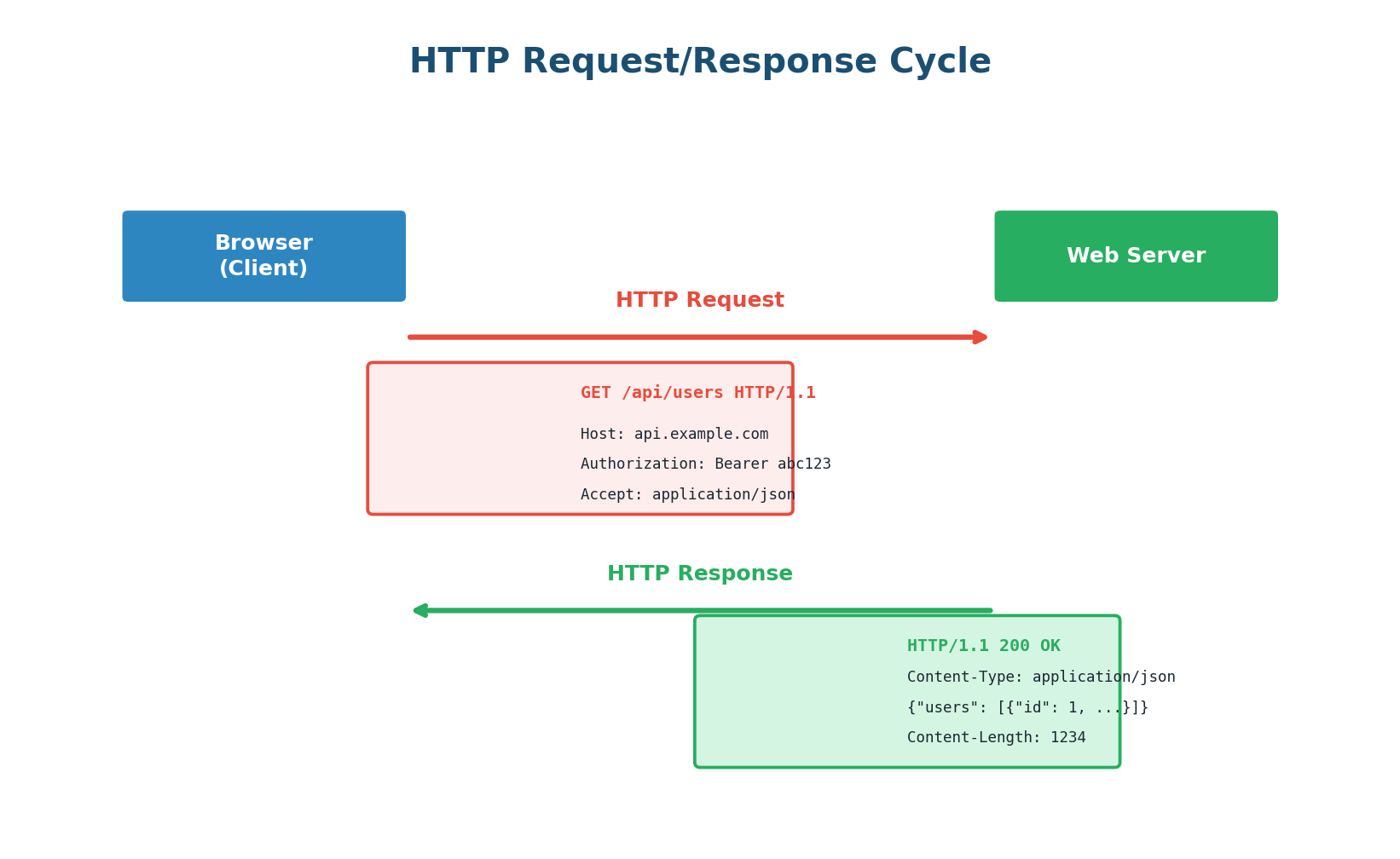
An HTTP request consists of: a method (GET, POST, PUT, DELETE, PATCH), a path (/api/users), headers (metadata like Host, Authorization, Content-Type), and optionally a body (for POST/PUT).
| Method | Purpose | Has Body? | Idempotent? | Safe? |
|---|---|---|---|---|
| GET | Retrieve a resource | No | Yes | Yes |
| POST | Create a new resource | Yes | No | No |
| PUT | Replace a resource entirely | Yes | Yes | No |
| PATCH | Partially update a resource | Yes | No* | No |
| DELETE | Remove a resource | Optional | Yes | No |
Idempotent means calling the same request multiple times produces the same result. GET /users/42 always returns the same user (safe + idempotent). DELETE /users/42 deletes the user once; subsequent calls return 404 but cause no additional state change (idempotent but not safe). POST /orders creates a new order each time — not idempotent.
| Range | Category | Common Codes |
|---|---|---|
| 2xx | Success | 200 OK, 201 Created, 204 No Content |
| 3xx | Redirection | 301 Moved Permanently, 304 Not Modified |
| 4xx | Client Error | 400 Bad Request, 401 Unauthorized, 403 Forbidden, 404 Not Found, 429 Too Many Requests |
| 5xx | Server Error | 500 Internal Server Error, 502 Bad Gateway, 503 Service Unavailable, 504 Gateway Timeout |
HTTPS: Securing HTTP with TLS
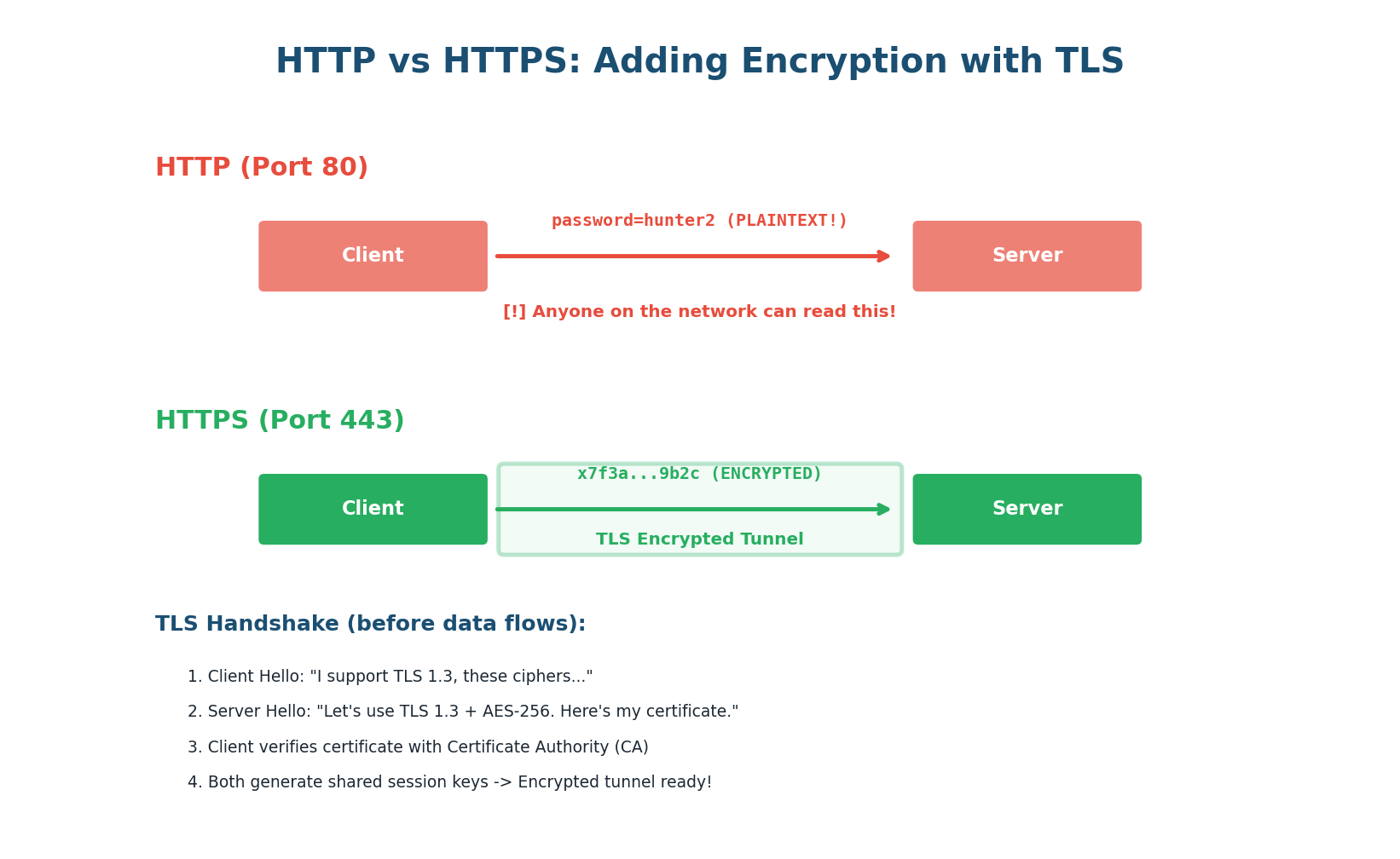
HTTP sends everything in plaintext. Anyone who can intercept your network traffic can read your passwords, API keys, and sensitive data. HTTPS solves this by layering HTTP on top of TLS (Transport Layer Security). TLS provides three things: encryption (nobody can read the data), authentication (you are talking to the real server, not an imposter), and integrity (data has not been tampered with in transit).
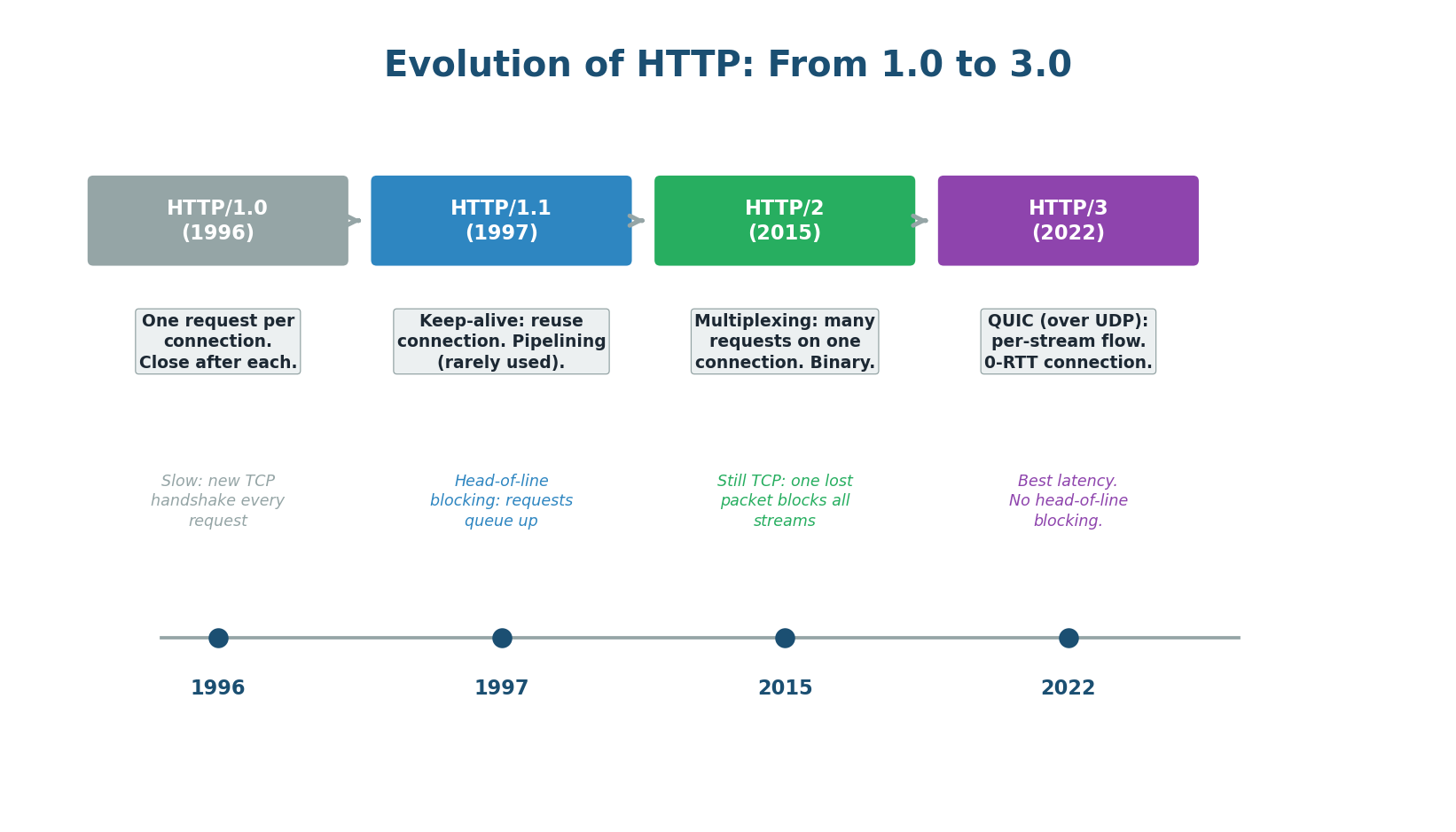
HTTP/1.0 opened a new TCP connection for every request — very inefficient. HTTP/1.1 introduced keep-alive connections, reusing one TCP connection for multiple requests. HTTP/2 added multiplexing — multiple requests and responses interleaved on a single TCP connection, eliminating head-of-line blocking at the application level. HTTP/3 replaced TCP with QUIC (built on UDP), providing per-stream flow control so a dropped packet in one stream does not block others.
Mentioning HTTP/3 shows you are up-to-date: "For our mobile app, I recommend HTTP/3 because mobile networks have higher packet loss rates. HTTP/3's QUIC transport eliminates TCP head-of-line blocking, so a dropped packet in one stream does not delay all other streams as it would in HTTP/2." This kind of specific, current knowledge impresses interviewers.
Pre-Class Summary
What You Should Know Before Class
Before class, make sure you can answer these questions confidently:
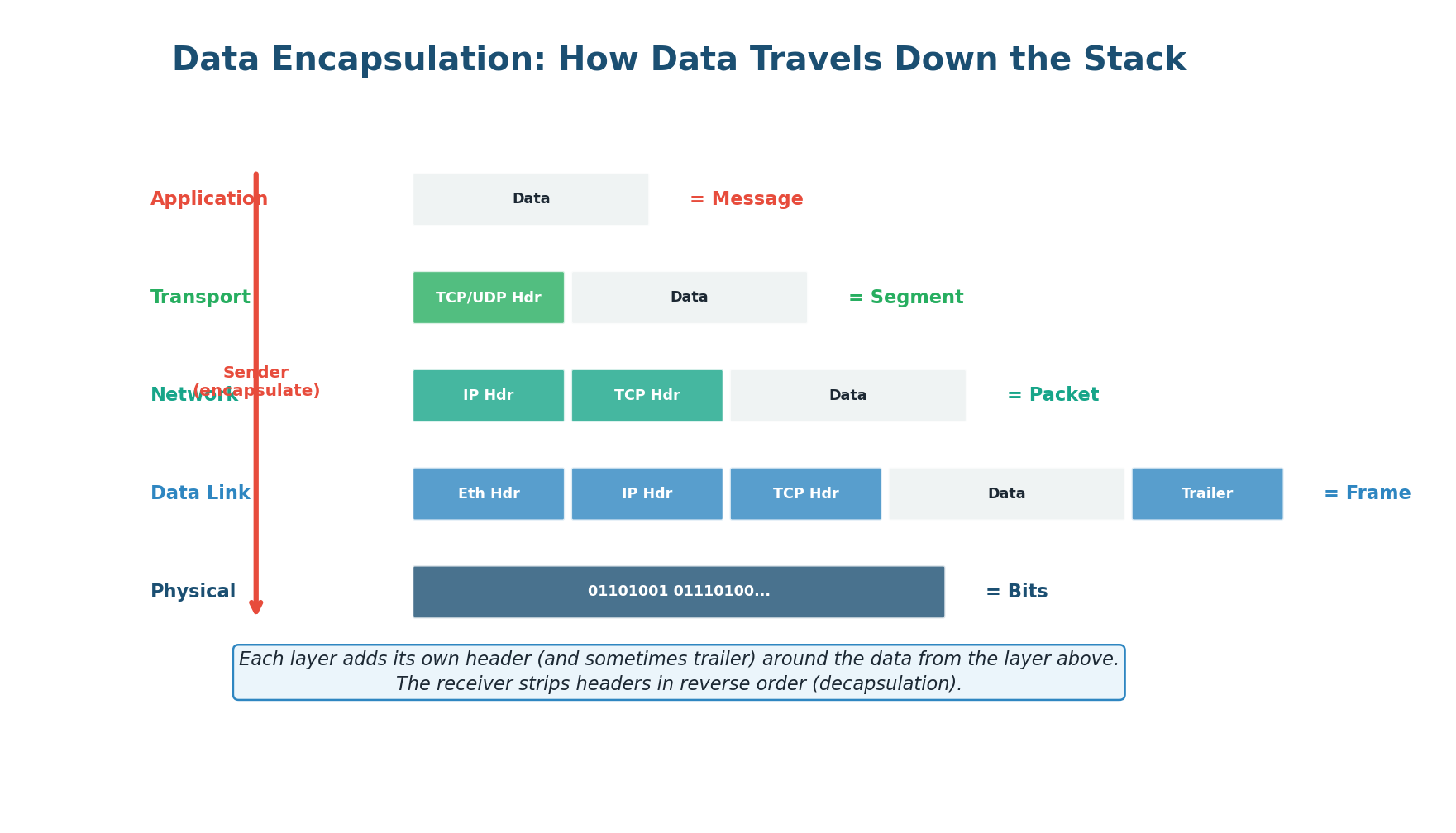
- OSI Model: What are the 7 layers? What protocols operate at each layer? What is encapsulation and decapsulation? Which layers does a load balancer operate at?
- IP Addressing: What is the structure of an IPv4 address? What are private vs public IPs? What is NAT and why is it needed? What problem does IPv6 solve?
- TCP vs UDP: What is the three-way handshake? What guarantees does TCP provide (and at what cost)? When would you choose UDP over TCP? Name three applications that use UDP and explain why.
- HTTP/HTTPS: What is the request/response cycle? What are HTTP methods and when to use each? What is idempotency and why does it matter? What does HTTPS add to HTTP? How does HTTP/2 improve on HTTP/1.1?
Want to Land at Google, Microsoft or Apple?
Watch Pranjal Jain's free 30-min training — the exact GROW Strategy that helped 1,572+ engineers go from TCS/Infosys to top product companies with a 3–5X salary hike.