

What's Inside
Topic 1
DNS Deep Dive
DNS: The Internet's Phone Book
DNS (Domain Name System) is the protocol that translates human-friendly domain names like api.example.com into machine-readable IP addresses like 93.184.216.34. Without DNS, you would need to memorize the IP address of every website. DNS makes the internet usable by humans while keeping routing machine-efficient.
DNS is not just a simple lookup table — it is a globally distributed, hierarchical database with billions of entries, designed to handle trillions of queries per day with sub-millisecond response times thanks to aggressive caching at every level.
The DNS Hierarchy
DNS is organized as a hierarchical, distributed database. No single server knows everything. Instead, the knowledge is distributed: each server knows a piece of the puzzle and knows who to ask for the rest.
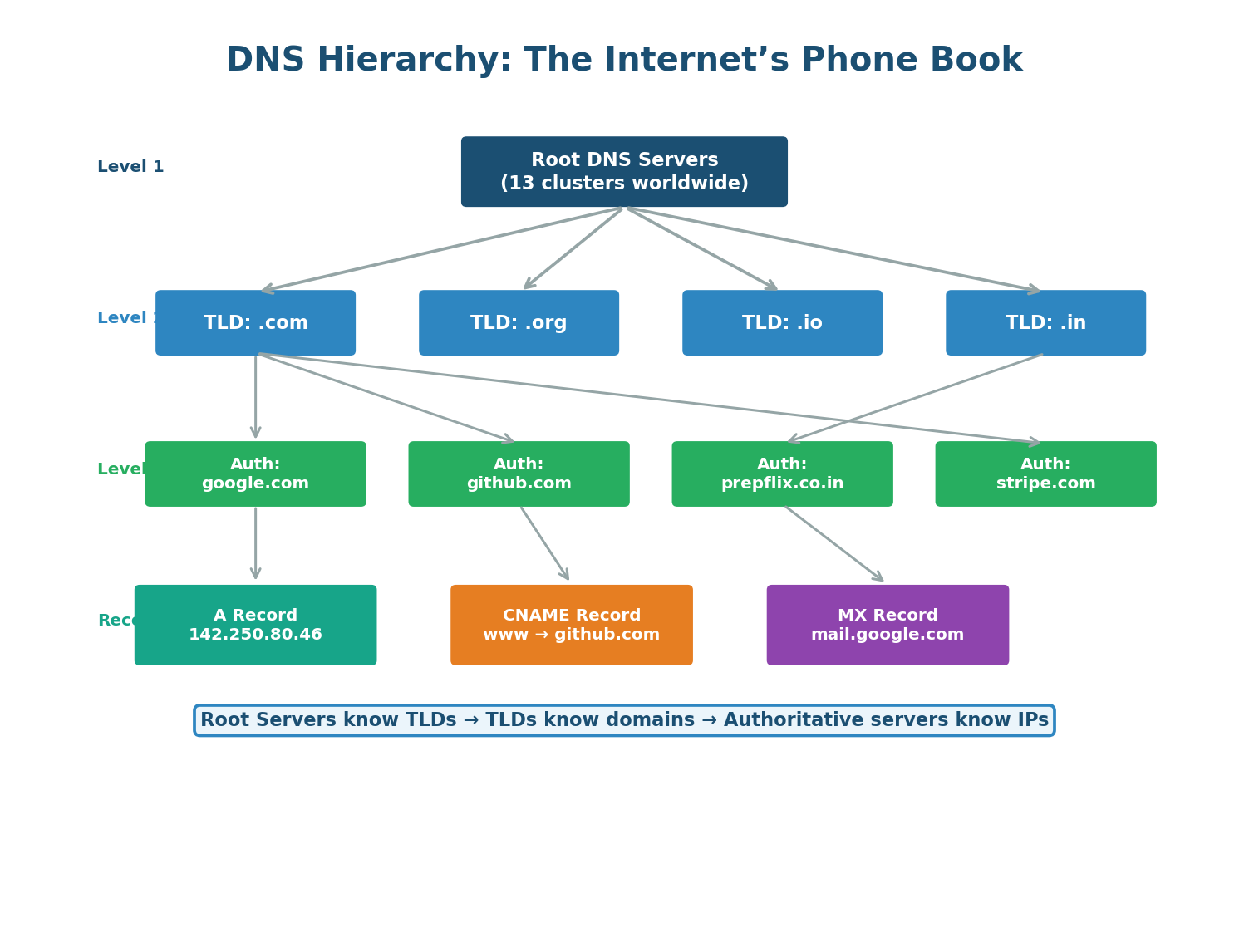
Root DNS Servers: At the top of the hierarchy are 13 root server clusters (named A through M), operated by organizations like ICANN, Verisign, and NASA. They do not know IP addresses for specific domains, but they know where to find TLD servers.
TLD (Top-Level Domain) Servers: TLD servers manage all domains under a specific top-level domain. The .com TLD server knows the authoritative nameservers for every .com domain. There are TLD servers for .com, .org, .net, .in, and every country code (.uk, .de, .jp).
Authoritative DNS Servers: These are the final source of truth for a domain. They contain the actual DNS records (A records for IPs, CNAME for aliases, MX for mail, etc.). When you configure DNS for your domain (e.g., in Route 53 or Cloudflare), you are updating the authoritative server.
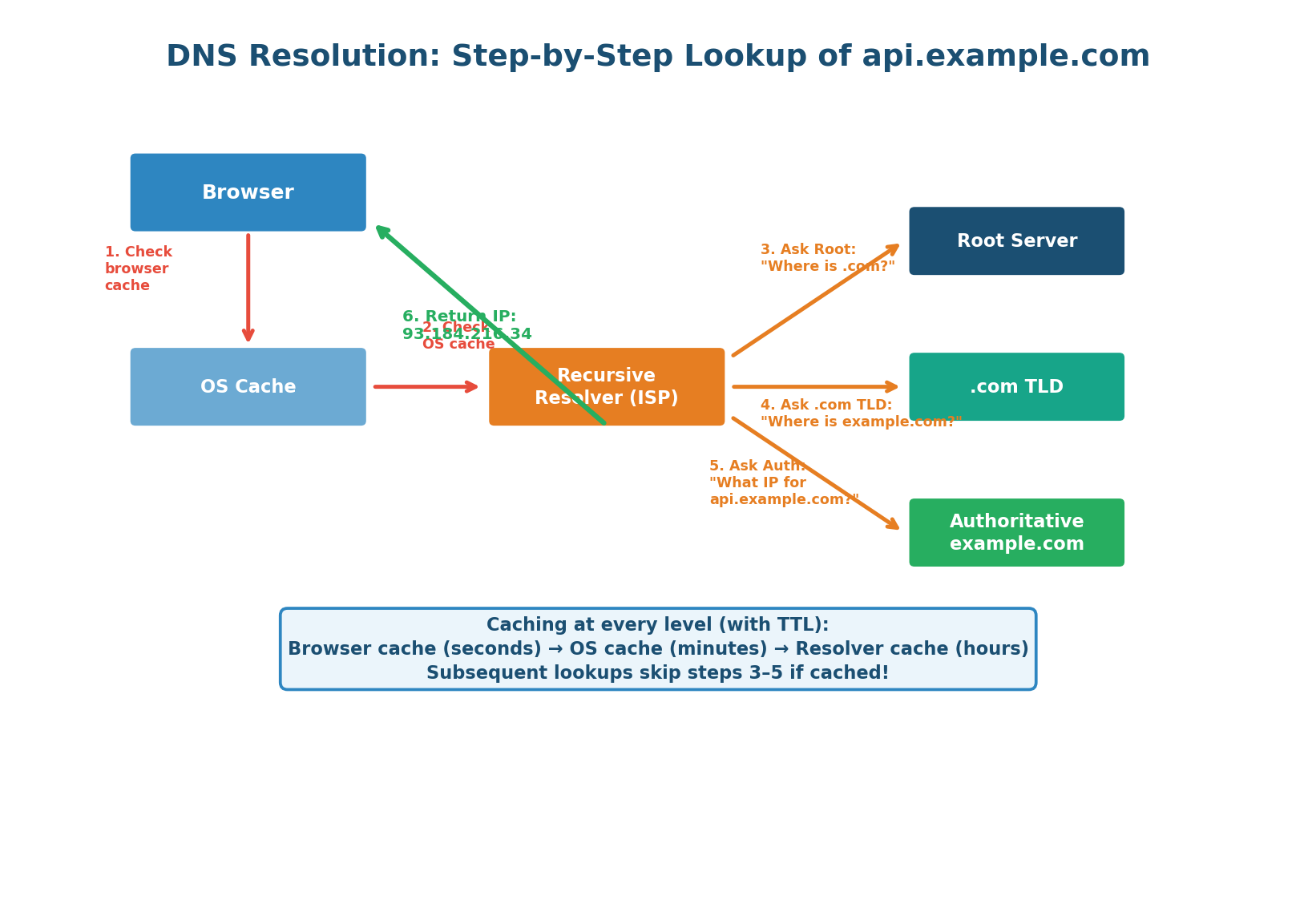
When you type api.example.com into your browser, DNS resolution follows this cascade:
- Browser Cache Check: The browser checks its own DNS cache. If you visited this site recently, the IP is already stored. Cache hit: ~0ms.
- OS Cache Check: If not in the browser, the OS cache is checked. Many OSes maintain a DNS cache that is shared across applications. Cache hit: ~0ms.
- Recursive Resolver: If neither cache has the answer, the query goes to a recursive resolver (usually operated by your ISP or a public DNS like Google's 8.8.8.8 or Cloudflare's 1.1.1.1). The resolver does the heavy lifting of walking the hierarchy on your behalf.
- Root Server Query: The resolver asks a root server: "Where can I find .com domains?" The root responds with the IP of the .com TLD server.
- TLD Server Query: The resolver asks the .com TLD server: "Where can I find example.com?" The TLD responds with the IP of example.com's authoritative nameserver.
- Authoritative Query: The resolver asks the authoritative server: "What is the IP for api.example.com?" The authoritative server responds with the A record: 93.184.216.34.
- Response and Caching: The resolver caches the response for the TTL duration, the OS caches it, the browser caches it, and returns the IP to the application. Subsequent requests skip the entire hierarchy.
TTL controls how long DNS responses are cached. A high TTL (e.g., 86400 = 24 hours) means fewer DNS lookups but slower failover — if you change your server's IP, old IPs stay cached for up to 24 hours. A low TTL (e.g., 60 = 1 minute) enables fast failover but increases DNS query load. Before a planned migration, gradually lower TTL from 86400 → 3600 → 300 → 60 over several days.
DNS Record Types
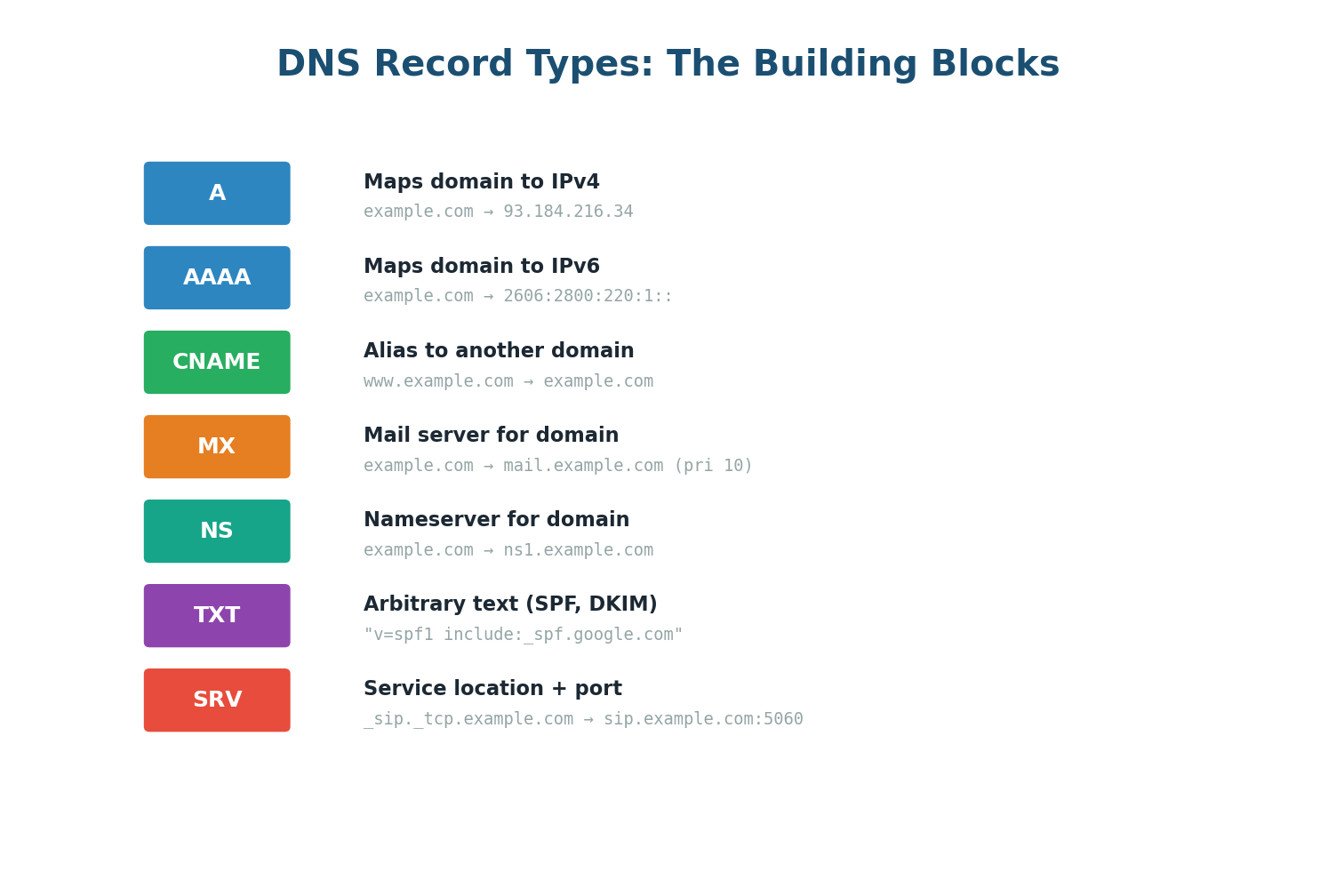
| Record | Purpose | Example | System Design Use |
|---|---|---|---|
| A | Domain → IPv4 | example.com → 93.184.216.34 | Point domain to load balancer IP |
| AAAA | Domain → IPv6 | example.com → 2606:2800:… | IPv6 support |
| CNAME | Alias to another domain | www → example.com | CDN integration (www → cdn.cloudflare.net) |
| MX | Mail server for domain | mail.example.com (priority 10) | Email routing |
| NS | Nameserver delegation | ns1.example.com | Delegate subdomain to different DNS provider |
| TXT | Arbitrary text | SPF, DKIM, domain verification | Email authentication, SSL cert verification |
| SRV | Service location + port | _sip._tcp:5060 | Service discovery in microservices |
You cannot set a CNAME record on a bare/apex domain (example.com without www). A CNAME at the apex would conflict with the required SOA and NS records at the zone root. Use A records or ALIAS/ANAME records (provider-specific) for the apex domain, and CNAME for subdomains like www.
When designing global systems, mention DNS as an architecture tool: "I will use Route 53 with latency-based routing to direct US users to us-east-1 and Indian users to ap-south-1." "I will use DNS-based failover with health checks — if the primary region goes down, Route 53 automatically removes it and all traffic shifts to the backup region within 60 seconds." This elevates your answer from basic to expert-level.
Topic 2
Proxy vs Reverse Proxy
What Is a Proxy?
A proxy is an intermediary that sits between two parties in a network communication. Instead of Client talking directly to Server, Client talks to Proxy, and Proxy talks to Server on behalf of the client (or server). The two key proxy types in system design are forward proxies (protecting clients) and reverse proxies (protecting servers).
Forward Proxy: The Client's Representative
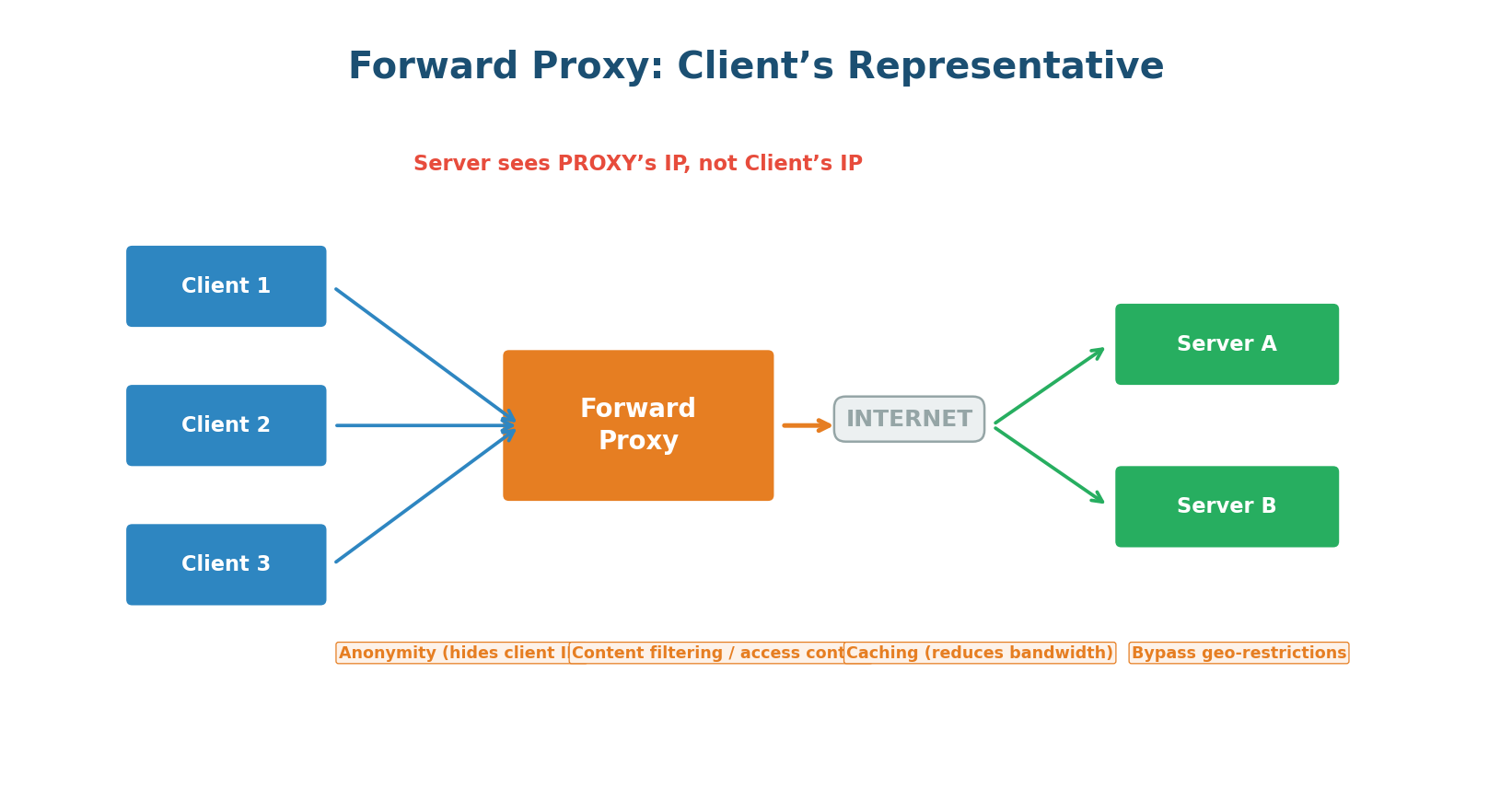
A forward proxy sits between clients and the internet, acting on behalf of the clients. The client explicitly configures its browser/application to route all requests through the proxy. The server sees only the proxy's IP address, not the client's real IP.
Key uses of forward proxies: anonymity and privacy (hide your real IP address, like Tor or VPN), content filtering (corporate networks block social media and malicious sites), caching (proxy caches frequently requested resources, reducing bandwidth), and bypassing geographic restrictions (access content blocked in your region by routing through a proxy in another country).
Reverse Proxy: The Server's Gatekeeper
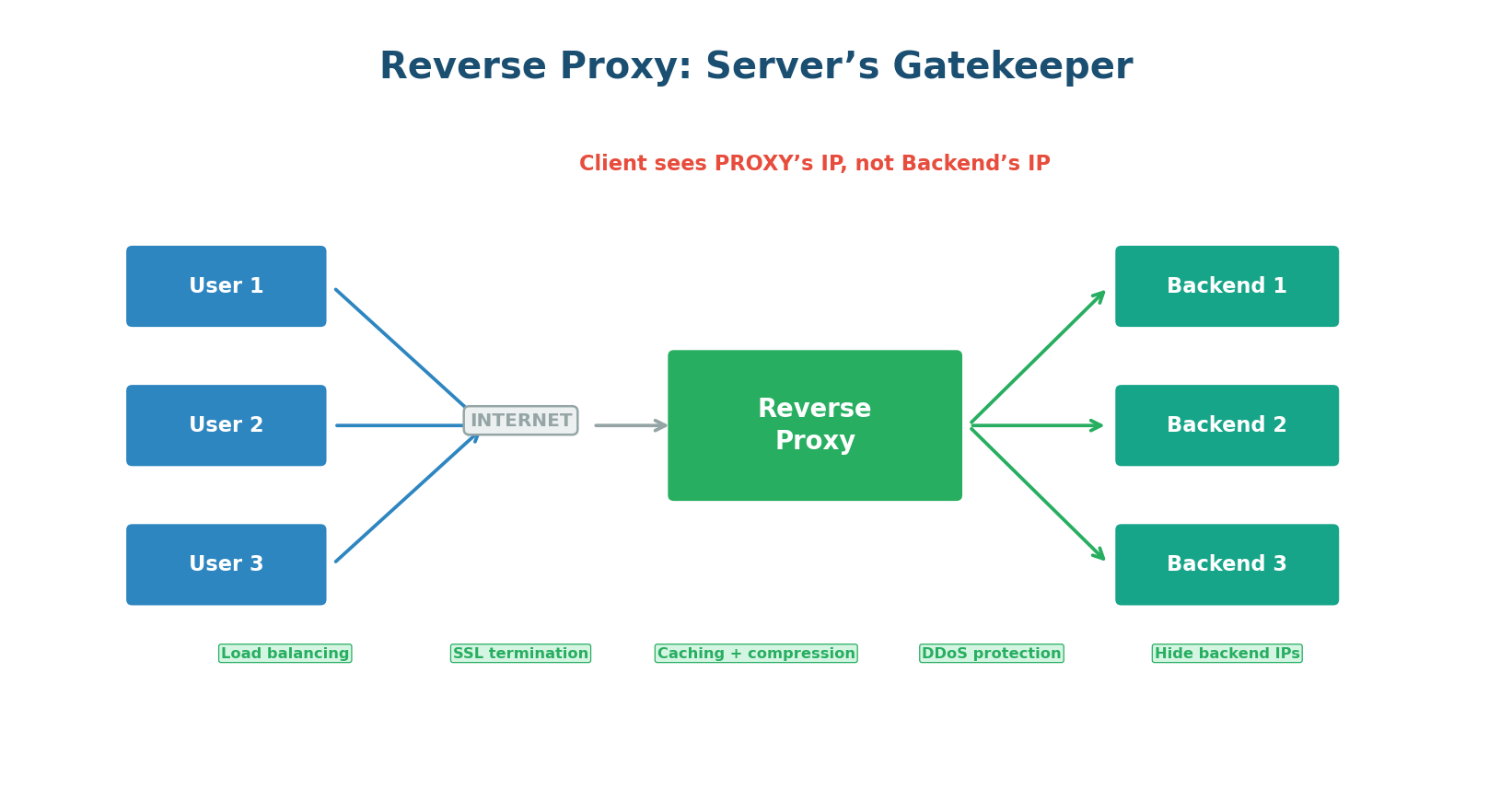
A reverse proxy sits between the internet and your backend servers, acting on behalf of the servers. The client does not know the proxy exists — it thinks it is talking directly to your application. The client connects to api.example.com, which points to the reverse proxy, not directly to any application server.
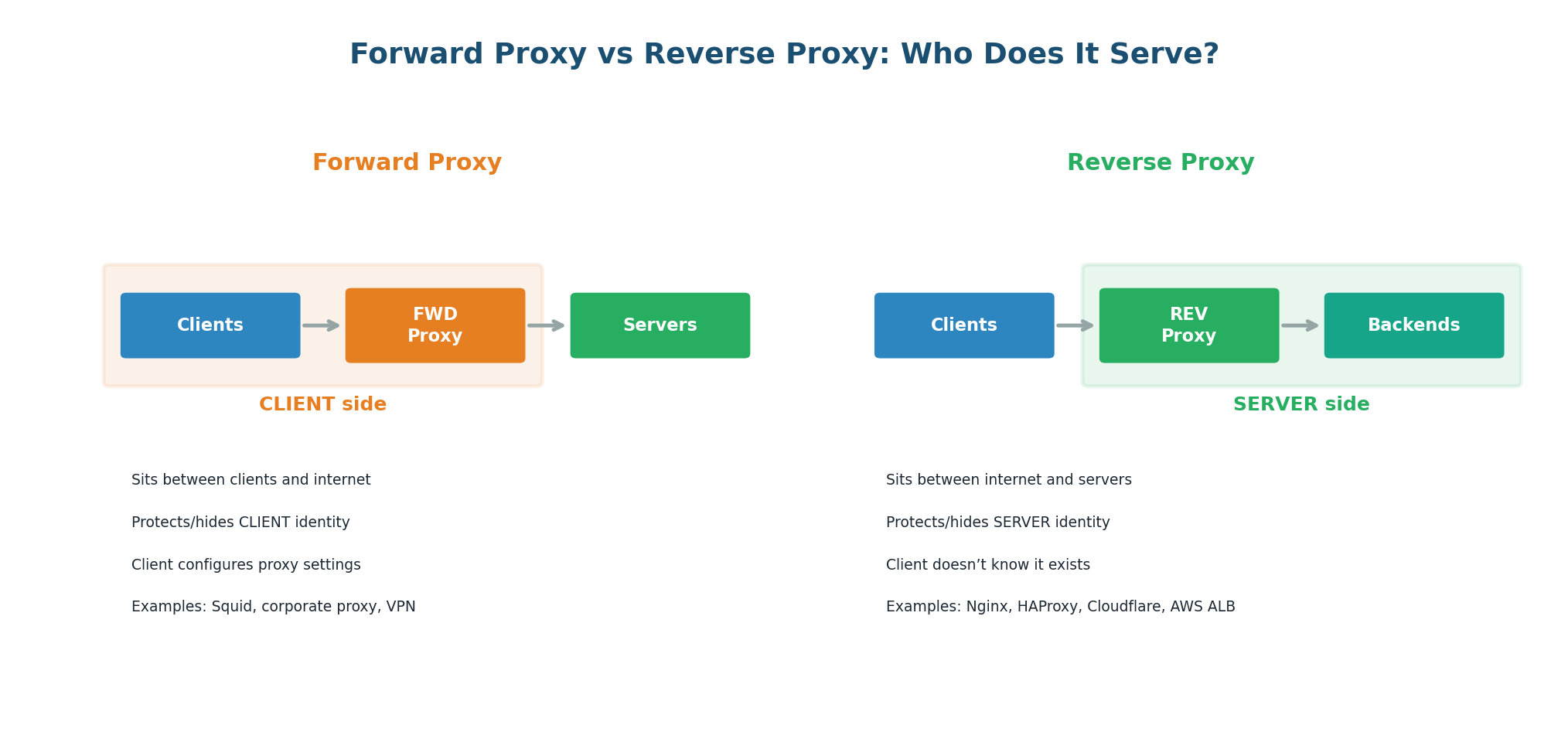
The reverse proxy provides five critical functions in a production system:
- Load Balancing: The most important function. Distributes incoming requests across multiple backend servers using algorithms like Round Robin, Least Connections, or IP Hash. When one server dies, traffic automatically shifts to healthy servers.
- SSL/TLS Termination: The reverse proxy handles all TLS encryption and decryption. Backend servers receive plain HTTP traffic over the internal network — simpler, faster, and easier to manage certificates in one place.
- Caching: Can cache responses from backend servers. If 1,000 users request the same product page within 60 seconds, only the first request hits the backend; the other 999 are served from the proxy's cache.
- Rate Limiting and DDoS Protection: Can throttle abusive clients, block known malicious IPs, and absorb DDoS traffic before it reaches your application servers.
- Compression and Optimization: Can gzip or Brotli-compress responses before sending them to clients, reducing bandwidth by 60–80%.
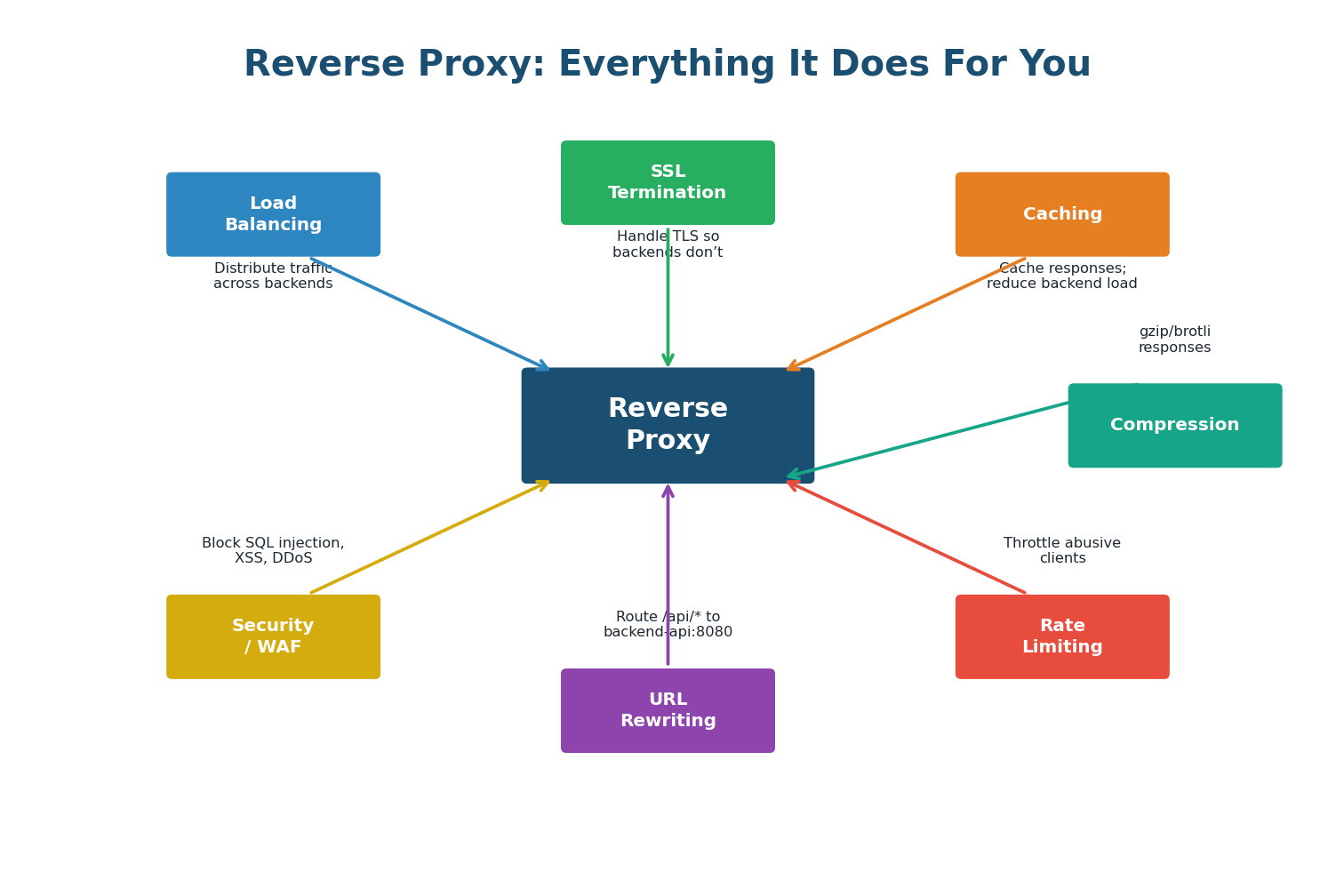
| Aspect | Forward Proxy | Reverse Proxy |
|---|---|---|
| Serves | Clients | Servers |
| Position | Client side (in front of clients) | Server side (in front of backends) |
| Client awareness | Client configures proxy explicitly | Client does not know proxy exists |
| Hides | Client's identity from servers | Server's identity from clients |
| Main purpose | Privacy, filtering, caching for clients | Load balancing, security, caching for servers |
| Examples | Squid, corporate proxy, VPN, Tor | Nginx, HAProxy, AWS ALB/NLB, Cloudflare, Envoy |
| In system design | Rarely discussed | Almost always present in architecture diagrams |
In every system design answer, include a reverse proxy (typically Nginx, AWS ALB, or Cloudflare) between the internet and your application servers. State explicitly: "I will put an AWS Application Load Balancer as the reverse proxy. It handles SSL termination, routes traffic based on URL patterns, and performs health checks to remove unhealthy instances." This shows production-level thinking.
Topic 3
Full Request Lifecycle Walkthrough
What Happens When You Type a URL?
This is one of the most famous interview questions in software engineering. The answer reveals your depth of understanding across networking, protocols, and system architecture. The complete answer has 8 distinct phases, each with measurable latency that can be optimized.
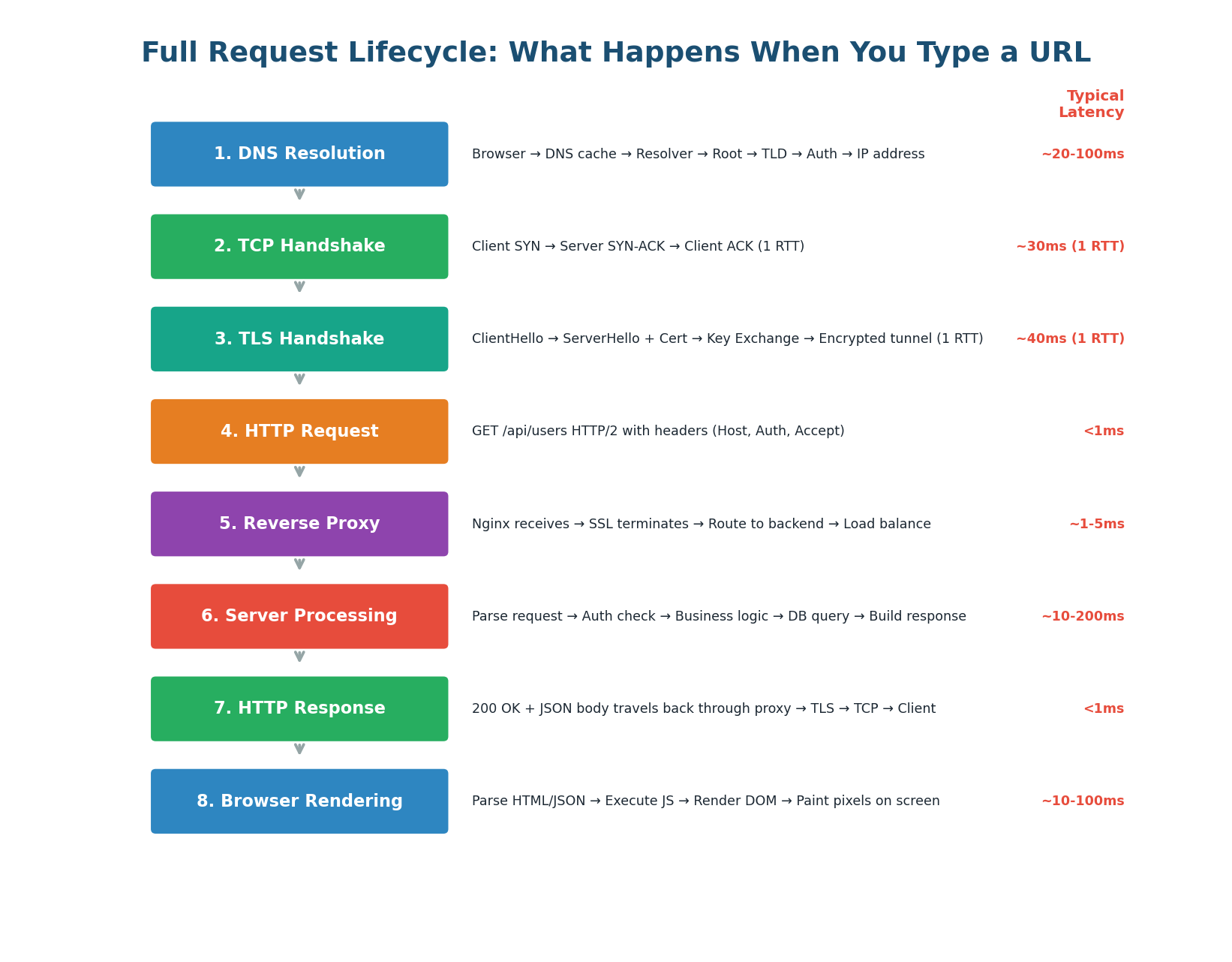
The 8 Phases
Phase 1: DNS Resolution (~20–100ms) — The browser converts api.example.com into an IP address. It checks browser DNS cache → OS DNS cache → router cache → ISP recursive resolver → root/TLD/authoritative servers. Latency: ~50ms cold, <1ms if cached. Optimization: DNS prefetch hints, low TTL for failover.
Phase 2: TCP Handshake (~30ms) — The browser initiates a TCP connection to port 443. The three-way handshake (SYN → SYN-ACK → ACK) takes one round-trip. A round trip to a server in the same region is ~1–5ms; cross-continent is ~100–200ms. Optimization: Connection pooling and HTTP keep-alive reuse existing connections. CDN edge servers reduce distance.
Phase 3: TLS Handshake (~40ms) — Since we use HTTPS, a TLS handshake follows TCP. The browser and server negotiate cipher suites, exchange certificates, and derive encryption keys. TLS 1.3 reduced this from 2 RTTs (TLS 1.2) to 1 RTT. Optimization: TLS 1.3, session resumption (0-RTT for returning users), OCSP stapling.
Phase 4: HTTP Request (<1ms) — The browser sends the encrypted HTTP request through the established connection. With HTTP/2, multiple requests can be multiplexed on the same connection.
Phase 5: Reverse Proxy Processing (~1–5ms) — The request arrives at the reverse proxy (Nginx, HAProxy, or AWS ALB). The proxy terminates TLS, inspects the request, applies rate limiting, and load-balances to a backend server. If the response is cached at the proxy, it returns immediately without hitting the backend.
Phase 6: Server Processing (~10–200ms) — This is typically the slowest phase and the one most under your control:
- Request Parsing: Deserialize HTTP request, extract parameters and headers. (~1ms)
- Authentication: Validate JWT token or API key, check permissions. (~5ms with cached token, ~20ms if hitting an auth service)
- Business Logic: Execute application logic. For GET /users, this might involve building a query, applying pagination, filtering. (~5–20ms)
- Database Query: Query the database. A well-indexed query takes 1–10ms. A complex join or unindexed query on a large table can take 500ms+.
- Response Building: Serialize the result to JSON, set response headers. (~1–2ms)
Without caching: DB query = 50ms, total server processing = 80ms. With Redis cache (99% hit rate): Redis lookup = 0.5ms, total server processing = 10ms. An 8× speedup for the simple addition of a cache layer. This is why caching is the single most impactful optimization in most systems.
Phase 7: Response Journey Back (~5–10ms) — The backend sends the HTTP response to the reverse proxy. The proxy may cache the response, compress it with gzip/Brotli, add security headers (HSTS, CSP), and forward it through the established TLS connection to the client.
Phase 8: Browser Rendering (~10–100ms) — For API calls returning JSON, JavaScript parses the JSON and updates the DOM. For full page loads, the browser must also parse HTML, build the DOM, download and execute CSS/JS, and paint pixels to the screen.
The Latency Budget
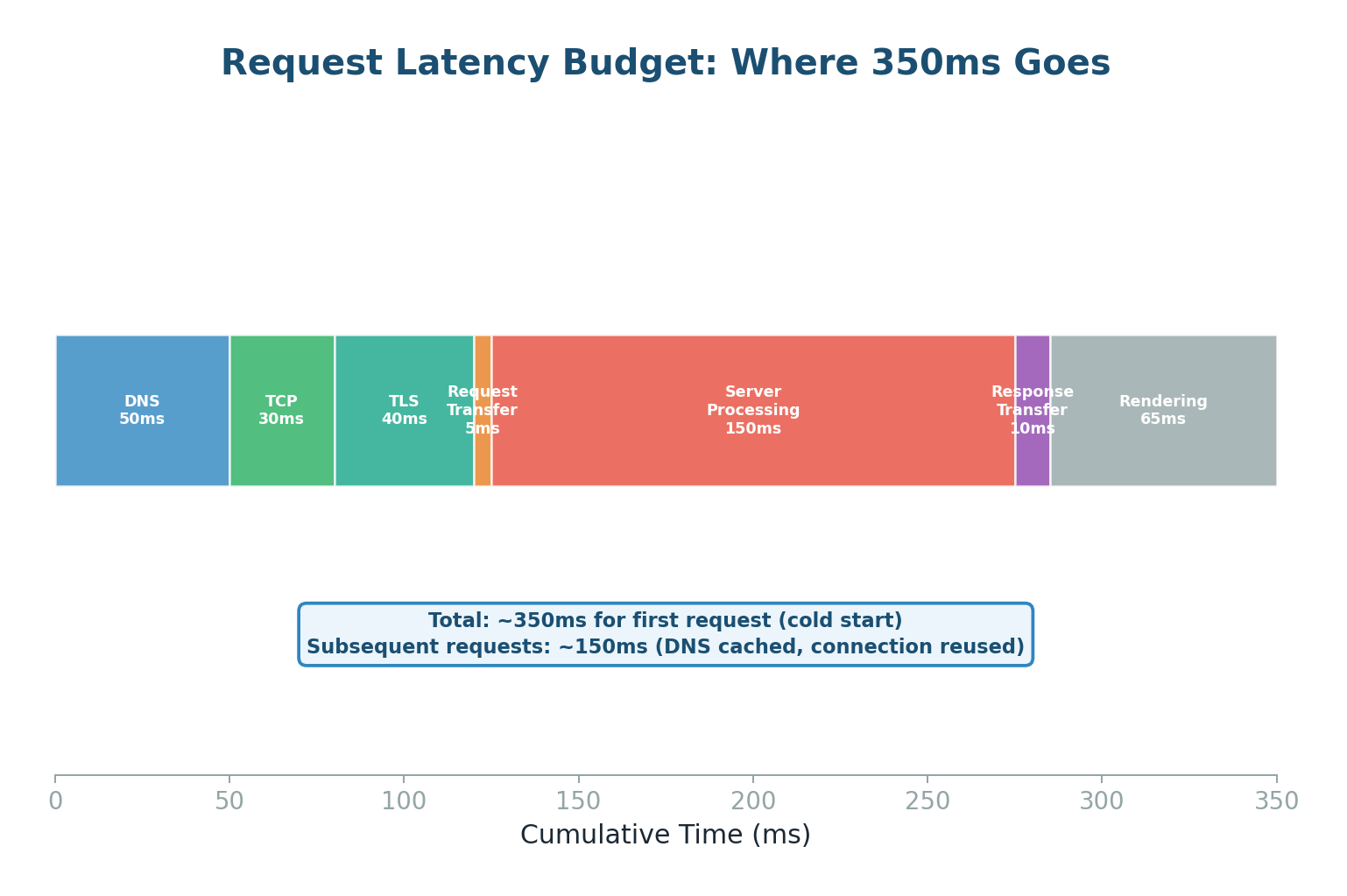
| Phase | Cold Start | Warm (Cached) | Key Optimization |
|---|---|---|---|
| DNS Resolution | 50ms | <1ms (cached) | DNS prefetch, low TTL for failover |
| TCP Handshake | 30ms | 0ms (reused) | Connection pooling, keep-alive |
| TLS Handshake | 40ms | 0ms (resumed) | TLS 1.3, session tickets, 0-RTT |
| HTTP Request | <1ms | <1ms | HTTP/2 multiplexing |
| Reverse Proxy | 2ms | <1ms (edge cache) | CDN, response caching |
| Server Processing | 150ms | 10ms (Redis cache) | Caching, DB indexing, async |
| Response Transfer | 10ms | 5ms (compressed) | gzip/Brotli, smaller payloads |
| Browser Rendering | 50ms | 20ms (cached assets) | Code splitting, lazy loading |
| TOTAL | ~350ms | ~40ms | ~90% reduction possible! |
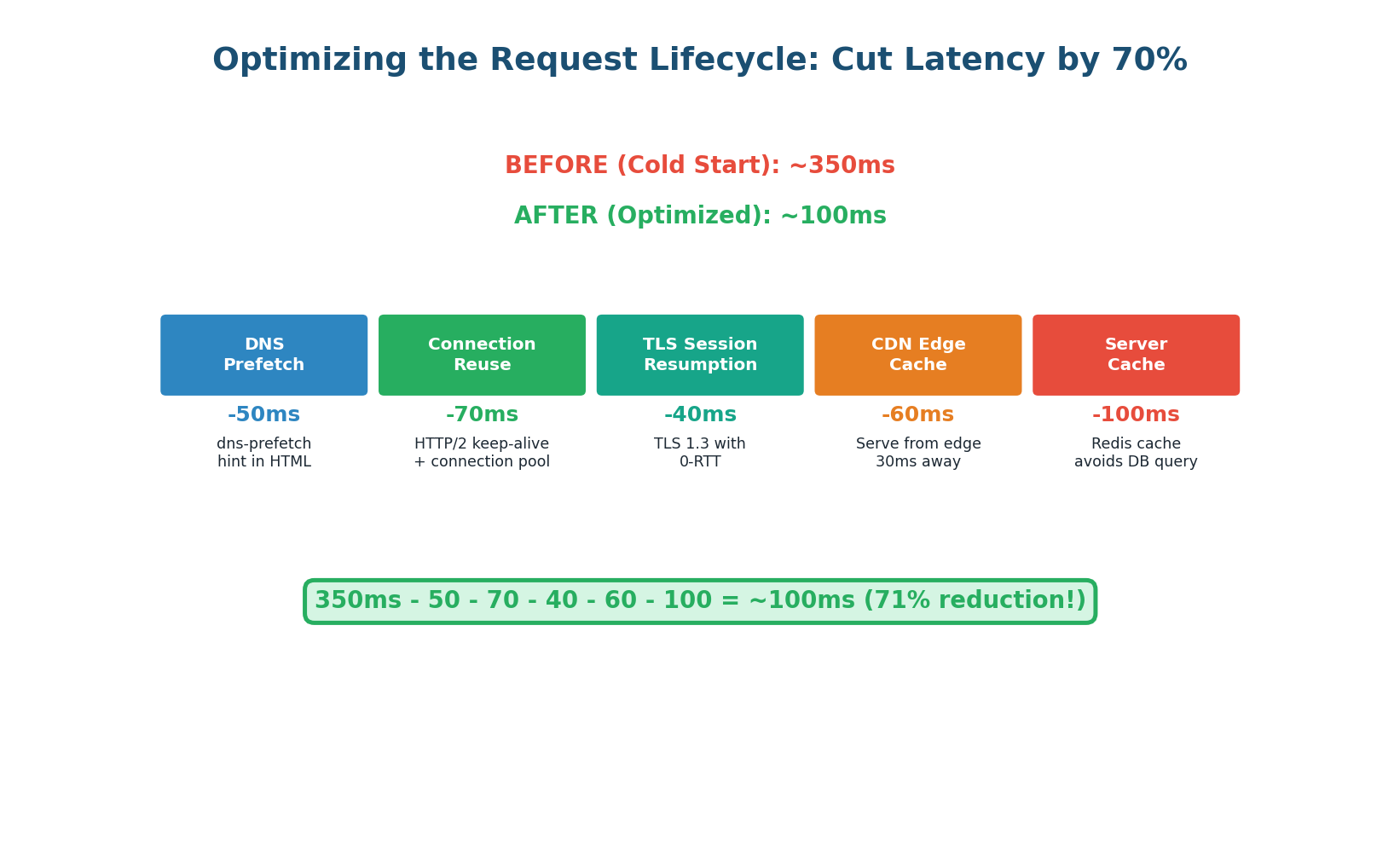
When asked "What happens when you type a URL?", structure your answer in these 8 phases. Spend the most time on DNS (show you understand the hierarchy and caching), the proxy layer (show you always include one in architecture), and server processing (show you know the bottlenecks). Then mention the warm-vs-cold optimization: "In practice, most requests skip DNS (cached) and TLS (session resumed), reducing latency from ~350ms to ~40ms."
Class Summary
Connecting the Three Topics
Today's three topics form a complete picture of how internet requests work:
DNS is the starting point of every request. It translates human-readable names into IP addresses using a hierarchical, distributed database. Understanding DNS lets you design global routing, fast failover, and geographic load distribution.
Proxies and Reverse Proxies are the gatekeepers of internet traffic. Forward proxies protect and represent clients. Reverse proxies protect and represent servers — providing load balancing, SSL termination, caching, rate limiting, and compression in one component.
The Full Request Lifecycle ties everything together. DNS resolution finds the server, TCP and TLS establish a secure connection, the reverse proxy routes the request to the right backend, the server processes it (often hitting a cache or database), and the response travels back through the same layers to the user's browser.
Together, these concepts give you the networking foundation to design any distributed system. When an interviewer asks about latency, you know where it comes from and how to reduce it. When they ask about security, you know where TLS fits. When they ask about scalability, you know how DNS and reverse proxies distribute load.
Want to Land at Google, Microsoft or Apple?
Watch Pranjal Jain's free 30-min training — the exact GROW Strategy that helped 1,572+ engineers go from TCS/Infosys to top product companies with a 3–5X salary hike.