

What's Inside
The Exercise: Extend, Don't Rebuild

A Common Interview Follow-Up
One of the most common interview follow-ups is: “We've designed the basic system. Now the product team wants feature X. How would you extend the architecture?” This tests your ability to modify an existing design incrementally — adding components without rewriting the system.
Today's exercise extends the URL Shortener from Class 9 with two features: a Custom Alias System (vanity URLs like sho.rt/my-brand) and a Real-Time Analytics Dashboard (clicks, geography, referrers, unique visitors).
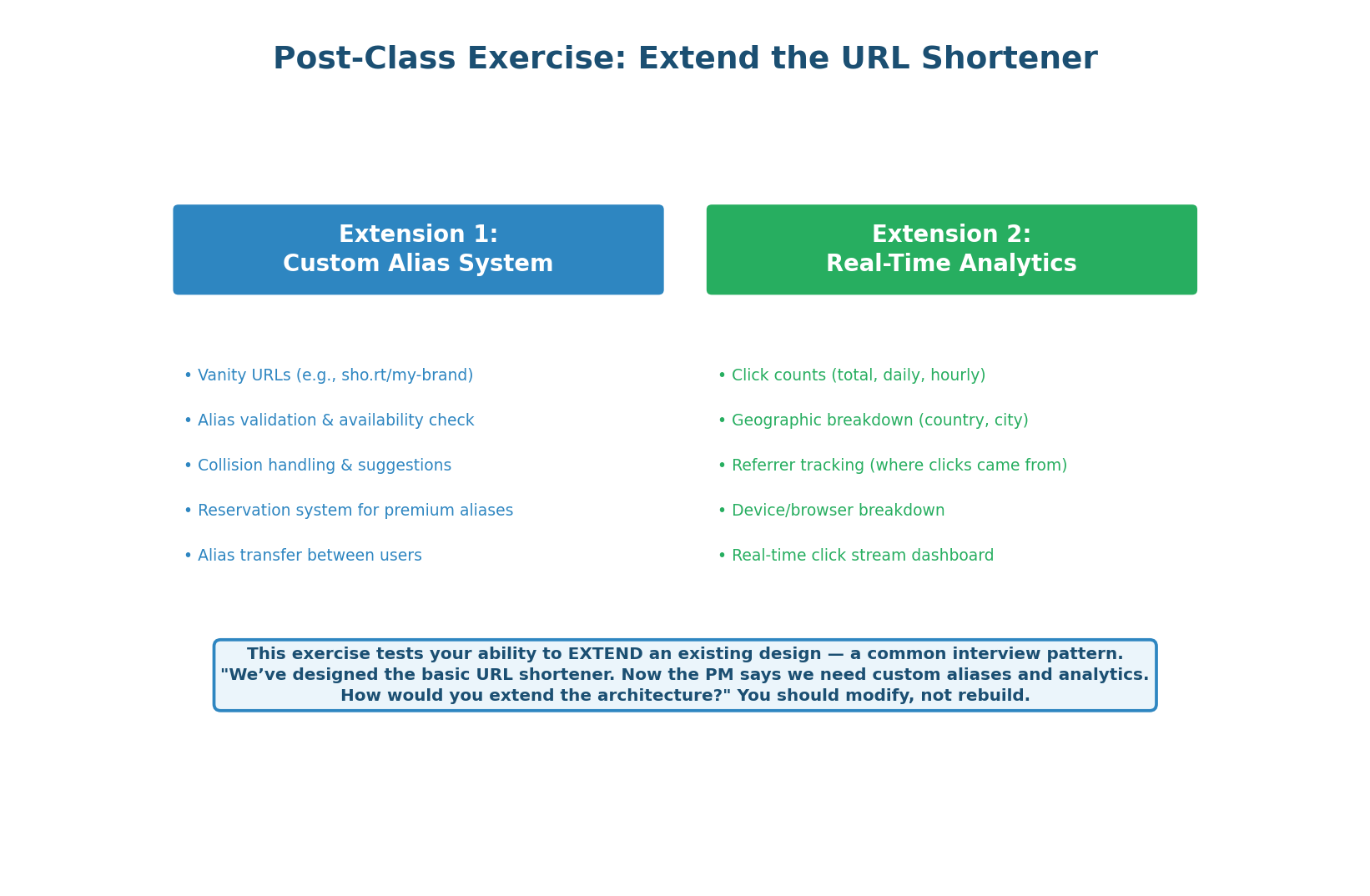
The redirect hot path (GET /{code}) must remain completely unchanged. Every new feature must be additive: new tables, new services, new async pipelines — but zero impact on the <1ms redirect latency that users experience. Extensions that slow down the core flow fail the interview.
Custom Alias: Full Create Flow
4 Steps from Request to 201 (or 409)
A custom alias allows users to choose their own short code (e.g., sho.rt/my-brand instead of sho.rt/abc1234). This seems simple but introduces several design challenges: validation (what characters are allowed?), uniqueness (what if the alias is already taken?), suggestions (how to help users find available alternatives?), and reservation (how to protect brand names from squatting?).
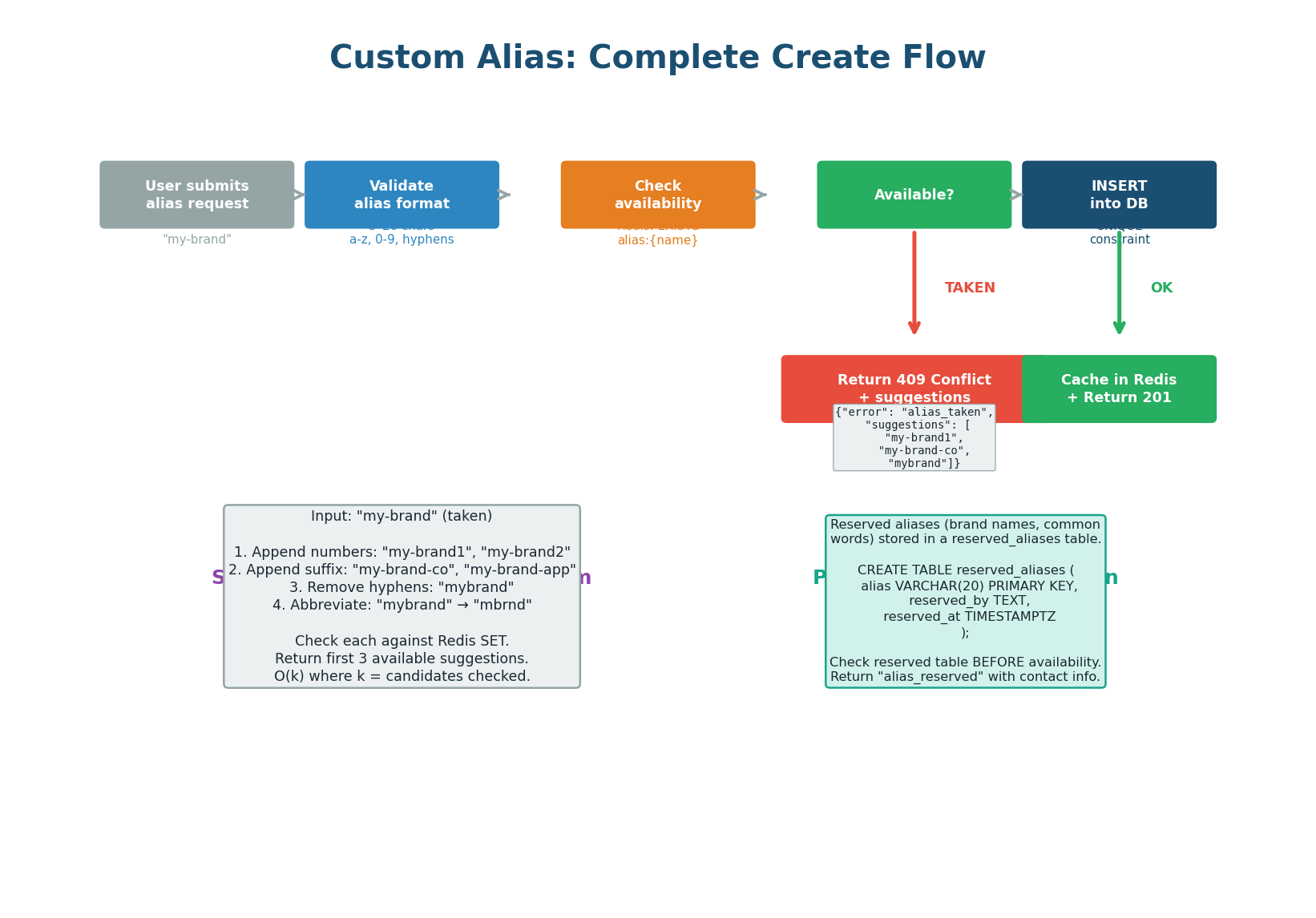
| Step | What Happens | Where |
|---|---|---|
| Step 1: Validate Format | 3–20 chars, lowercase a–z / digits / hyphens only. No consecutive hyphens. No leading/trailing hyphens. Run through offensive-word blocklist (~10,000 terms). | API server, before any DB calls |
| Step 2: Check Availability | Check reserved_aliases table (platform-protected brand names), then check the Bloom filter for O(1) availability signal. 99% of checks resolve here — no DB query needed. |
Redis Bloom filter + PostgreSQL |
| Step 3: INSERT with UNIQUE | Attempt INSERT using existing UNIQUE index on short_code. If race condition causes collision, DB returns constraint violation → API returns 409 Conflict. |
PostgreSQL |
| Step 4: Suggestions | On 409, generate 3 alternatives: append numbers (my-brand1), append suffixes (my-brand-co), remove hyphens (mybrand). Each candidate checked via Bloom filter. Takes ~1ms. |
API server + Redis Bloom filter |
The Bloom filter check (Step 2) is an optimization for the 99% case — it avoids a database round-trip when the alias is clearly available. But it is not the guard. The UNIQUE constraint on short_code is the ultimate guard. Even if two requests pass the Bloom filter simultaneously, only one INSERT will succeed — the other gets a constraint violation and returns 409 with suggestions. This is safe because the database is the single source of truth.
Schema Changes for Custom Aliases
Minimal, Backward-Compatible Changes
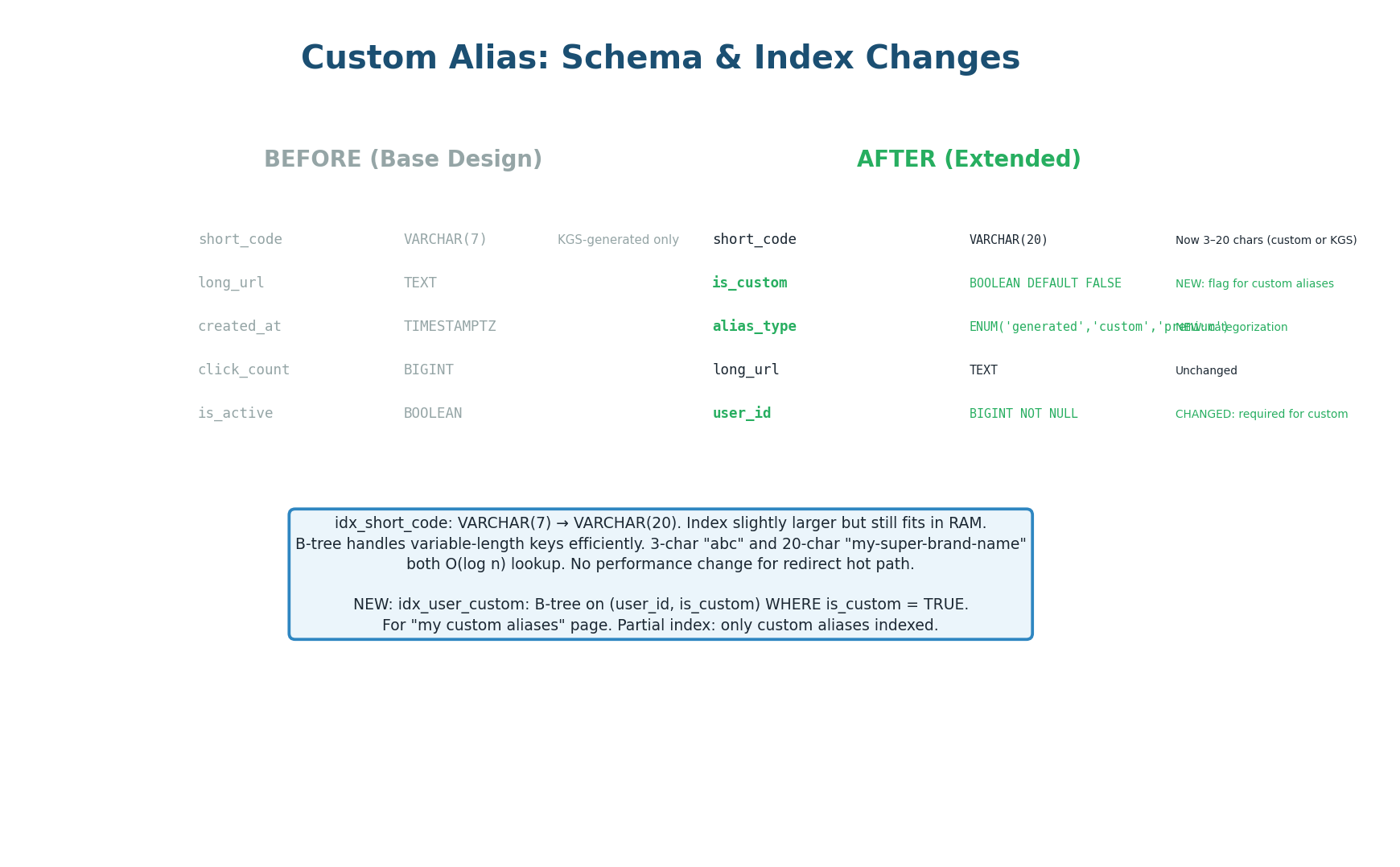
short_code expanded to VARCHAR(20), two new columns added-- Widen short_code to accommodate custom aliases up to 20 chars ALTER TABLE urls ALTER COLUMN short_code TYPE VARCHAR(20); -- Distinguish custom from generated codes ALTER TABLE urls ADD COLUMN is_custom BOOLEAN NOT NULL DEFAULT FALSE, ADD COLUMN alias_type VARCHAR(10) NOT NULL DEFAULT 'generated'; -- alias_type values: 'generated' | 'custom' | 'premium' -- New reserved aliases table (brand protection) CREATE TABLE reserved_aliases ( alias VARCHAR(20) PRIMARY KEY, reason TEXT, reserved_at TIMESTAMPTZ NOT NULL DEFAULT NOW() ); -- Partial index for "my custom aliases" page CREATE INDEX idx_urls_user_custom ON urls (user_id, is_custom) WHERE is_custom = TRUE; -- Existing UNIQUE index on short_code handles both generated and custom codes
The existing UNIQUE index on short_code already enforces uniqueness across all codes — generated (abc1234) and custom (my-brand) alike. Adding a separate index for custom aliases would be redundant and waste disk space. The schema changes are minimal: one column widened, two columns added, one new table for reserved aliases.
Real-Time Availability Check (Bloom Filter)
Type-Ahead with O(1) Lookups
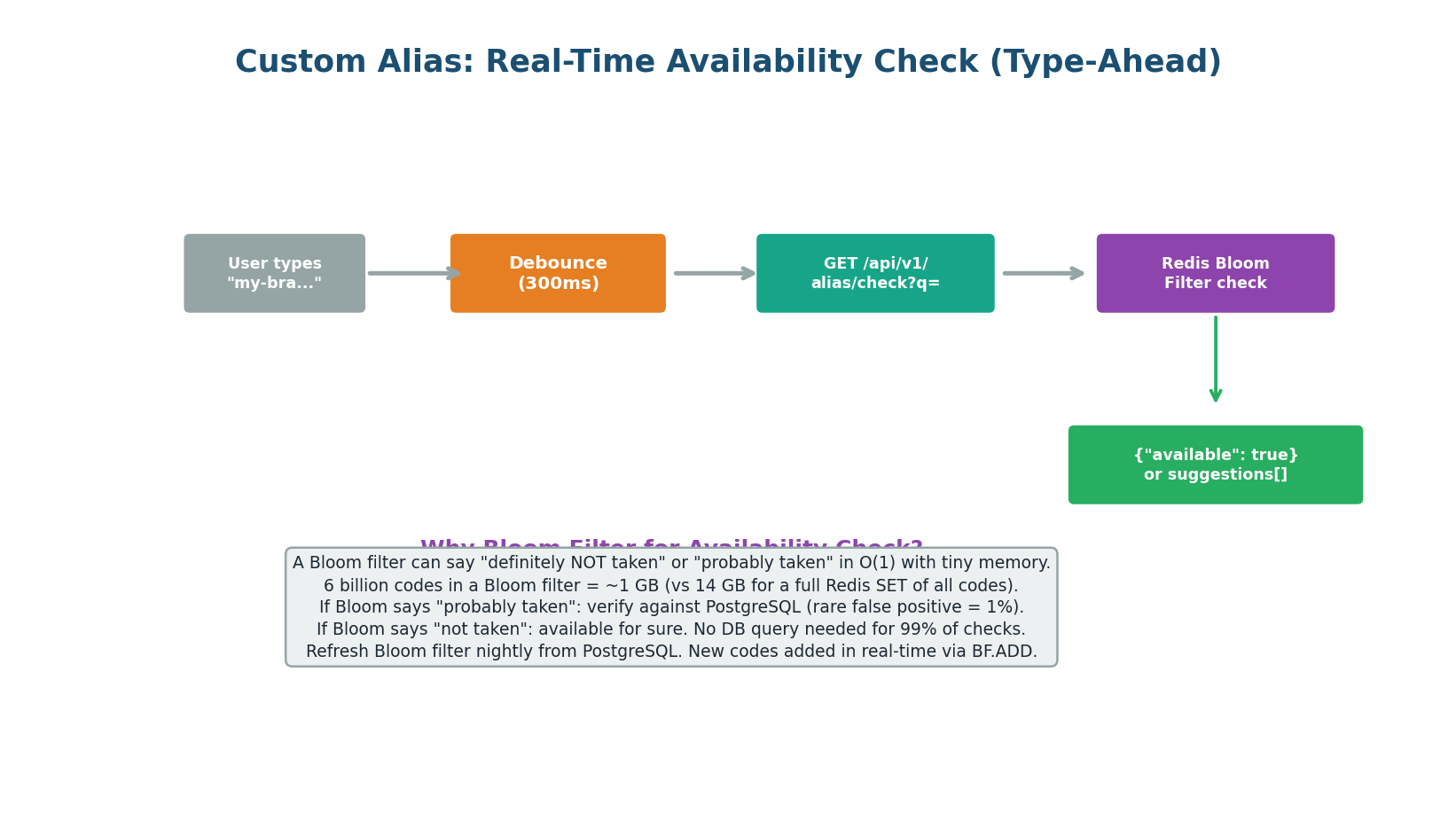
As the user types their desired alias, the frontend sends a debounced availability check (GET /api/v1/alias/check?q=my-bra) every 300ms. The API checks a Redis Bloom filter containing all existing short codes.
| Storage Option | 6 Billion Codes | Lookup Time |
|---|---|---|
| Redis SET (all codes) | ~14 GB RAM | O(1) |
| Bloom Filter (1% false positive) | ~1 GB RAM | O(1) |
| PostgreSQL SELECT EXISTS | Index scan per query | ~5ms per check |
A Bloom filter with 6 billion entries and a 1% false positive rate requires approximately 1 GB of memory — 14× less than storing all codes in a Redis SET. The Bloom filter returns one of two results:
- Definitely available — no DB query needed (99% of checks). Show green checkmark instantly.
- Probably taken — verify against PostgreSQL to confirm (1% false positive rate). May add ~5ms latency.
A Bloom filter can produce false positives (reports “taken” when the alias is actually free) but never false negatives (it will never say “available” when the alias is taken). The 1% false positive rate means 1 in 100 available aliases will incorrectly show as taken during type-ahead — a minor UX friction, not a correctness issue, since the actual INSERT will succeed.
Analytics Architecture: From Click to Dashboard
Zero Impact on Redirect Latency
The analytics feature tracks every click and presents the data in a real-time dashboard. The critical design constraint: analytics must have zero impact on redirect latency. The redirect path (GET /{code}) must return 301/302 in under 1ms. All analytics processing happens asynchronously after the redirect response is sent.
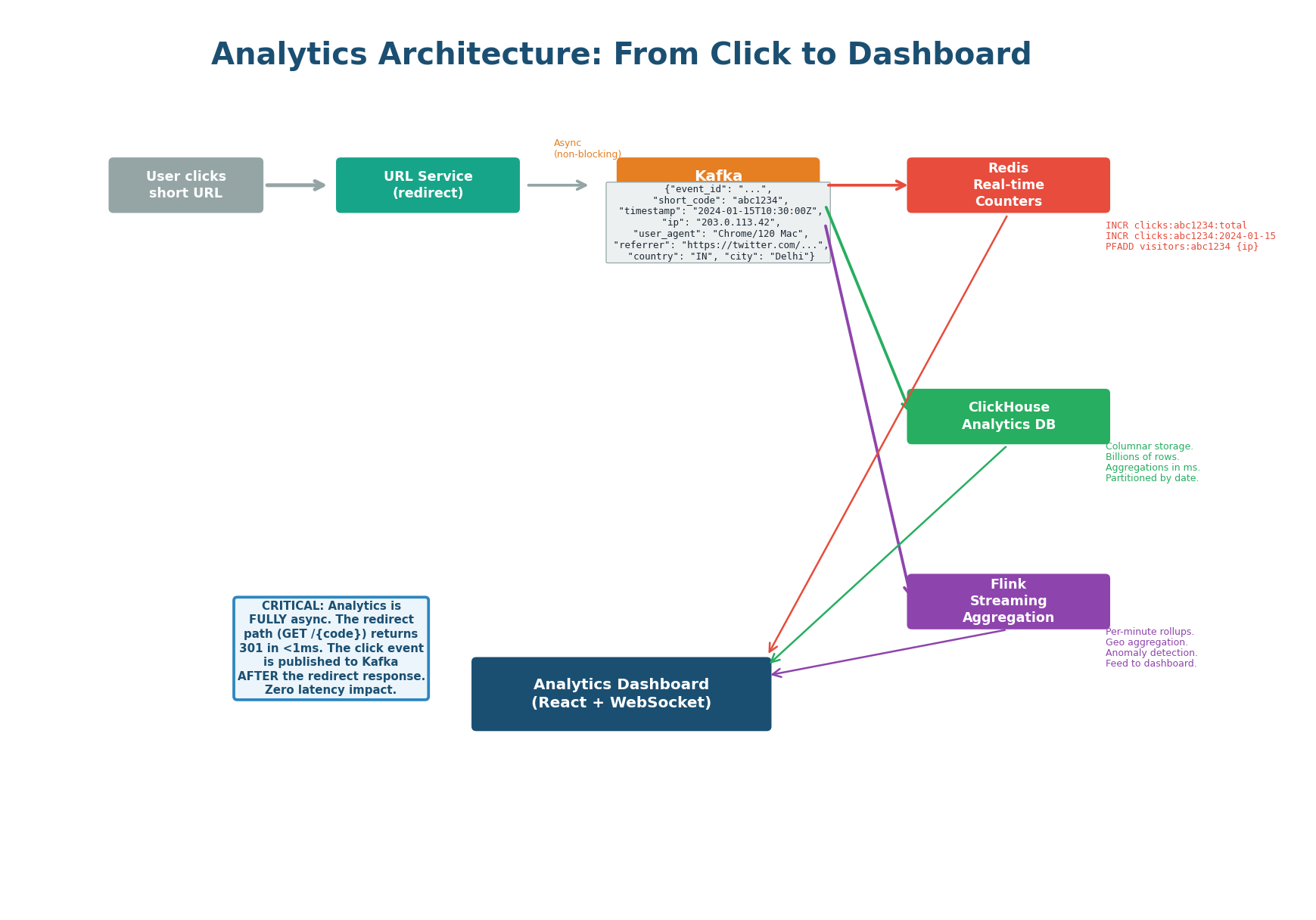
| Step | What Happens | Latency Impact |
|---|---|---|
| 1. User clicks short URL | URL Service looks up long URL, returns 301/302 redirect response immediately | Zero — analytics not involved |
| 2. Publish to Kafka | After returning the response, service publishes click event to Kafka topic click.events (non-blocking fire-and-forget) |
Zero — happens post-response |
| 3a. Redis consumer | Increments real-time counters (total clicks, daily clicks, HyperLogLog for unique visitors, hourly heatmap) | Async, ~1ms |
| 3b. Flink consumer | Streaming aggregation: windowed counts by country, referrer, device type | Async, ~5–10s lag |
| 3c. ClickHouse consumer | Persists raw click events for historical queries and ad-hoc analytics | Async, eventual consistency |
Each Kafka event contains: event_id (UUID for deduplication), short_code, timestamp, ip_address, user_agent, referrer. Pre-computed at ingestion: country, city (GeoIP lookup), device_type, browser (user-agent parsing). Pre-computing avoids repeated parsing in all three downstream consumers.
ClickHouse: Historical Analytics Storage
Sub-50ms Queries on Billions of Rows
ClickHouse is a columnar database optimized for analytics queries. It stores click events partitioned by day, enabling efficient time-range queries and automatic archival of old data. Columnar storage compresses click data approximately 10× (a 1 TB dataset occupies ~100 GB on disk). Aggregation queries (count clicks by country, group by referrer) scan only the needed columns, making them 10–50× faster than equivalent PostgreSQL queries on the same data.
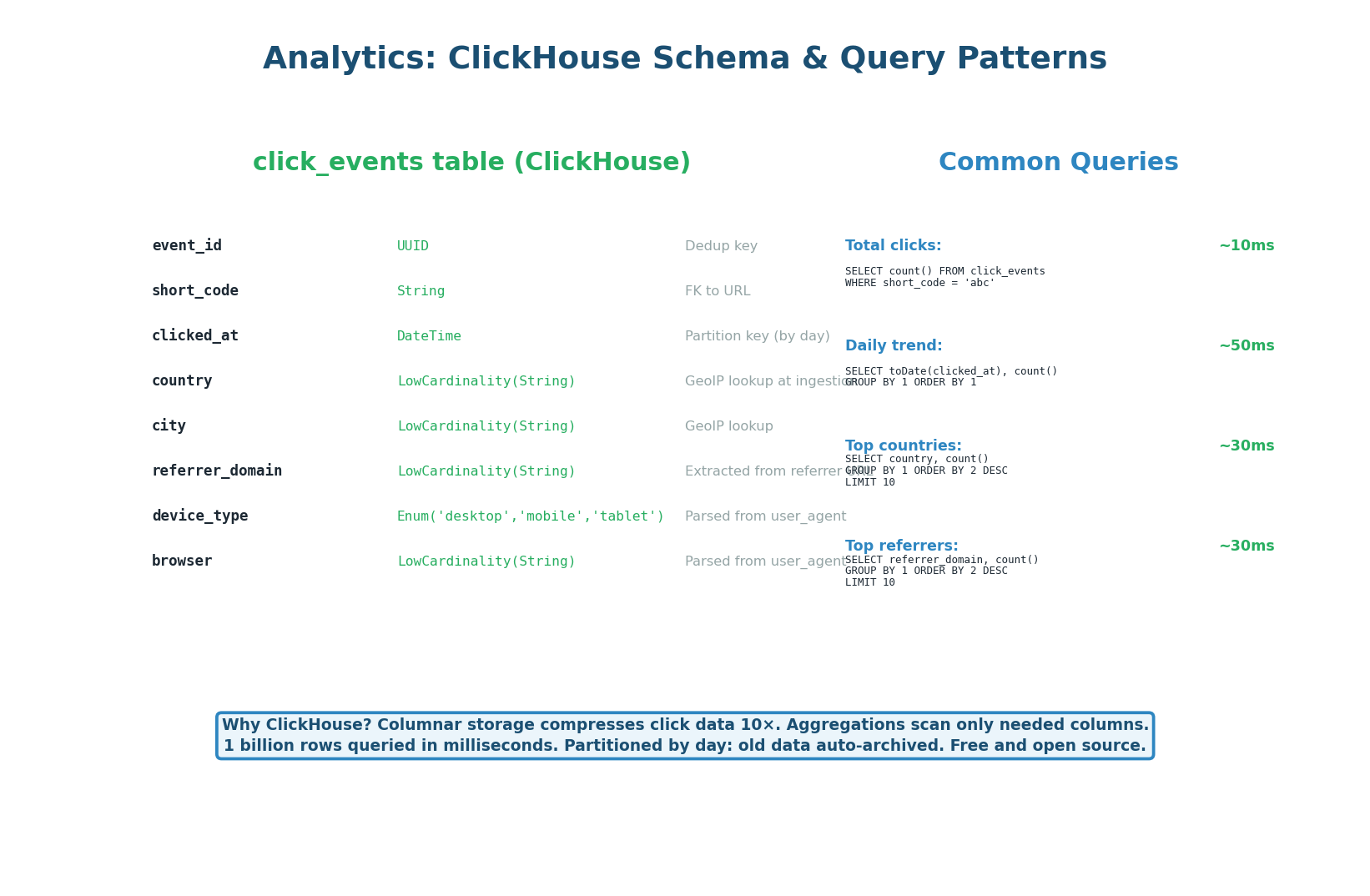
CREATE TABLE click_events (
  event_id     UUID,
  short_code   VARCHAR(20)   NOT NULL,
  clicked_at   DateTime      NOT NULL,
  country      VARCHAR(2),                 -- pre-computed from GeoIP
  city         VARCHAR(100),
  device_type  VARCHAR(20),                -- mobile | desktop | tablet
  browser      VARCHAR(50),
  referrer     TEXT
)
ENGINE = MergeTree()
PARTITION BY toYYYYMMDD(clicked_at)     -- partition by day
ORDER BY (short_code, clicked_at)      -- primary sort key
TTL clicked_at + INTERVAL 2 YEAR;       -- auto-delete after 2 years
PostgreSQL uses row-based storage. A query like SELECT country, COUNT(*) FROM click_events WHERE short_code = 'abc1234' reads entire rows, even though only two columns are needed. At 10 billion rows, this scans terabytes of data. ClickHouse's columnar storage reads only the country and short_code columns — perhaps 50 GB instead of 1 TB — and returns the result in under 50ms.
Redis Real-Time Counters
Three Data Structures for Three Use Cases
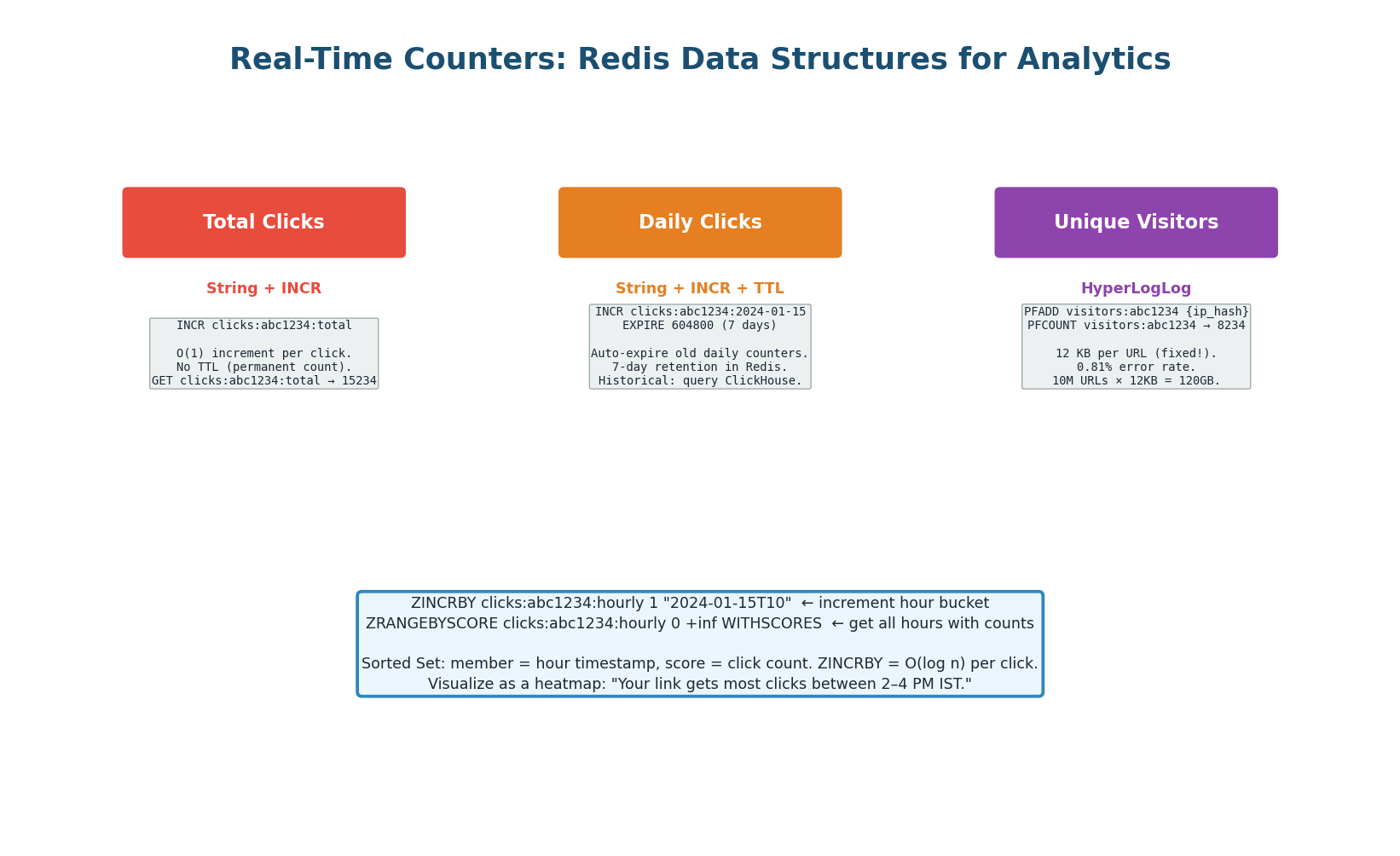
| Use Case | Redis Structure | Key Pattern | Memory per URL |
|---|---|---|---|
| Total clicks | String + INCR | clicks:{code}:total |
~60 bytes, no TTL |
| Daily clicks (last 7 days) | String + INCR + TTL | clicks:{code}:2024-01-15 |
~80 bytes, 7-day TTL |
| Unique visitors | HyperLogLog | visitors:{code} |
Fixed 12 KB, 0.81% error |
| Hourly heatmap | Sorted Set + ZINCRBY | clicks:{code}:hourly |
~2 KB (24 members) |
Exact unique visitor counting requires storing every visitor's hashed IP — unbounded memory as traffic grows. PFADD visitors:{code} {hashed_ip} uses a fixed 12 KB regardless of how many visitors. For 10 million URLs, the total HyperLogLog memory is 120 GB — manageable in a Redis Cluster. The 0.81% error rate is acceptable for a dashboard that shows “~1.2M unique visitors” rather than needing exact precision.
Two-tier strategy for daily clicks: last 7 days from Redis (instant), older data from ClickHouse. This keeps Redis memory bounded while providing both real-time and historical views from a single dashboard API.
Analytics Dashboard API
Right Data Source for Each Endpoint
The dashboard uses a hybrid data source strategy: each endpoint reads from whichever store provides the fastest, most accurate answer for that specific type of data.
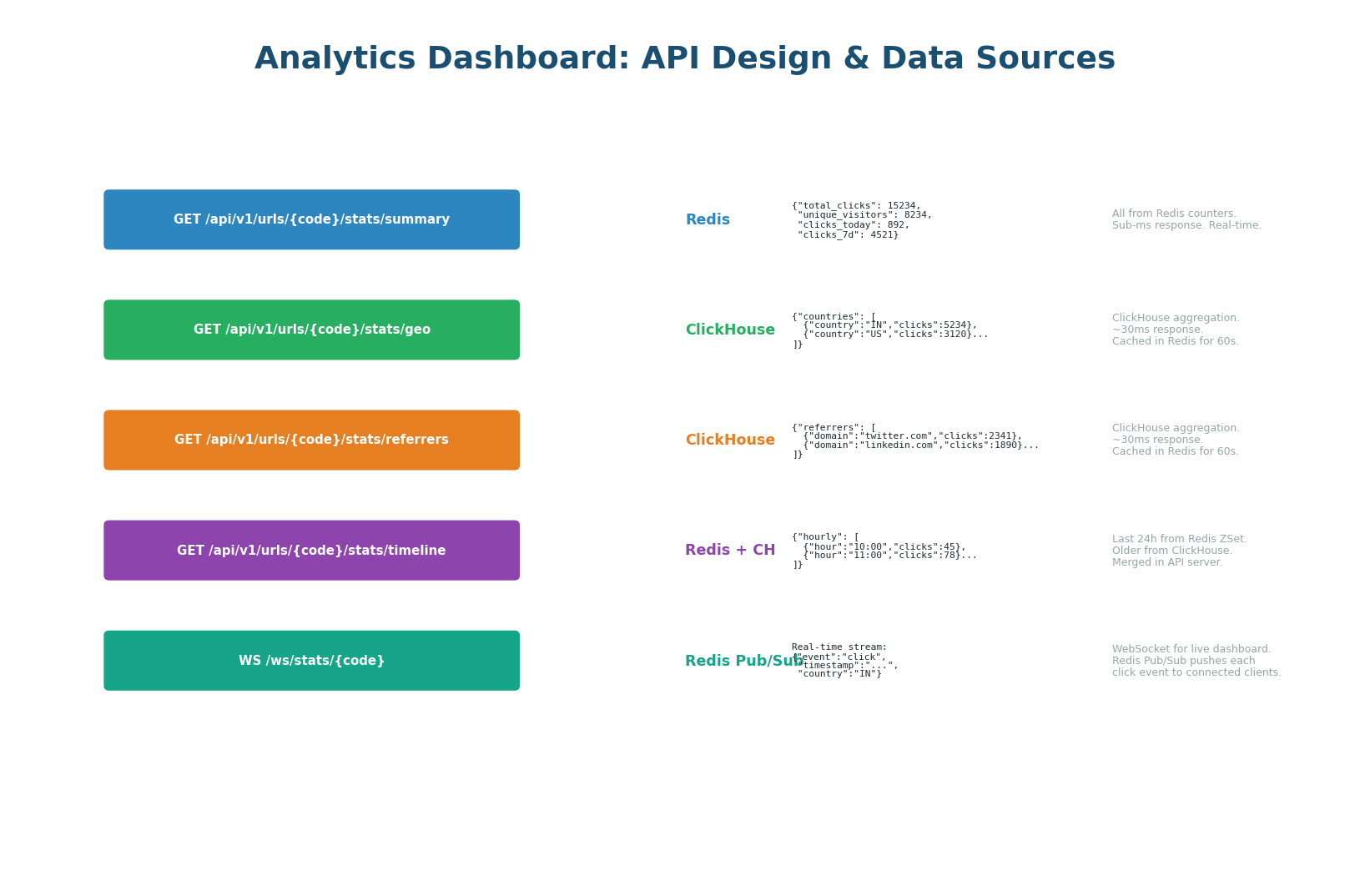
| Endpoint | Data Source | Latency |
|---|---|---|
GET /analytics/{code}/summary |
Redis counters (total, unique, today) | <1ms |
GET /analytics/{code}/geo |
ClickHouse query, cached in Redis 60s | <50ms (first), <1ms (cached) |
GET /analytics/{code}/referrers |
ClickHouse query, cached in Redis 60s | <50ms (first), <1ms (cached) |
GET /analytics/{code}/timeline |
Redis (last 24h) + ClickHouse (older), merged | <50ms |
WS /analytics/{code}/live |
Redis Pub/Sub → WebSocket push | Real-time per click |
The WebSocket endpoint subscribes to Redis Pub/Sub channel analytics:{code}. Every time the Kafka consumer processes a click event, it publishes to this channel. The API server receives the event and pushes it to all connected WebSocket clients. This enables a live counter that ticks in real-time with every click — the kind of feature that impresses product teams and interviewers alike.
Extended Architecture: Everything Together
Three New Components, Zero Impact on Hot Path
The extended architecture adds three new components to the base URL Shortener design from Class 9. Critically, the redirect hot path (GET /{code}) is completely unchanged. The CDN, Redis cache, and PostgreSQL redirect flow work identically for both generated codes and custom aliases — the UNIQUE index on short_code handles both transparently.
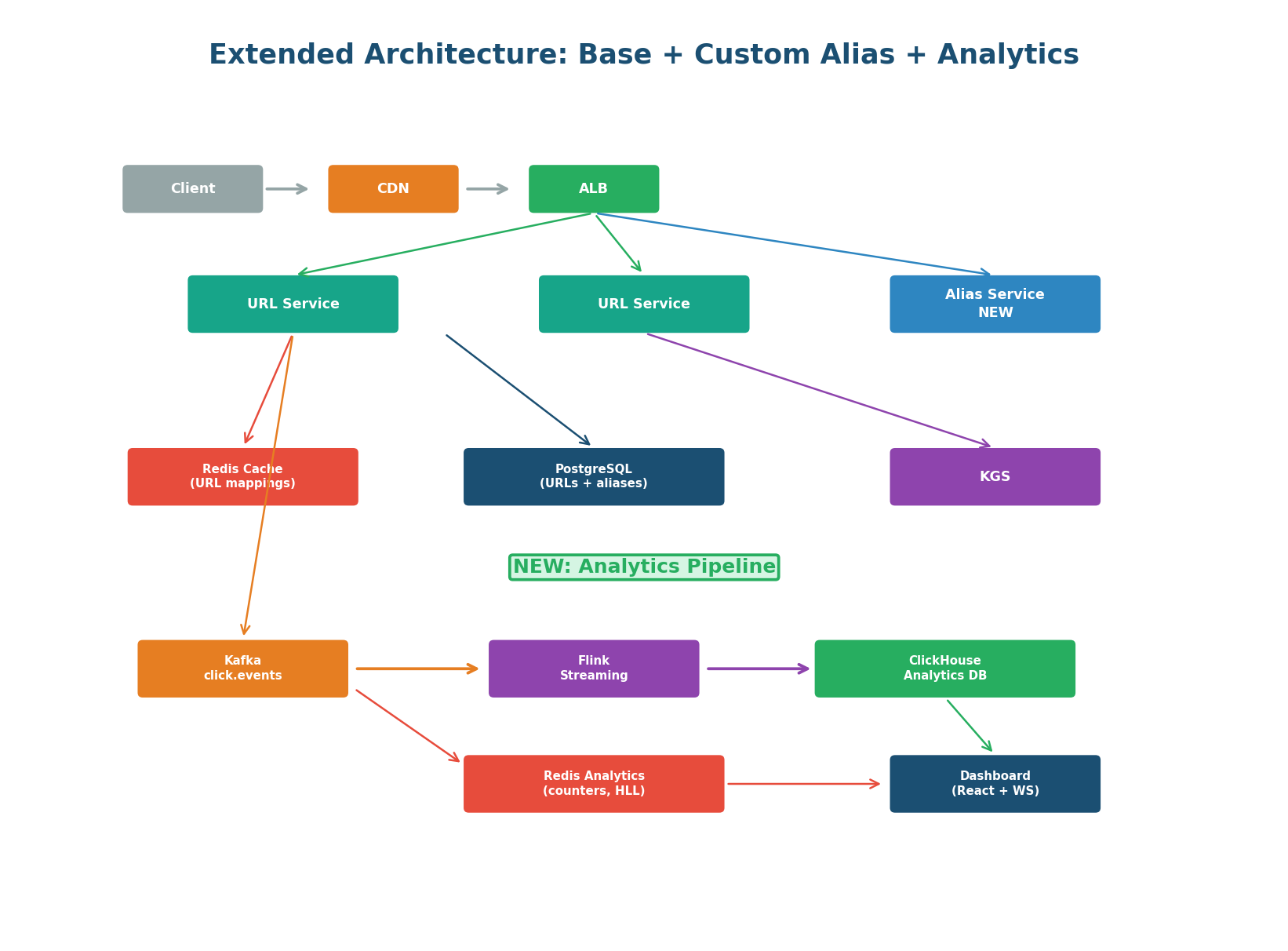
| New Component | Responsibility | Why Separated? |
|---|---|---|
| Alias Service | Custom alias creation, format validation, Bloom filter availability checks, suggestion generation | Isolates alias complexity from URL Service; allows independent scaling of alias creation without affecting redirect throughput |
| Analytics Pipeline | Kafka producer (in URL Service), Flink consumer, ClickHouse writer, Redis counter updater | Async pipeline means analytics failures never affect redirects; each consumer can scale independently |
| Analytics Dashboard API | REST + WebSocket endpoints backed by Redis and ClickHouse | Separates read-heavy analytics traffic from the write path; can be deployed independently |
"The extension is purely additive. The redirect hot path is unchanged — the UNIQUE index on short_code handles both generated and custom codes identically, so redirects see no difference. The Custom Alias feature adds a new Alias Service and a reserved_aliases table but doesn't touch the redirect path. The Analytics feature publishes to Kafka after the redirect response is sent, so it's fire-and-forget from the redirect's perspective. Three new services, zero performance regression on the existing 4,000 redirects/second."
Complete Design Checklist
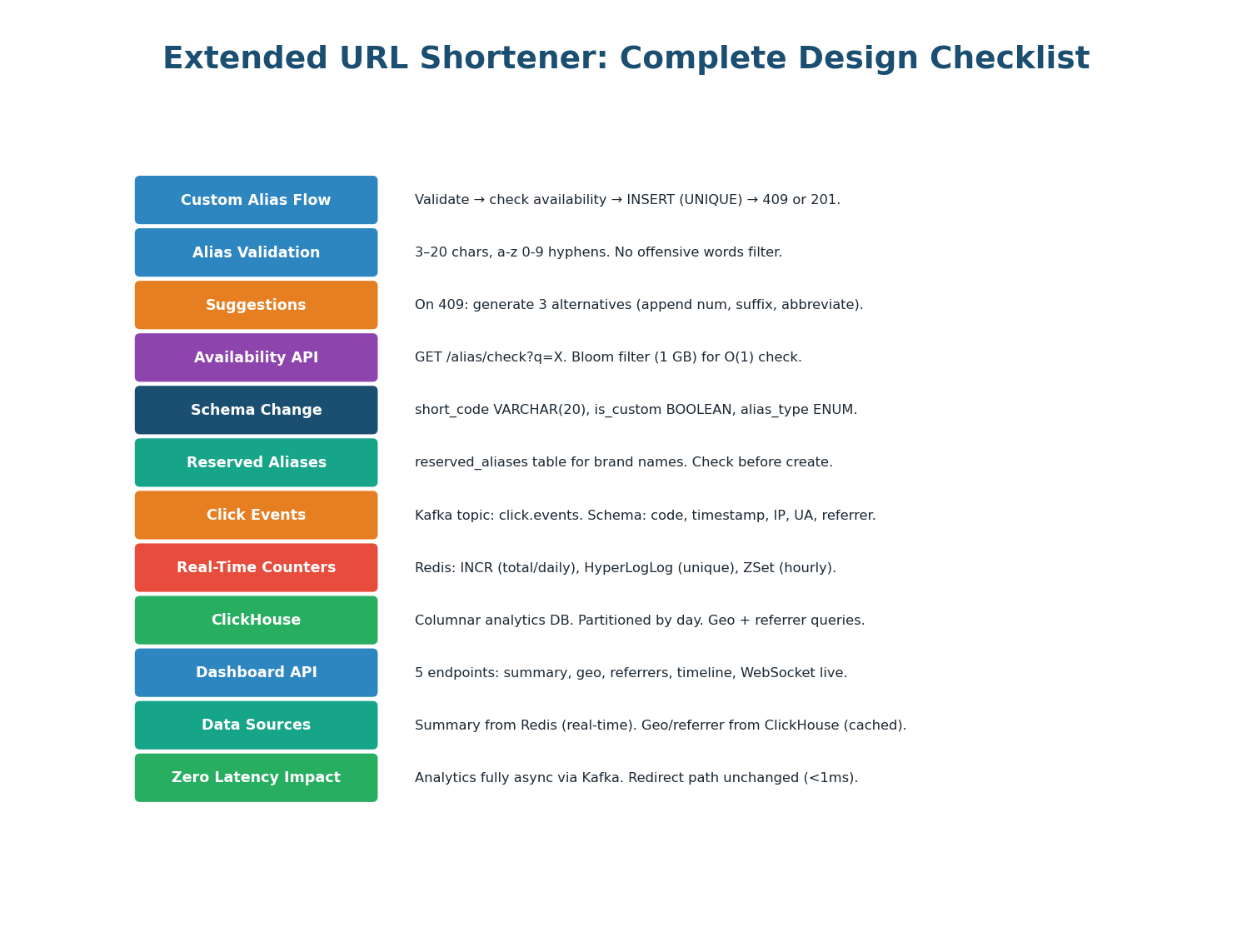
"To summarize the extensions: the Custom Alias System adds vanity URL support with a 4-step create flow — format validation, Bloom filter availability check, UNIQUE-constraint INSERT, and suggestion generation on conflict. The schema change is minimal: short_code widened to VARCHAR(20), two new columns, one new reserved_aliases table. The Real-Time Analytics feature adds a Kafka-based async pipeline with three consumers: Redis for real-time counters (INCR, HyperLogLog, Sorted Sets), Flink for streaming aggregation, and ClickHouse for historical storage with sub-50ms queries on billions of rows. Both extensions are purely additive — the redirect hot path is completely unchanged."
Want to Land at Google, Microsoft or Apple?
Watch Pranjal Jain's free 30-min training — the exact GROW Strategy that helped 1,572+ engineers go from TCS/Infosys to top product companies with a 3–5X salary hike.