

What's Inside
The 7-Phase Framework Walkthrough
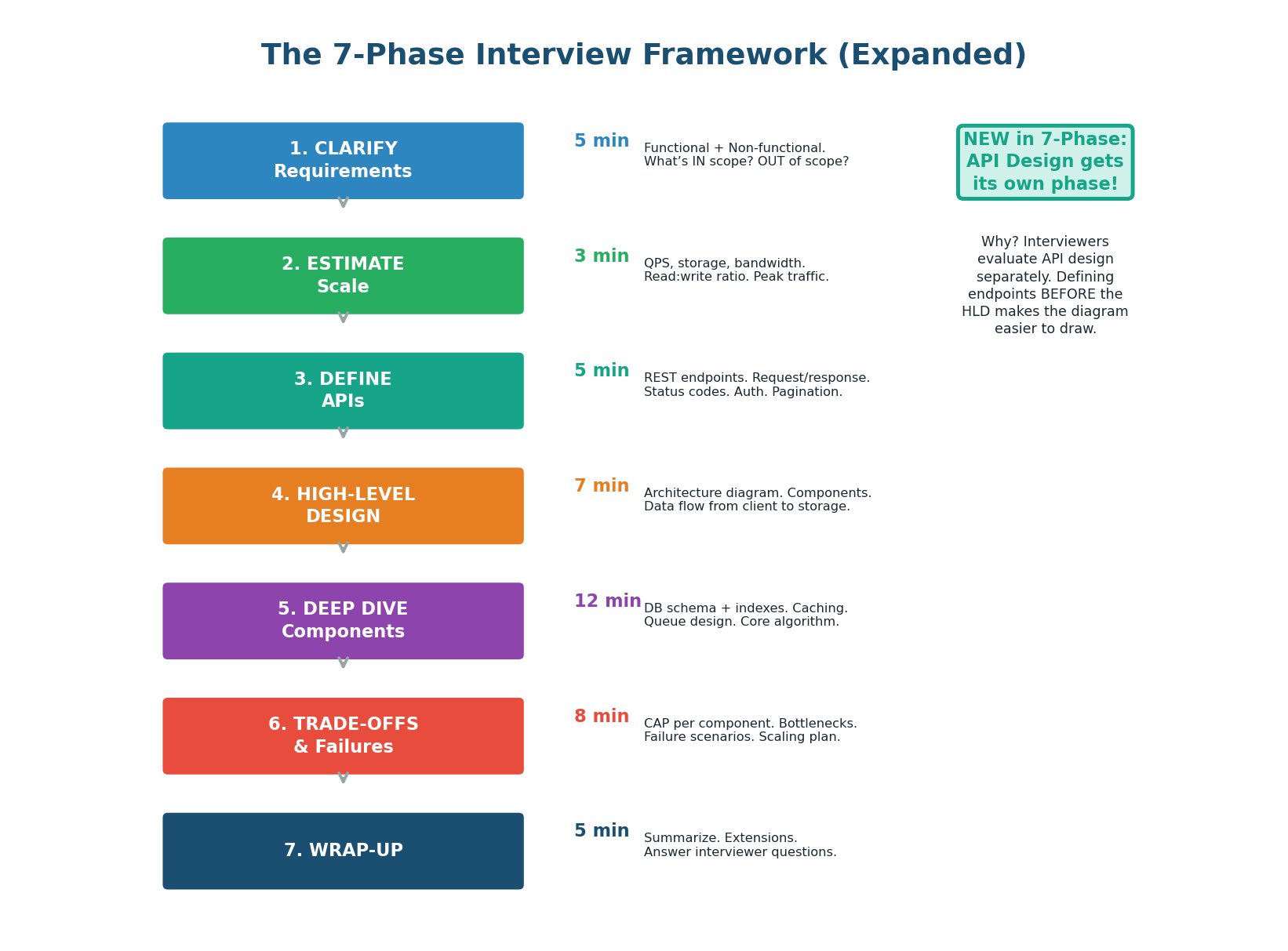
From 6 Phases to 7: API Design Gets Its Own Phase
The pre-class introduced a 6-phase framework. In practice, we split High-Level Design into two distinct phases: API Design and Architecture Diagram. Why? Because defining the API endpoints before drawing the architecture makes the diagram easier to create — you already know what each service does. It also demonstrates a structured, user-first thinking approach that interviewers reward. FAANG companies like Google and Meta evaluate API design as a separate scoring dimension.
Requirements Checklist
The requirements phase is where most candidates either shine or stumble. Shining means asking structured, prioritized questions that narrow the scope. Stumbling means asking random questions or, worse, not asking at all. Use the two-column checklist: Functional (WHAT the system does) and Non-Functional (HOW WELL it does it). Aim for 5 questions from each column.
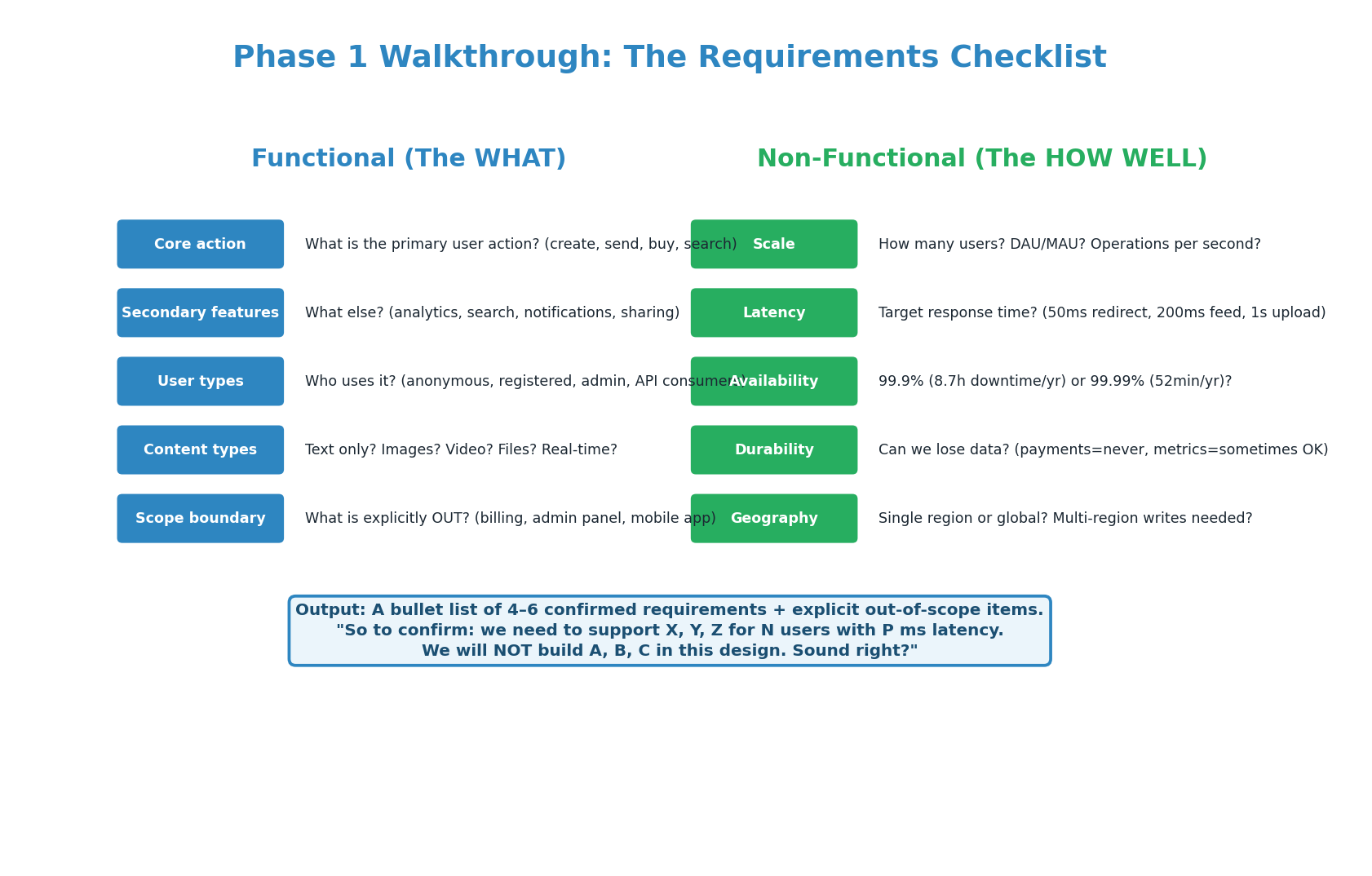
| Functional (WHAT) | Non-Functional (HOW WELL) |
|---|---|
| Core action: what does this system do? | Scale: DAU, QPS, data volume? |
| Secondary features: what else is needed? | Latency: p99 target for key operations? |
| Users: who uses it and how? | Availability: 99.9% or 99.99%? |
| Content: what data types are involved? | Durability: can we lose any data? |
| Scope: what is explicitly OUT of scope? | Geography: single region or global? |
"So to confirm: we need a URL shortener that supports creating short URLs, custom aliases, and basic click analytics for 100 million URLs per month with sub-50ms redirect latency and 99.9% availability. We will NOT build user accounts, paid tiers, or an admin dashboard in this design. Sound right?" The interviewer will correct you if needed, and you have a clear scope to design against.
Estimation Practice
Three Systems: Estimation Side by Side
The estimation phase takes 3 minutes and produces the numbers that drive every subsequent decision. You do not need exact answers — you need the right order of magnitude. Is it 100 QPS or 100,000 QPS? That difference determines whether one server suffices or you need sharding. Practice estimating for different system types until it becomes automatic.
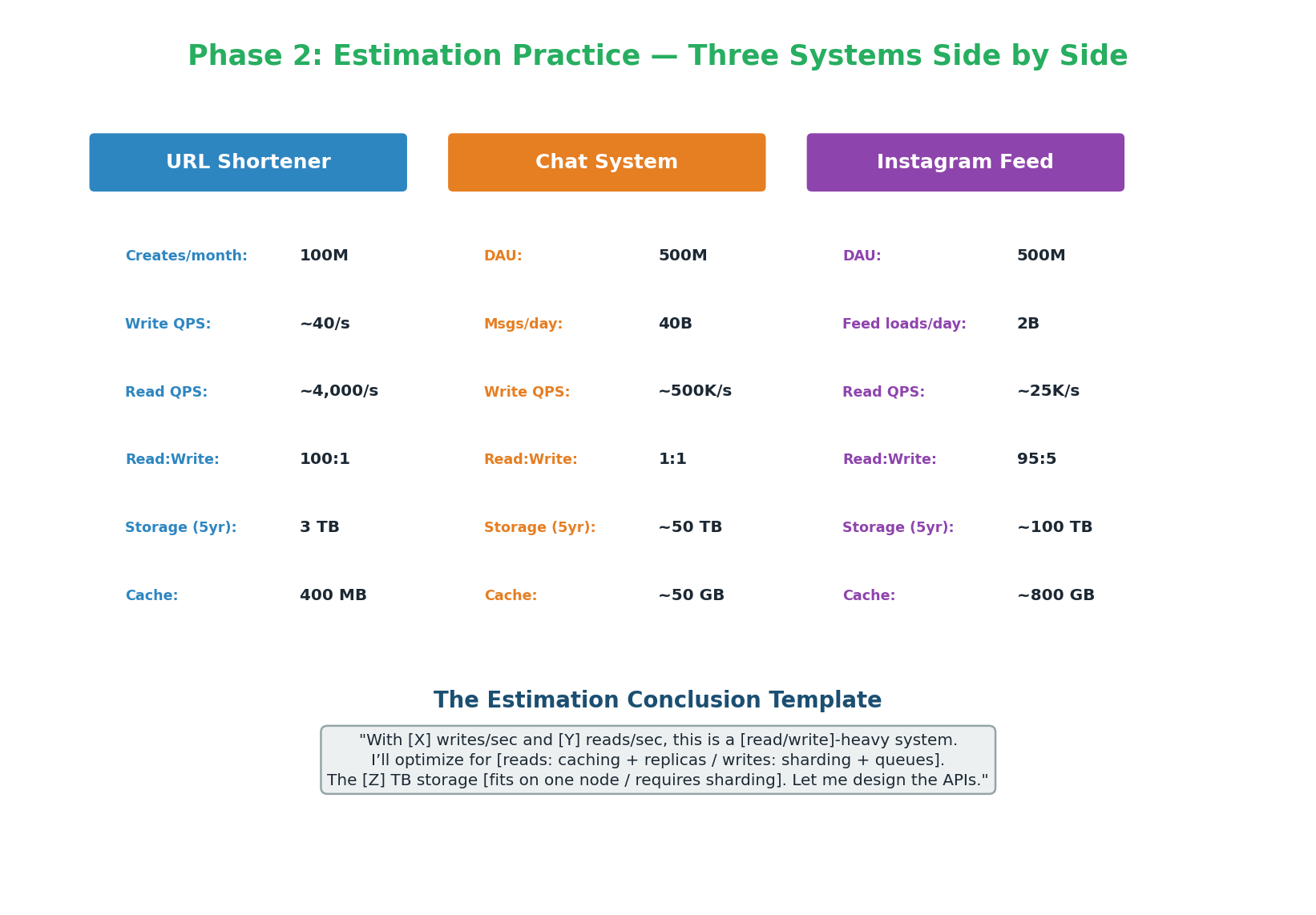
- Read-heavy (100:1 or 95:5) → Multi-layer caching (CDN + Redis), read replicas, cache-aside pattern
- Write-heavy (1:1 or worse) → LSM-tree database (Cassandra/DynamoDB), write sharding, async fan-out
- Massive storage (>10 TB) → Sharding strategy needed; discuss partition key choice
- High QPS (>100K) → No single-instance DB; distributed architecture required
API Design Templates & Practice
The 5-Element API Template
Every API endpoint in your design should specify five elements. Defining these takes 3–5 minutes and immediately gives the interviewer confidence that you think concretely, not abstractly.
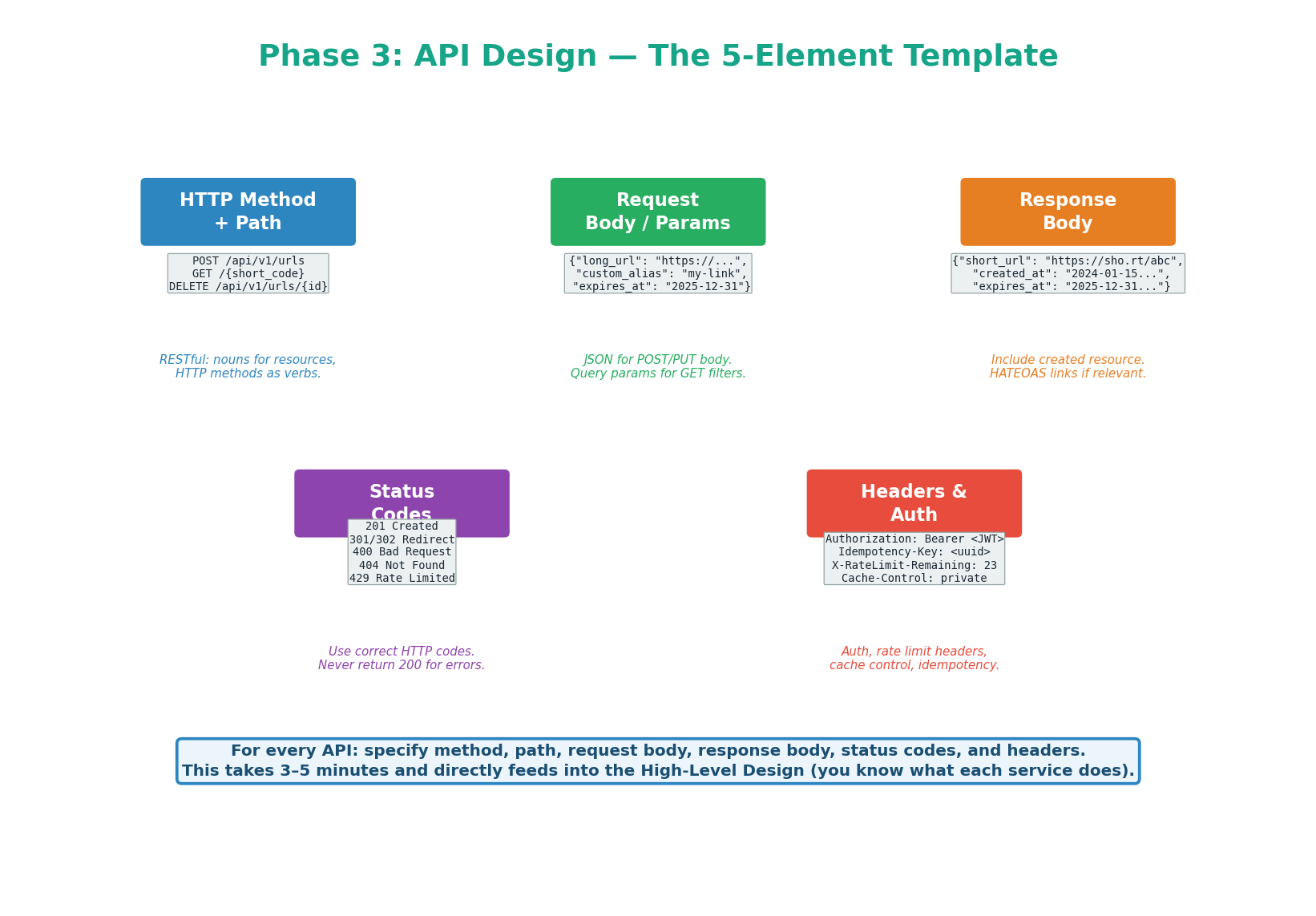
/api/v1/urls). Version prefix. Path params for identity (/{id}), query params for filtering (?user_id=42).Content-Type: application/json. Specify constraints (max length, format, enum values).{ data, cursor, error }.Authorization: Bearer <JWT> for auth · Idempotency-Key: <uuid> for safe POST retries · X-RateLimit-Remaining for rate limit feedback · Cache-Control for caching directives.Saying "I'll have a POST endpoint to create a URL" is abstract. Saying "POST /api/v1/urls with long_url (required), custom_alias (optional), returns 201 Created with { short_url, short_code, expires_at }, protected by Idempotency-Key header to prevent duplicate creates on retry" — that signals production experience. Always be concrete.
API Design Practice: Three Systems
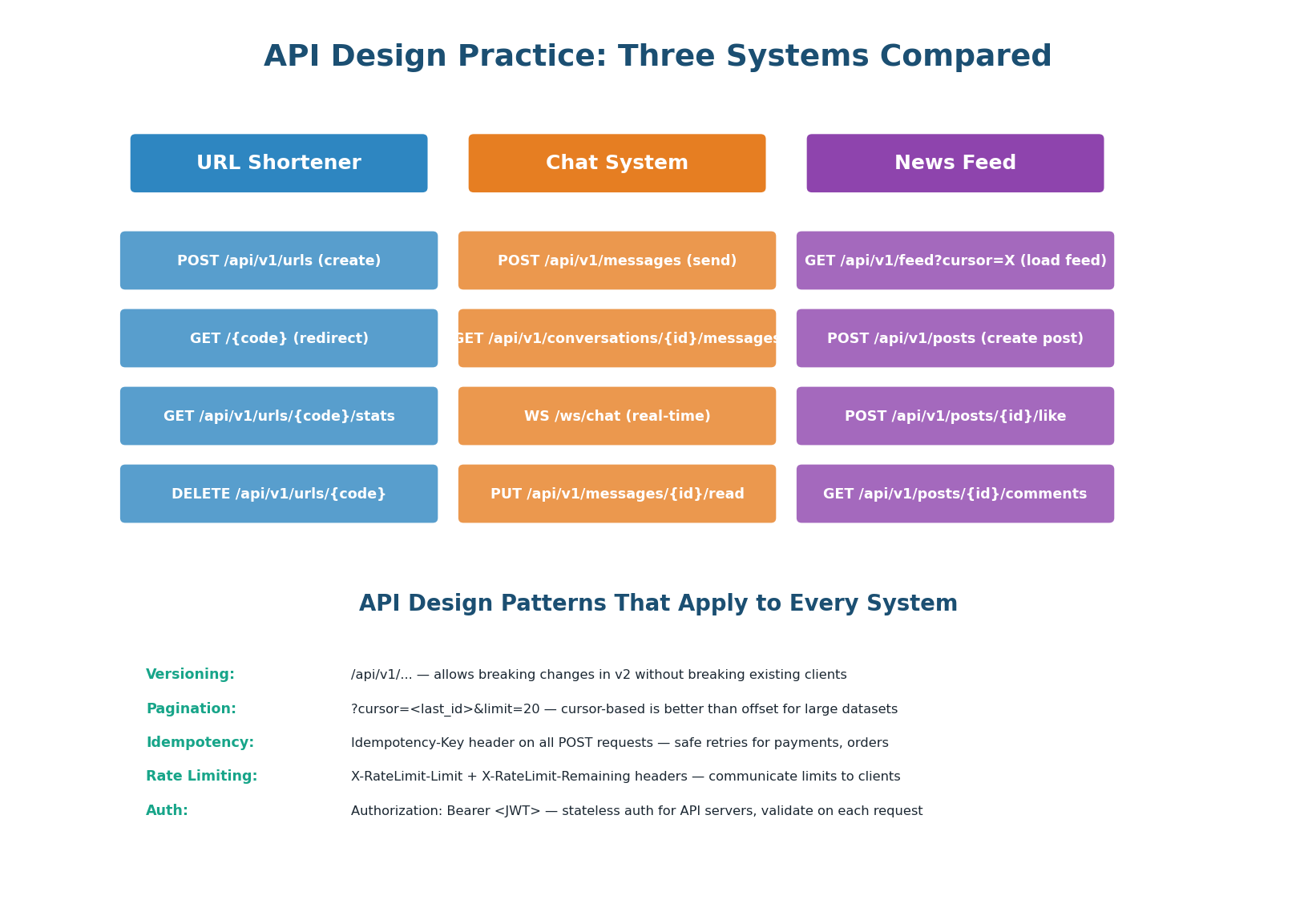
| System | Key API Insight | Non-Obvious Detail |
|---|---|---|
| URL Shortener | GET /{code} returns 301 or 302 depending on analytics need |
301 allows CDN to cache the redirect. 302 forces every hit through the server for analytics. |
| Chat System | Real-time messages use WebSocket, not REST | GET /messages?cursor=<timestamp> uses cursor pagination (not page number) — messages are infinite scroll, not page-based. |
| News Feed | GET /feed returns pre-computed timeline from Redis |
Cursor is the last-seen post_id (not timestamp) for stable pagination even when new posts arrive. |
High-Level Design Creation
Building the HLD: 7 Steps
Drawing the architecture diagram is where the interview becomes visual. You should be talking the entire time you draw, explaining each component's role and how data flows. The 7-step method ensures you build the diagram systematically instead of randomly placing boxes.
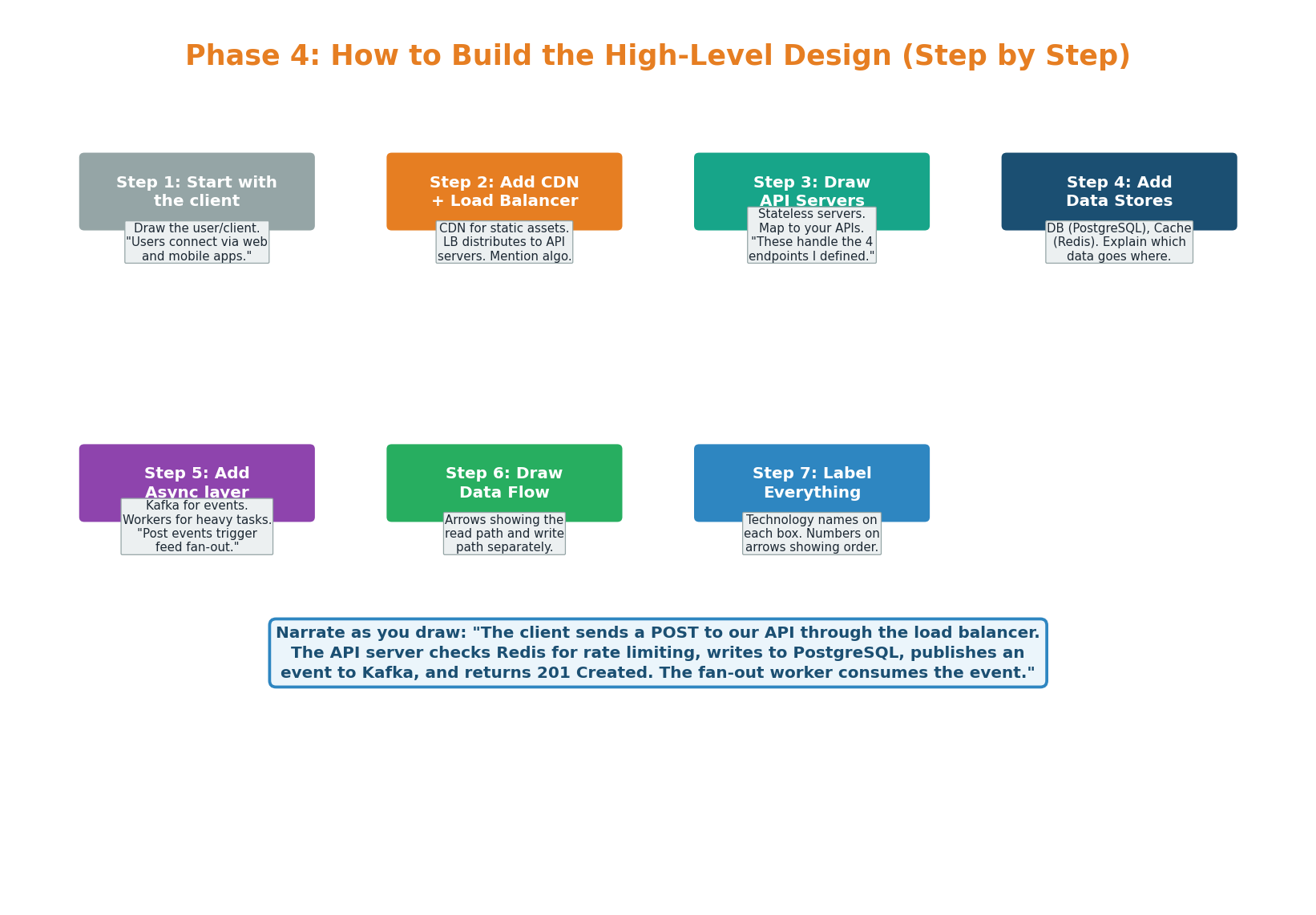
Start with the Client
Draw a Client box on the left. Say: "Users connect via web and mobile apps over HTTPS REST." This grounds the diagram in the user's experience.
Add CDN and Load Balancer
CDN for static assets (Cloudflare — 80% latency reduction). ALB with Least Connections distributes traffic to API servers.
Draw API Servers
2–3 boxes labeled with technology (Node.js/Go). "Stateless — any server handles any request. Session state in Redis, not server memory."
Add Data Stores
PostgreSQL (source of truth) + Redis (cache, LRU, 1h TTL). Mention cache-aside: check Redis first, query DB on miss, populate Redis.
Add Async Layer
Kafka + background workers. "Click events published to Kafka async so the redirect path is never slowed by analytics. Workers write to ClickHouse."
Draw Data Flow Arrows
Number the arrows: 1 = write path, 2 = read path (cache hit), 3 = read path (cache miss). The viewer should understand the full flow without your explanation.
Label Everything with Specific Technologies
Not "database" — "PostgreSQL 16, primary + 2 read replicas, sync replication." Not "cache" — "Redis 7, allkeys-lru, 330 MB, 1h TTL." Specificity = depth.
HLD Worked Example: URL Shortener
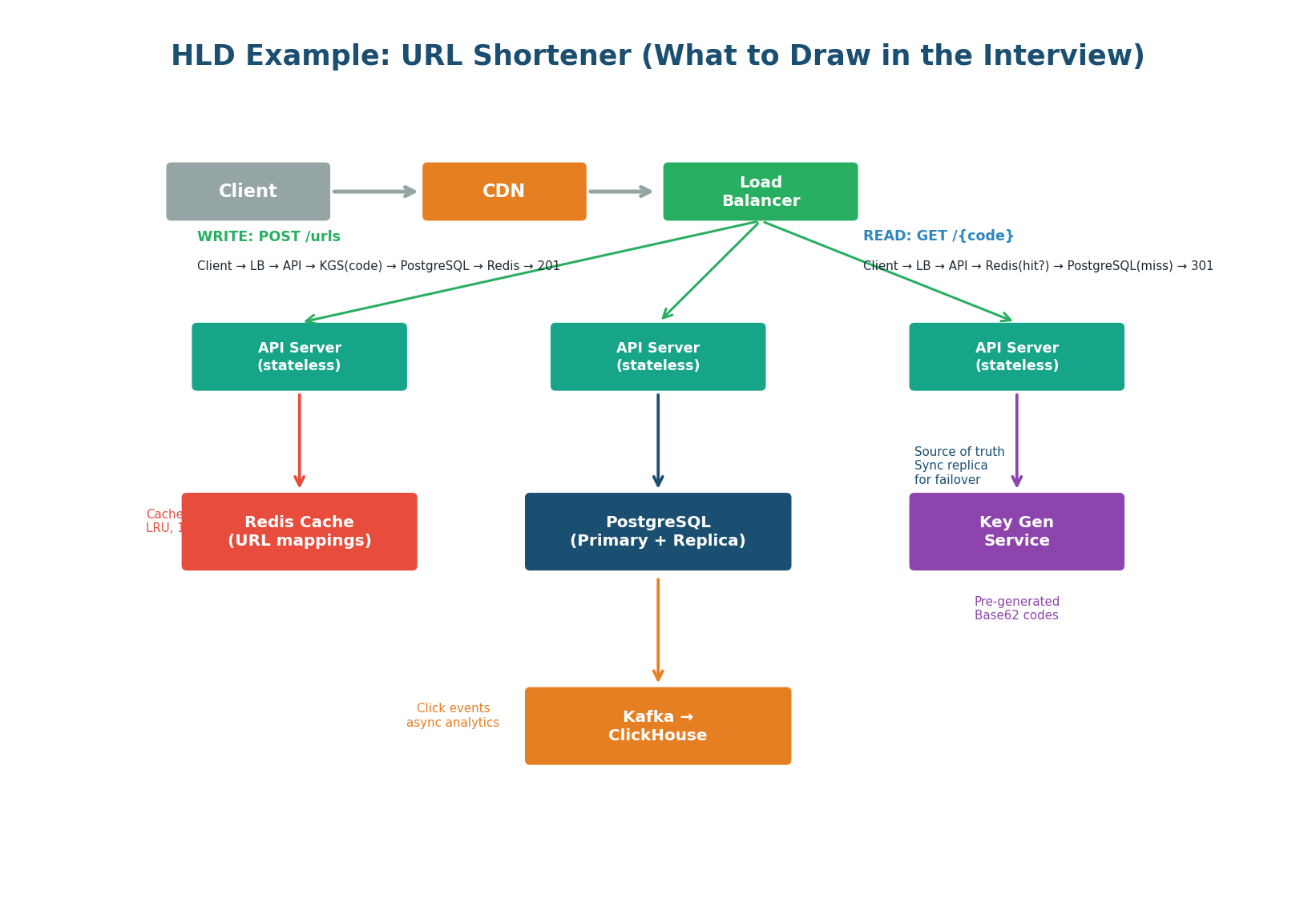
This diagram shows exactly what to draw in an interview. Every box has a specific technology label. The read path and write path are explicitly annotated. The Key Generation Service (KGS) is a unique component specific to this system — mentioning it shows you understand the core algorithm, not just the infrastructure pattern.
- KGS is present — shows you know code generation is non-trivial
- CDN handles 301 redirects — shows you understand caching at the protocol level
- Kafka for analytics — shows you know how to keep the hot path clean
- PostgreSQL + 2 read replicas — not just "a database", a specific topology
- Redis 330 MB, LRU, 1h TTL — concrete cache sizing from the estimation phase
HLD Worked Example: Chat System
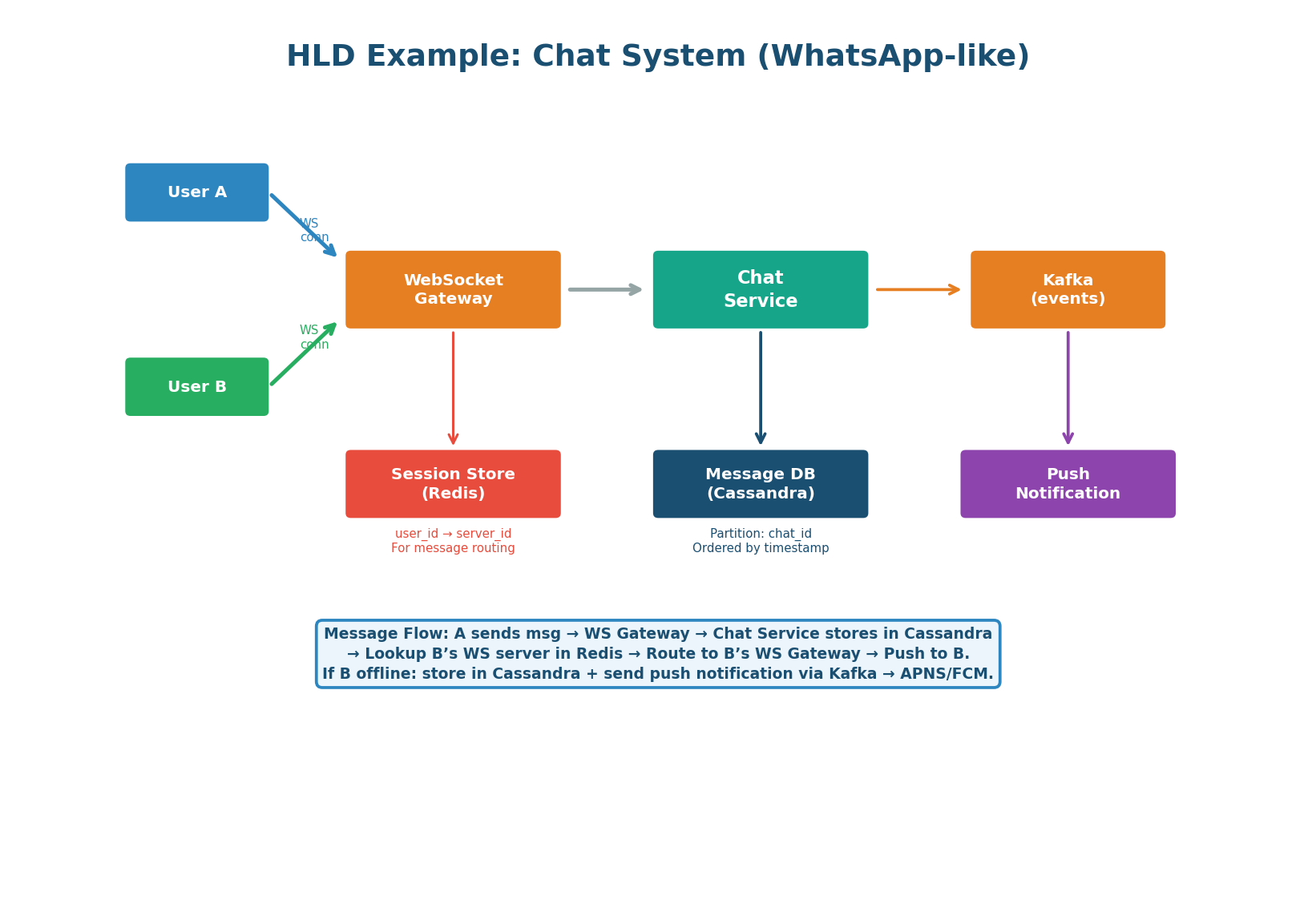
The chat system HLD is fundamentally different from the URL shortener because it requires real-time bidirectional communication (WebSocket instead of REST) and a message routing mechanism — how does a message from User A reach User B's specific WebSocket server?
With multiple WebSocket servers, User A and User B may be connected to different servers. When User A sends a message, how does it reach User B?
Solution — Session Store (Redis): Redis maps each user_id to the WebSocket server they are connected to (user:{id}:server = server-3). When User A sends a message, the receiving server looks up User B's server in Redis and routes the message via an internal pub/sub channel. This is the key insight that separates strong candidates from average ones on the chat system question.
| Component | URL Shortener | Chat System |
|---|---|---|
| Client protocol | HTTPS REST | WebSocket (persistent) |
| Primary DB | PostgreSQL (ACID, 3 TB) | Cassandra (LSM, 15 PB, write-heavy) |
| Cache use | URL mappings, LRU, 1h TTL | User-to-server mapping, session routing |
| Async layer | Kafka for click analytics | Internal pub/sub for cross-server routing |
| Unique component | Key Generation Service (KGS) | WebSocket gateway + session store routing |
| Partition key | hash(short_code) at scale | conversation_id (co-locates messages) |
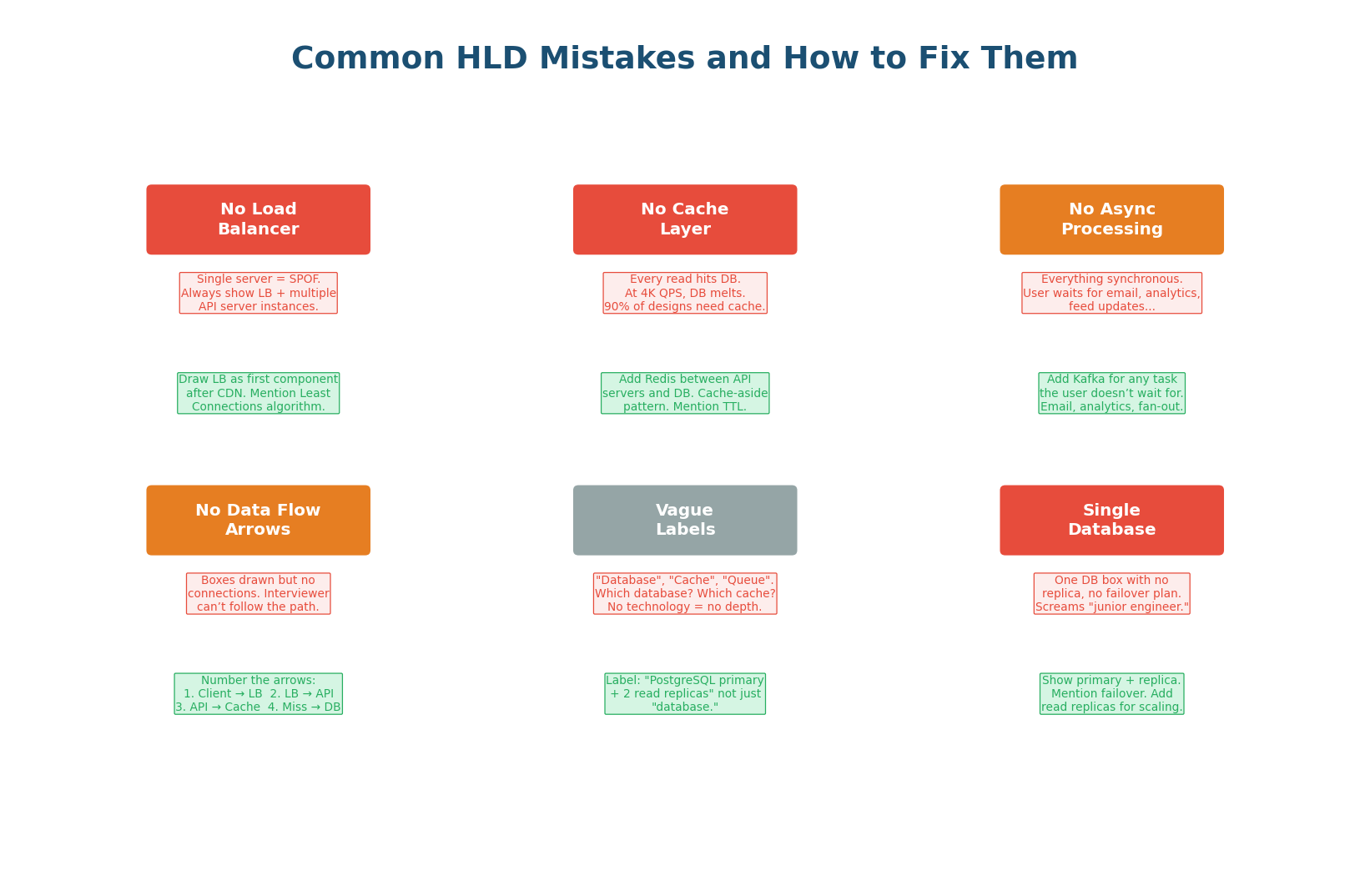
6 Common HLD Mistakes & Fixes
What to Say at Every Phase
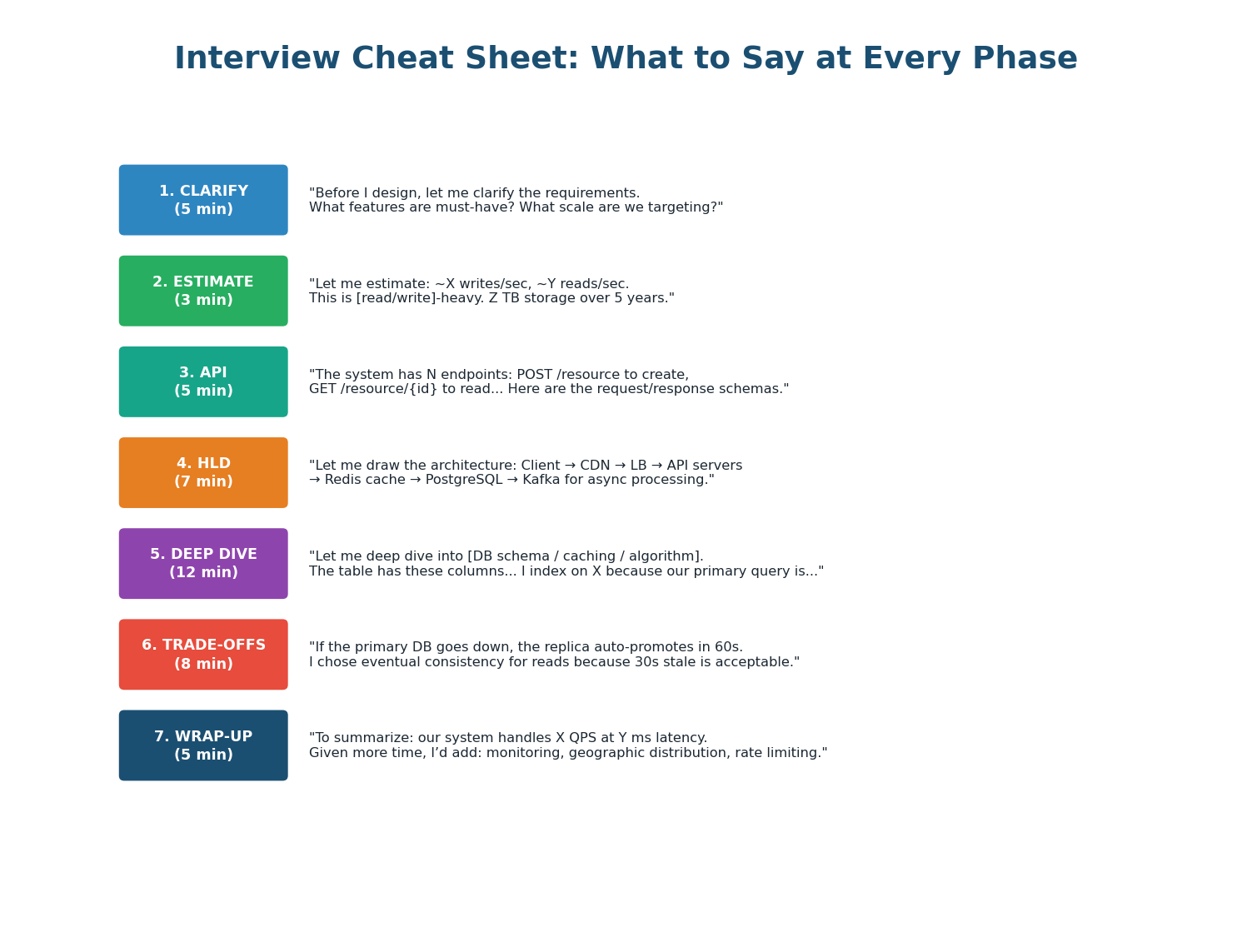
- 7-Phase Framework: API Design is now Phase 3. Time budget: Clarify 5m, Estimate 3m, API 5m, HLD 7m, Deep Dive 12m, Trade-offs 8m, Wrap-up 5m.
- Estimation: URL Shortener (read-heavy 100:1, 3 TB, cache-optimized), Chat (write-heavy 500K w/s, 15 PB, Cassandra + sharding), Instagram (read-heavy 95:5, 180 TB, fan-out + Redis). The conclusion matters more than the math.
- API Design: 5-element template — Method+Path, Request, Response, Status Codes, Headers. Define all endpoints before drawing HLD. Use idempotency keys, cursor pagination, and specific status codes.
- HLD: 7-step build: Client → CDN+LB → API Servers → Data Stores → Async Layer → Data Flow → Labels. Narrate while drawing. Show read and write paths separately.
- Common Mistakes: Missing LB, no cache, no async, no data flow, vague labels, single DB. Fix each proactively — the interviewer checks for all six.
Want to Land at Google, Microsoft or Apple?
Watch Pranjal Jain's free 30-min training — the exact GROW Strategy that helped 1,572+ engineers go from TCS/Infosys to top product companies with a 3–5X salary hike.