

What's Inside

Design WhatsApp
Real-Time Messaging • WebSocket • Cassandra • Kafka Fan-Out • Presence • Read Receipts
Requirements & Scale
The #2 Interview Question
WhatsApp is the second most commonly asked system design question after URL Shortener. It tests fundamentally different skills: real-time bidirectional communication (WebSocket vs REST), massive write throughput (1.2M writes/sec vs 40/sec), offline message handling, group messaging fan-out, presence tracking, and read receipts.
If the URL shortener tests your caching and read-optimization skills, WhatsApp tests your real-time messaging and write-scaling skills.
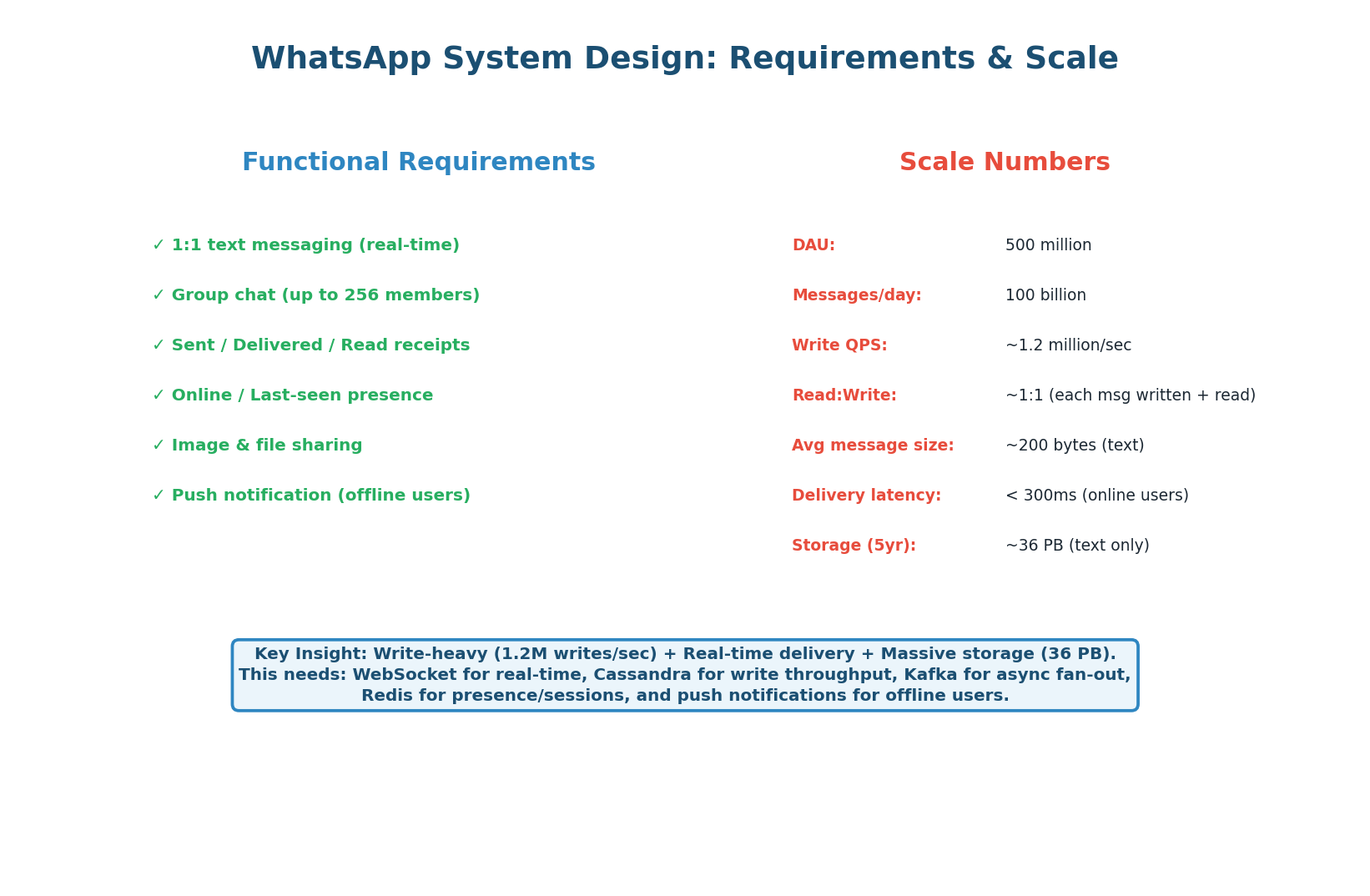
| Dimension | URL Shortener | |
|---|---|---|
| Read/Write ratio | 100:1 (read-heavy) | ~1:1 (write-heavy) |
| Protocol | REST (stateless) | WebSocket (stateful, persistent) |
| Write throughput | ~40 writes/sec | 1.2M writes/sec |
| Storage | 3 TB (5 years) | 36 PB |
| Key challenge | Cache optimization | Real-time routing + write scale |
| Database | PostgreSQL (relational) | Cassandra (wide-column, LSM-tree) |
These two systems are architecturally opposite. URL shortener = stateless REST + read cache. WhatsApp = stateful WebSocket + write throughput. When an interviewer asks you to design a messaging system, the first thing to establish is: "This is a write-heavy, real-time system — so our architecture will be fundamentally different from a URL shortener." Saying this immediately demonstrates architectural maturity.
High-Level Design
Six Components, One Key Insight
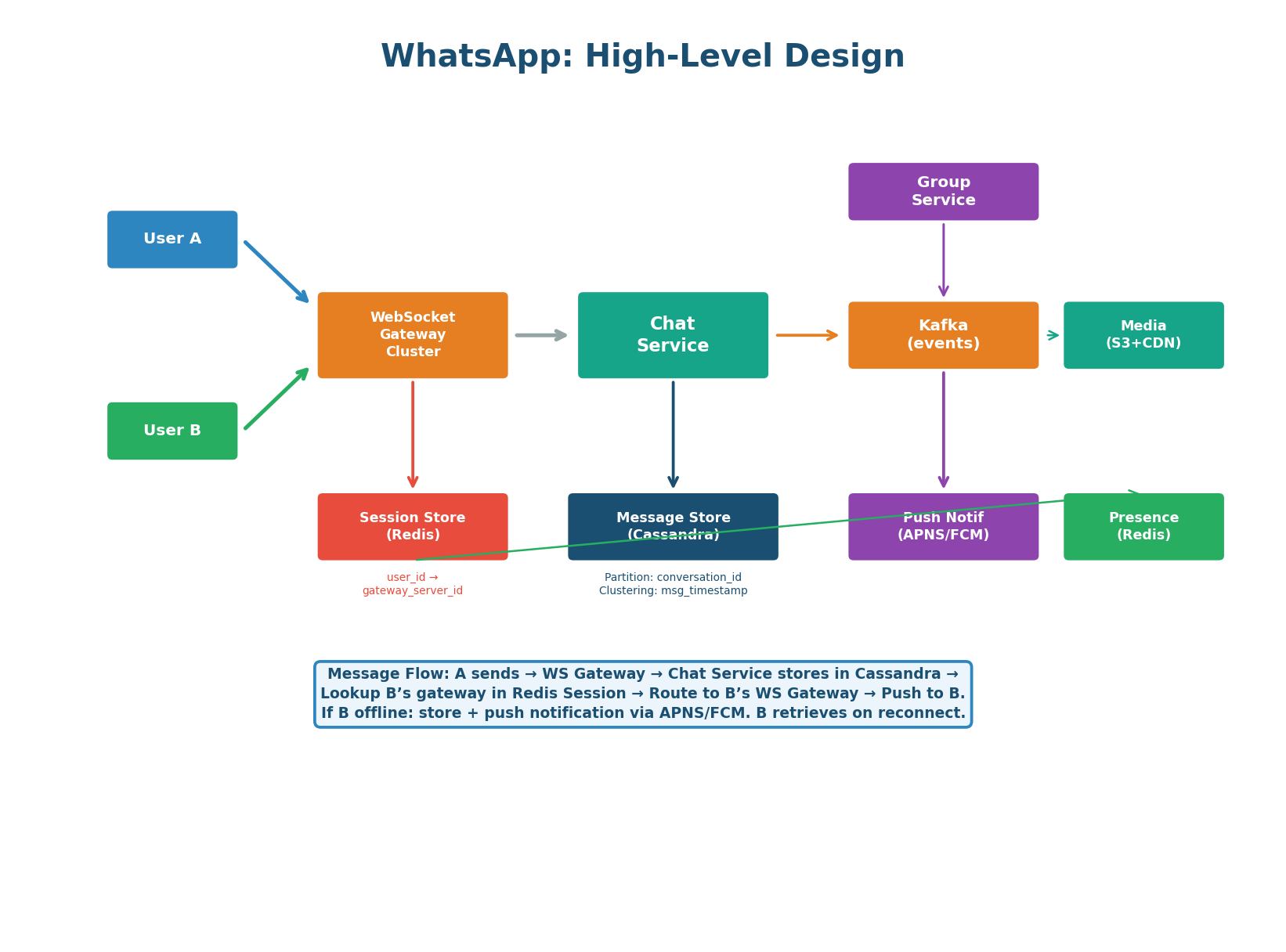
| Component | Responsibility | Key Detail |
|---|---|---|
| WebSocket Gateway Cluster | Maintains persistent WebSocket connections with clients. Handles connect, heartbeat, disconnect, and message routing. | 200M concurrent connections ÷ 50K per server = ~4,000 gateway servers |
| Chat Service | Business logic: validate message, store in Cassandra, look up recipient’s gateway, route the message. | Stateless — any instance handles any message. Horizontally scalable. |
| Session Store (Redis) | Maps user_id → gateway_server_id. Updated on every connect/disconnect. |
The key insight — this is how the Chat Service routes a message to the correct gateway. Sub-millisecond lookups. |
| Message Store (Cassandra) | All messages persisted, partitioned by conversation_id, clustered by timestamp. Write-once, read-once. |
LSM-tree architecture handles 1.2M writes/sec across the cluster. 36 PB total storage. |
| Kafka | Group message fan-out, push notification delivery, analytics events. Decouples message receipt from delivery. | One group message → one Kafka event → fan-out worker delivers to up to 256 members. |
| Presence Service (Redis) | Tracks online/offline status. Each client sends a heartbeat every 25 seconds. | Key: presence:{user_id} with 30-second TTL. Key expiry = user offline. |
In a WebSocket-based architecture, persistent connections make routing non-trivial. When User A sends a message to User B, the Chat Service cannot broadcast to all 4,000 gateway servers — that would be 4,000 unnecessary deliveries. Instead, it does a single Redis lookup: GET session:{user_b_id} returns the specific gateway server ID. One targeted delivery. This Redis session store is what makes the architecture work at scale, and it’s what interviewers are listening for.
Message Delivery: Online, Offline & Group
Three Delivery Paths for Three Scenarios
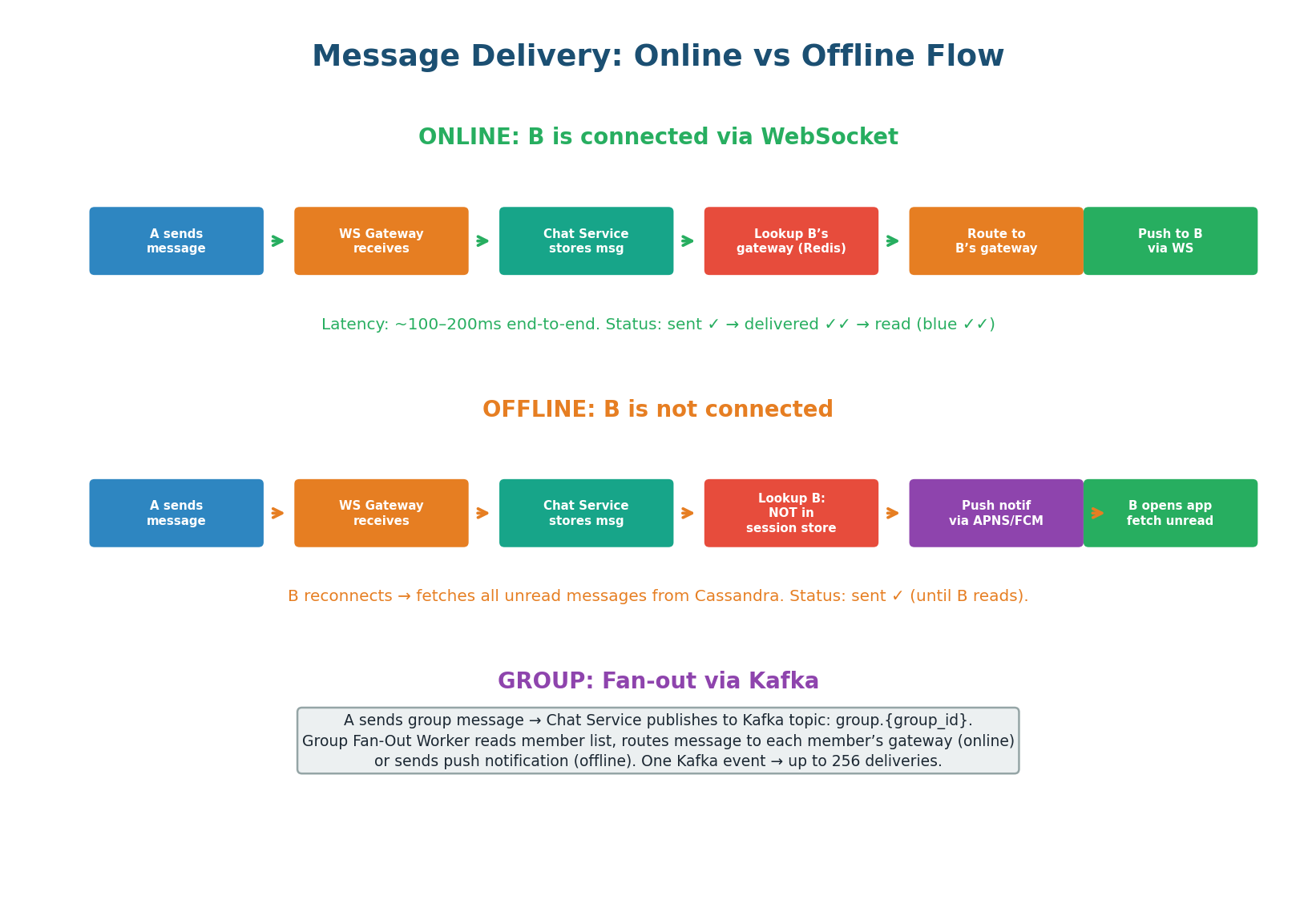
- User A sends a message via their WebSocket connection to the gateway.
- Gateway forwards to Chat Service.
- Chat Service stores in Cassandra (write-ahead for durability).
- Chat Service looks up User B’s gateway server in Redis (
GET session:{user_b_id}). - Routes the message to B’s specific gateway server.
- Gateway pushes message to B’s device via existing WebSocket connection.
- B’s device ACKs receipt → triggers “delivered” status update back to A.
If User B is not in the session store (not connected), the Chat Service stores the message in Cassandra and sends a push notification via APNS (iOS) or FCM (Android). When B opens the app and reconnects, the client fetches all unread messages: SELECT * FROM messages WHERE conversation_id = ? AND message_id > last_seen_id. This gives B all missed messages in order, regardless of how long they were offline.
For a group message (up to 256 members), the Chat Service publishes the message to Kafka (topic: group.{group_id}). A Group Fan-Out Worker consumes the event, reads the group’s member list, and delivers to each member:
- Online members: message routed to their WebSocket gateway via the session store.
- Offline members: push notification via APNS/FCM.
One Kafka event triggers up to 256 deliveries. Without Kafka, the Chat Service would need to make 256 synchronous calls, blocking for each one.
Message Schema & Read Receipts
Cassandra Schema & Receipt State Machine
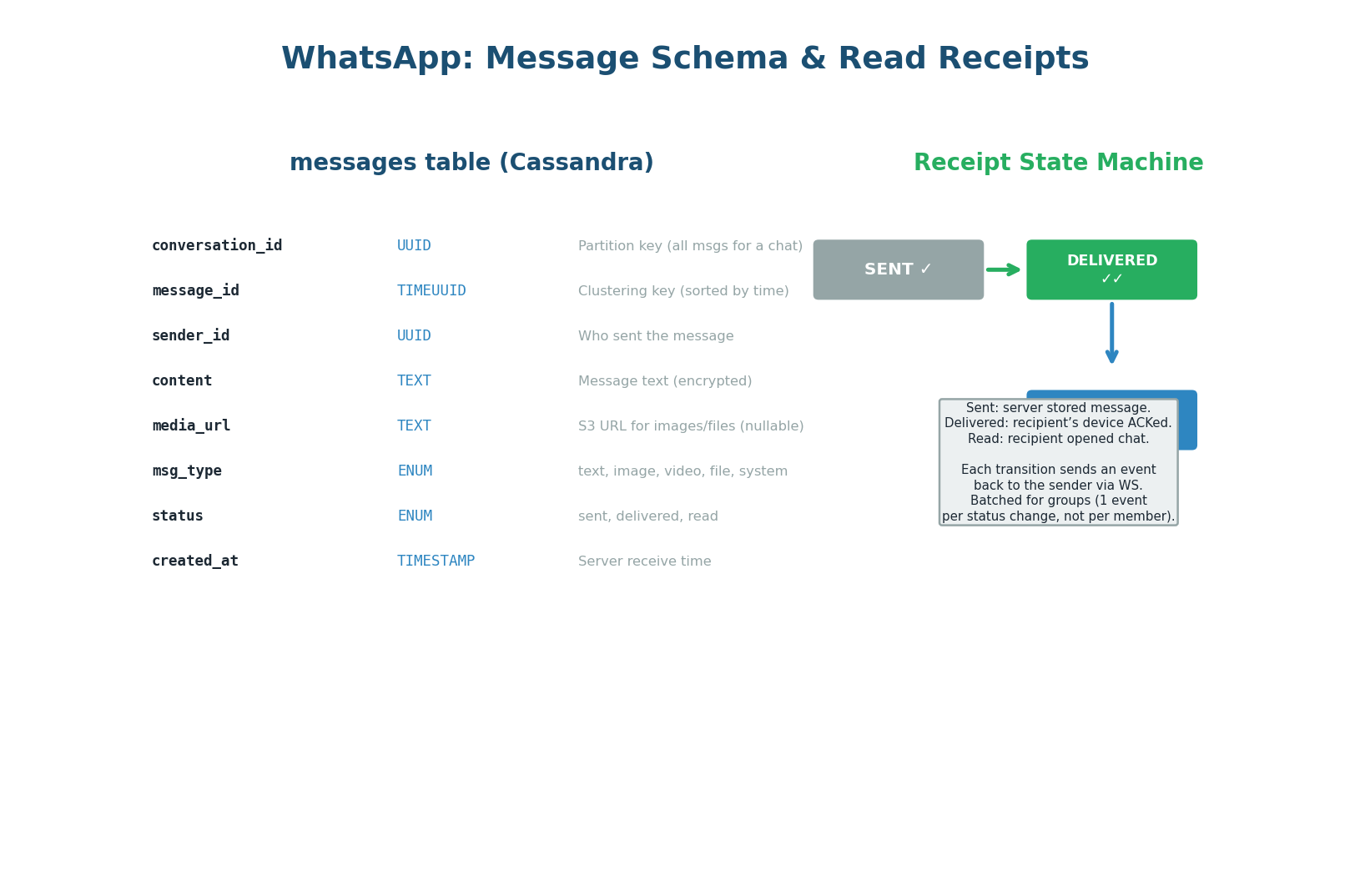
conversation_id) and read receipt state machine: sent ✓ → delivered ✓✓ → read (blue)CREATE TABLE messages ( conversation_id UUID, message_id TIMEUUID, -- time-ordered, globally unique sender_id UUID NOT NULL, content TEXT, content_type VARCHAR, -- text | image | video | audio status VARCHAR, -- sent | delivered | read created_at TIMESTAMP NOT NULL, is_deleted BOOLEAN DEFAULT FALSE, PRIMARY KEY (conversation_id, message_id) ) WITH CLUSTERING ORDER BY (message_id DESC) -- newest first AND default_time_to_live = 7776000; -- 90-day auto-expiry
Why Cassandra over PostgreSQL? At 1.2M writes/sec, PostgreSQL’s B-tree index maintenance under heavy write load becomes a bottleneck. Cassandra’s LSM-tree writes are always sequential (append to MemTable, flush to SSTable) — no random I/O, no index contention. Partition key conversation_id ensures all messages for a conversation land on the same node, making chat history reads a single-partition scan.
| Receipt State | Trigger | Symbol | Implementation |
|---|---|---|---|
| Sent | Server stored the message in Cassandra | ✓ (single grey tick) | Chat Service updates status, sends event back to sender’s WebSocket |
| Delivered | Recipient’s device ACKed receipt via WebSocket | ✓✓ (double grey tick) | Gateway receives ACK, Chat Service updates Cassandra, notifies sender |
| Read | Recipient opened the chat | ✓✓ (blue) | Client sends read event, Chat Service updates Cassandra, notifies sender |
For groups, generating one receipt event per member per message would create a message storm — a 256-member group with 100 messages/minute would produce 25,600 receipt events/minute just for one user’s messages. Instead, receipts are batched: one “delivered to 180/256” event per message, updated as each member ACKs. The sender sees an aggregate counter, not 256 individual events.
Common Interview Follow-Ups
Five Questions with Production-Grade Answers
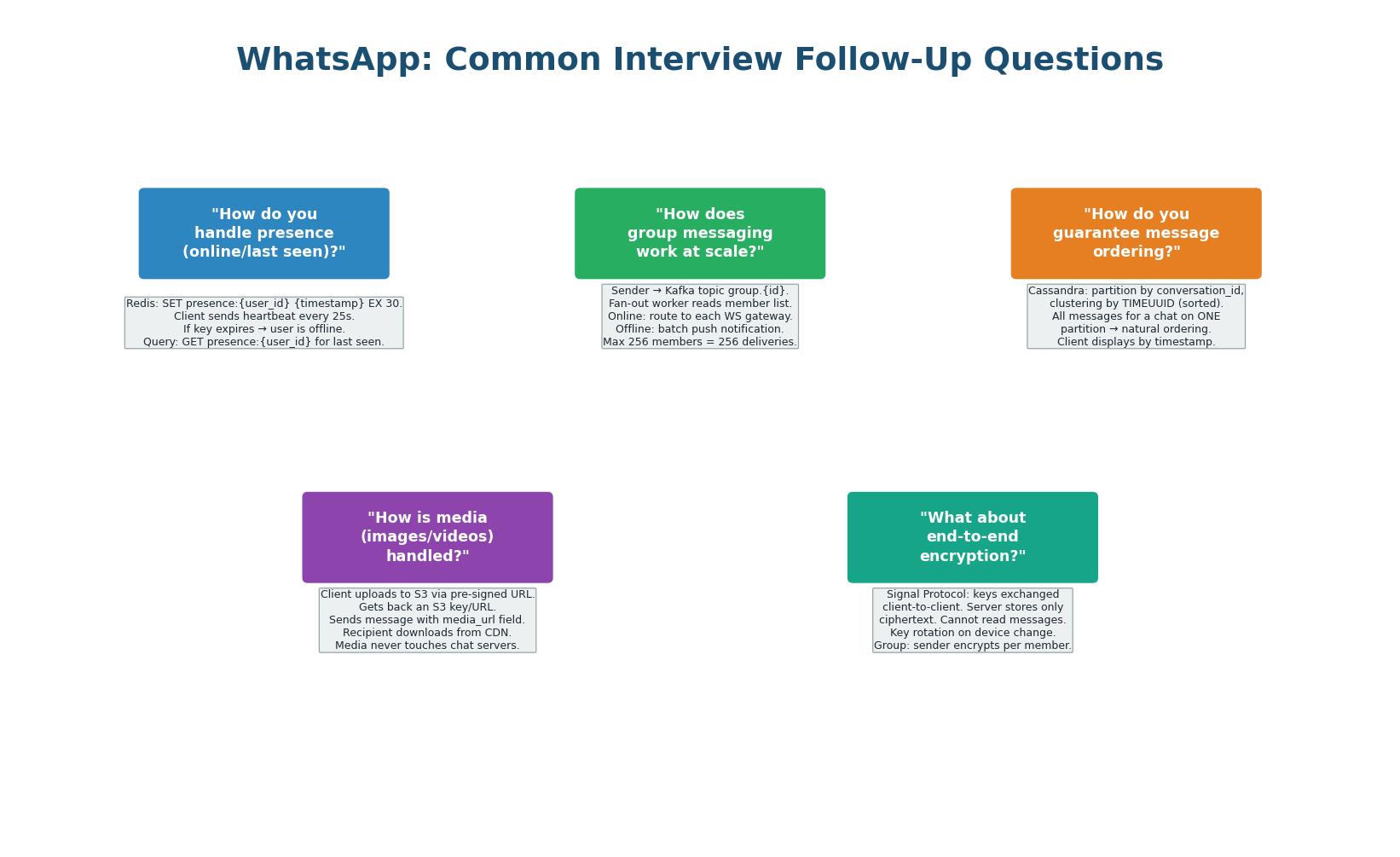
| Follow-Up Question | Production-Grade Answer |
|---|---|
| How does presence work at scale? | Redis key presence:{user_id} with 30-second TTL. Heartbeat every 25 seconds resets TTL. Key expiry = offline. Only show presence to contacts — not all 500M users. Filter in the application layer. ~10 contacts × 500M users = 5B presence queries/day, mostly served from Redis at sub-millisecond latency. |
| How do groups scale beyond 256 members? | WhatsApp caps groups at 256 members specifically because fan-out cost is O(n). For larger groups (Channels, Broadcast Lists), switch to a pub/sub model: members subscribe to a topic, the server publishes once. Recipients pull on open. Do not push to all subscribers synchronously. |
| How do you guarantee message ordering? | Cassandra TIMEUUID as the clustering key: time-ordered and globally unique. For conversations, ordering is per-conversation (not global). Clients use the TIMEUUID to sort — they never trust their local clock. For the same millisecond, TIMEUUID has a UUID suffix that breaks ties. |
| How is media delivered? | Media is never sent through the Chat Service. Sender uploads to an S3-equivalent object store, gets a CDN URL. The message payload contains only the CDN URL + metadata (thumbnail, file size). Recipient downloads from CDN directly. This keeps the Chat Service lean — it only handles metadata, never binaries. |
| How does end-to-end encryption work? | Signal Protocol: each device has a public/private key pair. The server stores only public keys. Messages are encrypted client-side using the recipient’s public key. The server never has the plaintext — it stores and forwards encrypted blobs. The server cannot read your messages even if subpoenaed. |
Kafka Internal Architecture
Why Kafka Handles 1M+ Messages/Sec
Apache Kafka is the industry-standard event streaming platform, used by LinkedIn (1 trillion messages/day), Netflix, Uber, and virtually every large-scale system. It appears in nearly every system design answer: for event-driven architecture, async processing, analytics pipelines, and message delivery. Understanding why it’s fast gives you the authority to recommend it confidently in interviews.
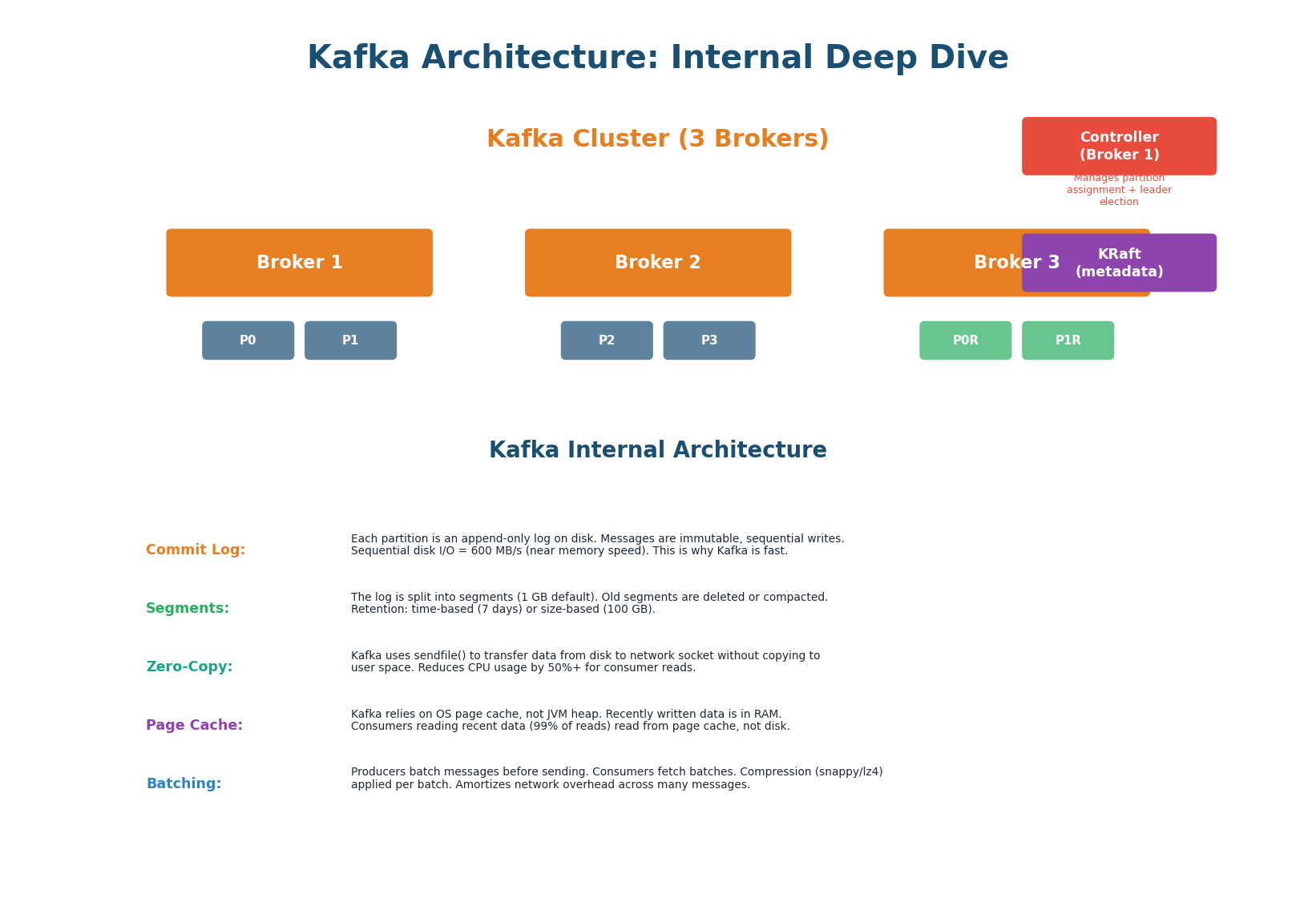
| # | Mechanism | How It Works | Speedup |
|---|---|---|---|
| 1 | Append-Only Commit Log | Each partition is an append-only log. Messages are never modified — only appended. All writes are sequential. Sequential disk I/O achieves 600+ MB/s on modern SSDs. | 6× faster vs random I/O (~100 MB/s) |
| 2 | Log Segments | Log divided into segments (default 1 GB). Active segment receives writes; older segments are immutable. Time-based (7 days default) or size-based retention limits disk usage. | Bounded disk use + replay capability |
| 3 | Zero-Copy | sendfile() transfers data from disk page cache directly to network socket, bypassing user-space copy. Traditional: disk → kernel → user → socket. Zero-copy: disk → kernel → network. |
50%+ CPU reduction for consumer reads |
| 4 | Page Cache | Kafka uses OS page cache instead of JVM heap. Writes go to page cache first (RAM). Consumer reads of recent data (99% of reads) served at memory speed, not disk speed. | Memory-speed reads for active data |
| 5 | Batching + Compression | Producers batch multiple messages before sending. Compression (Snappy, LZ4, Zstd) applied per batch, reducing network transfer by 60–80%. Per-message overhead becomes per-batch overhead. | 60–80% network reduction |
Kafka is fast because of sequential I/O. A traditional message queue does random I/O (update message status, delete after consumption). Kafka only appends. The OS is highly optimized for sequential writes — it can pre-fetch ahead, write in large pages, and use the full bandwidth of the storage device. This is why Kafka can sustain 1M+ messages/sec on commodity hardware. Everything else (zero-copy, page cache, batching) amplifies this core advantage.
Partitions & Consumer Groups
The Foundation of Kafka’s Scalability
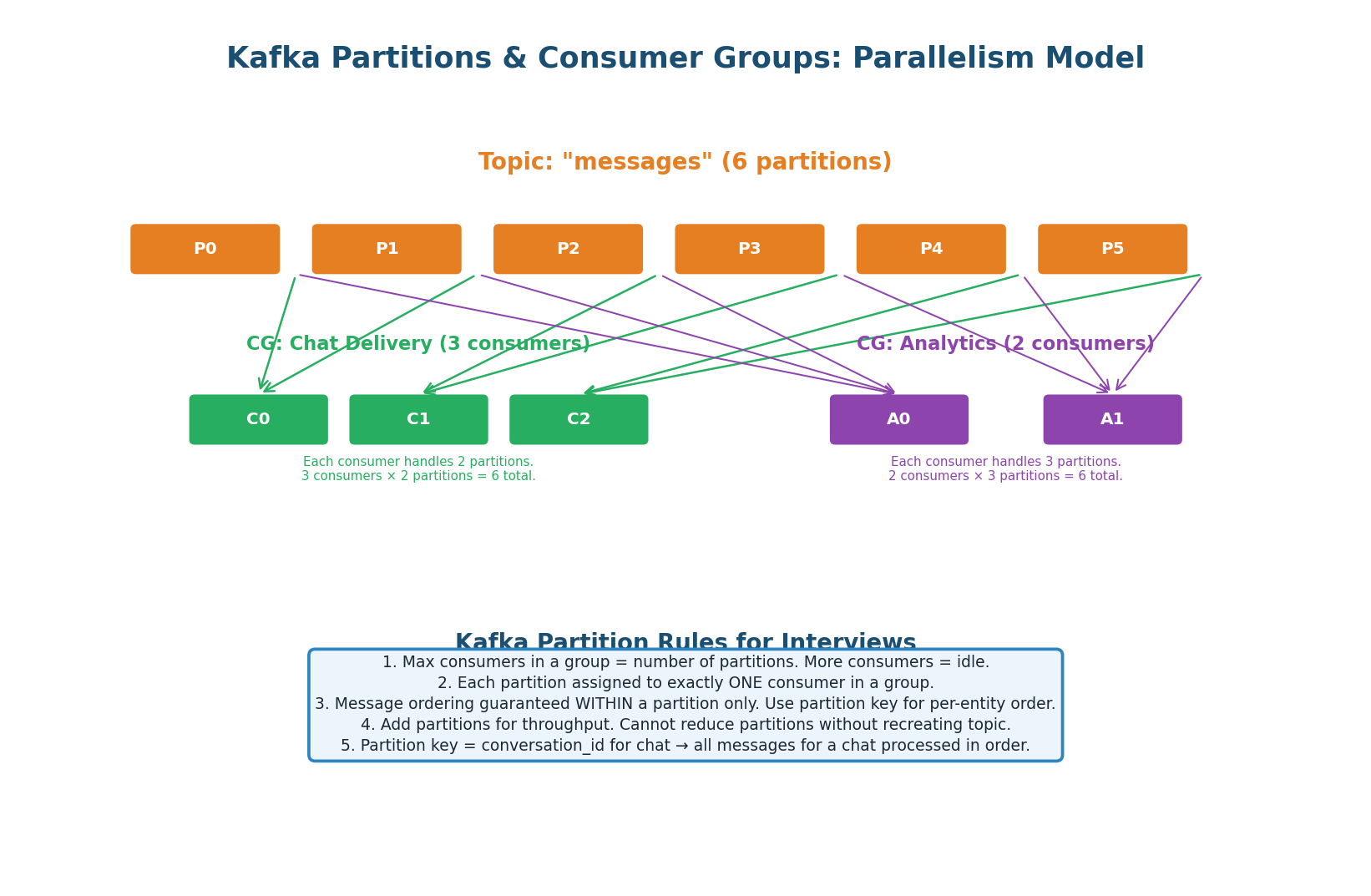
Kafka’s partition model is the foundation of its scalability and its most commonly tested concept in interviews. A topic is divided into N partitions. Each partition is an ordered log. Messages with the same partition key always go to the same partition (hash(key) % N). Within a consumer group, each partition is assigned to exactly one consumer.
- Max parallelism = number of partitions. If you have 6 partitions and 10 consumers in a group, 4 consumers sit idle.
- Ordering is per-partition only. No global ordering across partitions. If you need all messages from one user in order, use the user ID as the partition key.
- Multiple consumer groups are independent. The same topic can be consumed by a Chat Delivery group AND an Analytics group simultaneously, each at their own offset.
- Cannot reduce partitions without recreating the topic. Start with 12–64 partitions. Over-provision — it’s cheap.
- Partition key determines ordering. For WhatsApp: partition by
conversation_idso all messages in a conversation go to the same partition, preserving ordering.
| Scenario | Partition Key Choice | Why |
|---|---|---|
| Chat messages | conversation_id | All messages in a conversation stay ordered on one partition |
| URL click events | short_code | All clicks for one URL are processed by the same consumer — no cross-partition aggregation needed |
| User activity events | user_id | Ensures per-user event ordering for session reconstruction |
| Log aggregation | null (round-robin) | No ordering needed; maximize throughput across all partitions |
Replication & Durability
acks=all — Never Lose a Message
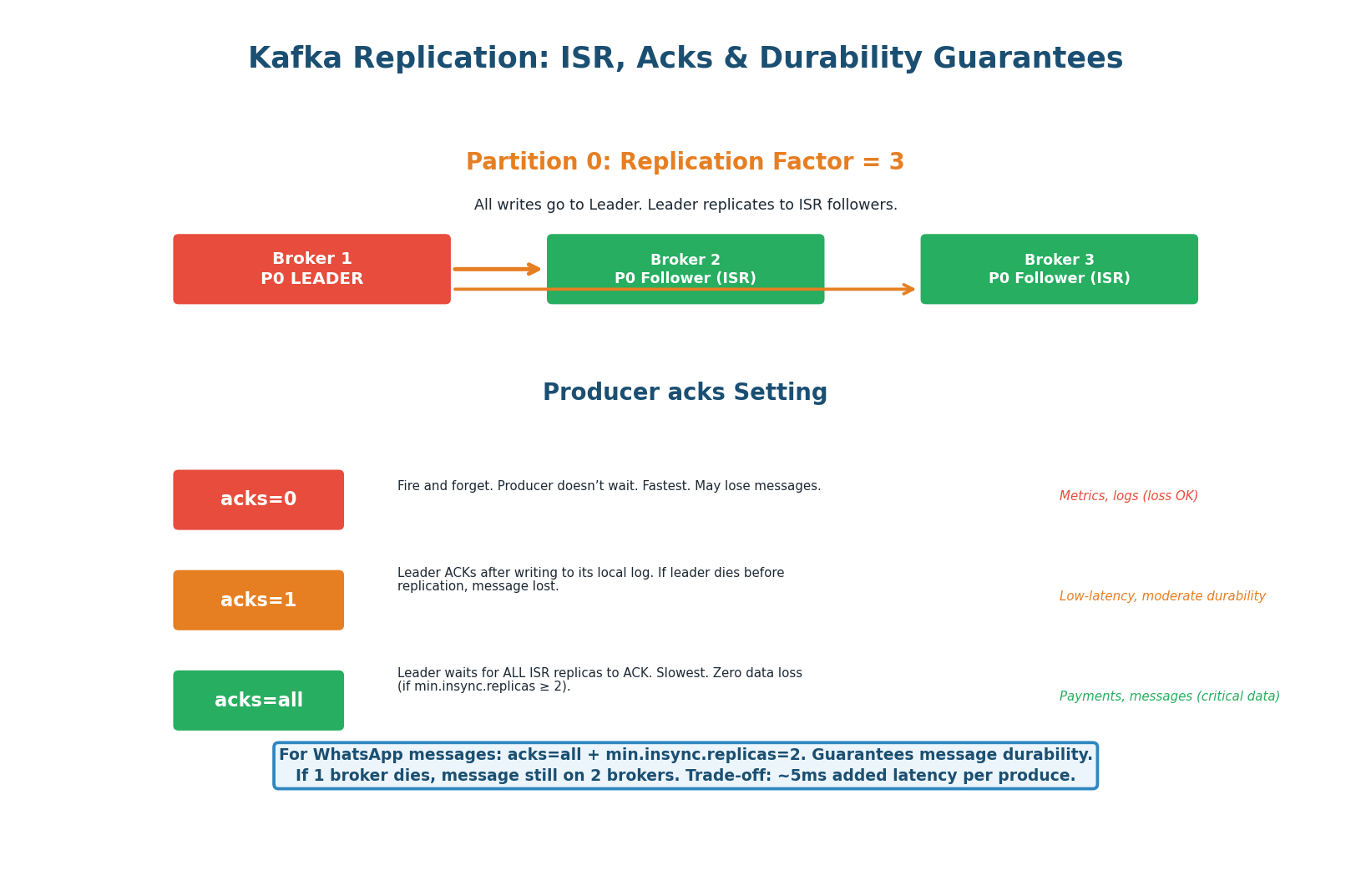
acks levels explained.Kafka replicates each partition across multiple brokers (replication factor, typically 3). One replica is the Leader (handles all reads and writes) and the others are Followers in the In-Sync Replica set (ISR). The producer’s acks setting controls the durability guarantee.
| acks setting | Durability | Latency | Use When |
|---|---|---|---|
acks=0 |
None — fire and forget. Message lost if broker crashes before writing. | Lowest (~1ms) | Metrics/logs where some loss is acceptable |
acks=1 |
Leader writes to disk, ACKs. Lost if leader crashes before followers replicate. | ~5ms | Moderate durability, lower latency |
acks=all |
All ISR replicas write to disk before ACK. No data loss if any single broker fails. | ~10ms | Critical data: messages, payments, orders |
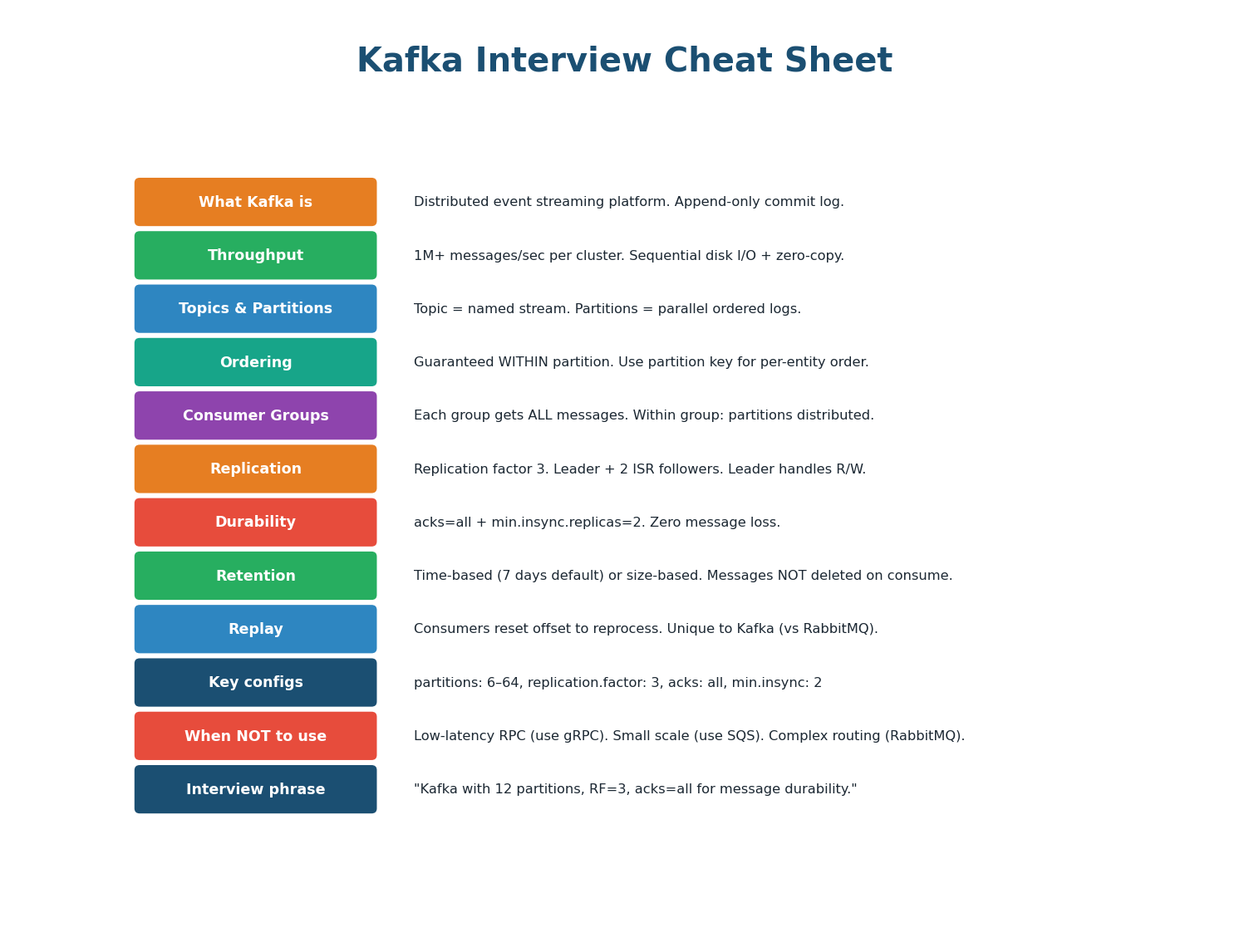
Use acks=all with min.insync.replicas=2. Every message is stored on at least 2 brokers before the producer gets an ACK. If one broker dies, the message survives on the other. The added latency (~10ms vs ~5ms) is negligible compared to network latency between client and server (~100ms). Messages are too important to lose. In an interview: “For this topic, I’d use replication factor 3, acks=all, min.insync.replicas=2 to ensure zero message loss at a negligible latency cost.”
Kafka Use Cases in System Design
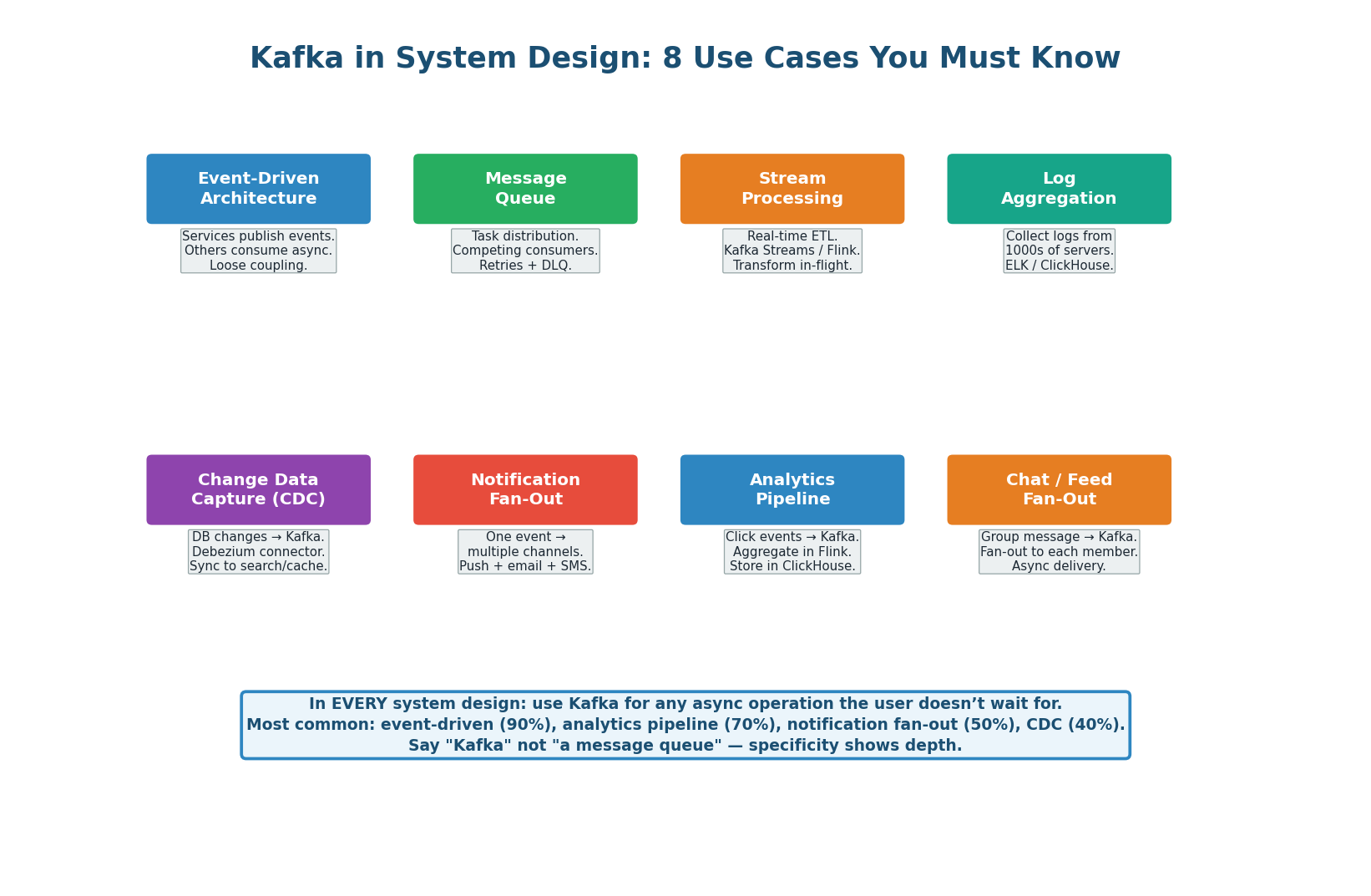
8 Use Cases That Appear in Every Interview
| Use Case | How Kafka Helps | Example |
|---|---|---|
| Event-Driven Architecture | Services communicate via events instead of direct calls. Producer doesn’t know or care who consumes. | Order placed → Kafka → inventory, billing, notification services consume independently |
| Message / Task Queue | Competing consumers within a group. One message processed by exactly one consumer. Built-in retry + Dead Letter Queue. | Email sending, video transcoding, background jobs |
| Stream Processing | Real-time ETL with Kafka Streams or Flink. Windowed aggregations, joins, transformations on live data. | Fraud detection (sliding window over card transactions), real-time dashboards |
| Log Aggregation | Collect logs from thousands of servers into centralized topics. ELK stack or Splunk consumes downstream. | Microservice logs → Kafka → Elasticsearch for search and alerting |
| Change Data Capture (CDC) | Debezium reads DB transaction log, publishes every row change to Kafka. Downstream systems stay in sync without polling. | PostgreSQL changes → Kafka → Elasticsearch (search sync), Redis (cache invalidation) |
| Notification Fan-Out | One event triggers multiple notification channels without blocking the main flow. | User action → Kafka → push notification + email + SMS consumers in parallel |
| Analytics Pipeline | Click/event data flows through Kafka to ClickHouse or Druid for aggregation and dashboarding. | URL click events → Kafka → Flink → ClickHouse → analytics dashboard |
| Chat / Feed Fan-Out | One message triggers delivery to multiple recipients asynchronously. | Group message → Kafka → fan-out worker delivers to 256 members |
Pre-Class Summary & Kafka Cheat Sheet
Everything You Need Before Class
- Scale: 500M DAU, 100B messages/day, 1.2M writes/sec, <300ms delivery latency, 36 PB storage.
- Protocol: WebSocket (not REST) — bidirectional, persistent, required for real-time push.
- Routing secret: Redis Session Store maps
user_id → gateway_server_id. This is the key insight. - Storage: Cassandra, partitioned by
conversation_id. LSM-tree handles 1.2M writes/sec. - Group delivery: Kafka fan-out worker. One event → up to 256 deliveries.
- Presence: Redis key with 30s TTL, heartbeat every 25s. Key expiry = offline.
- Receipts: sent ✓ → delivered ✓✓ → read (blue ✓✓). Groups batch receipts to avoid message storms.
- Why fast: Append-only commit log = sequential I/O (600+ MB/s). Plus: zero-copy, page cache, batching + compression.
- Partitions: Max parallelism = partition count. Ordering within partition only. Partition key for per-entity ordering.
- Consumer groups: Independent groups consume the same topic at their own offset. Multiple use cases from one topic.
- Durability: RF=3,
acks=all,min.insync.replicas=2for critical data. Zero data loss at ~10ms extra latency. - Scale: Start with 12–64 partitions. Cannot reduce without recreating. Over-provision up front.
- 8 use cases: Event-driven architecture, task queue, stream processing, log aggregation, CDC, notification fan-out, analytics pipeline, chat fan-out.
Want to Land at Google, Microsoft or Apple?
Watch Pranjal Jain's free 30-min training — the exact GROW Strategy that helped 1,572+ engineers go from TCS/Infosys to top product companies with a 3–5X salary hike.