

Contents
URL Shortener: Interview Mastery
The URL shortener is the most frequently asked system design question. It appears in interviews at Google, Meta, Amazon, Microsoft, and virtually every tech company. The question seems simple but tests every fundamental concept: caching, database design, code generation algorithms, scaling, and trade-off analysis. This section shows you exactly what interviewers look for at each phase and what mistakes lose you points.

What Interviewers Score at Each Phase
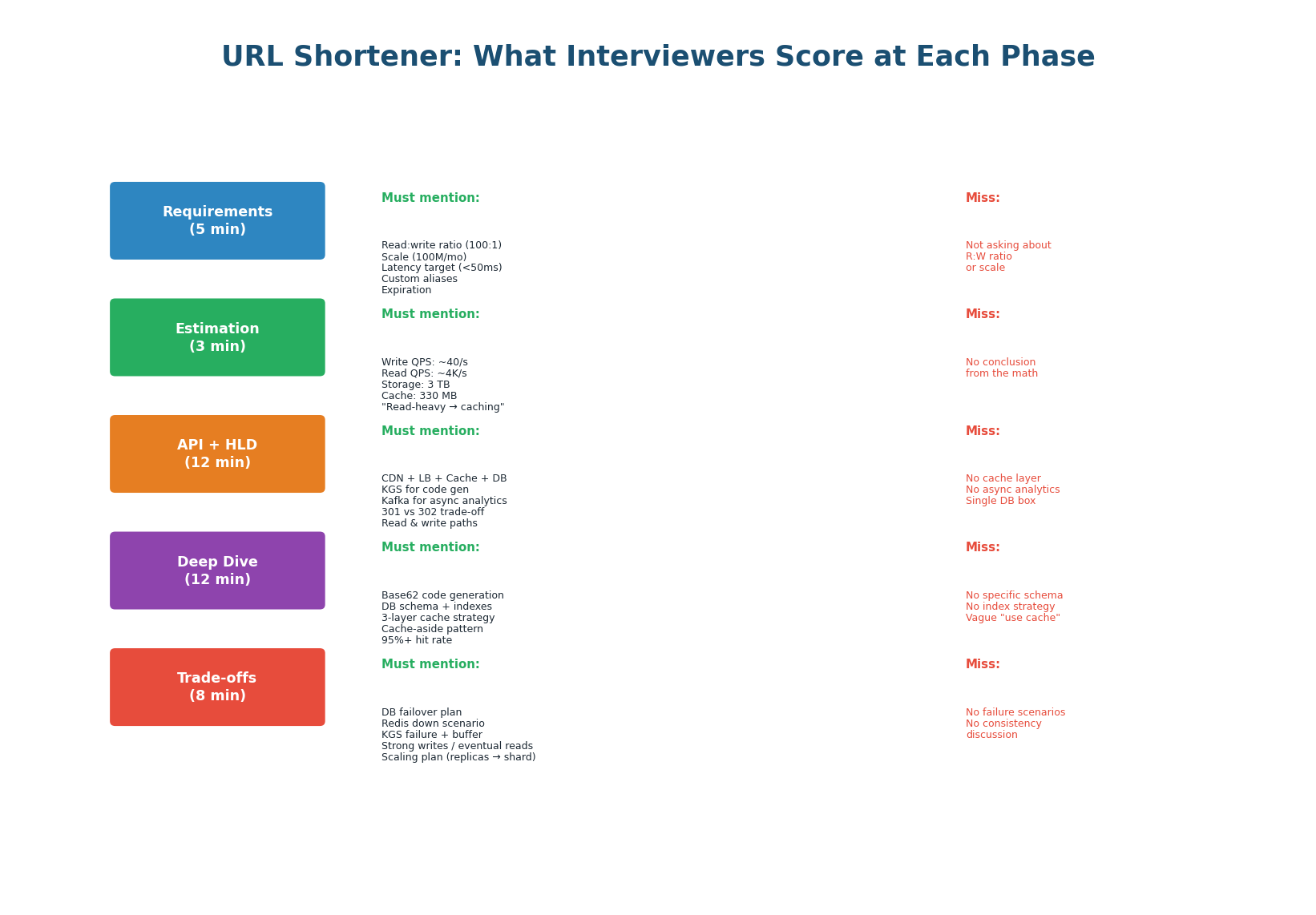
| Phase | Must Mention (Score Points) | Common Misses (Lose Points) |
|---|---|---|
| Requirements | R:W ratio (100:1), scale (100M/mo), latency target (<50ms), custom alias, expiration | Not asking about read:write ratio. Not asking about scale. Jumping into design. |
| Estimation | Write QPS (~40/s), read QPS (~4K/s), 3TB storage, 330MB cache. "This is read-heavy." | Doing math but not stating the conclusion. Not connecting numbers to architecture. |
| API + HLD | CDN, LB, Cache, DB, KGS, Kafka. 301 vs 302 trade-off. Read + write paths with arrows. | No cache layer. No async analytics. Single database box. No data flow arrows. |
| Deep Dive | Base62 KGS, DB schema with UNIQUE index on short_code, 3-layer cache (CDN+Redis+DB). |
No specific code gen algorithm. Vague "use cache." No DB schema or index. |
| Trade-offs | DB failover (60s), Redis down (4× latency), KGS buffer. Strong writes, eventual reads. | No failure scenarios. No consistency discussion. No scaling plan. |
Production Reference Architecture
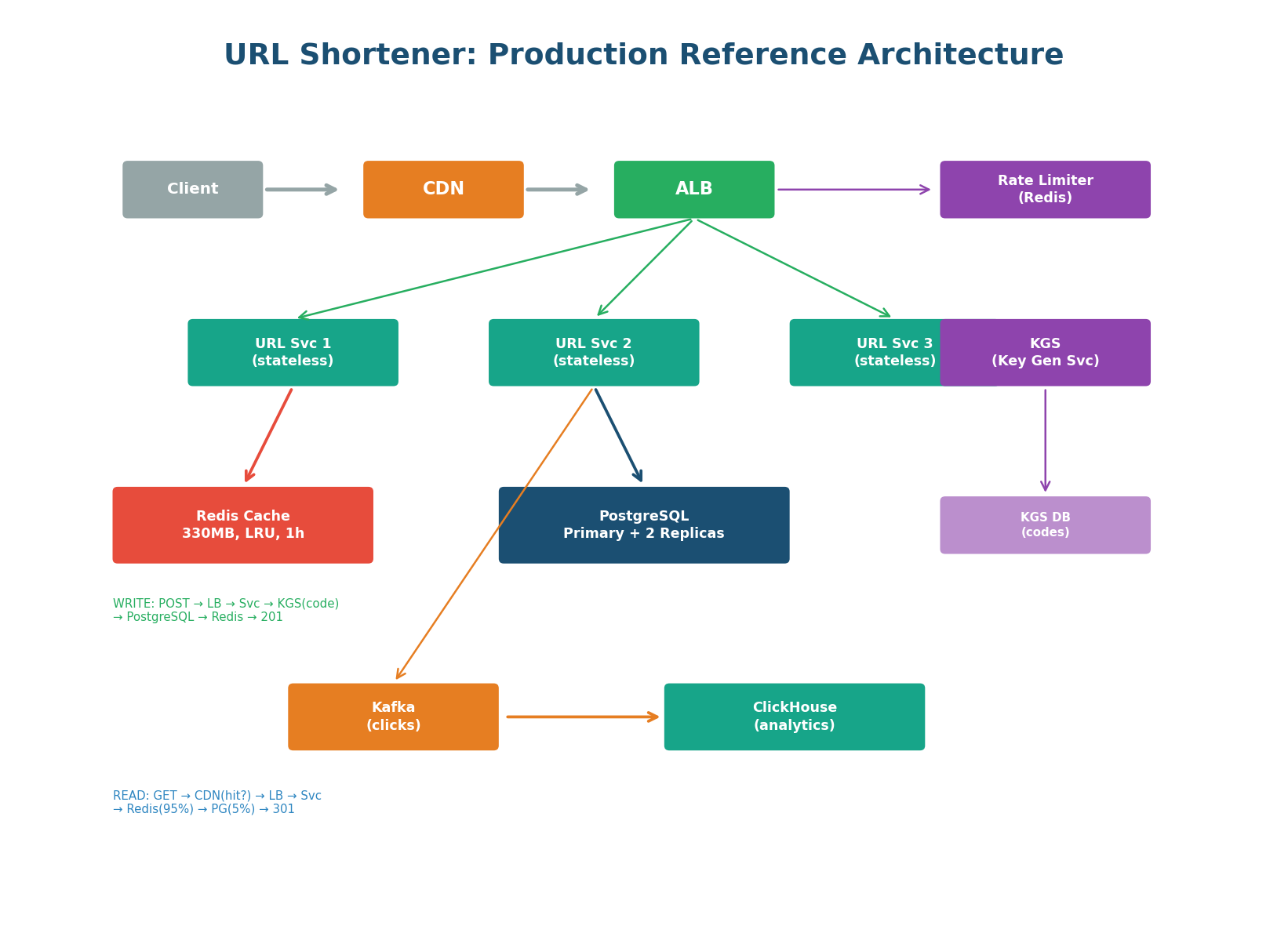
This is the reference diagram you should be able to draw from memory in under 5 minutes. Every component is labeled with a specific technology. Both the read path (GET /{code} → CDN → Redis → PostgreSQL) and write path (POST /urls → KGS → PostgreSQL → Redis) are annotated. The async analytics pipeline (Kafka → ClickHouse) is separate from the hot path. The rate limiter protects the write endpoint.
"Clients connect through CloudFront CDN for cached redirects and an ALB that distributes to 3 stateless URL Service instances. For creates: the service gets a pre-generated Base62 code from the Key Generation Service, stores the mapping in PostgreSQL (primary + 2 sync replicas), caches it in Redis (330 MB, LRU, 1h TTL), and returns 201. For redirects: the service checks Redis first (95% hit rate, <1ms), falls back to PostgreSQL on miss (~5ms), and returns a 301 redirect. Click events are published to Kafka and processed asynchronously by ClickHouse for the analytics dashboard."
6 Common Interview Follow-Up Questions
After you present your design, interviewers will probe with follow-up questions. These are not trick questions — they test whether you understand the edge cases and can think on your feet. Here are the six most common follow-ups and how to answer them.
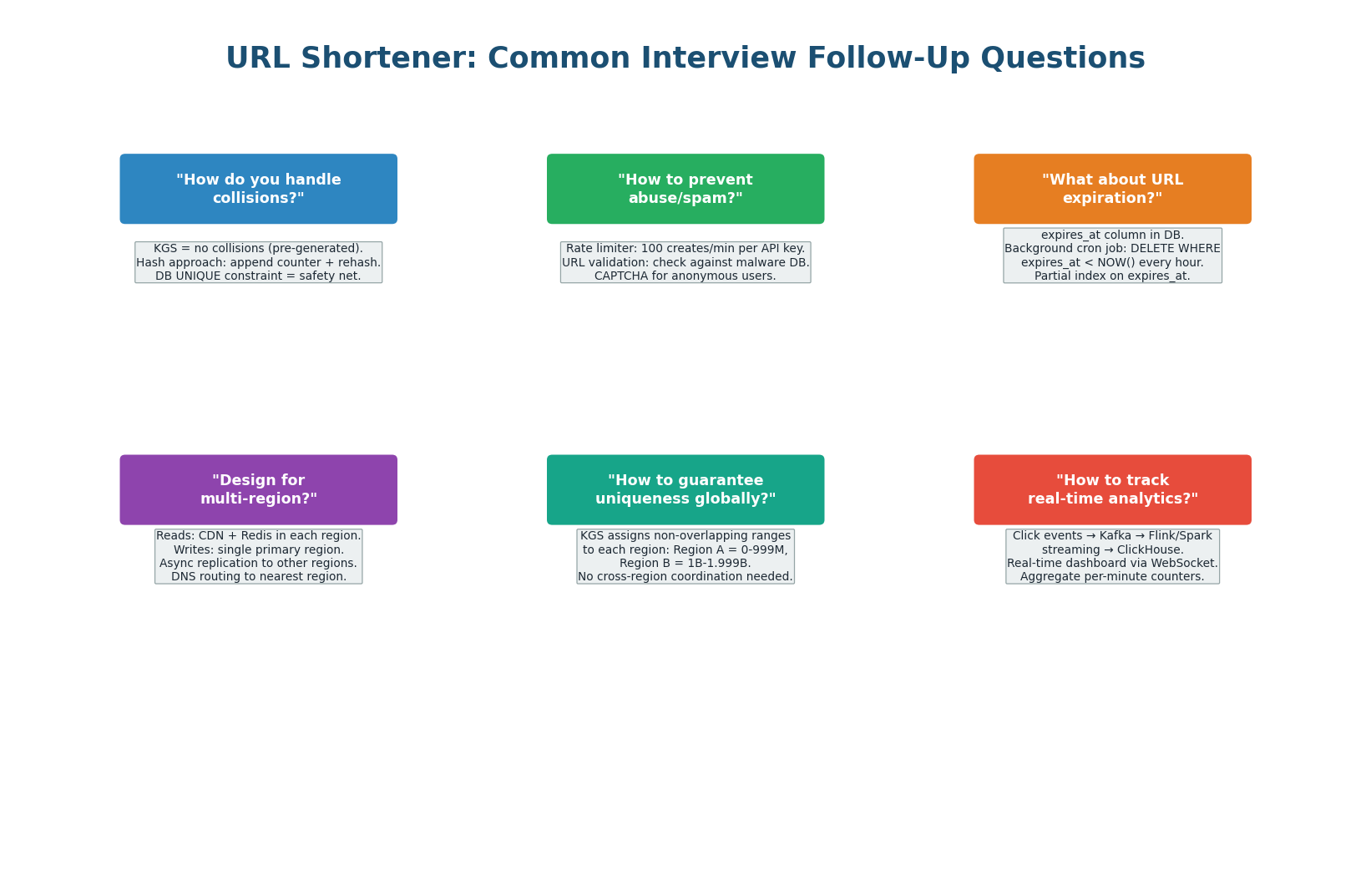
| Question | Strong Answer | Key Insight |
|---|---|---|
| How to handle collisions? | KGS pre-generates unique codes = zero collisions. DB UNIQUE constraint = safety net. | Pre-generation eliminates collision handling from the hot path. |
| How to prevent abuse? | Rate limiter (100 creates/min), URL validation against malware DBs, CAPTCHA for anon. | Security is part of production design. Show you think about abuse. |
| How does expiration work? | expires_at column + hourly cron job: DELETE WHERE expires_at < NOW(). Partial index. |
Partial index (only non-null expires_at) keeps the cleanup job efficient. |
| Multi-region design? | Reads: CDN + Redis per region. Writes: single primary region. Async replication. | Reads are local (fast). Writes go to one region (consistent). Replicate async. |
| Global uniqueness? | KGS assigns non-overlapping code ranges per region. No cross-region coordination. | Partitioned code ranges = independence. Ranges are cheap to pre-allocate. |
| Real-time analytics? | Kafka → Flink streaming → ClickHouse. Per-minute counters. WebSocket dashboard. | Streaming analytics is async, never impacts the redirect hot path. |
Proactively address 1–2 follow-ups before the interviewer asks: "One edge case worth mentioning: if a URL goes viral and gets 100K reads/sec, the CDN absorbs 99% since we use 301 redirects. The remaining 1% hits Redis, not the DB. No special hot-key handling needed for URLs." This shows you think ahead — a Strong Hire signal.
Redis Technology Deep Dive
Redis (Remote Dictionary Server) is the most widely used in-memory data store in system design. It appears in virtually every interview answer — for caching, session storage, rate limiting, distributed locks, leaderboards, and message queues. Understanding Redis deeply is a prerequisite for senior engineering roles and system design interviews at any level.
Redis Architecture: How It Works
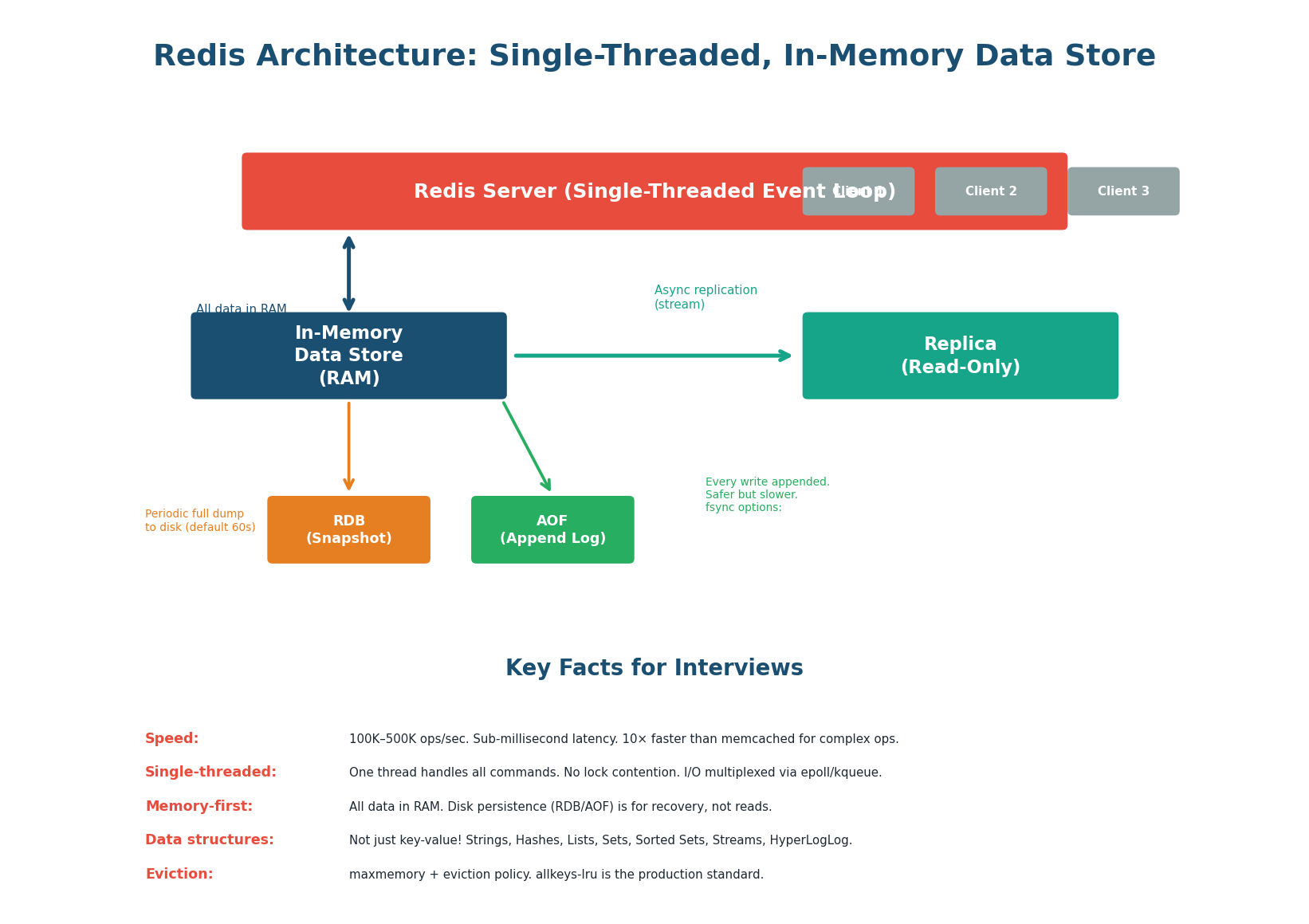
Why Redis is so fast:
- In-memory: All data lives in RAM. A Redis GET takes ~0.1ms compared to ~5ms for a PostgreSQL indexed read (50× faster) or ~50ms for a disk-based NoSQL read (500× faster). This speed comes from avoiding disk I/O entirely for reads.
- Single-threaded: Redis processes all commands on a single thread using an event loop (epoll/kqueue). No lock contention, no context switching, no thread synchronization overhead. One thread can handle 100K–500K operations per second because each operation is sub-microsecond.
- Efficient data structures: Redis uses optimized in-memory data structures: SDS (Simple Dynamic Strings), ziplist (compact encoding for small collections), skiplist (sorted sets), hash tables. These are purpose-built for speed, not disk efficiency.
Redis is a cache and data structure store, not a primary database. It does not provide ACID transactions (in the traditional sense), complex queries, joins, or guaranteed durability (AOF with fsync=always is close but slow). Use Redis alongside PostgreSQL: PostgreSQL as source of truth, Redis as a fast read layer. Never use Redis as the only copy of important data.
Redis Data Structures: Beyond Key-Value
Most developers think of Redis as a simple key-value cache (GET/SET). In reality, Redis supports six major data structures, each with specific use cases in system design. Knowing the right data structure for each problem is what separates a junior answer ("I use Redis for caching") from a senior one ("I use a Redis Sorted Set for the leaderboard because ZADD gives O(log n) inserts").
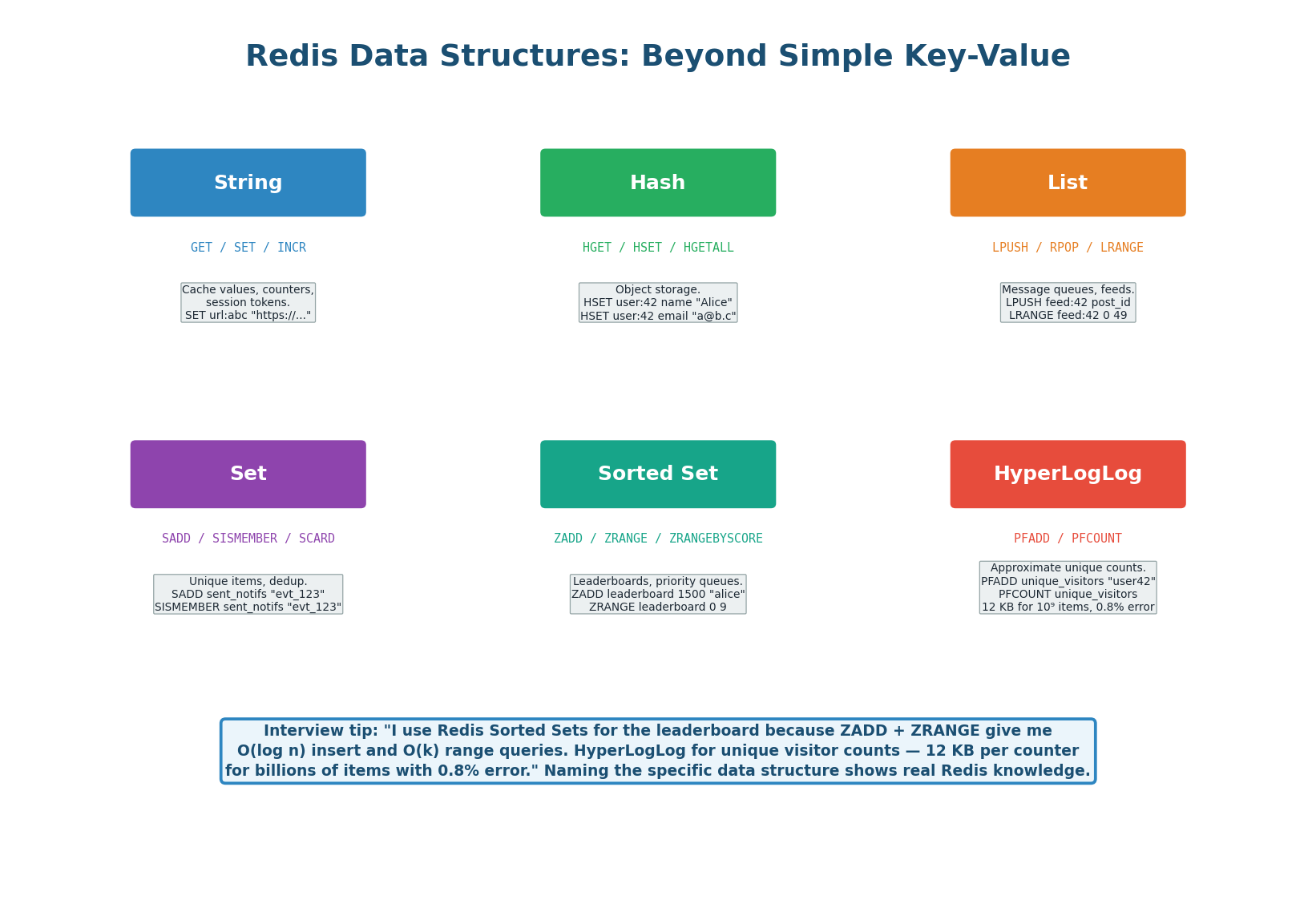
GET, SET, INCR, EXPIRE — URL mappings, counters, session tokensHGET, HSET, HGETALL — Object caching (user profile: name, email, avatar)LPUSH, RPOP, LRANGE — Feed timeline, simple task queueSADD, SISMEMBER, SCARD — Deduplication, unique visitorsZADD, ZRANGE, ZRANK — Leaderboards, priority queues, rate limiting (sliding window)PFADD, PFCOUNT — Approximate unique counts (12 KB for billions, 0.8% error)| Structure | Key Commands | Time Complexity | System Design Use Case |
|---|---|---|---|
| String | GET, SET, INCR, EXPIRE |
O(1) | Caching (URL mappings), counters (views), session tokens |
| Hash | HGET, HSET, HGETALL |
O(1) per field | Object caching (user profile: name, email, avatar) |
| List | LPUSH, RPOP, LRANGE |
O(1) push/pop, O(n) range | Feed timeline (recent posts), simple task queue |
| Set | SADD, SISMEMBER, SCARD |
O(1) | Deduplication (sent notifications), unique visitors |
| Sorted Set | ZADD, ZRANGE, ZRANK |
O(log n) add, O(k) range | Leaderboards, priority queues, rate limiting (sliding window) |
| HyperLogLog | PFADD, PFCOUNT |
O(1) | Approximate unique counts (12 KB for billions, 0.8% error) |
- Caching a single value (URL mapping, session token)? → String
- Caching an object with fields (user profile)? → Hash (efficient: only fetch/update individual fields)
- Building a feed/timeline? → List (
LPUSHto prepend,LRANGE 0 49for top 50) - Checking if an item was already processed? → Set (
SISMEMBER= O(1) existence check) - Ranking users by score? → Sorted Set (
ZRANGEfor top-K,ZRANKfor position) - Counting unique visitors? → HyperLogLog (if 0.8% error is acceptable; 12 KB per counter vs. millions for exact Set)
Redis in System Design: 8 Use Cases
Redis appears in system design interviews for eight primary use cases. You will use at least two in every interview. The most common are caching (90% of designs), rate limiting (50%), session store (40%), and distributed locks (30%). For each, know the Redis command pattern, the configuration, and an example system.
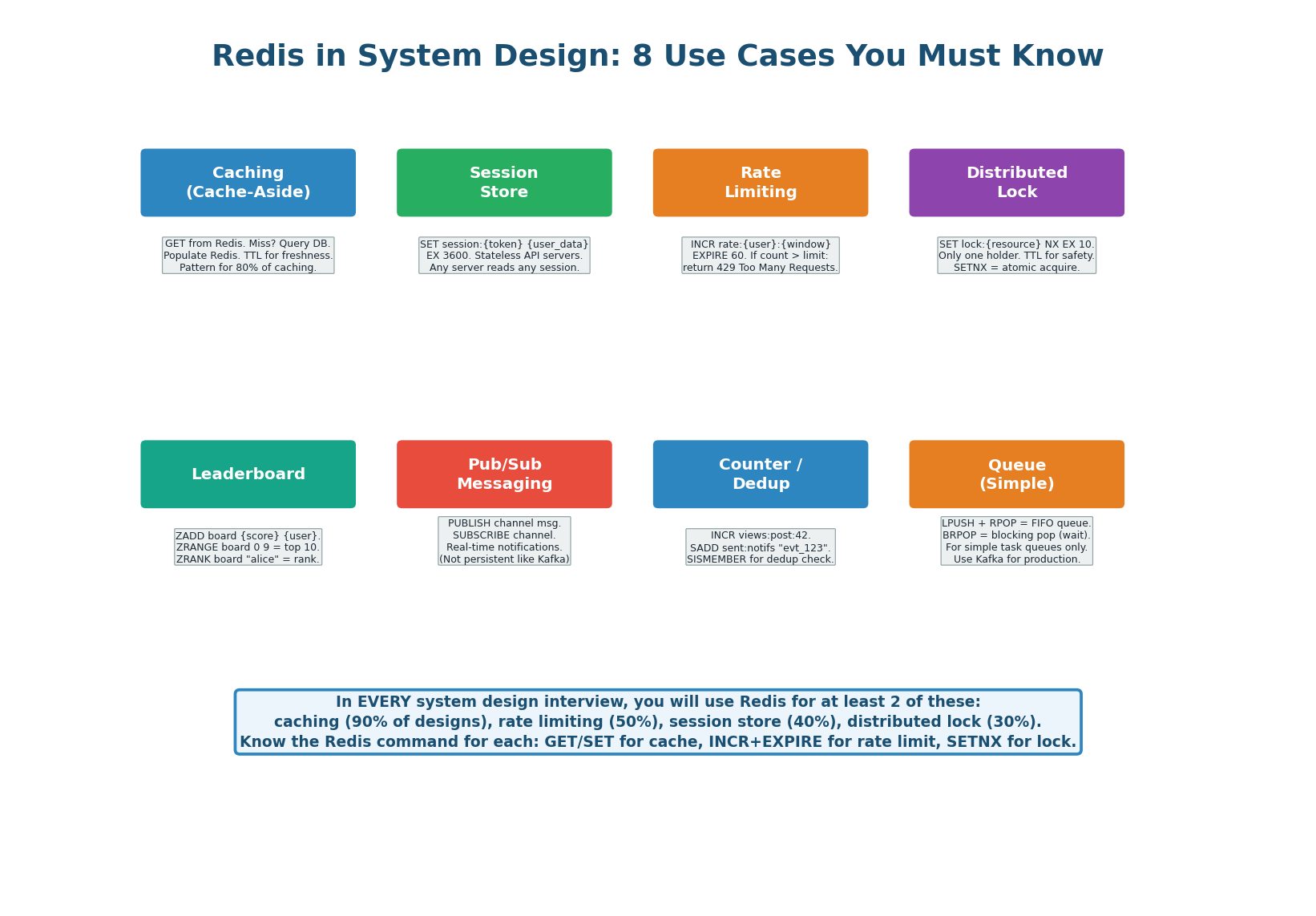
| Use Case | Redis Command Pattern | Configuration | Interview Example |
|---|---|---|---|
| Caching | GET key → miss? DB → SET key EX ttl |
maxmemory 16gb, allkeys-lru | URL shortener: cache url:{code} mappings |
| Session store | SET session:{token} {data} EX 3600 |
Sentinel for HA | Chat system: stateless API servers |
| Rate limiting | INCR rate:{user}:{min} + EXPIRE 60 |
One Redis per region | API gateway: 100 req/min per user |
| Distributed lock | SET lock:{resource} NX EX 10 |
Redlock for multi-node | Payment: prevent double charge |
| Leaderboard | ZADD board {score} {user} |
Sorted Set, no TTL | Gaming: top 100 players by score |
| Pub/Sub | PUBLISH + SUBSCRIBE |
In-memory, not persistent | Real-time notifications (volatile) |
| Counter / dedup | INCR views:{id}, SADD sent:{key} |
TTL on dedup keys | Notification dedup, view counts |
| Simple queue | LPUSH + BRPOP |
Not for production queues | Dev/test task queues (use Kafka for prod) |
Eviction Policies: Managing Memory
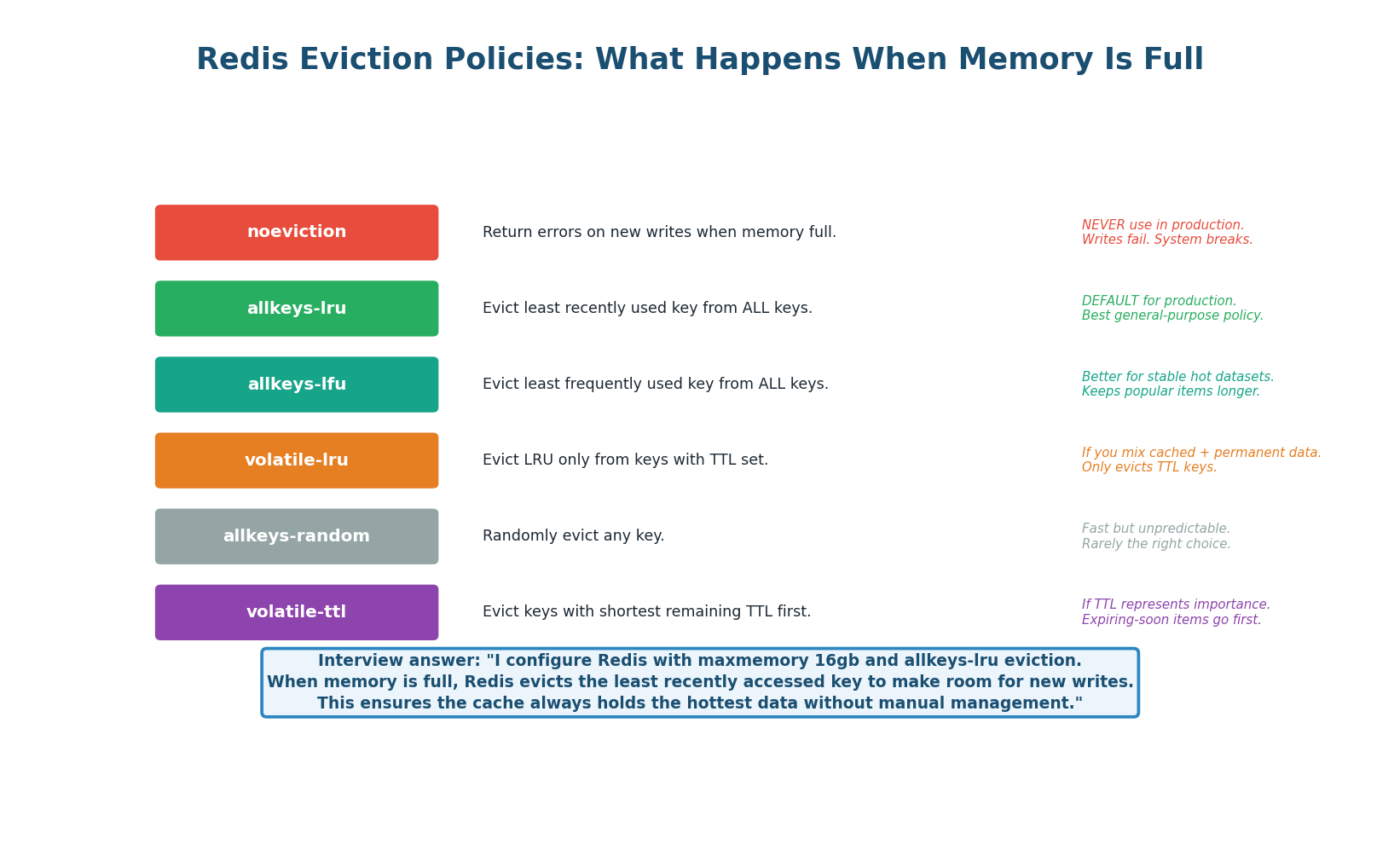
When Redis reaches its configured maxmemory limit, it must decide what to evict. The eviction policy determines which keys are removed to make room for new writes. The production standard is allkeys-lru: evict the least recently used key from the entire keyspace. This ensures the cache always holds the hottest data without any manual management. Never use noeviction in production — it returns errors when memory is full, which breaks writes.
Persistence: RDB vs AOF
Redis stores all data in memory, but it can persist to disk for recovery after a restart. Two persistence mechanisms exist and can be used together. RDB (Redis Database) takes periodic full snapshots (every 60s if 1,000+ keys changed) — fast recovery but up to 60s data loss. AOF (Append-Only File) logs every write command — at most 1 second data loss with fsync=everysec. Use both in production.
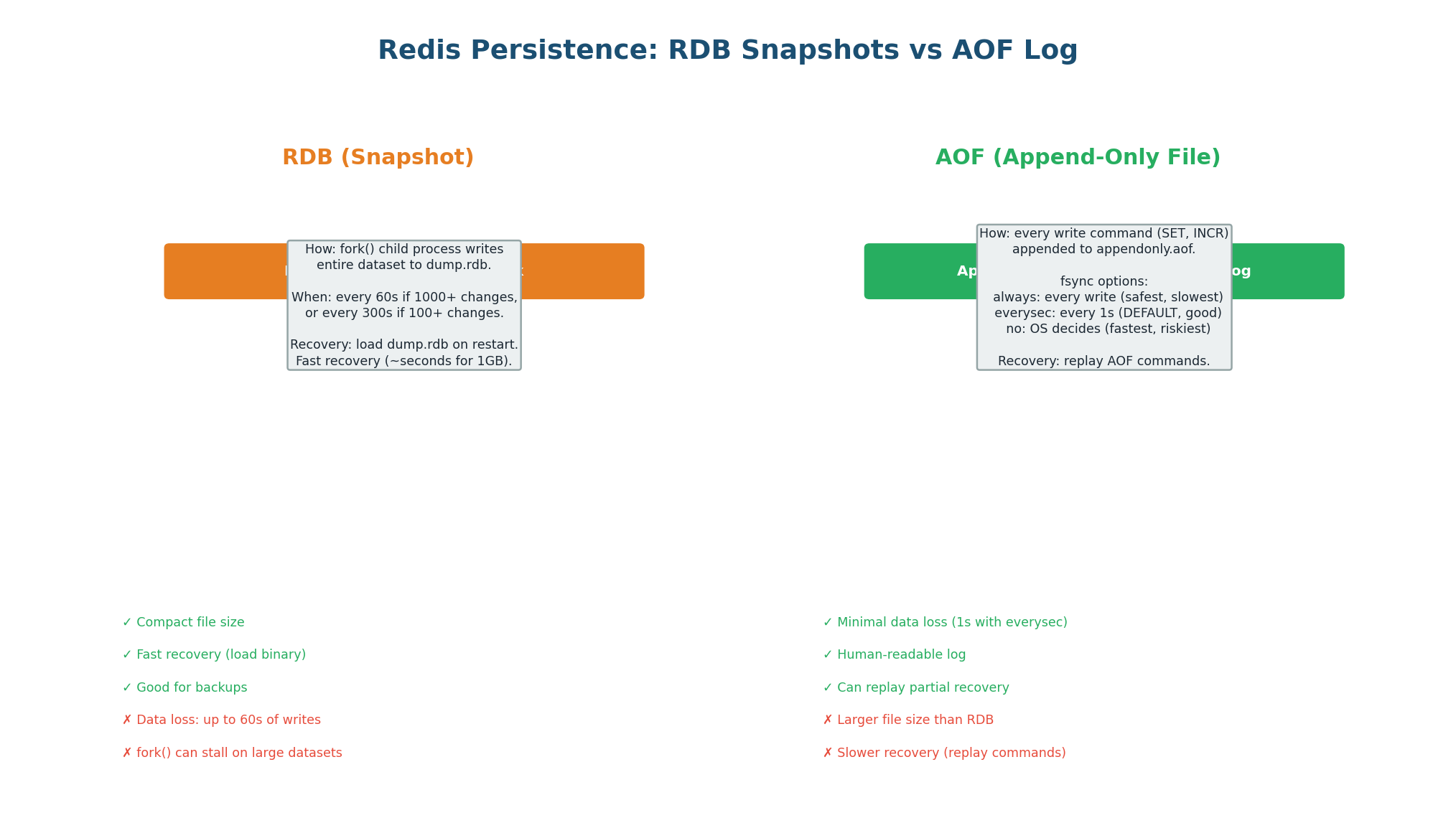
| Aspect | RDB (Snapshot) | AOF (Append Log) | Both (Recommended) |
|---|---|---|---|
| Mechanism | Fork + dump entire dataset | Append each write command | RDB for fast recovery, AOF for durability |
| Data loss risk | Up to 60s of writes | Up to 1s (everysec fsync) | Minimal (AOF for most recent) |
| File size | Compact (binary) | Larger (text commands) | Both files on disk |
| Recovery speed | Fast (load binary) | Slower (replay commands) | Use RDB first, then AOF for tail |
| CPU impact | High during fork() | Low (just append) | Fork impact from RDB only |
| Best for | Backups, disaster recovery | Primary persistence | Production standard |
When describing Redis in your design: "I use Redis with RDB + AOF persistence. RDB snapshots every 60 seconds for fast recovery. AOF with everysec fsync for at most 1 second of data loss on crash. For the URL shortener, even if Redis loses recent cache entries, the source of truth is PostgreSQL — we just get a few cache misses that auto-repopulate." This shows you understand that Redis is ephemeral and PostgreSQL is durable.
Scaling Redis: Sentinel vs Cluster
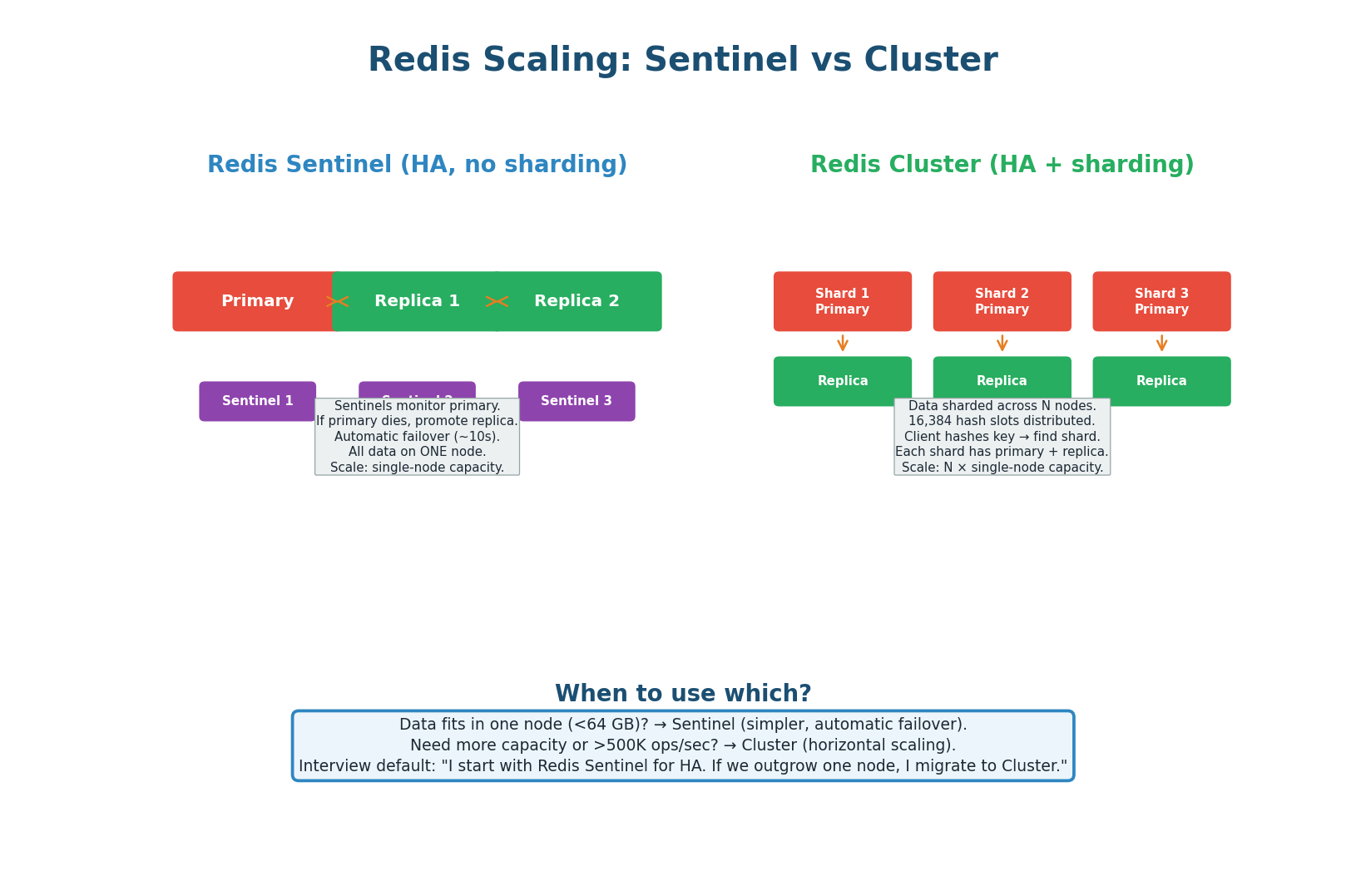
Redis Sentinel: Provides high availability for a single Redis node. Three Sentinel processes monitor the primary. If the primary fails, Sentinels elect a new primary from the replicas (automatic failover in ~10 seconds). All data is on one node. Use when your dataset fits in one node's memory (typically <64 GB). This is sufficient for most URL shortener and caching use cases.
Redis Cluster: Provides both HA and horizontal scaling. Data is sharded across N primary nodes using 16,384 hash slots. Each primary has one or more replicas. The client hashes each key to determine which shard it belongs to. Use when you need more capacity than one node (>64 GB) or more throughput than one node (>500K ops/sec). Instagram's feed cache uses Redis Cluster with 50+ nodes.
| Aspect | Sentinel | Cluster |
|---|---|---|
| Scaling | Vertical only (one node) | Horizontal (N shards) |
| Data capacity | Single node RAM (up to 64 GB) | N × single node RAM |
| Throughput | 100K–500K ops/sec | N × 100K–500K ops/sec |
| Failover | Sentinel promotes replica (~10s) | Cluster promotes shard replica (~5s) |
| Complexity | Low (simple to operate) | Medium (multi-node management) |
| Multi-key ops | Fully supported | Only if keys on same shard (hash tags) |
| When to use | Dataset < 64 GB, most designs | Dataset > 64 GB or >500K ops/sec |
"I start with Redis Sentinel — one primary with two replicas and three Sentinel processes for automatic failover. Our cache is 330 MB, well within a single node. If we scale to 10× and the cache grows to 3.3 GB, Sentinel still handles it. If we reach 50×+ and need 800 GB+ of cache, I migrate to Redis Cluster with consistent hashing across 16+ shards." This shows you choose the simpler solution first and scale when needed.
Redis Quick Reference
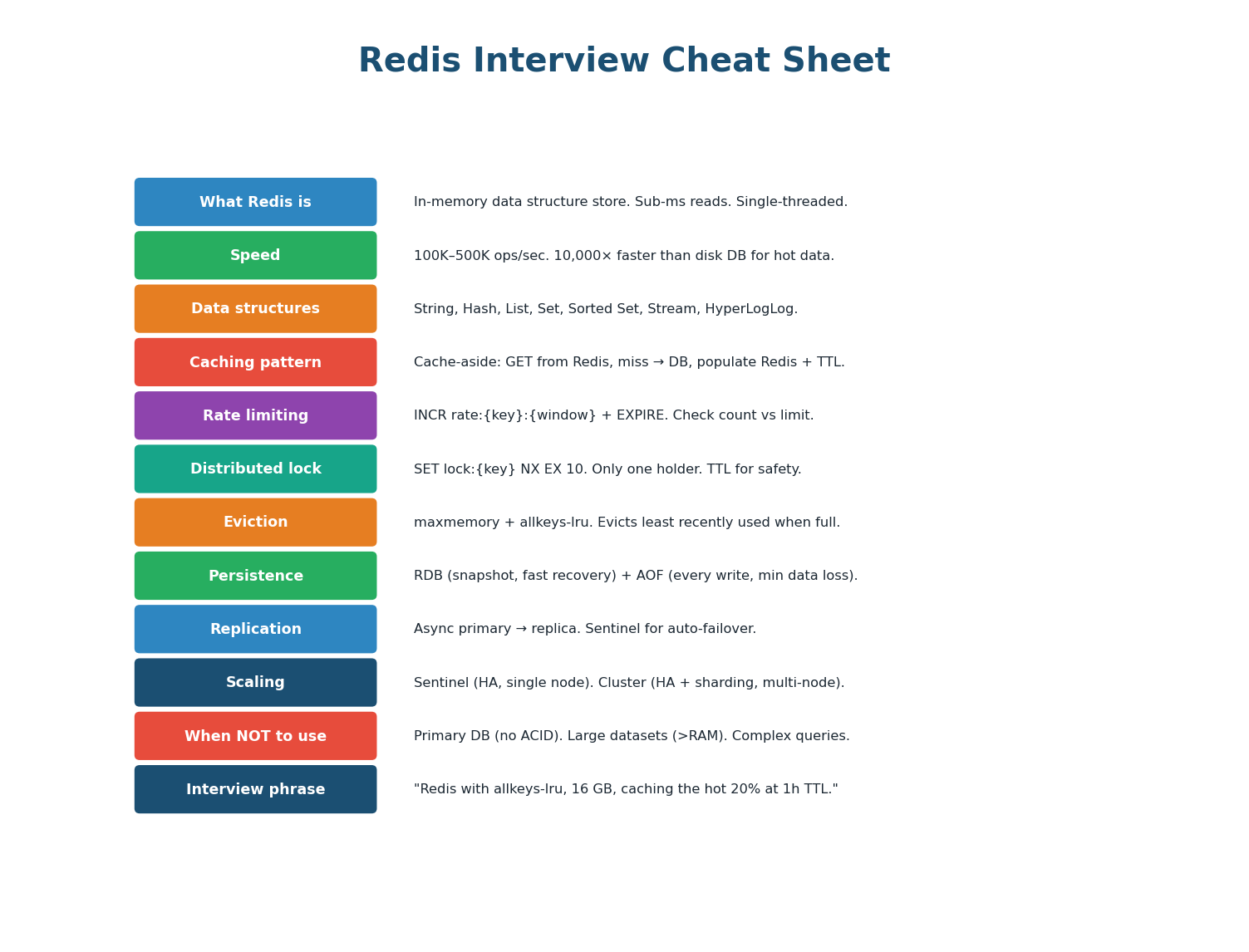
| Scenario | Redis Solution | Command / Config |
|---|---|---|
| Cache URL mapping | String with TTL | SET url:abc https://... EX 3600 |
| Rate limit API | Counter with expiry | INCR rate:user42:min + EXPIRE 60 |
| Prevent double charge | Distributed lock | SET lock:order42 NX EX 10 |
| Session storage | String with TTL | SET session:token {data} EX 3600 |
| Leaderboard top 10 | Sorted Set | ZADD board 1500 alice; ZRANGE board 0 9 REV |
| Dedup notifications | Set membership | SADD sent:notifs evt_123; SISMEMBER sent:notifs evt_123 |
| Unique visitor count | HyperLogLog | PFADD visitors user42; PFCOUNT visitors |
| Memory full? | Eviction policy | maxmemory 16gb; maxmemory-policy allkeys-lru |
- URL Shortener Mastery: Know the scoring rubric per phase. Draw the reference architecture from memory in 5 minutes. Prepare for 6 common follow-ups (collisions, abuse, expiration, multi-region, uniqueness, analytics). Proactively address 1–2 edge cases before the interviewer asks.
- Redis Architecture: In-memory data store. Single-threaded event loop. 100K–500K ops/sec. Sub-millisecond latency. Not a database replacement — use alongside PostgreSQL as a fast read layer.
- Redis Data Structures: String (cache/counter), Hash (objects), List (feeds/queues), Set (dedup), Sorted Set (leaderboards), HyperLogLog (approximate counts). Know when to use each and name the specific commands.
- Redis Use Cases: 8 use cases: caching, sessions, rate limiting, distributed locks, leaderboards, pub/sub, counters/dedup, simple queues. You will use 2+ in every interview. Know the command pattern for each.
- Redis Operations: Eviction: allkeys-lru (production standard). Persistence: RDB + AOF (both for production). Scaling: Sentinel (single-node HA) → Cluster (multi-node sharding). Start simple, scale when needed.
Want to Land at Google, Microsoft or Apple?
Watch Pranjal Jain's free 30-min training — the exact GROW Strategy that helped 1,572+ engineers go from TCS/Infosys to top product companies with a 3–5X salary hike.